


Cordless Precision for Your Living Room Battlestation
Tangled cords and tight physical setups quickly ruin the comfort of playing PC titles from a living room sofa. When your PC connects to a television across the room, standard wired hardware simply cannot deliver the flexibility you need. Identifying the best wireless keyboard and mouse for couch gaming requires looking at responsive 2.4 GHz wireless links, ergonomic mouse shapes, and dependable optical tracking across lap desks.
Managing peripheral clutter is equally critical when relaxing away from a desk. Modern wireless combos simplify your space by utilizing unified 2-in-1 USB dongles, conserving ports whether your system is a full desktop or a budget gaming laptop. Built-in rechargeable batteries, on-the-fly mouse DPI toggles, and dedicated multimedia keys ensure you can control media and adjust settings without leaving your seat. Based on supplied specifications, these multi-mode sets offer the low-latency connection required for relaxed play.

Pros
- Reliable tri-mode wireless with stable 2.4G connection and Bluetooth for multi-device use.
- Full-size keyboard with comfortable keystrokes and quiet operation reduces fatigue during long sessions.
- Programmable keys and mouse buttons via Redragon software offer deep customization for macros and DPI.
- Sturdy build quality and positive long-term user feedback suggest excellent durability for the price.
- Affordable price point delivers strong value for budget-conscious gamers and setup builders.
Cons
- Keyboard may have a brief reconnection delay after sleeping (5-10 seconds), which can interrupt fast-paced gaming.
- Some users report the keyboard feels slightly mushy compared to higher-end mechanical switches.
- Software driver download required for full customization, and early reviews note limited initial compatibility.
The Redragon S101M-KS is a wireless gaming keyboard and mouse combo designed for PC gamers who want to cut the cord without sacrificing performance or breaking the bank. This tri-mode set supports wired USB, 2.4G wireless via a single dual-function receiver, and Bluetooth connectivity, giving you flexibility for desktop gaming, laptop use, or streaming setups. With a 4800 DPI adjustable mouse and 10 dedicated multimedia keys, it targets casual gamers, competitive esports players, and content creators building an affordable, clutter-free gaming station.
In real-world use, the combo delivers solid responsiveness and low-latency performance, especially in 2.4G mode. The mouse offers five DPI levels (800/1200/1600/3200/4800) that you can cycle through on the fly, making it suitable for both precise aiming in FPS titles and faster cursor movement in MOBA or strategy games. The keyboard features anti-ghosting and 12 combination multimedia keys, which help maintain input accuracy during intense gaming sessions. According to user feedback, the keyboard is comfortable for long typing and gaming, though some describe the keys as slightly softer than mechanical-switch alternatives.
Build quality appears robust for its price range, with a full-size layout and an ergonomic design that includes a wrist rest. The RGB backlighting offers 8 patterns with adjustable speed and brightness, adding visual flair to any desk setup. Both the keyboard and mouse are rechargeable, with the keyboard lasting up to 300 hours with RGB off. The dual-function 2.4G receiver stored in the keyboard slot simplifies cable management and keeps your workspace tidy. The mouse also features programmable buttons via Redragon's software, allowing you to remap controls for gaming or productivity shortcuts.
Setting up the S101M-KS is straightforward: plug in the receiver, power on the devices, and they connect automatically. For Bluetooth, a quick pairing button on the mouse and FN+1/2/3 on the keyboard gets you connected to PCs, laptops, or tablets. The included 6-foot detachable USB-C cable offers wired use and charging. One limitation noted by users is that the keyboard may take a few seconds to wake from sleep mode, which could be a minor hiccup in fast-paced games. The software customization is available via Redragon's website, though some early buyers reported initial configuration hiccups.
While the S101M-KS is not a top-tier mechanical setup, it offers excellent value for budget-focused gamers, streamers, or college students building a first gaming PC. Its tri-mode connectivity makes it versatile for work-from-home setups or LAN parties, and the RGB lighting enhances any gaming room aesthetic. For competitive players seeking ultra-responsive switches or higher polling rates, higher-end options exist, but this combo excels as an affordable, reliable everyday solution.
The S101M-KS gaming combo delivers reliable wireless performance for most gaming scenarios. The 2.4G mode provides a stable, low-latency connection ideal for fast-paced shooters and real-time strategy games. The mouse's 4800 DPI sensor with five adjustable levels allows quick sensitivity changes, while the keyboard's anti-ghosting ensures simultaneous key presses register accurately. However, the keyboard's wake-up delay of a few seconds may interrupt action in games requiring instant input after idle periods.
Constructed with a durable plastic frame, the keyboard and mouse feel solid for the price point. The keys have a soft, membrane-like feel that many users find comfortable for extended typing and gaming. The mouse fits well in medium to large hands, with textured side grips for secure control. The included braided USB-C cable adds durability, while the storage slot for the 2.4G receiver prevents loss.
The full-size keyboard includes an integrated wrist rest that reduces strain during long gaming sessions. The mouse ambidextrous shape suits palm and claw grips, with programmable side buttons within easy reach. Users report low fatigue even after hours of use, though the key feel may not satisfy mechanical-switch enthusiasts.
Eight RGB backlighting patterns with adjustable brightness and speed let you personalize the aesthetic. The software (download from Redragon.com) enables keyboard macro assignments and mouse DPI/polling rate adjustments up to 1000Hz. While the RGB is not per-key, the preset modes offer dynamic effects that complement any gaming setup.
Pros
- Affordable all-in-one wireless combo with reliable tri-mode connectivity.
- Lightweight 65g mouse with excellent battery life and high DPI range.
- Anti-ghosting keyboard and customizable software enhance gaming performance.
- RGB lighting options add flair to any desk setup without extra cost.
Cons
- Keyboard uses membrane switches rather than mechanical, which may not appeal to enthusiasts seeking tactile feedback.
- Software required for full customization may have a learning curve for some users.
- Limited user reviews available, so long-term durability is unverified.
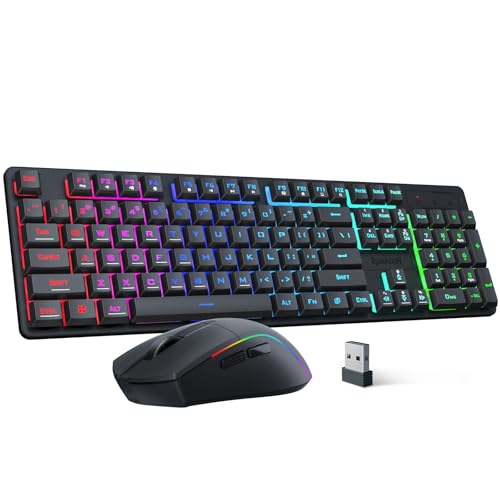
The Redragon S107KS is a wireless gaming keyboard and mouse combo designed for PC gamers who want a clutter-free desk without sacrificing performance. It’s a versatile set that works well for competitive gamers, casual players, streamers, and even work-from-home or college gamers looking for a reliable all-in-one solution.
In terms of real-world performance, the mouse offers up to 10,000 DPI and a 1,000 Hz polling rate, which translates to responsive tracking in fast-paced FPS or MOBA games. The 25-key anti-ghosting on the keyboard ensures that simultaneous key presses register accurately, which is crucial for executing complex combos. The tri-mode connectivity (wired, 2.4G, and Bluetooth) makes it easy to switch between gaming rig, laptop, or tablet, and the single 2.4G receiver handles both devices – a practical convenience for multi-device users.
Build quality is decent for the price. The mouse weighs only 65g, making it one of the lightest options in this segment, and its battery lasts up to 200 hours depending on usage. The keyboard features a compact layout with multimedia keys, though it uses membrane switches rather than mechanical ones. This might be a drawback for enthusiasts who prefer tactile feedback, but it keeps the combo affordable and quiet for shared spaces like dorm rooms or offices.
Setup is straightforward: plug in the receiver, pair via Bluetooth, or use the included cable. The Redragon software lets you adjust DPI, polling rate, macros, and RGB lighting – but you’ll need to download it separately. The RGB backlighting offers 6 modes on the keyboard and millions of colors on the mouse, with adjustable brightness and speed, which is a nice touch for RGB setup enthusiasts.
A realistic limitation is the lack of mechanical switches, which may affect long-term typing comfort for heavy users. Also, the software interface isn’t the most intuitive, but it’s functional once you get used to it. Since this is a newer model with few reviews, long-term reliability is still an unknown, but Redragon generally has a solid reputation for budget gaming gear.
Overall, the Redragon S107KS is a smart buy for budget-conscious PC gamers, streamers, or anyone who wants a wireless keyboard and mouse combo with solid performance, RGB flair, and versatile connectivity. It’s especially suited for those building a first gaming setup or upgrading an older wired kit without spending a lot.
Pros
- Reliable 2.4G wireless performance with minimal input lag for casual and competitive gaming.
- Long battery life with 3000mAh keyboard and 800mAh mouse, plus auto-sleep for energy efficiency.
- Comfortable ergonomic mouse with anti-sweat grip and adjustable DPI up to 3200.
- Easy plug-and-play setup with a shared USB receiver that reduces cable clutter.
- Affordable price point for a full keyboard and mouse combo with RGB lighting and mechanical feel.
Cons
- Some users report LED backlight flickering or uneven lighting after extended use.
- Battery life may degrade over time, with some reviews noting shorter charge retention after months.
- Limited MacOS support and requires a USB-C adapter for Mac users.
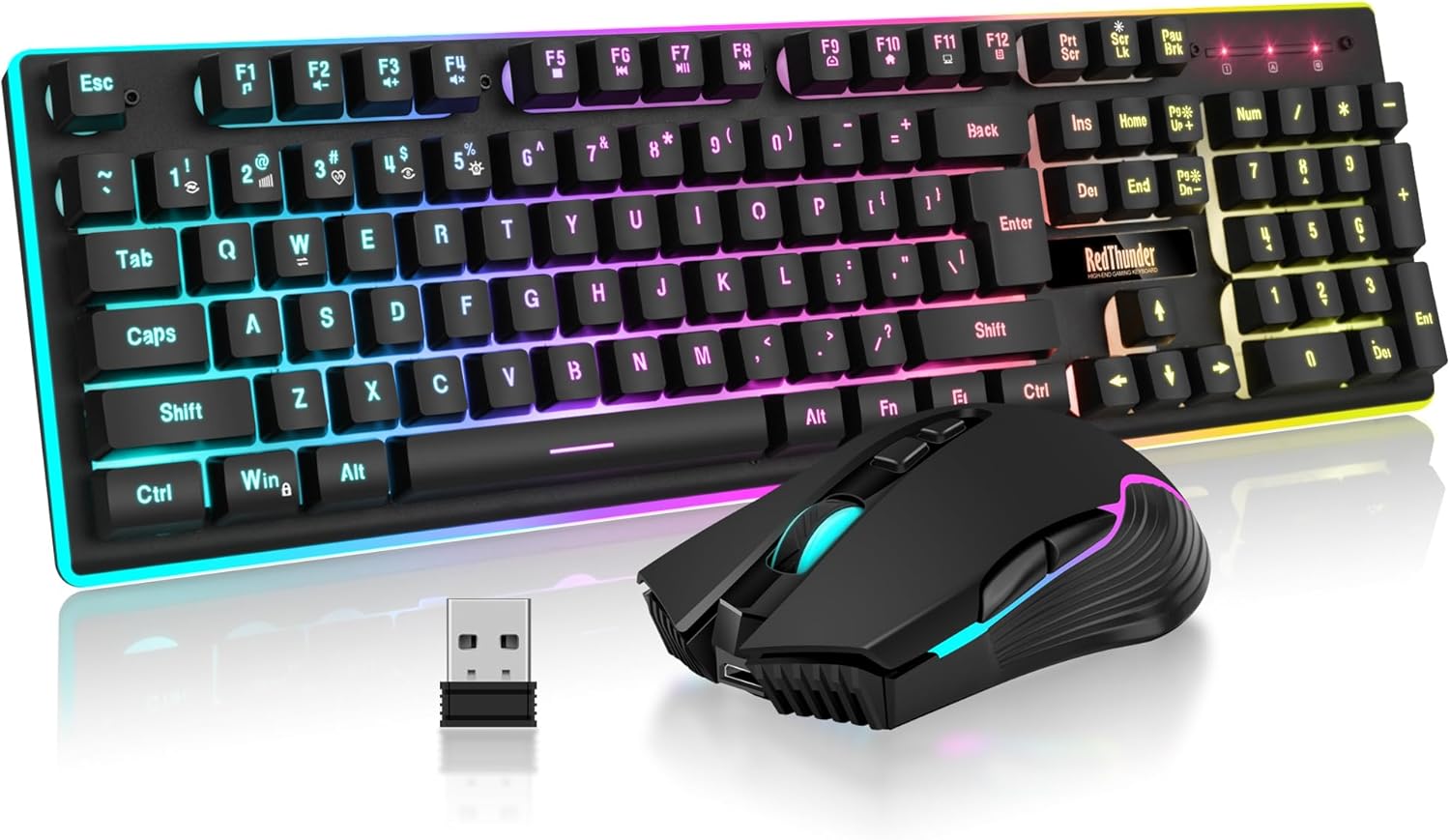
The RedThunder K10 Wireless Gaming Keyboard and Mouse Combo is a budget-friendly solution for PC gamers who want a clean, cable-free desk setup without sacrificing essential gaming features. This combo includes a full-size keyboard with a mechanical feel and a 7D 3200DPI mouse, both powered by a single 2.4G wireless receiver. It's designed for casual gamers, college gamers, and anyone building a gaming setup on a budget, but it also works well for everyday productivity and light competitive play.
In terms of real-world performance, the K10 delivers stable wireless connectivity with low latency, making it suitable for FPS, MOBA, and open-world games. The anti-ghosting keys ensure that rapid inputs register accurately, which is crucial during intense battles. The mouse offers adjustable DPI up to 3200, providing decent sensitivity for most gaming scenarios, though competitive gamers may prefer higher DPI options. The mechanical-feel keys provide satisfying tactile feedback without the noise of full mechanical switches, which some users may appreciate for quieter gaming sessions.
Build quality is solid for the price point. The keyboard features a frosted metal cover that adds durability and a premium feel, while the ABS keycaps use two-color injection molding to prevent fading over time. The mouse fits the palm comfortably with an anti-sweat, non-slip design that helps maintain control during long sessions. Both devices include RGB lighting - the keyboard offers multiple backlight modes and brightness levels, while the mouse cycles through 7 colors - adding visual flair to any gaming setup.
Setup is straightforward: the keyboard and mouse share a single USB receiver stored in the mouse, so you just plug it in and turn on the devices. The 3000mAh keyboard battery and 800mAh mouse battery provide several days of use between charges, and the auto-sleep feature helps conserve power. However, some users have noted that the LED lights can flicker or the keyboard may need occasional re-pairing, which can be a minor inconvenience. Charging via USB-C is convenient, but it's important to charge fully before first use to avoid connectivity issues.
Realistic limitations include reports of battery degradation over several months, with some users experiencing shorter charge retention or LED inconsistencies. The mouse scroll wheel may also wear out faster than expected based on some reviews. Additionally, MacOS support is limited, and a USB-C adapter is required for Mac users. While the K10 is not built for hardcore esports or heavy daily use, it's a reliable choice for casual gamers, dorm room setups, or as a secondary keyboard for work and play.
Overall, the RedThunder K10 Wireless Gaming Keyboard and Mouse Combo offers good value for budget-conscious PC gamers. It provides a wireless, RGB-lit setup with decent performance and comfort for casual gaming and everyday tasks. If you're looking for an affordable way to declutter your desk and add some flair to your gaming room, this combo is worth considering. Just be aware of potential long-term durability issues and plan for occasional charging maintenance.
Frequently Asked Questions
Can you use a single USB receiver for both the keyboard and mouse?
Yes, models such as the Redragon S101M-KS Gaming Keyboard and Mouse and Redragon S107KS Wireless Gaming Keyboard feature a 2-in-1 2.4 GHz USB receiver for both devices. This setup conserves USB ports on your gaming rig while cutting cord clutter. It also simplifies connection management by pairing both peripherals to one dongle.
Is 2.4 GHz wireless better than Bluetooth for couch gaming?
Yes, 2.4 GHz wireless transmission provides lower latency and a more consistent connection than Bluetooth, making it preferable for couch play. Bluetooth remains convenient for connecting to secondary systems without open USB ports. For fast-paced games played on a gaming laptop for Battlefield, a 2.4 GHz dongle delivers smoother cursor responsiveness.
How does mouse weight affect couch gaming comfort?
A lightweight mouse, such as the 65g design included with the Redragon S107KS Wireless Gaming Keyboard, minimizes wrist strain during prolonged play on a lap tray. Lighter mice require less effort to lift and reposition when surface space is restricted. This enables quick swipes across small mousepads or lapboards.
How long do the rechargeable batteries last during gaming?
Battery life depends on backlighting, ranging from 8 continuous hours with active LEDs on the RedThunder K10 Wireless Gaming Keyboard and Mouse up to 200 or 300 hours with lighting off on Redragon models. Built-in sleep modes automatically preserve power during pauses in gameplay. You can recharge them easily using standard USB cables.
Does mouse DPI matter when playing on a living room TV?
Yes, adjustable mouse DPI allows you to tailor sensitivity to high-resolution television screens. The supplied combos offer selectable settings ranging from 800 up to 10,000 DPI. Higher DPI levels let you glide across large displays with minimal physical movement from the couch.






Write Your Review
No reviews yet. Be the first to share your experience!