


Eliminating Cable Drag with High-Precision Wireless Control
Tangled cords can easily drag across your mousepad, creating unwanted resistance during fast flick shots and competitive matches. Cutting the cord provides fluid hand movement across your desk surface without tethering your reflexes to a stiff wire. Evaluating the best wireless rgb gaming mouse models means balancing reliable 2.4 GHz low-latency wireless dongles, responsive optical sensors, and vivid customizable illumination. Whether you are assembling a clean workspace or optimizing a custom gaming desk setup, modern cordless pointers provide fast tracking without compromising aesthetic flair.
Careful review of manufacturer specifications, sensor models, programmable button layouts, and battery capacities helps identify the right fit for your preferred grip style. Options on the market range from lightweight competitive mice to fully featured ergonomic shapes with thumb rests and dual-mode scroll wheels. Factoring in dual-mode Bluetooth connectivity, onboard DPI memory, and recharge cycles ensures that your chosen peripheral integrates seamlessly into both intense gaming sessions and everyday productivity.
Pros
- Tri-mode flexibility makes switching between 2.4GHz wireless, Bluetooth, and wired USB-C fast and straightforward
- Wide tracking adjustment range spanning 250 to 8000 DPI with four selectable polling rate levels up to 1000Hz
- Rechargeable battery design supports simultaneous use while charging via the USB-C cable
- Power-saving auto-sleep activates after one minute of inactivity to extend runtime between charges
- Dedicated configuration software enables macro creation, button reassignment, and RGB lighting adjustments
Cons
- Full macro programming and lighting adjustments require downloading external software that is specifically geared toward Windows PCs
- Official specifications state an unusual height measurement in the listing data, so buyers should verify physical desk clearances
- Non-Windows operating system compatibility is not documented by the manufacturer
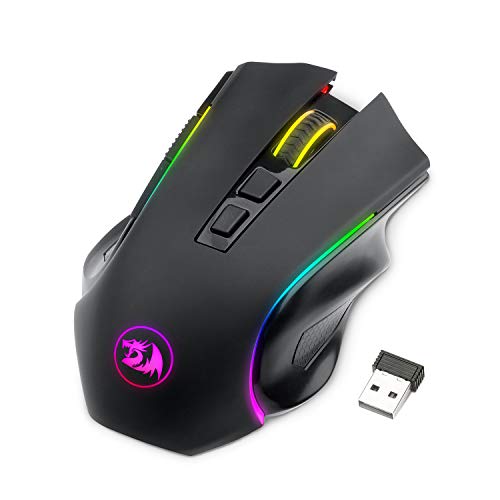
The Redragon M602 Griffin is an ergonomic, wireless gaming mouse built for PC users seeking adaptable connectivity without a complex setup. With its tri-mode configuration, this mouse bridges the gap between competitive desktop gaming and everyday computing. It primarily targets Windows PC gamers and power users who want configurable controls, custom macros, and dynamic RGB backlighting in a substantial, comfortable form factor.
Connectivity is one of the standout aspects of the M602 Griffin. It supports three distinct modes: low-latency 2.4GHz wireless, Bluetooth, and a standard wired connection via USB-C. This multi-mode setup offers flexibility across a range of up to 10 meters, allowing users to toggle between a primary gaming rig and a secondary work laptop easily. While the manufacturer explicitly specifies compatibility for Windows PCs, users relying on alternative operating systems should confirm basic driverless pointer support prior to purchase.
Handling and physical controls are oriented around an ergonomic right-handed shape finished with skin-friendly materials designed to provide a secure grip. Under the hood, the mouse features an adjustable sensor capable of shifting between 250 and 8000 DPI. Users can also select between four distinct polling rates: 125Hz, 250Hz, 500Hz, and 1000Hz. Button remapping, macro editing, and color customization across 16.8 million shades are supported through dedicated driver software available on the Redragon website.
Power management is handled by an internal rechargeable battery. According to manufacturer specifications, users can expect roughly 35 hours of continuous operation with RGB lighting turned on, or up to 70 hours with the illumination disabled. To conserve energy, the mouse enters an automatic sleep mode after one minute of idle time. Conveniently, you can plug in the USB-C cable and continue using the device while it recharges, preventing unexpected downtime in the middle of a task.
There are a few practical limitations to keep in mind. Full customization, including advanced macros and detailed lighting effects, depends on downloading Redragon software, which is not verified for macOS or Linux environments. Furthermore, while the listed length is 4.92 inches and width is 3.19 inches, the product listing contains an atypical height figure, so buyers should check physical dimensions if palm clearance is a primary consideration.
Overall, the Redragon M602 Griffin represents a versatile option for Windows users who want an affordable, tri-mode mouse capable of handling daily gaming and multitasking. If you need seamless switching between wired and wireless modes alongside a customizable DPI curve, this model provides solid functionality tailored to your desk setup.
The Redragon M602 Griffin features tri-mode connectivity, allowing users to switch between 2.4GHz wireless, Bluetooth, and wired USB Type-C connections. The wireless transmission functions within a stated operating range of up to 10 meters, offering reliable flexibility whether sitting directly at a desktop monitor or working from a moderate distance.
Device compatibility is officially targeted at Windows PC users. While standard pointer and scroll functions may operate over basic USB or Bluetooth on other systems, full access to button remapping, custom macros, and advanced RGB profiles relies on downloadable configuration software designed for Windows. Prospective buyers on non-Windows platforms should confirm feature availability before ordering.
Tracking performance on the M602 Griffin is driven by an adjustable sensor that accommodates sensitivity settings between 250 and 8000 DPI. This wide span allows users to calibrate pointer speed for delicate graphic editing, standard browsing, or fast-paced gaming movements across high-resolution displays.
In addition to DPI adjustments, the mouse provides four selectable polling rates: 125Hz, 250Hz, 500Hz, and 1000Hz. These rates determine how frequently the mouse reports position data to your computer, giving users the option to prioritize system responsiveness at 1000Hz or balance power consumption at lower reporting speeds.
Power is supplied by an internal rechargeable battery engineered to provide extended wireless use. The manufacturer states that the mouse delivers up to 35 hours of battery life with RGB spectrum backlighting active, and up to 70 hours when lighting is turned off. An automatic sleep state activates after one minute of inactivity to preserve charge.
When battery levels run low, the mouse supports pass-through charging via its USB-C port. Users can plug the cable directly into their computer and continue working or gaming without waiting for the device to replenish, eliminating battery-related interruptions.

Pros
- Highly accurate 26K DPI sensor with zero smoothing for responsive aiming
- Versatile HyperScroll wheel with three modes adapts to different tasks
- Comfortable ergonomic design with thumb rest for extended use
Cons
- Wired USB connection may limit desk cable management for some setups
- Software required for full customization, which may be a minor setup step
- Larger hand size may prefer a more extended shape for palm grip
The Razer Basilisk V3 is a wired ergonomic gaming mouse designed for PC gamers who demand precision, customization, and comfort. It features a 26K DPI optical sensor, 11 programmable buttons, and a unique HyperScroll tilt wheel that can switch between tactile and free-spin modes. This mouse caters to competitive gamers, casual players, streamers, and content creators looking for reliable performance and vibrant RGB lighting.
In real-world gaming scenarios, the Focus+ 26K DPI sensor delivers crisp tracking with zero smoothing, making it ideal for fast-paced FPS games and precise MOBA clicks. The optical switches actuate at 0.2ms, reducing input lag and preventing accidental clicks during intense matches. The HyperScroll wheel is a standout feature: use tactile mode for weapon cycling or free-spin mode for rapid document scrolling, with Smart-Reel automatically switching based on scroll speed.
Build quality is solid with a durable USB cable and a comfortable ergonomic shape that includes a thumb rest. The 11 programmable buttons are well-placed for quick access to macros, push-to-talk, or pings. The 11 RGB lighting zones are customizable via Razer Synapse, allowing syncing with over 150 games for dynamic lighting effects that enhance any gaming setup.
Setup is straightforward: plug into a USB port, install Razer Synapse for full customization, and adjust DPI, lighting, and button assignments. The mouse is lightweight at 3.56 ounces, reducing fatigue during long sessions. However, the wired connection may require cable management to keep the desk tidy.
One limitation is the need for Razer Synapse software to unlock all features, which might be a minor inconvenience for some users. Additionally, while the ergonomic design suits most hand sizes, gamers with larger hands might prefer a more extended shape for palm grip. Despite this, the Basilisk V3 offers excellent value for its price.
Overall, the Razer Basilisk V3 is a practical choice for PC gamers, streamers, and esports players who want a customizable, comfortable mouse with top-tier sensor accuracy and versatile scroll wheel options. It performs well across various genres and integrates seamlessly into RGB-heavy setups, making it a reliable addition to any gaming desk.

Pros
- Excellent wireless performance with low latency and no noticeable lag.
- Comfortable ergonomic shape for extended use, with a solid build quality that feels durable.
- High DPI range and easy on-the-fly adjustment suitable for various game genres.
- Great value with lots of features – programmable buttons, RGB, and long battery life.
- Simple software for remapping buttons and customizing lighting without bloatware.
Cons
- The mouse is relatively lightweight (8.8 oz) – some users used to heavier mice may need time to adjust.
- The included USB-C cable uses a snap-in design that may not work with standard cables, limiting replacement options.
- Software is basic but functional; advanced users might want more detailed customization.
The Redragon M810 Pro is a wireless gaming mouse built to deliver solid performance without the premium price tag. It's aimed at PC gamers who want low-latency wireless freedom, customizable controls, and RGB flair for their desk setup. Whether you're into competitive FPS shooters, casual MOBA sessions, or just need a reliable mouse for work and play, this model packs a surprising amount of features for its cost.
At the heart of the M810 Pro is a Pixart 3325 optical sensor that supports up to 10,000 DPI with five adjustable levels (500/1000/2000/3000/10000). Combined with a 1ms polling rate over the 2.4Ghz wireless connection, the mouse feels snappy and responsive. According to user feedback, the tracking is accurate and there's no perceptible lag – important for fast-paced gaming where every millisecond counts. The 8 programmable buttons, including a dedicated rapid fire key and two side macros, give you plenty of room for customizing hotkeys for games like Fortnite, Apex Legends, or even productivity tasks in Photoshop or Excel.
Build quality is reassuring for a budget-friendly mouse. The right-hand ergonomic shape with a skin-friendly matte finish fits well for medium to large hands, and the grooved scroll wheel adds a nice tactile feel. Many users report it's comfortable for long hours of gaming or browsing, with minimal hand fatigue. The mouse also features full RGB backlighting that you can control via the Redragon Pro driver – choose from breathing, wave, or fixed colors to match your setup. The software also lets you remap all buttons and set macro sequences, though it's straightforward rather than feature-packed.
One standout feature is battery life. In eco mode, the M810 Pro can last up to 45 hours on a single charge, and it automatically goes to sleep after 8 minutes of inactivity. Recharging is easy via the included USB-C cable, though note that the cable has a snap-in locking mechanism – it's not a standard USB-C plug, so you'll want to keep the included cable handy. The mouse also works wired while charging, so you can switch between modes as needed. The 2.4Ghz dongle stores neatly underneath the mouse for travel.
On the downside, the lightweight design (8.8 ounces) might not suit everyone – those used to heavier mice like the Logitech G502 might find it too light for their taste. The software, while sufficient for most, could be more intuitive for advanced users. Also, the proprietary charging cable is a minor inconvenience if you misplace it. However, these are small trade-offs given the price point.
Overall, the Redragon M810 Pro is a smart buy for PC gamers on a budget who want reliable wireless performance, customizable features, and decent ergonomics. It's especially well-suited for competitive and casual gamers, streamers who need quick button access, and anyone building a gaming setup without overspending. If you value performance and comfort without the high cost, this mouse deserves a spot on your desk.
The M810 Pro's Pixart 3325 sensor delivers accurate tracking up to 10,000 DPI with a 1ms report rate, making it suitable for both twitch shooters and strategy games. The 2.4Ghz wireless connection is stable and feels like wired – no dropped inputs or interference during normal use. The rapid fire key (next to left click) is a nice bonus for games that require fast repeated clicks like MMOs or battle royales. Eight programmable buttons let you assign critical actions directly without reaching for the keyboard.
Designed with a right-hand, contoured shape, the M810 Pro offers a comfortable grip for palm, claw, or fingertip styles. The matte finish resists fingerprints and provides a secure hold even during sweaty sessions. Weighing 8.8 ounces, it's on the lighter side, which many gamers prefer for quick flicks. The side buttons are well-placed and easy to reach without accidental presses. Most users report minimal fatigue even after hours of use, making it a solid choice for both gaming and everyday computing.

Pros
- High-accuracy PixArt PAW3395 optical sensor scaling up to 26,000 DPI
- Flexible tri-mode connectivity (2.4GHz wireless, Bluetooth, and wired USB)
- Impressive battery life lasting up to 240 hours with RGB illumination turned off
- Nine programmable buttons with dedicated rapid-fire and side macro access
Cons
- Configuration software is primarily designed for Windows PC setups
- Ergonomic shell is strictly built for right-handed grip styles
- Slightly heavier than ultralight minimalist esports mice
The Redragon M991 is a feature-packed tri-mode wireless gaming mouse built for PC gamers, esports fans, and desktop setup builders who want top-tier tracking without an excessive price tag. Whether you spend your evenings climbing ranks in competitive FPS titles or organizing team raids in MMOs, this mouse offers an ergonomic, right-handed chassis loaded with tactical shortcuts. Its dual wireless modes also make it a reliable companion for college students and hybrid remote workers who jump between a desktop rig and a laptop throughout the day.
At the core of the mouse is the PixArt PAW3395 optical sensor, capable of reaching up to 26,000 DPI with six quick-switch onboard presets. Combined with a 1000Hz polling rate in dual wireless mode, tracking feels immediate, fluid, and free of jitter. Quick micro-adjustments in tactical shooters register cleanly, while the dedicated rapid-fire button provides extra utility during intense firefights. For fast twitch aiming and precise cursor control, the internal sensor hardware holds its own against far more expensive peripherals.
The mouse housing is engineered with an ergonomic contour featuring an integrated thumb rest to keep hand fatigue down across marathon gaming sessions. You get nine programmable buttons that can be remapped for weapon cycling, custom macros, or office productivity shortcuts. Redragon Pro software unlocks access to customizable RGB lighting zones, letting you select dynamic streaming, breathing, and waving effects that integrate smoothly with your RGB desk layout.
Flexibility is a major highlight, as the M991 supports low-latency 2.4GHz nano-receiver wireless, Bluetooth pairing, and standard wired USB connectivity for uninterrupted play while charging. Power efficiency is well managed; according to product specifications, the rechargeable battery delivers up to 240 hours of run time when the RGB backlighting is disabled. Even with lighting turned on, users can enjoy days of uninterrupted gaming before needing to plug in the charging cable.
Setup is straightforward, requiring just a quick plug of the USB receiver or a simple Bluetooth pairing step, though unlocking advanced button remapping and custom lighting profiles requires downloading the Windows software. While left-handed gamers and those seeking ultralight honeycomb mice might look elsewhere, the Redragon M991 stands out as a high-value wireless pointer. It provides serious sensor accuracy, comfortable palm support, and reliable multi-device flexibility for any PC gaming battlestation.
Equipped with the enthusiast-grade PixArt PAW3395 optical sensor, this mouse delivers tracking precision up to 26,000 DPI. That level of sensitivity, paired with a 1000Hz polling rate, ensures quick flick shots and deliberate tracking stay crisp and predictable in titles like Valorant, Apex Legends, and Counter-Strike 2.
The dedicated rapid-fire button and dual macro keys on the side give competitive players instantaneous access to key commands. Whether binding grenade throws, ping markers, or complex MMO key rotations, the tactical button layout eliminates wasted motion in the heat of battle.
The tri-mode connectivity enables easy switching between a high-speed 2.4GHz connection for competitive gaming, Bluetooth for productivity on a secondary laptop, and wired USB mode when charging. This makes it an adaptable tool for hybrid gamers who balance study or work with competitive gaming sessions.
With RGB lighting switched off, the rechargeable internal battery offers up to 240 hours of continuous operation. When it is time to recharge, plugging in the mouse allows you to keep playing without latency penalties or interruptions.

Pros
- Exceptional sensor accuracy with 1:1 tracking suitable for high-DPI gaming
- Hybrid optical-mechanical switches combine speed of optical with tactile feel of mechanical
- Long battery life up to 120 hours (37 with RGB) for uninterrupted gaming
- Comfortable ergonomic shape fits palm and claw grips, especially for larger hands
- G HUB software offers deep customization of DPI, RGB, and button mapping
Cons
- Premium price may be a barrier for budget-conscious gamers
- No Bluetooth connectivity limits use to USB dongle only
- Some users report the scroll wheel feels too loose out of the box until adjusted
The Logitech G502 X Plus Lightspeed Wireless RGB Gaming Mouse is a high-performance wireless gaming mouse that builds on the legendary G502 lineage. It is designed for PC gamers, competitive esports players, streamers, and gaming setup builders who prioritize low-latency responsiveness and precision. With its hybrid optical-mechanical switches and advanced HERO 25K sensor, this mouse aims to deliver a competitive edge in fast-paced titles like FPS and MOBA games.
Performance is the standout feature here. The LIGHTFORCE switches combine optical speed with a crisp mechanical click, ensuring rapid actuation and long-term durability. The HERO 25K sensor offers sub-micron accuracy with no smoothing or acceleration, which translates to consistent tracking even during high-speed flicks. LIGHTSPEED wireless technology provides a 68% faster response rate than the previous generation, making it virtually indistinguishable from wired mice. The dual-mode scroll wheel allows hyper-fast free spinning or precise ratcheting, useful for weapon swaps or menu navigation.
Build quality is robust yet lightweight at just 106 grams. The PTFE feet offer smooth gliding on most mouse pads, while the ergonomic shape accommodates palm and claw grips comfortably, especially for users with larger hands. The 13 programmable controls include a reversible DPI-shift button and left-right tilt on the scroll wheel, giving ample customization for complex macros or in-game commands. The LIGHTSYNC RGB lighting features 8 LEDs that can be customized via G HUB, with play detection to conserve battery during idle moments.
Setup is straightforward: plug in the included USB dongle, and the mouse is ready to use. For deeper customization, the G HUB software provides intuitive control over DPI settings, button assignments, and lighting effects. Battery life is impressive, lasting up to 120 hours with RGB off and 37 hours with full lighting. The mouse is also Powerplay compatible, allowing wireless charging via Logitech's charging mat (sold separately). The dongle stores neatly in a compartment under the mouse, aiding portability and cable management.
While the G502 X Plus excels in performance, it has some limitations. The lack of Bluetooth connectivity means you can only use it with the USB dongle, which may be inconvenient for users who switch between multiple devices. The price premium is significant compared to wired alternatives or even other wireless mice. Some early users noted the scroll wheel can feel loose initially, but this typically improves with use or minor adjustment. Additionally, the mouse does not include adjustable weights like earlier G502 models.
Overall, the Logitech G502 X Plus is a top-tier choice for gamers who want uncompromising wireless performance and extensive customization. It suits competitive players who need reliable tracking and fast clicks, as well as RGB enthusiasts who enjoy vibrant lighting integration. If your budget allows and you prioritize low latency and high precision, this mouse is a worthy investment for your gaming setup.
The G502 X Plus delivers exceptional gaming performance thanks to the HERO 25K sensor and LIGHTFORCE switches. The sensor offers 1:1 tracking with zero smoothing, making it ideal for high-DPI gaming and precise aiming in shooters. The hybrid optical-mechanical switches provide instant actuation without the risk of double-clicking, which is critical for competitive play. LIGHTSPEED wireless ensures near-zero latency, keeping you responsive in fast-paced matches. The 13 programmable controls let you map abilities or macros for any game, from MOBAs to MMOs.
Logitech has crafted the G502 X Plus with durable materials and a lightweight exoskeleton. At 106 grams, it balances heft and agility. The PTFE feet are optimized for smooth gliding, and the scroll wheel features a metal construction that feels solid. The primary buttons use LIGHTFORCE switches rated for high durability. The magnetic bottom cover stores the dongle securely, and the overall build resists flex. It is available in black and white finishes to match different setups.
Pros
- Affordable all-in-one wireless combo with reliable tri-mode connectivity.
- Lightweight 65g mouse with excellent battery life and high DPI range.
- Anti-ghosting keyboard and customizable software enhance gaming performance.
- RGB lighting options add flair to any desk setup without extra cost.
Cons
- Keyboard uses membrane switches rather than mechanical, which may not appeal to enthusiasts seeking tactile feedback.
- Software required for full customization may have a learning curve for some users.
- Limited user reviews available, so long-term durability is unverified.
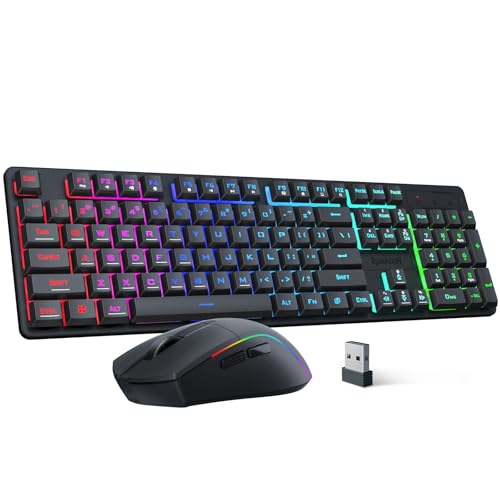
The Redragon S107KS is a wireless gaming keyboard and mouse combo designed for PC gamers who want a clutter-free desk without sacrificing performance. It’s a versatile set that works well for competitive gamers, casual players, streamers, and even work-from-home or college gamers looking for a reliable all-in-one solution.
In terms of real-world performance, the mouse offers up to 10,000 DPI and a 1,000 Hz polling rate, which translates to responsive tracking in fast-paced FPS or MOBA games. The 25-key anti-ghosting on the keyboard ensures that simultaneous key presses register accurately, which is crucial for executing complex combos. The tri-mode connectivity (wired, 2.4G, and Bluetooth) makes it easy to switch between gaming rig, laptop, or tablet, and the single 2.4G receiver handles both devices – a practical convenience for multi-device users.
Build quality is decent for the price. The mouse weighs only 65g, making it one of the lightest options in this segment, and its battery lasts up to 200 hours depending on usage. The keyboard features a compact layout with multimedia keys, though it uses membrane switches rather than mechanical ones. This might be a drawback for enthusiasts who prefer tactile feedback, but it keeps the combo affordable and quiet for shared spaces like dorm rooms or offices.
Setup is straightforward: plug in the receiver, pair via Bluetooth, or use the included cable. The Redragon software lets you adjust DPI, polling rate, macros, and RGB lighting – but you’ll need to download it separately. The RGB backlighting offers 6 modes on the keyboard and millions of colors on the mouse, with adjustable brightness and speed, which is a nice touch for RGB setup enthusiasts.
A realistic limitation is the lack of mechanical switches, which may affect long-term typing comfort for heavy users. Also, the software interface isn’t the most intuitive, but it’s functional once you get used to it. Since this is a newer model with few reviews, long-term reliability is still an unknown, but Redragon generally has a solid reputation for budget gaming gear.
Overall, the Redragon S107KS is a smart buy for budget-conscious PC gamers, streamers, or anyone who wants a wireless keyboard and mouse combo with solid performance, RGB flair, and versatile connectivity. It’s especially suited for those building a first gaming setup or upgrading an older wired kit without spending a lot.
Frequently Asked Questions
How does 2.4 GHz wireless compare to Bluetooth for gaming?
2.4 GHz wireless provides lower latency and a standard 1000 Hz polling rate, making it the preferred connection method for responsive gameplay. Bluetooth is more energy-efficient and allows quick pairing across multiple devices like laptops or tablets without occupying a USB port. Many tri-mode mice offer both options so you can play via a nano dongle and switch to Bluetooth for productivity.
What role does DPI play when choosing a gaming mouse?
DPI measures sensor sensitivity, indicating how far your cursor travels on screen relative to physical movement. High ratings such as 26,000 DPI on sensors like the Pixart PAW3395 or Logitech HERO 25K offer broad adjustability, but higher numbers alone do not make a mouse better. Most players use software or onboard toggles to set DPI between 400 and 3,200 for steady aiming and fine control.
How does RGB lighting impact wireless battery life?
RGB lighting significantly reduces battery runtimes because continuous illumination draws substantial power. For instance, the Redragon M602 lists around 35 hours of battery life with RGB active, which extends up to 70 hours with lighting turned off. Disabling lighting zones or using power-saving sleep timers helps maximize cordless endurance between charges.
Can you use a wireless gaming mouse while it is charging?
Yes, listed models like the Redragon M602 and Logitech G502 X Plus can operate while plugged in via their USB charging cables. This functionality prevents downtime during long gaming sessions on your performance gaming desktop if the battery depletes mid-match. Some devices like the G502 X Plus also support continuous wireless inductive charging mats.
What is the benefit of optical or hybrid mouse switches?
Optical and hybrid switches use light beams rather than physical metal contacts to register clicks, preventing double-click issues and lowering actuation delay. Switches like Razer Gen-2 opticals boast actuation speeds of 0.2 ms, while Logitech LIGHTFORCE hybrid switches combine optical speed with tactile mechanical feedback. These designs offer durability ratings reaching 70 million clicks.
Are all programmable buttons remappable across different computer systems?
Most remapping features require manufacturer companion software like Razer Synapse, Logitech G HUB, or Redragon Pro drivers. These programs let you assign macros, adjust polling rates, and alter RGB lighting on Windows PCs. While basic clicking functions work across various operating systems, extensive macro profiles usually depend on active software or saved onboard mouse memory.






Write Your Review
No reviews yet. Be the first to share your experience!