


Evaluating Graphics Hardware and Laptop Gaming Rigs
Mobile gamers often face a compromise between compact portability and the sustained power limits of dedicated mobile GPUs. A high-tier GPU label does not guarantee peak frame rates if thermal constraints or low wattage restrict clock speeds. When selecting the best gaming laptop with best graphics card configurations, verifying core components like discrete graphics, DDR5 system memory, and cooling design ensures reliable gameplay. Some players also evaluate Thunderbolt gaming laptop setups to expand their visual rendering capability through external hardware docks.
Available choices range from entry systems with discrete GPUs like the NVIDIA GeForce RTX 4050 to standalone enclosures for desktop video cards. Machines such as the ASUS TUF Gaming A16 and HP Victus pair 144Hz displays with multithreaded processors capable of steady 1080p gaming. For buyers managing a budget, reviewing affordable gaming laptop configurations provides a practical starting point. Checking overall thermal headroom and system RAM helps you match hardware to your specific gaming library.
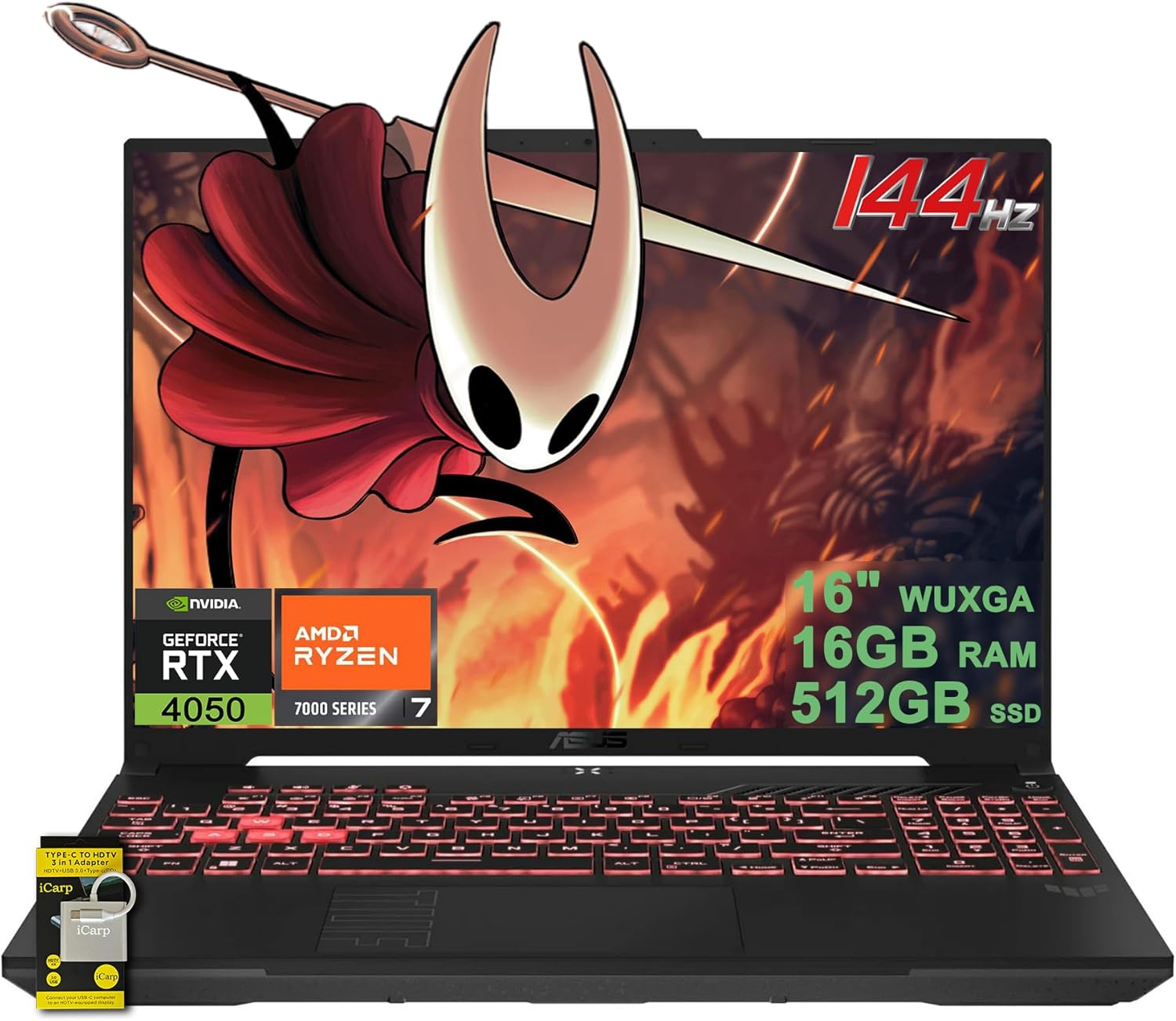
Pros
- Strong gaming performance for the price with Ryzen 7 and RTX 4050.
- Smooth 144Hz display enhances gameplay responsiveness.
- Durable build quality typical of TUF series.
- Good selection of ports including USB4 and HDMI 2.1.
- AI noise cancellation improves communication clarity.
Cons
- 512GB SSD may fill quickly for large game libraries; external storage recommended.
- Webcam quality is standard HD, not ideal for high-end streaming.
- Battery life may be modest under heavy gaming load (56Wh).
The ASUS TUF Gaming A16 is a budget-friendly gaming laptop designed for PC gamers, streamers, and students who want reliable performance without breaking the bank. It combines an AMD Ryzen 7 processor with an NVIDIA RTX 4050 graphics card, making it suitable for esports titles, AAA games at medium settings, and content creation tasks.
With the hexa-core Ryzen 7 7445HS and RTX 4050, this laptop handles games like Fortnite, Valorant, and Apex Legends well above 60 fps on high settings. The 144Hz WUXGA display ensures smooth motion and reduces screen tearing, which is a big plus for competitive gamers. The 16GB of DDR5 RAM keeps system responsiveness snappy, and the 512GB SSD provides fast boot and load times, though you may want to add external storage for larger libraries.
The laptop feels sturdy thanks to the TUF series' military-grade build certification, and the 1-zone RGB backlit keyboard adds a touch of gaming flair. Port selection is generous, including two USB-A, one USB-C with USB4, and HDMI 2.1 FRL, so connecting peripherals and external monitors is easy. The built-in AI noise cancellation works well for filtering background noise during Discord calls or streaming.
Setting up the laptop is straightforward: it comes with Windows 11 pre-installed, and all drivers are ready to go. The chassis has decent ventilation to keep thermals in check during long sessions, though you will likely want to use it on a hard surface for optimal airflow. Cleaning is simple, and the keyboard is spill-resistant for added peace of mind.
The main limitations are the storage capacity and webcam quality. 512GB fills up quickly with modern games, so plan to use an external SSD. The 720p webcam is adequate for casual video calls but not great for professional streaming. Battery life is average for a gaming laptop, around 5-6 hours of mixed use.
Overall, the ASUS TUF Gaming A16 offers excellent value for its price. It is a smart choice for college gamers, casual streamers, and anyone building a budget gaming setup. If you prioritize portability and performance without paying a premium, this laptop is worth considering.
The ASUS TUF Gaming A16 delivers a satisfying gaming experience for its class. The Ryzen 7 7445HS and RTX 4050 combo can run popular esports titles like CS2 and Valorant at over 120 fps on high settings. More demanding games like Cyberpunk 2077 or Starfield will need to dial settings to medium or use DLSS for playable frame rates.
The 144Hz display is a big advantage over standard 60Hz laptops, providing smoother gameplay and reduced eye strain. The RTX 4050 also supports NVIDIA Reflex for lower latency in competitive games. Thermal management is handled by dual fans and heat pipes; during extended sessions, the keyboard deck stays warm but not uncomfortable.
Overall, this laptop is capable of handling the vast majority of current games at 1080p with good settings. For those who want to stream or record, the dedicated GPU and CPU can handle encoding without sacrificing too much performance.

Pros
- Strong CPU and GPU combo for entry-level 1080p gaming.
- Fast SSD storage improves overall system responsiveness.
- Backlit keyboard adds convenience for night-time use.
- Affordable price point for budget-conscious gamers.
- Good build quality with a sleek black design.
Cons
- 8GB RAM may require an upgrade for more demanding games or heavy multitasking.
- 256GB SSD fills up quickly with modern game installs.
- Display refresh rate is standard 60Hz, not ideal for competitive esports.
The HP Pavilion Gaming Laptop 15-dk0096wm is a budget-friendly entry into PC gaming, combining a 9th-gen Intel Core i5-9300H processor with an NVIDIA GTX 1650 4GB graphics card. This setup is designed for casual gamers, college students, and work-from-home users who need a reliable machine for both productivity and light gaming. It's a practical choice for anyone looking to play popular titles like Fortnite, Overwatch, or League of Legends at decent settings without spending a fortune.
In real-world use, the Core i5-9300H and GTX 1650 deliver smooth 60fps performance in many esports and older AAA games at 1080p medium to high settings. The 8GB of RAM is adequate for everyday tasks and light multitasking, but heavier gaming sessions or streaming may benefit from an upgrade. The 256GB SSD is a nice touch for fast boot times and quick game loads, though modern game installs can eat up space quickly, so you might want an external drive or cloud storage for your library.
The 15.6-inch Full HD display offers clear visuals for gaming and media, though it's a standard 60Hz panel, so competitive players seeking high refresh rates may want to look elsewhere. The backlit keyboard is a welcome addition for late-night gaming sessions, and the laptop's black design keeps things professional enough for school or office use. Build quality feels solid for the price, with a durable chassis that can handle daily commuting.
Connectivity is decent with wireless and Bluetooth built-in, plus a webcam for video calls and streaming. The laptop runs Windows 10 out of the box, so you can jump right into gaming and productivity without extra setup. Cooling is adequate for casual use, but extended gaming sessions may cause the fans to spin up noticeably.
One realistic limitation is the 8GB of RAM, which may feel restrictive if you like to keep multiple browser tabs, Discord, and a game open at once. The 256GB SSD also means you'll need to manage your game installs carefully. For competitive esports players, the 60Hz display and GTX 1650 might not deliver the ultra-smooth experience they crave, but for general gaming and schoolwork, this laptop is a solid value.
Overall, the HP Pavilion Gaming Laptop 15-dk0096wm is a reliable entry-level gaming machine best suited for casual gamers, college students, and work-from-home users who want a balance of performance and affordability. It's a practical choice for anyone looking to get into PC gaming or need a versatile laptop for everyday use.

Pros
- Strong price-to-performance ratio for entry-level 1080p gaming.
- 144Hz display provides smooth gameplay in fast-paced titles.
- Decent storage and memory configuration out of the box.
- Eco-friendly construction with recycled materials.
Cons
- 7-pound weight makes it less portable for frequent travel.
- DDR4 RAM (not DDR5) may limit future upgradability potential.
- No Thunderbolt or USB4 support limits external GPU options.
The HP Victus 15.6-inch laptop (model 15-fa1040nr) is a mid-range gaming machine designed for PC gamers who want a capable desktop replacement without breaking the bank. Powered by a 12th Gen Intel Core i5-12500H and an NVIDIA GeForce RTX 4050 with 6GB of dedicated GDDR6 memory, this laptop can handle modern esports titles like Valorant and Apex Legends at high settings, while also running demanding single-player games at medium-to-high details in 1080p. The 144Hz FHD IPS anti-glare display adds a level of smoothness that competitive gamers will appreciate, reducing motion blur and helping you track fast-moving targets.
This laptop is best suited for budget-conscious PC gamers, college students who need a blend of gaming and study performance, and casual gamers who want a reliable machine for their dorm room or home office setup. The 16GB of DDR4 RAM and 512GB PCIe Gen4 NVMe SSD provide snappy boot times and quick level loads, so you can jump into games without long waits. The RTX 4050 supports ray tracing and DLSS in supported titles, which helps improve visual fidelity without tanking frame rates. For streamers or content creators, the 6GB VRAM can handle light 1080p video editing and streaming, though more demanding 4K work may be a stretch.
Build quality is solid for the price point, with a Mica Silver chassis that has a clean, understated look. The laptop weighs 7 pounds, which is on the heavier side, so it's better suited for stationary use or occasional transport rather than daily backpack commuting. The keyboard includes a number pad and offers decent key travel, though it's not mechanical. The 88-degree wide-angle HD webcam with AI noise cancellation is a welcome addition for remote work or Discord calls, ensuring your voice comes through clearly in noisy environments.
Audio from the HP Dual Speakers tuned by B&O is surprisingly rich for a laptop in this class, with decent volume and clarity for casual media consumption and in-game sound effects. For serious gaming, you'll likely still want a dedicated gaming headset for positional audio. Connectivity includes Wi-Fi 6 and Bluetooth 5.3, along with USB-A, USB-C, HDMI, and a headphone jack, covering the basics for peripheral hookup. The battery life is moderate; expect around 4-5 hours of mixed use, less during gaming.
One realistic limitation is the use of DDR4 RAM instead of the newer DDR5, which means memory upgrades won't benefit from the fastest speeds available in other 2023 laptops. Also, the single storage slot limits expansion without replacing the existing SSD. The 512GB drive may fill up quickly if you install several modern games, but you can always use an external drive or cloud storage. Overall, this HP Victus offers a well-balanced package for gamers seeking an affordable entry into 1080p 144Hz gaming without compromising on core performance.
If you're a PC gamer looking for a budget-friendly laptop that can handle esports and moderate AAA titles, or a student needing a versatile device for both gaming and coursework, the HP Victus 15-fa1040nr is a strong contender. Its combination of a responsive 144Hz display, capable CPU/GPU, and reasonable memory configuration makes it a practical choice for U.S. gamers who want reliable performance without overspending.
With the Intel Core i5-12500H and RTX 4050, the HP Victus delivers smooth 1080p gaming in most modern titles. Esports games like Fortnite, Overwatch 2, and Rocket League can easily hit 144fps on competitive settings, fully leveraging the 144Hz panel. Heavier games like Cyberpunk 2077 or Elden Ring will run at medium settings with DLSS enabled for a steady 60fps. The 6GB of VRAM is enough for high-resolution texture packs in many games, though future titles may require more.
The 15.6-inch FHD IPS panel with 144Hz refresh rate and anti-glare coating is a highlight at this price. Colors are decently vibrant with good contrast, and the 178-degree viewing angles make it easy to share the screen. The anti-glare finish helps reduce reflections in bright rooms, which is a plus for gaming near windows or under direct light. The 144Hz refresh rate offers a noticeable upgrade over standard 60Hz for fast-paced gaming, reducing motion blur and improving perceived smoothness.

Pros
- Excellent performance uplift for ultrabooks, mini PCs, and handhelds like the ROG Ally X at 1080p-1440p.
- Quieter and cooler operation compared to competing eGPUs, according to user feedback.
- Versatile connectivity: works with Thunderbolt 3/4, USB4, and OCuLink for broad compatibility.
- Integrated SSD slot and USB/Ethernet ports reduce cable clutter and enhance desk organization.
Cons
- Not compatible with original ROG Ally Z1 (only Z1 Extreme and Ally X) - verify your device's OCuLink or Thunderbolt support before buying.
- Build materials feel slightly less premium than all-metal alternatives, though still durable for travel use.
- Power adapter is large (230W), adding bulk to the portable setup; may require a larger bag.
The BOSGAME GVP 7600 eGPU is an external graphics dock that packs a full AMD Radeon RX 7600M XT GPU with 8GB of GDDR6 memory into a sleek, portable aluminum enclosure. Designed for PC gamers, streamers, and content creators who need desktop-class graphics on the go, this eGPU connects to laptops, mini PCs, and even handheld gaming consoles via Thunderbolt 3/4, USB4, or OCuLink. It's particularly well-suited for gamers who want to breathe new life into a thin-and-light work laptop or a mini PC for gaming sessions at home or on the road.
In real-world gaming use, the RX 7600M XT delivers smooth 1080p-1440p performance in popular titles like Call of Duty, Fortnite, and Elden Ring. According to user reviews, it can handle 1440p at high settings comfortably, and even push 4K on less demanding esports titles. The dual-mode power switching lets you choose between a quieter 100W Eco mode for casual use or a more aggressive 120W Turbo mode for maximum frame rates in competitive gaming. The fan noise stays manageable, and the enclosure doesn't get uncomfortably hot during long sessions.
Build quality is solid with a mostly metal body that feels durable enough for travel. The inclusion of an M.2 2280 SSD slot is a smart touch, letting users add up to 4TB of game storage directly inside the dock. Port selection is generous: two HDMI 2.1 (4K60), two DisplayPort 2.0 (4K120), two USB-A 3.2, and an RJ45 Ethernet port. This makes it a genuine docking station, simplifying cable management and reducing desk clutter. Setup is straightforward: install the AMD drivers, plug in via the included Thunderbolt 4 cable, and the device is recognized quickly on both Windows and Linux.
Comfort and ergonomics extend beyond the device itself. Because this eGPU handles all the graphics processing, your laptop stays cooler and quieter, allowing for longer gaming sessions without thermal throttling. The compact size (just 1.92 lb) means it can slip into a backpack alongside your laptop or handheld, making it a practical solution for college gamers or remote workers who want to game after hours. It also cleans easily with a dry cloth thanks to the aluminum finish.
That said, there are a couple of limitations. The 230W power adapter is bulky, which somewhat diminishes portability. Compatibility is excellent with Thunderbolt 3/4 and OCuLink, but users of the original ROG Ally Z1 (non-Extreme) have reported issues, so it's best suited for the Ally X or other OCuLink-capable devices. Additionally, while the performance is impressive for an external GPU, it won't match a full desktop RTX 4070 in raw power, but that's expected given its size and power envelope.
Overall, the BOSGAME GVP 7600 eGPU is a strong choice for PC gamers, esports enthusiasts, and streamers who want a flexible, portable graphics upgrade. It's particularly valuable for those with Thunderbolt 4 laptops who want to game at higher settings without building a separate desktop. With its integrated storage, docking features, and quiet operation, it delivers a practical, cost-effective boost for your gaming setup.
The Radeon RX 7600M XT inside this eGPU delivers solid 1080p and 1440p gaming performance across a wide range of titles. Users report hitting 60+ fps in AAA games like Cyberpunk 2077 at medium-high settings, and exceeding 100 fps in competitive shooters like Overwatch 2 and Valorant at 1440p. The Turbo mode (120W) provides a noticeable bump in frame rates for demanding scenes. While not a replacement for a high-end desktop GPU, it performs similarly to a laptop RTX 4050 and is ideal for turning a modest laptop into a capable gaming machine.
This eGPU doubles as a dock. It offers two USB-A 3.2 ports for peripherals, an RJ45 Gigabit Ethernet port for stable wired networking, and an M.2 2280 PCIe 3.0 slot for adding up to 4TB of SSD storage. Video output supports up to four displays via two HDMI 2.1 (4K60) and two DisplayPort 2.0 (4K120). This makes it suitable for multi-monitor productivity setups or immersive gaming spans multiple screens. The Thunderbolt 4 cable included provides 40Gbps bandwidth for low-latency GPU communication.
Weighing only 1.92 lb and housed in a compact aluminum alloy enclosure, the BOSGAME eGPU is designed for travel. The chassis stays cool under load, and the internal fan is relatively quiet, even in Turbo mode. The included 230W power adapter adds some bulk, but the overall package is still far more portable than a desktop PC. The build feels sturdy enough for regular packing and unpacking, though some users note the materials are slightly less premium than all-metal competitors. A carrying case is recommended for frequent travelers.

Pros
- Ultra-fast Thunderbolt 5 bandwidth ensures low latency and high performance for gaming and content creation
- Wide GPU compatibility – supports most NVIDIA and AMD cards up to 4 slots wide
- Tool-free modular design allows easy upgrades or reuse of existing GPU and PSU
- True plug-and-play with no driver hassle on compatible Windows laptops and devices
Cons
- Requires a separate GPU and ATX power supply (not included), adding to the total cost
- Compatibility depends on your laptop – must have a Thunderbolt 4/5 or USB4 port with eGPU support
- Not supported on Mac devices with M1 or newer chips, limiting platform options
The Razer Core X V2 is an external graphics enclosure that gives compatible laptops – whether Thunderbolt 4, Thunderbolt 5, or USB4 – a huge boost in graphical power. It's essentially a desktop GPU dock that lets you plug in a full-size graphics card and use it via a single cable. This is perfect for PC gamers who want desktop-level performance on their laptop, streamers who need extra GPU muscle for encoding, content creators working with 3D rendering or video editing, and even college gamers who want a single laptop that doubles as a powerful desktop when docked.
Performance-wise, the Core X V2 benefits from Thunderbolt 5's massive 80 Gbps bandwidth – double that of Thunderbolt 4. This means lower latency and smoother gaming, especially in demanding AAA titles. You can install the latest NVIDIA GeForce or AMD Radeon cards (up to 4 slots wide) and get near-desktop frame rates. The enclosure also delivers up to 140W power delivery to your laptop, so you can game and charge simultaneously. Setup is a breeze: just plug the included Thunderbolt 5 cable into your device, and the eGPU is recognized without a reboot – perfect for quick transitions between on-the-go and docked use.
Build quality is solid. The steel chassis is vented for maximum airflow, and the built-in 120mm fan automatically adjusts speed based on temperature to keep things quiet during light use and ramps up under load. You can even customize fan curves through Razer Synapse software. The interior is modular – you can swap the GPU and ATX power supply tool-free using thumbscrews. This gives you flexibility to upgrade later or reuse parts from an older desktop build. The enclosure's dimensions (16.59 x 8.51 x 7.76 inches) are compact enough for most desks but leave room for a large GPU.
One practical consideration: the Core X V2 does not come with a GPU or power supply, so you'll need to budget for those separately. Also, not every Thunderbolt 4 or USB4 device supports external graphics – always check your laptop manufacturer's documentation. Mac users with M1 or newer chips are out of luck, as those don't support eGPUs. But for Windows gaming laptops and handhelds (like certain USB4 gaming handhelds), it's a game-enhancing accessory.
In a setup, the Core X V2 is a clean addition. Its black steel finish matches most gaming gear, and the single cable reduces clutter. The 140W power delivery means you might not need a separate charger for your laptop. For streamers, pairing this with a high-end GPU can handle 1440p or 4K gaming while streaming at the same time. For content creators, GPU-accelerated tasks like video rendering and 3D modeling get a massive boost. The fan and PSU can be customized to match your performance needs and noise tolerance.
Overall, the Razer Core X V2 is a great investment for anyone who wants desktop-class graphics in a laptop-centric lifestyle. It's best suited for PC gamers who travel but still want high-end gaming at home, streamers or creators who need extra GPU power on demand, and laptop users who want to future-proof their setup with GPU upgrades. Just make sure your device is compatible and be ready to invest in a GPU and PSU. The convenience and performance make it a smart upgrade for many gamers and power users.
With Thunderbolt 5 bandwidth up to 80 Gbps, the Razer Core X V2 can handle demanding titles without bottlenecking most modern GPUs. You can expect smooth frame rates in games like Cyberpunk 2077, Call of Duty, and Forza Horizon at high settings. The enclosure supports both NVIDIA and AMD graphics cards up to 4 slots wide, so you can drop in a flagship card like the RTX 4090 or RX 7900 XTX. Active cooling with a 120mm fan keeps temperatures in check during long sessions. Since the GPU is fully inside the enclosure, you'll get desktop-grade performance with minimal compromise, especially when connecting an external monitor directly to the GPU.
The Core X V2 works with Windows laptops and devices that have a Thunderbolt 4, Thunderbolt 5, or USB4 port with eGPU support. It's also compatible with select USB4 gaming handhelds. Check your device manufacturer's documentation to ensure eGPU support. The enclosure supports most NVIDIA and AMD PCIe graphics cards up to 4 slots wide and any standard ATX power supply (sold separately). Note that Mac devices with M1 or later chips do not support eGPUs. The included Thunderbolt 5 cable is USB-C to USB-C, and the enclosure requires Windows 10 or 11 for full functionality.
Frequently Asked Questions
What graphics card is recommended for modern laptop gaming?
A dedicated discrete GPU such as an NVIDIA GeForce RTX 4050 or AMD Radeon RX 7600M XT provides solid power for modern gaming. These chips offer dedicated video RAM and support modern visual upscaling features. Older entry GPUs like the GTX 1650 handle casual titles but lack current feature support.
Can an external GPU enclosure improve laptop graphics performance?
Yes, an external GPU dock can elevate visual performance when connected to a laptop with Thunderbolt 4, Thunderbolt 5, or USB4 ports. Modular enclosures support full desktop graphics cards, while compact docks provide integrated mobile GPUs. The host laptop CPU remains responsible for core gameplay logic.
How much RAM is needed in a Best Gaming Laptop With Best Graphics Card?
A minimum of 16GB of DDR4 or DDR5 RAM is recommended for modern gaming titles. While 8GB supports basic tasks, modern games and background programs quickly consume available system memory. Players can also explore how to optimize laptop settings for competitive gaming to reduce background overhead.
Does display refresh rate matter for a Best Gaming Laptop With Best Graphics Card in 2026?
Yes, a 144Hz display delivers noticeably smoother motion than a standard 60Hz panel in fast-paced games. Faster refresh rates lower perceived motion blur when the GPU produces high frame rates. Matching your display resolution with your GPU tier avoids unneeded processing bottlenecks.
Why does laptop cooling matter when evaluating graphics cards?
Thermal design determines whether a graphics card can sustain high clock speeds without thermal throttling. Compact laptop bodies generate substantial heat under load, requiring adequate fan curves and ventilation. Gamers prioritizing sustained frame rates can inspect gaming laptop picks for higher FPS to see how thermal solutions balance hardware power.






Write Your Review
No reviews yet. Be the first to share your experience!