


Selecting High Performance Hardware for Competitive Soccer Gaming
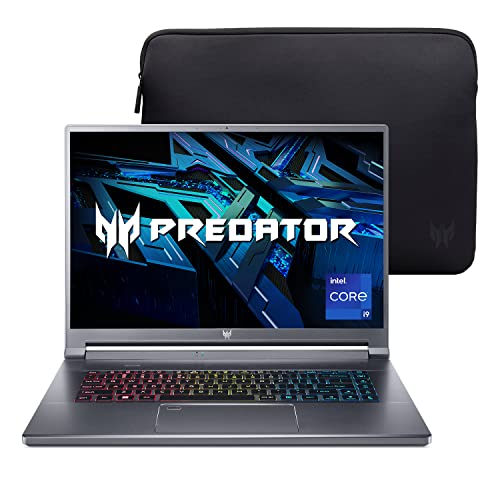
Fast-paced sports simulations demand responsive displays and sustained clock speeds to prevent stutter during crucial counterattacks. Many buyers assume any portable computer with dedicated graphics handles modern sports titles easily, but thermal throttling and slow screen refresh rates quickly introduce visual tearing. Evaluating the best gaming laptop for fifa 23 requires balancing a high-tier graphics chip with effective cooling and responsive panel hardware. Machines like the Acer Predator Triton 500 SE Gaming/Creator Laptop pair an Intel Core i9-12900H processor with an NVIDIA GeForce RTX 3080 Ti to deliver immense rendering headroom. You can also explore our guide on how to optimize a gaming laptop for esports for setup advice.
Display quality plays a critical role when tracking player movements across a wide virtual stadium. A fast 240Hz refresh rate on a 16-inch WQXGA 2560 x 1600 panel eliminates motion blur, while NVIDIA G-SYNC reduces tearing during rapid camera pans. Memory and storage bandwidth also matter, as 32GB LPDDR5 RAM and a PCIe Gen 4 SSD reduce loading screens between matches. For players comparing different configurations, checking our overview of the best gaming laptop with Thunderbolt 3 provides perspective on peripheral support. Liquid metal thermal compound and custom metal fans keep clock rates stable during long sessions.
Pros
- Incredible performance for gaming and creative tasks thanks to i9-12900H and RTX 3080 Ti
- High-refresh-rate 240Hz G-SYNC display with excellent color accuracy (100% DCI-P3) and 16:10 aspect ratio for more vertical workspace
- Advanced cooling system with liquid metal and AeroBlade fans maintains performance without excessive noise
- Killer Wi-Fi 6E and Ethernet provide reliable, low-latency connectivity for competitive gaming and streaming
- Thin and relatively lightweight design (0.78" thin, 5.29 lbs) makes it portable for LAN parties or working on the go
Cons
- Premium price point may be prohibitive for budget-conscious gamers or students
- Memory is soldered and limited to 32GB, so no future upgrades possible
- Battery life under heavy gaming load is limited, as expected from a high-performance laptop
The Acer Predator Triton 500 SE (model PT516-52s-99EL) is a high-performance gaming and creator laptop that bridges the gap between desktop-replacement power and portable convenience. At its core, it features a 12th Gen Intel Core i9-12900H processor with 14 cores and 20 threads, paired with an NVIDIA GeForce RTX 3080 Ti with 16GB of dedicated GDDR6 VRAM. This combination ensures it can handle demanding AAA games at high settings, as well as intensive creative tasks like video editing, 3D rendering, and live streaming without breaking a sweat.
This laptop is best suited for competitive gamers, streamers, content creators, and gaming setup builders who need top-tier performance in a portable package. The 16-inch WQXGA (2560x1600) IPS display with a 240Hz refresh rate and NVIDIA G-SYNC support delivers buttery-smooth visuals with minimal tearing, making it ideal for fast-paced esports titles like Valorant or Apex Legends. The 16:10 aspect ratio also provides extra vertical screen space, which is a boon for productivity tasks such as coding, photo editing, or managing streaming overlays.
Real-world gaming responsiveness is outstanding, thanks to the high-refresh-rate panel and the powerful GPU. The RTX 3080 Ti easily pushes high frame rates at native resolution, and the 240Hz refresh rate ensures every frame is rendered smoothly. The laptop's cooling system, featuring 5th Gen AeroBlade 3D fans, Vortex Flow airflow, and liquid metal thermal compound on the CPU, keeps thermals in check even during extended gaming sessions. The system stays relatively quiet under load, though the fans do become audible during intense gaming.
Build quality is solid, with a sleek gray aluminum chassis that feels premium and durable. The 3-zone RGB keyboard offers per-key customization via the PredatorSense software, allowing users to match their setup's aesthetic. The keyboard itself provides decent travel and tactile feedback, suitable for both gaming and typing. Connectivity is comprehensive, with two Thunderbolt 4 USB-C ports, HDMI 2.1, USB 3.2 Gen 2, an Ethernet port (RJ-45), and a headphone jack, making it easy to connect multiple peripherals or external displays.
Setup is straightforward: unbox, plug in, and start gaming or creating. The PredatorSense utility gives you control over performance profiles, fan speeds, and RGB lighting, all through an intuitive interface. One limitation to consider is that the 32GB of LPDDR5 RAM is soldered and not upgradeable, so you'll need to be comfortable with that capacity from the start. Additionally, while the laptop is relatively thin and light at 5.29 pounds, the battery life under gaming loads is limited, as is typical for high-performance machines.
Overall, the Acer Predator Triton 500 SE is a powerful choice for gamers and creators who demand desktop-level performance in a portable form. Its combination of a fast i9 processor, RTX 3080 Ti, high-refresh-rate display, and robust cooling makes it a strong contender for those building a premium gaming or streaming setup. If you have the budget and need a laptop that can handle both gaming and creative work without compromise, this model is well worth considering.
The Acer Predator Triton 500 SE is engineered for high-end gaming, leveraging the 12th Gen Intel i9-12900H and RTX 3080 Ti to deliver exceptional frame rates in modern titles. The 240Hz G-SYNC display ensures tear-free, fluid motion, which is crucial for competitive gaming. The NVIDIA Advanced Optimus technology automatically switches between integrated and dedicated graphics to balance performance and battery life. With DirectX 12 Ultimate support, the laptop is ready for ray-traced games and advanced visual effects. The Killer Wi-Fi 6E and Ethernet prioritize gaming traffic, reducing latency for online multiplayer. This laptop is a beast for esports, AAA gaming, and VR experiences.
Acer's 5th Gen AeroBlade 3D Fan Technology uses custom-engineered blades to increase airflow while reducing noise. The Vortex Flow airflow design guides air through strategically placed thermal foam, and liquid metal thermal compound on the CPU ensures efficient heat transfer. This cooling system allows the Triton 500 SE to maintain high performance during extended gaming sessions without thermal throttling. The fans do ramp up under load, but the noise level is reasonable for a laptop of this caliber. The bottom intake and rear exhaust design helps keep the keyboard deck cool during use.
The 16-inch WQXGA (2560x1600) IPS display is a standout feature, offering a 240Hz refresh rate, 100% DCI-P3 color gamut, and 500 nits brightness. The 16:10 aspect ratio provides more vertical screen real estate compared to traditional 16:9 panels, which is beneficial for productivity and creative work. NVIDIA G-SYNC technology eliminates screen tearing and stuttering, ensuring smooth gameplay. The high color accuracy makes it suitable for photo and video editing, while the fast refresh rate caters to competitive gaming. This display is versatile enough for both gaming and content creation.
Frequently Asked Questions
What hardware specifications are ideal for running FIFA 23 smoothly?
A multi-core processor paired with a dedicated graphics card ensures stable framerates in FIFA 23. Top-tier configurations like the Triton 500 SE list a 14-core Intel Core i9 processor and 16GB of dedicated VRAM, exceeding baseline requirements. At least 16GB of system RAM and fast solid-state storage also prevent stutter during match loading.
Does a 240Hz display improve gameplay in soccer simulations?
Yes, higher refresh rates provide noticeably smoother player animations and clearer ball tracking. A 240Hz screen updates images four times faster than a standard 60Hz panel, reducing visible blur during fast breaks. Pairing that display with NVIDIA G-SYNC synchronizes frame output to eliminate screen tearing.
Is 32GB of RAM necessary for the Best Gaming Laptop For Fifa 23?
No, 16GB of memory is sufficient for smooth gameplay, though 32GB provides comfortable multitasking headroom. The installed 32GB LPDDR5 RAM lets players stream or run voice apps without closing background software. Because this hardware specifies a maximum capacity of 32GB, having that amount pre-installed avoids future memory constraints.
Can a budget machine run FIFA 23 effectively in 2026?
Yes, entry-level systems run the game effectively if their specifications meet basic graphical requirements. Shoppers on stricter budgets can review our breakdown of the best gaming laptop sub $700 for accessible hardware choices. Modest configurations may simply require lowering visual settings to maintain a steady 60 FPS.
How does thermal cooling affect performance in the Best Gaming Laptop For Fifa 23 of 2026?
Efficient thermal design prevents hardware components from reducing clock speeds during demanding matches. High-end cooling systems utilize metal fans, liquid metal interfaces, and guided airflow to vent heat away from the processor and GPU. Without proper heat dissipation, rising temperatures can cause sudden framerate drops during online play.
What internet connectivity features help reduce online latency?
High-speed Ethernet and modern Wi-Fi 6E adapters minimize network latency and ping spikes during competitive matches. Hardware with Intel Killer DoubleShot Pro can utilize wired and wireless connections simultaneously to prioritize game traffic. Players looking at balanced options can also inspect the best gaming laptops under 1000 euros for reliable networking options.





Write Your Review
No reviews yet. Be the first to share your experience!