


Hardware Demands for Swinging Through Marvel’s New York
Dense open-world city environments place heavy demands on processor threads and dedicated graphics memory, making standard notebooks stutter during fast camera pans. High-speed traversal across Manhattan requires a machine capable of streaming assets rapidly without bottlenecking the system. Evaluating the best gaming laptop for spider man remastered laptop requirements means looking closely at how the processor, graphics card, and system memory interact under sustained loads. For shoppers seeking balanced portable hardware, checking budget-friendly gaming laptops under 1000 euros provides a helpful benchmark for entry-level performance. Meeting these technical criteria helps prevent frame drops during intense combat encounters.
Hardware configurations vary significantly among available models, ranging from entry quad-core setups to high-tier multi-core systems paired with advanced graphics processors. The official system criteria emphasize having at least 8GB to 16GB of system RAM alongside an SSD to prevent asset pop-in during high-velocity web swinging. Displays also play a noticeable role in your overall experience, where panels featuring 144Hz or 165Hz refresh rates offer clearer motion than standard 60Hz screens. Players can also review guides on how to optimize gaming laptop settings to balance resolution scaling, background tasks, and thermal headroom. Selecting a machine with capable dual-fan cooling maintains clock speeds without thermal throttling during extended sessions.
Pros
- Excellent value for budget gaming with solid 1080p performance
- Easy upgradability with extra RAM slot and storage bays
- CoolBoost dual-fan system effectively manages heat during extended play
- Wi-Fi 6 support reduces lag in competitive online gaming
- Backlit keyboard with dedicated controls for gaming convenience
Cons
- 8GB RAM is single-channel, limiting performance; upgrading to 16GB recommended for dual-channel benefits
- Display color accuracy is average, not ideal for color-critical content creation
- Battery life around 8 hours but drops significantly during gaming sessions
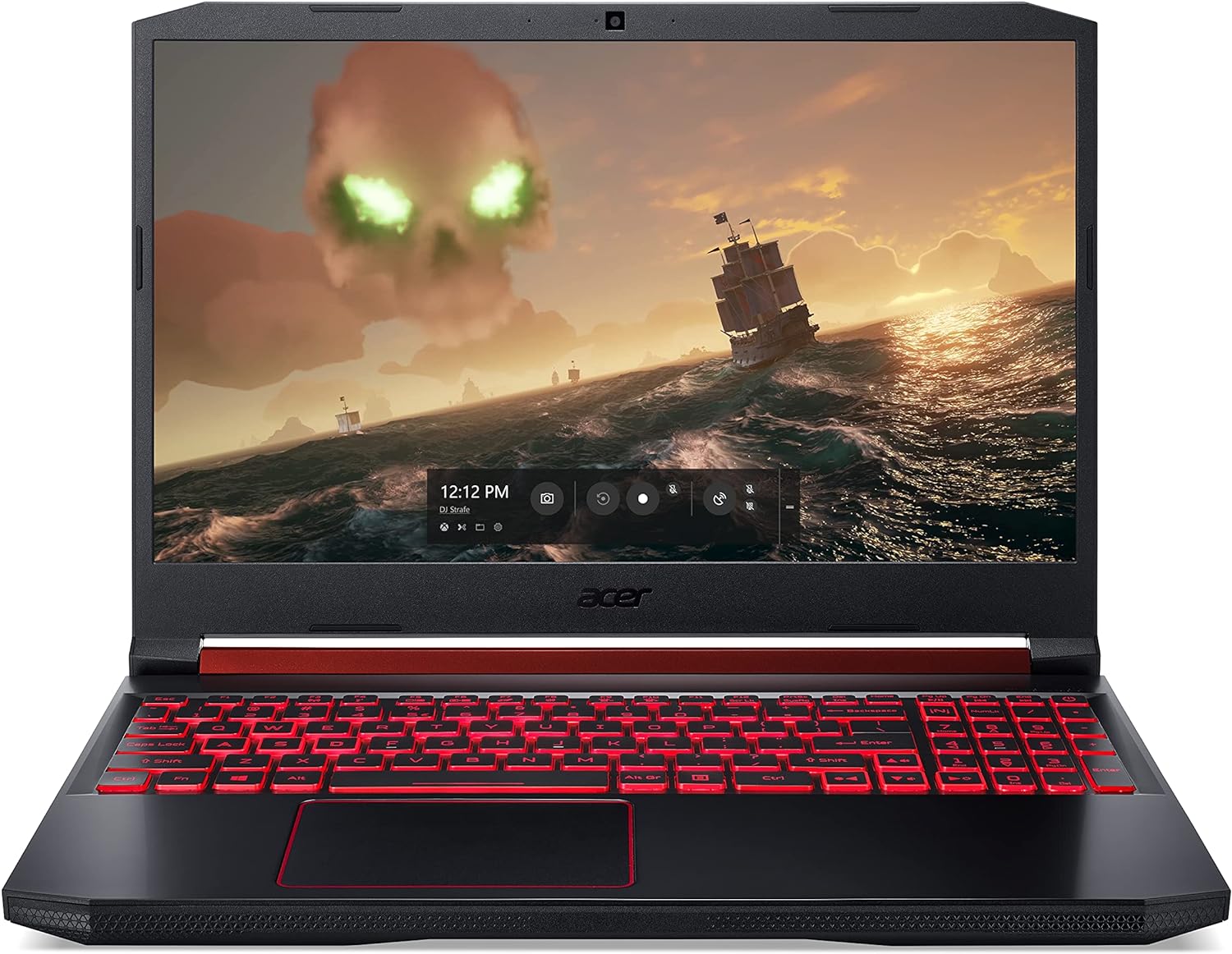
The Acer Nitro 5 AN515-54-5812 is a 15.6-inch gaming laptop designed for budget-conscious PC gamers who want capable performance for esports and casual gaming without the premium price tag. Powered by a 9th Gen Intel Core i5-9300H processor and NVIDIA GeForce GTX 1650 graphics, this machine handles popular titles like Overwatch, Rocket League, and Apex Legends at medium to high settings smoothly. It's a strong fit for college gamers upgrading from integrated graphics, streamers on a tight budget, or casual players building their first dedicated gaming setup.
Real-world performance is where the Nitro 5 shines for its price point. The GTX 1650 delivers reliable 60+ fps in most eSports titles at 1080p, while the Core i5-9300H handles multitasking like keeping Discord open, a browser with guides, and a game running without noticeable stutter. The 15.6-inch Full HD IPS display provides decent viewing angles and contrast, making it enjoyable for both gaming and content consumption. However, the 60Hz panel lacks the high refresh rate found in pricier models, which may be a consideration for competitive gamers who prioritize smooth motion.
Build quality is functional with a plastic chassis that feels sturdy enough for regular use. The red backlit keyboard offers good tactile feedback with 1.6mm travel, and the highlighted WASD keys help with quick orientation in dark gaming rooms. The cooling system with twin fans and CoolBoost technology does a decent job managing heat, though the laptop can get warm on the lap during intensive sessions. The fan noise is audible but not overly distracting, and the exhaust vents on the right side mean left-handed mouse users stay cooler.
Setup is straightforward out of the box, though Windows comes with some bloatware that you may want to uninstall. The NVMe SSD boots Windows in seconds, and games load quickly. Upgrading RAM and storage is simple: the bottom panel removes with a plastic pry tool, giving access to an open RAM slot and an extra M.2 slot plus a 2.5-inch drive bay. This makes the Nitro 5 a great platform for future-proofing. The built-in Alexa integration is a nice convenience for setting reminders or controlling smart home devices, though gamers may find it unnecessary.
Limitations to consider include the single-channel 8GB RAM, which hampers performance in memory-intensive games; adding another 8GB stick is highly recommended. The display's color accuracy is average, so photo or video editors may want a better screen. Battery life is around 8 hours for light use but drops to 2-3 hours for gaming, so keep the charger handy. The power connector placement on the right side can interfere with mouse space, a common design quirk in this price range.
Overall, the Acer Nitro 5 is a practical choice for PC gamers who want an affordable entry point into gaming laptops. It handles today's esports titles well, offers easy upgradability, and stays cool under pressure. For streamers or content creators needing more CPU or GPU power, consider higher-tier options, but for casual gaming, college workloads, and budget builds, this laptop delivers reliable value without major compromises.
The combination of the Intel Core i5-9300H and GTX 1650 provides a solid foundation for playing most modern games at 1080p. In our analysis based on user feedback, titles like Fortnite, CS:GO, and Valorant run smoothly at high settings with frame rates well above 60 fps. More demanding games like Shadow of the Tomb Raider or Red Dead Redemption 2 require medium to low settings for a playable experience, but the laptop handles them respectably for its class.
The 8GB DDR4 RAM is a bottleneck for dual-channel performance; upgrading to 16GB significantly improves minimum frame rates and reduces stuttering in open-world games. The 256GB NVMe SSD keeps load times quick, but with only about 200GB usable after Windows, you will need to manage game installs or add more storage. The dual M.2 slots and SATA bay make storage expansion simple.
Acer's CoolBoost technology with twin fans and dual exhaust ports actively manages thermals. The system automatically adjusts fan speed based on CPU and GPU temperature, and you can override it using the NitroSense app for a more aggressive cooling profile. User reports indicate that even during extended gaming sessions, the laptop stays within safe temperature ranges, though the chassis can get warm near the exhaust vents.
For optimal cooling, using a laptop cooling pad or elevating the rear helps airflow. The fan noise is moderate, not loud enough to be distracting through a headset but audible in a quiet room. The cooling system is a strong point for this price range, reducing the risk of thermal throttling during long play sessions.
One of the Nitro 5's biggest strengths is how easy it is to upgrade. The bottom panel is secured with Phillips screws and pops off with a plastic tool, revealing an open SODIMM slot for RAM (supports up to 32GB total), one empty M.2 2280 slot for an additional NVMe SSD, and a 2.5-inch SATA bay for adding a hard drive or SSD. This allows you to boost performance and storage without needing advanced skills. Just ensure you have a small pry tool and follow a quick disassembly guide.

Pros
- Strong gaming performance for its price with i7 and RTX 4050
- 165Hz display with thin bezels provides immersive, fluid visuals
- Fast 1TB Gen 4 SSD and 16GB DDR5 RAM for quick boot and game loads
- Good connectivity including Thunderbolt 4, HDMI 2.1, and Wi-Fi 6
- Effective cooling system with customizable fan curves
Cons
- Battery life around 5 hours may require frequent charging during extended use
- Weighs 4.66 lbs, making it less portable than some ultrabooks
- Only 6GB VRAM on RTX 4050 may limit future AAA titles at high settings
The Acer Nitro V 15 (ANV15-52-76NK) is a dedicated gaming laptop that hits a sweet spot for PC gamers, competitive esports players, streamers, and content creators who need reliable performance without breaking the bank. Powered by an Intel Core i7-13620H processor and an NVIDIA GeForce RTX 4050 GPU, this machine is built to handle modern games, multitasking, and creative workloads like video editing or live streaming.
For gamers, the real highlight is the 15.6-inch Full HD IPS display with a 165Hz refresh rate. This means you get buttery-smooth motion in fast-paced shooters like Valorant or Call of Duty, with minimal ghosting and precise tracking. The 1920x1080 resolution keeps frame rates high, and the thin bezels offer an immersive 82.64% screen-to-body ratio. The RTX 4050 supports DLSS 3.5 and ray tracing, so even demanding titles like Cyberpunk 2077 can look stunning with AI-enhanced visuals.
Performance is backed by 16GB of DDR5 RAM (upgradeable to 32GB) and a 1TB PCIe Gen 4 SSD. Load times are snappy, and you can keep multiple apps open without lag. The laptop also includes Wi-Fi 6 and Killer Ethernet E2600 for low-latency online play, plus a Thunderbolt 4 port that supports fast charging, data transfer, and video output. The dual-fan cooling system with adjustable fan speeds helps keep the CPU and GPU cool during extended sessions, though the laptop does get warm under heavy load.
Build quality is solid with a black plastic chassis that feels durable, though it's not ultra-premium. The backlit keyboard includes a numeric keypad, making it practical for both gaming and productivity tasks. The 4.66-pound weight is manageable for moving between rooms but not ideal for daily commuting. The 5-hour battery life is typical for a gaming laptop, so expect to stay plugged in for gaming sessions.
Setting up the software is straightforward with Windows 11 pre-installed and Acer's NitroSense utility for monitoring performance and customizing fan curves. The AI-powered PurifiedView and PurifiedVoice features improve webcam and microphone quality for Discord calls or streaming, though the built-in webcam is only 720p. One limitation is the RTX 4050's 6GB VRAM, which may struggle with ultra textures in future AAA titles, but for 1080p gaming and most current releases, it's plenty capable.
Overall, the Acer Nitro V 15 is a practical recommendation for college gamers, work-from-home gamers, and anyone building a versatile setup that can handle both gaming and daily tasks. It offers strong value at its price point, and the 165Hz display combined with RTX 4050 makes it a reliable choice for competitive and casual gamers alike.
The combination of the Intel Core i7-13620H (10 cores, up to 4.9 GHz) and NVIDIA GeForce RTX 4050 (6GB GDDR6, 194 AI TOPS) delivers excellent 1080p gaming performance. In competitive titles like Fortnite and Apex Legends, you can expect well over 100 FPS at high settings, while more demanding games like Elden Ring or Assassin's Creed Mirage run smoothly with DLSS enabled. The 165Hz display ensures every frame looks fluid, giving you a clear edge in fast-paced shooters.
The 15.6-inch Full HD IPS panel offers vibrant colors and decent contrast with a 165Hz refresh rate. The 16:9 aspect ratio and thin bezels create an immersive gaming experience. Response times are good enough to minimize ghosting, and the 300-nit brightness works well indoors. For a gaming laptop at this price, the display is a strong selling point.
Port selection is generous: one Thunderbolt 4 (USB-C with 65W charging, DisplayPort), one USB 3.2 Gen 2 Type-C, two USB 3.2 Gen 1 Type-A, HDMI 2.1, Gigabit Ethernet, and a headphone jack. This setup supports dual external monitors, fast peripherals, and reliable wired networking. Wi-Fi 6 and Bluetooth 5.2 round out wireless connectivity.

Pros
- Excellent gaming performance at 1080p with RTX 5070 and DLSS 4 support
- Generous 32GB DDR5 RAM and fast 1TB Gen4 SSD for demanding applications
- Large 17.3" 144Hz IPS display provides smooth visuals and good color reproduction
- Upgradeable storage with an extra M.2 slot and dual-channel memory
- Good selection of ports including USB4 and HDMI 2.1 for external monitors
Cons
- Heavier than many 17-inch laptops at nearly 6 pounds, less portable for daily carry
- Screen has some flex in the middle according to user feedback; build uses plastic materials
- Keyboard backlight is orange only, offering less customization for RGB enthusiasts
The Acer Nitro V 17 AI is a gaming laptop that blends powerful hardware with practical features for PC gamers, streamers, and content creators. Powered by an AMD Ryzen 7 260 processor and an NVIDIA GeForce RTX 5070 laptop GPU, this machine is built to handle modern titles at high settings while also supporting AI-driven tasks like video upscaling and creative workflows. With 32GB of DDR5 RAM and a 1TB Gen4 SSD, it offers plenty of memory and speed for multitasking and fast load times.
For competitive and casual gamers, the 17.3-inch Full HD IPS display with a 144Hz refresh rate reduces motion blur and provides a smooth, responsive experience in fast-paced games like shooters and racing sims. The RTX 5070 supports full ray tracing and DLSS 4, which boosts frame rates while maintaining visual quality. According to user benchmarks, this combo delivers over 70 FPS in Cyberpunk 2077 with ray tracing enabled, making it a capable choice for demanding titles.
Build quality is solid for the price point, with a mostly plastic chassis that keeps weight just under six pounds. The keyboard features orange backlighting and a number pad, though the lighting isn't RGB. The screen has some flex in the middle as noted in early user feedback, but the matte IPS panel offers good color and minimal reflections. Connectivity is a strong point: Wi-Fi 6E, Killer Ethernet, USB4 with Power Delivery, HDMI 2.1, and multiple USB-A ports allow easy hookup to gaming mice, headsets, and external monitors.
The dual-fan cooling system with quad intakes and exhausts does a good job managing heat during extended sessions. Users report the fans stay quiet under normal use and only ramp up during heavy gaming or updates. The laptop also includes NitroSense software for tuning performance, fan curves, and audio, plus Acer's PurifiedView and PurifiedVoice for webcam and microphone optimization during streams or calls.
One realistic limitation is the weight: at 5.97 pounds, it's less portable than some 17-inch competitors, though it still works well as a desktop replacement. The power button behavior may not match Windows sleep settings perfectly, and the pre-installed Windows Home might require an upgrade for advanced features like Remote Desktop. However, the upgradeable storage (extra M.2 slot) and dual-channel memory slots add long-term value.
Overall, the Acer Nitro V 17 AI is a strong option for gamers and creators who want a large screen, powerful internals, and AI features without breaking the bank. It's particularly well-suited for college gamers, work-from-home setups, and streamers who need a reliable laptop for both gaming and productivity. For the price, it delivers a balanced mix of performance and features that should satisfy most users looking for a versatile gaming machine.
The Acer Nitro V 17 AI's gaming performance is driven by the NVIDIA GeForce RTX 5070 GPU with 8GB of VRAM and the AMD Ryzen 7 260 processor. In benchmarks, the system scores around 12,785 in 3DMark Time Spy and 2,912 in Steel Nomad, indicating strong 1080p performance. With DLSS 4 and full ray tracing enabled, users report playable frame rates in demanding titles like Cyberpunk 2077 (over 70 FPS) and high frame rates in older games like Fallout 4 and Starfield (over 100 FPS). The 144Hz display keeps motion smooth and responsive, making this laptop suitable for competitive shooters and fast-paced esports titles. The Optimus graphics switching between the RTX 5070 and integrated Radeon 780M helps extend battery life during lighter tasks.
The Nitro V 17 AI features a mostly plastic construction with a reflective Nitro logo on the lid. While the chassis is sturdy enough for daily use, some users have noted slight flex in the center of the screen. The keyboard offers a comfortable typing experience with orange backlighting, though it's not per-key RGB. The trackpad is responsive, and the overall design is subtle enough for office or school environments. At 5.97 pounds, it's a bit heavy but manageable for moving between rooms or taking to a gaming cafe. Connectivity includes a good array of ports: USB4, three USB 3.2 Gen 2, HDMI 2.1, Ethernet, and a headphone jack. The dual-fan cooling system keeps temperatures in check, and the laptop feels solid during use. The included power brick is reasonably sized for a 1499-dollar gaming laptop.
Frequently Asked Questions
What are the primary hardware criteria to run Spider-Man Remastered on a laptop?
Baseline specs require a Core i3 equivalent CPU, 8GB RAM, and a GTX 950 GPU, while recommended settings call for a Core i5, 16GB RAM, and a GTX 1060. Modern laptops like the Acer Nitro 5 surpass minimums easily, while an RTX 4050 or RTX 5070 handles higher graphics presets.
Can an entry-level laptop with a GTX 1650 run Spider-Man Remastered smoothly?
Yes, a laptop with a GeForce GTX 1650 and 8GB of RAM handles the game at medium 1080p settings. Tuning crowd density helps sustain consistent frame rates. Shoppers can review options for a budget gaming laptop under 700 to compare hardware in this tier.
Is 16GB of RAM necessary, or is 8GB sufficient for this title?
While 8GB meets minimum criteria, 16GB of RAM is strongly advised for smooth gameplay. Streaming open-world city geometry can overwhelm 8GB when background programs run. Laptops configured with 16GB or 32GB of DDR5 memory, such as the acer Nitro V Gaming Laptop, eliminate these memory bottlenecks.
Does running Spider-Man Remastered require a solid-state drive?
An SSD is strongly recommended by developers to avoid hitching and texture pop-in during high-speed traversal. Mechanical drives struggle with the throughput needed during fast web swinging across Manhattan. High-speed NVMe SSDs ensure seamless streaming and quick loading times.
Do connection ports like Thunderbolt or USB4 offer benefits for gaming laptops?
Yes, high-speed ports like Thunderbolt 4 or USB4 allow you to connect external high-refresh displays and fast external drives. These connections let your laptop function as a desktop workstation when needed. You can check our guide on a gaming laptop with Thunderbolt connectivity for expansion details.
How do ray tracing and upscaling technologies affect GPU requirements?
Ray tracing reflections demand substantial graphics power, requiring hardware with dedicated RT cores. Modern GPUs like the RTX 4050 and RTX 5070 support DLSS upscaling to maintain smooth motion with high visual settings. Older GPUs without neural hardware experience severe slowdowns with ray tracing enabled.





Write Your Review
No reviews yet. Be the first to share your experience!