


Hardware Demands for Competitive Battle Royale Play
Competitive battle royale titles punish hardware bottlenecks aggressively, especially when expansive maps and dozens of active players demand consistent processing power. Drops in frame rates during intense firefights often stem from thermal throttling or insufficient graphic memory rather than overall raw clock speed alone. Selecting the best gaming laptop for warzone call of duty laptop requires balancing discrete GPU power, such as modern NVIDIA GeForce RTX cards, with capable multi-core processors from Intel or AMD. A responsive high refresh rate display between 144Hz and 300Hz helps you track fast motion across wide sightlines without disorienting screen tear. If you want to optimize your gaming laptop for esports, prioritizing balanced thermals and memory throughput is essential before jumping into matches.
Memory capacity and storage architecture play an equally vital role in real-world playability, given the large install footprint and asset streaming in modern tactical shooters. Equipping a system with 16GB or 32GB of DDR5 RAM prevents stuttering when background communication software runs alongside the game. Fast NVMe solid-state storage drastically reduces load times while leaving room for recurring game updates. Players who plug into desktop peripherals or external monitors may also value a gaming laptop with Thunderbolt connectivity or USB4 ports for convenient desktop docking. Evaluating these specifications helps you identify which configuration delivers sustained stability under heavy battle royale sessions.

Pros
- Strong gaming and multitasking performance with RTX 5060 and Intel Core 7 processor.
- Large 17.3-inch 144Hz display offers smooth motion clarity for competitive gaming.
- Thin and light design for a 17-inch laptop, easy to carry between rooms or classes.
- Fast DDR5 memory and NVMe SSD improve load times and system responsiveness.
- Effective cooling system helps maintain performance during extended gaming sessions.
Cons
- 1080p resolution may not satisfy users wanting higher pixel density on a 17-inch screen.
- Graphics card listed as RTX 4060 in specs could cause confusion; verify exact model.
- Battery life may be limited under heavy gaming loads typical for gaming laptops.
The MSI Cyborg 17 B2RWFKG-074US is a 17.3-inch gaming laptop built for gamers who want a big screen without carrying a heavy rig. It balances performance and portability, making it a solid pick for PC gamers, competitive players, streamers, and content creators who need power they can move between home, dorm, or office. The translucent black design adds a unique visual flair that RGB enthusiasts may appreciate.
At the heart of this laptop is an Intel Core 7-240H processor paired with an NVIDIA GeForce RTX 5060 graphics card. This combo handles modern titles at high settings, with the 144Hz FHD display ensuring smooth motion in fast-paced games like FPS and MOBA titles. DLSS 4 support helps boost frame rates without sacrificing image quality, which is useful for both competitive play and visually demanding open-world games. The 16GB of DDR5 RAM and 1TB NVMe SSD provide fast load times and enough space for a growing game library, plus room for creative projects or school files.
Build quality is practical for a portable gaming machine. At 0.83 inches thick and 5.5 pounds, it is relatively slim for a 17-inch laptop. The Cooler Boost thermal system uses a shared-pipe design to manage heat from both CPU and GPU, which helps maintain performance during long gaming sessions without excessive fan noise. The keyboard area features a translucent finish that aligns with the laptop's cyberpunk-inspired aesthetic, and the backlit keys are easy to use in low-light gaming environments.
Connectivity is well-rounded for a gaming setup. It includes USB-C, USB-A, HDMI, and RJ45 ports, along with Wi-Fi 6E for low-latency online gaming and fast file transfers. This makes it easy to connect to external monitors, gaming mice, headsets, and other peripherals. The laptop runs Windows 11 Home and includes Microsoft Copilot, which can assist with productivity tasks like content creation or research.
One realistic limitation is the 1080p resolution on a 17-inch panel. While 144Hz refresh rate is excellent for competitive gaming, some users may prefer a higher resolution for creative work or media consumption. Additionally, the spec sheet lists the graphics card as both RTX 5060 and RTX 4060 in different places, so buyers should confirm the exact model before purchase. Battery life on gaming laptops is typically limited under heavy load, so this unit is best used plugged in for gaming sessions.
Overall, the MSI Cyborg 17 is a strong choice for gamers who prioritize a large screen, solid performance, and portability in one package. It suits competitive and casual gamers alike, and also works well for streamers or content creators needing a mobile rig. For anyone building a gaming setup that requires a laptop that can handle both play and productivity on the go, this model delivers reliable performance without being a burden to carry.

Pros
- Excellent CPU and GPU performance for the price point
- High-quality 165Hz QHD display with accurate colors
- Ample 32GB DDR5 RAM and 1TB SSD storage
- Effective cooling sustains performance over long sessions
- Solid port selection for gaming and creator peripherals
Cons
- Battery life is short (around 2 hours) typical for gaming laptops
- Chassis is mostly plastic, lacking the premium feel of higher-end models
- Fans can get loud under heavy load
The MSI Katana 15 HX is a gaming laptop built for players who want high performance without breaking the bank. Powered by an Intel Core i9-14900HX and NVIDIA GeForce RTX 5070, this 15.6-inch machine targets competitive gamers, streamers, content creators, and anyone who needs a portable system that can handle modern AAA titles and creative workloads. With 32GB of DDR5 RAM and a 1TB NVMe SSD, it's ready to run demanding software right out of the box.
In real-world gaming, the i9-14900HX and RTX 5070 push high frame rates even at QHD resolution. The RTX 5070 supports NVIDIA DLSS 4, which uses AI to boost FPS and improve image quality in supported games. The display is a QHD 165Hz panel with 100% DCI-P3 color coverage, meaning you get sharp details, smooth motion, and rich colors whether you're battling in an FPS or exploring an open world. The 165Hz refresh rate reduces motion blur for a competitive edge.
MSI's Cooler Boost 5 cooling system uses two fans and shared heat pipes to keep the CPU and GPU temperatures in check during long gaming sessions. Based on user feedback, the design does a good job maintaining stable frame rates without throttling, though the fans do become audible under load. The 4-zone RGB keyboard includes highlighted WASD keys, and the keycaps have a nice tactile feel for gaming. Port selection is generous with USB-C Gen 2, HDMI 2.1 supporting up to 8K output, multiple USB-A ports, and Wi-Fi 6E for fast wireless connectivity.
Build quality is practical rather than premium. The chassis is primarily plastic, which keeps weight down to just under 5 pounds, but it doesn't have the all-metal feel of more expensive laptops. The hinge feels sturdy, and the keyboard deck has minimal flex. Setup is straightforward: the laptop comes with Windows 11 Home and MSI Center software for performance tuning, RGB control, and system monitoring. Battery life is limited to around two hours under gaming loads, so you'll want to stay plugged in for serious play.
One realistic limitation is fan noise; under heavy gaming, the cooling fans ramp up noticeably. If you game in a quiet room or stream with an open mic, this is something to consider. Additionally, the 1080p webcam is average, so streamers may want a dedicated webcam for better quality.
The MSI Katana 15 HX offers strong value for gamers and creators who need a portable, high-performance laptop. It's ideal for college gamers, work-from-home players, and anyone building a gaming setup on a budget. If you can live with plastic build and short battery life, this laptop delivers where it counts: gaming performance, display quality, and system responsiveness.
The combination of Intel Core i9-14900HX and GeForce RTX 5070 makes the Katana 15 HX a beast for modern games. The i9's 24 cores (8 Performance + 16 Efficient) handle both gaming and background tasks seamlessly, while the RTX 5070, based on NVIDIA Blackwell architecture, brings full ray tracing and DLSS 4. In titles like Cyberpunk 2077 or Call of Duty, you can expect high to ultra settings at QHD resolution with smooth frame rates. The 32GB DDR5 RAM ensures zero stutter even when streaming or running Discord in the background. Esports players will appreciate the 165Hz display low latency for fast-paced shooters.
The 15.6-inch QHD display is a highlight, offering 2560x1440 resolution, a 165Hz refresh rate, and 100% DCI-P3 color gamut. This means you get sharp details, smooth motion, and vibrant colors suitable both for gaming and photo/video editing. The Cooler Boost 5 cooling system employs two fans and five heat pipes to keep temperatures in check. In sustained gaming, the CPU and GPU stay within safe limits, though the fans do become audible. The laptop maintains stable performance without significant thermal throttling, which is crucial for long sessions.

Pros
- Exceptional gaming performance with high frame rates and smooth 240Hz display.
- Large 18-inch screen with excellent color accuracy and brightness for immersive gaming and creative work.
- Solid build quality and lightweight design (6.83 lbs) for a desktop replacement laptop.
- Ample storage (2TB NVMe) and memory (32GB DDR5) out of the box, with upgrade potential.
Cons
- Runs hot under sustained gaming loads; a cooling pad is recommended for extended sessions.
- Battery life is limited, as typical for high-performance gaming laptops, so expect to stay plugged in during gaming.
- Some users report driver conflicts with third-party peripherals (e.g., Razer) and pre-installed MSI software that may need removal for optimal performance.
The MSI Crosshair 18 HX AI is a top-tier gaming laptop designed for PC gamers who want desktop-level performance without being tied to a desk. It's best suited for competitive gamers, streamers, content creators, and college gamers who need a powerful machine for both gaming and productivity. With an 18-inch QHD+ 240Hz display, Intel Core Ultra 9 275HX processor, and NVIDIA RTX 5070 graphics, this laptop aims to deliver high frame rates and stunning visuals in the latest titles.
In real-world gaming, the combination of the 240Hz refresh rate and RTX 5070 ensures smooth, tear-free gameplay in fast-paced shooters like Valorant or Call of Duty, while the 100% DCI-P3 color gamut makes open-world adventures like Cyberpunk 2077 look vibrant. The 32GB of DDR5-5600 RAM handles multitasking with ease, whether you're streaming on Twitch, running Discord, or editing video. The 2TB NVMe SSD provides lightning-fast load times, so you're never waiting long to jump into a match. However, users report that the laptop gets hot during extended gaming sessions, so investing in a quality cooling pad is wise for maintaining performance and comfort.
Build quality is solid, with a sleek black chassis that feels premium despite being relatively lightweight at 6.83 pounds for an 18-inch machine. The SteelSeries keyboard offers 24-zone RGB lighting and anti-ghost keys, providing responsive feedback for both gaming and typing. The Dynaudio speakers deliver surprisingly rich audio with clear mids and decent bass, though for competitive gaming you'll still want a dedicated headset. Connectivity is generous: Thunderbolt 4 USB-C, HDMI 2.1 for external monitors, RJ45 Ethernet, and Wi-Fi 6E ensure you can hook up all your peripherals and networks without adapters.
Setup is straightforward: Windows 11 Home comes pre-installed, and the laptop is ready to use out of the box. Some users suggest removing MSI's preloaded software to avoid potential driver conflicts, especially with third-party gaming mice or headsets. The 720p webcam with privacy shutter is adequate for video calls but not ideal for streaming. The laptop's dimensions are large, so it will take up considerable desk space, but the 18-inch screen makes it a true desktop replacement.
Realistic limitations include the battery life, which is typical for a gaming powerhouse—expect only a couple of hours for light tasks and significantly less during gaming. The heat output is notable, and you'll likely need a cooling pad for marathon sessions. Additionally, the premium price tag reflects the high-end specs, but it offers solid long-term value given the upgradeable RAM and storage (two SSD slots).
Overall, the MSI Crosshair 18 HX AI is an excellent choice for competitive PC gamers, streamers, and content creators who need a portable yet powerful gaming setup. It shines in desktop-replacement scenarios where you prioritize performance over battery life, and it's well-suited for dorm rooms, home offices, or LAN parties. If you can handle the heat and the upfront cost, this laptop delivers an impressive gaming experience that rivals many desktop rigs.
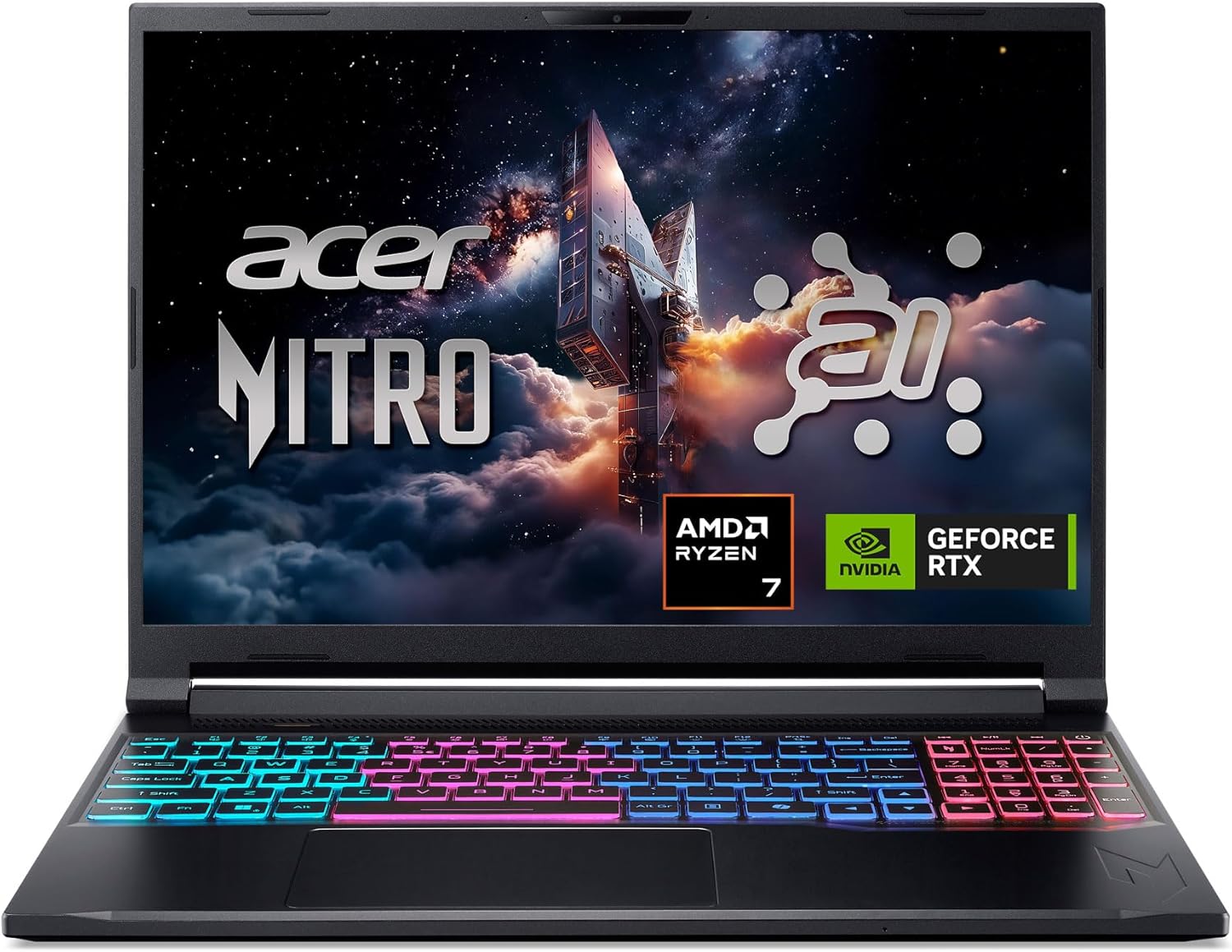
Pros
- Powerful AI-optimized CPU and GPU combination for demanding games and creative apps
- Excellent 32GB DDR5 RAM and fast 1TB Gen 4 SSD out of the box reduce need for upgrades
- High 180Hz refresh rate with good color accuracy enhances visual clarity and responsiveness
- Compact and relatively lightweight chassis (4.63 lbs) makes it portable for gamers on the go
- Robust cooling solution with quad air intakes and dual fans keeps thermals under control during intense sessions
Cons
- Maximum RAM is 32GB with no expansion slots available after purchase, limiting future upgrade potential
- Battery life may be typical for a gaming laptop and could require frequent charging during extended unplugged use
- Integrated webcam quality not specified; users may want an external camera for streaming
The Acer Nitro V 16S AI is a mid-range gaming laptop built around the latest AMD Ryzen 7 260 processor and NVIDIA GeForce RTX 5060 GPU. It's designed for PC gamers who want a balance of performance and portability, as well as content creators and streamers who can leverage the AI capabilities for tasks like upscaling, background effects, and faster encoding. With a 16-inch 180Hz display and 32GB of DDR5 RAM, this laptop aims to deliver smooth gameplay and efficient multitasking right out of the box.
When it comes to real-world gaming performance, the RTX 5060 with DLSS 4 and full ray tracing support gives you high frame rates in modern titles at 1080p or 1200p resolution. The 180Hz refresh rate makes fast action in FPS and racing games feel buttery smooth, while the 100% sRGB coverage ensures vibrant colors for open-world adventures. The AMD Ryzen 7 260's AI TOPS also help with background tasks, voice commands, and optimizing settings in supported software, giving an edge in competitive scenarios.
Build quality is typical for the Nitro line: a black plastic chassis with a clean, understated look. At 4.63 pounds, it's slim enough to slip into a backpack for college or LAN parties. The dual-fan quad-intake cooling keeps temperatures reasonable under load, though you'll still hear the fans ramp up during extended gaming sessions. The keyboard includes a backlit numeric keypad, and the touchpad is responsive for everyday use. Port selection is solid with USB4, two USB 3.2 Gen 2, HDMI 2.1, and Ethernet, making external monitor or dock setups easy.
Setting up the laptop is straightforward: it runs Windows 11 Home, and the pre-installed NitroSense software gives you control over fan speeds, power profiles, and system monitoring. The Acer PurifiedView and PurifiedVoice 2.0 features handle webcam background blur and noise reduction during Discord calls or streams. There are two M.2 SSD slots (one free) for storage expansion, but note that the RAM is soldered and maxes out at 32GB, so choose your capacity wisely at purchase.
One realistic limitation is that while the laptop includes a USB4 port, you'll need an external GPU dock if you ever want more graphics power - but for most users the RTX 5060 is plenty. Battery life is average for a gaming laptop; expect around four to five hours of light use. Also, the 1080p webcam isn't specified, but many laptops in this range offer only basic 720p or 1080p sensors, so external webcams are still recommended for professional streaming.
Overall, the Acer Nitro V 16S AI is a well-rounded portable gaming machine that hits a sweet spot for price-conscious PC gamers, esports players, and content creators. If you value high-refresh-rate gaming, AI-assisted performance, and decent portability without breaking the bank, this laptop is worth considering. It also comes with a three-month PC Game Pass trial to get you started with hundreds of games on day one.
The RTX 5060 laptop GPU with 572 AI TOPS and DLSS 4 Multi Frame Generation provides a significant boost in supported games. You can expect high settings at 1080p with smooth frame rates in titles like Call of Duty, Fortnite, and Cyberpunk 2077. The 180Hz display minimizes motion blur and screen tearing, while the AMD Ryzen 7 260 processor handles CPU-intensive simulations and background tasks without stutter. Gamers who play competitive esports titles will appreciate the low-latency response and Killer Ethernet for stable online play.
Despite being a slim 0.79-inch profile, the Nitro V 16S AI packs a dual-fan, quad-intake, quad-exhaust cooling system. This design pushes heat out efficiently, keeping the CPU and GPU within safe operating temperatures during long gaming sessions. The chassis is made of durable plastic with a matte finish that resists fingerprints. The hinge feels sturdy, and the weight of 4.63 pounds makes it manageable for daily carry. The backlit keyboard has a numeric keypad and decent key travel, suitable for both gaming and typing.

Pros
- Exceptional gaming performance with RTX 5080 and high-refresh 300Hz screen
- Innovative Cryo-Chamber cooling system maintains performance under heavy loads
- Large 18-inch display with fast 3ms response ideal for competitive gaming
- AI-ready Intel Core Ultra 9 with NPU for future-proofed workloads
- Premium build quality with 1-year onsite service for peace of mind
Cons
- Premium price point may be out of reach for budget-conscious gamers
- Heavy and large form factor reduces portability for frequent travel
- Limited upgradeability compared to desktop gaming PCs
The Alienware 18 Area-51 AA18250 is a top-tier gaming laptop designed for gamers who refuse to compromise on performance. This machine packs an NVIDIA GeForce RTX 5080 graphics card and an Intel Core Ultra 9 275HX processor, making it one of the most powerful laptops available for PC gaming, streaming, and content creation.
This laptop is best suited for competitive gamers, esports players, streamers, and content creators who need desktop-grade performance in a portable form. The 18-inch WQXGA display with a 300Hz refresh rate and 3ms response time ensures buttery-smooth visuals in fast-paced shooters like Valorant or Call of Duty. The RTX 5080 with Max-Q technology balances battery life and raw graphics power, allowing you to play demanding titles at high settings without being tethered to a wall outlet.
Build quality is impressive, with a sturdy chassis and the innovative Cryo-Chamber cooling system. When you open the laptop, it props up slightly, creating a larger air intake for improved airflow. This design helps maintain performance during long gaming sessions without excessive thermal throttling. The Ambient AlienFX lighting, inspired by the aurora borealis, adds a unique RGB aesthetic that complements any gaming setup.
Setup is straightforward: Windows 11 Home comes pre-installed, and the 2TB SSD offers ample storage for your game library. The 32GB of DDR5 RAM handles multitasking with ease, whether you're streaming on Twitch, running Discord, or editing videos. The 2MP FHD IR camera is handy for video calls, and the backlit keyboard with numeric keypad is comfortable for both gaming and typing.
One realistic limitation is the price - at over $3000, it's a significant investment. The laptop is also quite heavy and large, so it's not the most portable option for college gamers who need to carry it between classes. Additionally, while the cooling is effective, the fans can get loud under load. However, for those who prioritize raw performance and a large, high-refresh display, these trade-offs are acceptable.
Overall, the Alienware 18 Area-51 is a fantastic choice for serious PC gamers, streamers, and content creators who want a no-compromise gaming laptop. It delivers exceptional performance in a well-built package with standout cooling and a stunning display. If you have the budget and need desktop-level power on the go, this laptop is worth serious consideration.
The RTX 5080 graphics card paired with the Intel Core Ultra 9 processor provides outstanding gaming performance. The 300Hz display ensures minimal motion blur and tear-free gameplay in competitive titles. According to product specifications, the laptop supports higher graphics and processor power limits, allowing you to push settings in demanding games like Cyberpunk 2077 or Microsoft Flight Simulator. The 32GB DDR5 RAM and 2TB NVMe SSD further reduce load times and stuttering.
The Cryo-Chamber is a standout feature. When the laptop is opened, the rear lifts to create a larger intake area, drawing in more cool air. This design, combined with AlienFX fans visible through a Gorilla Glass panel, helps keep temperatures in check during extended gaming sessions. While the fans can be audible under load, the trade-off is sustained performance without thermal throttling.
The 18-inch WQXGA (2560x1600) display offers a 16:10 aspect ratio, providing extra vertical space for productivity and immersive gaming. With a 300Hz refresh rate and 3ms response time, it's ideal for competitive esports where every millisecond counts. Colors are vibrant, and the anti-glare coating reduces reflections for comfortable viewing in various lighting conditions.
Frequently Asked Questions
How much RAM is recommended for running Warzone on a laptop?
At least 16GB of RAM is standard, though 32GB provides optimal headroom. Modern battle royale titles allocate substantial memory for high-resolution textures and voice chat applications. A dual-channel 32GB configuration prevents stuttering during intense firefights.
What GPU should you look for in a Best Gaming Laptop For Warzone Call Of Duty Laptop of 2026?
A dedicated NVIDIA GeForce RTX 5060, RTX 5070, or RTX 5080 GPU offers the graphic architecture needed for demanding matches. While entry-level shoppers can look at the best gaming laptops under 1000 euros, higher-tier discrete GPUs deliver smoother frame rates at higher resolutions.
Does display refresh rate matter for battle royale shooters?
Yes, a refresh rate of 144Hz or higher significantly improves visual clarity during rapid camera movement. Fast display panels reduce visible motion blur when scanning open terrain. Gamers exploring gaming laptops for Overwatch find that higher refresh rates provide a similarly responsive feel in fast firefights.
How much storage space is necessary for Call of Duty Warzone?
A minimum of a 1TB NVMe solid-state drive is strongly recommended. Expansive game files and frequent seasonal patches quickly consume smaller drives. A 1TB or 2TB SSD provides enough capacity for the operating system, large game files, and everyday programs.
Can thermal throttling impact laptop gaming performance during long sessions?
Yes, high internal temperatures can force processors and graphics cards to drop clock speeds to manage heat. Laptops with dual-fan setups, shared heat pipes, or elevated chassis intake vents help sustain consistent power limits during long play sessions.





Write Your Review
No reviews yet. Be the first to share your experience!