


Hardware Trends and Portable Power in Modern Mobile Rigs
A mismatch between advertised specifications and actual gaming workloads often catches buyers off guard when evaluating new portable hardware. While spec sheets emphasize peak clock speeds, real-world utility depends on how well memory bandwidth, cooling profiles, and graphics architectures cooperate under load. Gamers evaluating the best gaming laptops at computex 2026 need to look past flashy badges and inspect practical thermal engineering, high refresh panel specs, and expandable memory. High refresh panels running at 144Hz or 165Hz provide fluid frame transitions when paired with adequate discrete graphics. Reviewing a capable gaming laptop with Thunderbolt connectivity can also expand peripheral options for desktop setups.
Portable gaming hardware now balances serious gaming with everyday coursework and content creation. The acer Nitro V Gaming Laptop combines an Intel Core i7-13620H processor with an NVIDIA GeForce RTX 4050 GPU, while the msi Cyborg A15 AI 15.6” FHD 144Hz Thin & Light prioritizes carry weight at roughly 4.3 pounds. Meanwhile, multitasking options like the HP Victus 15.6″ Gaming Laptop 144Hz 2025-2026 deliver 32GB of RAM and expanded storage for heavier software demands. To squeeze higher frame rates out of your rig, learning how to optimize a laptop for competitive gaming helps maximize baseline hardware.

Pros
- Strong gaming performance for its price with i7 and RTX 4050
- 165Hz display with thin bezels provides immersive, fluid visuals
- Fast 1TB Gen 4 SSD and 16GB DDR5 RAM for quick boot and game loads
- Good connectivity including Thunderbolt 4, HDMI 2.1, and Wi-Fi 6
- Effective cooling system with customizable fan curves
Cons
- Battery life around 5 hours may require frequent charging during extended use
- Weighs 4.66 lbs, making it less portable than some ultrabooks
- Only 6GB VRAM on RTX 4050 may limit future AAA titles at high settings
The Acer Nitro V 15 (ANV15-52-76NK) is a dedicated gaming laptop that hits a sweet spot for PC gamers, competitive esports players, streamers, and content creators who need reliable performance without breaking the bank. Powered by an Intel Core i7-13620H processor and an NVIDIA GeForce RTX 4050 GPU, this machine is built to handle modern games, multitasking, and creative workloads like video editing or live streaming.
For gamers, the real highlight is the 15.6-inch Full HD IPS display with a 165Hz refresh rate. This means you get buttery-smooth motion in fast-paced shooters like Valorant or Call of Duty, with minimal ghosting and precise tracking. The 1920x1080 resolution keeps frame rates high, and the thin bezels offer an immersive 82.64% screen-to-body ratio. The RTX 4050 supports DLSS 3.5 and ray tracing, so even demanding titles like Cyberpunk 2077 can look stunning with AI-enhanced visuals.
Performance is backed by 16GB of DDR5 RAM (upgradeable to 32GB) and a 1TB PCIe Gen 4 SSD. Load times are snappy, and you can keep multiple apps open without lag. The laptop also includes Wi-Fi 6 and Killer Ethernet E2600 for low-latency online play, plus a Thunderbolt 4 port that supports fast charging, data transfer, and video output. The dual-fan cooling system with adjustable fan speeds helps keep the CPU and GPU cool during extended sessions, though the laptop does get warm under heavy load.
Build quality is solid with a black plastic chassis that feels durable, though it's not ultra-premium. The backlit keyboard includes a numeric keypad, making it practical for both gaming and productivity tasks. The 4.66-pound weight is manageable for moving between rooms but not ideal for daily commuting. The 5-hour battery life is typical for a gaming laptop, so expect to stay plugged in for gaming sessions.
Setting up the software is straightforward with Windows 11 pre-installed and Acer's NitroSense utility for monitoring performance and customizing fan curves. The AI-powered PurifiedView and PurifiedVoice features improve webcam and microphone quality for Discord calls or streaming, though the built-in webcam is only 720p. One limitation is the RTX 4050's 6GB VRAM, which may struggle with ultra textures in future AAA titles, but for 1080p gaming and most current releases, it's plenty capable.
Overall, the Acer Nitro V 15 is a practical recommendation for college gamers, work-from-home gamers, and anyone building a versatile setup that can handle both gaming and daily tasks. It offers strong value at its price point, and the 165Hz display combined with RTX 4050 makes it a reliable choice for competitive and casual gamers alike.
The combination of the Intel Core i7-13620H (10 cores, up to 4.9 GHz) and NVIDIA GeForce RTX 4050 (6GB GDDR6, 194 AI TOPS) delivers excellent 1080p gaming performance. In competitive titles like Fortnite and Apex Legends, you can expect well over 100 FPS at high settings, while more demanding games like Elden Ring or Assassin's Creed Mirage run smoothly with DLSS enabled. The 165Hz display ensures every frame looks fluid, giving you a clear edge in fast-paced shooters.
The 15.6-inch Full HD IPS panel offers vibrant colors and decent contrast with a 165Hz refresh rate. The 16:9 aspect ratio and thin bezels create an immersive gaming experience. Response times are good enough to minimize ghosting, and the 300-nit brightness works well indoors. For a gaming laptop at this price, the display is a strong selling point.
Port selection is generous: one Thunderbolt 4 (USB-C with 65W charging, DisplayPort), one USB 3.2 Gen 2 Type-C, two USB 3.2 Gen 1 Type-A, HDMI 2.1, Gigabit Ethernet, and a headphone jack. This setup supports dual external monitors, fast peripherals, and reliable wired networking. Wi-Fi 6 and Bluetooth 5.2 round out wireless connectivity.
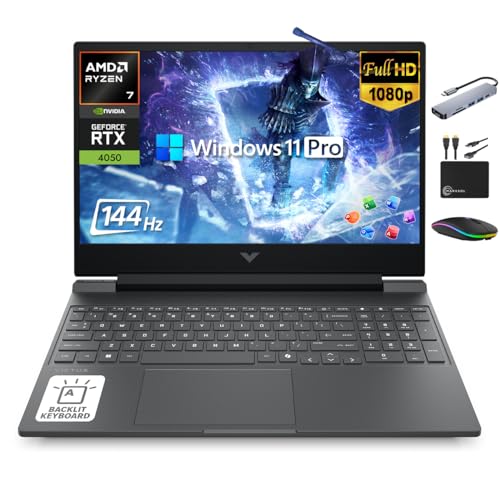
Pros
- Strong CPU and GPU combo for 1080p gaming and creative work.
- High 144Hz refresh rate for smooth, tear-free visuals.
- Large 32GB RAM and 1.5TB storage out of the box.
- Includes useful accessories like a docking station and external drive.
- Backlit keyboard and Mica Silver finish look great on any desk.
Cons
- Bulky at 5.06 pounds and 0.93 inches thick, less portable than ultrabooks.
- Limited to 6-core CPU, which may not match higher-core-count laptops for heavy multitasking.
- Fan noise under load may be noticeable during quiet gaming sessions.
The HP Victus 15.6-inch gaming laptop is a well-rounded machine designed for PC gamers who want solid performance without breaking the bank. Powered by an AMD Ryzen 7 7445HS processor and an NVIDIA GeForce RTX 4050 GPU, this laptop handles modern titles at 1080p with ease. The 144Hz IPS display ensures smooth motion in fast-paced games like Call of Duty, Fortnite, or Apex Legends, reducing screen tearing and input lag for a more responsive experience. Whether you are a competitive esports player or a casual gamer exploring open-world adventures, this setup delivers consistent frame rates.
This laptop is also a strong fit for streamers and content creators. The 32GB of DDR5 RAM allows for smooth multitasking while running OBS, Discord, and a game simultaneously. The 1TB NVMe SSD provides quick load times, and the included 500GB external drive offers extra space for recording clips or storing project files. The bundle includes a 6-in-1 USB-C docking station, wireless mouse, mouse pad, and HDMI cable, making it easy to set up a clean desk configuration. The backlit keyboard is useful for late-night gaming sessions, and the Mica Silver finish gives it a professional look that fits well in a dorm room or home office.
Build quality is decent for a mid-range gaming laptop. The chassis is sturdy, though the 5.06-pound weight and 0.93-inch thickness mean it is not the most portable option for carrying between classes or coffee shops. The 144Hz display offers good color reproduction and wide viewing angles, which helps with both gaming and video editing. The cooling system keeps temperatures in check during extended play, but the fans can get audible under heavy loads, which might be noticeable if you are streaming without a headset.
Setup is straightforward out of the box. Windows 11 Pro comes pre-installed, and the included lifetime Microsoft Office adds value for students or professionals. The additional accessories reduce the need for separate purchases, though the wireless mouse is basic and many gamers may prefer their own peripheral. The external drive is a nice bonus for backing up save files or media. Cable management is easier thanks to the USB-C hub, which consolidates connections for peripherals and external displays.
One realistic limitation is the 6-core, 12-thread CPU. While the Ryzen 7 7445HS is capable, it may not match the multi-core performance of 8-core or 12-core laptops used for heavy video rendering or 3D modeling. Gamers who primarily play and stream should be fine, but those doing intensive content creation might want more cores. Additionally, the 144Hz display is not the highest refresh rate available, but it strikes a good balance between smoothness and battery life for most users.
Overall, the HP Victus 15.6 is a practical choice for U.S. PC gamers who want a capable gaming laptop with ample memory and storage right away. It suits college gamers, work-from-home users, and streamers looking for a reliable daily driver. The included accessories and lifetime Office make it a value-packed option for those building a versatile gaming and productivity setup. If you prioritize portability or need a higher refresh rate, you might look elsewhere, but for balanced performance and convenience, this Victus delivers.

Pros
- Portable design at just 4.29 pounds, ideal for students and on-the-go gamers.
- RTX 5060 delivers strong 1080p gaming performance with DLSS 4 support for newer titles.
- 144Hz display offers smooth visuals in competitive games like Valorant, Fortnite, and Apex Legends.
- Backlit keyboard with translucent keycaps looks great and works well in low light.
- Generous 1TB SSD and 16GB DDR5 RAM for fast loading and multitasking.
Cons
- Graphics card listed as RTX 4050 in specs (possible error) - verify before purchase for RTX 5060 expectation.
- Plastic build may feel less premium than metal chassis alternatives.
- Battery life under gaming load may be limited; best used plugged in for full performance.
The MSI Cyborg A15 AI is a gaming laptop that tries to balance portability with real gaming power. It's a 15.6-inch machine that weighs just over four pounds, making it a solid choice for college gamers, esports players, and streamers who need to move between classes, dorm rooms, and gaming setups without lugging a heavy brick. With its Ryzen 7 260 processor and NVIDIA GeForce RTX 5060 graphics, it's aimed at gamers who want to play modern titles at 1080p with high settings and smooth frame rates.
In terms of real-world performance, the 144Hz FHD display is a key feature for competitive gamers. It provides fluid motion in fast-paced shooters like Valorant, Call of Duty, and Overwatch 2, and the RTX 5060's DLSS 4 support helps boost frame rates in more demanding ray-traced games. The 16GB of DDR5 RAM and 1TB SSD ensure quick load times and snappy multitasking, whether you're streaming on Twitch, running Discord, or editing clips between matches. The shared-pipe cooling design is a practical solution for keeping temperatures in check during long gaming sessions, though you'll still want a cooling pad for extended use.
Build quality is where the Cyborg A15 AI shows its budget-friendly side. The chassis is mostly plastic, which keeps weight down but doesn't feel as robust as metal alternatives. That said, the translucent keyboard area and backlit keycaps add a distinctive look that RGB enthusiasts will appreciate. The keyboard itself is comfortable for both gaming and typing, with decent key travel. Port selection includes three USB 3.0 ports, HDMI, and a headphone jack, which covers the basics for a gaming laptop setup.
Setting up the Cyborg A15 AI is straightforward - it comes with Windows 11 Home pre-installed, and MSI's software allows you to tweak performance profiles, fan speeds, and keyboard lighting. The laptop also includes a fingerprint reader for quick logins, which is a nice convenience. Cable management is minimal since it's a laptop, but the thin design means you'll want a compact mouse and headset to keep your desk uncluttered.
One realistic limitation is the battery life. Like most gaming laptops, you'll want to keep it plugged in for full performance, especially when gaming or streaming. The specs also list an RTX 4050 in one field, which may be a listing error - buyers should confirm the GPU is indeed the RTX 5060 advertised in the title. Additionally, the plastic build may not hold up as well over years of heavy use compared to more expensive metal laptops.
Overall, the MSI Cyborg A15 AI is a practical choice for budget-conscious gamers, students, and streamers who need a portable machine that can handle modern games and daily tasks. It won't replace a high-end desktop, but for someone who wants a capable gaming laptop that's easy to carry to class or LAN parties, it's a solid buy. Just double-check the GPU configuration and be ready to keep it plugged in for the best gaming experience.
Frequently Asked Questions
What graphics hardware should you look for in 2026 gaming laptops?
Dedicated GPUs like the NVIDIA GeForce RTX 4050 or RTX 5060 deliver hardware-accelerated ray tracing and AI frame generation that integrated chips cannot match. These discrete graphics solutions provide dedicated video memory for demanding titles. Exploring affordable gaming laptop configurations helps buyers balance graphical fidelity against their budget.
How much system memory is necessary for modern mobile gaming?
16GB of DDR5 RAM serves as the baseline for smooth modern gaming, while 32GB benefits users handling background streaming or creative software. Models like the HP Victus supply 32GB of high-bandwidth memory out of the box. Machines with 16GB, including the acer Nitro V, offer capable baseline performance and support dual-channel memory expansion.
Why does screen refresh rate matter on a gaming laptop?
Higher refresh rates like 144Hz or 165Hz render fast motion smoothly and reduce noticeable input delay in competitive titles. A fast screen allows the panel to keep pace with frames produced by a discrete GPU. Players looking at entry level gaming laptop options should ensure the display supports at least 120Hz or 144Hz.
How does chassis weight influence everyday portability?
A lighter chassis around 4.3 pounds, like the msi Cyborg A15 AI, improves daily carry comfort between home, class, and work. Bulkier gaming laptops often feature heavier cooling hardware and larger power bricks that add backpack strain. Choosing between a light chassis and larger thermal headroom depends on your travel routine.
Does internal storage capacity affect game loading performance?
PCIe Gen 4 NVMe solid-state drives drastically cut game loading times compared to older storage formats. A 1TB SSD provides adequate initial capacity for multiple modern titles and operating system updates. Models offering additional expansion slots or secondary external drives prevent sudden storage crunches.





Write Your Review
No reviews yet. Be the first to share your experience!