


Hardware Demands for Chaotic Planetary Combat
Intense swarm encounters and physics-heavy explosions demand serious sustained performance that thinner machines often struggle to deliver without thermal throttling. Swarms of robotic and insectoid enemies push mobile hardware hard, especially when high resolutions are involved. If you want the best gaming laptop for helldivers 2, you need a balanced combination of a high-wattage discrete graphics card, a heavy-duty cooling chassis, and a capable multi-core processor. Evaluating hardware like the ASUS ROG Strix G18 G814 Gaming Laptop 18″ 2.5k helps pinpoint how much screen area and processing headroom you need for fluid team play. Players who also enjoy fast-paced competitive titles might check out our guide on how to optimize gaming laptop for esports to keep frame rates steady.
Screen size and refresh rates play a huge role in spotting distant bug breaches across foggy planetary landscapes. A large 18-inch display running at 240Hz delivers remarkable visual clarity, while dedicated components like the GeForce RTX 5070 and 32GB of DDR5 RAM ensure background applications never disrupt your active deployment. While budget hunters often explore budget gaming laptop options, heavy cooperative titles benefit substantially from premium desktop replacement architectures. Solid memory capacity and ample SSD storage keep load times brief so you spend more time completing missions alongside your squad.
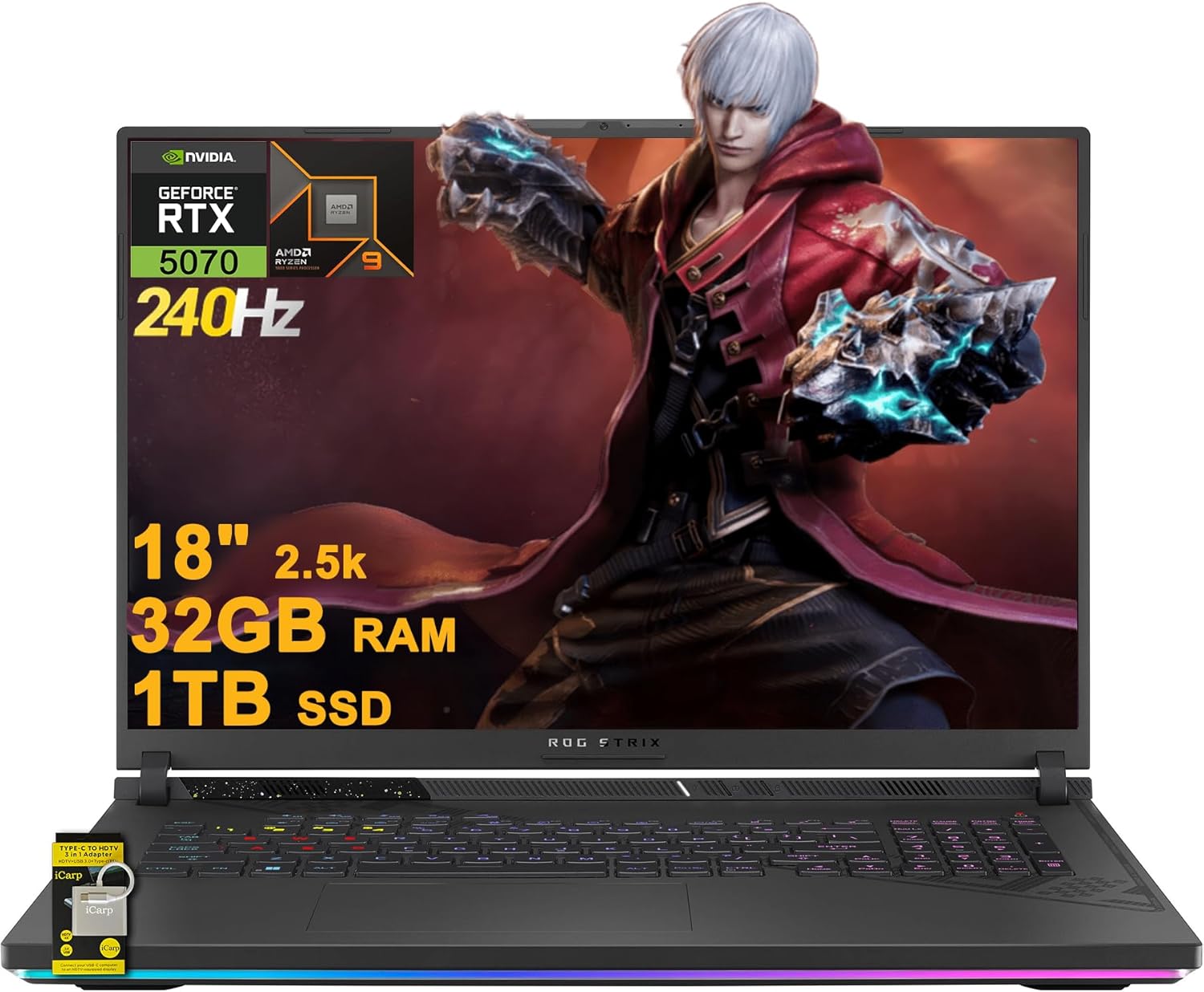
Pros
- Incredible CPU and GPU combo handles any modern game at high settings with ease
- Stunning 18-inch 2.5K 240Hz display with excellent color accuracy and anti-glare coating
- Ample 32GB RAM and fast SSD for demanding multitasking and content creation
- Comfortable RGB keyboard with good travel and responsive feedback for gaming and typing
- Strong connectivity including USB 4, HDMI 2.1 FRL, and RJ45 Ethernet for desk setups
Cons
- Large and heavy (6.61 lbs) makes it less portable than smaller gaming laptops; best for desktop replacement use
- USB-A ports on right side can interfere with mouse movement when using a lap desk
- Lacks a built-in privacy shutter for the FHD camera; users may need an external cover
The ASUS ROG Strix G18 G814 is a top-tier gaming laptop designed for PC gamers, competitive esports players, streamers, and content creators who demand desktop-level power in a mobile form. Powered by AMD's 16-core Ryzen 9 9955HX processor and NVIDIA GeForce RTX 5070 graphics with 8GB VRAM, this machine can handle the latest AAA titles, high-refresh-rate competitive shooters, and heavy creative workloads like video editing or 3D rendering without breaking a sweat. The 32GB of DDR5 RAM and 1TB PCIe SSD ensure snappy load times and smooth multitasking, making it a strong choice for gaming setup builders who want a laptop that doubles as a workstation.
Real-world gaming performance is outstanding. The 18-inch 2.5K (2560x1600) IPS display runs at 240Hz with 100% DCI-P3 color coverage and a 3ms response time, delivering incredibly fluid motion and vivid colors in titles like Cyberpunk 2077, Call of Duty, or Fortnite. Combined with the RTX 5070, you can expect high frame rates with ray tracing enabled at native resolution, or push even higher through DLSS. The anti-glare coating helps reduce reflections during long sessions, and the 16:10 aspect ratio gives extra vertical space that benefits both gaming and productivity tasks.
Build quality is typical of the ROG Strix line: a sturdy chassis with a sleek, gamer-centric design and a 4-zone RGB backlit keyboard that provides satisfying tactile feedback. The keyboard layout is generally comfortable, though the compact arrow keys and small right Shift key may take some acclimation for touch typists. The laptop includes ample connectivity: two USB-A 3.2 ports, a USB 4 Type-C port, HDMI 2.1 FRL (supports external 8K displays), and an RJ45 Ethernet port, making it easy to integrate into a gaming desk setup with external monitors, a wired keyboard, and high-speed internet.
Cooling is handled by ASUS's advanced thermal system, which keeps the Ryzen 9 and RTX 5070 at acceptable temperatures under load. The exhaust vents at the rear can push hot air effectively, but as noted in some user reviews, it's important to leave at least 2–3 inches of clearance behind the laptop to avoid overheating and unexpected shutdowns. The fans are quiet during everyday tasks but become audible in Turbo mode — a worthy trade-off for the extra performance headroom in demanding games.
Setup and maintenance are straightforward. The laptop comes with Windows 11 Home and pre-installed Armoury Crate software for customizing RGB lighting, performance profiles, and fan curves. Upgrading storage is easy: the bottom panel is removable, and there's an empty M.2 slot for adding a second SSD. Battery life is decent at around 5–6 hours for light use, which is reasonable for a desktop-replacement class laptop. The built-in FHD webcam and AI noise-canceling technology are solid for streaming or video calls, though a physical privacy shutter would have been a welcome addition.
Realistic limitations include the laptop's size and weight — at 6.61 pounds and over an inch thick, it's not ideal for frequent travel. The placement of USB-A ports on the right side can interfere with mouse space when using a lap desk, and some users may miss a camera shutter. Overall, the ASUS ROG Strix G18 G814 is an excellent choice for PC gamers who value pure performance over portability, or for streamers and content creators who need a powerful secondary machine for their gaming setup. It's a reliable desktop replacement that delivers flagship-level gaming and productivity capabilities.
The combination of the AMD Ryzen 9 9955HX (16 cores, up to 5.4 GHz) and the NVIDIA RTX 5070 with 8GB GDDR6 VRAM makes this laptop a powerhouse for modern gaming. In competitive titles like Valorant, Overwatch 2, and Apex Legends, the 240Hz display ensures buttery-smooth visuals with minimal input lag. For graphically demanding single-player games, the RTX 5070 can handle ray tracing at high settings with DLSS 3.5 enabling frame rates well above 60 fps. The 32GB DDR5 RAM prevents any stuttering during intensive scenes, and the fast 1TB PCIe SSD keeps load times to a minimum.
The 18-inch 2.5K (2560x1600) IPS panel is one of the best in its class. With a 240Hz refresh rate, 3ms response time, and 100% DCI-P3 color gamut, it delivers exceptional clarity and color accuracy for both gaming and content creation. The anti-glare coating reduces reflections, and the 16:10 aspect ratio provides extra vertical screen real estate — great for coding, browsing, or viewing documents during work-from-home sessions. Whether you're gaming or editing photos, the display is a standout feature.
The chassis is primarily plastic but feels solid and well-constructed, with a matte black finish and subtle RGB lighting accents. The 4-zone RGB keyboard is comfortable for long gaming sessions, though the slightly cramped arrow keys and small right Shift key may take getting used to. The hinge is sturdy, and the overall build quality inspires confidence. The laptop's weight (6.61 lbs) and thickness (1.21 inches) mean it's best suited as a desktop replacement rather than an everyday carry.
ASUS's thermal solution includes dual fans and multiple heat pipes to manage the heat from the powerful CPU and GPU. Under gaming loads, the fans ramp up but remain relatively quiet — many users report a noticeably lower noise level compared to competing gaming laptops. It's important to keep the rear exhaust vents clear; placing the laptop too close to a wall can cause overheating and thermal shutdowns. For most desk setups, giving it some breathing room is sufficient.
Frequently Asked Questions
How much RAM is recommended for Helldivers 2 on a laptop?
At least 16GB of system RAM is standard, though 32GB of DDR5 memory provides ideal breathing room. Helldivers 2 features expansive procedural maps with dozens of active AI units on screen at once. Extra memory helps prevent stutter when background voice chat and system utilities run concurrently. The listed ASUS ROG Strix configuration includes 32GB of DDR5 RAM, ensuring the operating system has plenty of buffer.
What GPU is needed to run Helldivers 2 at 1440p or 2.5K resolutions?
A modern dedicated graphics chip such as the NVIDIA GeForce RTX 5070 with 8GB of VRAM or higher is well suited for higher resolutions. Pushing 2560×1600 pixels in high-intensity combat requires substantial graphical throughput. The discrete RTX 5070 paired with an anti-glare 240Hz panel provides the visual power needed for sharp, responsive gameplay. If you are comparing versatile machines that also handle high-bandwidth external docks, explore our guide on the best gaming laptop with Thunderbolt 3.
Does Helldivers 2 require a fast multi-core processor?
Yes, the game relies heavily on processor performance to track physics, ballistic trajectories, and dozens of enemy paths. The AMD 16-core Ryzen 9 9955HX processor supplies extensive computing power across multiple threads. This high core count prevents CPU bottlenecks during massive orbital strikes or extraction swarms. Balanced CPU and GPU hardware prevents unexpected frame drops when action peaks.
Can you play Helldivers 2 on budget hardware in 2026?
Yes, though lower hardware tiers typically require reducing resolution to 1080p and lowering graphic presets. While flagship rigs deliver maximum fidelity, gamers shopping in tighter price brackets can review configurations in our guide to the best gaming laptops under 1000 euros. Demanding co-op titles will run, but you may need to enable upscaling technologies to maintain 60 FPS.
How does screen size affect the gaming experience in Helldivers 2?
An 18-inch display provides significantly better peripheral awareness compared to compact 15-inch alternatives. Spotting patrol groups and distant objectives across dense terrain is easier on a spacious panel with 100% DCI-P3 color coverage. The tradeoff comes in overall chassis footprint and carrying weight. Large 18-inch models serve primarily as desktop replacements rather than ultraportable travel notebooks.
Why is an SSD important for the Best Gaming Laptop For Helldivers 2?
A fast solid-state drive drastically cuts loading times between planetary drops and prevents hitching during asset streaming. Helldivers 2 frequently streams high-detail textures, environmental assets, and weather effects as you traverse maps. A 1TB NVMe SSD ensures fast boots, smooth updates, and sufficient capacity for modern game install footprints.





Write Your Review
No reviews yet. Be the first to share your experience!