


Tight desk clearance beneath a display stand often complicates audio placement, especially when factory screen drivers sound hollow. Integrating dedicated audio alongside your display solves this issue by delivering clear directional cues and dialogue without cluttering your workspace. The best gaming monitor speakers range from compact soundbars that slide under a panel to dedicated stereo bookshelf units and displays with integrated sound. Whether you connect them to a 144Hz gaming monitor or use them for casual streaming, balanced sound makes gaming significantly more engaging.
Evaluating these options requires balancing connectivity formats like USB power, auxiliary inputs, and Bluetooth against physical desk space. Some players prefer modular units that splice into a soundbar, while others look for displays like a 27-inch gaming monitor that bundles integrated stereo drivers to minimize cords. In this guide, we review manufacturer specifications, port requirements, and user feedback to help you find the right audio solution for your gaming desk.

Pros
- Clear, balanced sound for the price with decent stereo separation.
- Space-saving 2-in-1 design adapts to different desk layouts.
- Easy plug-and-play setup with wide OS compatibility.
- Touch RGB lighting adds ambiance without a separate controller.
- Long cables provide flexibility for larger desks or dual-monitor rigs.
Cons
- No Bluetooth connectivity only USB and 3.5mm wired.
- Lacks deep bass ideal for casual listening but not bass-heavy genres.
- Speaker-to-speaker cable can be slightly awkward to manage without cable ties.
The OFFSIR Computer Speakers are a 2-in-1 stereo system designed for PC gamers and desktop enthusiasts who want a clean audio setup without sacrificing desk space. These compact speakers can be used separately for a wider stereo field or snapped together to form a single soundbar-like unit. This flexibility makes them a strong contender for anyone building a tidy gaming station or a minimalist home office.
Aimed at casual to moderate gamers, streamers, and RGB lovers, these speakers provide a noticeable step up from built-in laptop or monitor audio. The dual 5W drivers deliver clear mids and highs with enough volume for a small to medium room. While they won't reproduce thumping bass, the Hi-Fi stereo core offers good clarity for spoken dialogue in games, music, and video calls. For competitive esports titles where audio cues matter, they perform adequately, though a dedicated headset is still recommended for pinpoint accuracy.
Setup is truly plug-and-play. Connect the USB cable for power and the 3.5mm audio cable to your PC, laptop, or console, and you're ready. No drivers or software are required, which is great for quick installations or sharing between devices. The extended 58-inch cables give you plenty of reach even on larger desks, and the speaker-to-speaker cable is long enough to place the speakers far apart or keep them close together.
Build quality feels solid for the price point. The black plastic housing is lightweight but sturdy, and the touch-sensitive RGB lighting on top is a neat touch. You can cycle through four lighting modes (including static, breathing, and off) with a simple tap. The volume knob on the right speaker works smoothly and doubles as the power switch. It's a clean interface that avoids extra buttons or on-screen controls.
One realistic limitation is the lack of Bluetooth, which means all audio must come through the 3.5mm jack. Also, the speaker-to-speaker cable can get a bit messy if you don't have a cable management plan. But for the price and simplicity, these are minor trade-offs. They work well for Twitch streams, Discord chats, casual gaming, and everyday productivity tasks like music or YouTube.
Overall, the OFFSIR 2-in-1 speakers are an excellent budget choice for PC gamers, college students, and setup builders who want decent sound with a dash of RGB flair. They offer great value for under $25, especially if you're looking to clear desk clutter while improving audio quality. Pair them with a subwoofer later if you crave more bass, but as a standalone desktop solution, they deliver exactly what most casual users need.

Pros
- Compact, space-saving design ideal for small desks or multi-monitor gaming setups.
- Touch-controlled RGB lighting adds style without complicated software or extra cables.
- Clear, distortion-free sound at low volume, suitable for casual gaming, videos, and voice calls.
- Simple plug-and-play installation with USB-C adapter included for modern laptops.
- Affordable price point for budget-conscious gamers or streamers looking to upgrade audio.
Cons
- Limited bass response – not ideal for immersive action games or bass-heavy music genres.
- 3.5mm audio cable required – no Bluetooth or wireless connectivity for clutter-free setups.
- Touch light control lacks customization options (no colors or patterns) compared to premium RGB speakers.
The LENRUE G11 computer speakers are a compact, budget-friendly audio solution designed for desktop gamers, streamers, and casual PC users who want to add a touch of RGB flair without breaking the bank. These speakers combine a slim profile with touch-activated lights and surge stereo sound, making them a practical choice for anyone looking to upgrade their gaming setup or home office audio.
Best suited for PC gamers, casual gamers, streamers, and RGB setup enthusiasts, the G11 offers a straightforward plug-and-play experience. With a USB-C or USB-A power connection and a standard 3.5mm audio jack, compatibility is wide – from Windows PCs to MacBooks and Chromebooks. The compact design sits neatly under most monitors, helping to keep your desk tidy while delivering clear audio for dialogue, game soundtracks, and occasional multiplayer sessions.
In terms of performance, the G11 uses four amplifier horns to produce distortion-free sound at moderate volumes. While it won't shake the room with deep bass, it provides clear mids and highs suitable for esports titles like Valorant or Overwatch, where footstep clarity matters. The touch-sensitive RGB light adds a subtle glow to your setup, controlled by a single tap on the top panel – no app required. For streamers, these speakers are adequate for monitoring audio during streams or Discord calls, though a dedicated headset is better for precise audio.
Build quality is decent for the price. The plastic enclosure feels lightweight but sturdy enough for daily use. The cables are glued together to reduce clutter, which is a thoughtful touch for cable management. The top volume knob is easy to reach and turn, though it lacks a mute button. The touch light control is responsive, but the lighting is fixed to a single color pattern – no RGB customization beyond on/off.
Setup is as simple as it gets: plug the USB cable into a power source, connect the 3.5mm audio cable to your device, and you're ready to go. No drivers, no software, no fuss. Cleaning is easy with a dry cloth, and the compact size means they won't collect much dust. One limitation is the lack of Bluetooth or wireless connectivity, so cable management is necessary to keep your desk tidy. Also, the speakers are designed for near-field listening – they won't fill a large room with sound.
Overall, the LENRUE G11 is a practical, affordable upgrade for budget-conscious gamers and streamers who want better audio than built-in laptop speakers without spending a lot. They're a great fit for dorm rooms, home offices, or compact gaming setups where space is premium. If you need deep bass or wireless freedom, look elsewhere, but for everyday gaming, video watching, and voice calls, these speakers deliver solid value.
The LENRUE G11 speakers feature four amplifier horns that provide surge stereo sound with minimal distortion at low to moderate volumes. The audio profile is clear in the mids and highs, making dialogue and in-game footsteps easy to hear. However, bass response is limited – don't expect deep thumping for explosion-heavy games or EDM. For casual gaming, YouTube videos, and voice calls, the sound is perfectly adequate. At higher volumes, some distortion may creep in, so they're best used within a few feet of your ears.
The touch-activated angular game lights are a standout feature at this price point. A single tap on the top of the speaker toggles the lights on and off – no app or remote required. The lighting is a fixed color pattern (likely a multicolor cycling effect), so you can't change colors or brightness. While not as customizable as more expensive RGB speakers, the glow adds a nice ambient touch to any gaming setup, especially under the monitor.
These speakers are designed to save space. Measuring just 2.48 x 14.96 x 2.55 inches, they fit neatly under most monitors, keeping your desk surface free. The cables are glued together to reduce tangling, and the included USB-C adapter ensures compatibility with modern laptops. The top-mounted volume knob is easy to reach, and the compact footprint means you can place them without blocking your screen or keyboard. Ideal for minimalists and gamers with limited desk real estate.
Pros
- Clear stereo sound quality suitable for casual gaming and media consumption
- Attractive RGB lighting with multiple modes that sync with gaming setup aesthetics
- Compact size fits easily on most desks without taking up too much space
- Simple volume control buttons provide accurate adjustments without hunting for knobs
- USB power and 3.5mm input work with nearly any device, including PC, laptop, and TV
Cons
- Limited bass response compared to larger speakers with subwoofers
- RGB lighting is not software-controllable and cannot sync with other RGB peripherals
- Cable length between speakers may be too short for wider desk setups
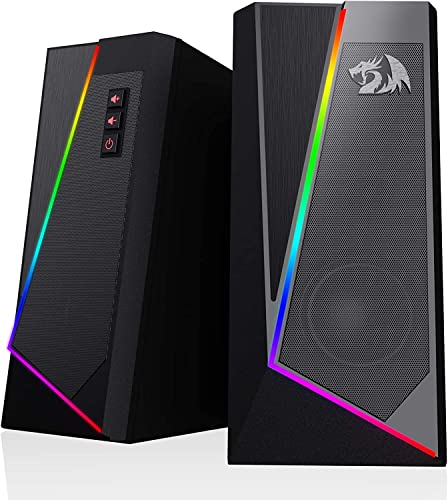
The Redragon GS520 ANVIL desktop speakers are a budget-friendly 2.0 channel stereo set designed to enhance the audio experience for PC gamers, streamers, and casual users who want a simple upgrade from built-in monitor speakers. These USB-powered speakers deliver clear sound with a touch of RGB flair, making them a practical addition to any gaming desk or dorm room setup.
For PC gamers and esports players, the GS520 provides solid audio clarity for footsteps, gunfire, and environmental cues in games like Valorant or Fortnite, though the lack of deep bass means explosion-heavy titles won't feel as punchy. Casual gamers and content creators will appreciate the easy-access volume buttons for quick adjustments during streams or Discord calls. The touch-controlled RGB lighting offers six modes, letting you match the vibe of your gaming setup without needing extra software.
Build quality is respectable for the price point, with a brushed texture finish that looks more premium than its cost suggests. The compact dimensions (3.5 x 4 x 7 inches) and lightweight 1.8-pound design make them easy to place on either side of your monitor, even on cramped desks. The 31-inch cable between the two speakers gives you some flexibility in positioning, though wider setups might find it limiting.
Setup is truly plug-and-play: connect the USB cable for power and the 3.5mm audio cable to your PC, laptop, or TV, and you're good to go. There's no software to install, which is a plus for gamers who want a hassle-free experience. The volume buttons are responsive and let you dial in the perfect level without fumbling with a dial.
One realistic limitation is the audio performance for competitive gaming or music production. The GS520 lacks a subwoofer, so bass-heavy soundtracks and explosions may feel thin. Additionally, the RGB lighting cannot be synced with other RGB components via software, which might disappoint enthusiasts building a fully integrated lighting ecosystem.
Overall, the Redragon GS520 ANVIL speakers are a great value for budget-conscious PC gamers, streamers, and college gamers looking to add decent audio and RGB aesthetics to their setup. They're not for audiophiles or competitive players demanding pinpoint sound positioning, but for everyday gaming, YouTube, and Discord use, they get the job done without breaking the bank.
Pros
- Affordable price point for decent stereo sound with enhanced bass
- Touch-controlled RGB lighting adds visual flair to any gaming desk
- Simple knob control for volume and power is intuitive and convenient
- Plug-and-play setup with USB power and 3.5mm aux works with multiple devices
Cons
- Limited soundstage and power compared to larger or more expensive speaker systems
- No Bluetooth connectivity; relies on wired aux connection only
- RGB lighting may be too bright or distracting for some users in dark rooms
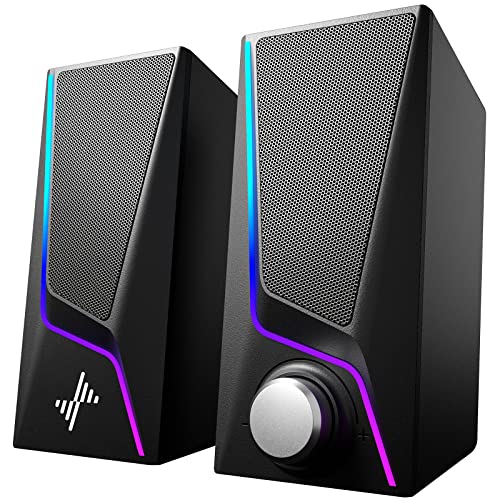
The Nylavee Computer Speakers are a budget-friendly desktop audio solution designed for PC gamers, casual listeners, and RGB setup enthusiasts. These USB-powered speakers feature two full-range dual-magnet driver units and dual bass-boost ports, aiming to deliver clearer sound and deeper bass than typical built-in monitor or laptop speakers. With 6 touch-controlled lighting modes and a simple knob for volume and power, they offer an easy way to upgrade your gaming or work-from-home audio without breaking the bank.
For competitive and casual gamers alike, audio clarity and bass response can make a difference in immersion and situational awareness. While these speakers won't replace a high-end gaming headset for pinpoint positional audio, they provide a noticeable improvement over basic computer speakers for games like open-world adventures, MOBAs, or single-player titles. The dual bass ports help emphasize explosions and soundtracks, adding a bit of rumble without distorting at moderate volumes. That said, audiophiles or those seeking room-filling sound may find the output limited for larger spaces.
Build quality is typical for this price range: a lightweight plastic construction with a compact footprint (about 7 inches tall) that fits easily on most desks. The touch-sensitive lighting controls on the top are responsive, though they can be accidentally triggered if you rest items on the speakers. The single knob for volume and on/off is a nice touch, reducing clutter and making adjustments quick during gaming sessions. The speakers are powered via USB and connect through a 3.5mm aux cable, so no drivers or Bluetooth pairing is needed - just plug into your PC, laptop, monitor, or even a phone or tablet.
One of the main selling points is the RGB lighting, which offers six modes including symphony, flowing, breathing, and three solid colors. This allows users to match their gaming setup's aesthetic or create a dynamic visual effect. The lighting is controlled by touch, but there's no software or remote, so customization is limited to the built-in modes. For RGB enthusiasts, this adds a nice pop of color without needing extra controllers or hubs.
In terms of limitations, the lack of Bluetooth means you're tethered by the aux cable, which may be a dealbreaker for those wanting wireless flexibility. Also, the bass, while enhanced, won't satisfy users seeking deep, thumping low-end - it's more of a subtle boost than a subwoofer experience. The speakers are best suited for small to medium-sized desks, and the plastic build feels less premium than metal or wood alternatives. Setup and cleaning are straightforward: just plug in, place, and wipe with a dry cloth if needed.
Overall, the Nylavee Computer Speakers are a practical choice for budget-conscious gamers, college students, or anyone wanting to improve their desktop audio and add RGB flair. They're not for hardcore competitive gamers who need precise audio cues, but they work well for casual gaming, streaming, watching videos, or music. If you're building a compact gaming setup or need an affordable speaker upgrade, these are worth considering for their ease of use and visual appeal.

Pros
- Rich, detailed sound with carbon fiber drivers for its compact size.
- Versatile connectivity: Bluetooth 5.0, USB, and AUX inputs.
- Easy treble/bass adjustment for personalized audio tuning.
- Elegant wood finish that blends into any desktop or gaming room aesthetic.
Cons
- No included subwoofer limits deep bass for heavy EDM or action games.
- 3-inch drivers may struggle to fill a larger room with high volume.
- Speaker placement and room acoustics can affect stereo imaging more than larger systems.
The Sanyun SW208 3" Active Bluetooth Bookshelf Speakers are a compact audio solution designed to upgrade your PC gaming, streaming, or work-from-home setup. These powered speakers deliver 60W of total output through a carbon fiber driver system, aiming to provide a balanced soundstage without taking up too much desk space. The white finish and wood cabinet give them a clean, modern look that fits well with most gaming peripherals and monitor setups.
For PC gamers and streamers, the built-in 24bit DAC via USB connection is a standout feature. It pulls a digital signal directly from your computer, minimizing interference and preserving audio detail. This translates to clearer in-game audio cues like footsteps in competitive FPS titles or ambient effects in open-world RPGs. The adjustable treble and bass knobs let you fine-tune the sound profile to emphasize what matters most for your game or stream. Bluetooth 5.0 also adds flexibility for quick music streaming from your phone or tablet during breaks.
When it comes to build quality, these speakers feel solid thanks to their wood construction. The 3-inch carbon fiber cones are designed for durability and consistent performance over time. They handle moderate volume levels well without distortion, making them suitable for close-range desktop listening. However, the lack of a dedicated subwoofer means the low-end response is limited. For gamers who enjoy heavy bass in action games or cinematic titles, these speakers may leave you wanting more rumble.
Setup is straightforward: plug in the power, connect via USB to your PC, or pair over Bluetooth. The side-mounted controls for volume, treble, and bass are easy to reach, though they are placed on the main speaker only. Cable management is simple with the included wiring, and the compact footprint (about 7.5 x 5.4 inches each) frees up desk space for your keyboard, mouse, and monitor. The auto standby feature is a nice touch for energy savings and noise reduction when not in use.
Realistically, the Sanyun SW208 speakers are best suited for casual gamers, streamers, content creators, or anyone building a clean, compact desktop setup. They excel at delivering clear vocals for Discord calls, podcast monitoring, or background music while working. For competitive esports players who need pinpoint audio positioning, a dedicated gaming headset might still be preferred. But for everyday gaming, media consumption, and productivity, these speakers offer a solid audio upgrade over built-in monitor speakers.
Overall, the Sanyun SW208 is a practical choice for gamers and desktop users who want better sound without a complex setup or a large footprint. The combination of Bluetooth, USB DAC, and adjustable EQ gives you flexibility, while the wood cabinet adds a touch of class. If you can live without earth-shaking bass and keep expectations realistic for a 3-inch driver, these speakers deliver good value for a clean, functional gaming audio solution.

Pros
- 240Hz refresh rate and 1ms MPRT deliver exceptional responsiveness for competitive gaming.
- VA panel provides high contrast and no backlight bleed common with IPS panels.
- Wide color coverage (130% sRGB) and HDR10 support for vibrant visuals.
- Built-in speakers are convenient for casual use or when desk space is limited.
- Affordable price point for a 27-inch curved gaming monitor with these specs.
Cons
- 1080p resolution on a 27-inch screen results in lower pixel density compared to 1440p or 4K monitors.
- Built-in speakers are basic 2W units - not ideal for immersive audio or streaming without dedicated speakers.
- No height adjustment or USB ports included, limiting ergonomic flexibility and peripheral connectivity.
The Amzfast 27-inch 240Hz curved gaming monitor is designed for PC gamers who want a high-refresh-rate display without spending a fortune. With a 240Hz refresh rate and 1ms MPRT (Moving Picture Response Time), this monitor aims to deliver smooth, tear-free gameplay in fast-paced titles like Valorant, Call of Duty, and Fortnite. The 1500R curvature adds a wraparound feel that can enhance immersion in open-world games or cinematic experiences.
This monitor is best suited for competitive gamers, esports players, and casual gamers who prioritize motion clarity over resolution. Streamers and content creators may also appreciate the 130% sRGB coverage and HDR10 support for editing photos or videos, though the 1080p resolution may limit detail compared to higher-resolution panels. College gamers and gaming setup builders on a budget will find the combination of 240Hz and VA contrast appealing for both gaming and general use.
Performance-wise, the fast VA panel offers a 4000:1 contrast ratio, which delivers deep blacks and vivid colors without the backlight bleed common on IPS monitors. This makes it a strong choice for dark scenes in horror games or movies. The Adaptive-Sync feature helps reduce screen tearing when paired with compatible graphics cards, though the monitor does not carry official G-Sync or FreeSync certification according to the product listing. The 300 nits brightness is adequate for indoor gaming, but may struggle in very bright rooms.
Build quality is typical for budget monitors: the stand offers basic tilt but no height or swivel adjustments, and the plastic construction feels sturdy enough for desk use. The thin bezels and curved design give it a modern look that fits well in gaming setups. The built-in 2W speakers are a practical addition for users who don't want external speakers, but they lack bass and volume for immersive audio - external speakers or a headset are recommended for proper gaming sound.
Setup is straightforward: the 27-inch panel attaches to the stand via VESA 100x100mm, and the included DP cable gets you 240Hz out of the box. The on-screen display (OSD) offers gaming presets like FPS, RTS, and RPG modes, plus crosshair overlays and black level adjustment. While there are no USB ports, the HDMI 2.0 and DP 1.4 inputs cover most modern PCs and consoles.
Realistically, the main limitation is the 1080p resolution on a 27-inch screen - text and fine details won't be as sharp as on a 24-inch 1080p or 27-inch 1440p monitor. Also, with zero user reviews at the time of writing, the actual longevity and quality control remain to be seen. However, the 1-year zero-bright-dot warranty is a positive sign for peace of mind. For a budget-conscious gamer who wants 240Hz without compromising on contrast or spending a lot, this monitor is a practical option worth considering.
The Amzfast 27-inch 240Hz curved monitor is built for speed. The 240Hz refresh rate and 1ms MPRT significantly reduce motion blur, making fast-moving targets appear clearer in competitive shooters like Overwatch and Apex Legends. Adaptive-Sync helps eliminate screen tearing when paired with modern GPUs, though the monitor lacks official G-Sync or FreeSync branding. The VA panel's 4000:1 contrast ratio ensures deep blacks and good dark-room visibility, which is useful for games with shadowy environments. While 1080p resolution is standard, the size and curvature can enhance peripheral vision in racing or flight sims. Overall, this monitor delivers responsive gameplay that meets the demands of most PC gamers.
The Amzfast monitor uses a fast VA panel that covers 130% sRGB and supports HDR10, providing vibrant colors and decent contrast for a budget display. The 4000:1 contrast ratio is a standout feature - it produces deeper blacks than typical IPS panels, which is great for watching movies or playing dark-themed games. The 300 nits brightness is sufficient for typical indoor lighting but may not be ideal for very bright rooms. The 1500R curvature matches the natural curve of the human eye, creating a more immersive viewing experience. However, at 27 inches and 1080p, the pixel density is lower than higher-resolution alternatives, so text and fine details may not be as crisp. For gamers who prioritize fluidity and contrast over razor-sharp clarity, this panel strikes a good balance.
Frequently Asked Questions
Do built-in monitor speakers provide enough audio quality for competitive gaming?
Built-in monitor speakers provide basic stereo sound for dialogue and alerts, but they often lack deep bass. A display like the Amzfast 27 inch 240Hz Curved Gaming Monitor includes upgraded 2W speakers for convenient desktop audio without extra cables. However, players who want rich cinematic audio usually benefit from dedicated external units.
How do you connect the best gaming monitor speakers to your PC or console?
Most desktop speakers connect using a 3.5mm auxiliary audio cable and a USB cable for power. Advanced models like the Sanyun SW208 3″ Active Bluetooth 5.0 Bookshelf feature an integrated 24-bit DAC via USB and wireless Bluetooth 5.0. When connecting audio to a console monitor setup, check whether your display includes a 3.5mm audio output.
Can you fit external speakers under a monitor stand without blocking the display?
Yes, compact soundbars and modular 2-in-1 speakers fit cleanly beneath most screen bezels without blocking your view. Units like the LENRUE G11 Computer Speakers for Desktop and the OFFSIR 2-in-1 speakers have low horizontal profiles designed for monitor clearance. This layout keeps your gaming area tidy while delivering direct front-facing sound.
What is the benefit of carbon fiber drivers in gaming monitor speakers?
Carbon fiber speaker cones offer high rigidity and low weight, which helps minimize audio distortion during loud game effects. In models like the Sanyun SW208, carbon fiber construction combines with manual treble and bass controls to maintain clear mids and controlled low frequencies. This provides crisp detail during intense gaming sessions.
Are affordable gaming monitor speakers suitable for budget setups in 2026?
Yes, entry-level external speakers offer a noticeable audio upgrade over standard built-in monitor speakers without costing much. Many affordable options include RGB lighting modes, dual-magnet drivers, and bass ports that easily complement a budget gaming monitor. Checking connection lengths and power requirements ensures they fit your workspace comfortably.
Do USB-powered monitor speakers require dedicated software drivers?
Most USB-powered gaming speakers operate via standard plug-and-play functionality without requiring extra software drivers. Power is drawn directly from a USB port, while audio transmits through a standard 3.5mm jack or digital connection. This provides broad compatibility across Windows, Mac, Chrome OS, and gaming systems.


Write Your Review
No reviews yet. Be the first to share your experience!