


Screen tearing and stuttering can ruin your aim mid-firefight. That split-second lag between your mouse click and the action on screen often decides who wins and who respawns. A monitor that syncs with your GPU eliminates that disconnect, giving you smoother framerates and lower input lag when it matters most. The best 27 inch g-sync gaming monitor lineup in 2026 focuses on variable refresh rate technology that matches your GPU’s output frame by frame, so you see every enemy peek and grenade toss without visual artifacts. Whether you are grinding ranked matches or exploring open worlds, a G-Sync compatible display keeps motion fluid and your response crisp.
After analyzing product specifications, panel types, and user feedback across multiple brands like LG, ASUS, Samsung, KTC, and Alienware, it is clear that the 27-inch QHD form factor strikes a sweet spot between pixel density and performance headroom. High refresh rates from 144Hz all the way up to 300Hz pair with IPS, OLED, and curved VA panels to suit different budgets and visual preferences. If you are moving from a standard 60Hz display, the jump to a G-Sync compatible monitor dramatically reduces eye strain and makes tracking fast targets feel natural. For more insight into high-refresh tech, check out our guide on the best 240Hz OLED gaming monitor for comparable fluidity. Also, a proper corner desk gaming setup can help you position these monitors for maximum comfort during long sessions.

Pros
- High 180Hz refresh rate and 1ms response for ultra-smooth gaming
- Vibrant IPS panel with wide color gamut and HDR support
- G-Sync and FreeSync compatibility for tear-free play on both NVIDIA and AMD GPUs
- Low blue light technology helps reduce eye fatigue without washing out colors
- Brand reliability and solid build quality typical of Alienware monitors
Cons
- Limited ergonomic adjustments (height, pivot, swivel) may require a separate monitor arm
- No built-in speakers, so external audio is needed for full immersion
- Some users may prefer a higher 240Hz+ refresh rate for top-tier esports
The Alienware AW2725DM is a 27-inch QHD gaming monitor that aims to deliver high-performance visuals without breaking the bank. With a 180Hz refresh rate, 1ms gray-to-gray response time, and support for both NVIDIA G-Sync and AMD FreeSync, this monitor is designed for PC gamers who demand fluid, tear-free gameplay in competitive titles like Call of Duty, Valorant, or Apex Legends. The IPS panel offers rich colors and wide viewing angles, making it equally suitable for casual open-world adventures and streaming sessions.
This monitor is best suited for competitive gamers, esports players, and streamers who need fast response times and consistent frame pacing. The QHD resolution (2560x1440) provides a sweet spot between sharpness and performance, allowing modern GPUs to push high frame rates without overloading. Casual gamers and content creators will also appreciate the 95% DCI-P3 color coverage and VESA DisplayHDR 400 certification, which bring out details in games, movies, and photo editing work.
In terms of real-world performance, the 180Hz refresh rate ensures that fast-moving objects remain clear and smooth, while the 1ms response time minimizes ghosting. The inclusion of G-Sync and FreeSync adaptive sync technologies means you can pair this monitor with a wide range of graphics cards and enjoy tear-free gameplay across a variety of game genres. The hardware-based low blue light mode is a practical addition for late-night gaming sessions, preserving color accuracy while reducing eye strain.
Build quality is typical of Alienware's monitor lineup: a sturdy plastic chassis with a metallic finish and slim bezels. The stand offers tilt adjustment, but lacks height swivel or pivot adjustments, which may be a limitation for users who want precise ergonomic positioning. However, the VESA 100x100mm mount allows you to attach a third-party arm or stand for better desk customization. The monitor weighs about 14.5 pounds, so it feels solid on a desk without being too heavy.
Setting up the AW2725DM is straightforward: plug in the power, connect via DisplayPort or HDMI, and the monitor auto-detects the signal. The on-screen display (OSD) menu is intuitive, with controls for brightness, contrast, input switching, and gaming presets. There is no built-in speaker, so you will need external speakers or a headset for audio. Cable management is decent, with a small cutout in the stand for routing cables, though a full cable cover is not included.
Overall, the Alienware AW2725DM is a compelling choice for PC gamers who prioritize high refresh rates and vivid image quality at a reasonable price point. While it may lack advanced ergonomics and built-in audio, its core performance features make it a strong contender for competitive play and everyday gaming. If you are building a mid-range to high-end gaming setup or need a reliable secondary monitor for streaming, this monitor delivers excellent value without compromise.
The AW2725DM excels in fast-paced gaming thanks to its 180Hz refresh rate and 1ms response time. Combined with G-Sync and FreeSync support, screen tearing and stuttering are virtually eliminated, providing a buttery-smooth experience in competitive shooters, battle royales, and racing games. The QHD resolution helps maintain high frame rates on modern GPUs while offering a noticeable sharpness upgrade over 1080p. For esports titles where every millisecond counts, this monitor delivers the responsiveness needed to stay ahead.
The IPS panel on the Alienware AW2725DM covers 95% of the DCI-P3 color space and achieves VESA DisplayHDR 400 certification. This means vibrant colors, deep blacks, and good contrast for HDR content. The 27-inch size is a sweet spot for both immersive gaming and productivity, with wide viewing angles that keep colors accurate from any position. Whether you are editing video, playing open-world RPGs, or watching streams, the display quality holds up well against more expensive monitors.
The monitor features a classic Alienware design with a dark gray finish and slender bezels. The stand provides tilt adjustment but lacks height, swivel, and pivot functions. That said, the VESA mount compatibility (100x100mm) lets you easily attach a monitor arm for full ergonomic control. The overall construction feels sturdy, and the unit weighs a manageable 14.5 pounds. Cable management is basic but functional, with a small opening in the stand to route cables neatly.

Pros
- 240Hz refresh rate and 1ms response deliver top-tier competitive performance.
- Wide color gamut (95% DCI-P3) ensures rich, accurate colors out of the box.
- Dual adaptive sync support (G-Sync + FreeSync) works flawlessly with both NVIDIA and AMD GPUs.
- Fully adjustable stand offers excellent ergonomics for comfort during long gaming sessions.
- HDMI 2.1 enables 240Hz at QHD on compatible consoles and PCs.
Cons
- DisplayHDR 400 is entry-level HDR; highlights may not pop as much as higher HDR tiers.
- No built-in speakers; you'll need a headset or external speakers for audio.
- Stand base is relatively wide and may take up considerable desk space.
The LG 27GR83Q-B is a 27-inch QHD (2560x1440) IPS gaming monitor designed to deliver a competitive edge. With a 240Hz refresh rate and 1ms GTG response time, it's built for esports players, competitive gamers, and anyone who values ultra-smooth motion in fast-paced titles. Its IPS panel offers wide viewing angles and vibrant colors, while support for both NVIDIA G-Sync and AMD FreeSync Premium ensures tear-free gameplay regardless of your GPU.
This monitor is best suited for PC gamers who play shooters like Valorant, Apex Legends, or Call of Duty, where every millisecond counts. It also works well for streamers and content creators who need accurate colors for editing or broadcasting, thanks to its 95% DCI-P3 color gamut. Casual gamers will appreciate the smoothness and responsiveness, but the high refresh rate really shines in competitive scenarios.
In real-world use, the 240Hz refresh rate provides exceptionally fluid motion, reducing eye strain during long sessions. The 1ms response time minimizes ghosting, so fast-moving objects stay sharp. The IPS panel maintains consistent colors from any angle, which is great for co-op gaming or when sharing the screen. Adaptive sync works silently in the background, eliminating screen tearing without added input lag. The DisplayHDR 400 certification adds a modest boost to contrast and peak brightness, but it's not as impactful as higher HDR standards like 600 or 1000.
Build quality is solid with a sturdy plastic chassis and a metal-reinforced stand that supports tilt, height, and pivot adjustments. The cable management channel on the stand helps keep your desk tidy. Connectivity is generous with two HDMI 2.1 ports (supporting up to 240Hz at QHD) and one DisplayPort 1.4, plus a 4-pole headphone jack with DTS Headphone:X for 3D audio. The on-screen display is easy to navigate with a joystick, and features like Black Stabilizer, Dynamic Action Sync, and a crosshair overlay are useful for gaming tweaks.
One limitation is the lack of built-in speakers, so you'll need a headset or external speakers. The stand base is fairly large, which might be an issue on small desks. Also, the HDR performance is basic; it's fine for HDR content but not comparable to premium HDR monitors. Setup is straightforward: plug in the cables, adjust the stand, and you're ready to go. The monitor supports VESA mounting if you prefer an arm.
Overall, the LG 27GR83Q-B is an excellent choice for competitive gamers who want a high-refresh-rate QHD display with adaptive sync and solid color accuracy. It's also a good fit for console gamers thanks to HDMI 2.1, and for esports enthusiasts who prioritize responsiveness. If you're building a gaming setup around a mid-to-high-end PC and need a monitor that balances speed and image quality, this is a strong contender worth considering.
The LG 27GR83Q-B delivers outstanding gaming performance thanks to its 240Hz refresh rate and 1ms GTG response time. In fast-paced games like Overwatch 2, Counter-Strike 2, or Fortnite, motion clarity is exceptional, and you'll notice far less blur than on a standard 60Hz or 144Hz monitor. The IPS panel maintains consistent colors and contrast even when viewed at an angle, so you get a consistent experience whether you're leaning in or sitting back.
Adaptive sync is fully supported: NVIDIA G-Sync Compatible and AMD FreeSync Premium both work without issue. This eliminates screen tearing and stutter across a wide frame rate range. Input lag is negligible, with Dynamic Action Sync further reducing delay. The monitor also includes a Black Stabilizer to brighten dark areas without overexposing highlights, which is helpful for spotting enemies in shadowy corners.
The LG 27GR83Q-B offers excellent connectivity for a modern gaming setup. It includes two HDMI 2.1 ports that support 2560x1440 at 240Hz with HDR, making it perfect for both PC and next-gen consoles like the PS5 and Xbox Series X. There's also one DisplayPort 1.4 for high refresh rates on PCs. Additionally, a 4-pole headphone jack with DTS Headphone:X provides immersive 3D audio through any compatible headset.
The HDMI 2.1 ports are a standout feature, as many monitors in this price range still use HDMI 2.0. This ensures you can take full advantage of the monitor's speed with modern consoles. The DisplayPort also supports the full 240Hz at QHD without compression. Cable management is handled by a channel on the stand, keeping your desk neat.

Pros
- Exceptionally smooth 300Hz refresh rate with 1ms response time ideal for competitive gaming and esports
- Vibrant IPS panel with wide color gamut (95% DCI-P3) and HDR 400 for vivid visuals
- Fully adjustable stand (height, tilt, swivel, pivot) offers ergonomic flexibility for desk setups
- Dual HDMI 2.1 and DisplayPort 1.4 provide future-proof connectivity for consoles and high-end GPUs
- FreeSync Premium and G-Sync compatibility ensure tear-free gameplay on both AMD and NVIDIA systems
Cons
- USB-C port only delivers 15W power delivery, which may not be enough to charge larger laptops
- No built-in speakers, so you'll need external audio or a headset for sound
- Stand base has a moderate footprint that may take up desk space in compact setups
The LG 27G640A-B UltraGear is a 27-inch QHD IPS gaming monitor designed for gamers who demand speed, clarity, and precision. It's built for competitive players, esports enthusiasts, and anyone who wants a high-refresh-rate display without sacrificing color accuracy. With a 300Hz refresh rate and 1ms response time, this monitor targets the fast-paced world of games like Valorant, Apex Legends, and Call of Duty, but it's also versatile enough for casual gaming, content creation, and everyday use.
Performance is where this monitor shines. The 300Hz refresh rate combined with 1ms (GtG) response time delivers incredibly fluid motion and near-instantaneous pixel transitions. Screen tearing and stutter are effectively eliminated thanks to AMD FreeSync Premium and NVIDIA G-Sync compatibility, making it a great match for both PC and console gamers. The QHD resolution provides a noticeable step up from 1080p, offering sharper visuals without the heavy GPU demand of 4K. Color reproduction is strong with 95% DCI-P3 coverage and VESA DisplayHDR 400, giving lifelike highlights and deeper shadows in HDR-enabled titles.
Build quality and ergonomics are practical for long sessions. The monitor includes a fully adjustable stand with height, tilt, swivel, and pivot controls, so you can find a comfortable viewing angle whether you're gaming, streaming, or working from home. The slim bezels make it suitable for multi-monitor setups, and the overall construction feels sturdy. However, the stand base has a moderate footprint that may take up desk space in compact setups. The lack of built-in speakers means you'll need external audio, but that's common among gaming monitors.
Connectivity is a strong point. You get dual HDMI 2.1 ports, a DisplayPort 1.4, and a USB-C port with 15W power delivery. HDMI 2.1 is great for next-gen consoles like PS5 and Xbox Series X, enabling 1440p at 120Hz or higher. The USB-C port can charge a phone or small device, but 15W is insufficient for most laptops. There are no additional USB-A ports, so you'll need a separate hub for peripherals. Setup is straightforward, and the on-screen display (OSD) with a joystick controller makes adjustments easy.
On the software side, LG's gaming features add value. Dynamic Action Sync reduces input lag, Black Stabilizer brightens dark areas to spot enemies, and the Crosshair overlay improves accuracy in shooters. An FPS counter is also built in. These tools are useful for competitive play without needing third-party software. The monitor's color accuracy out of the box is decent, though calibration can further improve it for content creators.
Overall, the LG 27G640A-B is a strong recommendation for competitive gamers who prioritize high refresh rates and smooth gameplay. Its combination of QHD resolution, IPS color quality, and 300Hz refresh rate at this price point is compelling. Casual gamers and streamers will also appreciate the HDR support and ergonomic stand. The main limitations are the low-power USB-C and lack of built-in speakers, but these are minor trade-offs for the performance and features offered. It's a solid choice for a gaming setup, whether you're building a new rig or upgrading your current display.
The LG 27G640A-B is built for speed. The 300Hz refresh rate delivers incredibly fluid motion, giving competitive gamers a clear advantage in fast-paced titles. The 1ms GtG response time minimizes ghosting, so fast-moving objects stay sharp. Combined with AMD FreeSync Premium and NVIDIA G-Sync compatibility, screen tearing and stuttering are virtually eliminated, creating a seamless experience in both PC and console gaming. The QHD resolution offers a nice balance between visual fidelity and performance, allowing high frame rates without overburdening your GPU.
Advanced gaming features like Dynamic Action Sync reduce input lag for real-time responsiveness, while Black Stabilizer brightens dark scenes to reveal hidden enemies. The Crosshair overlay helps with aim precision, and the built-in FPS counter keeps you informed. These tools are especially useful for esports games like Overwatch, Rainbow Six Siege, and Fortnite. For open-world and story-driven games, the IPS panel's wide color gamut and HDR 400 support add depth to environments, though HDR performance is modest compared to higher-tier monitors.
The monitor features a sturdy construction with a slim bezel design that looks modern on any desk. The stand offers full ergonomic adjustments: height (up to 110mm), tilt (-5 to 15 degrees), swivel (-30 to 30 degrees), and pivot (90 degrees for portrait mode). This flexibility makes it easy to find a comfortable position for gaming, streaming, or work. The base is solid but has a moderate footprint, so ensure you have enough desk space. VESA 100x100mm compatibility allows for monitor arm mounting if you prefer a cleaner setup.
Cable management is minimal due to the lack of a built-in routing channel, but the ports are conveniently located on the back. The OSD joystick is intuitive and responsive, making menu navigation a breeze. Overall, the build quality feels reliable for daily use, and the ergonomic adjustments are a welcome feature for long sessions.

Pros
- Outstanding QD-OLED picture quality with deep blacks and vivid colors.
- High 180Hz refresh rate and ultra-low 0.03ms response time for competitive gaming.
- Effective burn-in prevention with OLED Safeguard technology.
- Glare Free coating enhances visibility in bright environments.
- Pantone Validated for color-accurate work beyond gaming.
Cons
- Price may be higher than comparable IPS or VA monitors.
- Limited to 27-inch size, which may not suit users wanting a larger display.
- No built-in speakers, requiring external audio solutions.
The Samsung 27-inch Odyssey OLED G5 (G50SF) is a QHD gaming monitor that combines the latest QD-OLED technology with a high 180Hz refresh rate and an incredibly fast 0.03ms GtG response time. This monitor is designed for U.S. PC gamers, esports players, competitive gamers, streamers, and content creators who demand top-tier visual performance and responsiveness from their gaming setup.
At the heart of the Odyssey OLED G5 is Samsung's QD-OLED panel, which delivers exceptional color accuracy, deep blacks, and high brightness levels. The QHD resolution (2560x1440) strikes a great balance between detail and performance, making it ideal for fast-paced FPS games like Call of Duty or Overwatch, as well as visually rich open-world titles. The 180Hz refresh rate ensures smooth motion, and the 0.03ms response time virtually eliminates motion blur, giving you a competitive edge in esports.
For gamers who experience screen tearing, the monitor supports both NVIDIA G-Sync compatibility and AMD FreeSync, ensuring tear-free gameplay regardless of your GPU. The OLED Safeguard feature uses a Thermal Modulation System to actively prevent burn-in, a common concern with OLED displays, extending the monitor's lifespan. Additionally, the Glare Free technology minimizes reflections, which is especially useful for streamers or those gaming in bright rooms.
Build quality is solid, with a sleek black design that fits well into any gaming desk setup. The monitor is relatively lightweight at 7.27 pounds, making it easy to mount or adjust. Connectivity options include HDMI and DisplayPort, though the product specifications do not detail the exact ports. The Auto Source Switch+ feature automatically detects and switches to the active input, simplifying multi-device setups for gamers who use consoles and PCs.
One realistic limitation is the price, which is higher than many 27-inch QHD monitors with IPS or VA panels. Also, the 27-inch size may not suit users who prefer larger displays for immersive gaming or multitasking. The monitor lacks built-in speakers, so you'll need separate speakers or a gaming headset for audio, which is common among serious gamers.
Overall, the Samsung Odyssey OLED G5 is an excellent choice for competitive gamers, esports players, and content creators who prioritize image quality, responsiveness, and color accuracy. It's a strong addition to any high-end gaming PC build, especially for those who want a monitor that excels in both gaming and creative work. If you're looking for a premium 27-inch QHD gaming monitor with OLED-level visuals, this model is worth serious consideration.

Pros
- Exceptional OLED picture quality with glossy finish and HDR True Black 400
- Fast 240Hz refresh rate and near-instant 0.03ms response time for competitive edge
- Wide connectivity with dual HDMI 2.1 and DisplayPort 1.4 for PC and console gamers
- Ergonomic stand with full adjustability and RGB Hexagon lighting for setup aesthetics
Cons
- Premium pricing compared to standard IPS gaming monitors
- Glossy screen may reflect ambient light in bright rooms
- OLED burn-in risk requires careful use and OLED care features
The LG 27GX704A-B is a 27-inch QHD OLED gaming monitor that targets serious PC gamers, esports competitors, and streamers who want the best visual performance. With a 240Hz refresh rate and 0.03ms response time, this monitor is built for fast-paced FPS, MOBA, and racing games where every millisecond matters. The glossy OLED panel delivers incredible color accuracy and contrast, making it a strong choice for gaming setups that prioritize image quality.
In real-world gaming, the 240Hz refresh rate combined with NVIDIA G-Sync Compatible and AMD FreeSync Premium Pro ensures buttery-smooth, tear-free gameplay. The 0.03ms response time virtually eliminates ghosting, so fast-moving objects stay sharp. The VESA DisplayHDR True Black 400 certification with 1.5M:1 contrast ratio brings out deep blacks and bright highlights, enhancing immersion in dark games like horror titles or open-world adventures. The 98.5% DCI-P3 color coverage makes colors pop, which is great for both gaming and content creation.
Build quality is solid with a fully adjustable stand that offers swivel, tilt, height, and pivot adjustments for comfortable long sessions. The 4-side virtually borderless design and Hexagon lighting add a clean, modern look to any gaming desk. Connectivity includes dual HDMI 2.1, DisplayPort 1.4, USB 3.2 upstream, and two downstream ports, making it easy to hook up a gaming PC, console, and peripherals without cable clutter.
Setup is straightforward with On-Screen Control software for adjusting display settings and OLED care features. The monitor includes automatic pixel care cycles to mitigate image retention, which is important for OLED longevity. Users should be mindful of static elements on screen for extended periods, but the built-in protections help reduce burn-in risk.
One limitation is the glossy screen, which can reflect light in bright rooms, though it enhances perceived contrast and color vibrancy. The price is higher than comparable IPS monitors, but the OLED performance justifies the cost for enthusiasts. Overall, the LG 27GX704A-B is an excellent choice for competitive gamers, streamers, and PC builders who want a top-tier gaming monitor with stunning visuals and fast response times.

Pros
- Excellent price-to-performance ratio for 1440P 180Hz gaming.
- HVA panel offers strong contrast and color reproduction for an immersive experience.
- G-Sync and FreeSync support provide tear-free gaming with multiple GPU brands.
- On-screen crosshairs and black equalizer are handy tools for competitive FPS players.
- Joystick control and OSD Sidekick software make menu navigation and adjustments easy.
Cons
- Limited to 180Hz, which some competitive gamers may find less than premium 240Hz+ options.
- Stand ergonomics are limited; may prefer a VESA arm or better monitor arm for height and tilt adjustments.
- Built-in speakers may be basic; external speakers or headset recommended for better audio.
The KTC H27S17 is a 27-inch curved gaming monitor that brings together high refresh rate performance with a sharp 1440P resolution, all at a price point that's hard to ignore. Designed for PC gamers who want a big visual upgrade without breaking the bank, this monitor features a 1500R curve and an HVA fast panel that promises both speed and picture quality.
This monitor is best suited for competitive gamers and esports players who need smooth, responsive gameplay, as well as casual gamers who enjoy immersive single-player worlds. With a 180Hz refresh rate and 1ms MPRT response time, motion blur is minimized, making fast-paced shooters and racing games feel fluid and sharp. The 1440P resolution provides a nice balance between detail and performance, easier on your GPU than 4K while still looking crisp.
Color performance is a highlight here, with 120% sRGB coverage and HDR10 support. Games and content pop with vibrant, accurate colors, and deeper blacks help you see details in shadowy scenes. The 1500R curve wraps around your field of view, adding a sense of depth that works great for both gaming and productivity. FreeSync and G-Sync compatibility ensure that your gameplay stays smooth without tearing or stuttering, regardless of whether you're using an AMD or NVIDIA GPU.
Build quality is solid for its price range, with a platinum silver finish and a three-sided narrow bezel that maximizes screen space. The included stand offers basic tilt, but lacks height and swivel adjustments. Many users will prefer to use the VESA mount compatibility to attach the monitor to a more ergonomic arm or wall mount, which also helps with cable management and desk organization.
Setting up the monitor is straightforward thanks to the intuitive joystick control on the back. The OSD menu is easy to navigate, and the optional OSD Sidekick software lets you adjust settings from your desktop. The monitor includes DisplayPort, HDMI, and USB ports, giving you flexibility to connect multiple devices. On-screen crosshairs and black equalizer are practical additions for gamers who want that extra edge in FPS games.
While the KTC H27S17 is a fantastic value, it's not without some limitations. The stand is basic, and the 180Hz refresh rate, while fast, isn't the highest available for serious competitive play. The built-in speakers are adequate for casual use but won't replace dedicated speakers or a gaming headset for immersive audio. Overall, this monitor is a strong recommendation for PC gamers looking to upgrade to a larger, smoother, and more colorful display without overspending. It's a versatile choice for gaming, streaming, content creation, and even work-from-home setups.

Pros
- Excellent color accuracy and wide viewing angles thanks to IPS panel.
- Fast 144Hz refresh rate with 1ms response time for competitive gaming.
- G-Sync and FreeSync support for tear-free gaming on both NVIDIA and AMD GPUs.
- Fully adjustable stand (height, tilt, pivot) for ergonomic comfort.
- Borderless design looks great in multi-monitor setups.
Cons
- No built-in speakers, so external audio is required.
- HDR performance is limited due to lack of local dimming; not true HDR.
- Stand is sturdy but takes up desk space; VESA mountable for alternatives.
The LG 27GL83A-B is a 27-inch QHD IPS gaming monitor that hits a sweet spot for PC gamers and content creators. With a 2560x1440 resolution, 144Hz refresh rate, and 1ms GtG response time, it delivers sharp visuals and fluid motion. This monitor is especially suited for competitive gamers, esports players, and streamers who demand low latency and vibrant colors. The IPS panel covers 99% of the sRGB spectrum, ensuring accurate and vivid hues right out of the box.
In real-world gaming, the 144Hz refresh rate combined with 1ms response time minimizes motion blur and ghosting, making fast-paced FPS and MOBA titles feel incredibly responsive. NVIDIA G-Sync Compatible and AMD FreeSync Premium support virtually eliminate screen tearing and stuttering, providing a smooth experience regardless of your GPU brand. The Black Stabilizer feature brightens dark areas without overexposing highlights, giving you a tactical advantage in shadowy game environments.
Build quality is solid, with a matte black finish and a sturdy stand that offers tilt, height, and pivot adjustments. The three-side borderless design reduces bezel distraction and looks clean in a multi-monitor setup. While the stand lacks built-in cable management, the monitor's overall footprint is manageable for most desks. For those who prefer a different mount, the VESA 100x100mm pattern is compatible with aftermarket arms.
Setup is straightforward: plug in the included HDMI or DisplayPort cable, power on, and the monitor is recognized immediately. The on-screen display (OSD) is intuitive, with a joystick control for quick adjustments to brightness, contrast, and gaming presets. No additional software is required, though LG's OnScreen Control utility (available separately) allows for more granular settings via desktop.
Limitations are worth noting. There are no built-in speakers, so you'll need external speakers or a headset. HDR10 support is present but limited by the lack of local dimming, so HDR content won't look as punchy as on higher-end monitors. The stand, while adjustable, is somewhat wide and may not fit on shallow desks without a mount.
Overall, the LG 27GL83A-B is a well-rounded gaming monitor that excels in color accuracy and responsiveness. It's an excellent choice for PC gamers who prioritize competitive performance and visual quality, as well as for streamers and content creators who need reliable color reproduction. If you're building a gaming setup and want a monitor that balances speed and image fidelity without breaking the bank, this is a strong contender.

Pros
- Fast 170Hz refresh rate and 1ms response time deliver responsive gameplay for competitive gamers
- QHD resolution with IPS panel offers sharp details and accurate colors for both gaming and productivity
- ELMB and G-SYNC compatibility reduce motion blur and screen tearing
- Ergonomic stand and VESA mountable design provide flexible placement options
- Eye Care technologies help reduce strain during extended gaming sessions
Cons
- Built-in speakers are basic and may not satisfy gamers seeking immersive audio
- Limited to HDMI 2.0 and DisplayPort 1.2, which may restrict future high-bandwidth needs
- Some users may find the stand's build quality less premium compared to higher-end models
The ASUS TUF Gaming VG27AQ1A is a 27-inch QHD gaming monitor that strikes a strong balance between performance and value. It features a 2560x1440 IPS panel with a 170Hz refresh rate (also supports 144Hz) and a 1ms response time, making it a solid choice for PC gamers who want smooth visuals without breaking the bank. This monitor is well-suited for competitive gamers, esports players, casual gamers, and even content creators who need accurate colors and sharp detail.
In terms of real-world performance, the 170Hz refresh rate and 1ms response time provide fluid motion and low input lag, which is crucial for fast-paced games like first-person shooters and racing titles. The Extreme Low Motion Blur (ELMB) technology helps reduce ghosting, while G-SYNC compatibility ensures tear-free gameplay by enabling variable refresh rate. The QHD resolution offers a noticeable upgrade over 1080p, delivering sharper textures and more screen real estate for multitasking or streaming setups.
Build quality is typical of the TUF Gaming line: sturdy but not overly premium. The monitor has a matte black finish and a stand that supports tilt and swivel adjustments, making it easy to find a comfortable viewing angle. It also supports VESA mounting (100x100mm) for those who prefer an arm or wall mount. Connectivity includes two HDMI 2.0 ports and one DisplayPort 1.2, which should cover most gaming PCs and consoles. However, it lacks USB-C or higher bandwidth options like DisplayPort 1.4, which may matter for future-proofing.
Setup is straightforward: the monitor comes partially assembled, and attaching the stand takes just a few minutes. The on-screen display (OSD) is controlled via a joystick, making navigation simple. ASUS Eye Care technologies, including Flicker-free and Low Blue Light, are built in and can be enabled to reduce eye strain during long sessions. The built-in speakers are adequate for basic audio but are not ideal for immersive gaming or streaming, so a separate headset or speakers are recommended.
A realistic limitation is the lack of high-end features like HDR600 or a wider color gamut, though the monitor does support HDR10. The 300-nit brightness is sufficient for most indoor environments but may not be ideal for brightly lit rooms. Additionally, the stand, while functional, feels a bit plasticky and may not offer the same stability as more expensive models. Cable management is basic, with no built-in routing, but the clean design helps keep the desk tidy.
Overall, the ASUS TUF Gaming VG27AQ1A is a practical choice for PC gamers who want a fast, responsive QHD monitor without spending a premium. It works well for competitive gaming, casual play, and even light productivity or content creation. If you're building a gaming setup on a budget or need a reliable monitor for esports and streaming, this model offers strong value. For those needing higher brightness or more advanced HDR, it may be worth considering alternatives, but for most gamers, this monitor delivers where it counts: speed and clarity.

Pros
- 4K at 160Hz with 1ms response time is rare and well-executed
- ELMB Sync works with variable refresh rates to reduce motion blur
- Wide 95% DCI-P3 color coverage out of the box for HDR and editing
- Solid build quality and 3-year warranty from ASUS TUF series
- Works with both G-Sync and FreeSync for flexible GPU pairing
Cons
- Stand has limited ergonomic adjustment (no height or swivel out of the box)
- Connectivity may lack HDMI 2.1, which could limit console performance at 4K 120Hz
- No USB-C or built-in speakers, requiring separate audio and video cables
The ASUS TUF Gaming VG27UQ1A is a 27-inch 4K gaming monitor that targets PC gamers, esports players, and content creators who want high resolution without sacrificing speed. With a 160Hz refresh rate and 1ms response time, this monitor bridges the gap between sharp visuals and competitive responsiveness. It's also well-suited for streamers who need accurate colors for video editing or live overlays.
In real-world use, the combination of 4K and 160Hz provides a smooth experience in fast-paced shooters and immersive single-player titles. The Extreme Low Motion Blur Sync (ELMB Sync) technology allows motion blur reduction to work alongside variable refresh rates, reducing ghosting without introducing tearing. G-Sync Compatible and FreeSync Premium support ensure compatibility with most modern GPUs, making it a flexible choice for gaming PCs.
Color performance is a strong point, with 95% DCI-P3 coverage delivering rich, accurate hues for HDR gaming and creative tasks. The monitor handles HDR content well for its price point, though peak brightness may not match premium HDR displays. Gamers who play colorful games like Cyberpunk 2077 or work with photo and video content will appreciate the enhanced vibrancy.
Build quality reflects the TUF lineup's reputation for durability. The stand offers tilt but no height or swivel adjustment, so you may need a separate monitor arm for optimal desk setup. The included L-shaped screwdriver and DisplayPort cable add convenience for immediate use. Cable management is straightforward with ports located at the rear, though you'll need to supply your own HDMI cable if required.
One limitation is the lack of HDMI 2.1, which means console gamers aiming for 4K at 120Hz may need to rely on DisplayPort or accept lower refresh rates. The monitor also omits built-in speakers and USB-C, which could be drawbacks for all-in-one setups. However, for a dedicated PC gaming monitor, these omissions are common at this price point.
Overall, the ASUS TUF Gaming VG27UQ1A is a strong recommendation for PC gamers and creators who want a 4K high-refresh experience without breaking the bank. It performs well in competitive and casual scenarios alike, and the inclusion of ELMB Sync and wide color gamut makes it versatile for both gaming and productivity.
The ASUS TUF Gaming VG27UQ1A delivers excellent gaming performance thanks to its 160Hz refresh rate and 1ms response time. In fast-paced esports titles like Valorant and Apex Legends, motion stays clear and responsive. The ELMB Sync feature reduces motion blur without dimming the screen, and it works alongside variable refresh rates to keep gameplay smooth. G-Sync Compatible and FreeSync Premium ensure tear-free visuals across a wide range of graphics cards, making it a solid choice for any gaming PC.
With 4K (3840 x 2160) resolution and 95% DCI-P3 color coverage, the VG27UQ1A provides sharp, vivid imagery suitable for HDR gaming and content creation. The panel delivers good brightness and contrast for its class, though HDR peak brightness is not as high as premium models. Colors appear saturated and accurate out of the box, reducing the need for calibration. For gamers and creators who prioritize color fidelity, this monitor offers strong value.
The monitor includes DisplayPort and HDMI inputs, plus a headphone jack. The box contains a DisplayPort cable and an L-shaped screwdriver for VESA mount installation. Setting up the monitor is straightforward: attach the stand, plug in power and video, and adjust basic settings via the on-screen display or optional DisplayWidget software. The stand only offers tilt adjustment, so a VESA arm may improve ergonomics and desk space.
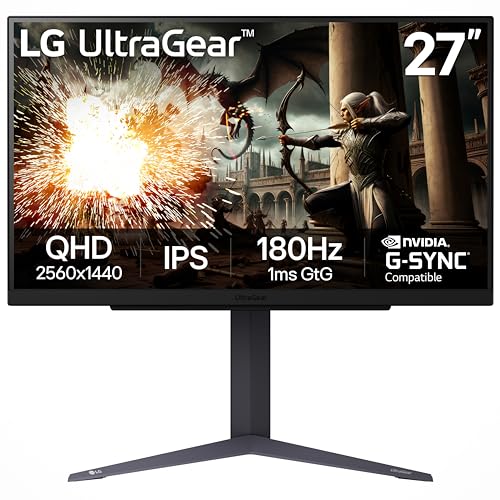
Pros
- Exceptional 200Hz overclocked refresh rate and 1ms response time for smooth, responsive gameplay.
- IPS panel offers rich colors and wide viewing angles, great for both gaming and media consumption.
- G-Sync and FreeSync compatibility ensures tear-free performance with a wide range of GPUs.
- Fully ergonomic stand with height, tilt, and pivot adjustments for comfortable long-session use.
- Virtually borderless design looks sleek and saves desk space.
Cons
- Overclocking to 200Hz may require a DisplayPort connection and compatible GPU.
- Built-in speakers are basic; most gamers will prefer a dedicated headset or external speakers.
- HDR10 support is entry-level, lacking the full brightness and contrast of true HDR monitors.
The LG 27GS75Q-B is a 27-inch QHD IPS gaming monitor that strikes an impressive balance between speed, image quality, and price. With a native 180Hz refresh rate that can be overclocked to 200Hz and a 1ms GtG response time, this display is built for PC gamers who prioritize fluid, low-latency performance in fast-paced games like Valorant, Apex Legends, or Call of Duty. It's also a strong contender for esports players and competitive gamers who need every frame to count.
At its core, the 27-inch IPS panel delivers vibrant colors covering 99% sRGB and supports HDR10 for improved contrast in supported titles. This makes it a versatile choice not just for gaming, but also for content creators and streamers who need accurate color reproduction for editing or live broadcasts. The three-side virtually borderless design helps it blend seamlessly into any gaming setup, whether you're building a dedicated battlestation or a dual-monitor productivity desk.
Performance-wise, the monitor is certified NVIDIA G-Sync Compatible and also supports AMD FreeSync, so screen tearing and stuttering are effectively eliminated regardless of your GPU brand. The 200Hz overclocked refresh rate provides exceptionally smooth motion clarity, while the 1ms response time keeps ghosting to a minimum. Features like Dynamic Action Sync reduce input lag, and Black Stabilizer brightens dark areas without overexposing highlights, giving you an edge in shadowy corners.
Build quality is solid for its price range. The stand offers full ergonomic adjustments including height, tilt, and pivot, which is a rare find at this price point. This is a huge plus for gamers who spend hours in front of the screen, as it allows you to dial in a comfortable viewing angle. The monitor also includes two HDMI ports and a DisplayPort, making it easy to connect a gaming PC, console, or streaming setup. Cable management is straightforward, though the stand's base is fairly sturdy and won't wobble during intense gaming sessions.
Of course, there are a few trade-offs. The built-in speakers are functional but lack bass and volume, so a dedicated gaming headset or external speakers are recommended. HDR10 support is basic and won't match the punch of true HDR displays with higher brightness and local dimming. Also, reaching the full 200Hz requires using DisplayPort and a capable GPU, so check your hardware before relying on that overclock. Setup is quick and the on-screen menu is intuitive, though some users may prefer a joystick controller over the button-based navigation.
Overall, the LG 27GS75Q-B is an excellent choice for PC gamers, competitive esports players, and even streamers or content creators on a budget. It delivers high-speed performance, great color accuracy, and a fully adjustable stand that many competitors lack at this price. If you're building a gaming setup that needs a responsive, versatile QHD monitor without breaking the bank, this LG Ultragear model should be high on your list.
Frequently Asked Questions About 27 Inch G-Sync Gaming Monitors
What is the best 27 inch G-Sync gaming monitor for competitive FPS?
For competitive shooters, a monitor with a high refresh rate and fast response time is key. The LG 27G640A-B offers 300Hz with 1ms GtG response, G-Sync compatibility, and QHD resolution for sharp visuals without motion blur. Its adjustable stand and HDMI 2.1 ports also make it a strong choice for PC and console esports.
Is G-Sync compatible with AMD FreeSync?
Yes, many monitors support both G-Sync Compatible and AMD FreeSync. For instance, the LG 27GL83A-B is NVIDIA-tested for G-Sync and also features FreeSync Premium, so it works seamlessly with both NVIDIA and AMD GPUs. Check the monitor’s specs to confirm dual compatibility before buying.
Does a 27 inch G-Sync monitor improve gaming performance?
G-Sync does not increase FPS directly, but it eliminates screen tearing and reduces stutter by synchronizing the monitor’s refresh rate with your GPU’s frame output. This makes gameplay feel smoother and more responsive, especially in titles where frame rates fluctuate. The improvement is most noticeable in the 40-144 FPS range.
Can I use a 27 inch G-Sync monitor with a console?
Some 27 inch G-Sync monitors support consoles via HDMI, but variable refresh rate (VRR) may require specific HDMI 2.1 ports. Models like the LG 27GX704A-B feature dual HDMI 2.1, making them compatible with Xbox Series X and PS5 VRR for tear-free console gaming. Always check the product description for console VRR support.
What is the difference between G-Sync and G-Sync Compatible?
G-Sync monitors use a proprietary NVIDIA module for adaptive sync, while G-Sync Compatible monitors rely on the VESA Adaptive-Sync standard (often used by FreeSync) and are tested by NVIDIA for basic VRR functionality. For most users, G-Sync Compatible monitors offer a cost-effective way to get tear-free gaming without the premium price of a full G-Sync module.
How important is refresh rate for G-Sync monitors?
Refresh rate determines how many frames per second the monitor can display. A higher rate like 240Hz or 300Hz reduces motion blur and improves responsiveness, especially in fast-paced games. G-Sync works across a wide refresh range, so even a 144Hz monitor with G-Sync will feel smoother than a non-VRR 144Hz display at fluctuating frame rates.
Are IPS or OLED panels better for G-Sync gaming?
OLED panels like the Samsung Odyssey OLED G5 offer perfect blacks, near-instantaneous 0.03ms response times, and vibrant colors, making them excellent for immersive gaming. IPS panels remain strong for color accuracy and wider viewing angles, often at lower prices. Both benefit from G-Sync, but OLED excels in dark scenes and motion clarity.


Write Your Review
No reviews yet. Be the first to share your experience!