


Many desk users sit down expecting plush luxury, only to experience stiffness and fatigue within a few hours of use. If you have ever wondered why are gaming chairs so uncomfortable during prolonged sessions, the issue usually stems from styling choices that prioritize racing aesthetics over human biology. Racing-inspired bucket designs frequently restrict natural movement and press against the thighs, while budget foam padding can quickly compress against hard internal frames. A well-arranged desk environment often relies on practical budget desk setup accessories to complement seating posture and reduce clutter, but no desk accessory can compensate for a fundamentally misaligned seat.
Evaluating seat dimensions, cushion materials, and adjustment mechanisms provides clear insight into why certain chairs feel restrictive while others offer reliable comfort. Manufacturers produce designs ranging from narrow bucket seats to broad, wingless bases equipped with pocket springs and multi-angle recline features. Understanding how your body proportions interact with lumbar support, armrest positioning, and seat depth helps you pinpoint sources of fatigue before choosing a replacement. Whether you use a setup for competitive gaming, remote office work, or casual study, identifying these design factors will help you achieve a far more supportive seating posture.





Understanding Why Gaming Chairs Cause Discomfort and How to Fix It
The persistent complaint that gaming seats cause soreness, numbness, or stiffness traces back to a clash between aesthetic racing-car styling and sedentary human biology. While standard office chairs generally focus on neutral body positioning, gaming chairs originated from motorsports bucket seats built to hold drivers firmly in place against high centrifugal force. At a computer desk, however, your body does not experience cornering forces; instead, it requires gentle support, subtle shifts in posture, and pressure distribution. When a chair combines rigid side bolsters, dense synthetic leather, and inflexible cushioning, discomfort is the inevitable outcome for many users.
The Motorsports Bucket Heritage and Constrictive Side Wings
Racing bucket seats were originally engineered to lock drivers into a fixed position so they would not slide during high-speed turns. When chair manufacturers adapted this visual silhouette for computer desks, they kept the prominent steel-reinforced side bolsters along the seat cushion and backrest. For everyday desk use, these aggressive side wings prevent you from sitting naturally, crossing your legs, or shifting your weight across the seat pan. Users with broader hips or thighs often find that these metal-framed wings press directly against their lateral thigh muscles, impeding circulation and causing tingling or numbness over time.
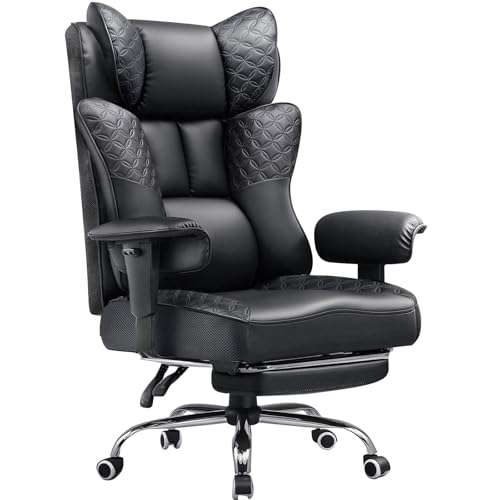
Backrest wings introduce a similar mechanical problem for the upper body. Instead of allowing your shoulder blades to rest flat against the back cushion, flared upper bolsters curve forward and push the shoulders inward. This posture rounds the upper back, contributing to a slouched position that strains the neck and trapezius muscles. To counter this issue, modern designs from brands like JECQCUPG adopt wingless seat cushions measuring up to 51 centimeters across. By eliminating rigid side barriers, flat seat cushions offer broader effective seating space and let users sit naturally without localized thigh compression.
Cushion Composition and Bottoming-Out Pressure
Seat cushion firmness is one of the most common complaints among desk users. Many budget gaming chairs utilize high-density polyurethane block foam that feels hard right out of the box and takes months to soften. Conversely, lower-quality bonded foam can collapse rapidly under repeated use, causing the user to bottom out directly against the rigid steel frame or wooden base underneath. When that cushioning compresses completely, sitting pressure concentrates directly on the sit bones, leading to acute tailbone aches and gluteal soreness.
Advanced designs address this breakdown by borrowing construction methods from traditional residential furniture. Chairs from brands like N-GEN GAMING and Wismestr integrate independent pocket springs alongside high-rebound foam layers. These pocket coils distribute seated weight across multiple contact points, allowing the cushion to yield under heavier body parts while continuing to support the lower thighs. This hybrid spring-and-foam approach helps prevent bottoming out, cushions the pelvis more evenly, and maintains its structural shape far longer than a standard single-density foam slab.
Detachable Lumbar Pillows Versus Built-In Spinal Curves
Lower back discomfort often arises from how gaming chairs approach lumbar support. Rather than engineering an adjustable S-curve directly into the chair frame, many manufacturers include a loose, strapped lumbar pillow filled with dense foam. These pillows are frequently too thick, forcing the lumbar spine into an exaggerated forward arch that leaves the upper back hovering without support. When your spine is held in an unnatural curve, the muscles of the lower back must contract continuously to stabilize the torso, resulting in muscular fatigue after only an hour or two.
Strapped cushions also suffer from chronic slippage, dropping down into the gap between the seat and backrest whenever you adjust your seating position. Some chairs now implement adjustable or contoured backrests that align more closely with natural spinal curvature. Chairs like the HELXQEXB model utilize an S-curve backrest paired with repositionable pillows that users can fine-tune or remove entirely depending on their torso height. If a lumbar cushion pushes you too far forward or feels like a hard block, removing it entirely and leaning flat against the backrest often provides immediate relief.
Armrest Limitations and Upper Body Tension
Armrest design plays a massive role in whether a chair supports your shoulders or creates chronic neck stiffness. Many entry-level gaming chairs feature fixed armrests or linked arms that only tilt when the backrest reclines. If armrests cannot adjust vertically, they either sit too low, leaving your forearms dangling and pulling down on your shoulder girdle, or sit too high, forcing you to shrug your shoulders constantly. This static muscle contraction frequently leads to tension headaches, upper back knots, and forearm fatigue during extended typing or gaming sessions.
Multi-directional armrests resolve this positioning conflict by adapting to your personal desk height and forearm angle. Models such as the GTPLAYER chair incorporate 3D adjustable armrests that move up and down, slide forward and backward, and rotate inward or outward. Setting the armrests level with your desk surface allows your elbows to rest at an open angle, removing pressure from the wrist joints. Furthermore, synchronized armrests that tilt in harmony with the backrest keep your arms supported even when you recline, preventing awkward reaching angles.
Thermal Heat Retention in Synthetic PU Leather
Material selection directly influences how comfortable a chair feels across several continuous hours. Most gaming chairs are upholstered in synthetic polyurethane leather because it provides a sleek, wipe-clean finish and resists spills. However, standard PU leather is non-porous and acts as a thermal insulator, trapping body heat and moisture against your back and thighs. As your body temperature rises, sweat accumulates against the smooth upholstery, creating friction, skin irritation, and a hot, sticky sensation that distracts from desk tasks.
Breathability varies significantly depending on the grade and treatment of the synthetic material. High-grade perforated PU leather and modern breathable faux leathers feature microscopic vents that facilitate air circulation between your clothes and the foam cushion. If you find your chair uncomfortably warm, placing a breathable fabric cover or pad over the seat can create an effective thermal barrier. When selecting a new chair, users sensitive to warmth should examine whether the upholstery features breathable perforations or consider fabric-upholstered alternatives.
Body Proportion Mismatches and Weight Rating Misconceptions
A frequent mistake when purchasing a gaming chair is assuming that a high maximum weight capacity guarantees a spacious or comfortable fit. For instance, heavy-duty chairs from N-GEN GAMING boast weight capacities of up to 400 pounds, supported by robust steel frames and certified gas lifts. However, weight rating measures structural integrity and load resistance rather than physical dimensions. If a chair has a high weight capacity but retains narrow side bolsters or a shallow seat pan, a broad-framed user will still experience pinching and poor leg support.
Seat height range and seat depth are equally critical measurements that buyers often overlook. If the gas cylinder cannot lower the seat pan enough for your feet to rest flat on the floor, pressure builds under your thighs, cutting off blood flow to your lower legs. Conversely, if the seat depth is too long, the front edge of the cushion will press firmly against the back of your knees, preventing you from utilizing the backrest. Checking the manufacturer-stated seat width, depth, and vertical adjustment range against your own body measurements is essential to avoid an ill-fitting chair.
Practical Adjustments to Eliminate Seating Fatigue
Improving your daily comfort often requires only systematic mechanical adjustments rather than buying an entirely new setup. Begin by setting the chair height so your feet rest completely flat on the floor, with your knees bent at roughly a 90-degree angle. This distributes your weight evenly across the entire surface of the thighs rather than concentrating it solely on the buttocks. If your desk is too high and forces you to raise the seat, using an ergonomic under-desk footrest helps maintain firm foot support without dangling.
Next, adjust your backrest recline angle away from a rigid, upright 90-degree position. A slight recline between 100 degrees and 110 degrees reduces intervertebral disc pressure in the lower back compared to sitting bolt upright. When taking breaks or watching media, reclining further to 135 degrees or 150 degrees while extending a retractable footrest allows the body to relax completely. Coordinating your seating posture with your workstation is crucial; for example, adding monitor light bars to your screen helps illuminate your workspace and prevent forward head posture caused by screen glare.
Gaming Chairs Compared with Ergonomic Office Chairs
Shoppers often debate whether a dedicated gaming chair or an ergonomic office chair provides superior daily comfort. Office chairs prioritize dynamic movement, featuring active lumbar curves, flexible mesh backrests, and synchro-tilt mechanisms that encourage subtle shifts in posture throughout the day. In contrast, gaming chairs excel at deep, locked recline angles, plush headrest cushioning, and retractable leg rests designed for relaxed media consumption. Neither style is universally superior; your satisfaction depends entirely on how you balance focused desk work with relaxed leisure.
If your computing routine involves intense writing or data entry, the rigid posture enforced by some gaming chairs may cause fatigue faster than an office chair with active tilt. However, if you spend hours using a controller, leaning back, and watching streams, a gaming chair with linked armrests and a footrest offers relaxation features that standard office task chairs rarely include. When assessing viewing distance and desk layout, pairing your chair decision with well-positioned gaming monitor options ensures that your neck and shoulders remain relaxed regardless of which chair style you choose.
Key Construction Details to Check Before Buying
If you are shopping for a gaming chair that avoids common comfort pitfalls, inspect the seat cushion construction first. Look for models featuring wide, wingless seat bases that measure 50 centimeters or wider to ensure ample space for changing leg positions. Prioritize cushions built with hybrid pocket springs or high-density molded foam over basic chopped or bonded sponge layers. Verifying that the armrests offer at least vertical and horizontal adjustment will also ensure that your upper body remains supported without straining your neck.
Finally, review the manufacturer warranty coverage, return terms, and replacement-part policies before completing your order. Budget chairs often come with limited 30-day refund windows, while reputable brands provide one-year to multi-year protection on frames, mechanisms, and gas lifts. Because sitting comfort is inherently subjective, having the flexibility to return a chair that does not match your spinal curvature or thigh width provides vital peace of mind. Taking the time to evaluate verifiable specifications ensures that your next chair provides steady, restorative support throughout all your desk activities.





Write Your Review
No reviews yet. Be the first to share your experience!