


Setting up a dedicated computer space often sparks the debate over which is better ergonomic or gaming chair. Traditional gaming models emphasize high backrests, headrest pillows, and racing-inspired bucket seats, whereas ergonomic office chairs focus on neutral spinal alignment and adaptable posture support. Deciding between them depends on how you sit during long sessions, whether you prefer adjustable lumbar mechanisms, and how much movement you want across your seat base. Pairing either style with essential desk accessories for your workstation can refine your overall comfort without requiring an overhaul of your room.
Many modern chairs now blur these categories by incorporating sofa-grade pocket spring cushions, retractable footrests, and wingless seat bases into gamer-friendly profiles. Brands like GTPLAYER, COMHOMA, and Vonesse offer hybrid models that combine high-angle reclining with dedicated lumbar supports. Evaluating weight limits, seat dimensions, and frame materials helps clarify whether a specialized ergonomic build or an adjustable gaming seat fits your daily routine best.


Comparing Ergonomic and Gaming Chairs for Everyday Desk Use
Determining which is better ergonomic or gaming chair depends on balancing task focus with relaxation. Traditional ergonomic chairs prioritize active posture support, neutral pelvic alignment, and airflow across your back. In contrast, gaming chairs emphasize full-height backrests, headrest pillows, and deep reclining mechanisms built for leisure. Neither design is universally superior for every body type or workspace. Your daily sitting habits and comfort preferences will dictate which style serves you best.
The boundary between these chair categories has become increasingly fluid in recent years. Modern gaming models now borrow engineering concepts from office furniture, including pocket spring seat foundations and wingless cushion profiles. At the same time, ergonomic chairs continue to refine multi-directional armrests and tilt controls for computer work. Examining the mechanical differences between these styles helps you select a seat that fits your workspace.
Seat Cushion Architecture: Bucket Bolsters Versus Wingless Flat Bases
The shape of the seat cushion represents an immediate functional distinction between chair styles. Classic gaming models feature raised side bolsters inspired by racing bucket seats. These bolsters are intended to keep your hips centered and prevent lateral shifting during energetic movements. However, rigid bolsters can constrict your thighs if your hip measurements exceed the inner width of the base. Users who enjoy sitting cross-legged often find bolstered edges restrictive.
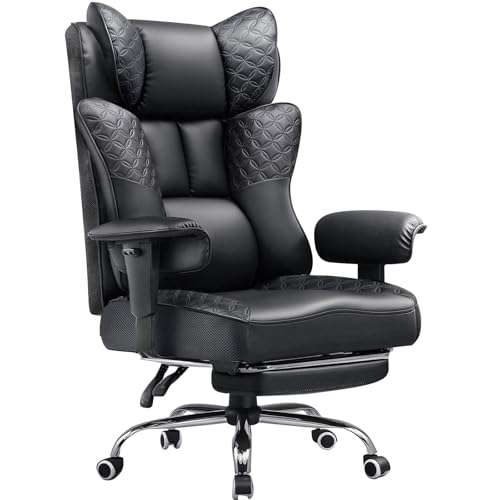
Ergonomic office seating and hybrid models adopt a flat, wingless seat profile to encourage natural body movement. Options like the JECQCUPG Video Gaming Chair provide a 51cm wide wingless base that grants open legroom without firm outer ridges. Removing the raised side edges expands the usable seating surface and allows you to adjust your posture freely. A flat edge design also helps prevent localized pressure along the outer thighs during desk work.
Internal cushion construction also separates utilitarian desk seats from relaxation-oriented models. Budget chairs frequently rely on standard cut foam that can compress after repeated use. Advanced alternatives, such as the Vonesse Office Chair and COMHOMA Big and Tall Chair, incorporate pocket spring packs layered beneath high-density foam. Pocket springs respond independently to localized pressure, distributing body weight across the seat pan while resisting premature sagging.
Lumbar Support Mechanisms: External Pillows Versus Integrated Curves
Lower back support is a central factor when evaluating which is better ergonomic or gaming chair for spinal comfort. Standard gaming chairs typically address lower back alignment by supplying a detachable, strap-mounted lumbar pillow. These pillows can be moved vertically along elastic straps to sit in the small of your back. While external pillows offer quick adjustability, some users find that they protrude too far forward. Straps can also slip over time, requiring periodic readjustment during daily computer sessions.
Dedicated ergonomic chairs usually integrate lumbar support directly into the frame or utilize an adjustable internal mechanism. Built-in lumbar curves follow the spine’s natural shape to encourage steady pelvic alignment without abrupt pressure points. Certain models, like the COMHOMA Big and Tall Office Chair, embed pocket springs within the lower backrest to provide adaptive resistance. Other options, such as the JECQCUPG series, feature multi-point support structures designed to align the head, shoulders, and waist.
Adjustability remains critical because an ill-fitting lumbar support can lead to muscular fatigue. When a chair features a fixed lumbar bump that does not match your torso height, it can press uncomfortably against your back. Removable cushions allow you to experiment with different placements or discard the pillow entirely. Evaluating whether you prefer firm, continuous contact or a softer cushion will guide your choice.
Backrest Recline and Dynamic Posture Transitions
Reclining capability highlights a fundamental divergence in design philosophy between gaming chairs and traditional office furniture. Gaming seats frequently boast deep reclining backrests that tilt independently from the seat pan. Chairs such as the GTPLAYER Gaming Chair and Vonesse Office Chair allow users to lock the backrest at angles from 90 degrees to 145 degrees. This deep recline allows you to transition from an upright working posture to a relaxed position suitable for playing console games or watching video.
Most ergonomic task chairs employ a synchro-tilt mechanism rather than an independent backrest drop. In a synchro-tilt system, the backrest reclines at a two-to-one ratio relative to the seat cushion, opening the hip angle while keeping your feet on the floor. This synchronized motion prevents the front of the seat from lifting your thighs and impeding lower-body circulation. While synchro-tilt mechanisms suit typing, they rarely tilt back far enough for resting between tasks.
Many modern gaming models supplement deep recline features with retractable footrests tucked beneath the seat base. Extending a padded footrest allows you to elevate your legs when reclining, shifting body weight off your spine and onto the backrest surface. Models from N-GEN GAMING and Wismestr integrate fold-out footrests to transform a standard desk seat into a temporary lounge chair. While a footrest adds comfort during breaks, it increases the footprint of your chair.
Armrest Adjustability: Multi-Directional Movement Versus Linked Pivots
Armrest engineering plays a vital role in preventing tension across your shoulders and upper back during desk sessions. Ergonomic models and higher-end gaming chairs often incorporate 3D or 4D adjustable armrests that modify height, depth, and rotation angle. The GTPLAYER Gaming Chair features 3D armrests that allow you to raise or lower the pads and angle them inward toward your keyboard. Aligning your armrests to desk height allows your elbows to rest naturally at a ninety-degree angle, reducing forearm strain.
Other gaming-focused seats utilize synchronized or linked armrests connected directly to both the seat pan and the reclining backrest. Models like the JECQCUPG Video Gaming Chair and N-GEN GAMING Big and Tall Chair use linked pivots that adjust automatically as you tilt backward. When you recline to relax, the armrests angle backward alongside your torso, keeping your forearms comfortably supported. While linked armrests excel during reclined gaming with a controller, they cannot be adjusted independently in height.
Evaluating your primary desk activities will determine which armrest configuration offers the greatest practical utility. If your routine consists primarily of competitive PC gaming and precision typing, independent multi-directional armrests provide the exact alignment needed for mouse control. Conversely, if you spend significant time leaning back to watch media or play with a wireless controller, synchronized armrests maintain continuous forearm contact without manual readjustment. Checking whether the armrests clear your desk remains an essential step before choosing either mechanism.
Upholstery Materials, Breathability, and Maintenance Demands
The choice of upholstery material significantly affects both daily comfort and long-term durability. Most gaming chairs feature synthetic polyurethane (PU) leather, celebrated for its smooth texture, vibrant color accents, and resistance to liquid spills. Chairs from GTPLAYER, JECQCUPG, and N-GEN GAMING utilize PU leather surfaces that wipe clean easily with a damp cloth. However, synthetic leather creates a moisture barrier that traps body heat, which can lead to a warm feel during prolonged sessions in warm rooms.
Ergonomic office chairs often prioritize breathable mesh or woven fabric upholstery to facilitate passive air circulation across your back and thighs. Open mesh dissipates body heat efficiently, maintaining a neutral sitting temperature during intense workdays. Certain hybrid chairs, such as the Vonesse Office Chair, bridge this gap by offering a choice between PU leather and breathable tech cloth. Tech cloth provides the soft feel of traditional fabric upholstery while retaining the durability of modern gaming furniture.
Upholstery longevity also depends on consistent maintenance and environmental factors. PU leather requires protection from direct sunlight, sharp pet claws, and abrasive clothing to prevent premature flaking over time. Fabric and tech cloth options resist peeling but can absorb accidental spills, requiring periodic vacuuming or spot cleaning. Selecting the right upholstery requires balancing the low-maintenance wipe-down convenience of synthetic leather against the cooling airflow of woven textiles.
Frame Construction, Structural Bases, and Stated Weight Limits
A chair’s internal skeleton determines its structural stability, weight distribution, and resistance to wobble during daily adjustments. Quality gaming chairs and ergonomic office models are built around welded tubular steel frames and reinforced metal star bases. The JECQCUPG Video Gaming Chair highlights a steel-reinforced framework with extra wall thickness designed to support up to 150 kilograms. Similarly, heavy-duty options like the N-GEN GAMING Big and Tall models utilize reinforced steel frames and heavy bases rated for up to 400 pounds.
Gas lift cylinders represent another critical mechanical component that governs smooth height adjustment and load bearing. Heavy-duty desk chairs typically feature SGS certified Class 3 or Class 4 pneumatic cylinders that withstand thousands of compression cycles without leaking pressure. Cheaper cylinders can develop height creep, gradually sinking downward throughout the day as you sit. Verifying that a chair incorporates a certified gas lift and a wide five-star base ensures secure, dependable height regulation across years of regular use.
A stated weight capacity indicates structural tolerance rather than a guarantee of comfortable ergonomic proportions. A chair rated for 400 pounds may possess a reinforced frame, but its seat width, lumbar contour, and backrest depth might still feel awkward for users with shorter leg lengths. Comparing the manufacturer’s published seat dimensions against your own measurements ensures that the chair accommodates your frame comfortably. Relying solely on a high weight limit without verifying seat dimensions often leads to an ill-fitting seating experience.
Workspace Integration, Peripheral Setup, and Environmental Balance
A chair must integrate seamlessly with your desk, display setup, and available floor space. High-back gaming chairs with prominent side wings and extended headrests have a substantial visual presence that can overpower compact bedrooms or small home offices. Measuring the clearance between your floor and the underside of your desk ensures the chair can slide inward when not in use. Bulky armrests or non-adjustable arms can bump against desk edges, preventing you from pulling close enough to maintain proper typing posture.
Pairing your chair with a well-planned workspace setup enhances overall comfort and minimizes unnecessary physical strain. Installing monitor light bars that reduce glare helps maintain comfortable visual contrast, keeping you from leaning forward awkwardly to read screen text. When your display is positioned at eye level, your neck remains neutral against the chair’s backrest cushion. Similarly, if your desk houses high refresh rate displays for smooth gaming, positioning your chair at the correct viewing distance ensures an immersive experience without hunching over your keyboard.
Floor surface compatibility is another practical consideration that buyers frequently overlook during setup. The nylon casters included with chairs like the GTPLAYER and Wismestr models roll smoothly, but hard flooring may benefit from protective floor mats or softer polyurethane wheels. Ensuring ample clearance behind your desk is especially important if you select a reclining model with a footrest. Reclining to 135 degrees and deploying a footrest requires at least three to four feet of clear space behind your desk edge.
Making the Right Choice for Your Daily Routine
Choosing between an ergonomic office chair and a gaming chair ultimately comes down to your primary use cases and posture habits. If you spend long hours daily engaged in precision desk work and typing, an ergonomic office chair or a wingless hybrid chair offers excellent postural adaptability. The absence of restrictive side bolsters allows you to shift positions naturally, while breathable fabrics and integrated lumbar support promote steady spinal alignment. These design choices prevent the physical fatigue often associated with rigid sitting postures.
If your computer time is split between casual desk work, console gaming with a controller, and watching media, a feature-rich gaming chair offers distinct advantages. Models like the GTPLAYER, COMHOMA, and Vonesse chairs provide deep reclining mechanisms, pocket spring cushions, and retractable footrests that excel in recreational setups. The high backrest cushions your head and neck during extended gameplay, while the reclining angles allow for comfortable relaxation that standard task chairs cannot replicate. In these mixed-use scenarios, gaming furniture delivers an inviting, lounge-like feel.
Before finalizing your purchase, carefully review the manufacturer’s assembly instructions, warranty coverage, and return policies. Brands such as GTPLAYER and Vonesse offer thirty-day replacement periods and one-year repair services, giving you peace of mind if mechanical issues arise. Assembling your chair with the included hardware and systematically tightening all bolts ensures frame stability without annoying squeaks. By aligning your personal body measurements, desk dimensions, and sitting habits with the right chair design, you can build a supportive setup tailored to your daily needs.






Write Your Review
No reviews yet. Be the first to share your experience!