


Sitting through multi-hour desk sessions often exposes the drawbacks of standard office seating, from stiff cushions to restrictive side bolsters that pinch your thighs. Many desk workers and gamers find themselves asking what is the best gaming chair when their current setup creates tension across their neck and lower back. Finding a truly supportive seat requires looking beyond flashy racing aesthetics and focusing on structural fundamentals like cushion density, seat dimensions, and adjustable support mechanisms. A well-fitted chair works in harmony with your desk clearance and peripheral arrangement, much like pairing your keyboard space with an extended gaming mouse pad to keep your arms at an easy, natural angle.
Manufacturers often highlight bold styling and high recline angles, but daily physical comfort depends on verifiable specifications that match your height and body proportions. Features like independent spring padding, wide wingless seat cushions, and multi-directional armrests can make a measurable difference in how your body handles daily sitting. Evaluating steel frames, certified gas lift cylinders, and realistic weight limits provides a clearer path toward dependable daily seating than relying on cosmetic branding alone. Identifying the ideal chair involves balancing adjustability, upholstery breathability, and reliable manufacturer support to create a workstation that sustains your focus.



How to Determine the Right Gaming Chair for Your Body and Setup
Rather than searching for an elusive universal winner, the most effective approach involves identifying how distinct seat designs match your specific desk habits. Answering the core question behind what is the best gaming chair requires recognizing that no single product excels for every body type or desk setup. Physical comfort remains an individualized experience determined by your torso height, leg length, preferred sitting posture, and daily routine. By examining specific structural components, adjustment ranges, and material properties, you can discover which engineering choices align with your personal sitting needs.
The Myth of the Single Universal Gaming Chair
Marketing campaigns often suggest that one specific chair model can solve posture discomfort for everyone, but human proportions vary too significantly for that claim to hold true. A seat that cradles a shorter user with compact shoulder breadth may severely restrict someone with wider hips or a longer spine. Similarly, chairs built with deep seat pans can press uncomfortably against the back of shorter legs, restricting healthy blood circulation during desk tasks. Recognizing these physical variations helps you approach product marketing with healthy skepticism.
Evaluating chair design from an objective standpoint means examining measurable dimensions rather than relying on aggressive styling. Seat width, backrest height, and gas lift travel ranges provide concrete data points that determine whether a chair can fit your frame comfortably. When you treat seating as an ergonomic tool tailored to your workstation, you avoid the disappointment of buying a chair that works against your posture. Your individual daily routine, whether focused on intensive typing or leisure gaming, should always dictate your feature checklist.
Seat Base Architecture: Pocket Springs Versus Traditional Foam
The interior structure of a seat cushion serves as the foundation for physical comfort throughout the day. Standard budget computer chairs frequently employ a single slab of polyurethane foam resting over a rigid baseboard. While standard foam can feel initially plush, lower-density options often compress over months of daily use, leading to a firm bottoming-out sensation that transfers pressure to your sit bones. This lack of resilient pushback can cause users to shift constantly in search of relief.
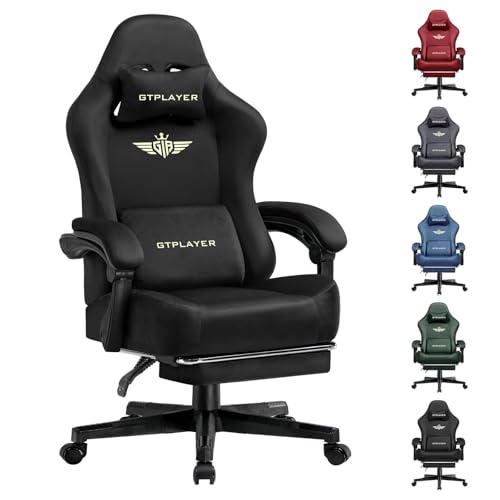
In contrast, several contemporary designs incorporate independent pocket spring units embedded beneath high-rebound foam layers, borrowed directly from modern mattress engineering. Models such as the GTPLAYER fabric chair and JECQCUPG adult gaming chairs utilize pocketed coils to deliver responsive weight distribution across the seat pan. Because each steel spring reacts independently, the cushion adapts actively as you shift, helping prevent premature cushion collapse during extended sitting sessions. This hybrid design balances initial softness with supportive core resilience over months of regular sitting.
Seat Edge Geometry: Wide Wingless Bases Versus Racing-Style Bolsters
Early gaming chairs drew inspiration from automotive bucket seats, featuring elevated side bolsters designed to keep drivers centered during sharp lateral turns. While that lateral containment makes sense inside a performance vehicle, it often creates unnecessary physical restrictions at a computer desk. Tapered metal frames with steep side wings force your thighs together, restricting natural shifts in leg positioning throughout the day. For many users, this restrictive contouring leads to annoying outer thigh pressure during extended work hours.
To address this physical limitation, manufacturers have increasingly shifted toward flat, wingless seat cushion architectures. JECQCUPG chairs feature a fifty-one-centimeter flat seat span, offering noticeably more usable width than traditional thirty-eight-centimeter bolstered chairs. This open horizontal surface allows users to cross their legs or sit sideways without pressing against stiff steel frames, which encourages steady blood flow and reduces outer thigh tension. Having unobstructed seat edges provides the freedom to adjust your seating angle whenever stiffness begins to set in.
Upholstery Trade-offs: Breathable Fabric Versus Easy-Clean PU Leather
Selecting upholstery material influences thermal comfort, routine maintenance requirements, and long-term surface appearance. Polyurethane synthetic leather, commonly designated as PU leather, remains the standard choice on chairs from brands like GTRACING, HELXQEXB, and N-GEN GAMING. PU leather provides a smooth finish that resists accidental liquid spills and wipes clean in seconds with a damp microfiber cloth, though it offers minimal airflow in warmer environments. Over time, warm gaming rooms can make smooth synthetic surfaces feel hot and uncomfortably clingy.
For buyers who prioritize continuous ventilation, breathable woven fabric represents an appealing alternative to synthetic leather surfaces. The light black GTPLAYER fabric chair utilizes a porous textile weave that permits steady air circulation, keeping you cooler over extended desk sessions. While woven fabric demands more care to prevent liquid staining, it completely avoids the surface cracking and peeling that synthetic leather can suffer over years of use. Fabric upholstery also feels softer against bare skin when sitting in shorts or casual clothing.
Armrest Functionality: Synchronized Linkage Versus Independent 3D Movement
Armrest design plays an essential role in mitigating shoulder and neck strain by supporting the weight of your forearms. Entry-level chairs generally feature either synchronized linkage systems or independent multi-directional assemblies. Linkage armrests, found on models like the N-GEN GAMING and JECQCUPG series, connect directly between the seat pan and the reclining backrest, shifting automatically to support your elbows as you recline. This linked motion provides effortless elbow cradling without requiring you to pause and fiddle with adjustment levers.
While synchronized linkage rests excel during casual relaxation, dedicated keyboard and mouse tasks often benefit from independent 3D adjustable armrests. Chairs like the GTRACING reclining model and specific GTPLAYER variants feature 3D mechanisms that allow you to adjust height, slide pads forward, and pivot inward. Inward angling provides stable forearm support during gamepad play, while parallel alignment accommodates mouse navigation across an extra-large desk mousepad. Fine-tuning the elevation prevents you from slouching to reach your arm supports.
Recline Mechanics and Integrated Footrest Utility
The ability to tilt the backrest back offers practical physical variety during long stretches of desk work and gaming. Recline ranges vary across models, with JECQCUPG and N-GEN units focusing on ninety to one hundred thirty-five degrees, while GTPLAYER and GTRACING models extend up to one hundred fifty-five degrees. A ninety-degree upright lock supports focused typing, while moderate angles around one hundred ten to one hundred twenty degrees redistribute upper body weight onto the backrest. Leaning back periodically helps alleviate static spinal loading accumulated during intense concentration.
Many reclining gaming seats pair their backrest mechanisms with a fold-out, retractable footrest positioned beneath the seat pan. Pulling out the padded footrest supports your calves and lower legs, transforming your desk chair into a comfortable recliner suitable for reading or casual media consumption. This horizontal lounge position mimics the relaxation of a couch gaming setup while keeping you centered at your personal workstation. You should verify that the footrest slides smoothly along its dual steel rails before locking your recline position.
Lumbar and Cervical Alignment: External Pillows Versus Built-in Support
Supporting the natural curvature of your spine represents a central consideration when sitting for prolonged work or gaming periods. The human spine features an inward lordotic curve at the lower back that can flatten out when fatigue causes an individual to slouch forward. Most chairs in this category, including options from HELXQEXB, GTPLAYER, and JECQCUPG, address spinal alignment through removable external lumbar cushions and headrest pillows that slide along elastic straps. These external cushions offer a simple way to fill the gap between your lower lumbar spine and the flat backrest.
While adjustable straps provide useful vertical placement, external cushions present certain ergonomic tradeoffs that users must manage carefully. An overly thick lumbar pillow can push your pelvis too far forward, separating your upper back from the chair and creating awkward postural tension. Detachable pillows grant the flexibility to remove the lumbar support entirely or swap in a slimmer cushion if the included foam feels too prominent against your spine. Finding the right balance requires adjusting the pillow height until your lower back feels gently supported without exaggerated curvature.
Structural Integrity: Steel Frames, Gas Lifts, and Stated Weight Capacities
The longevity and structural stability of any gaming chair depend directly on the internal skeleton beneath the padding and upholstery. Reliable models build their foundations around one-piece tubular steel frames that resist bending and creaking over time. For example, JECQCUPG highlights reinforced steel thickness within its internal frame, while GTPLAYER Pearl White and GTRACING incorporate FSC-certified wood cushion supports. The central gas lift cylinder should also feature certified ratings, such as SGS Class 3 certifications, to assure safe pneumatic height adjustment. A dependable lift prevents the seat from slowly sinking under normal body weight.
Weight capacity ratings offer a useful benchmark for structural resilience, with listed models supporting capacities ranging from 300 pounds on GTRACING chairs up to 350 pounds on GTPLAYER and JECQCUPG frames. However, buyers should recognize that a stated weight rating measures structural load capacity rather than a guarantee of comfortable physical fit. Reviewing base material construction, whether reinforced five-star nylon or solid steel, ensures the chair remains stable during daily swivel movements and deep reclines. A sturdy base prevents tipping when you lean backward or shift your weight abruptly.
Workspace Harmony: Desk Height, Floor Surfaces, and Room Clearance
Evaluating a chair in isolation often overlooks critical spatial interactions between the seat, your desk height, and the surrounding room. Standard computer desks generally feature tabletop heights between twenty-eight and thirty inches from the floor. Checking minimum and maximum seat elevation ensures your legs fit comfortably without contacting the underside of your desktop while keeping your feet resting flat on the floor. Proper vertical alignment prevents awkward wrist angles while typing and keeps your knees bent at a comfortable ninety-degree angle.
Floor surface compatibility and caster wheel construction also dictate how easily your seating moves within your room. Many contemporary chairs feature smooth-rolling rubber or coated nylon casters designed to glide quietly across hardwood, tile, or low-pile rugs without leaving visible scuffs. Additionally, if you plan to recline deeply or extend a retractable footrest, verify that your workstation layout provides adequate rear and front clearance so you avoid colliding with surrounding furniture. Checking these dimensional clearances beforehand saves you from dealing with cramped movements later.
Assembly Realities, Maintenance Schedules, and Warranty Protections
Almost all gaming chairs ship unassembled in compact packaging, requiring thirty to forty-five minutes of careful home setup with included hardware. Following the manufacturer’s illustrated assembly manual step by step helps prevent cross-threading heavy steel bolts into internal frame brackets. When attaching the backrest to the lower seat brackets, tightening the bolts gradually in an alternating pattern prevents misalignment and annoying frame squeaks during daily swivel movements. Taking care during initial assembly establishes a rigid, squeak-free base that stands up to regular use.
Reviewing warranty terms and customer support policies provides essential peace of mind should a pneumatic cylinder fail or a seam show premature wear. Brands like GTPLAYER provide stated policies featuring thirty-day replacement or refund terms alongside one-year limited repair warranties covering defective components. Simple routine maintenance, including wiping synthetic leather with neutral cleaners and vacuuming fabric upholstery, preserves cosmetic appeal and extends mechanical lifespan without demanding specialized tools. Periodically checking bolt tension every six months keeps moving components secure and stable.
A Practical Decision Framework for Selecting Your Seating
Synthesizing all these technical variables into a practical purchasing decision requires cataloging your daily physical habits and spatial constraints. If you frequently shift postures, sit cross-legged, or dislike tight side bolsters, prioritizing a wide, wingless flat seat with pocket spring cushioning provides superior positional freedom. If you generate substantial body heat or live in a warmer climate, selecting a breathable textile fabric over traditional PU leather will prevent uncomfortable moisture buildup. Choosing features that directly match your daily habits ensures you get genuine utility rather than superficial styling.
Balancing functional adjustability against your personal physical measurements will consistently yield better long-term comfort than choosing a model based solely on aggressive styling or brand recognition. By focusing on verifiable specifications like steel frame thickness, gas lift certification, seat dimensions, and clear warranty protections, you can choose a chair that reliably supports your daily activities. Taking time to measure your workspace ensures that your chosen seating actively enhances your productivity, gaming focus, and overall setup comfort. A thoughtful assessment of your posture preferences leads to an informed, satisfying purchase.
Finding the right chair ultimately comes down to matching specific engineering choices with how you personally sit, work, and relax each day. No single model suits every body type, but analyzing cushion composition, recline flexibility, armrest movement, and frame integrity enables you to invest in a chair that serves your physical needs. Prioritize verified dimensions and practical adjustments over cosmetic flair, and you will secure seating that supports your desk sessions for years to come.


Write Your Review
No reviews yet. Be the first to share your experience!