


Sitting through an eight-hour shift requires reliable posture support, which leads many home professionals to wonder about alternative seating styles. While racing-inspired bucket seats dominate streaming setups, answering whether is a gaming chair good for office work comes down to body proportions, daily tasks, and personal ergonomic requirements. Traditional executive chairs often emphasize breathability and basic lumbar curves, whereas gaming seats frequently introduce high backrests, separate support pillows, and deep reclining mechanisms. Upgrading your workspace with smart additions, such as practical desk setup accessories, often pairs well with seating adjustments to improve daily task flow. Understanding how these distinct design philosophies function during typical computing hours helps you decide which build fits your routine.
Evaluating a seat for daily computer tasks involves checking seat cushion density, lumbar adjustability, and whether the frame promotes neutral spinal alignment. Some professionals prefer the firm contouring and high-back neck support typical of racing chairs, while others find rigid side bolsters constricting over a full workday. Comparing published dimensions, upholstery breathability, and mechanism flexibility ensures you invest in gear that complements your desk habits without introducing physical fatigue. Evaluating your individual workspace setup allows you to balance style preferences with necessary posture adjustments.


Evaluating Gaming Chairs for Daily Office Tasks
Deciding whether a gaming seat suits an office routine requires looking past aggressive racing graphics and examining mechanical functionality. Remote workers and corporate professionals frequently discover that high-back gaming models share foundational engineering with executive desk chairs, such as heavy-duty pneumatic gas lifts, tilt-tension springs, and steel sub-frames. Distinct design elements like deep side bolsters, thick external lumbar cushions, and high-angle recline mechanisms deliver a different sitting dynamic than standard office mesh chairs. Evaluating how these features align with your daily computer tasks, desk height, and posture habits helps you make an informed workspace choice.
Ergonomic Profiles and Spinal Alignment
Traditional ergonomic office chairs emphasize active sitting, utilizing flexible backrests and contoured shapes that encourage natural spine articulation throughout the workday. In contrast, standard gaming chairs inherit their profile from motorsport bucket seats, which prioritize lateral containment and firm torso cradling. This lateral containment holds drivers securely through high-speed turns, but it can restrict leg shifting and casual posture changes at a desk. Office professionals who enjoy shifting their legs or crossing an ankle over a knee may find rigid side wings somewhat restrictive. Conversely, individuals who prefer a structured, upright boundary often find that racing-inspired seat designs help prevent subconscious slouching.
Another meaningful mechanical distinction centers on lower back support systems and upper backrest height. High-end mesh office chairs, such as models produced by GABRYLLY and Nexthro, integrate lumbar supports directly into the structural frame, allowing users to adjust vertical height and depth. Gaming chairs traditionally rely on detachable, strap-mounted memory foam or dense polyurethane lumbar cushions paired with tall headrest pillows. While an external cushion offers direct, pronounced thickness, it can shift during movement and might not match the natural curve of every spine. Full-length high-back frames offer continuous upper-torso contact for reading or virtual meetings, whereas mid-back office chairs allow freer shoulder blade mobility.
Seat Cushion Construction and Daily Pressure Relief
The internal engineering of the seat cushion determines whether a chair remains supportive through an eight-hour shift. Standard office seating generally employs molded high-density foam cushions that distribute user weight across the sitting bones and upper thighs. Recent hybrid chair designs, including models from COMHOMA and GTPLAYER, integrate independent pocket spring systems directly beneath high-resilience foam layers. These pocket coils compress individually in response to localized pressure, mimicking the adaptive support found in premium sleep mattresses. This independent coil action helps reduce pressure concentration on the tailbone and hips during intense spreadsheets or programming sessions.
Firmness levels in gaming seats often surprise professionals accustomed to soft, plush executive leather chairs. Gaming seats are intentionally tuned toward medium-firm or firm densities to prevent the cushioning from bottoming out against the metal base frame. While an ultra-soft cushion feels comfortable during the first twenty minutes, weak padding compresses rapidly and can leave you sitting against hard structural components after two hours. In addition, ergonomic desk chairs commonly feature a rounded waterfall front edge that slopes downward to reduce contact pressure behind the knees. Evaluating cushion thickness, such as the 3.2-inch high-density foam padding specified on ergonomic mesh models, provides a practical benchmark for sustained daily support.
Backrest Recline Mechanics and Posture Flexibility
Desk tasks demand flexibility in backrest positioning, allowing transitions between concentrated writing, phone conversations, and document reviews. Conventional office chairs offer center-tilt or synchro-tilt mechanisms that recline between 90 and 120 degrees, tilting the seat base slightly as the backrest reclines. Gaming chairs typically utilize independent backrest recline levers, allowing angles from an upright 90 degrees back to 135 degrees or even 150 degrees on models like COMHOMA. This independent backrest hinge lets you recline the back without tilting the seat cushion, offering a lounge-style resting position. While deep recline functions provide quick rest between meetings, maintaining an upright posture of 90 to 105 degrees is best for typing ergonomics.
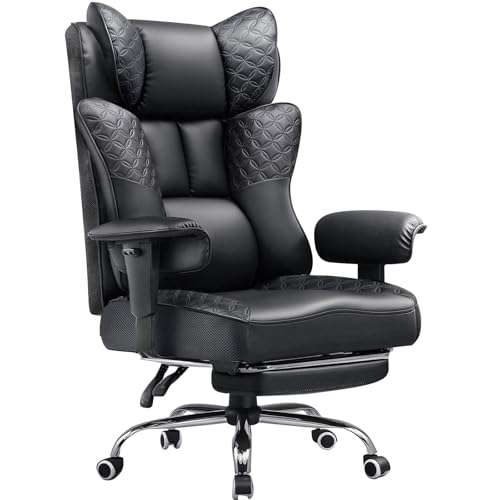
Several gaming and hybrid office models also include retractable footrests that extend outward from beneath the seat pan. When combined with a recline angle between 120 and 135 degrees, a deployed footrest distributes body weight across the calves, thighs, and back. This configuration can provide temporary physical relief when reviewing reports, reading lengthy emails, or taking mid-day conference calls. Adjustable tilt-tension knobs beneath the seat pan further regulate the resistance required to rock backwards, encouraging subtle micro-movements that ease muscle stiffness. Deploying a footrest does require substantial forward clearance under your workstation, making it less practical in tight cubicles or compact desk nooks.
Armrest Adjustability and Typing Ergonomics
Armrests are essential for reducing trapezius muscle strain and supporting neutral wrist positioning at a computer keyboard. Gaming chairs frequently feature multi-directional armrests that adjust in height, slide forward and backward, and pivot inward or outward. Pivoting armrests allow you to angle the pads inward, creating a stable resting platform for forearms while typing on a compact keyboard. Task-focused office chairs, on the other hand, frequently offer simple height adjustments or padded flip-up mechanisms. Flip-up armrests, found on models like GABRYLLY and GTPOFFICE, rotate up 90 degrees, allowing the chair to slide completely underneath your desk surface.
Proper armrest setup requires setting the armrest height so your elbows rest at a comfortable 90-degree angle with relaxed shoulders. If the armrests sit too high, they force your shoulders into an elevated shrug, leading to upper back tension after several hours. If the armrests sit too low or cannot be adjusted, your elbows hang unsupported, increasing gravitational strain on your neck muscles. Wide gaming armrests can occasionally collide with the edge of your desk, preventing you from pulling close enough to your keyboard. Checking both the minimum and maximum armrest heights relative to your desk surface prevents frustrating clearance mismatches and promotes natural posture.
Upholstery Breathability and Thermal Management
The materials covering a chair have a direct impact on thermal comfort and skin breathability across an entire working shift. Traditional gaming seating relies heavily on polyurethane (PU) synthetic leather, selected for its refined appearance, water resistance, and easy cleaning. However, solid synthetic leather has very low air permeability, which can trap body heat and moisture against your back and thighs in warm office environments. Manufacturers frequently introduce perforated panels or diamond-stitched textures to improve superficial airflow across contact points. If your home office tends to run warm during summer months, synthetic leather requires consideration regarding ambient temperature management.
In contrast, all-mesh ergonomic chairs utilize open double-layer woven fabrics that allow continuous airflow around your body. Mesh backrests and seat cushions prevent heat accumulation entirely, keeping you cool and sweat-free during high-temperature workdays. However, mesh seating surfaces can sometimes feel abrasive against delicate fabrics or bare skin, and they do not provide the plush, padded feel of foam. Hybrid chairs, such as the COMHOMA executive designs, combine diamond-stitched synthetic leather with strategic breathable mesh panels along side bolsters to balance ventilation with cushioned comfort. Identifying your personal thermal tolerance helps you select the right upholstery balance for your workspace.
Workspace Clearance and Room Dimensions
Workspace layout and room dimensions directly dictate what style of chair fits comfortably around your desk setup. Gaming chairs typically feature wide five-star metal or nylon bases with diameters spanning between 24 and 28 inches, providing stability for deep reclining. This broad wheel base requires ample open floor space between desk legs, nearby walls, and file cabinets to allow 360-degree swiveling. Measuring your desk opening width and knee clearance ensures the chair base and armrests glide smoothly into your workstation. If you work in a compact home office or tight alcove, a chair with flip-up arms or a smaller footprint provides easier maneuvering.
Lighting and overall desk ergonomics also influence how comfortable you remain in your chosen seating posture. Integrating proper illumination, such as sleek monitor light bars, minimizes glare across your screen while keeping your desk workspace well illuminated. When your monitor is properly lit and adjusted to eye level, you naturally avoid leaning forward or hunching away from your chair backrest. Smooth-rolling polyurethane casters further complement your setup by gliding silently across hardwood floors and rugs without leaving scuffs or marks. Selecting neutral color palettes, such as matte black, charcoal grey, or soft pearl white, delivers a sleek, professional executive presence on camera during video conferences.
Body Proportions, Seat Sizing, and Weight Capacities
Evaluating published chair dimensions against your own body measurements is crucial for achieving a comfortable, ergonomic fit. Many heavy-duty chairs, including big and tall models from GTPLAYER and Nexthro, list weight capacities up to 400 pounds supported by heavy-duty metal bases. While a 400-pound rating confirms the strength of the steel frame and pneumatic cylinder, it does not guarantee an ideal fit for every individual. A chair built for big and tall users features wider seat dimensions, such as 20.9 inches of width and 20.7 inches of depth, which may feel excessively large for petite professionals. Reviewing exact seat width and depth measurements ensures the proportions match your physical build.
Seat depth requires special attention because an overly deep seat cushion can restrict blood circulation behind the knees. When sitting with your spine supported against the backrest, you should easily maintain a two-finger gap between the front cushion edge and your calves. If the seat pan is too deep, shorter users will struggle to reach the backrest, leading to slouching and lower back fatigue. Taller individuals need sufficient seat depth to support the majority of their thighs, avoiding concentrated pressure on their sitting bones. Certified Class-3 and Class-4 pneumatic gas cylinders provide smooth height adjustments so your feet rest completely flat on the floor with knees at a 90-degree angle.
Assembly Rigidity, Maintenance, and Warranty Coverage
Proper assembly is fundamental to ensuring your chair operates safely, quietly, and smoothly from its very first day of use. Most office and gaming chairs arrive flat-packed, requiring roughly 15 to 30 minutes of assembly with included Allen wrenches and bolts. Installing the tilt mechanism squarely under the seat pan and tightening the bolts evenly prevents uneven mechanical stress on the frame. Ensuring the pneumatic gas cylinder drops completely into the center bore of the star base prevents wobbling and squeaking during daily swivel motions. Checking and re-tightening hardware every few months prevents fasteners from loosening as a result of repeated reclining and posture shifts.
Routine maintenance and warranty protections preserve both the functional mechanics and the visual appearance of your desk chair over the long haul. Caster wheels should be inspected periodically to clear away hair, carpet fibers, and debris that can impede smooth rolling across flooring. For synthetic leather upholstery, gently wiping the surface with a damp cloth keeps the material supple while removing body oils and dust. Warranty terms in this product category commonly range from one-year limited coverage on budget models up to three years on brands like GABRYLLY. Verifying warranty protections and return trial windows before purchasing ensures you can replace worn parts and invest with lasting confidence.
Determining whether a gaming chair fits your office work routine ultimately depends on your physical build, task habits, and ergonomic priorities. Gaming seats provide generous full-spine support, deep recline capabilities, and durable pocket spring cushioning that many professionals find comfortable for long hours. Meanwhile, dedicated mesh office chairs deliver unmatched passive ventilation, flexible lumbar integration, and compact footprints tailored for focused typing. By comparing key specifications like seat dimensions, armrest adjustments, upholstery breathability, and cylinder ratings against your workspace, you can select a chair that maintains comfort and productivity throughout your entire workday.







Write Your Review
No reviews yet. Be the first to share your experience!