


Desk clearance and armrest positioning often dictate how comfortably you can manage cameras, audio interfaces, and peripherals during a live broadcast. Many creators run into issues where bulky racing wings or rigid armrests bump directly into workstation trays, making it tough to stay centered on camera. Identifying the best gaming chair for streaming requires checking critical measurements like seat width, minimum seat height, and backrest recline before buying. Options like the Video Gaming Chair for Adults offer a 51cm wingless cushion, while the Homall Gaming Chair, Ergonomic Faux Leather provides classic high-back framing. If you want extra lumbar positioning, evaluating gaming chairs for back support helps you match built-in cushions to your spinal curve.
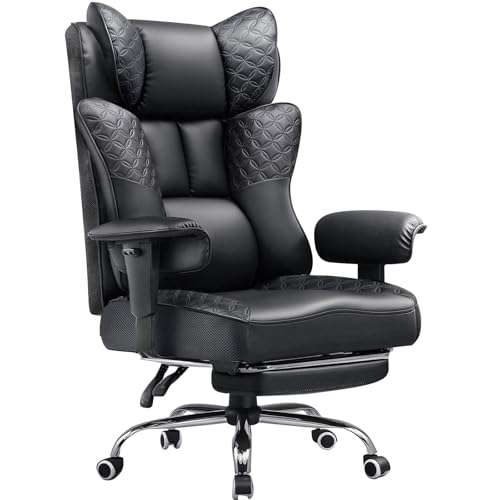
Stated weight capacity and cushion construction also separate dependable studio seats from short-lived options. Several models, such as the Dowinx Gaming Chair with Footrest, feature a 330-pound weight rating and pocket spring seat cushioning alongside a retractable footrest. You should also assess armrest adjustability, since fixed pads can prevent you from sliding close to your desk, while 2D or 3D arms allow closer alignment. Shoppers on a budget can explore gaming chairs under $150 to match broadcast features with reasonable pricing. Checking these specifications ensures your seat fits your physical dimensions and studio space.





Frequently Asked Questions
What seat dimensions should streamers check before buying a chair?
Measure the seat width between bolsters and the distance from the backrest to the front edge. Narrow seats with raised side bolsters can pinch your thighs, whereas flat designs like the 51cm cushion on the Video Gaming Chair for Adults allow wider postures. Comparing these measurements against your current chair confirms you have adequate hip room on camera.
Why do armrest adjustments matter for streaming setups?
Adjustable armrests let you slide closer to your broadcast desk without hitting keyboard trays or audio mounts. Fixed armrests, like those on the Homall Gaming Chair, Ergonomic Faux Leather, remain at one height and can conflict with desk edges. Models with 2D or 3D armrests allow you to adjust height and angle to support your forearms while operating controls.
How does seat foam density affect broadcast comfort in 2026?
High-density shaping foam and hybrid pocket-spring cushions resist compression much better than standard foam. When evaluating the Best Gaming Chair For Streaming of 2026, resilient padding keeps the seat from flattening out during long streams. If your chair feels too firm, adding dedicated gaming chair cushions provides supplemental padding for long sessions.
What weight capacity should you look for in a streamer chair?
Check the manufacturer’s stated weight rating to ensure the gas lift and frame safely match your build. Options from Dowinx specify a 330-pound limit with an SGS-certified cylinder, offering reliable stability for varied user sizes. A stated capacity between 250 and 330 pounds generally indicates a reinforced steel frame built for daily studio use.
Do caster wheels scratch studio flooring during live broadcasts?
Standard nylon casters can scuff hardwood or laminate when you roll across your room during a stream. Soft rubber casters glide quietly without marking floors, while adding floor protection rugs for gaming chairs prevents surface wear. Smooth wheels also reduce background noise picked up by studio microphones.




Write Your Review
No reviews yet. Be the first to share your experience!