


Balancing Creative Accuracy and Visual Performance
Graphic software and modern 3D games place conflicting demands on mobile computers, creating difficult choices for buyers seeking a single reliable machine. Video editing, vector illustration, and digital rendering require high-resolution panels with dependable color reproduction alongside generous system memory. Meanwhile, gaming engines prioritize thermal headroom, rapid screen refresh rates, and dedicated graphics processors. Identifying the best gaming and graphic design laptop setup requires balancing GPU muscle against visual clarity so creative projects look right while games run smoothly. Users seeking high pixel density often look toward a gaming laptop with a QHD display to maintain crisp detail across both creative canvases and fast-paced titles.
Hardware choices extend beyond standard all-in-one notebooks when balancing desk setups and travel needs. Mobile machines like the ASUS TUF FX505DT Gaming Laptop- 15.6″ and HP Pavilion Gaming 15.6-Inch Micro-EDGE Laptop feature dedicated Nvidia GeForce GTX 1650 graphics to handle baseline rendering and popular titles. At the same time, specialized accessories like the Acer Nitro 27in QHD 2560×1440 IPS 320Hz monitor or the Razer Core X V2 External Graphics Enclosure allow creators to expand desktop fidelity and external processing power. Evaluating modern portable setups alongside alternatives like a budget gaming laptop with an RTX 4050 helps pinpoint where to spend for maximum return.


Pros
- Great value for entry-level 1080p gaming performance
- Upgradable RAM and storage options for futureproofing
- Thin and light design at under 5 pounds, easy to carry between classes or rooms
- Decent battery life for mixed use, up to 8 hours for light tasks
Cons
- Only 60Hz refresh rate display, not ideal for competitive esports players seeking higher framerates
- 8GB RAM may feel limited for heavy multitasking or modern AAA titles without an upgrade
- Fan noise can become noticeable under heavy gaming load, though it helps keep temperatures in check
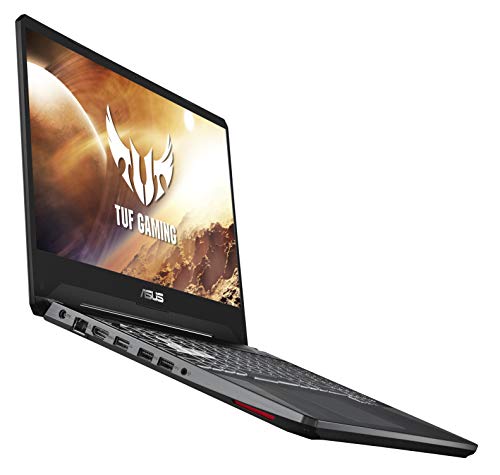
The HP Pavilion Gaming 15.6 laptop (model 15-dk0020nr) is a well-rounded entry-level gaming machine that balances performance, portability, and price. Powered by a 9th-generation Intel Core i5-9300H processor and NVIDIA GeForce GTX 1650 graphics with 4GB of GDDR5 VRAM, this laptop is designed to handle 1080p gaming at medium to high settings in popular titles like Fortnite, Overwatch, and PUBG. It also comes with 8GB of DDR4 RAM and a 256GB PCIe NVMe SSD, which ensures fast boot times and smooth multitasking for everyday use.
This laptop is best suited for casual gamers, college students, and work-from-home users who need a reliable device for both gaming and productivity. The GTX 1650 is capable of running most esports titles at 60fps, but the 60Hz display means you won't get the ultra-smooth motion that competitive players might want from a 144Hz panel. Still, for the price point, it's a solid performer.
Build quality is decent with a plastic chassis that feels sturdy enough for daily commuting. The backlit keyboard features acid green accents, which adds a subtle gaming vibe without being over the top. Audio is a standout feature, thanks to front-firing Bang & Olufsen speakers that deliver clear, impactful sound for gaming, movies, and music. The dual-fan cooling system helps manage thermals during extended play, though the fans can get audible under load.
Setup and maintenance are straightforward. Windows 10 Home comes pre-installed, and the HP software suite provides basic system monitoring and optimization tools. Upgrading RAM or storage is simple via two accessible memory slots and an extra M.2 slot, making it easy to boost performance down the line. Port selection includes USB 3.1 Type-C, three USB 3.1 Type-A, HDMI, and an RJ-45 Ethernet port, which covers most peripherals for a gaming desk setup.
One realistic limitation is that the 256GB SSD fills up quickly if you install several modern games, so you may want to add a secondary drive or use external storage. Also, the 8GB of RAM can become a bottleneck for heavy multitasking or newer AAA titles. Battery life is decent at up to 8 hours for light use, but gaming will drain it much faster, so keeping the charger nearby is recommended.
Overall, the HP Pavilion Gaming 15.6 laptop is a practical choice for budget-conscious gamers, streamers on the go, or anyone needing a versatile laptop for gaming, school, or work. If you prioritize portability and value over high refresh rates, this laptop delivers a dependable experience that's easy to upgrade and maintain.
Pros
- VESA certified ensures top-tier quality and compatibility.
- Braided design offers excellent durability and flex resistance.
- Supports high refresh rates (165Hz at 2K) for competitive gaming.
- Gold-plated connectors minimize signal loss and corrosion.
- Latch-free plug makes installation and removal hassle-free.
Cons
- 6.6 feet length may be too short for large desk setups or cable runs behind furniture.
- The gray color may not blend in with all gaming setups if the cable is visible.
- Not compatible with HDMI or Mini DP ports without an adapter.
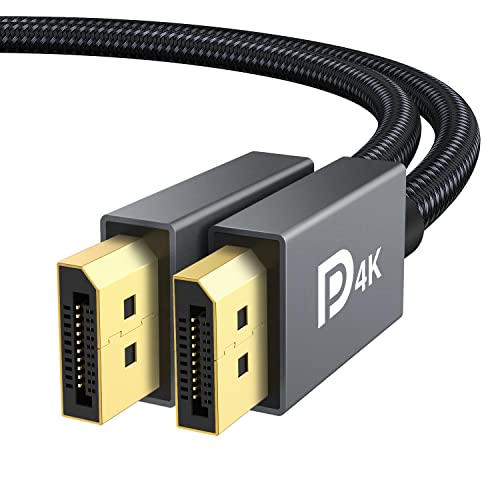
The IVANKY DisplayPort Cable 1.2 is a VESA-certified DisplayPort to DisplayPort cable designed for PC gamers, streamers, and anyone who needs a reliable, high-bandwidth video connection. Supporting resolutions up to 4K at 60Hz and 2K at 165Hz (or 144Hz), this cable is an excellent choice for gaming monitors that require high refresh rates. It's best suited for competitive gamers who want to eliminate screen tearing and motion blur, as well as casual users building a solid dual-monitor setup.
In terms of real-world performance, this cable delivers stable and flicker-free video transmission, thanks to its 24K gold-plated connectors and multiple layers of shielding. The 30 AWG tinned copper wire ensures consistent signal integrity even over the full 6.6-foot length. For gamers using 144Hz or 165Hz monitors, this cable can handle the bandwidth without dropped frames or artifacts.
Build quality is a standout feature. The nylon braided jacket is much more durable than standard PVC cables, rated to withstand over 28,000 bends. This makes it a practical choice for cable management in a gaming desk setup, as it resists kinking and wear over time. The latch-free design also makes plugging and unplugging easy, which is handy when swapping between a laptop and desktop.
Compatibility is broad: it works with any DisplayPort device, including gaming monitors, graphics cards, and projectors. It's plug-and-play, so no software or drivers are needed. If you're setting up a streaming station or a work-from-home gaming PC, this cable can handle the load without issues.
One realistic limitation is the cable length. At 6.6 feet (2 meters), it may be too short for some desk setups, especially if you need to route the cable behind furniture or across a large desk. Also, the gray color might not match a black or RGB-heavy setup, though it's not a performance concern. Lastly, it's strictly DisplayPort, so if you have a device with Mini DP or HDMI, you'll need an adapter.
Overall, this IVANKY cable offers exceptional value for PC gamers and gaming setup builders looking for a certified, durable cable that supports high refresh rates. It's a straightforward upgrade from the cheap cables that often come with monitors, and the braided build gives it longevity. If you need a reliable cable for your gaming monitor without spending a lot, this is a solid pick.

Pros
- Ultra-fast Thunderbolt 5 bandwidth ensures low latency and high performance for gaming and content creation
- Wide GPU compatibility – supports most NVIDIA and AMD cards up to 4 slots wide
- Tool-free modular design allows easy upgrades or reuse of existing GPU and PSU
- True plug-and-play with no driver hassle on compatible Windows laptops and devices
Cons
- Requires a separate GPU and ATX power supply (not included), adding to the total cost
- Compatibility depends on your laptop – must have a Thunderbolt 4/5 or USB4 port with eGPU support
- Not supported on Mac devices with M1 or newer chips, limiting platform options
The Razer Core X V2 is an external graphics enclosure that gives compatible laptops – whether Thunderbolt 4, Thunderbolt 5, or USB4 – a huge boost in graphical power. It's essentially a desktop GPU dock that lets you plug in a full-size graphics card and use it via a single cable. This is perfect for PC gamers who want desktop-level performance on their laptop, streamers who need extra GPU muscle for encoding, content creators working with 3D rendering or video editing, and even college gamers who want a single laptop that doubles as a powerful desktop when docked.
Performance-wise, the Core X V2 benefits from Thunderbolt 5's massive 80 Gbps bandwidth – double that of Thunderbolt 4. This means lower latency and smoother gaming, especially in demanding AAA titles. You can install the latest NVIDIA GeForce or AMD Radeon cards (up to 4 slots wide) and get near-desktop frame rates. The enclosure also delivers up to 140W power delivery to your laptop, so you can game and charge simultaneously. Setup is a breeze: just plug the included Thunderbolt 5 cable into your device, and the eGPU is recognized without a reboot – perfect for quick transitions between on-the-go and docked use.
Build quality is solid. The steel chassis is vented for maximum airflow, and the built-in 120mm fan automatically adjusts speed based on temperature to keep things quiet during light use and ramps up under load. You can even customize fan curves through Razer Synapse software. The interior is modular – you can swap the GPU and ATX power supply tool-free using thumbscrews. This gives you flexibility to upgrade later or reuse parts from an older desktop build. The enclosure's dimensions (16.59 x 8.51 x 7.76 inches) are compact enough for most desks but leave room for a large GPU.
One practical consideration: the Core X V2 does not come with a GPU or power supply, so you'll need to budget for those separately. Also, not every Thunderbolt 4 or USB4 device supports external graphics – always check your laptop manufacturer's documentation. Mac users with M1 or newer chips are out of luck, as those don't support eGPUs. But for Windows gaming laptops and handhelds (like certain USB4 gaming handhelds), it's a game-enhancing accessory.
In a setup, the Core X V2 is a clean addition. Its black steel finish matches most gaming gear, and the single cable reduces clutter. The 140W power delivery means you might not need a separate charger for your laptop. For streamers, pairing this with a high-end GPU can handle 1440p or 4K gaming while streaming at the same time. For content creators, GPU-accelerated tasks like video rendering and 3D modeling get a massive boost. The fan and PSU can be customized to match your performance needs and noise tolerance.
Overall, the Razer Core X V2 is a great investment for anyone who wants desktop-class graphics in a laptop-centric lifestyle. It's best suited for PC gamers who travel but still want high-end gaming at home, streamers or creators who need extra GPU power on demand, and laptop users who want to future-proof their setup with GPU upgrades. Just make sure your device is compatible and be ready to invest in a GPU and PSU. The convenience and performance make it a smart upgrade for many gamers and power users.
With Thunderbolt 5 bandwidth up to 80 Gbps, the Razer Core X V2 can handle demanding titles without bottlenecking most modern GPUs. You can expect smooth frame rates in games like Cyberpunk 2077, Call of Duty, and Forza Horizon at high settings. The enclosure supports both NVIDIA and AMD graphics cards up to 4 slots wide, so you can drop in a flagship card like the RTX 4090 or RX 7900 XTX. Active cooling with a 120mm fan keeps temperatures in check during long sessions. Since the GPU is fully inside the enclosure, you'll get desktop-grade performance with minimal compromise, especially when connecting an external monitor directly to the GPU.
The Core X V2 works with Windows laptops and devices that have a Thunderbolt 4, Thunderbolt 5, or USB4 port with eGPU support. It's also compatible with select USB4 gaming handhelds. Check your device manufacturer's documentation to ensure eGPU support. The enclosure supports most NVIDIA and AMD PCIe graphics cards up to 4 slots wide and any standard ATX power supply (sold separately). Note that Mac devices with M1 or later chips do not support eGPUs. The included Thunderbolt 5 cable is USB-C to USB-C, and the enclosure requires Windows 10 or 11 for full functionality.
Frequently Asked Questions
What hardware specifications matter most for gaming and graphic design?
A capable dedicated graphics processor and an accurate display panel are the most critical components for hybrid workloads. Creative software like Photoshop or Illustrator relies on graphics acceleration and high color fidelity, while gaming requires steady frame rates and efficient cooling. Systems with discrete graphics cards, such as the GeForce GTX 1650 found in entry-level rigs, provide hardware acceleration that integrated chips struggle to match. Fast solid-state storage also helps both game load times and large digital project file transfers.
Is 8GB of RAM sufficient for both graphic design and gaming?
An 8GB memory configuration functions as a practical baseline, but it may create bottlenecks during heavy multitasking. Large multi-layered design files, web browsers, and background utilities quickly consume standard memory limits. Modern creative applications and recent games run smoother with 16GB of system memory. Laptops that provide accessible memory slots allow you to upgrade capacity later as project sizes expand.
Why would a creator consider an external monitor or eGPU setup?
External hardware expands visual workspace and processing capability without requiring the purchase of a bulky desktop tower. Dedicated displays like the Acer Nitro 27in QHD 2560×1440 IPS 320Hz offer color-critical coverage like 90% DCI-P3 alongside extreme refresh rates. Connecting with a certified IVANKY VESA Certified DisplayPort Cable ensures stable visual transmission. Adding an external graphics enclosure like the Razer Core X V2 External Graphics Enclosure enables compatible laptops to utilize desktop GPU power over high-speed Thunderbolt connections.
Does screen refresh rate impact graphic design work?
High refresh rates do not change static color accuracy or graphic output, but they noticeably improve interface fluidity and motion rendering. Fluid cursor movements and smooth canvas panning reduce visual fatigue during long editing sessions. Gamers benefit directly from higher refresh speeds through lower input latency and cleaner frame transitions. Exploring laptops with a 144Hz display provides a balanced middle ground between smooth rendering and practical battery efficiency.
What display panel type works best for Best Gaming And Graphic Design Laptop needs in 2026?
In-Plane Switching (IPS) panels are widely recognized as the top choice for dual-purpose setups. IPS screens deliver wide viewing angles and consistent color fidelity across the entire display area, preventing color shifting while illustrating or photo editing. These panels also achieve rapid response times and high refresh rates needed for competitive gaming. Matte or anti-glare coatings add extra comfort by minimizing reflections in bright studio spaces.





Write Your Review
No reviews yet. Be the first to share your experience!