


Striking the Ideal Balance Between Resolution and Frame Rates
Screen clarity often defines the line between spotting an opponent at distance and missing a critical frame in competitive titles. Moving from standard 1080p to a 2560×1440 Quad HD panel sharpens textures and enhances readability without the heavy hardware penalty of a 4K screen. Identifying the best gaming laptop qhd display requires balancing pixel density with graphics power, ensuring the system sustains high frame rates in demanding titles. Mobile hardware featuring an Intel Core i9 or i7 processor paired with dedicated graphics provides the muscle needed for high refresh rates.
Display flexibility also matters when building an adaptable setup. While laptops like the msi Katana 15 HX and Thunderobot Storm 17 include built-in 165Hz QHD panels, pairing them with desktop monitors like the AOC Gaming Q27G41ZE expands your workspace. Evaluating laptops with advanced display connectivity helps maintain multi-screen flexibility. Taking time to optimize your gaming laptop for esports ensures frame pacing matches your screen speed.

Pros
- Smooth 144Hz performance with 1ms MPRT and FreeSync for competitive edge
- Sharp QHD resolution that balances detail and GPU demands
- Ergonomic stand with full adjustability reduces neck and shoulder fatigue
- Built-in speakers save desk space and handle basic audio needs
- Eye comfort certification protects eyes during long gaming sessions
Cons
- No USB-C or built-in USB hub limits connectivity for peripherals
- Speakers are adequate but lack bass and volume for immersive gaming audio
- Stand base is relatively wide, may need ample desk space
The Dell 27 Plus QHD Monitor S2725DSM is a 27-inch display designed for PC gamers who want a fast, high-resolution monitor without breaking the bank. With a 144Hz refresh rate, 1ms Moving Picture Response Time (MPRT), and AMD FreeSync, it targets competitive gamers, esports players, and streamers who need smooth gameplay and minimal input lag. Casual gamers and content creators will also appreciate the QHD resolution for crisp visuals and extra screen real estate.
Performance-wise, the 144Hz refresh rate ensures fluid motion in fast-paced titles like Call of Duty, Valorant, and Apex Legends. The 1ms MPRT helps reduce ghosting, keeping fast-moving objects sharp. Combined with AMD FreeSync, screen tearing is virtually eliminated when paired with a compatible graphics card. The QHD 2560x1440 resolution hits a sweet spot between Full HD and 4K, delivering detailed textures without demanding as much GPU power.
The build quality is solid with an ash white finish that stands out. The stand offers full ergonomic adjustments: height, tilt, pivot, and swivel, making it easy to find a comfortable viewing angle for long sessions. Setup is straightforward with HDMI and DisplayPort 1.4 inputs. The integrated dual 3W speakers provide clear audio for browsing or casual gaming, but serious gamers will want a dedicated headset or external speakers for immersive sound.
Eye comfort is a key feature with TUV-certified low blue light technology that reduces harmful emissions without washing out colors. This is a big plus for college gamers or anyone who spends hours in front of the screen. The Dell Display and Peripheral Manager software lets you control settings and manage multiple monitors, which is helpful for streaming setups or multi-taskers.
On the downside, the monitor lacks USB-C and a USB hub, so connecting peripherals requires separate cables. The speakers are decent for the price but lack punchy bass and high volume. The stand base is a bit wide, so measure your desk if space is tight. For work-from-home gamers and desk setup enthusiasts, the versatile ergonomics and slim bezels make it a practical choice for both productivity and play.
Overall, the Dell S2725DSM is a well-rounded monitor that delivers strong gaming performance, excellent adjustability, and eye comfort features at an accessible price. It's best suited for PC gamers who want a reliable 144Hz QHD screen for competitive play and everyday use, especially those who value ergonomics and a clean ash white aesthetic.
The 144Hz refresh rate and 1ms MPRT make the Dell 27 Plus monitor a strong performer for competitive gaming. In fast shooters and racing games, motion clarity is impressive with minimal blur. AMD FreeSync keeps the experience tear-free, providing a smooth visual flow. The QHD resolution delivers enough detail for spotting enemies at distance while maintaining high frame rates on mid-to-high-end GPUs. Input latency is low thanks to the quick response time, though hardcore esports pros might still prefer a 240Hz panel. Overall, it’s a great balance of speed and resolution for most gamers.
The fully adjustable stand is a standout feature. You can easily tweak height (up to 5.1 inches), tilt, swivel, and pivot to portrait mode, which is rare at this price point. This flexibility helps maintain proper posture during marathon sessions, reducing neck and eye strain. The TUV-certified low blue light mode works well without making the screen look yellow, so you can keep it on all day. VESA mount compatibility is also available if you prefer a monitor arm. For gaming setup builders and streamers who sit for hours, this level of ergonomic support is a real benefit.
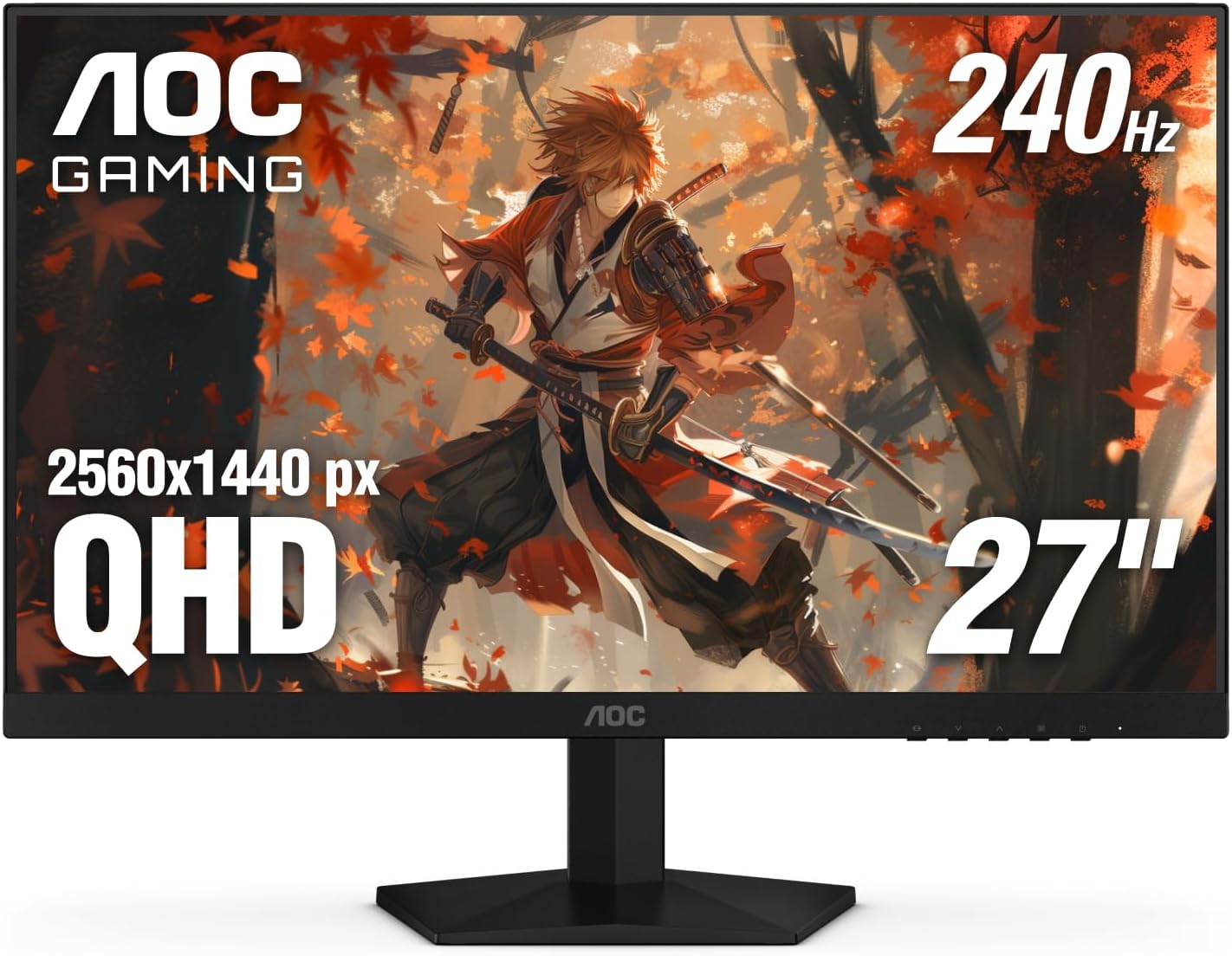
Pros
- Incredible 240Hz refresh rate and 0.3ms response for competitive edge
- Sharp QHD resolution with vibrant IPS colors and wide viewing angles
- G-Sync compatible and Adaptive-Sync for smooth, tear-free visuals
- Frameless design and VESA support great for multi-monitor and clean setups
- Easy-to-use OSD with practical gaming presets and Shadow Control
Cons
- Stand only offers tilt adjustment - no height, swivel, or pivot options
- HDMI 2.0 ports limit refresh rate to 144Hz over HDMI; use DisplayPort for full 240Hz
- Glossy screen surface may cause reflections in brightly lit rooms
The AOC Gaming Q27G41ZE is a 27-inch QHD IPS monitor built for gamers who prioritize speed and clarity. With a native 240Hz refresh rate that can be overclocked to 260Hz and a 0.3ms MPRT response time, it targets competitive esports players, serious PC gamers, and streamers who need every frame to count. The QHD resolution (2560x1440) strikes a balance between sharpness and performance, making it a solid choice for both high-fidelity single-player games and fast multiplayer titles.
When it comes to real-world performance, this monitor delivers. The combination of high refresh rate and ultra-low response time minimizes motion blur and ghosting, which is crucial in fast-paced shooters like Valorant or Apex Legends. Adaptive-Sync technology (G-Sync compatible) keeps gameplay smooth and tear-free, working seamlessly with both NVIDIA and AMD GPUs. The IPS panel offers vibrant colors and solid viewing angles, so you won't lose image quality when leaning back or sharing your screen on stream.
Build quality is practical for a gaming setup. The three-sided frameless design reduces bezel distraction and makes multi-monitor arrays look clean. The stand only allows tilt adjustment (-3 to +21 degrees), which might be limiting for some users, but the 100x100mm VESA mount lets you swap in an arm or height-adjustable stand. The textured black and red finish gives it a sporty gaming look without being too over-the-top.
Setting up the monitor is straightforward: connect via DisplayPort 1.4 to unlock the full 240Hz refresh rate, since HDMI 2.0 caps at 144Hz. The on-screen display (OSD) is intuitive, with joystick navigation and quick shortcuts for gaming presets like FPS, RTS, and racing. Shadow Control brightens dark areas without washing out the whole image - a handy feature for spotting enemies in shadows. The monitor also includes a headphone jack for easy audio routing.
That said, there are some realistic limitations. The lack of height adjustment on the stock stand means you'll likely want an aftermarket monitor arm for ergonomic positioning, especially during long sessions. The glossy screen surface can also produce reflections if you have bright lights behind you. While the connectivity covers the basics (2x HDMI 2.0, 1x DisplayPort 1.4, audio out), it lacks USB ports or USB-C, which some users may miss for peripherals.
Overall, the AOC Gaming Q27G41ZE is a fantastic value for gamers who want high-refresh QHD performance without paying a premium. It's best suited for competitive gamers who use DisplayPort and either already have a monitor arm or don't mind the basic tilt stand. Streamers and content creators will appreciate the color accuracy and smooth motion for gameplay footage. If you're building a gaming PC on a budget or upgrading from 1080p, this monitor delivers where it matters most: speed, clarity, and responsiveness.

Pros
- Powerful RTX 5070 GPU and i7-13620H deliver excellent gaming performance at QHD resolution.
- Large 32GB DDR5 RAM and fast 1TB SSD ensure smooth multitasking and quick load times.
- High-refresh 165Hz QHD display with good color accuracy enhances gameplay and creative work.
- Effective cooling system keeps performance stable under heavy loads.
- RGB keyboard and numeric keypad add versatility and style.
Cons
- Battery life is limited under gaming load; best used plugged in for full performance.
- At 11 pounds, it's heavier than many 16-inch competitors, reducing portability.
- The brand may be less familiar to U.S. buyers, potentially affecting support and resale value.
The Thunderobot Storm 17 is a gaming laptop that targets performance-hungry gamers and content creators who want a large screen without sacrificing power. Packing an Intel Core i7-13620H processor and NVIDIA GeForce RTX 5070 GPU, it's built to handle modern games at high settings, especially on its 17.3-inch QHD 165Hz display. With 32GB of DDR5 RAM and a 1TB PCIe SSD, this machine is ready for heavy multitasking, streaming, and storing a large game library.
For competitive gamers, the 165Hz refresh rate and QHD resolution strike a nice balance between smooth motion and visual detail. The RTX 5070 provides enough horsepower for high frame rates in popular titles like Call of Duty, Fortnite, and Apex Legends. Streamers and content creators will appreciate the ample RAM for running OBS, editing software, and games simultaneously. The RGB backlit keyboard with numeric keypad adds a touch of personalization and practicality for both gaming and productivity tasks.
Cooling is a critical factor in a gaming laptop, and Thunderobot has equipped the Storm 17 with a robust thermal solution. Dual 12V turbofans with 164 LCP blades and 0.2mm copper fins help dissipate heat effectively. The system includes multiple air outlets and a one-click forced cooling mode for demanding sessions. While the fans can get loud under load, this is expected for a high-performance laptop, and the cooling keeps the CPU and GPU from throttling during extended play.
Build quality is solid, with a gray chassis that feels sturdy despite the plastic construction. The 17.3-inch form factor means it's not the most portable option - at 11 pounds, it's best suited for desk use or occasional transport. Connectivity is strong: three USB-A ports, one USB-C, HDMI, RJ-45 Ethernet, and Wi-Fi 6 ensure you can hook up all your peripherals without dongles. The 53Wh battery is modest, but the laptop supports 100W PD fast charging, so you can top up quickly when needed.
Setup is straightforward: Windows 11 Home comes pre-installed, and the Thunderobot Control Center lets you tweak performance modes, fan curves, and RGB lighting. Some users may find the BIOS switching for GPU modes a bit technical, but the included documentation and online support help. One realistic limitation is the brand's relative unfamiliarity in the U.S. market, which might affect warranty service and community support compared to bigger names like ASUS or MSI.
Overall, the Thunderobot Storm 17 offers impressive specs for its price point, especially for gamers who prioritize performance and screen size over portability. If you're a college gamer setting up a dorm room battle station, a content creator needing a powerful mobile workstation, or a competitive player who wants a large high-refresh display, this laptop is worth considering. Just keep in mind the weight and battery trade-offs, and you'll get a capable machine that can handle anything you throw at it.

Pros
- Excellent CPU and GPU performance for the price point
- High-quality 165Hz QHD display with accurate colors
- Ample 32GB DDR5 RAM and 1TB SSD storage
- Effective cooling sustains performance over long sessions
- Solid port selection for gaming and creator peripherals
Cons
- Battery life is short (around 2 hours) typical for gaming laptops
- Chassis is mostly plastic, lacking the premium feel of higher-end models
- Fans can get loud under heavy load
The MSI Katana 15 HX is a gaming laptop built for players who want high performance without breaking the bank. Powered by an Intel Core i9-14900HX and NVIDIA GeForce RTX 5070, this 15.6-inch machine targets competitive gamers, streamers, content creators, and anyone who needs a portable system that can handle modern AAA titles and creative workloads. With 32GB of DDR5 RAM and a 1TB NVMe SSD, it's ready to run demanding software right out of the box.
In real-world gaming, the i9-14900HX and RTX 5070 push high frame rates even at QHD resolution. The RTX 5070 supports NVIDIA DLSS 4, which uses AI to boost FPS and improve image quality in supported games. The display is a QHD 165Hz panel with 100% DCI-P3 color coverage, meaning you get sharp details, smooth motion, and rich colors whether you're battling in an FPS or exploring an open world. The 165Hz refresh rate reduces motion blur for a competitive edge.
MSI's Cooler Boost 5 cooling system uses two fans and shared heat pipes to keep the CPU and GPU temperatures in check during long gaming sessions. Based on user feedback, the design does a good job maintaining stable frame rates without throttling, though the fans do become audible under load. The 4-zone RGB keyboard includes highlighted WASD keys, and the keycaps have a nice tactile feel for gaming. Port selection is generous with USB-C Gen 2, HDMI 2.1 supporting up to 8K output, multiple USB-A ports, and Wi-Fi 6E for fast wireless connectivity.
Build quality is practical rather than premium. The chassis is primarily plastic, which keeps weight down to just under 5 pounds, but it doesn't have the all-metal feel of more expensive laptops. The hinge feels sturdy, and the keyboard deck has minimal flex. Setup is straightforward: the laptop comes with Windows 11 Home and MSI Center software for performance tuning, RGB control, and system monitoring. Battery life is limited to around two hours under gaming loads, so you'll want to stay plugged in for serious play.
One realistic limitation is fan noise; under heavy gaming, the cooling fans ramp up noticeably. If you game in a quiet room or stream with an open mic, this is something to consider. Additionally, the 1080p webcam is average, so streamers may want a dedicated webcam for better quality.
The MSI Katana 15 HX offers strong value for gamers and creators who need a portable, high-performance laptop. It's ideal for college gamers, work-from-home players, and anyone building a gaming setup on a budget. If you can live with plastic build and short battery life, this laptop delivers where it counts: gaming performance, display quality, and system responsiveness.
The combination of Intel Core i9-14900HX and GeForce RTX 5070 makes the Katana 15 HX a beast for modern games. The i9's 24 cores (8 Performance + 16 Efficient) handle both gaming and background tasks seamlessly, while the RTX 5070, based on NVIDIA Blackwell architecture, brings full ray tracing and DLSS 4. In titles like Cyberpunk 2077 or Call of Duty, you can expect high to ultra settings at QHD resolution with smooth frame rates. The 32GB DDR5 RAM ensures zero stutter even when streaming or running Discord in the background. Esports players will appreciate the 165Hz display low latency for fast-paced shooters.
The 15.6-inch QHD display is a highlight, offering 2560x1440 resolution, a 165Hz refresh rate, and 100% DCI-P3 color gamut. This means you get sharp details, smooth motion, and vibrant colors suitable both for gaming and photo/video editing. The Cooler Boost 5 cooling system employs two fans and five heat pipes to keep temperatures in check. In sustained gaming, the CPU and GPU stay within safe limits, though the fans do become audible. The laptop maintains stable performance without significant thermal throttling, which is crucial for long sessions.
Frequently Asked Questions
Why select a 1440p resolution over standard 1080p for mobile gaming?
A Quad HD screen delivers significantly more pixels than a 1080p panel, creating sharper images and finer detail. This density enhances visual immersion without the severe performance hit of 4K. Players exploring large environments or using gaming laptops for fast shooters benefit from cleaner distant targets.
Does an RTX 5070 mobile GPU handle modern games at native QHD?
Yes, the GeForce RTX 5070 handles 2560×1440 resolutions effectively in modern titles. With AI upscaling tools like DLSS and robust GPU architecture, it maintains fluid frame rates. Heavy ray tracing may require fine-tuning visual settings to reach peak panel refresh rates.
How much system memory is recommended for 1440p gaming?
A capacity of 32GB of DDR5 RAM provides reliable headroom for native QHD gaming. High-resolution textures demand more memory throughput, and 32GB prevents performance stuttering. This configuration also supports background multitasking, Discord communication, and browser tabs during gaming sessions.
What advantage does a 165Hz refresh rate offer?
A 165Hz refresh rate updates frames much faster than a standard 60Hz screen. This speed minimizes motion blur and lowers input lag during rapid camera movement. Fast multiplayer action feels significantly smoother, aiding quick visual reactions.
Can you connect an external high-refresh QHD monitor to a gaming laptop?
Yes, modern gaming laptops feature HDMI 2.1 or USB-C DisplayPort outputs that easily power external high-refresh displays. Connecting a 144Hz or 240Hz monitor lets you build a full desktop station. Verify your connection cable supports the required resolution and bandwidth.





Write Your Review
No reviews yet. Be the first to share your experience!