


Essential Features for Everyday Portable Computing
Everyday computing often encounters frustrating bottlenecks when entry-level hardware cannot keep pace with modern web browsers and productivity tools. Shoppers seeking the best basic pc laptop face narrow performance boundaries where balancing an entry-level CPU like an Intel Celeron with modest system memory determines overall responsiveness. Entry-level machines frequently pair 4GB of system RAM with compact solid-state storage, making disciplined task management essential. If your workload involves demanding multitasking or visual media, comparing a budget gaming laptop illustrates how discrete hardware manages heavier tasks. For simple browsing and document editing, a targeted configuration controls costs while handling routine chores.
Hardware tradeoffs at this price point require practical expectations regarding screen resolution and integrated audio. A standard 14-inch high-definition screen at 1366 by 768 pixels delivers adequate clarity for reading text, though it lacks the sharpness of full HD panels. Because compact budget chassis feature modest speakers and basic webcams, adding simple external accessories can significantly upgrade call clarity and audio quality. Physical ports like USB Type-A slots and card readers ensure your machine links easily to necessary desktop accessories. Aligning your daily routine with these hardware boundaries prevents overspending while fulfilling core computing needs.

Pros
- Affordable price point for a Windows 11 laptop
- Lightweight and portable for on-the-go use
- Webcam and microphone included for streaming and video calls
- Solid-state drive ensures fast startup and app loading
Cons
- 4GB RAM may limit multitasking for heavier applications
- 64GB storage fills up quickly with games and media
- Intel Celeron processor is not suitable for demanding modern games
This HP 14" HD Laptop is a renewed device that brings Windows 11 to a highly accessible price point. Powered by an Intel Celeron Dual-Core Processor that can reach up to 2.60GHz, it's designed for basic computing tasks, light web browsing, and casual gaming. With 4GB of RAM and a 64GB SSD, it offers enough speed for everyday use, though it won't handle heavy gaming or intensive creative software.
This laptop is best suited for college gamers, work-from-home professionals, or anyone needing a secondary device for streaming, video calls, and light productivity. It's not built for competitive esports or high-end gaming, but it can run older or less demanding titles and handle streaming services like Twitch or YouTube without issue. The integrated HD webcam and digital microphone make it a practical choice for Discord chats or online classes.
In terms of real-world performance, the laptop boots quickly thanks to the SSD, and basic tasks like word processing, web browsing, and media playback feel responsive. The 14-inch HD display provides adequate clarity for watching videos or working on documents, though the 1366 x 768 resolution is on the lower side for modern standards. For casual gaming, you can expect playable frame rates in lightweight games, but don't expect high refresh rates or detailed graphics.
Build quality is typical for an entry-level laptop, with a durable plastic chassis in a Dale Blue finish. The keyboard and trackpad are functional for everyday typing and navigation. Connectivity includes three USB Type-A ports, an SD card reader, and a headphone/microphone jack, which covers basic peripheral needs. Wi-Fi and Bluetooth support ensure easy wireless connections for mice, headsets, or external storage.
Setup is straightforward, as the laptop comes with Windows 11 pre-installed and a renewed certification that ensures it's been tested and refurbished. The 64GB storage is limited, so you'll want to rely on cloud services or external drives for larger files. Maintenance is minimal, but you may need to manage storage carefully if you plan to install several applications or games.
Overall, this HP laptop is a practical choice for budget-conscious users who need a reliable machine for light gaming, streaming, and daily tasks. It's not a gaming powerhouse, but for casual use, schoolwork, or as a secondary streaming device, it offers solid value. If your gaming needs are modest and your budget is tight, this renewed laptop is worth considering.


Pros
- Exceptional value for budget-conscious streamers, podcasters, and gamers needing a reliable USB mic
- Simple plug-and-play setup with no extra software required, compatible with Windows and Mac
- Cardioid pattern and shock absorber help deliver clear, focused audio in typical home environments
- Adjustable stand and 360-degree rotation let you position the mic precisely where you need it
- Lightweight and compact, making it easy to move between desk setups or take on the go
Cons
- Build quality feels a bit plasticky and may not withstand heavy daily handling
- USB-only connection limits compatibility with some audio interfaces or consoles
- Built-in stand is basic; serious streamers may prefer pairing it with a separate boom arm for better placement
The Amazon Basics USB Condenser Microphone is a budget-friendly option designed for streamers, podcasters, and anyone who needs better audio than a headset mic can provide. With a 14mm large diaphragm, cardioid pickup pattern, and built-in shock absorber, it aims to deliver clear, low-distortion sound while minimizing background noise and desk vibrations. For PC gamers, this mic can upgrade Discord chats, Twitch streams, or YouTube commentary without breaking the bank.
In terms of performance, the cardioid pattern does a solid job of focusing on your voice and rejecting room noise like keyboard clacks or fans. The 14mm diaphragm captures decent detail for the price, making it suitable for voiceover work, podcasts, or casual music recording. The plug-and-play USB connection means you just plug it into your PC or Mac and start talking — no drivers, no complicated settings. That simplicity is a huge plus for gamers who want to get streaming quickly.
Build quality is adequate for the price point. The adjustable stand rotates 360 degrees and feels sturdy enough for occasional repositioning. However, the main body is mostly plastic, so it's not built like a tank. The included shock absorber and silicone boot help reduce thumps and knocks, though you may still pick up some tapping on the desk if the stand is on a hard surface. If you're looking for a permanent studio setup, you'd likely want to mount this mic on a boom arm using its standard 5/8-inch thread.
Comfort and desk practicality are strong — the unit is very compact (under 6 inches tall) and doesn't take up much space. The one-tap mute button is handy for muting during streams or calls, and it syncs with your PC's mute status. For cleaning, just wipe down the metal grille with a dry cloth; the mesh is easy to maintain. No software customization exists, but for this price range that's expected.
A realistic limitation is the mic's sensitivity to plosives — you may want a pop filter or windscreen if you tend to speak closely. Also, the built-in stand is not height-adjustable beyond the 360-degree tilt, so taller gamers might find it too low on the desk. The audio quality, while clear, isn't as detailed as pricier condenser mics, but for the price it's hard to complain.
Overall, this Amazon Basics mic is a smart buy for budget-minded streamers, esports players who want better voice clarity in team chat, or content creators starting out. It's also perfect for work-from-home gamers handling conference calls. If you're a competitive gamer or casual user who needs a straightforward USB mic that performs above its price, this is a strong recommendation.
For streamers, the Amazon Basics USB Condenser Microphone delivers the essential features to improve audio quality without a big investment. Its cardioid pattern helps isolate your voice from game audio and keyboard noise, which is critical for keeping your commentary crisp on Twitch or YouTube. The plug-and-play simplicity means you can set up in seconds, and the mute button is a lifesaver during unexpected moments. While the built-in stand works for desk placement, many streamers will want a boom arm to get the mic closer to their mouth for optimal clarity. The lack of a gain control dial is a minor drawback, but your PC's volume settings handle it well enough. For the price, it's a solid entry-level streaming mic.
Pros
- Instant plug-and-play USB setup with zero background software overhead
- Comfortable ambidextrous profile suits both left- and right-handed users
- Lightweight chassis glides smoothly across standard desk surfaces
- Dependable build quality from an established desktop peripheral brand
Cons
- Fixed 800 DPI sensor lacks the high-speed sensitivity adjustments required for competitive FPS titles
- No extra thumb buttons for dedicated in-game macros or custom keybinds
- Basic office aesthetic without RGB lighting or braided cabling
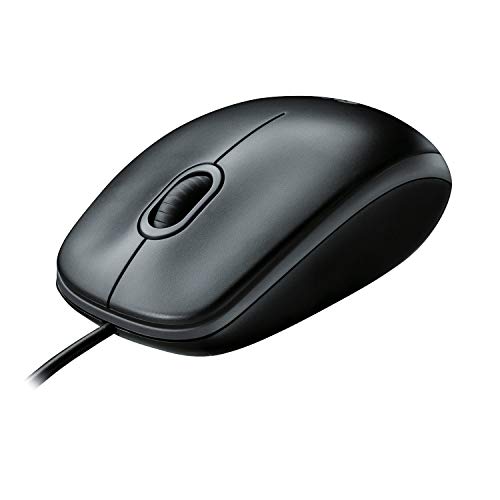
The Logitech B100 is an entry-level, wired optical mouse designed for straightforward dependability and ease of use. While high-end peripherals dominate competitive esports setups, this mouse serves an equally vital role on desktop workstations, dorm desks, and casual gaming battle stations. It is an ideal pick for budget setup builders, work-from-home gamers, students, and PC builders who need an ultra-reliable pointer that performs day after day without fuss.
In terms of real-world responsiveness, the B100 relies on an 800 DPI optical sensor. This fixed sensitivity provides consistent, predictable tracking that works well for turn-based strategy games, simulation titles, point-and-click adventures, and everyday desktop navigation. Because it features a direct wired USB connection, input latency remains low with zero signal stutter or dropouts, which is a common worry with cheap wireless mice. While it does not offer the lightning-fast tracking speeds needed for intense competitive first-person shooters, casual gamers will appreciate the steady cursor control during long evening sessions.
Ergonomics and build quality focus on practical comfort. Logitech crafted the chassis with a symmetrical ambidextrous profile, accommodating both left-handed and right-handed users comfortably. The curved top shell supports palm and claw grips nicely, helping reduce hand fatigue when shifting between studying, remote work, and casual gaming. The shell incorporates post-consumer recycled plastic, providing a solid, dependable feel without unnecessary weight. The standard three-button layout includes crisp left and right clicks alongside a responsive scroll wheel capable of side-to-side horizontal movement.
Setup and daily maintenance are virtually effortless. The wired design is fully plug-and-play, connecting immediately into any available USB port without demanding bloated software installations. This makes it particularly useful for secondary streaming PCs or older gaming laptops where keeping background CPU usage minimal is a priority. Keeping the matte finish clean is simple with a quick wipe down, and the lightweight cable stays out of the way on tidy desk pads.
Realistic limitations must be acknowledged. The fixed 800 DPI tracking rate cannot be adjusted via physical switches, there are no side macro buttons for custom gameplay commands, and the clean utilitarian design omits RGB illumination. However, for users who need a trustworthy primary mouse on a strict budget, an emergency backup for their gaming rig, or a reliable daily driver for casual gaming and remote work, the Logitech B100 delivers proven utility and lasting value.
Integrating the Logitech B100 into a gaming or study desk requires almost no preparation. With true zero-setup functionality, you simply plug the cord into a desktop PC or laptop USB port, and the cursor is immediately ready to track. This hassle-free design is especially helpful when assembling new PC builds or troubleshooting secondary rigs where third-party configuration software is inconvenient.
The compact footprint of 1.49 by 2.44 by 4.44 inches ensures the mouse fits easily on crowded college dorm desks, small computer carts, and shared home office tables. At just under a quarter pound, moving the mouse requires minimal effort, making it a handy companion to stash inside a laptop backpack as an everyday travel peripheral.


Pros
- Affordable price point for budget-conscious gamers and streamers
- Built-in privacy shutter adds peace of mind without extra accessories
- Plug-and-play setup works out of the box on multiple operating systems
- Auto light correction helps maintain visibility in mixed or low-light settings
- Compact design with flexible mount fits most monitors and laptops easily
Cons
- 30fps frame rate may not be ideal for high-framerate streaming or fast-paced content
- Fixed focus limits manual control over image sharpness compared to adjustable lenses
- Plastic build may feel less premium than higher-end webcams
The NIVEOLI Webcam is a budget-friendly 1080P USB camera designed for PC and laptop users who need reliable video quality for calls, streaming, and online meetings. With a built-in noise-canceling microphone and a sliding privacy cover, it packs practical features into a compact, affordable package. This webcam suits casual gamers, streamers starting out on Twitch or YouTube, and remote workers or college gamers looking for a straightforward plug-and-play solution.
In terms of performance, the webcam delivers crisp 1080P video at 30 frames per second with HDR support that helps maintain clear visibility in backlit or low-light conditions. The auto light correction adjusts brightness automatically, so you don't have to fiddle with settings during a Discord call or a quick stream. The dual noise-reducing microphones capture stereo sound while filtering out background noise, making conversations clearer in busy dorm rooms or home offices. While 30fps is fine for standard video chats and casual streaming, competitive streamers who need ultra-smooth 60fps may want to consider a higher-end model.
Build quality is practical for the price. The webcam features a plastic housing with a flexible clip that attaches securely to monitors, laptops, or stands. The 360-degree rotating head lets you adjust the angle easily, whether you're framing your face for a stream or showing off your gaming setup. The built-in privacy cover is a nice touch, giving you physical control over the lens when not in use. It's a simple but effective way to block the camera without needing a separate cover or tape.
Setup is truly plug-and-play. Just connect the USB 2.0 cable to your PC or laptop, and the webcam is recognized instantly on Windows, Mac, Linux, and Android systems. No drivers or software installations are required, which is great for quick deployment across multiple devices. The webcam works with all major platforms like Zoom, Skype, Microsoft Teams, and streaming software such as OBS, making it versatile for both work and play.
One realistic limitation is the fixed focus. While it keeps images sharp at typical distances, you can't manually adjust focus for close-up shots or specific framing. The plastic build also feels less robust than metal-bodied webcams, but it's light and easy to pack for travel. For the price, these trade-offs are expected and acceptable for most casual users.
Overall, the NIVEOLI Webcam is a solid entry-level choice for PC gamers, streamers, and remote workers who need a functional, no-fuss webcam with a microphone and privacy shutter. It won't replace a high-end streaming camera, but for everyday calls, basic streaming, and online classes, it delivers reliable performance at an unbeatable price point. If you're building a budget gaming setup or just need a quick webcam for your home office, this is a practical pick.
Frequently Asked Questions
Can a basic PC laptop handle modern gaming?
No, a basic laptop with an Intel Celeron processor and integrated graphics cannot run modern 3D titles smoothly. These systems lack dedicated graphics hardware and video memory required for rendering complex environments. Light 2D games or older titles may function, but modern gaming requires dedicated hardware such as a high refresh rate display and discrete GPU.
Is 4GB of RAM sufficient for a Best Basic Pc Laptop in 2026?
Yes, 4GB of RAM is sufficient for single-task computing like word processing, checking email, and light web browsing. Background operating system processes consume a noticeable portion of this capacity. Opening numerous browser tabs simultaneously may introduce slowdowns, meaning disciplined tab management remains helpful.
How much local storage does an entry-level laptop require?
An entry-level machine typically requires at least 64GB of solid-state storage to accommodate Windows and primary applications. Operating system files occupy significant room, leaving limited space for large media libraries. Utilizing cloud storage or external drives helps preserve local capacity for essential utilities.
What screen resolution is typical on budget notebooks?
Most entry-level notebooks provide a 1366 by 768 HD resolution on a 14-inch panel. This display format handles document drafting and streaming video reliably, though it lacks the sharpness found in a laptop with a QHD display. The resolution remains practical for indoor study and general office productivity.
Do peripheral accessories improve an entry-level laptop setup?
Yes, adding dedicated peripherals like an external mouse, external speakers, and a standalone microphone significantly enhances daily productivity. Built-in laptop sound and trackpads on budget models offer entry-level fidelity. Connecting an ambidextrous mouse or a dedicated USB webcam improves comfort during longer study and work sessions.





Write Your Review
No reviews yet. Be the first to share your experience!