


Essential Audio Gear for Laptop Music Workstations
Complex digital audio workstations demand heavy processing power, yet built-in laptop speakers rarely deliver the clarity required to balance a clean audio mix. Latency issues and cramped port selections often complicate mobile workflows, making external audio monitoring essential. Pairing the best pc laptop for music production with accurate studio gear allows producers to track subtle frequencies across complex tracks. Creators who balance synthesis plugins alongside everyday computing tasks often look to budget-friendly performance laptops that supply steady multi-core processing power and sufficient USB ports for peripherals.
Reliable audio monitoring prevents misleading equalization decisions during recording sessions. Hardware options like the OneOdio A71 Hi-Res Studio Recording Headphones provide dedicated 40mm drivers and dual-jack connectivity without requiring extra adapters for standard headphone jacks or audio interfaces. Meanwhile, compact solutions such as the Creative Pebble 2.0 USB-Powered Desktop Speakers deliver straightforward USB power and front controls for desktop reference playback. Evaluating connectivity standards, driver dimensions, and port availability ensures your studio workstation remains versatile whether tracking vocals in a bedroom or editing stems on the go.


Pros
- Excellent sound quality for the price with deep bass and clear highs perfect for gaming and music.
- Very comfortable for extended wear thanks to soft ear cushions and a lightweight design.
- Includes both 3.5mm and 6.35mm cables plus a SharePort for easy daisy-chaining.
- Sturdy build with a foldable frame and carrying case for portability.
Cons
- The plastic construction may feel less premium compared to higher-end models, and some users report cable durability issues over time.
- The inline microphone is basic and not ideal for serious streaming or podcasting without an external mic.
- Wired-only connection limits wireless freedom, but ensures zero latency for competitive gaming.
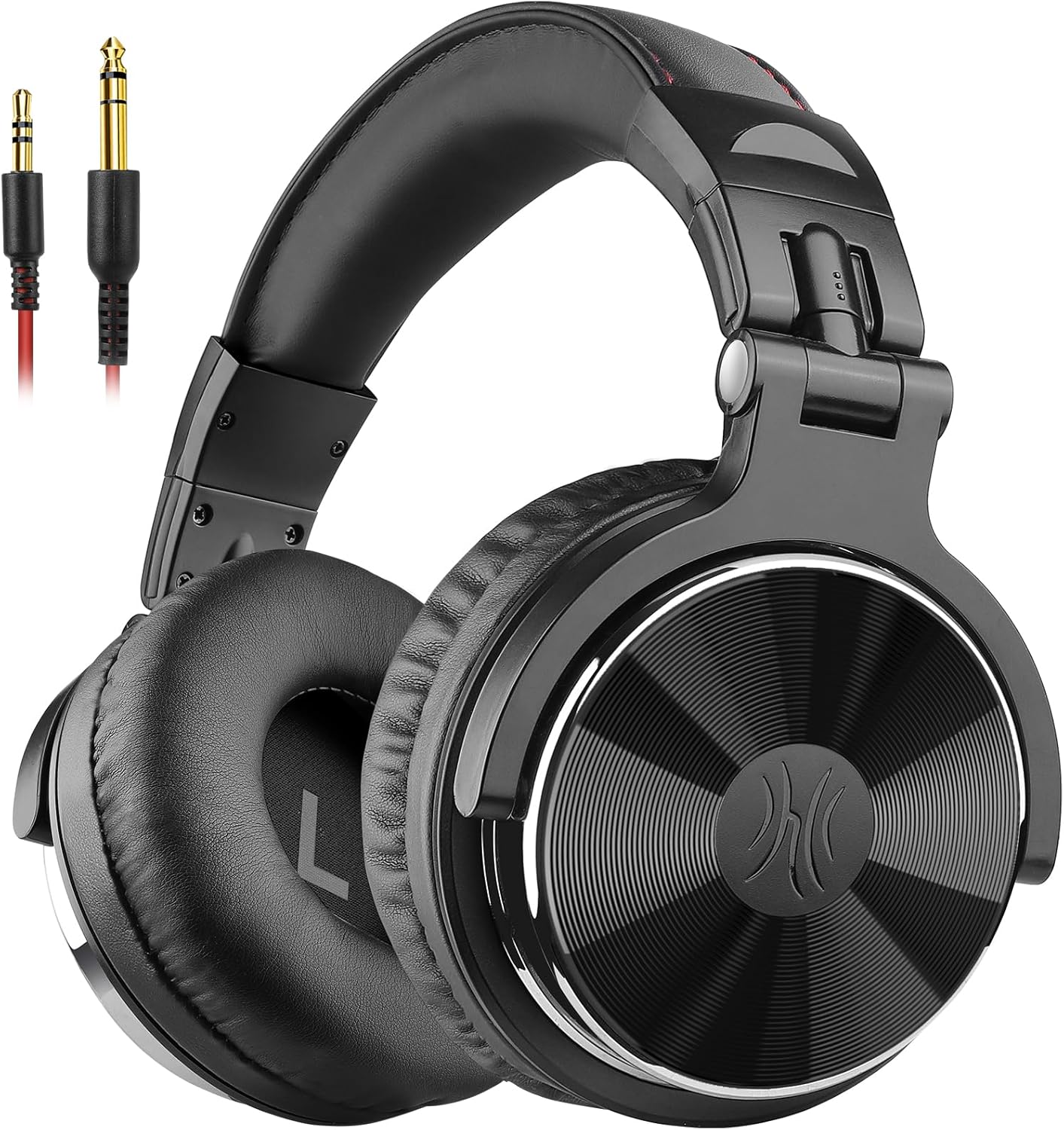
The OneOdio A71 is a wired over-ear headphone designed for studio monitoring, DJ mixing, and serious listening, but it also fits perfectly into a gaming or streaming setup. For PC gamers who want clear audio without breaking the bank, this headset offers Hi-Res certified sound with 40mm drivers that deliver punchy bass, clear vocals, and crisp highs. Whether you're tracking footsteps in an FPS, mixing audio for a stream, or just enjoying an open-world game, the A71 provides an immersive soundstage that many budget headsets can't match.
Comfort is a key selling point for long sessions. The soft protein leather ear cushions fully enclose your ears, and the adjustable headband distributes weight evenly. Many users report wearing them for hours without discomfort, which is crucial for marathon gaming sessions, all-night streaming, or extended audio editing. The lightweight design (13.3 ounces) helps prevent neck strain, making them a solid choice for college gamers and work-from-home setups alike.
Build quality is practical rather than premium. The plastic frame keeps costs low and weight down, but it feels sturdy enough for daily use. The earcups swivel 90 degrees for single-ear monitoring, a feature DJs and streamers appreciate when they need to hear their surroundings. The included carrying case adds protection for travel or dorm room storage. Some users have noted cable wear over time, but the detachable cables make replacements easy, and OneOdio's customer service is often praised for sending replacements promptly.
Connectivity is straightforward and versatile. The two included cables — a 1.2m 3.5mm cable with inline mic and a coiled 2-3m 3.5mm to 6.35mm cable — cover everything from your gaming PC and controller to audio interfaces and mixers. The SharePort lets you daisy-chain a second pair of headphones, which is handy for co-op gaming or collaborating on a stream without extra splitters. Just be aware that the inline mic is basic; for clear voice chat or streaming, you'll likely want a dedicated USB mic.
If you're a casual or competitive gamer on a budget, or a streamer just starting out, the OneOdio A71 offers impressive bang for the buck. It's not a replacement for high-end studio monitors, but its Hi-Res audio, comfort, and dual-cable flexibility make it a reliable workhorse for daily gaming, music listening, and light audio work. The few drawbacks — plastic build and mediocre mic — are easily overshadowed by its performance at this price point.
Pros
- Exceptional value for the price with high-quality sound and build.
- Comfortable for long sessions thanks to plush ear pads and self-adjusting headband.
- Versatile connectivity with both 3.5mm and 6.35mm plugs, plus detachable cables.
- Durable metal frame and swivel hinges feel sturdy for daily use.
Cons
- Wired only; no wireless or Bluetooth option for cable-free convenience.
- Inline microphone is basic and may not match dedicated gaming headsets for clarity.
- Ear cups are large and may feel bulky for smaller heads or on-the-go use.
The OneOdio Pro-10 is a wired over-ear headphone designed primarily for studio monitoring and DJ use, but its specifications and features make it a strong contender for PC gamers, streamers, and content creators on a budget. With large 50mm dynamic drivers and neodymium magnets, these headphones deliver a balanced sound signature with punchy bass and crisp highs - perfect for hearing footsteps in competitive FPS games or enjoying the soundtrack of open-world titles. The 32-ohm impedance means they are easy to drive directly from a PC, laptop, or console without needing a separate amplifier.
For gamers who spend hours at their desk, comfort is critical. The Pro-10 features thick, soft padded ear cushions and an adjustable, stretchable headband that distributes weight evenly. Many users report they can wear these for several hours without discomfort. The ear cups swivel 90 degrees, allowing for single-ear monitoring - a handy feature for streamers who want to hear their own voice or game audio while keeping one ear free for chat or ambient noise. The closed-back design also provides decent passive noise isolation, helping you focus on your game without distractions.
Build quality is solid for the price. The headband uses a metal frame with a plastic outer shell, and the hinges feel durable. The included cables are detachable: a coiled 9.8-foot cable with a 6.35mm plug and a straight 3-foot cable with a 3.5mm plug and inline microphone. The microphone is basic but functional for Discord calls or in-game chat. One standout feature is the share audio port, which lets you plug in a second pair of headphones for co-op gaming or shared listening - no splitter needed.
Setup is plug-and-play: just connect the appropriate cable to your device, and you are ready to go. There is no software to install, and the headphones work with PCs, Macs, consoles (via 3.5mm), audio interfaces, and even mobile devices. The foldable design makes storage easy, though the ear cups are large and may not fit in all carrying cases. The main limitation is the lack of wireless connectivity - if you prefer a cable-free setup, these are not for you. Also, the inline microphone is adequate for voice chat but not ideal for serious streaming or podcasting where a dedicated mic would be better.
Overall, the OneOdio Pro-10 headphones offer outstanding value for gamers, streamers, and content creators who prioritize sound quality and comfort on a tight budget. They are especially well-suited for PC gamers who need reliable wired audio for competitive play, casual gaming, or monitoring during streaming. While they lack some premium features like wireless or a high-quality boom mic, their performance and build quality at this price point are hard to beat. If you are building a gaming setup and need a versatile, no-fuss headphone for both gaming and music, the Pro-10 is a smart choice.
Pros
- Affordable price point for decent stereo sound with enhanced bass
- Touch-controlled RGB lighting adds visual flair to any gaming desk
- Simple knob control for volume and power is intuitive and convenient
- Plug-and-play setup with USB power and 3.5mm aux works with multiple devices
Cons
- Limited soundstage and power compared to larger or more expensive speaker systems
- No Bluetooth connectivity; relies on wired aux connection only
- RGB lighting may be too bright or distracting for some users in dark rooms
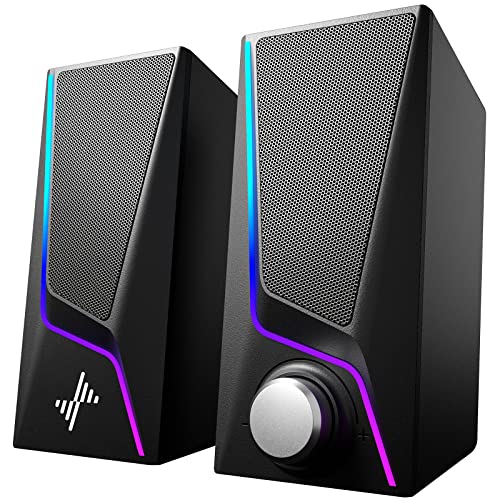
The Nylavee Computer Speakers are a budget-friendly desktop audio solution designed for PC gamers, casual listeners, and RGB setup enthusiasts. These USB-powered speakers feature two full-range dual-magnet driver units and dual bass-boost ports, aiming to deliver clearer sound and deeper bass than typical built-in monitor or laptop speakers. With 6 touch-controlled lighting modes and a simple knob for volume and power, they offer an easy way to upgrade your gaming or work-from-home audio without breaking the bank.
For competitive and casual gamers alike, audio clarity and bass response can make a difference in immersion and situational awareness. While these speakers won't replace a high-end gaming headset for pinpoint positional audio, they provide a noticeable improvement over basic computer speakers for games like open-world adventures, MOBAs, or single-player titles. The dual bass ports help emphasize explosions and soundtracks, adding a bit of rumble without distorting at moderate volumes. That said, audiophiles or those seeking room-filling sound may find the output limited for larger spaces.
Build quality is typical for this price range: a lightweight plastic construction with a compact footprint (about 7 inches tall) that fits easily on most desks. The touch-sensitive lighting controls on the top are responsive, though they can be accidentally triggered if you rest items on the speakers. The single knob for volume and on/off is a nice touch, reducing clutter and making adjustments quick during gaming sessions. The speakers are powered via USB and connect through a 3.5mm aux cable, so no drivers or Bluetooth pairing is needed - just plug into your PC, laptop, monitor, or even a phone or tablet.
One of the main selling points is the RGB lighting, which offers six modes including symphony, flowing, breathing, and three solid colors. This allows users to match their gaming setup's aesthetic or create a dynamic visual effect. The lighting is controlled by touch, but there's no software or remote, so customization is limited to the built-in modes. For RGB enthusiasts, this adds a nice pop of color without needing extra controllers or hubs.
In terms of limitations, the lack of Bluetooth means you're tethered by the aux cable, which may be a dealbreaker for those wanting wireless flexibility. Also, the bass, while enhanced, won't satisfy users seeking deep, thumping low-end - it's more of a subtle boost than a subwoofer experience. The speakers are best suited for small to medium-sized desks, and the plastic build feels less premium than metal or wood alternatives. Setup and cleaning are straightforward: just plug in, place, and wipe with a dry cloth if needed.
Overall, the Nylavee Computer Speakers are a practical choice for budget-conscious gamers, college students, or anyone wanting to improve their desktop audio and add RGB flair. They're not for hardcore competitive gamers who need precise audio cues, but they work well for casual gaming, streaming, watching videos, or music. If you're building a compact gaming setup or need an affordable speaker upgrade, these are worth considering for their ease of use and visual appeal.
Pros
- Excellent value for the price with surprisingly good audio quality for its size
- USB-powered convenience means no wall wart needed, perfect for clean desk setups
- Compact footprint saves valuable desk space for gamers and streamers
- Easy plug-and-play setup with no software or drivers required
Cons
- Limited bass compared to larger speakers with dedicated subwoofers, may not satisfy bass-heavy gamers
- Frequency response tops out at 17 kHz, which may lack some high-end detail for critical listening
- USB connection only, no 3.5mm auxiliary input for non-USB devices
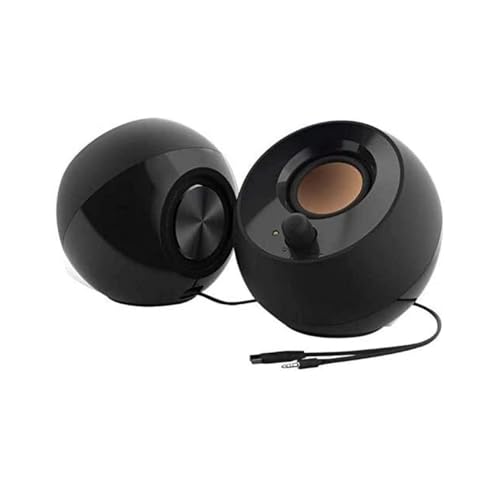
The Creative Pebble 2.0 desktop speakers are a compact, USB-powered audio solution designed for PC gamers, streamers, and anyone who wants better sound without taking over their desk. These speakers use custom-tuned far-field drivers and rear-facing passive radiators to produce a fuller sound than you'd expect from such a small package. They're aimed at casual gamers, college gamers, and work-from-home users who prioritize simplicity and desk space.
In terms of real-world performance, the Pebble 2.0 delivers clear mids and highs with a noticeable bass boost thanks to the passive radiators. While they won't rattle the walls like a dedicated subwoofer setup, they provide enough low-end punch for immersive gameplay in titles like RPGs or open-world adventures. The 45-degree elevated drivers help project sound upward, creating a more personal listening experience that's great for long gaming sessions or streaming on Twitch. For competitive gamers who need pinpoint audio cues, these speakers may lack the precision of a good gaming headset, but they work well for casual play and background music.
Build quality is solid for the price point, with a compact plastic enclosure that feels durable enough for daily use. The black finish is understated and should blend into most gaming setups without looking out of place. The front-facing volume control is a nice touch, letting you adjust levels quickly without reaching around the back. Setup is as simple as plugging the single USB cable into your PC or laptop, and you're good to go. No power adapter, no software, no fuss.
One realistic limitation is the frequency response, which tops out at 17 kHz. This means the highest treble details might be slightly rolled off compared to more expensive speakers. Also, the USB-only connection means you can't use these with devices that lack USB audio support, like some older consoles or media players. For most PC gamers and streamers, though, this won't be an issue.
Overall, the Creative Pebble 2.0 is a practical choice for budget-conscious gamers, streamers, and anyone building a clean, minimalist desk setup. They're especially well-suited for dorm rooms, home offices, or secondary gaming rigs where space is at a premium. If you need better audio than your monitor's built-in speakers but don't want to invest in a full sound system, these are a solid buy.
Frequently Asked Questions
What hardware specifications matter most for music production on a PC laptop?
A fast multi-core processor and at least 16GB of system memory are critical for stable audio production. Digital audio workstations load numerous virtual instruments and track plugins directly into active RAM, making memory bottlenecks a frequent source of latency. Solid-state storage also ensures sample libraries and project files load quickly without audio dropouts. If you also use your machine for visual media editing, machines with sharp QHD displays offer extra screen real estate for viewing dense arrangement timelines.
Can you produce music using wired headphones instead of studio monitor speakers?
Yes, wired studio headphones are well suited for mobile music production and mixing in untreated rooms. Models like the OneOdio Wired Over Ear Headphones Hi-Res Studio feature 50mm drivers and dual 3.5mm and 6.35mm inputs that plug directly into laptop jacks or dedicated audio gear. Closed-back headphones prevent sound bleed during vocal tracking and offer passive noise isolation. However, cross-referencing your mix across external speakers remains helpful to evaluate stereo imaging and room response.
Do USB-powered speakers provide enough volume for audio editing on a laptop?
USB-powered desktop speakers provide adequate volume for near-field reference listening and basic audio editing. Units such as LENRUE Computer Speakers and Nylavee Computer Speakers draw power via USB or USB-C while receiving line audio through a 3.5mm cable. While they do not replace calibrated studio monitors for mastering sub-bass frequencies, they offer an accessible desktop soundstage for casual editing and multimedia playback.
Why are audio adapters unnecessary with dual-jack studio headphones?
Dual-jack studio headphones eliminate separate adapters by incorporating both 3.5mm and 6.35mm ports directly into the earcups. The supplied cables typically feature matching reversible jacks on either end, enabling direct connection to an audio interface, an electric instrument, or a PC laptop headphone jack. This design prevents missing dongles during travel and allows audio sharing between two listeners without splitters.
How many USB ports are needed on a PC laptop for music production?
Most music production setups require at least two to three available USB ports to connect essential hardware. Producers routinely connect an external audio interface, a MIDI keyboard controller, and external storage drives simultaneously. When selecting a machine for your 2026 setup, reviewing port standards and considering an external USB hub will keep your studio peripherals connected reliably. Power-focused users who also game may explore laptops with advanced hardware switches that combine generous connectivity with dedicated graphics power.





Write Your Review
No reviews yet. Be the first to share your experience!