


Spongy keystrokes and ghosted inputs can ruin an intense match faster than almost anything else. When every split-second command counts, upgrading to a board with crisp switch actuation and rock-solid stabilization completely changes how your setup feels under your fingers. Digging through product specifications, switch stem tolerances, and verified user feedback highlights how the best gaming keyboard reviewed compared here solves common gaming frustrations. Pairing your deck alongside dialed-in mouse tracking accuracy ensures you never miss a shot during clutch rounds. Whether you need pre-lubed mechanical switches or quiet spill-resistant keys, securing the right balance between tactile feedback and travel distance makes all the difference.
Durable construction keeps your hands comfortable through marathon sessions while protecting against long-term wear. Heavy-duty doubleshot PBT keycaps resist finger shine, while integrated wrist rests help eliminate wrist fatigue before it starts. Factoring in layout dimensions is also key when budgeting your complete desk space, especially if you prefer a compact tenkeyless footprint for broad mouse sweeps. Analyzing switch dampening pads, wireless latency protocols, and companion software helps separate flimsy novelty decks from dependable peripherals.

Pros
- Hot-swappable switch design allows easy customization and future upgrades without soldering.
- Pre-lubed ROG NX Snow V2 linear switches offer smooth, quiet, and responsive keystrokes out of the box.
- PBT doubleshot keycaps provide excellent durability and resistance to shine over time.
- Built-in sound-dampening foam significantly reduces keyboard ping and echo for a cleaner typing sound.
- Multi-function wheel and dedicated streaming hotkeys add convenience for gamers and content creators.
Cons
- Full-size layout may take up more desk space than tenkeyless or compact options, which could be a concern for smaller setups.
- Armoury Crate software can be resource-heavy and less intuitive for some users, though onboard controls are available.
- Wrist rest is slightly firmer than some competing models, which may not suit everyone's comfort preference.
The ASUS ROG Strix Scope II X is a full-size wired mechanical gaming keyboard that brings together premium build quality, hot-swappable switches, and thoughtful features for PC gamers, streamers, and content creators. It uses pre-lubed ROG NX Snow V2 linear switches, which offer a smooth, quiet keystroke with reduced wobble and improved stability. The PBT doubleshot keycaps resist shine and wear, keeping the keyboard looking fresh even after heavy use. This keyboard is designed for those who want a reliable, customizable daily driver that performs well in both gaming and productivity tasks.
In real-world gaming, the ROG NX Snow V2 switches deliver fast, responsive inputs with a satisfying thocky sound. The linear feel is ideal for rapid key presses in competitive FPS games like Valorant or Apex Legends, as well as MOBA titles where quick ability activations matter. The full-size layout includes a number pad, which is handy for streamers who need to enter commands or for work-from-home gamers handling spreadsheets. The multi-function wheel and dedicated F1-F5 hotkeys for Xbox Game Bar and recording make it easy to adjust volume, skip tracks, or start/stop captures without leaving the game.
Build quality is excellent. The aluminum top plate gives the keyboard a sturdy, weighty feel with no flex, and the detachable USB-C cable adds convenience for transport or cable management. The integrated sound-dampening foam and switch pads effectively reduce pinging and echoes, resulting in a quieter typing experience that won't disturb others during late-night sessions. The detachable wrist rest is covered in a soft faux leather and provides decent support, though some users may find it a bit firm compared to plush alternatives. Three adjustable tilt angles let you find a comfortable typing position.
Customization is a strong point. The hot-swappable switch sockets allow you to easily swap in different ROG NX switches or other compatible 3-pin/5-pin mechanical switches without soldering. This extends the keyboard's lifespan and lets you tailor the feel to your preferences. Per-key Aura Sync RGB lighting is vibrant and fully customizable via Armoury Crate software, which also enables macro recording, key remapping, and profile management. While the software can be resource-heavy, the keyboard also offers onboard controls for basic lighting and media adjustments.
One limitation is the full-size footprint, which may be too large for compact desks or those who prefer a minimalist setup. Additionally, the Armoury Crate software has a learning curve and may require some tweaking to get the most out of the RGB and macro features. The wrist rest, while functional, is not as plush as some premium options, but it still reduces fatigue during long sessions. Overall, the ROG Strix Scope II X offers a compelling mix of performance, build quality, and customization at a reasonable price point.
For PC gamers, streamers, and content creators who want a durable, full-size mechanical keyboard with hot-swappable switches, quiet acoustics, and extensive RGB customization, the ASUS ROG Strix Scope II X is a strong recommendation. It works well for competitive and casual gaming, daily productivity, and streaming setups. If you have the desk space and don't mind the software learning curve, this keyboard delivers excellent value and long-term reliability.

Pros
- Compact TKL layout maximizes mouse space and reduces desk clutter.
- Quiet switches are great for shared spaces, late-night gaming, or streaming.
- IP32 rating adds peace of mind against accidental spills or dust.
- Responsive anti-ghosting for reliable input in competitive play.
- Affordable price point delivers excellent value for a SteelSeries keyboard.
Cons
- 8-zone RGB is less customizable than per-key lighting, which may disappoint RGB enthusiasts.
- Non-mechanical switches lack the tactile feel some gamers prefer.
- Wired connection only; no wireless option for those seeking a cable-free setup.
The SteelSeries Apex 3 TKL is a tenkeyless gaming keyboard designed for PC gamers, esports players, streamers, and gaming setup builders who value a compact footprint and quiet operation. By removing the number pad, this keyboard frees up significant desk space for mouse movement, a key advantage in fast-paced FPS and MOBA games where every inch counts. It's also a great fit for college gamers or anyone with a smaller desk who still wants a full-featured gaming peripheral.
In real-world use, the whisper quiet gaming switches provide a surprisingly responsive and accurate typing experience. The keys have a soft, cushioned feel with minimal noise, making them ideal for late-night gaming sessions or streaming where a loud keyboard could distract. According to user feedback, the anti-ghosting technology works well, ensuring that every keypress registers even during complex combos. This reliability is crucial for competitive gamers who cannot afford missed inputs.
Build quality is solid for the price point. The keyboard features a durable frame with an IP32 water and dust resistant rating, which adds a layer of protection against accidental spills or dust buildup. The included detachable wrist rest offers comfortable support during long sessions, though it is not padded. The keycaps feel sturdy and should hold up well over time, as noted by reviewers who have used SteelSeries keyboards for years without issues.
Setup is straightforward: plug in the USB cable, and the keyboard is recognized immediately on Windows, Mac, Xbox, and PlayStation. The SteelSeries Engine software allows for customization of the 8-zone RGB lighting, key assignments, and macros, though the lighting is zonal rather than per-key, which may limit some creative RGB setups. The dedicated multimedia controls, including a clickable volume roller, are a convenient touch for adjusting audio without leaving your game.
One realistic limitation is the non-mechanical switch design. While quiet and durable, they lack the distinct tactile bump or audible click that mechanical keyboard enthusiasts often seek. Additionally, the 8-zone RGB, while vibrant, cannot match the granular control of per-key lighting found on higher-end models. However, for its price, the Apex 3 TKL offers a compelling balance of performance, durability, and features.
Overall, the SteelSeries Apex 3 TKL is a practical recommendation for PC gamers, streamers, and anyone building a gaming setup on a budget. Its compact size, quiet operation, and reliable performance make it a versatile choice for both competitive gaming and everyday use. Whether you're a casual gamer, a college student, or a work-from-home gamer, this keyboard delivers solid value without breaking the bank.

Pros
- Reliable tri-mode wireless with stable 2.4G connection and Bluetooth for multi-device use.
- Full-size keyboard with comfortable keystrokes and quiet operation reduces fatigue during long sessions.
- Programmable keys and mouse buttons via Redragon software offer deep customization for macros and DPI.
- Sturdy build quality and positive long-term user feedback suggest excellent durability for the price.
- Affordable price point delivers strong value for budget-conscious gamers and setup builders.
Cons
- Keyboard may have a brief reconnection delay after sleeping (5-10 seconds), which can interrupt fast-paced gaming.
- Some users report the keyboard feels slightly mushy compared to higher-end mechanical switches.
- Software driver download required for full customization, and early reviews note limited initial compatibility.
The Redragon S101M-KS is a wireless gaming keyboard and mouse combo designed for PC gamers who want to cut the cord without sacrificing performance or breaking the bank. This tri-mode set supports wired USB, 2.4G wireless via a single dual-function receiver, and Bluetooth connectivity, giving you flexibility for desktop gaming, laptop use, or streaming setups. With a 4800 DPI adjustable mouse and 10 dedicated multimedia keys, it targets casual gamers, competitive esports players, and content creators building an affordable, clutter-free gaming station.
In real-world use, the combo delivers solid responsiveness and low-latency performance, especially in 2.4G mode. The mouse offers five DPI levels (800/1200/1600/3200/4800) that you can cycle through on the fly, making it suitable for both precise aiming in FPS titles and faster cursor movement in MOBA or strategy games. The keyboard features anti-ghosting and 12 combination multimedia keys, which help maintain input accuracy during intense gaming sessions. According to user feedback, the keyboard is comfortable for long typing and gaming, though some describe the keys as slightly softer than mechanical-switch alternatives.
Build quality appears robust for its price range, with a full-size layout and an ergonomic design that includes a wrist rest. The RGB backlighting offers 8 patterns with adjustable speed and brightness, adding visual flair to any desk setup. Both the keyboard and mouse are rechargeable, with the keyboard lasting up to 300 hours with RGB off. The dual-function 2.4G receiver stored in the keyboard slot simplifies cable management and keeps your workspace tidy. The mouse also features programmable buttons via Redragon's software, allowing you to remap controls for gaming or productivity shortcuts.
Setting up the S101M-KS is straightforward: plug in the receiver, power on the devices, and they connect automatically. For Bluetooth, a quick pairing button on the mouse and FN+1/2/3 on the keyboard gets you connected to PCs, laptops, or tablets. The included 6-foot detachable USB-C cable offers wired use and charging. One limitation noted by users is that the keyboard may take a few seconds to wake from sleep mode, which could be a minor hiccup in fast-paced games. The software customization is available via Redragon's website, though some early buyers reported initial configuration hiccups.
While the S101M-KS is not a top-tier mechanical setup, it offers excellent value for budget-focused gamers, streamers, or college students building a first gaming PC. Its tri-mode connectivity makes it versatile for work-from-home setups or LAN parties, and the RGB lighting enhances any gaming room aesthetic. For competitive players seeking ultra-responsive switches or higher polling rates, higher-end options exist, but this combo excels as an affordable, reliable everyday solution.
The S101M-KS gaming combo delivers reliable wireless performance for most gaming scenarios. The 2.4G mode provides a stable, low-latency connection ideal for fast-paced shooters and real-time strategy games. The mouse's 4800 DPI sensor with five adjustable levels allows quick sensitivity changes, while the keyboard's anti-ghosting ensures simultaneous key presses register accurately. However, the keyboard's wake-up delay of a few seconds may interrupt action in games requiring instant input after idle periods.
Constructed with a durable plastic frame, the keyboard and mouse feel solid for the price point. The keys have a soft, membrane-like feel that many users find comfortable for extended typing and gaming. The mouse fits well in medium to large hands, with textured side grips for secure control. The included braided USB-C cable adds durability, while the storage slot for the 2.4G receiver prevents loss.
The full-size keyboard includes an integrated wrist rest that reduces strain during long gaming sessions. The mouse ambidextrous shape suits palm and claw grips, with programmable side buttons within easy reach. Users report low fatigue even after hours of use, though the key feel may not satisfy mechanical-switch enthusiasts.
Eight RGB backlighting patterns with adjustable brightness and speed let you personalize the aesthetic. The software (download from Redragon.com) enables keyboard macro assignments and mouse DPI/polling rate adjustments up to 1000Hz. While the RGB is not per-key, the preset modes offer dynamic effects that complement any gaming setup.

Pros
- Affordable price point with excellent RGB customization through iCUE
- Quiet membrane switches with a satisfying tactile feel, good for typing and gaming
- Spill-resistant design adds durability for everyday use
- Dedicated media keys and macro keys provide extra functionality
Cons
- Membrane switches lack the tactile feedback and longevity of mechanical switches
- Ten-zone RGB limits per-key lighting customization
- Plastic build may feel less premium compared to higher-end mechanical keyboards
The Corsair K55 CORE RGB is a wired membrane gaming keyboard that delivers a quiet, responsive typing experience at an accessible price point. Designed for PC and Mac users, it features a full QWERTY US layout with ten-zone RGB backlighting, dedicated media controls, and 300ml spill resistance. This keyboard is a solid entry-level option for casual gamers, streamers, and anyone looking to upgrade their desktop setup without breaking the bank.
Performance-wise, the K55 CORE uses membrane switches that are notably quiet and provide a soft, responsive feel. The 12-key rollover and 1,000Hz polling rate ensure that your inputs register quickly and accurately, making it suitable for most gaming genres, from MOBAs to FPS titles. The dedicated media keys let you adjust volume and playback on the fly, which is a welcome convenience for streamers and multitaskers.
Build quality is decent for the price, with a lightweight plastic frame and a comfortable, integrated wrist rest. The spill-resistant design is a practical feature for those who keep drinks at their desk, adding a layer of durability. The RGB lighting, while not per-key, offers ten customizable zones that look vibrant and can be synced with other Corsair iCUE-compatible devices for a cohesive gaming aesthetic.
Setup is straightforward: plug in the USB-A cable, and the keyboard is recognized immediately. The iCUE software is available for deeper customization, but the onboard controls let you change lighting effects and brightness without any software, which is great for quick adjustments. The included wrist rest is comfortable for long sessions, though some users might prefer a detachable option for easier cleaning.
One realistic limitation is that the membrane switches won't satisfy mechanical keyboard enthusiasts who crave tactile feedback or faster actuation. The ten-zone RGB, while attractive, doesn't allow for per-key lighting effects, which may disappoint RGB purists. Additionally, the plastic construction, while lightweight, feels less premium than aluminum-framed keyboards.
Overall, the Corsair K55 CORE is a practical choice for budget-conscious gamers, streamers, and anyone building a first gaming PC or upgrading a dorm room setup. It offers a quiet, reliable typing experience, customizable RGB, and useful media controls at a very reasonable price. If you don't need mechanical switches and want a keyboard that balances performance, comfort, and aesthetics, this is a solid recommendation.

Pros
- Complete two-in-one peripheral solution ready to use right out of the box
- Convenient hardware-based DPI toggle switch ranging from 600 to 3200 DPI
- Fade-resistant double-shot keycaps ensure long-lasting legend visibility in dark rooms
- Ergonomic floating keycap profile feels natural for both gaming and remote office work
Cons
- Uses membrane key switches rather than mechanical switches
- Lacks dedicated software for complex macro programming or per-key RGB mapping
- Requires two available USB ports to connect both peripherals simultaneously
The MageGee K1 RGB keyboard and mouse combo is a dual-peripheral desktop bundle designed to provide an accessible entry point into PC gaming gear. Pairing a full-size 104-key wired keyboard with a contoured optical mouse, this set focuses on essential control and aesthetic lighting without demanding a complex configuration. It is specifically tailored for budget-conscious gamers, college students setting up dorm gaming stations, casual players, and work-from-home users who want a unified setup that handles productivity tasks during the day and casual multiplayer matches at night.
Regarding gaming performance, the included optical mouse offers six preset sensitivity stages ranging from 600 up to 3200 DPI. This range allows players to toggle quickly between lower sensitivities for precise aiming in first-person shooters and higher speeds for rapid navigation in strategy or MOBA titles. The keyboard features a responsive membrane action under floating keycaps, delivering a quiet, cushioned keystroke suitable for shared spaces, voice calls on Discord, and late-night gaming sessions where noisy mechanical switches might be disruptive.
The build quality centers around sturdy ABS engineering plastic that resists everyday wear and surface flex. MageGee incorporates double-shot injection molding on the keycaps, an essential detail that prevents printed letters from fading away after months of intense WASD movement. The keyboard also features an ergonomic stepped layout that follows the natural arc of your fingers, alongside non-slip rubberized bottom pads that prevent unwanted sliding across wooden desks or mouse pads during high-stakes gaming moments.
Aesthetic customization is managed directly on the hardware without the need for resource-heavy background software. The keyboard offers five dynamic backlight modes and eight distinct colors, all adjustable via standard FN shortcut combinations to alter brightness levels or cycle speeds. On the mouse side, a 7-color breathing LED cycle brings ambient desktop glow, with a handy onboard button shortcut allowing you to freeze the lighting on your preferred shade to match your room aesthetic.
Setup and daily maintenance are straightforward thanks to driverless USB connectivity. Equipped with gold-plated connectors and built-in anti-interference magnet rings, the cables deliver stable data transmission while resisting physical snagging. Routine cleaning is simple because the floating keycap design leaves ample room to blow away dust and crumbs with compressed air. The primary trade-off to consider is that serious competitive esports players may miss the snappy actuation of mechanical switches and deep macro customization.
For casual gamers, students, and hybrid workers seeking an affordable all-in-one desktop upgrade, the MageGee K1 package strikes a practical balance between visual flair and everyday utility. It eliminates the hassle of purchasing peripherals separately, delivering comfortable typing, dependable tracking, and vibrant lighting suitable for any starter PC battle station.
The MageGee K1 set puts customizable desktop lighting within easy reach without requiring any companion software. The keyboard features five distinct lighting modes and eight color options that shine cleanly through the translucent double-shot keycaps, making nighttime typing and dark-room gaming easy on the eyes.
Lighting adjustments on the keyboard are executed via straightforward key combinations: FN plus K toggles through animation patterns, FN plus O or L adjusts brightness intensity, and FN plus U or J modifies cycle speeds. If you need a distraction-free work environment, the lights can be turned off entirely with FN plus I.
The companion mouse features an automated 7-color breathing illumination mode that transitions smoothly through a vibrant spectrum. Gamers who prefer a static aesthetic can simply press the side button and middle wheel simultaneously to lock in their favorite hue, creating a synchronized look across the entire desk setup.

Pros
- Outstanding value under $20 for a feature-rich backlit keyboard
- Easy to set up - no software required, works out of the box
- Good tactile feedback and responsive keys for both gaming and typing
- Bright, adjustable rainbow lighting with multiple modes
- Durable construction with a lightweight yet sturdy frame
Cons
- Not a true mechanical keyboard - uses membrane switches with a mechanical feel
- No wrist rest included, which may affect comfort during long sessions
- Backlight color zones cannot be individually customized per key; limited to preset patterns
The Redragon K521 is a wired full-size keyboard that bridges the gap between basic membrane boards and pricier mechanical options. Designed with a 'mechanical feeling' membrane switch system, it offers tactile bump and a satisfying bottom-out without the loud click of true mechanical switches. This makes it an excellent choice for budget-conscious gamers, college students, or anyone building a vibrant gaming setup without breaking the bank.
At its core, the K521 prioritizes practicality. The 104-key layout includes a dedicated numeric keypad and inverted-T arrow cluster, which is a boon for gamers who use key bindings or for productivity tasks like spreadsheet work. The 12 multimedia keys add convenience for streamers or anyone who frequently adjusts volume or playback during gameplay or content creation. Anti-ghosting on up to 19 keys ensures that complex input combinations register accurately, which is critical in competitive titles like Apex Legends or Valorant.
The standout feature is the rainbow LED backlighting. Unlike traditional single-color or basic RGB, the K521 uses a dynamic rainbow pattern that cycles through colors across the board. Users can turn the lights on/off with a dedicated button, adjust brightness in four levels, and choose from three breathing modes. While it doesn't offer per-key RGB customization via software, the preset effects are aesthetically pleasing and add life to any desk setup. The keys are clearly laser-etched and remain readable even in low light.
Build quality is respectable for the price. The keyboard feels solid, though lightweight at 1.5 pounds, making it easy to transport between home and dorm or LAN parties. The ABS keycaps are standard but hold up well under moderate use. Connectivity is straightforward via a permanently attached USB-A cable (about 6 feet long), which is long enough for most desk arrangements. Compatibility spans Windows, Mac, PlayStation, and Xbox - simply plug in and play without any driver installation.
Potential drawbacks include the lack of a wrist rest, which might be a consideration for marathon gaming sessions. Also, while the switch feel is commendable for a membrane board, it doesn't match the precision and consistency of a true mechanical switch. Some users have reported longevity concerns with older Redragon models, but the K521's recent release (December 2024) suggests improvements. For the price, it remains a fantastic entry-level option.
In summary, the Redragon K521 is a smart buy for casual gamers, work-from-home users, or anyone seeking an affordable, visually appealing keyboard with robust features. It excels as a primary keyboard for budget gaming PCs or as a backup for streaming setups. If you value cost-effectiveness and don't mind membrane switches, this is one of the best values on the market.

Pros
- Smooth linear red switches with low actuation force for fast gaming and typing
- Hot-swappable switches make customization and replacement easy without soldering
- Full key anti-ghosting and 12 multimedia shortcuts enhance gameplay and convenience
- 11 backlit modes with 5-level brightness control offer versatile RGB lighting
- Durable double-shot PBT keycaps resist wear and maintain clarity over time
Cons
- Backlight color is not customizable; only preset modes are available
- FN key functions cannot be disabled, which may interfere with standard F-key use
- Driver software only supports Windows, limiting customization on Mac or other systems
The Redragon K671 is a wired mechanical gaming keyboard that brings solid performance and customization to PC gamers without breaking the bank. It features linear red switches that require less force to press, making them smooth and responsive for both gaming and typing. Whether you are into competitive shooters, MOBAs, or long RPG sessions, the K671 delivers consistent input accuracy and low-latency performance that can keep up with fast-paced action.
This keyboard is best suited for a wide range of users including PC gamers, casual gamers, esports players, streamers, content creators, and gaming setup builders. It also works well for work-from-home gamers and college gamers who need a reliable keyboard for both play and productivity. The hot-swappable switch design is a standout feature, allowing you to replace switches without any soldering. The package includes four spare switches, so if a key ever fails, you can swap it out quickly and keep gaming.
In terms of build quality, the Redragon K671 feels sturdy with a solid frame and double-shot PBT keycaps that resist fading and shine even after extended use. The full key anti-ghosting ensures that every keypress registers accurately, which is crucial during intense gaming moments where multiple keys are pressed simultaneously. The 11 backlit modes provide plenty of visual flair, and you can adjust brightness and speed to match your gaming setup. However, the backlight color cannot be customized per key; you are limited to preset modes.
Setting up the keyboard is straightforward. It connects via a wired USB cable, so there is no pairing or battery concerns. The software for macro editing and lighting control is available for Windows, but Mac users will have to rely on onboard controls. The keyboard also includes 12 multimedia shortcuts for quick access to volume, media, and calculator functions, which adds convenience for everyday use. The spill-resistant design is a practical bonus for those who keep drinks at their desk.
One realistic limitation is that the FN key functions cannot be turned off, which may interfere with standard F-key usage in some applications or games. Additionally, the backlight color is not customizable, which might disappoint RGB enthusiasts who want full control. The driver software only supports Windows, so Mac users miss out on advanced customization. Despite these drawbacks, the K671 offers excellent value for its price point.
Overall, the Redragon K671 is a practical choice for anyone building a gaming PC setup on a budget. It delivers reliable mechanical performance, hot-swappable flexibility, and durable construction that can handle daily gaming and work. If you are a PC gamer, streamer, or gaming setup builder looking for an affordable mechanical keyboard with essential features and room for customization, the K671 is a solid recommendation.

Pros
- Fast and responsive mech-dome keys with tactile feedback.
- Spill-resistant construction adds durability for everyday use.
- Customizable RGB lighting with easy software control.
- Comfortable integrated palm rest and adjustable feet.
- Affordable price point for the features offered.
Cons
- Not mechanical switches; some users may prefer true mechanical feel.
- Wired connection only, no wireless option.
- Plastic build may not feel as premium as higher-end models.
The Logitech G213 Prodigy is a full-sized wired gaming keyboard that bridges the gap between membrane and mechanical designs. Its mech-dome keys offer a tactile bump and quick actuation, making it a solid choice for PC gamers, esports players, and casual users who want responsive feedback without the higher cost of mechanical switches. The keyboard’s spill-resistant body and integrated palm rest also appeal to streamers and college gamers who need durability and comfort during long sessions.
In terms of performance, the G213’s anti-ghosting matrix handles multiple simultaneous key presses accurately, which is crucial for competitive games like FPS and MOBA titles. The keys are tuned to register inputs faster than standard keyboards, providing a snappy feel that can give you an edge in fast-paced scenarios. While not as crisp as true mechanical switches, the mech-dome technology offers a satisfying tactile response that many users find adequate for both gaming and typing.
Build quality is practical rather than luxurious. The keyboard features a spill-resistant membrane and keyframe, so common accidents like spilled drinks or crumbs are less likely to ruin your session. The plastic construction feels sturdy enough for everyday use, though it won’t match the heft of aluminum-framed boards. The included palm rest is non-detachable but well-cushioned, reducing wrist fatigue during extended gaming marathons. Adjustable feet let you tilt the keyboard to your preferred angle, further improving ergonomics.
Customization is a highlight thanks to Logitech G HUB software. You can program five RGB lighting zones with millions of colors and sync effects with other Logitech G peripherals. The software also lets you assign macros and create game-specific profiles. Dedicated media controls on the top right let you adjust volume, mute, skip tracks, and pause without minimizing your game, which is a convenient touch for streamers and multitaskers.
Setup is straightforward: plug the USB cable into your PC, install the software if desired, and you’re ready to go. The cable is braided and reasonably long, making cable management easy on a typical gaming desk. Cleaning the keyboard is simple thanks to its sealed membrane; a quick wipe with a damp cloth handles most messes. However, the lack of mechanical switches and wireless connectivity are notable limitations for purists and those seeking a clutter-free desk.
Overall, the Logitech G213 Prodigy is an excellent value for gamers on a budget, especially those who prioritize durability, comfortable ergonomics, and customizable RGB. It suits competitive players who want reliable input, casual gamers who appreciate a quiet typing experience, and setup builders looking for an affordable keyboard that still looks great with a themed RGB desktop. If you don’t need mechanical switches or wireless freedom, this keyboard delivers dependable performance for daily gaming and productivity.
The Logitech G213 Prodigy features five independently customizable RGB lighting zones, each capable of displaying over 16.8 million colors. Using Logitech G HUB software, you can choose from preset lighting effects like wave, breathing, or color cycle, or create your own custom designs. The software also enables LIGHTSYNC integration, where lighting reacts to in-game actions in over 300 supported titles. This makes the keyboard a great addition for RGB enthusiasts who want their setup to respond to gameplay, and it also syncs with other Logitech G gear for a cohesive look.
Beyond lighting, the software allows you to assign macros or secondary functions to individual keys, which can streamline complex commands in MMOs or speed up productivity tasks. The customization is deep enough for dedicated users but remains simple for those who just want to change a few colors.
The G213 Prodigy prioritizes comfort with its integrated palm rest and two-level adjustable feet. The palm rest is padded and provides a stable surface to rest your wrists, reducing strain during long gaming or typing sessions. The feet flip out for a slight tilt that can help maintain a natural wrist angle. While the palm rest is not detachable, it is wide enough for most hand sizes and doesn’t take up excessive desk space. Over several hours of use, the keyboard remains comfortable, though users who prefer steep negative tilt may find the adjustment options limited. Combined with the quiet, tactile keystrokes, the G213 is a solid choice for anyone prone to fatigue during extended sessions.

Pros
- Great value for a feature-rich membrane keyboard with RGB and macros at a budget price point.
- Quiet key feel that won't disturb others, ideal for shared spaces or late-night gaming.
- Spill resistance adds peace of mind for accidental drink spills during gaming.
- Easy setup with plug-and-play USB and intuitive iCUE software for lighting and macro customization.
- Comfortable detachable palm rest helps reduce hand fatigue during extended use.
Cons
- Membrane key switches lack the tactile feedback and durability of mechanical options preferred by competitive gamers.
- Some users report software limitations for macro programming and lighting compared to more advanced Corsair keyboards.
- Build quality may feel light and plasticky to those accustomed to metal-reinforced mechanical boards.
The Corsair K55 RGB PRO is a wired membrane gaming keyboard that brings a solid set of features to budget-conscious PC gamers, streamers, and casual players. Built around a quiet, responsive membrane key design, it offers five-zone dynamic RGB backlighting, six dedicated macro keys, and IP42-rated spill and dust resistance. This keyboard is aimed at those who want reliable performance and easy customization without the higher cost of mechanical switches.
When it comes to real-world gaming, the K55 RGB PRO delivers dependable input accuracy with anti-ghosting and selective key rollover, ensuring your keypresses register during fast-paced gameplay. While it won't match the crisp feedback of mechanical switches, the membrane keys are quiet and comfortable for both gaming and typing - a nice bonus for shared spaces or late-night sessions. The dedicated volume and media keys are handy for quick adjustments without alt-tabbing out of your game.
Build quality is practical for its price point: the keyboard feels lightweight with a plastic chassis, but the spill-resistant design adds real peace of mind for those who keep drinks nearby. The detachable soft rubber palm rest is a welcome addition, reducing wrist strain during long gaming marathons or work-from-home days. Customization comes through Corsair's iCUE software, which lets you control RGB lighting across five zones, assign macros to the six dedicated keys, and even integrate with Elgato Stream Deck for streaming commands. Some users note the software can be finicky, but basic lighting and macro setup is straightforward.
Setup is simple: just plug the USB cable into your PC, Mac, or Xbox, and the keyboard is ready. iCUE software installs quickly for deeper personalization. The keyboard's compact footprint (19 x 6.58 inches) fits well on most desks, and cable management is decent thanks to the fixed, braided-like cable.
Realistically, the K55 RGB PRO has limitations. Membrane keys lack the durability and tactile feel of mechanical switches, and competitive gamers may crave faster actuation and more satisfying feedback. The macro programming via iCUE could be more intuitive, as some users report it's not as polished as dedicated macro software. Additionally, the build feels light, which might not appeal to those used to heavier, metal-reinforced boards.
For budget-minded PC gamers, casual players, streamers starting out, or college gamers looking for a reliable daily driver with RGB and macros, the Corsair K55 RGB PRO is a strong choice. It balances essential gaming features, spill protection, and decent software support at a price that won't break your setup budget. If you value quiet keys, easy RGB customization, and a durable design for under $60, this keyboard is worth considering.
Pros
- Reliable 2.4G wireless performance with minimal input lag for casual and competitive gaming.
- Long battery life with 3000mAh keyboard and 800mAh mouse, plus auto-sleep for energy efficiency.
- Comfortable ergonomic mouse with anti-sweat grip and adjustable DPI up to 3200.
- Easy plug-and-play setup with a shared USB receiver that reduces cable clutter.
- Affordable price point for a full keyboard and mouse combo with RGB lighting and mechanical feel.
Cons
- Some users report LED backlight flickering or uneven lighting after extended use.
- Battery life may degrade over time, with some reviews noting shorter charge retention after months.
- Limited MacOS support and requires a USB-C adapter for Mac users.
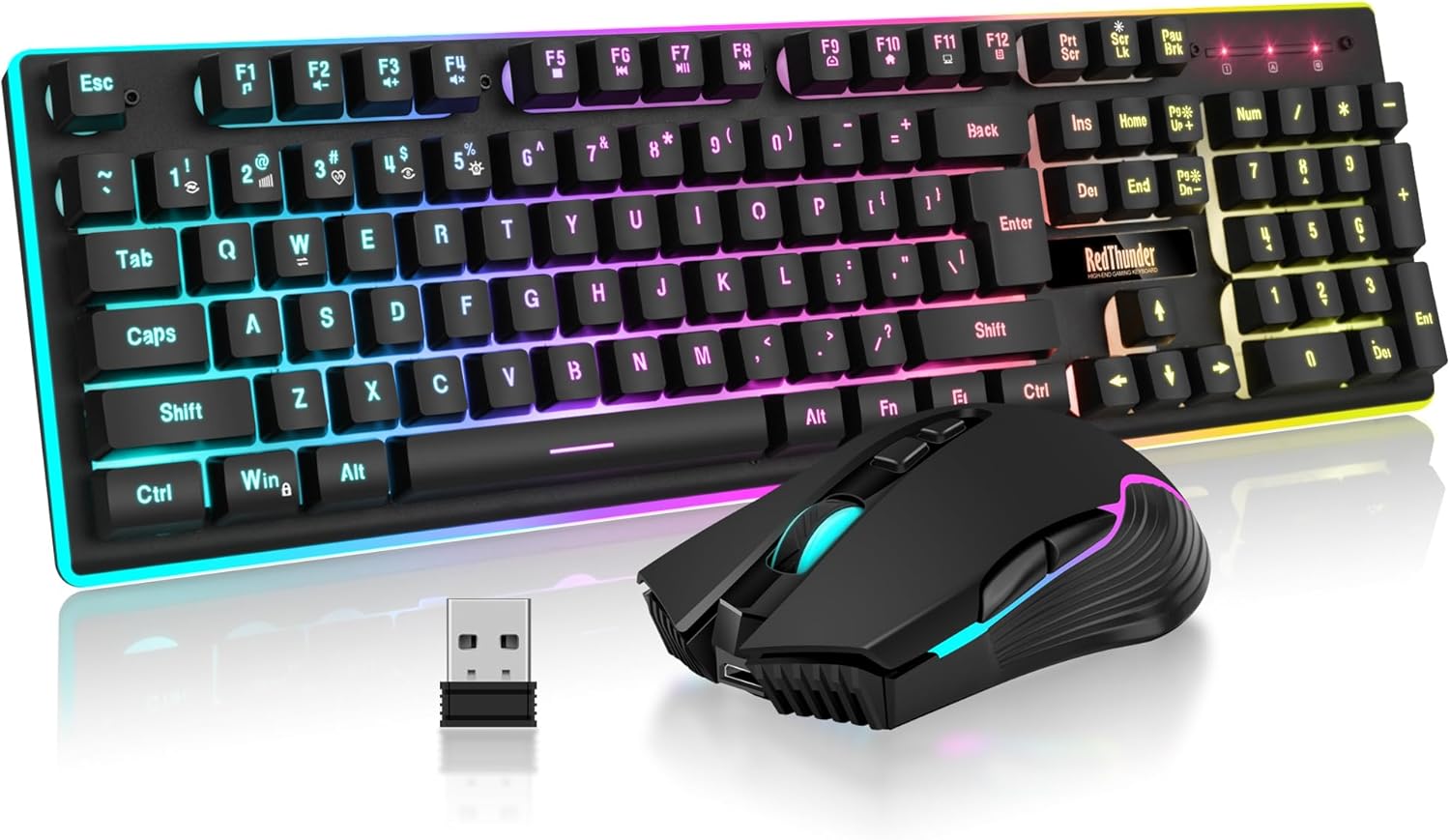
The RedThunder K10 Wireless Gaming Keyboard and Mouse Combo is a budget-friendly solution for PC gamers who want a clean, cable-free desk setup without sacrificing essential gaming features. This combo includes a full-size keyboard with a mechanical feel and a 7D 3200DPI mouse, both powered by a single 2.4G wireless receiver. It's designed for casual gamers, college gamers, and anyone building a gaming setup on a budget, but it also works well for everyday productivity and light competitive play.
In terms of real-world performance, the K10 delivers stable wireless connectivity with low latency, making it suitable for FPS, MOBA, and open-world games. The anti-ghosting keys ensure that rapid inputs register accurately, which is crucial during intense battles. The mouse offers adjustable DPI up to 3200, providing decent sensitivity for most gaming scenarios, though competitive gamers may prefer higher DPI options. The mechanical-feel keys provide satisfying tactile feedback without the noise of full mechanical switches, which some users may appreciate for quieter gaming sessions.
Build quality is solid for the price point. The keyboard features a frosted metal cover that adds durability and a premium feel, while the ABS keycaps use two-color injection molding to prevent fading over time. The mouse fits the palm comfortably with an anti-sweat, non-slip design that helps maintain control during long sessions. Both devices include RGB lighting - the keyboard offers multiple backlight modes and brightness levels, while the mouse cycles through 7 colors - adding visual flair to any gaming setup.
Setup is straightforward: the keyboard and mouse share a single USB receiver stored in the mouse, so you just plug it in and turn on the devices. The 3000mAh keyboard battery and 800mAh mouse battery provide several days of use between charges, and the auto-sleep feature helps conserve power. However, some users have noted that the LED lights can flicker or the keyboard may need occasional re-pairing, which can be a minor inconvenience. Charging via USB-C is convenient, but it's important to charge fully before first use to avoid connectivity issues.
Realistic limitations include reports of battery degradation over several months, with some users experiencing shorter charge retention or LED inconsistencies. The mouse scroll wheel may also wear out faster than expected based on some reviews. Additionally, MacOS support is limited, and a USB-C adapter is required for Mac users. While the K10 is not built for hardcore esports or heavy daily use, it's a reliable choice for casual gamers, dorm room setups, or as a secondary keyboard for work and play.
Overall, the RedThunder K10 Wireless Gaming Keyboard and Mouse Combo offers good value for budget-conscious PC gamers. It provides a wireless, RGB-lit setup with decent performance and comfort for casual gaming and everyday tasks. If you're looking for an affordable way to declutter your desk and add some flair to your gaming room, this combo is worth considering. Just be aware of potential long-term durability issues and plan for occasional charging maintenance.
Frequently Asked Questions About Best Gaming Keyboard Reviewed Compared
What are the main advantages of hot-swappable switches in a gaming keyboard?
Hot-swappable sockets let you replace individual mechanical switches without soldering. Boards like the ASUS ROG Strix Scope II X Wired USB Mechanical allow you to swap in smooth linear ROG NX Snow stems or tactile alternatives easily. This modular design extends keyboard lifespan because a single faulty switch does not ruin the deck.
How do linear switches differ from tactile switches during fast gameplay?
Linear switches provide a smooth, consistent downward keystroke without any tactile bump before bottoming out. Red switches, like those on the Redragon Mechanical Gaming Keyboard Wired, require minimal actuation force and reset instantly for rapid double-taps. Most competitive players favor linear stems because smooth travel reduces finger resistance during fast-paced twitch reactions.
Is a tenkeyless layout better than a full-size gaming keyboard?
A tenkeyless design provides extra desk surface area for mouse movement by dropping the numeric keypad. Models like the SteelSeries Apex 3 TKL RGB Gaming Keyboard bring your hands closer together, encouraging natural ergonomic posture. Choosing a TKL deck keeps your battlestation uncluttered and makes packing for LAN parties easier.
Can a membrane gaming keyboard hold up against mechanical models in 2026?
Quality membrane decks deliver quiet typing and excellent spill protection at an accessible price point. Keyboards like the Corsair K55 CORE RGB Membrane Wired and Logitech G213 Prodigy Gaming Keyboard feature tuned dome switches that offer tactile resistance without disturbing housemates. They provide reliable anti-ghosting matrices and fast polling rates for everyday gaming.
Does 2.4GHz wireless connectivity add noticeable input lag compared to wired USB?
Modern 2.4GHz wireless connections deliver responsive performance virtually indistinguishable from wired cables. Setups like the Redragon S101M-KS Gaming Keyboard and Mouse use dedicated USB dongles to maintain stable transmission, matching cord-free gaming peripheral setups. Bluetooth modes may introduce slight latency, but switching to the 2.4GHz receiver keeps input delays minimal.





Write Your Review
No reviews yet. Be the first to share your experience!