


Heavy key resistance and clicky switch noise can quickly ruin an intense late-night gaming match or leave your fingers fatigued after hours of typing. Gamers and writers often struggle with stiff tactile bumps that slow down double-tap commands or distract everyone nearby with clattering clicks. Selecting the best gaming keyboard with red switches solves this issue by offering a smooth, linear keystroke with consistent resistance from top to bottom. Linear red switches actuate cleanly without tactile resistance, giving you rapid inputs in fast-paced titles while maintaining a much quieter acoustic profile for shared living spaces. Pairing your setup with a dedicated competitive gaming keyboard setup ensures you stay responsive under pressure.
Careful analysis of switch specs, hot-swappable PCB designs, and real user feedback reveals that build durability makes a massive difference in day-to-day use. Rigid metal frames, anti-ghosting N-key rollover, and responsive mechanical sockets prevent missed inputs during frantic firefights. Options featuring hot-swap switch sockets even let you customize switch feel down the road without touching a soldering iron, while double-shot keycaps resist shine and fading from natural skin oils. When you need smooth gliding switches that balance rapid reflex gaming with comfortable, fast typing accuracy, a red switch keyboard provides reliable performance across every session.



Pros
- Hot-swappable with nearly all switch types for endless modding possibilities
- Sturdy aluminum base gives a premium feel and long-term reliability
- Quiet linear switches with foam padding reduce noise for shared spaces
- Full-size layout includes number pad and dedicated keys for versatility
- Affordable price point for the feature set
Cons
- Non-detachable USB cable limits cable management options
- Software customization is less intuitive than higher-end brands
- No wrist rest included, may require separate purchase for extended comfort
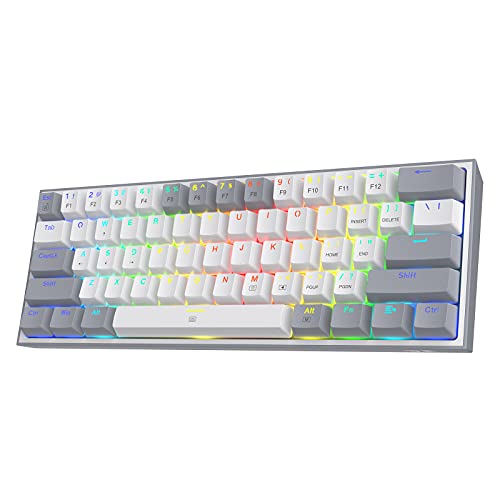
The Redragon K556 is a full-size mechanical gaming keyboard that stands out in the crowded budget segment thanks to its hot-swappable switch sockets, sturdy aluminum construction, and noise-dampening foam. Designed for PC gamers, streamers, and even casual typists, this board offers a solid foundation for anyone looking to customize their typing feel without breaking the bank.
Performance-wise, the K556 uses linear red switches that are smooth and quiet, making them suitable for both competitive gaming and quiet office environments. The anti-ghosting feature across all 104 keys ensures that every command registers accurately, even during rapid sequences in fast-paced FPS or MOBA titles. According to user feedback, the response time feels snappy and reliable for everyday gaming needs.
Build quality is where this keyboard truly impresses for its price. The anodized aluminum frame gives it a premium weight and rigidity, preventing any flex during heavy use. Inside, noise-absorbing foam helps reduce the hollow sound commonly found in cheaper boards, resulting in a more satisfying typing experience. The K556 also features 20 preset RGB lighting modes that can be adjusted on the fly or customized further through Redragon’s software, allowing for subtle ambiance or flashy effects to match your setup.
Setup is straightforward: plug the USB cable into your PC, and the keyboard is recognized immediately. The software, available from Redragon’s website, adds macro programming and lighting control, though it may feel a bit basic compared to competitors like Corsair or Razer. The non-detachable cable is a minor drawback for cable management enthusiasts, and the lack of a wrist rest means you may want to invest in one for long sessions.
Overall, the Redragon K556 is a fantastic entry point for gamers and modders who want hot-swappable functionality on a budget. It works well in a dorm room, home office, or dedicated gaming desk, offering quiet operation and a solid feel. While it does have some limitations in software and cable design, its price-to-feature ratio makes it a strong recommendation for anyone building their first custom mechanical keyboard or seeking a reliable daily driver.
The K556 delivers consistent performance for most gaming scenarios. The linear red switches have a short actuation distance and smooth travel, which helps in fast-paced games where every millisecond counts. Anti-ghosting across all keys means no missed inputs during complex key combinations, a must for competitive titles like Valorant or Apex Legends. The quiet operation also makes it suitable for streaming without picking up loud keystrokes on your microphone.
Redragon uses a full aluminum frame with a brushed finish that not only looks elegant but also adds significant weight (2.6 lbs) for desk stability. The hot-swap sockets are reinforced to reduce wobble, and the included foam layer dampens vibrations. User reviews frequently praise the keyboard's solid feel and durability over time, noting that it can withstand heavy daily use without developing loose keys or flex.
With 20 built-in RGB presets accessible via function keys, you can quickly switch between wave, breathing, reactive, and static modes. Brightness and speed are adjustable without software. For deeper customization, the Redragon software allows you to create per-key lighting effects and assign macros. The keyboard supports both 3-pin and 5-pin switches, making it easy to swap in tactile or clicky switches if you prefer a different feel.

Pros
- Smooth linear red switches with low actuation force for fast gaming and typing
- Hot-swappable switches make customization and replacement easy without soldering
- Full key anti-ghosting and 12 multimedia shortcuts enhance gameplay and convenience
- 11 backlit modes with 5-level brightness control offer versatile RGB lighting
- Durable double-shot PBT keycaps resist wear and maintain clarity over time
Cons
- Backlight color is not customizable; only preset modes are available
- FN key functions cannot be disabled, which may interfere with standard F-key use
- Driver software only supports Windows, limiting customization on Mac or other systems
The Redragon K671 is a wired mechanical gaming keyboard that brings solid performance and customization to PC gamers without breaking the bank. It features linear red switches that require less force to press, making them smooth and responsive for both gaming and typing. Whether you are into competitive shooters, MOBAs, or long RPG sessions, the K671 delivers consistent input accuracy and low-latency performance that can keep up with fast-paced action.
This keyboard is best suited for a wide range of users including PC gamers, casual gamers, esports players, streamers, content creators, and gaming setup builders. It also works well for work-from-home gamers and college gamers who need a reliable keyboard for both play and productivity. The hot-swappable switch design is a standout feature, allowing you to replace switches without any soldering. The package includes four spare switches, so if a key ever fails, you can swap it out quickly and keep gaming.
In terms of build quality, the Redragon K671 feels sturdy with a solid frame and double-shot PBT keycaps that resist fading and shine even after extended use. The full key anti-ghosting ensures that every keypress registers accurately, which is crucial during intense gaming moments where multiple keys are pressed simultaneously. The 11 backlit modes provide plenty of visual flair, and you can adjust brightness and speed to match your gaming setup. However, the backlight color cannot be customized per key; you are limited to preset modes.
Setting up the keyboard is straightforward. It connects via a wired USB cable, so there is no pairing or battery concerns. The software for macro editing and lighting control is available for Windows, but Mac users will have to rely on onboard controls. The keyboard also includes 12 multimedia shortcuts for quick access to volume, media, and calculator functions, which adds convenience for everyday use. The spill-resistant design is a practical bonus for those who keep drinks at their desk.
One realistic limitation is that the FN key functions cannot be turned off, which may interfere with standard F-key usage in some applications or games. Additionally, the backlight color is not customizable, which might disappoint RGB enthusiasts who want full control. The driver software only supports Windows, so Mac users miss out on advanced customization. Despite these drawbacks, the K671 offers excellent value for its price point.
Overall, the Redragon K671 is a practical choice for anyone building a gaming PC setup on a budget. It delivers reliable mechanical performance, hot-swappable flexibility, and durable construction that can handle daily gaming and work. If you are a PC gamer, streamer, or gaming setup builder looking for an affordable mechanical keyboard with essential features and room for customization, the K671 is a solid recommendation.
Frequently Asked Questions About Linear Red Switch Keyboards
Why are red switches considered good for gaming?
Red linear switches are ideal for fast-paced gaming because they feature a smooth, straight-down keystroke without a tactile bump or loud click. This linear actuation allows for faster double-tapping, quick direction changes, and minimal finger fatigue during marathon sessions. Because there is no resistance bump to overcome, commands register instantly when you press down on the key.
Are red mechanical switches loud during typing and gaming?
No, linear red switches are among the quietest traditional mechanical switches available. They do not have the sharp clicking mechanism found in blue switches, producing only a muffled bottoming-out sound when the keycap hits the mounting plate. Adding sound-dampening foam or using O-rings can make them even quieter for shared dorm rooms or home offices.
Can you swap out switches on hot-swappable red switch keyboards?
Yes, hot-swappable mechanical keyboards allow you to remove and replace linear red switches without soldering. Boards like the Redragon K556 and K617 feature modular switch sockets that accept compatible 3-pin or 5-pin mechanical switches. This enables gamers to test tactile switches or upgrade individual faulty switches in seconds using a simple switch puller tool.
What form factor works best for a red switch mechanical keyboard?
Form factor selection depends entirely on your desk space and gaming style. Compact 60% and tenkeyless (TKL) layouts provide ample mouse pad clearance for wide sweeping arm movements in first-person shooters. Meanwhile, full-size 104-key layouts maintain dedicated numeric keypads and arrow clusters for productivity work, matching well with a keyboard for precision movement.
Do red switch keyboards cause wrist fatigue during extended gaming?
Linear red switches require very little actuation force, which directly helps reduce finger and tendon strain. However, high-profile mechanical frames can still force your hands into an upward angle over several hours. Pairing your board with an ergonomic supportive gaming wrist rest keeps your wrists neutral and prevents forearm discomfort during extended gaming marathons in 2026.
How long do mechanical red switches typically last?
Most linear red switches are rated for 50 million keypresses or more, significantly outlasting rubber membrane keyboards. High-grade metal top plates and double-shot keycaps further protect the board against daily wear and tear. If a switch ever fails on a hot-swappable model, you can easily replace just that single switch rather than buying an entirely new keyboard.







Write Your Review
No reviews yet. Be the first to share your experience!