


Quick building and rapid wall edits on console demand lightning-fast key registration that standard handheld gamepads simply cannot match. Dropped inputs during intense box fights can ruin an entire match, which makes responsive gear vital for battle royale success. Plugging a keyboard into your PlayStation 4 unlocks PC-style keybinds, giving your fingers direct access to individual weapon slots, rapid crouch spamming, and fluid stair placements. Picking the best gaming keyboard for ps4 fortnite comes down to selecting responsive switches, true anti-ghosting circuitry, and a compact design that fits your play space. Paired alongside other competitive PC gaming keyboard setups, console-ready decks bring immediate tactical advantages to daily matches.
Desk space doesn’t stay neat during heated skirmishes, especially when sweeping mouse motions are required for shotgun tracking. Compact tenkeyless form factors, 60 percent layouts, and one-handed keypad models solve clutter by freeing up valuable mousepad real estate. Based on product specifications and user feedback, console boards must deliver seamless plug-and-play USB connectivity without demanding complex driver software on PlayStation. Reliable 19-key anti-ghosting matrixes and responsive membrane or mechanical-feel switches ensure every building sequence triggers without hesitation. Choosing a model with vibrant RGB backlighting keeps your control scheme illuminated during long competitive sessions.
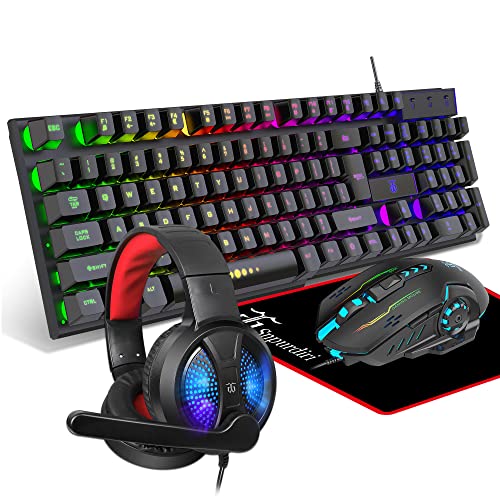
Pros
- Complete all-in-one peripheral package eliminates the need to buy accessories separately
- Floating keycap design makes dust removal, cleaning, and maintenance simple
- Plug-and-play USB setup with no additional software or driver downloads required
- Lightweight headset build with soft ear cushions ensures comfortable Discord sessions
Cons
- Lacks dedicated companion software for custom key remapping or advanced RGB synchronization
- Membrane-style floating switches offer less tactile precision compared to standalone mechanical keyboards
- Wired peripheral bundle requires thoughtful desktop cable management
The DGG Gaming Combo is an all-inclusive 4-in-1 peripheral bundle engineered to get a desktop battlestation running right out of the box. Featuring a full-size 104-key keyboard, an ergonomic optical mouse, an over-ear stereo headset with an integrated microphone, and a matching fabric mouse pad, this package covers every essential desktop touchpoint. It is particularly well suited for entry-level PC gamers, students outfitting a dorm room, work-from-home users who enjoy gaming in the evenings, and budget setup builders who want a coordinated look without purchasing individual components.
In terms of desktop performance, the keyboard utilizes a floating key architecture on a slim, lightweight frame. This elevated profile gives keystrokes a light and responsive action suitable for casual FPS, MOBA, and open-world exploration, while also making debris removal and daily surface cleaning straightforward. The accompanying optical mouse is contoured to support comfortable palm and claw grips during extended sessions, delivering reliable tracking on the included low-friction mouse pad for everyday browsing and gameplay.
Audio and communication needs are handled by the lightweight over-ear gaming headset. Built around 40mm audio drivers, it delivers balanced sound reproduction with solid passive noise isolation to help block out household distractions. The integrated high-definition microphone keeps voice transmission clear during Discord calls, team coordination, and video conferences, while synthetic protein leather earpads and a retractable headband maintain head comfort through multi-hour gaming marathons.
Aesthetic appeal is central to the bundle design. The keyboard provides three switchable color illumination modes to brighten up dim gaming spaces, while the gaming mouse features a dynamic seven-color circular breathing LED effect. The hardware operates on standard USB and 3.5mm connections, allowing instant plug-and-play functionality across Windows, Mac, and Linux systems, as well as mainstream gaming consoles, without the hassle of downloading proprietary drivers.
Because this package relies on standard wired connections across four distinct accessories, dedicating time to desktop cable management will keep your workspace neat and organized. Potential buyers should also note that the keyboard uses floating membrane-style keys rather than customizable mechanical switches, and lighting modes are cycled via hardware rather than granular software suites. However, for casual gaming, remote schoolwork, and everyday multimedia, the system delivers solid reliability.
For gamers and creators searching for a hassle-free starter bundle, the DGG 4-in-1 setup provides an accessible entry point. It balances essential audio, comfortable input controls, and vibrant ambient lighting in a single unified kit that easily complements any modern budget PC setup.
This complete starter bundle includes four matching peripherals designed to work seamlessly together. You get a full-size 104-key backlit keyboard with a floating layout, a contoured optical gaming mouse with breathing RGB lighting, a lightweight stereo headset featuring 40mm drivers and a boom mic, and a smooth cloth mouse pad tailored for consistent sensor tracking.
Each accessory connects directly via standard plug-and-play interfaces, making unboxing and initial desk setup effortless. Whether you are assembling your first gaming desktop or replacing outdated home office peripherals, having all four components in one package ensures immediate out-of-the-box readiness.
The DGG peripheral package offers broad multi-platform versatility. The keyboard and mouse operate via standard USB connections and function reliably on Windows 10, 8, 7, Vista, XP, macOS, and Linux without requiring secondary configuration software.
The included headset features broad hardware compatibility, connecting smoothly with PC rigs, laptops, tablets, mobile devices, and popular gaming consoles like PS4, PS5, Xbox, and Nintendo Switch. Depending on your specific console controller or notebook port configuration, standard 3.5mm audio splitters or adapters can easily expand connection options.
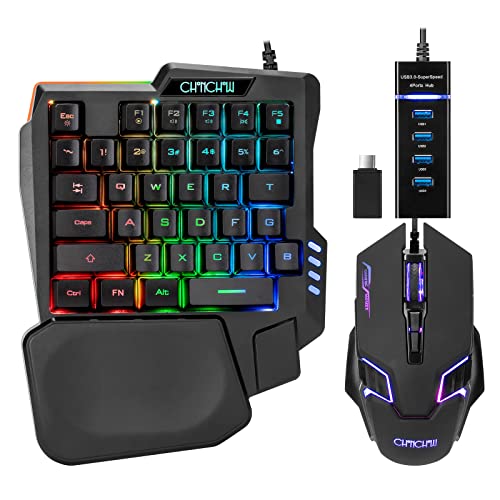
Pros
- Four documented DPI presets ranging from 1200 to 7200 DPI for quick sensitivity changes
- Includes a 4-port USB splitter and Type-C adapter to expand host port connections
- Driver-free plug-and-play compatibility across Windows, Mac, and major gaming consoles
- Compact peripheral layout allows more room on the desk for unobstructed mouse movement
Cons
- Listing does not state physical mouse dimensions, exact weight, or individual button counts
- Console and mobile in-game functionality depends on third-party game peripheral rules
- Sensor brand, polling rate, and cable specifications are omitted from product data
The CHONCHOW T10b is a wired ergonomic gaming mouse packaged together with a one-handed RGB keyboard and multi-port connectivity accessories. Aimed primarily at computer and console players who want a compact battlestation for titles such as MOBAs and first-person shooters, this peripheral set targets gamers looking to streamline their desk space. Because the companion keyboard takes up only half the footprint of a traditional board, it allows the accompanying mouse significantly more room for low-friction sweeps and quick repositioning on a desktop mat.
Connection and system compatibility are centered around standard wired USB connectivity. The package includes a 4-port USB splitter along with a USB-A to USB-C adapter, enabling users to plug the mouse, keyboard, and other peripherals into a single host port. According to the manufacturer, the hardware supports Windows PCs, macOS, PlayStation 4, Xbox One, and Nintendo Switch without requiring manual driver installations. It also connects to select Android mobile devices using the included Type-C adapter, though iOS devices require a separate, unbundled adapter. Players should verify that individual games natively allow mouse and keyboard input on their console or mobile platform before purchasing.
For tracking and cursor control, the mouse offers four selectable speed presets: 1200, 2400, 4800, and 7200 DPI. These stepped options allow users to toggle between slower, deliberate targeting and rapid cursor motion across high-resolution displays. The manufacturer characterizes the mouse shape as ergonomic, aimed at maintaining a natural hand posture during active gaming sessions. However, the listing leaves several detailed control specifications unstated, including the exact button layout, side button functions, and sensor model, meaning buyers should anticipate a conventional gaming mouse arrangement rather than an extensive programmable array.
Power and daily operation are straightforward thanks to the wired, bus-powered setup. Because the mouse and hub draw power directly from the connected computer or console, there are no internal batteries to charge or wireless pairing sequences to manage. The included 4-port splitter acts as a central hub for the mouse, the half-sized keyboard, a headset, or memory storage cards, helping manage desktop cable routing when host USB ports are limited.
A clear evaluation of this combo requires recognizing what the product documentation does and does not provide. While the multi-port hub and preset DPI levels offer clear functional utility, the listing omits physical mouse dimensions, exact weight, polling rate figures, and cable length. Additionally, console and mobile compatibility depends entirely on individual game support rules rather than universal peripheral operation. The manufacturer backs the setup with a one-year quality warranty should any hardware defects arise.
For gamers seeking an accessible, all-in-one peripheral kit that frees up desk room for mouse movement, this CHONCHOW bundle delivers solid baseline utility. The stepped DPI range up to 7200 DPI and included USB-C hub adapter make it a practical match for budget PC setups and supported console play. Shoppers requiring precise weight tuning, customized button mapping software, or verified ultra-high polling rates will want to explore dedicated standalone mice with exhaustive technical sheets.
The CHONCHOW combo connects using standard wired USB interfaces and includes both a 4-port USB splitter and a USB-A to USB-C adapter. This setup is designed to consolidate peripheral connections into a single port on the host machine. Listed platform compatibility covers Windows PC, macOS, PS4, Xbox One, and Nintendo Switch with driver-free plug-and-play operation. It is also compatible with select Android phones via the Type-C adapter, while Apple iPhone users must purchase an adapter separately. Console and mobile users should note that in-game keyboard and mouse support depends on the specific rules of each title.
Tracking on this gaming mouse is governed by four distinct hardware sensitivity presets: 1200, 2400, 4800, and 7200 DPI. These settings provide users with adjustable cursor speeds to accommodate different screen resolutions and in-game sensitivity preferences. The manufacturer does not list the underlying optical sensor model, maximum tracking speed, or acceleration ratings, so performance should be evaluated based on the documented stepped DPI values.

Pros
- Exceptional value for a complete gaming bundle at this price point
- Responsive keyboard with satisfying key feel and customizable RGB modes
- Lightweight ambidextrous mouse with smooth glide and adjustable DPI
- Comfortable headset with decent sound quality and flexible microphone
- Wide platform compatibility including PC, consoles, and handhelds
Cons
- Membrane keyboard lacks the tactile feedback of mechanical switches
- Headset microphone clarity is average and may not suit serious streamers
- Mouse has no side buttons, limiting customization for some games
The Orzly Hornet RX-250 is a budget-friendly 4-in-1 gaming bundle that gives you everything you need to start gaming without spending a fortune. It includes a full-size membrane keyboard, an ambidextrous mouse, a stereo headset, and a cloth mouse pad. This set is designed for casual gamers, console players, and anyone building their first gaming setup who wants a quick, all-in-one solution.
The keyboard is the centerpiece, offering a 104-key layout with 19-key rollover and anti-ghosting. While it uses membrane switches rather than mechanical ones, the keys feel smooth and responsive for both typing and gaming. The RGB backlighting has multiple modes, letting you customize the look to match your setup. It's also spill-resistant, which adds peace of mind during late-night sessions.
The mouse is lightweight at 90 grams and works well for both left- and right-handed users. You can cycle through four DPI settings (1200, 1600, 2400, 3200) with a dedicated button, making it easy to adjust sensitivity for different games. The auto-rotating RGB lighting adds a nice visual touch. However, there are no side buttons, so you won't get extra programmable inputs.
The headset delivers surprisingly good stereo sound with decent bass and clear highs. The aluminum frame and suspended headband keep it comfortable for long gaming sessions, and the cushioned ear cups provide good noise isolation. The microphone folds up when not in use and reduces background noise, though audio quality is average for voice chat. In-line volume controls are convenient for quick adjustments.
Setup is truly plug-and-play: just connect the USB cables and you're ready to go. The keyboard and mouse work on PC, PS4, Xbox, Steam Deck, and other devices without any drivers. Build quality is acceptable for the price, though some users report key fading or headset durability issues over time. The mouse pad is a generous size with a non-slip rubber base, helping with smooth mouse movement.
Overall, the Orzly Hornet RX-250 is a solid choice for budget-conscious gamers, console players, or anyone who needs a complete setup in one box. It's not meant for competitive esports due to the membrane keyboard and average mic, but for casual gaming, school, or work-from-home use, it delivers great value. If you're looking for an affordable way to upgrade your gaming desk, this bundle is worth considering.
For casual and entry-level gaming, the Orzly Hornet RX-250 performs admirably. The keyboard's anti-ghosting and 19-key rollover ensure that rapid key presses register correctly in games like Fortnite, Call of Duty, or League of Legends. The membrane switches are quiet and smooth, though they lack the tactile click of mechanical boards. The mouse's adjustable DPI allows you to switch between fast flick shots and precise aiming, and the 1000 Hz polling rate (typical for budget mice) keeps input lag low. The headset's stereo sound provides good directional audio for footsteps and gunfire, though the bass is more thumping than nuanced. Overall, this bundle handles most mainstream games well, but competitive players may want dedicated peripherals.
Comfort is a strong point for this bundle, especially considering the price. The keyboard has foldable feet for adjustable typing angle and a standard layout that reduces wrist strain. The mouse is ambidextrous and lightweight, making it easy to grip for hours without fatigue. The headset's suspended headband and soft ear cups distribute weight evenly, and the aluminum frame keeps it sturdy yet light. The ear cups are large enough to fit most ears, though users with larger ears may find them snug. The microphone is positioned close to the mouth, which some may find intrusive, but it stays out of the way when flipped up. For long gaming sessions or work-from-home use, the bundle offers decent ergonomics.

Pros
- Outstanding value under $20 for a feature-rich backlit keyboard
- Easy to set up - no software required, works out of the box
- Good tactile feedback and responsive keys for both gaming and typing
- Bright, adjustable rainbow lighting with multiple modes
- Durable construction with a lightweight yet sturdy frame
Cons
- Not a true mechanical keyboard - uses membrane switches with a mechanical feel
- No wrist rest included, which may affect comfort during long sessions
- Backlight color zones cannot be individually customized per key; limited to preset patterns
The Redragon K521 is a wired full-size keyboard that bridges the gap between basic membrane boards and pricier mechanical options. Designed with a 'mechanical feeling' membrane switch system, it offers tactile bump and a satisfying bottom-out without the loud click of true mechanical switches. This makes it an excellent choice for budget-conscious gamers, college students, or anyone building a vibrant gaming setup without breaking the bank.
At its core, the K521 prioritizes practicality. The 104-key layout includes a dedicated numeric keypad and inverted-T arrow cluster, which is a boon for gamers who use key bindings or for productivity tasks like spreadsheet work. The 12 multimedia keys add convenience for streamers or anyone who frequently adjusts volume or playback during gameplay or content creation. Anti-ghosting on up to 19 keys ensures that complex input combinations register accurately, which is critical in competitive titles like Apex Legends or Valorant.
The standout feature is the rainbow LED backlighting. Unlike traditional single-color or basic RGB, the K521 uses a dynamic rainbow pattern that cycles through colors across the board. Users can turn the lights on/off with a dedicated button, adjust brightness in four levels, and choose from three breathing modes. While it doesn't offer per-key RGB customization via software, the preset effects are aesthetically pleasing and add life to any desk setup. The keys are clearly laser-etched and remain readable even in low light.
Build quality is respectable for the price. The keyboard feels solid, though lightweight at 1.5 pounds, making it easy to transport between home and dorm or LAN parties. The ABS keycaps are standard but hold up well under moderate use. Connectivity is straightforward via a permanently attached USB-A cable (about 6 feet long), which is long enough for most desk arrangements. Compatibility spans Windows, Mac, PlayStation, and Xbox - simply plug in and play without any driver installation.
Potential drawbacks include the lack of a wrist rest, which might be a consideration for marathon gaming sessions. Also, while the switch feel is commendable for a membrane board, it doesn't match the precision and consistency of a true mechanical switch. Some users have reported longevity concerns with older Redragon models, but the K521's recent release (December 2024) suggests improvements. For the price, it remains a fantastic entry-level option.
In summary, the Redragon K521 is a smart buy for casual gamers, work-from-home users, or anyone seeking an affordable, visually appealing keyboard with robust features. It excels as a primary keyboard for budget gaming PCs or as a backup for streaming setups. If you value cost-effectiveness and don't mind membrane switches, this is one of the best values on the market.

Pros
- Single shared USB dongle simplifies setup and saves an extra USB port on your computer
- Built-in rechargeable battery avoids the recurring cost of replacement alkaline cells
- Integrated receiver storage slot prevents losing the wireless adapter when moving between desks
- Plug-and-play functionality works across Windows PCs, Mac systems, and major game consoles
Cons
- Product specifications do not list DPI sensitivity stages, sensor hardware, or button count
- Lacks Bluetooth connectivity and requires an open USB-A port or compatible third-party adapter
- Reviving a completely drained battery can require an extended 10-hour recharge with a 5V 2A charger
The CHONCHOW wireless mouse arrives as part of a space-saving desktop package paired with a 60 percent compact keyboard. Positioned primarily for casual gaming, remote work, student desks, and media centers, this illuminated wireless mouse is intended for users who want to clear away desktop cables without dealing with separate pairing processes for each peripheral.
Connection duties are handled by a 2.4GHz wireless link via a single USB adapter that is stored on the back of the mouse. The shared receiver allows the mouse and companion keyboard to operate together up to a stated distance of 10 meters. The manufacturer lists broad plug-and-play support across Windows platforms from Windows 2000 up to Windows 11, alongside Mac systems and gaming consoles including Xbox, PS3, PS4, and PS5. Because the connection relies entirely on a standard USB receiver, computers or tablets equipped only with USB-C ports will require an appropriate adapter, as native Bluetooth is not included.
For handling and controls, the mouse incorporates an ergonomic shape intended to provide a comfortable grip during daily productivity and browsing tasks. The shell is accented by a seven-color lighting system that cycles through vivid tones to match gaming setups. The physical layout includes standard primary click buttons and an integrated scroll wheel, though the manufacturer listing does not specify detailed tracking figures such as DPI levels, sensor model, polling rate, or programmable button customization software.
Power is supplied by an internal 500 mAh rechargeable battery. To help preserve charge throughout the day, the mouse features an automatic energy-saving sleep state that activates after idle periods and wakes when any button is pressed. According to the manufacturer, keeping the mouse periodically charged is recommended, as waking a completely depleted lithium cell can require up to 10 hours connected to a 5V 2A power source.
There are a few practical limitations worth noting before purchasing. Because the mouse and keyboard rely on a single shared USB receiver, misplacing the adapter will disable wireless connectivity for both devices simultaneously. Furthermore, competitive gamers or creative professionals who need customizable DPI profiles, adjustable polling rates, or specialized software will find that this entry-level model focuses purely on plug-and-play convenience rather than deep hardware customization.
For shoppers looking to replace a standard office pointer with a cordless, illuminated mouse that shares a single receiver with an ultra-compact keyboard, this CHONCHOW unit delivers straightforward everyday value. It is particularly well-suited for general web browsing, schoolwork, and casual gaming on systems that have a spare USB-A port ready to go.
Setting up the CHONCHOW wireless mouse is straightforward thanks to its plug-and-play design. The 2.4GHz USB receiver is housed in a designated storage compartment on the underside of the mouse. Simply remove the dongle and insert it into an available USB-A port on your PC, laptop, or gaming console, then turn on the mouse.
If the mouse ever loses wireless communication with the receiver, the manufacturer provides a specific hardware reset sequence. First, unplug the receiver from your computer. Next, press and hold the mouse scroll wheel and the right-click button together for three seconds, then release them. Once the scroll wheel flashes blue, plug the USB receiver back into the computer port and click any button to resume normal cursor movement.
The CHONCHOW mouse features a built-in 500 mAh rechargeable lithium battery designed to eliminate the ongoing expense and waste of disposable batteries. When left idle on the desk, the mouse automatically enters an energy-saving sleep mode to conserve remaining battery power, reactivating instantly when you click any button.
The manufacturer notes a specific maintenance guideline regarding lithium battery characteristics. If the battery is allowed to drain down to zero percent, it may require up to 10 hours of continuous charging with a standard 5V 2A power block to revive the cell. Recharging the mouse before it completely drains helps ensure consistent daily performance.

Pros
- Compact tenkeyless footprint leaves ample room for low-DPI mouse movements
- All-in-one starter bundle includes keyboard, mouse, and mouse pad
- Quiet membrane key switches are suitable for shared living spaces and late-night gaming
- Four selectable mouse DPI levels (800 to 3200) for versatile tracking speeds
- True plug-and-play USB connection with no software installation required
Cons
- Membrane switches lack the distinct tactile feedback and swappability of mechanical switches
- Rainbow backlighting cannot be set to a single static solid color
- Console compatibility is limited to games that natively support keyboard and mouse inputs
The CHONCHOW TKL Gaming Keyboard and Mouse Combo is an all-in-one peripheral starter kit designed to give players a complete desktop setup without unnecessary complexity. Featuring an 87-key tenkeyless membrane keyboard, a multi-button optical mouse, and a dedicated fabric mouse pad, this bundle caters directly to casual PC gamers, college students in dorm rooms, and budget-conscious setup builders. It also serves as a handy secondary setup for console players on PlayStation or Xbox who play supported titles requiring keyboard and mouse navigation.
In everyday gaming, responsiveness and uninterrupted inputs make a significant difference. The keyboard utilizes a quiet membrane mechanism equipped with 19 anti-collision keys, allowing essential simultaneous key presses in fast-paced FPS or MOBA gameplay without missed keystrokes. Dedicated gaming utility is further enhanced by an integrated Windows key lock to prevent disruptive desktop drops during firefights, along with interchangeable WASD navigation controls. The companion mouse offers four quick DPI presets ranging from 800 to 3200, giving players the flexibility to quickly adapt sensitivity between precision sniping and rapid maneuvering.
Physical ergonomics and desk space efficiency are central to the appeal of this combo. The tenkeyless footprint removes the conventional numeric keypad, shortening the overall board width so your hands can sit at a natural shoulder-width angle while freeing up valuable mousepad real estate for broad sweeps. The mouse is shaped with ergonomic side contours, two thumb buttons, and low-friction PTFE feet that glide smoothly across the included rubber-backed mouse pad. Rainbow LED backlighting across the keyboard offers dynamic and static breathing effects, complemented by a multi-color cycling mouse glow to bring vibrant desk presence to darker gaming rooms.
Convenience remains one of the bundle's core advantages. Both peripherals operate via standard wired USB connections, functioning instantly out of the box with zero drivers or background utility software required. This straightforward plug-and-play execution makes swapping between different PCs or laptops and maintaining a clean desk straightforward. The smooth surface of the mouse pad wipes down easily, while the membrane keyboard design resists minor dust and debris better than exposed bare-switch layouts.
While this combo provides commendable value, prospective buyers should recognize its inherent trade-offs. The membrane keys will not deliver the crisp tactile click or actuation speed found in high-end mechanical gaming boards, and the rainbow backlighting is fixed in place rather than individually programmable RGB. Additionally, console functionality relies strictly on game-specific developer support. However, for entry-level gamers, student workstations, or anyone assembling an affordable backup battlestation, this CHONCHOW bundle delivers dependable functionality and a cohesive gaming aesthetic right out of the box.
Opting for a tenkeyless form factor provides clear ergonomic benefits compared to full-sized keyboards. By eliminating the ten-key numeric cluster, the 87-key design shortens the distance between your typing hand and your mousing hand, promoting a more natural, shoulder-width posture during prolonged gaming sessions.
This reduced width also proves critical for low-sensitivity mouse aimers in tactical shooters like Counter-Strike or Valorant, where broad arm sweeps require ample horizontal space. The included 10.12 by 8.16 inch mouse pad provides a dedicated, cushioned tracking area with a textured rubber underside that prevents slippage on slick gaming desks.
Frequently Asked Questions
Does Fortnite on PS4 support native keyboard input without an adapter?
Yes, Fortnite on PlayStation 4 supports native USB keyboard input without requiring third-party converter adapters. Epic Games built direct peripheral recognition into the console software. Once you plug the USB cable or wireless dongle into the console port, the game automatically switches on-screen prompts to PC keybinds.
What form factor works best for console Fortnite gaming?
Compact 60 percent, tenkeyless, or one-handed keyboards work best on console desks. These condensed layouts remove the numeric keypad, granting ample room for wide mouse swipes across your surface. For long build sessions, adding a supportive gaming wrist rest helps prevent palm fatigue during rapid edits.
Why is anti-ghosting essential for the Best Gaming Keyboard For Ps4 Fortnite of 2026?
Anti-ghosting prevents missed keystrokes when pressing multiple keys simultaneously during high-speed build battles. Fortnite players constantly press sprint, jump, crouch, and structure placement keys in rapid succession. Keyboards equipped with 19-key anti-ghosting ensure every command registers cleanly on the console without input drops.
Can you remap keyboard controls directly on PS4 for Fortnite?
Yes, you can customize your keyboard controls directly in the Fortnite settings menu on PS4. The console interface allows full remapping for movement, weapon slots, and structural edits without external PC software. Pairing your setup with a mouse with adjustable DPI levels allows precise sensitivity balancing alongside your customized keybinds.
Are membrane keyboards fast enough for competitive building and editing?
High-response membrane keyboards with tuned domes provide plenty of speed for reliable Fortnite building. While mechanical boards feature specific tactile actuation switches, quality gaming membrane keys snap back swiftly and quietly. Many console gamers prefer these quiet keystrokes for late-night gaming sessions.







Write Your Review
No reviews yet. Be the first to share your experience!