


Cramped desk surfaces often force players into awkward postures where a full-sized chassis collides with rapid mouse swipes. Slanted board angles can relieve forearm tension, but compact keypads eliminate this layout conflict directly by trimming unused keys. Selecting the best one handed gaming keyboard lets you center your mouse pad, keep your arm in a natural resting posture, and execute rapid keybinds comfortably. Many competitive gamers pair these mini controllers alongside a competitive gaming keyboard to gain the perfect balance of utility and physical space.
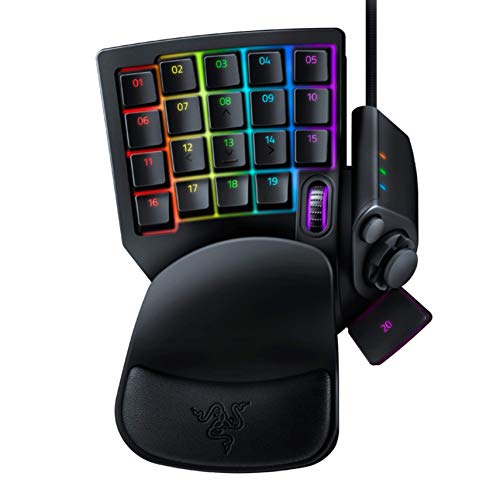
Based on product specifications and buyer feedback, modern one handed keypads deliver crisp responsiveness through specialized membrane domes or hybrid mechanical clickers. Integrated palm rests and ergonomic curves reduce wrist strain during marathon weekend sessions without requiring an external ergonomic wrist support. Whether you prefer driverless hardware macros on the RedThunder keypad or deep profile remapping on the Razer Tartarus V2, these devices keep your primary action keys within easy reach. Evaluating switch actuation feel and keycap stability ensures you get dependable gaming performance without unnecessary desk clutter.
Pros
- Plug-and-play setup with no drivers needed makes it instantly usable
- Anti-ghosting and 3ms response improve in-game accuracy and reaction time
- Ergonomic wrist rest and compact design offer comfort and space savings
- Macro recording adds versatility for complex game commands
- Affordable price point for a dedicated gaming keypad
Cons
- Limited to 35 keys may require adaptation for games with many keybinds
- RGB lighting is only 7 colors and two modes, not fully customizable
- Switches are likely membrane rather than mechanical, which may not satisfy enthusiasts
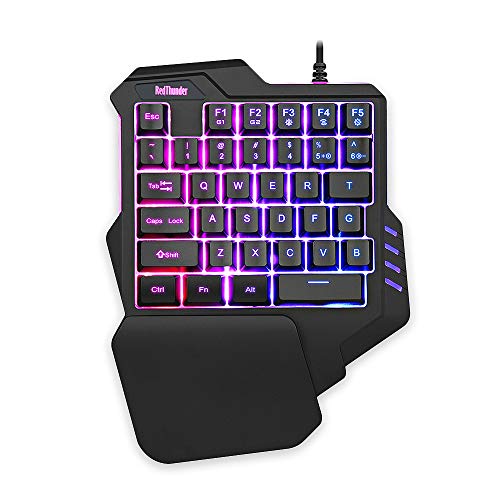
The RedThunder one-handed gaming keyboard is a compact, ergonomic keypad designed for PC gamers who want to maximize their gaming performance without cluttering their desk. This 35-key mini gaming keypad packs essential features like a 3ms response time, anti-ghosting, and macro recording into a portable form factor that fits comfortably alongside your main keyboard or as a standalone controller.
This keypad is an excellent choice for competitive gamers and esports players who need quick, accurate inputs in games like Fortnite, League of Legends, or Call of Duty. It’s also a solid fit for streamers who want extra programmable keys for hotkeys, scene switches, or commands without taking up much streaming desk space. Casual gamers and those with smaller desks, like college gamers or work-from-home users, will appreciate the space-saving design.
In terms of real-world performance, the 3ms response speed and full anti-ghosting ensure that your keypresses register quickly and reliably, even during fast-paced action. The two macro recording sets (FN+F1, FN+F2) are straightforward to program and can store complex sequences, which is handy for MMO rotations or editing shortcuts. The RGB backlight offers 7 colors with breathe and static modes, so you can match your gaming setup’s aesthetic, though customization is limited compared to full RGB keyboards.
Build quality is practical and budget-friendly. The keyboard uses a durable plastic frame with a generously sized wrist rest that provides good ergonomic support during long gaming sessions. Its compact dimensions (about 9 by 6.7 inches) and lightweight 0.77-pound build make it easy to toss in a bag for LAN events or move around your desk. Setup is truly plug-and-play: just connect via USB, and it works with Windows, Mac, Linux, and even older OS versions without any driver installation.
One limitation is the 35-key layout. While it covers essential gaming keys (WASD, Q, E, R, etc.), some users accustomed to full 60% keyboards may find it restrictive for games requiring many binds or typing tasks, thoughそれは主にゲーミング用途です。Additionally,因为它不是一个メカニカルキーボード、 switches are likely membrane, meaning tactile feel may not satisfy people accustomed to mechanical switches. RGB enthusiasts might also miss per-key color customization or software-based effects, as everything is controlled onboard with limited modes.
Overall, the RedThunder one-handed gaming keyboard delivers good value for gamers seeking a dedicated gaming keypad without breaking the bank. It excels in responsiveness, ease of use, and desk-space efficiency while offering useful macros and a comfortable layout. Whether you’re a PC gamer looking to optimize your setup, a streamer needing extra keys, or simply want a reliable and compact game controller for casual play, this keypad is a practical option worth considering for its price point.
Frequently Asked Questions
Can a one handed gaming keyboard replace a standard keyboard for everyday use?
No, a compact gaming keypad cannot replace a full keyboard for general computer tasks. These specialized controllers feature between 32 and 35 keys focused strictly on gaming clusters like WASD. While the best one handed gaming keyboard excels during matches, you still need a dedicated keyboard for typing to write emails or handle regular daily tasks.
What makes the best one handed gaming keyboard worthwhile in 2026?
Generous mouse space and improved wrist alignment make these compact keypads worthwhile. Trimming away unnecessary keys lets your mouse move freely during broad swipes without bumping into keyboard plastic. Integrated palm rests also help maintain a neutral wrist angle to avoid tendon fatigue during intense gaming marathons.
How do mecha-membrane switches feel compared to regular mechanical switches?
Mecha-membrane switches combine the soft bottom-out cushion of rubber domes with the crisp tactile click of mechanical switches. This design provides clear keypress confirmation while softening hard impacts. Gamers who want tactile feedback without loud clatter often appreciate this comfortable hybrid action.
Do you need extra software to record macros on a mini gaming keypad?
Not always, because configuration methods vary between brands. Models like the RedThunder board feature onboard hardware macro recording directly via function keys without software downloads. Advanced keypads like the Razer Tartarus V2 utilize desktop software to unlock complex multi-layer key bindings and RGB lighting controls.
Does an 8-way directional thumbpad improve character movement in games?
Yes, an 8-way directional thumbpad can offload character navigation entirely to your thumb. This frees your three main fingers to handle abilities, spells, and weapon swaps without lifting off movement keys. Players migrating from console controllers often adapt quickly to this fluid navigation method.






Write Your Review
No reviews yet. Be the first to share your experience!