


Cramped desk surfaces leave very little room for rapid mouse sweeps during intense competitive matches. Bulky full-size desktop keyboards take over valuable mousepad real estate, pushing wrists into awkward, fatiguing angles. Equipping your setup with the best mini mechanical gaming keyboard frees up vital elbow room so you can execute wide swipes with effortless precision. These compact 60% and 65% platforms strip away unnecessary number pads and navigation clusters, leaving pure gaming functionality right under your fingertips.
Switch responsiveness and durable keycap construction make all the difference when split-second decisions decide matches. Linear optical switches, hot-swappable sockets, and textured PBT plastics deliver snappy feedback without the sluggish delay of standard office decks. Based on detailed analysis of switch travel specs, board acoustics, and verified user feedback, a streamlined mini setup also cuts down on forearm strain during marathon sessions. Pairing an ultra-compact keyboard with a dedicated responsive gaming keyboard setup helps lock in clean mechanics. Many gamers also add a supportive wrist rest to keep joints relaxed through every high-stakes round.

Pros
- Ultra-compact design that fits easily into a backpack for travel or LAN parties
- Reliable wired connection with no input delay compared to budget wireless options
- Quiet membrane keys with a mechanical-like feel suitable for shared spaces
- Affordable price point that delivers solid gaming performance for entry-level users
Cons
- Membrane switches lack the tactile feedback and longevity of mechanical switches
- Compact layout may take time to adjust for users accustomed to full-size keyboards
- Limited RGB customization - only preset backlight modes, no per-key software control
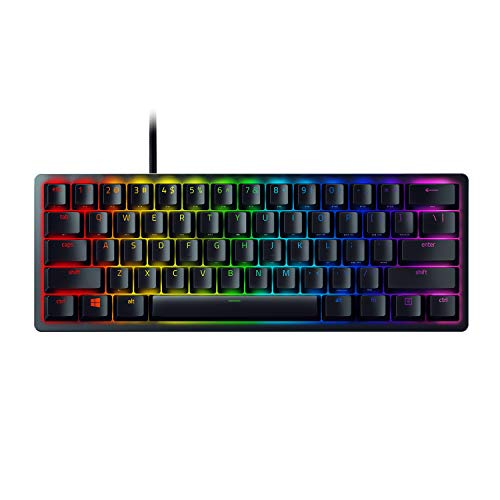
The GEODMAER 65% Wired Gaming Keyboard is a compact, budget-friendly option designed for PC gamers who value desk space and straightforward performance. This membrane keyboard packs a 68-key layout without a numpad, making it an excellent choice for competitive gamers, casual players, esports enthusiasts, and college gamers who need a portable setup. It also appeals to streamers and content creators looking for a minimalist keyboard that won't clutter their desk.
Performance-wise, the keyboard features 26-key no-conflict and anti-ghosting technology, ensuring that every keystroke registers accurately even during intense FPS or MOBA matches. The wired Type-C connection offers ultra-low latency and a stable signal, which many users prefer over wireless options for consistent responsiveness. According to product specifications, the membrane switches are rated for over 10 million keystrokes, providing decent longevity for daily use. The keys have a UV coating to resist fading, and the two-color injection molding keeps the backlit characters legible in low light.
In terms of build quality, the keyboard uses a plastic frame with an ergonomic keycap profile that helps reduce wrist fatigue during long gaming sessions. The mechanical-like feel is achieved through membrane technology, which is quieter than traditional mechanical switches - a plus for gamers in shared living spaces or dorm rooms. The detachable Type-C cable simplifies cable management and storage, allowing you to pack the keyboard away neatly when not in use.
Setting up the GEODMAER keyboard is plug-and-play with no additional software required. Users can adjust the LED backlight using FN key combinations, switching between always-on, breathing modes, and brightness levels. The FN+Win lock prevents accidental Windows key presses during gameplay, a practical feature for competitive gaming. One limitation is the lack of per-key RGB customization; the backlight is controlled via preset modes rather than software tuning.
A realistic drawback is the membrane switch feel, which may not satisfy mechanical keyboard enthusiasts who prefer tactile or clicky feedback. Additionally, the compact layout omits the numpad and some navigation keys, so users who frequently input numbers or use dedicated arrow keys for productivity may find it less convenient. However, the separate arrow key cluster helps mitigate this issue.
Overall, the GEODMAER 65% Gaming Keyboard is a solid entry-level choice for PC gamers, streamers, and everyday users who want a compact, reliable, and affordable wired keyboard. It excels in desk setup convenience, low-latency performance, and basic RGB aesthetics, making it a practical addition to any gaming PC build or dorm room arsenal.
The GEODMAER 65% keyboard is constructed with a durable plastic frame that feels sturdy for its price range. The keycaps use two-color injection molding, ensuring the backlit legends won't fade over time. The UV coating on each key adds an extra layer of protection against wear from frequent use. The detachable Type-C cable is braided for added durability and flexibility, reducing cable clutter on the desk. While the membrane switches lack the mechanical click, they offer a quiet and consistent typing experience that many users appreciate for both gaming and office work.

Pros
- Excellent value for the price with solid build quality and responsive red switches.
- Compact size saves desk space while still including arrow keys and F-row shortcuts.
- Customizable blue backlighting with multiple modes adds style to any gaming setup.
- Detachable USB-C cable makes it easy to pack up and move between devices.
Cons
- ABS keycaps may show wear over time with heavy use, though double-shot injection improves durability.
- Blue backlight is single-color only, so no RGB customization for those wanting more color options.
- Some users may find the linear red switches lack tactile feedback preferred for typing.
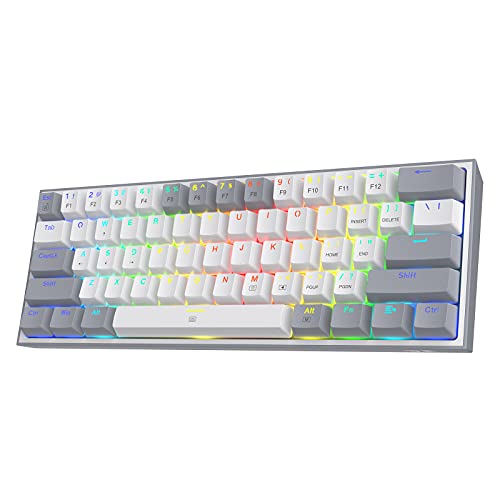
The MageGee MK-Box is a 60% mechanical gaming keyboard that packs a lot of value into a tiny footprint. With 68 keys, it shrinks down the traditional layout while keeping dedicated arrow keys and a full F-row, accessible via Fn combinations. This makes it a smart choice for PC gamers, college students, and anyone building a compact gaming or work-from-home setup who doesn't want to sacrifice functionality for space.
At the heart of this keyboard are linear red switches. They offer a smooth, quiet keystroke with no tactile bump, which many gamers appreciate for rapid, consecutive presses in fast-paced titles like FPS or MOBA games. The switches have minimal resistance, so your fingers won't tire out during long gaming sessions or extended typing. User feedback consistently highlights that the red switch version sounds and feels much better than clicky alternatives, making it a strong pick for shared spaces like dorm rooms or office desks.
Build quality is impressive for the price point. The keyboard features double-shot injection ABS keycaps, which means the legends are molded into the plastic and won't fade over time. The frame feels sturdy, and the detachable USB-C cable is a welcome addition, making cable management easy and the keyboard travel-friendly. The blue LED backlighting offers 16 modes, adjustable brightness, and speed control, letting you match the look to your mood or setup without needing any software.
Setup is truly plug-and-play. The keyboard works with Windows, Mac, and Linux right out of the box, no drivers required. The included key puller and 16 extra red keycaps let you customize the WASD or other keys for a personal touch. Some users have noted that the keycaps come in a mix of colors that you need to swap yourself to match the product images, but the process is straightforward.
One realistic limitation is that the ABS keycaps, while durable, may develop a shine over months of heavy use. Also, the backlight is single-color blue, so if you're an RGB enthusiast who wants per-key color customization, you'll need to look elsewhere. The keyboard also lacks software for macro programming, which competitive players might miss.
Overall, the MageGee MK-Box is an outstanding budget mechanical keyboard for gamers, streamers, or anyone who wants a reliable, space-saving input device. It delivers responsive performance, a clean aesthetic, and genuine portability. If you're a PC gamer on a budget, a college student with limited desk space, or someone who needs a backup travel keyboard, this is a fantastic buy that punches well above its price.
The MageGee MK-Box is built for responsive gaming. Its linear red switches actuate with a smooth, consistent feel, making them ideal for games where speed and quick double-taps matter. Full anti-ghosting across all 68 keys ensures that every keypress registers, even during complex combos in MOBAs or frantic movements in FPS titles. The compact layout puts all essential keys within easy reach, reducing hand travel and helping you react faster. While it lacks programmable macros, the straightforward plug-and-play nature means zero input lag from software overhead.
For a keyboard under $30, the MK-Box feels surprisingly solid. The plastic case has minimal flex, and the double-shot injection ABS keycaps resist wear and fading better than standard printed caps. The detachable USB-C cable is a premium touch, adding durability and making storage or travel easy. The switches are soldered to the board, so they aren't hot-swappable, but the overall construction is reliable for daily gaming and typing use. User reviews note that with basic mods like foam dampening, the keyboard can sound even better.
Frequently Asked Questions
What makes a 60% mini keyboard ideal for fast-paced gaming?
A 60% layout eliminates the numeric keypad and navigation cluster, providing maximum desk space for sweeping mouse movements. Competitive shooter players benefit greatly because lower mouse sensitivity requires broader sweeps without colliding into the keyboard edge. Compact mechanical boards also keep your hands positioned at a natural shoulder width to reduce wrist fatigue.
Are linear red switches better than clicky blue switches for Best Mini Mechanical Gaming Keyboard options?
Yes, linear red switches offer smooth, consistent travel without a tactile bump, making them faster for repeated keystrokes. Clicky blue switches generate loud tactile resistance and sharp audible clatter, which many typists enjoy but teammates in voice chat may dislike. For gamers who prioritize rapid double-tapping and silent action, linear switches provide a distinct speed advantage.
Can you swap out switches on hot-swappable compact boards?
Yes, hot-swappable compact mechanical keyboards allow you to remove stock switches and insert compatible 3-pin or 5-pin alternatives without soldering. Modern boards make switch customization simple, letting you mix switch types or replace worn parts in minutes. This modular flexibility gives you the freedom to tweak switch acoustics and actuation weight over time.
How do missing arrow keys work on a mini mechanical keyboard?
Missing dedicated directional keys are easily accessed through secondary function layers by holding the Fn key with designated letters. Some 60% models feature quick toggles such as Fn plus Spacebar, while 65% designs retain standalone arrow clusters. If your daily gaming routine requires constant directional inputs, pairing your board with a versatile typing keyboard option might suit your workflow better.
Do doubleshot PBT keycaps outlast standard ABS plastic in 2026?
Yes, doubleshot PBT keycaps resist shine, oil buildup, and legend wear significantly longer than standard ABS plastic caps. The textured surface stays grippy during long, sweaty matches, while dual-layer molding prevents letters from rubbing off. Investing in durable keycaps keeps your best mini mechanical gaming keyboard looking and feeling crisp over years of intense daily use.
Does a detachable Type-C wired connection reduce input latency?
Yes, a direct wired USB Type-C connection ensures rock-solid input stability and minimal latency for competitive esports play. Detachable cables also prevent bent connectors during transport, making compact boards easy to slide into a backpack. You can also pair your streamlined desk setup with a clean wireless mouse to keep the entire gaming surface clutter-free.






Write Your Review
No reviews yet. Be the first to share your experience!