


Stretching across wide key clusters during intense matches quickly causes painful finger fatigue and awkward misclicks. Traditional full-size boards space keys too far apart for smaller palms, forcing you to lift your wrist constantly just to tap the number row or sprint keys. Switching to compact keypads or streamlined 65 percent designs solves this reaching problem by consolidating your essential action buttons directly under your natural finger span. That is why securing one of the best gaming keyboards for small hands makes such a massive difference for comfort, actuation speed, and overall reaction time. Pairing a space-saving keypad with the best mouse DPI settings for gaming also gives your mouse arm plenty of room to flick without smacking into the edge of a bulky numpad.
Based on our detailed comparison of layout dimensions, anti-ghosting matrices, and buyer feedback, smaller keypads like the RedThunder One Handed Gaming Keyboard RGB Backlit provide integrated ergonomic wrist rests and quick-reach keys that prevent tendon strain. Other players lean toward versatile standalone typing layouts, such as the 65% Gaming Keyboard, Wired Backlit Mini Keyboard, which retains dedicated arrow keys while trimming wasted frame bulk. Selecting the right board comes down to switch feel, cable convenience, and layout style, whether you want an ultra-focused 35-key peripheral or a versatile ultra-compact keyboard for everyday play.
Pros
- Plug-and-play setup with no drivers needed makes it instantly usable
- Anti-ghosting and 3ms response improve in-game accuracy and reaction time
- Ergonomic wrist rest and compact design offer comfort and space savings
- Macro recording adds versatility for complex game commands
- Affordable price point for a dedicated gaming keypad
Cons
- Limited to 35 keys may require adaptation for games with many keybinds
- RGB lighting is only 7 colors and two modes, not fully customizable
- Switches are likely membrane rather than mechanical, which may not satisfy enthusiasts
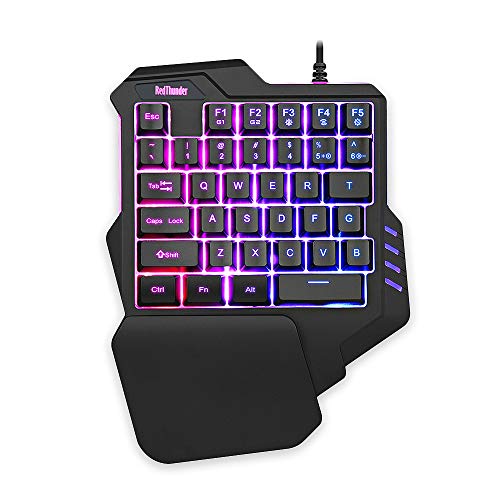
The RedThunder one-handed gaming keyboard is a compact, ergonomic keypad designed for PC gamers who want to maximize their gaming performance without cluttering their desk. This 35-key mini gaming keypad packs essential features like a 3ms response time, anti-ghosting, and macro recording into a portable form factor that fits comfortably alongside your main keyboard or as a standalone controller.
This keypad is an excellent choice for competitive gamers and esports players who need quick, accurate inputs in games like Fortnite, League of Legends, or Call of Duty. It’s also a solid fit for streamers who want extra programmable keys for hotkeys, scene switches, or commands without taking up much streaming desk space. Casual gamers and those with smaller desks, like college gamers or work-from-home users, will appreciate the space-saving design.
In terms of real-world performance, the 3ms response speed and full anti-ghosting ensure that your keypresses register quickly and reliably, even during fast-paced action. The two macro recording sets (FN+F1, FN+F2) are straightforward to program and can store complex sequences, which is handy for MMO rotations or editing shortcuts. The RGB backlight offers 7 colors with breathe and static modes, so you can match your gaming setup’s aesthetic, though customization is limited compared to full RGB keyboards.
Build quality is practical and budget-friendly. The keyboard uses a durable plastic frame with a generously sized wrist rest that provides good ergonomic support during long gaming sessions. Its compact dimensions (about 9 by 6.7 inches) and lightweight 0.77-pound build make it easy to toss in a bag for LAN events or move around your desk. Setup is truly plug-and-play: just connect via USB, and it works with Windows, Mac, Linux, and even older OS versions without any driver installation.
One limitation is the 35-key layout. While it covers essential gaming keys (WASD, Q, E, R, etc.), some users accustomed to full 60% keyboards may find it restrictive for games requiring many binds or typing tasks, thoughそれは主にゲーミング用途です。Additionally,因为它不是一个メカニカルキーボード、 switches are likely membrane, meaning tactile feel may not satisfy people accustomed to mechanical switches. RGB enthusiasts might also miss per-key color customization or software-based effects, as everything is controlled onboard with limited modes.
Overall, the RedThunder one-handed gaming keyboard delivers good value for gamers seeking a dedicated gaming keypad without breaking the bank. It excels in responsiveness, ease of use, and desk-space efficiency while offering useful macros and a comfortable layout. Whether you’re a PC gamer looking to optimize your setup, a streamer needing extra keys, or simply want a reliable and compact game controller for casual play, this keypad is a practical option worth considering for its price point.
Pros
- Four documented DPI presets ranging from 1200 to 7200 DPI for quick sensitivity changes
- Includes a 4-port USB splitter and Type-C adapter to expand host port connections
- Driver-free plug-and-play compatibility across Windows, Mac, and major gaming consoles
- Compact peripheral layout allows more room on the desk for unobstructed mouse movement
Cons
- Listing does not state physical mouse dimensions, exact weight, or individual button counts
- Console and mobile in-game functionality depends on third-party game peripheral rules
- Sensor brand, polling rate, and cable specifications are omitted from product data
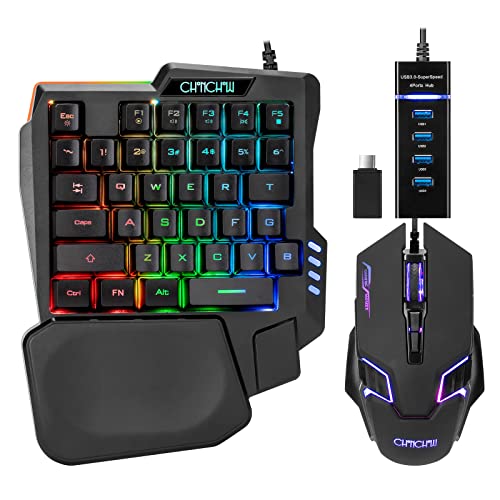
The CHONCHOW T10b is a wired ergonomic gaming mouse packaged together with a one-handed RGB keyboard and multi-port connectivity accessories. Aimed primarily at computer and console players who want a compact battlestation for titles such as MOBAs and first-person shooters, this peripheral set targets gamers looking to streamline their desk space. Because the companion keyboard takes up only half the footprint of a traditional board, it allows the accompanying mouse significantly more room for low-friction sweeps and quick repositioning on a desktop mat.
Connection and system compatibility are centered around standard wired USB connectivity. The package includes a 4-port USB splitter along with a USB-A to USB-C adapter, enabling users to plug the mouse, keyboard, and other peripherals into a single host port. According to the manufacturer, the hardware supports Windows PCs, macOS, PlayStation 4, Xbox One, and Nintendo Switch without requiring manual driver installations. It also connects to select Android mobile devices using the included Type-C adapter, though iOS devices require a separate, unbundled adapter. Players should verify that individual games natively allow mouse and keyboard input on their console or mobile platform before purchasing.
For tracking and cursor control, the mouse offers four selectable speed presets: 1200, 2400, 4800, and 7200 DPI. These stepped options allow users to toggle between slower, deliberate targeting and rapid cursor motion across high-resolution displays. The manufacturer characterizes the mouse shape as ergonomic, aimed at maintaining a natural hand posture during active gaming sessions. However, the listing leaves several detailed control specifications unstated, including the exact button layout, side button functions, and sensor model, meaning buyers should anticipate a conventional gaming mouse arrangement rather than an extensive programmable array.
Power and daily operation are straightforward thanks to the wired, bus-powered setup. Because the mouse and hub draw power directly from the connected computer or console, there are no internal batteries to charge or wireless pairing sequences to manage. The included 4-port splitter acts as a central hub for the mouse, the half-sized keyboard, a headset, or memory storage cards, helping manage desktop cable routing when host USB ports are limited.
A clear evaluation of this combo requires recognizing what the product documentation does and does not provide. While the multi-port hub and preset DPI levels offer clear functional utility, the listing omits physical mouse dimensions, exact weight, polling rate figures, and cable length. Additionally, console and mobile compatibility depends entirely on individual game support rules rather than universal peripheral operation. The manufacturer backs the setup with a one-year quality warranty should any hardware defects arise.
For gamers seeking an accessible, all-in-one peripheral kit that frees up desk room for mouse movement, this CHONCHOW bundle delivers solid baseline utility. The stepped DPI range up to 7200 DPI and included USB-C hub adapter make it a practical match for budget PC setups and supported console play. Shoppers requiring precise weight tuning, customized button mapping software, or verified ultra-high polling rates will want to explore dedicated standalone mice with exhaustive technical sheets.
The CHONCHOW combo connects using standard wired USB interfaces and includes both a 4-port USB splitter and a USB-A to USB-C adapter. This setup is designed to consolidate peripheral connections into a single port on the host machine. Listed platform compatibility covers Windows PC, macOS, PS4, Xbox One, and Nintendo Switch with driver-free plug-and-play operation. It is also compatible with select Android phones via the Type-C adapter, while Apple iPhone users must purchase an adapter separately. Console and mobile users should note that in-game keyboard and mouse support depends on the specific rules of each title.
Tracking on this gaming mouse is governed by four distinct hardware sensitivity presets: 1200, 2400, 4800, and 7200 DPI. These settings provide users with adjustable cursor speeds to accommodate different screen resolutions and in-game sensitivity preferences. The manufacturer does not list the underlying optical sensor model, maximum tracking speed, or acceleration ratings, so performance should be evaluated based on the documented stepped DPI values.

Pros
- Ultra-compact design that fits easily into a backpack for travel or LAN parties
- Reliable wired connection with no input delay compared to budget wireless options
- Quiet membrane keys with a mechanical-like feel suitable for shared spaces
- Affordable price point that delivers solid gaming performance for entry-level users
Cons
- Membrane switches lack the tactile feedback and longevity of mechanical switches
- Compact layout may take time to adjust for users accustomed to full-size keyboards
- Limited RGB customization - only preset backlight modes, no per-key software control
The GEODMAER 65% Wired Gaming Keyboard is a compact, budget-friendly option designed for PC gamers who value desk space and straightforward performance. This membrane keyboard packs a 68-key layout without a numpad, making it an excellent choice for competitive gamers, casual players, esports enthusiasts, and college gamers who need a portable setup. It also appeals to streamers and content creators looking for a minimalist keyboard that won't clutter their desk.
Performance-wise, the keyboard features 26-key no-conflict and anti-ghosting technology, ensuring that every keystroke registers accurately even during intense FPS or MOBA matches. The wired Type-C connection offers ultra-low latency and a stable signal, which many users prefer over wireless options for consistent responsiveness. According to product specifications, the membrane switches are rated for over 10 million keystrokes, providing decent longevity for daily use. The keys have a UV coating to resist fading, and the two-color injection molding keeps the backlit characters legible in low light.
In terms of build quality, the keyboard uses a plastic frame with an ergonomic keycap profile that helps reduce wrist fatigue during long gaming sessions. The mechanical-like feel is achieved through membrane technology, which is quieter than traditional mechanical switches - a plus for gamers in shared living spaces or dorm rooms. The detachable Type-C cable simplifies cable management and storage, allowing you to pack the keyboard away neatly when not in use.
Setting up the GEODMAER keyboard is plug-and-play with no additional software required. Users can adjust the LED backlight using FN key combinations, switching between always-on, breathing modes, and brightness levels. The FN+Win lock prevents accidental Windows key presses during gameplay, a practical feature for competitive gaming. One limitation is the lack of per-key RGB customization; the backlight is controlled via preset modes rather than software tuning.
A realistic drawback is the membrane switch feel, which may not satisfy mechanical keyboard enthusiasts who prefer tactile or clicky feedback. Additionally, the compact layout omits the numpad and some navigation keys, so users who frequently input numbers or use dedicated arrow keys for productivity may find it less convenient. However, the separate arrow key cluster helps mitigate this issue.
Overall, the GEODMAER 65% Gaming Keyboard is a solid entry-level choice for PC gamers, streamers, and everyday users who want a compact, reliable, and affordable wired keyboard. It excels in desk setup convenience, low-latency performance, and basic RGB aesthetics, making it a practical addition to any gaming PC build or dorm room arsenal.
The GEODMAER 65% keyboard is constructed with a durable plastic frame that feels sturdy for its price range. The keycaps use two-color injection molding, ensuring the backlit legends won't fade over time. The UV coating on each key adds an extra layer of protection against wear from frequent use. The detachable Type-C cable is braided for added durability and flexibility, reducing cable clutter on the desk. While the membrane switches lack the mechanical click, they offer a quiet and consistent typing experience that many users appreciate for both gaming and office work.
Frequently Asked Questions
Are one-handed keypads better than standard keyboards for smaller hands?
Yes, one-handed keypads place every essential action key directly beneath your fingertips without forcing you to stretch across a wide chassis. Models like the RedThunder One Handed Gaming Keyboard RGB Backlit condense movement keys, number hotkeys, and macro functions into a tight 35-key footprint. This compact setup prevents finger hyper-extension and eliminates unnecessary palm repositioning during fast-paced firefights. It also frees up substantial desk area for expansive mouse sweeps.
Do 65% gaming keyboards work well for small hands?
Yes, 65% layouts eliminate the numeric keypad and navigation cluster, bringing your hands into a natural, shoulder-width typing posture. The 65% Gaming Keyboard, Wired Backlit Mini Keyboard retains essential arrow keys while keeping keycaps tightly grouped for rapid finger travel. Because the outer frame is ultra-compact, you avoid reaching across unused plastic borders to trigger functional shortcuts. Gamers transitioning from full-size boards often appreciate this balance between daily typing and gaming responsiveness.
How do membrane switches feel compared to mechanical switches for smaller hands?
Membrane switches offer a cushioned, quiet keypress with soft tactile feedback that requires minimal finger strain. Many of the Best Gaming Keyboards For Small Hands options in 2026 utilize tuned membrane switches that deliver a satisfying mechanical feel without stiff actuation springs. The lighter resistance benefits players with shorter fingers who experience fatigue from heavy switch springs during long play sessions. These cushioned keys also keep your setup virtually silent during late-night voice calls.
Does an ergonomic wrist rest help prevent gaming fatigue?
Yes, an integrated ergonomic wrist rest maintains a neutral wrist angle to prevent repetitive tendon strain and palm soreness. Keyboards such as the One Handed Gaming Keyboard and Mouse Combo feature contoured palm rests tailored to a player’s natural grip angle. Resting the heel of your palm securely prevents upward wrist bending when reaching for higher number keys. This neutral wrist positioning keeps your hand relaxed across hours of gameplay.
Can a one-handed keypad work alongside a standard desktop setup?
Yes, one-handed gaming keypads function seamlessly as secondary controllers alongside standard desktop keyboards. You can keep your primary typing keyboard pushed aside while plugging in the gaming keypad directly into your gaming desktop via USB. This gives you optimal ergonomics while gaming without sacrificing full typing capabilities for everyday productivity or office work. Driver-free plug-and-play compatibility ensures both peripherals coexist without software conflicts.






Write Your Review
No reviews yet. Be the first to share your experience!