


Tangled desk cables create visual clutter and restrict fluid arm movement during long work hours or gaming sessions. Switching to a dependable best wireless keyboard for pc opens up clean surface space while delivering comfortable, responsive typing without cord snagging. Modern 2.4GHz RF nano receivers ensure snappy keystroke registration with virtually zero lag across your desktop. Pairing that clean setup with proper desk ergonomics and calibrated mouse DPI settings for gaming maintains complete precision across every task. Based on our detailed comparison of switch profiles and user feedback, wire-free typing setups provide crisp tactile actuation and quiet sound dampening.
Careful analysis of product specifications highlights how battery endurance has progressed, with low-draw switches running for months between battery changes. Dedicated multimedia hotkeys and quiet low-profile keycaps allow quick volume adjustments and steady data entry without distracting switch clatter. Sturdy spill-resistant enclosures also protect your investment while preventing wrist fatigue over long shifts. Upgrading to the best wireless keyboard for pc ensures you gain clean desk aesthetics alongside reliable tactile consistency.
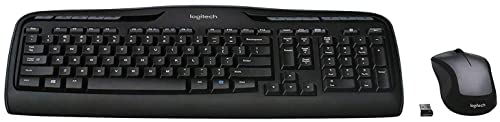
Pros
- Quiet membrane keys keep Discord voice chats and late-night gaming free of loud clatter
- Impressive battery endurance requires fewer swaps across both peripherals
- Instant plug-and-play 2.4 GHz wireless connection with zero complex setup
- Useful multimedia and hotkey row allows quick volume and playback adjustments
Cons
- Lacks mechanical switches and anti-ghosting features needed for fast competitive esports
- Mouse sensor lacks adjustable high DPI settings for precise FPS twitch aiming
- No customizable RGB backlighting for dark room visibility
The Logitech MK335 is a full-size wireless keyboard and mouse combo built for casual PC gamers, work-from-home pros, and college students who want a clutter-free desk setup. Pairing a low-profile keyboard with an ambidextrous wireless mouse, this set focuses on quiet everyday usability, long-lasting battery life, and clean cable management. While dedicated esports players often reach for expensive mechanical decks, this bundle targets budget-conscious PC users who need dependable gear that seamlessly transitions between casual gaming, school assignments, and daily productivity.
In real-world casual gaming scenarios, the 2.4 GHz wireless connection provides stable transmission with virtually no dropouts or noticeable input lag for slower-paced titles. Strategy games, management sims, casual open-world exploration, and point-and-click adventures feel responsive and fluid. The whisper-quiet key switches produce minimal clatter, which is a major advantage for late-night gaming in dorms or jumping on Discord calls without microphone feedback picking up every keystroke. However, fast-paced competitive FPS or MOBA titles will highlight the limitations of standard membrane switches and basic key rollover compared to dedicated gaming hardware.
The keyboard is built around a practical full-size frame featuring a dedicated number pad, directional arrow keys, and an extensive row of 11 multimedia hotkeys alongside 4 programmable F-keys. These quick-access buttons make adjusting stream volume, muting sound, or skipping music tracks effortless while running games in full-screen mode. The bundled mouse features an ambidextrous contour suited for both claw and palm grips during relaxed desktop sessions. Underneath its battery compartment, Logitech includes dedicated storage for the USB nano-receiver, protecting the dongle during travel between a home desk and a gaming laptop.
Setting up the MK335 is as effortless as plugging the compact 2.4 GHz nano-receiver into an open USB port on your gaming desktop or laptop. The plug-and-play design requires no bloatware or heavy background utilities, keeping your PC resources free for gaming. Desk organization improves immediately by removing two extra wires from your setup, simplifying mouse pad surface space and leaving your battle station looking tidy. Power management stands out as another strong point, offering up to 24 months of keyboard battery life and up to 12 months for the mouse under typical conditions, eliminating the constant stress of mid-session recharge cycles.
For gamers prioritizing high-speed competitive esports, adjustable optical sensors, or multi-zone RGB lighting, this combo will not replace a dedicated mechanical gaming keyboard and high-DPI esports mouse. The mouse features a standard fixed sensor suited more for navigation than micro-flick shooting, and the keys do not offer mechanical tactile actuation. Nonetheless, for dorm room setups, secondary streaming control rigs, family PCs, or casual gaming desks where quiet operation, wireless reliability, and budget value matter most, the Logitech MK335 delivers a practical and dependable solution.
Streamlining a gaming desk starts with clearing away unnecessary cables, and the Logitech MK335 helps achieve a neat desktop aesthetic effortlessly. The full-size keyboard profile remains slim enough to preserve valuable mouse pad room, while the wireless design gives you the freedom to reposition the keyboard for relaxed typing or angled casual gameplay.
Because both the keyboard and mouse share a single tiny USB nano-receiver, you only sacrifice one USB port on your motherboard or front I/O panel. This leaves your remaining ports open for gaming headsets, external microphones, capture cards, or USB storage drives.
Equipped with advanced 2.4 GHz wireless connectivity, this combo ensures an encrypted and steady link to your PC without the annoying signal drops common to budget wireless peripherals. The compact plug-and-forget receiver stays securely seated in your computer without obstructing adjacent ports.
For gamers who travel with a gaming laptop or switch between desktop stations, the mouse includes internal storage for the USB receiver right beneath the battery cover. This prevents loss during transit and ensures quick plug-and-play functionality wherever your PC setup moves.

Pros
- Ambidextrous, compact shape suits both right-handed and left-handed users
- Long listed mouse battery life of up to 12 months with a dedicated on/off switch
- Simple plug-and-play setup via a single shared USB receiver with a stated 33-foot wireless range
- Smooth navigation across most flat surfaces without requiring a specialized mouse pad
Cons
- Specific tracking metrics like DPI sensitivity and polling rates are not documented in the listing
- Requires an open USB-A port for the wireless receiver and does not offer Bluetooth support
- Packaged as part of a full desktop combo rather than sold as an individual replacement mouse
The mouse included with the Logitech MK270 combo is a compact wireless peripheral designed for general everyday computer tasks, office productivity, and study sessions. Because it is paired alongside a full-size keyboard, it serves shoppers looking to refresh their entire desktop setup with a unified wireless solution. Its compact build makes it easy to move between a desktop workspace and a laptop bag, catering to users who want a simple, uncluttered setup without complex installation routines.
Wireless connectivity relies on a single plug-and-play USB receiver that establishes a cord-free link with a manufacturer-rated range of up to 33 feet. Setting up the device requires an available USB port on your desktop, laptop, or docking station. The product details do not list native Bluetooth support, meaning devices that lack USB ports or compatible adapters cannot connect directly. While specific operating-system versions are not itemized in the listing, standard USB plug-and-play peripherals typically work across mainstream desktop systems once the receiver is plugged in.
In terms of handling, the mouse features an ambidextrous, compact shape intended to feel balanced in either the left or right hand. Logitech highlights smooth cursor control for reliable tracking across most typical desk surfaces, allowing for straightforward navigation through web pages, documents, and spreadsheets. Detailed tracking specifications such as exact sensor type, DPI sensitivity levels, and polling rates are not specified in the product data, indicating that this mouse is tuned for basic navigation rather than competitive gaming or high-precision creative work.
Power management is another key focus of the MK270 mouse. The manufacturer lists a battery life of up to 12 months, supported by an integrated on-and-off switch that lets users preserve power when the computer is turned off or while traveling. The exact battery chemistry and size required for replacement are not specified in the supplied information, but the hardware is designed to deliver extended operation before requiring attention. Setup is fast and driverless, engaging cursor control as soon as the USB receiver is recognized by the computer.
When considering this mouse, buyers should recognize a few practical limitations. The listing does not confirm customizable buttons, programmable thumb controls, or dedicated configuration software. Additionally, because the mouse is packaged as part of a full-size keyboard combo, it may not be ideal for shoppers who exclusively want an individual replacement pointer without an accompanying keyboard. Users who require multi-device pairing or Bluetooth support for thin tablets and ultrabooks will also find the connection options limited to the included USB dongle.
Overall, the Logitech MK270 mouse offers a sensible, practical option for anyone seeking straightforward cursor navigation and reliable everyday wireless operation. It is best suited for students, home office workers, and general browsing users who value ambidextrous handling, long listed battery endurance, and simple plug-and-play functionality. Those needing high-performance gaming sensors or specialized ergonomic contours should look toward dedicated productivity or gaming lines, but for basic computing needs, this mouse delivers documented utility at a dependable standard.
The MK270 wireless mouse connects using a single shared USB receiver that plugs directly into a standard USB port on your computer. Logitech lists a wireless operating range of up to 33 feet under normal conditions, minimizing cords across your workspace. Because this model relies exclusively on a physical USB receiver, your computer or docking hub must have an available port to support it.
Bluetooth connectivity is not included with this combo, so mobile devices, tablets, or slim laptops without traditional USB ports will require a compatible adapter to use the receiver. The product listing does not state specific operating-system requirements, so users should confirm basic USB HID support on their computer before purchasing.
Energy efficiency is a central design element for the MK270 mouse, with Logitech listing up to 12 months of mouse battery life. An integrated on-and-off switch on the mouse lets you shut down power during storage or transport, helping prevent accidental battery drain.
Although the exact battery size and replacement instructions are not detailed in the supplied listing specifications, the stated power management system is built for low-maintenance operation across months of standard desk use.

Pros
- Cable-free desktop convenience with reliable 2.4 GHz wireless connection
- Integrated textured palm rest supports comfortable posture through marathon sessions
- Remarkable battery life with included batteries lasting well over a year
- Spill-resistant build adds peace of mind for food and drinks on the gaming desk
Cons
- Membrane switches lack the rapid actuation and tactile feedback of mechanical gaming switches
- Lacks RGB backlighting for late-night gaming in dark rooms
- Mouse lacks custom DPI toggles and extra programmable thumb buttons needed for competitive FPS titles
The Logitech MK345 is a full-size wireless keyboard and optical mouse bundle designed for desktop users who prioritize clean cable management, quiet operation, and everyday comfort. While hardcore esports players often lean toward mechanical decks and ultra-high DPI mice, this combo targets casual PC gamers, college dorm builders, and work-from-home professionals who play strategy titles, simulation games, and relaxing open-world adventures after hours.
Typing on the full-size deck feels cushioned and quiet, which makes it ideal for late-night Discord chats, streaming voice channels, and shared living spaces. The keys provide dependable input accuracy for standard PC navigation and casual keybindings, supported by a broad textured palm rest that keeps your wrists at a neutral angle. The contoured mouse fits naturally into a right-handed palm or claw grip, tracking smoothly across standard cloth mouse pads without jitter during daily browsing and light gaming.
Logitech built this combo with practical desktop longevity in mind. The keyboard features a spill-resistant design with liquid drainage channels, which helps protect your setup from unexpected drink accidents during high-stress moments. Quick-access F-key media shortcuts let you control volume, mute audio, or skip audio tracks on Spotify without tabbing away from your active window. The right-handed mouse feels lightweight, gliding effortlessly while keeping desk clutter to an absolute minimum.
Setup requires zero software installation or driver hunting. Plugging the compact 2.4 GHz USB nano receiver into an available port instantly connects both peripherals with low-latency responsiveness up to thirty-three feet away. Power management is another standout highlight, offering up to thirty-six months of keyboard battery life and eighteen months of mouse operation on basic AA and AAA batteries. The lack of charging cables keeps your battle station sleek and organized.
Competitive FPS and fast-paced battle royale players should be aware that this combo does not offer mechanical switches, anti-ghosting rollover, customizable RGB backlighting, or adjustable DPI presets. However, for gamers building a budget-friendly hybrid desk setup for everyday study, remote work, and casual weekend gaming, the Logitech MK345 remains an ultra-reliable, clean, and ergonomic solution.
A clutter-free desktop makes a noticeable difference during long gaming and work marathons. The single unified wireless USB dongle eliminates multiple trailing cables, freeing up valuable space on your desk pad for wide mouse sweeps or streaming gear like standalone microphones and audio mixers.
The built-in palm rest and angled kickstands allow you to tailor your typing angle to match your chair height. Meanwhile, the sculpted contours of the mouse encourage a natural grip that helps stave off forearm strain over hours of productivity or relaxed gaming.

Pros
- Reliable tri-mode wireless with stable 2.4G connection and Bluetooth for multi-device use.
- Full-size keyboard with comfortable keystrokes and quiet operation reduces fatigue during long sessions.
- Programmable keys and mouse buttons via Redragon software offer deep customization for macros and DPI.
- Sturdy build quality and positive long-term user feedback suggest excellent durability for the price.
- Affordable price point delivers strong value for budget-conscious gamers and setup builders.
Cons
- Keyboard may have a brief reconnection delay after sleeping (5-10 seconds), which can interrupt fast-paced gaming.
- Some users report the keyboard feels slightly mushy compared to higher-end mechanical switches.
- Software driver download required for full customization, and early reviews note limited initial compatibility.
The Redragon S101M-KS is a wireless gaming keyboard and mouse combo designed for PC gamers who want to cut the cord without sacrificing performance or breaking the bank. This tri-mode set supports wired USB, 2.4G wireless via a single dual-function receiver, and Bluetooth connectivity, giving you flexibility for desktop gaming, laptop use, or streaming setups. With a 4800 DPI adjustable mouse and 10 dedicated multimedia keys, it targets casual gamers, competitive esports players, and content creators building an affordable, clutter-free gaming station.
In real-world use, the combo delivers solid responsiveness and low-latency performance, especially in 2.4G mode. The mouse offers five DPI levels (800/1200/1600/3200/4800) that you can cycle through on the fly, making it suitable for both precise aiming in FPS titles and faster cursor movement in MOBA or strategy games. The keyboard features anti-ghosting and 12 combination multimedia keys, which help maintain input accuracy during intense gaming sessions. According to user feedback, the keyboard is comfortable for long typing and gaming, though some describe the keys as slightly softer than mechanical-switch alternatives.
Build quality appears robust for its price range, with a full-size layout and an ergonomic design that includes a wrist rest. The RGB backlighting offers 8 patterns with adjustable speed and brightness, adding visual flair to any desk setup. Both the keyboard and mouse are rechargeable, with the keyboard lasting up to 300 hours with RGB off. The dual-function 2.4G receiver stored in the keyboard slot simplifies cable management and keeps your workspace tidy. The mouse also features programmable buttons via Redragon's software, allowing you to remap controls for gaming or productivity shortcuts.
Setting up the S101M-KS is straightforward: plug in the receiver, power on the devices, and they connect automatically. For Bluetooth, a quick pairing button on the mouse and FN+1/2/3 on the keyboard gets you connected to PCs, laptops, or tablets. The included 6-foot detachable USB-C cable offers wired use and charging. One limitation noted by users is that the keyboard may take a few seconds to wake from sleep mode, which could be a minor hiccup in fast-paced games. The software customization is available via Redragon's website, though some early buyers reported initial configuration hiccups.
While the S101M-KS is not a top-tier mechanical setup, it offers excellent value for budget-focused gamers, streamers, or college students building a first gaming PC. Its tri-mode connectivity makes it versatile for work-from-home setups or LAN parties, and the RGB lighting enhances any gaming room aesthetic. For competitive players seeking ultra-responsive switches or higher polling rates, higher-end options exist, but this combo excels as an affordable, reliable everyday solution.
The S101M-KS gaming combo delivers reliable wireless performance for most gaming scenarios. The 2.4G mode provides a stable, low-latency connection ideal for fast-paced shooters and real-time strategy games. The mouse's 4800 DPI sensor with five adjustable levels allows quick sensitivity changes, while the keyboard's anti-ghosting ensures simultaneous key presses register accurately. However, the keyboard's wake-up delay of a few seconds may interrupt action in games requiring instant input after idle periods.
Constructed with a durable plastic frame, the keyboard and mouse feel solid for the price point. The keys have a soft, membrane-like feel that many users find comfortable for extended typing and gaming. The mouse fits well in medium to large hands, with textured side grips for secure control. The included braided USB-C cable adds durability, while the storage slot for the 2.4G receiver prevents loss.
The full-size keyboard includes an integrated wrist rest that reduces strain during long gaming sessions. The mouse ambidextrous shape suits palm and claw grips, with programmable side buttons within easy reach. Users report low fatigue even after hours of use, though the key feel may not satisfy mechanical-switch enthusiasts.
Eight RGB backlighting patterns with adjustable brightness and speed let you personalize the aesthetic. The software (download from Redragon.com) enables keyboard macro assignments and mouse DPI/polling rate adjustments up to 1000Hz. While the RGB is not per-key, the preset modes offer dynamic effects that complement any gaming setup.

Pros
- Ultra-compact design that fits easily into a backpack for travel or LAN parties
- Reliable wired connection with no input delay compared to budget wireless options
- Quiet membrane keys with a mechanical-like feel suitable for shared spaces
- Affordable price point that delivers solid gaming performance for entry-level users
Cons
- Membrane switches lack the tactile feedback and longevity of mechanical switches
- Compact layout may take time to adjust for users accustomed to full-size keyboards
- Limited RGB customization - only preset backlight modes, no per-key software control
The GEODMAER 65% Wired Gaming Keyboard is a compact, budget-friendly option designed for PC gamers who value desk space and straightforward performance. This membrane keyboard packs a 68-key layout without a numpad, making it an excellent choice for competitive gamers, casual players, esports enthusiasts, and college gamers who need a portable setup. It also appeals to streamers and content creators looking for a minimalist keyboard that won't clutter their desk.
Performance-wise, the keyboard features 26-key no-conflict and anti-ghosting technology, ensuring that every keystroke registers accurately even during intense FPS or MOBA matches. The wired Type-C connection offers ultra-low latency and a stable signal, which many users prefer over wireless options for consistent responsiveness. According to product specifications, the membrane switches are rated for over 10 million keystrokes, providing decent longevity for daily use. The keys have a UV coating to resist fading, and the two-color injection molding keeps the backlit characters legible in low light.
In terms of build quality, the keyboard uses a plastic frame with an ergonomic keycap profile that helps reduce wrist fatigue during long gaming sessions. The mechanical-like feel is achieved through membrane technology, which is quieter than traditional mechanical switches - a plus for gamers in shared living spaces or dorm rooms. The detachable Type-C cable simplifies cable management and storage, allowing you to pack the keyboard away neatly when not in use.
Setting up the GEODMAER keyboard is plug-and-play with no additional software required. Users can adjust the LED backlight using FN key combinations, switching between always-on, breathing modes, and brightness levels. The FN+Win lock prevents accidental Windows key presses during gameplay, a practical feature for competitive gaming. One limitation is the lack of per-key RGB customization; the backlight is controlled via preset modes rather than software tuning.
A realistic drawback is the membrane switch feel, which may not satisfy mechanical keyboard enthusiasts who prefer tactile or clicky feedback. Additionally, the compact layout omits the numpad and some navigation keys, so users who frequently input numbers or use dedicated arrow keys for productivity may find it less convenient. However, the separate arrow key cluster helps mitigate this issue.
Overall, the GEODMAER 65% Gaming Keyboard is a solid entry-level choice for PC gamers, streamers, and everyday users who want a compact, reliable, and affordable wired keyboard. It excels in desk setup convenience, low-latency performance, and basic RGB aesthetics, making it a practical addition to any gaming PC build or dorm room arsenal.
The GEODMAER 65% keyboard is constructed with a durable plastic frame that feels sturdy for its price range. The keycaps use two-color injection molding, ensuring the backlit legends won't fade over time. The UV coating on each key adds an extra layer of protection against wear from frequent use. The detachable Type-C cable is braided for added durability and flexibility, reducing cable clutter on the desk. While the membrane switches lack the mechanical click, they offer a quiet and consistent typing experience that many users appreciate for both gaming and office work.

Pros
- Exceptional value at its price point - hard to beat for a full-featured wireless RGB keyboard.
- Quiet, creamy key feel that many users prefer over clicky mechanical switches in shared spaces.
- Easy connectivity with reliable 2.4GHz dongle for lag-free gaming and Bluetooth for tablets/phones.
- Full size layout with number pad and media knob adds convenience for work and productivity.
- Customizable RGB lighting and macro programming via software offer solid flexibility for the price.
Cons
- Space bar has a noticeably loud, pingy sound compared to the rest of the keys - a common complaint in user reviews.
- Membrane construction means no hot-swap switches and limited modding options for enthusiasts.
- Some users report minor key labeling mismatches (e.g., Fn row icons don't match default functions).
The AULA S99 is a wireless membrane gaming keyboard that targets budget-conscious PC gamers, students, and hybrid workers who want a clean, aesthetic desktop without breaking the bank. Unlike many mechanical keyboards in this price range, the S99 focuses on a creamy, quiet typing experience and tri-mode connectivity, making it a versatile option for both gaming and productivity.
Based on product specifications and user feedback, the S99 delivers a satisfying feel for its type. The membrane keys offer a soft, tactile bump with a muted sound profile - much quieter than typical clicky switches. The space bar, however, has been noted by several reviewers as producing a loud, pingy clack that contrasts with the rest of the keys. This is a realistic limitation if you share a room or record audio nearby. Despite that, the overall typing experience is smooth and comfortable for long sessions, whether you're grinding in an FPS or typing up a report.
Connectivity is a strong suit. The keyboard supports Bluetooth 5.0, 2.4GHz wireless via a USB dongle, and a wired USB-C mode. You can pair up to five devices and switch between them easily using the built-in knob. Latency in 2.4GHz mode feels fast enough for casual and competitive gaming, and Bluetooth works well for tablets or phones. The included dongle stores conveniently in the keyboard base, a nice cable management touch.
Build quality is typical for its price - lightweight plastic with a compact 96% layout that saves desk space while keeping the numpad. The two-stage kickstand offers three tilt angles for ergonomic adjustment. RGB lighting is configurable via software or onboard shortcuts, with multiple dynamic effects to match your setup. The media knob also controls volume and lighting, adding a premium feel.
Setup is plug-and-play out of the box. The keyboard automatically works with Windows, Mac, Android, and iOS. Programming macros requires the AULA software, which is straightforward but has limited advanced options. Battery life is decent, though not specified in detail - many users report lasting several days of mixed use.
Overall, the AULA S99 is an excellent entry-level choice for gamers who don't demand mechanical switches and want a quiet, full-sized keyboard with wireless freedom. It's especially suited for college dorm rooms, home offices, or casual PC setups where aesthetics and budget matter. If you're a competitive esports player needing rapid actuation or hot-swap capabilities, you may want to look at mechanical alternatives. But for the price, this keyboard delivers impressive value and practicality.
The AULA S99 features per-key RGB backlighting with over a dozen preset effects accessible via the FN + Page Up shortcut or through the free AULA software. You can adjust brightness, speed, and color patterns to match your gaming setup. The included media knob doubles as a lighting effect controller, letting you cycle through modes without software. While full per-key color editing is not available on this membrane board, the pre-set options are vibrant and offer enough variety for most users. The keycaps are translucent on the legends, ensuring the RGB shines through nicely even in low-light gaming sessions.
Frequently Asked Questions About Best Wireless Keyboard For Pc
Is a 2.4GHz wireless connection better than Bluetooth for PC typing and gaming?
Yes, a dedicated 2.4GHz connection provides noticeably lower input latency and stronger signal stability than Bluetooth. Most PC keyboards use a compact USB nano receiver that bypasses wireless pairing conflicts, ensuring instant keystroke response even in crowded offices. While Bluetooth handles multi-device tablet pairing well, 2.4GHz RF remains ideal for lag-free gaming and rapid data entry.
How long do batteries last in a modern best wireless keyboard for pc?
Battery longevity ranges from several weeks on illuminated boards to over 24 to 36 months on efficient battery-operated membrane units. Non-backlit models like the Logitech MK270 and MK345 maximize power efficiency through automatic sleep modes and low-draw wireless protocols. Models with active RGB backlighting will require more frequent recharging via USB-C cables.
Can a best wireless keyboard for pc interfere with other desktop peripherals?
No, modern wireless keyboards operate on frequency-hopping 2.4GHz bands that prevent signal overlap with other devices. Your wireless keyboard will perform cleanly alongside responsive mice or low-latency wireless gaming headphones without causing dropped keystrokes. Placing the USB receiver in an unobstructed front port further optimizes connection strength.
Are membrane wireless keyboards quiet enough for shared offices in 2026?
Yes, membrane keyboards feature cushioned rubber domes that naturally absorb typing impact and soften bottom-out acoustics. Low-profile keycaps and sealed membrane layers minimize noise, making boards like the Logitech MK335 great for shared workspaces or late-night home offices. They eliminate loud mechanical clatter while delivering predictable tactile feedback.
What form factor works best when picking a best wireless keyboard for pc for small desks?
A 65% or compact 96% layout delivers the best balance of typing utility and space savings. Compact boards remove excess bezel and unnecessary number pads to free up mouse tracking room, while retaining essential arrow keys. Selecting smaller boards prevents uncomfortable wrist angles and promotes a healthier, neutral typing posture.








Write Your Review
No reviews yet. Be the first to share your experience!