


Hollow plastic cases often flex under aggressive keystrokes, creating distracting rattles during intense firefights. Upgrading to a solid metal top plate changes your tactile feedback by anchoring every switch firmly in place. Searching for the best gaming keyboard aluminum models helps competitive players and daily typists gain rock-solid stability without chassis creaks. Pairing a heavy metal frame with fine-tuned mouse sensitivity settings gives your desk the physical foundation needed for precision gaming.
Careful evaluation of plate thickness, internal acoustic dampening, and switch mounting styles reveals clear differences across top models. Premium metal frames often combine brushed aluminum alloy with hot-swappable mechanical switches, sound-dampening foam layers, and durable PBT keycaps that resist grease. Placing one of these heavy boards onto a sturdy gaming desk setup stops keyboard slip during rapid keystrokes. Based on product specifications and user feedback, these metal decks deliver cleaner acoustics and lasting durability.

Pros
- Solid build with aluminum top case for minimal flex
- Tactile switches offer satisfying bump without excessive noise
- PBT keycaps are more durable than standard ABS
- Simple white LED lighting is effective and non-distracting
- Compatible with Windows and macOS out of the box
Cons
- No software customization (not recognized by Logitech G Hub)
- Non-hot-swappable switches, so soldering required for changes
- Full-size layout may take up more desk space than TKL versions
The Logitech G413 SE is a full-size mechanical gaming keyboard that strips away unnecessary frills to deliver a focused, high-performance typing and gaming experience. It features tactile mechanical switches, durable PBT keycaps, and a rigid aluminum top case that gives it a premium feel without a premium price tag. This keyboard is designed for gamers and professionals who value reliability and consistency over flashy RGB lighting or overly complex software.
This keyboard is best suited for competitive gamers, casual gamers, esports players, and content creators who want a straightforward tool that works out of the box. It also appeals to work-from-home gamers and college students who need a durable keyboard for both gaming and daily tasks. The full-size layout includes a number pad and dedicated navigation keys, making it versatile for productivity as well as intense gaming sessions.
In real-world use, the tactile switches offer a noticeable bump at the actuation point, providing clear tactile feedback that helps prevent accidental presses. The actuation force is moderate, striking a good balance between being light enough for rapid inputs and heavy enough to avoid fatigue during long typing sessions. The white LED backlighting is uniform and bright enough for low-light gaming without being distracting. The 6-key rollover anti-ghosting ensures that each key press is registered accurately, even during complex key combinations in fast-paced FPS or MOBA games.
Build quality is a standout feature of the G413 SE. The brushed aluminum top case provides excellent rigidity, with virtually no flex even under heavy use. The PBT keycaps are highly resistant to wear and heat, maintaining their texture and legends far longer than standard ABS keycaps. The keyboard connects via a sturdy USB cord, and the overall construction feels built to last.
Setting up the G413 SE is as simple as plugging it into a USB port. There is no proprietary software required, and the keyboard works seamlessly with Windows and macOS. However, this also means it is not recognized by Logitech's G Hub software, so users cannot customize lighting effects or create macros. The switches are soldered in place, so modifying them requires soldering skills. Additionally, the full-size layout may be too large for cramped desks, though a tenkeyless version is available for those who need more mouse space.
Overall, the Logitech G413 SE is a practical and trustworthy choice for anyone seeking a no-nonsense mechanical keyboard that prioritizes build quality and typing feel. It is particularly well-suited for gamers who prefer tactile switches and want a durable daily driver without paying extra for RGB or wireless features. For its price point, it offers excellent long-term value and a satisfying user experience.
The Logitech G413 SE features a brushed aluminum-magnesium alloy top case that serves as the keyboard's backbone. This material choice minimizes flex and provides a solid, weighty feel. The PBT keycaps are thicker and more resistant to shine compared to ABS keycaps, ensuring that frequently used keys like WASD retain their texture over time. The bottom housing is plastic but sturdy, and the keyboard has a non-slip rubber base to keep it stable on the desk. The USB cable is braided and thick, adding to the overall durability.
The tactile switches in the G413 SE offer a crisp bump with a moderate actuation force, making them suitable for both gaming and typing. In fast-paced games like first-person shooters or real-time strategy, the switch response feels immediate and accurate. The 6-key rollover anti-ghosting technology ensures that simultaneous key presses are registered correctly, which is crucial for executing complex combos. The white LED backlighting helps illuminate key legends without causing glare, allowing for comfortable gameplay in dark environments. While the keyboard lacks per-key RGB or macro programming, its straightforward performance is reliable and consistent.

Pros
- Compact 96% layout with full numpad and arrow keys, great for gamers who need function without clutter.
- Outstanding wireless performance with minimal latency thanks to ROG SpeedNova technology.
- Pre-lubed switches and dampening foam deliver a satisfying, quiet typing experience out of the box.
- Hot-swappable design lets users easily change switches to customize feel.
- Long battery life (up to 1500 hours) reduces charging frequency.
Cons
- Armoury Crate software can be cumbersome to set up and navigate.
- Space bar stabilizer may require a slight break-in period according to some users.
- Price is premium compared to other 96% keyboards, but build quality justifies it.
The ASUS ROG Strix Scope II 96 Wireless is a mechanical gaming keyboard designed for gamers who want the full functionality of a full-size keyboard but with a smaller desk footprint. It targets competitive gamers, streamers, content creators, and anyone building a clean, efficient gaming setup. The 96% layout keeps the numpad, arrow keys, and function row while shaving off unnecessary space.
In terms of real-world performance, the keyboard uses ROG's SpeedNova wireless technology for a low-latency 2.4GHz connection that feels just as responsive as wired. The pre-lubed ROG NX Snow linear switches provide smooth, consistent actuation, and the hot-swappable design lets you experiment with different switch types later. The integrated sound-dampening layers significantly reduce echo and pinging, resulting in a satisfying 'thocky' sound that many gamers prefer.
Build quality is excellent, with a solid aluminum top frame and PBT doubleshot keycaps that resist wear and shine. The keyboard includes a detachable wrist rest, three adjustable tilt angles, and a multi-function wheel for quick volume and lighting adjustments. The tri-mode connectivity (USB, 2.4GHz, Bluetooth) makes it easy to switch between a desktop, laptop, or even a mobile device, and the battery life is impressive at up to 1500 hours with 2.4GHz (RGB off).
Setting up the keyboard is straightforward: plug in the 2.4GHz dongle or pair via Bluetooth, and you're ready to go. The Armoury Crate software allows extensive customization of RGB lighting, macros, and key assignments, but some users find it less intuitive than alternatives. Additionally, the space bar stabilizer may need a brief break-in period to achieve maximum smoothness.
Overall, the ROG Strix Scope II 96 Wireless is a versatile, high-performance keyboard that works well for a wide range of users. Whether you're a competitive FPS gamer needing low latency, a streamer looking for a clean desk, or a work-from-home gamer wanting both productivity and gaming features, this keyboard delivers. It's a solid investment for anyone who values a compact layout without sacrificing full-size functionality.

Pros
- Excellent value for the price - includes both keyboard and mouse with RGB and macro functionality.
- Ergonomic wrist rest and low-profile keys provide comfort for long gaming or typing sessions.
- Mouse DPI adjustment from 800 to 7200 offers flexibility for different game genres and screen resolutions.
- Positive user feedback on durability and build quality, with many reporting years of reliable use.
- Easy setup with no driver hassles - just plug in and start gaming or working immediately.
Cons
- Membrane keys may feel mushy to gamers accustomed to mechanical switches, lacking the tactile click.
- Wired connection only - not ideal for those seeking a clutter-free wireless desk setup.
- Software download required for full macro and lighting customization, which some users found unavailable or complicated.
The Redragon S101-3 PRO is a wired gaming keyboard and mouse combo designed for PC gamers who want solid performance without breaking the bank. It includes a full-size RGB backlit keyboard with membrane switches and a high-precision mouse with adjustable DPI up to 7200, making it a practical choice for competitive gamers, casual players, esports newcomers, streamers building a budget streaming setup, and college gamers setting up their first gaming desk.
In real-world use, the keyboard offers quick responsiveness thanks to anti-ghosting technology, ensuring every key press registers during intense FPS or MOBA sessions. The mouse's adjustable DPI lets you switch between slow, precise aiming for sniping and fast tracking for fast-paced action. User reviews highlight that the combo maintains low latency and reliable input accuracy, making it suitable for both gaming and everyday productivity tasks like typing assignments or managing spreadsheets.
Build quality is surprisingly robust for the price point. The keyboard features a spill-resistant design and a comfortable wrist rest, while the mouse has an ergonomic shape that fits medium to large hands. The membrane keys provide a soft, quiet feel that works well in shared spaces or dorm rooms, though enthusiasts used to mechanical switches may find them less tactile. The included foldable stand lets you adjust the keyboard angle for better typing posture.
Setup is straightforward: plug the USB cables into your PC, and everything works out of the box. Customizing RGB effects and macro commands requires downloading Redragon software from their website, which is free but not always easy to find according to some reviewers. Once set, lighting and DPI profiles save directly to the hardware, so you don't need the software running constantly. Cable management is simple thanks to the braided USB cables, though the wired design means two cables on your desk.
One realistic limitation is that the keyboard uses membrane switches rather than mechanical ones, so it lacks the crisp feedback that competitive gamers often prefer. Additionally, the mouse's DPI settings are preset steps (800/1200/1600/2400/7200) rather than fully customizable increments. Some users also noted that the software can be inconsistent across different Windows versions.
Overall, the Redragon S101-3 PRO is a reliable and feature-rich combo that delivers excellent value for budget-conscious PC gamers, streamers starting out, or anyone needing a dependable upgrade for work and play. It won't match high-end mechanical gear, but for its price, it offers responsive performance, comfortable ergonomics, and enough RGB flair to light up your gaming setup without emptying your wallet.

Pros
- Hot-swappable with nearly all switch types for endless modding possibilities
- Sturdy aluminum base gives a premium feel and long-term reliability
- Quiet linear switches with foam padding reduce noise for shared spaces
- Full-size layout includes number pad and dedicated keys for versatility
- Affordable price point for the feature set
Cons
- Non-detachable USB cable limits cable management options
- Software customization is less intuitive than higher-end brands
- No wrist rest included, may require separate purchase for extended comfort
The Redragon K556 is a full-size mechanical gaming keyboard that stands out in the crowded budget segment thanks to its hot-swappable switch sockets, sturdy aluminum construction, and noise-dampening foam. Designed for PC gamers, streamers, and even casual typists, this board offers a solid foundation for anyone looking to customize their typing feel without breaking the bank.
Performance-wise, the K556 uses linear red switches that are smooth and quiet, making them suitable for both competitive gaming and quiet office environments. The anti-ghosting feature across all 104 keys ensures that every command registers accurately, even during rapid sequences in fast-paced FPS or MOBA titles. According to user feedback, the response time feels snappy and reliable for everyday gaming needs.
Build quality is where this keyboard truly impresses for its price. The anodized aluminum frame gives it a premium weight and rigidity, preventing any flex during heavy use. Inside, noise-absorbing foam helps reduce the hollow sound commonly found in cheaper boards, resulting in a more satisfying typing experience. The K556 also features 20 preset RGB lighting modes that can be adjusted on the fly or customized further through Redragon’s software, allowing for subtle ambiance or flashy effects to match your setup.
Setup is straightforward: plug the USB cable into your PC, and the keyboard is recognized immediately. The software, available from Redragon’s website, adds macro programming and lighting control, though it may feel a bit basic compared to competitors like Corsair or Razer. The non-detachable cable is a minor drawback for cable management enthusiasts, and the lack of a wrist rest means you may want to invest in one for long sessions.
Overall, the Redragon K556 is a fantastic entry point for gamers and modders who want hot-swappable functionality on a budget. It works well in a dorm room, home office, or dedicated gaming desk, offering quiet operation and a solid feel. While it does have some limitations in software and cable design, its price-to-feature ratio makes it a strong recommendation for anyone building their first custom mechanical keyboard or seeking a reliable daily driver.
The K556 delivers consistent performance for most gaming scenarios. The linear red switches have a short actuation distance and smooth travel, which helps in fast-paced games where every millisecond counts. Anti-ghosting across all keys means no missed inputs during complex key combinations, a must for competitive titles like Valorant or Apex Legends. The quiet operation also makes it suitable for streaming without picking up loud keystrokes on your microphone.
Redragon uses a full aluminum frame with a brushed finish that not only looks elegant but also adds significant weight (2.6 lbs) for desk stability. The hot-swap sockets are reinforced to reduce wobble, and the included foam layer dampens vibrations. User reviews frequently praise the keyboard's solid feel and durability over time, noting that it can withstand heavy daily use without developing loose keys or flex.
With 20 built-in RGB presets accessible via function keys, you can quickly switch between wave, breathing, reactive, and static modes. Brightness and speed are adjustable without software. For deeper customization, the Redragon software allows you to create per-key lighting effects and assign macros. The keyboard supports both 3-pin and 5-pin switches, making it easy to swap in tactile or clicky switches if you prefer a different feel.

Pros
- Tri-mode connectivity offers flexibility for both competitive and casual gaming setups.
- Hot-swappable design lets you experiment with different switches to find your perfect feel.
- Aluminum build provides a premium, durable feel at an affordable price point.
- Impressive battery life allows extended wireless use without frequent charging.
- Software support for macros and custom lighting adds extra personalization.
Cons
- Included keycaps are ABS plastic; some users may prefer PBT for better durability and feel.
- Wireless performance can be affected by RF interference; best used with 2.4G dongle for stability.
- Software interface is basic compared to premium brands, with limited advanced customization.
The Redragon K556 PRO is a wireless mechanical gaming keyboard designed for PC gamers who value flexibility and customization. This tri-mode keyboard supports Bluetooth 5.0, a 2.4GHz wireless connection, and USB-C wired use, making it a versatile choice for competitive gamers, casual players, streamers, content creators, and anyone building a gaming setup. Its full 104-key layout means you get a dedicated function row and numpad, which is especially useful for MMO gamers or those who use their keyboard for work and productivity.
In real-world gaming scenarios, the K556 PRO delivers solid responsiveness. The 2.4GHz wireless mode provides low-latency performance suitable for fast-paced FPS games like Valorant or Apex Legends, while the linear red switches offer a smooth, quiet keystroke that doesn't distract during long sessions. The anti-ghosting feature ensures every keypress registers accurately, even during complex combos in MOBAs or fighting games. For streamers, the ability to switch between devices via Bluetooth is handy for controlling a secondary PC or tablet on stream.
Build quality is a standout feature at this price point. The keyboard has a brushed aluminum top plate that gives it a premium, sturdy feel and prevents flex during heavy use. The hot-swappable switch sockets are compatible with virtually any 3- or 5-pin mechanical switch, so you can easily swap in different tactile or clicky switches without soldering. The included linear red switches are quiet thanks to the integrated sound-absorbing foam, making this keyboard suitable for shared spaces like dorm rooms or office environments.
Customization doesn't stop at switches. The K556 PRO has 16.8 million RGB colors with 20 preset lighting modes and adjustable brightness and speed, all controllable onboard. For more advanced macros and effects, Redragon's software lets you assign custom keybindings and lighting patterns. Battery life is impressive: up to 150 hours with RGB off, and around 50 hours with lights on, so you can game wirelessly for days. The keyboard recharges fully in under a night via USB-C.
Setting up the keyboard is straightforward. Plug in the 2.4GHz receiver or pair via Bluetooth for instant use. The software is optional but easy to install on Windows. One limitation is the ABS keycaps, which may develop shine over time; enthusiasts might want to upgrade to PBT caps. Additionally, wireless interference can sometimes occur in crowded environments, so using the wired mode or keeping the receiver close is recommended. The software, while functional, lacks the depth of premium brands like Corsair or Razer.
Overall, the Redragon K556 PRO offers exceptional value for gamers and setup builders looking for a wireless, hot-swappable mechanical keyboard with a solid aluminum frame. It's a practical choice for competitive gamers who need low-latency wireless, casual players who want to customize their switch feel, and streamers or content creators who appreciate versatile connectivity. If you're on a budget but refuse to compromise on build quality and customizability, this keyboard is a strong contender worth considering.
The Redragon K556 PRO excels in responsive gaming with its low-latency 2.4GHz wireless connection, eliminating noticeable input lag for competitive play. The linear red switches provide a consistent, smooth keypress with no tactile bump, allowing rapid double-taps in FPS games and effortless ability spamming in MOBAs. Anti-ghosting technology ensures all keys register accurately, even during fast multi-key combinations. For casual gamers, the Bluetooth 5.0 mode offers a convenient way to connect to tablets or laptops for less demanding titles. The battery life holds up well during long sessions, and you can always switch to wired mode for uninterrupted play.
The K556 PRO's brushed aluminum top plate gives it a premium, rigid feel that resists flex and keeps the keyboard stable on your desk. The hot-swappable sockets are reinforced to reduce wobble and support a wide range of 3- and 5-pin switches, making it easy to customize without soldering. The included linear red switches are rated for durability, though the ABS keycaps are a common point for upgrade. At 2.37 pounds, the keyboard feels substantial but not overly heavy, and the rubber feet provide good grip during intense gaming sessions. The USB-C port is neatly recessed for cable management.
With 16.8 million color RGB and 20 preset lighting modes, the K556 PRO offers plenty of visual flair straight out of the box. You can adjust brightness and speed using onboard shortcuts, or dive into the Redragon software to create custom lighting effects and assign macros to any key. The software allows per-key color customization, though its interface is basic compared to higher-end brands. For most users, the preset modes cover everything from a static color to reactive wave effects that sync with keystrokes. The lighting is bright and evenly distributed across the full-size layout.
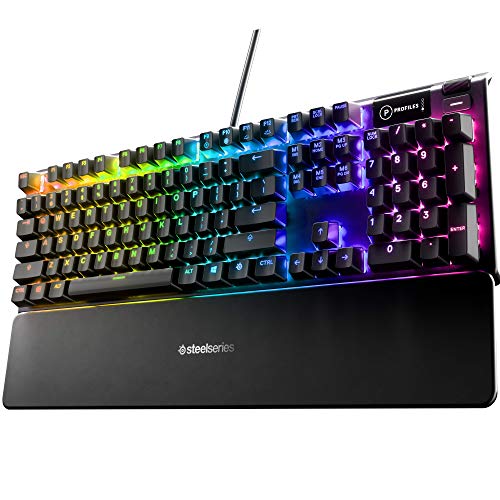
Pros
- Hybrid blue switches deliver a satisfying tactile experience with reduced noise compared to traditional mechanical blues.
- OLED smart display is a standout feature for displaying notifications, game stats, or custom animations.
- Sturdy aluminum frame with magnetic wrist rest enhances long-term durability and comfort.
- Per-key RGB and software customization offer extensive personalization.
- Good value for the price given the feature set.
Cons
- Hybrid switches may not satisfy purists who prefer full mechanical or full membrane feel.
- OLED display functionality may require additional software setup and is limited in size.
- No USB passthrough or dedicated media controls based on specifications.
The SteelSeries Apex 5 Hybrid Mechanical Gaming Keyboard is a versatile peripheral that blends elements of mechanical and membrane switch design. It is best suited for PC gamers who want the tactile feedback of a blue mechanical switch but with a smoother, quieter keypress. Streamers and content creators will appreciate the OLED smart display for showing custom graphics, game stats, or Discord notifications right on the keyboard. Gaming setup builders and RGB enthusiasts will find the per-key illumination easy to customize for a cohesive aesthetic.
In terms of real-world performance, the hybrid blue switches offer responsive actuation with a distinctive click, making them suitable for both fast-paced competitive gaming and comfortable typing sessions. The 20 million keypress lifespan ensures long-term reliability, while the aircraft-grade aluminum frame provides a rock-solid base that doesn't flex during intense use. The magnetic wrist rest adds comfort for marathon gaming sessions, reducing wrist strain without adding bulk to the desk footprint.
Build quality is a strong point here. The aluminum alloy frame feels premium and durable, easily handling travel or frequent setup changes. The keycaps are standard ABS but with a coated finish that resists shine over time. The keyboard connects via a detachable USB cable, which aids in cable management and portability. Software customization through SteelSeries Engine is straightforward, allowing you to remap keys, create macros, and control RGB lighting with per-key effects.
Setup is simple: plug in, install the software, and you're ready to customize. The OLED display is a standout feature, though its small size means text and graphics need to be simple for best visibility. Some users might find the initial software configuration for the display a bit fiddly, but once set, it works reliably. Cleaning the keyboard is easy thanks to the floating key design and removable wrist rest.
One realistic limitation is that the hybrid switch feel may not please everyone. Mechanical purists might miss the consistent feel of full mechanical switches, while those used to membrane keyboards might find the click too loud. Additionally, the OLED display, while novel, doesn't replace dedicated macro keys or a separate numpad for productivity tasks. Also, the lack of USB passthrough means you'll need separate ports for other peripherals.
Overall, the SteelSeries Apex 5 is a practical buy for PC gamers who want a durable, feature-rich keyboard without breaking the bank. It works well in a gaming setup, dorm room, or home office where both gaming and typing are priorities. For streamers and RGB enthusiasts, the OLED and per-key lighting add a unique visual flair. If you prioritize a traditional mechanical feel or need extra USB ports, you might look elsewhere, but for hybrid performance and smart display features, this keyboard is a solid choice.
The per-key RGB illumination on the SteelSeries Apex 5 is vibrant and fully customizable via SteelSeries Engine software. You can choose from millions of colors, apply reactive effects that respond to in-game actions, or create layered lighting schemes for different games. The software also integrates with other SteelSeries gear for synchronized lighting across your setup. The OLED display adds another dimension, allowing you to upload custom GIFs, display system stats, or show game-specific information like in-game kills or ammo count. While the display is small, it's sharp enough for simple animations and text, making it a fun addition for streamers who want to engage viewers with on-keyboard visuals.
The SteelSeries Apex 5 features an aircraft-grade aluminum alloy top frame that gives it a premium, rigid feel. This keyboard is built to last, with minimal flex even during aggressive gaming sessions. The keycaps are double-shot ABS with a coating that helps prevent early wear, though they may develop shine over time. The magnetic wrist rest attaches securely and provides comfortable palm support without sliding around. The rubber feet on the bottom keep the keyboard firmly planted on the desk. Overall, the build quality is excellent for the price point, matching many full-mechanical keyboards in sturdiness.
Long gaming sessions demand comfort, and the SteelSeries Apex 5 delivers with its premium magnetic wrist rest. The rest has a soft-touch surface that feels pleasant against the wrists and offers enough support to reduce fatigue. The keyboard's low profile design and slightly angled keycaps make typing natural, while the hybrid switches require just the right amount of force to actuate without causing strain. The floating key design also makes it easy to clean dust and debris between keys. For users who prefer a more angled typing experience, the keyboard has adjustable tilt legs. Overall, comfort is a strong suit, making it suitable for both gaming and all-day productivity.

Pros
- Hot-swappable switch socket works with most 3-pin and 5-pin switches, allowing easy customization.
- Solid aluminum base adds weight and stability, preventing sliding during intense gameplay.
- Full-size layout with dedicated function row and numpad is great for work and productivity tasks.
- Multiple RGB presets and adjustable brightness/speed give good lighting variety out of the box.
- Included noise-absorbing foam helps dampen switch noise for a cleaner sound profile.
Cons
- Non-detachable USB cable can complicate cable management and desk organization.
- Software is required for advanced macro programming and custom lighting effects, which may have a learning curve.
- Some users may prefer a more compact tenkeyless layout for extra mouse space on smaller desks.
The Redragon K556 is a full-sized wired mechanical gaming keyboard built for PC gamers who want a durable, customizable typing experience without breaking the bank. It features 104 standard keys with anti-ghosting technology, ensuring every keypress registers reliably during fast-paced gaming sessions. The keyboard is powered by hot-swappable brown switches, which provide a soft tactile bump that many users find comfortable for both gaming and everyday typing. This makes it a solid option for competitive gamers, casual players, streamers, content creators, and anyone spending long hours at their desk.
In terms of performance, the K556 delivers consistent input accuracy and low-latency responsiveness thanks to its wired USB connection. The brown switches offer a balanced feel that works well across various game genres, from FPS shooters to MOBAs and RPGs. The anti-ghosting feature helps prevent missed inputs during intense moments, giving you a reliable edge in competitive play. For streamers and content creators, the tactile feedback and quiet operation (aided by noise-absorbing foams) make it suitable for use during live broadcasts or Discord calls without distracting background noise.
Build quality is a standout feature here. The keyboard uses a full aluminum frame with a brushed finish that feels rock-solid on the desk. It weighs about 2.2 pounds, which adds stability and prevents sliding during heated matches. The hot-swappable socket is compatible with most 3-pin and 5-pin switches, so you can easily swap out switches to change the feel or replace worn ones without soldering. This longevity-focused design is great for gaming setup builders who like to experiment with different switch types over time.
RGB lighting is handled by 20 onboard presets, including dynamic, static, and groovy modes that you can cycle through without software. Brightness and speed adjustments are also available on the keyboard itself. For more control, the Redragon software lets you create custom lighting effects and program macros, though some users may find the software interface a bit basic. The lighting is vibrant and adds a nice touch to any gaming desk or RGB-themed setup.
Setup is straightforward: plug the USB cable into your PC or console, and the keyboard is ready to go. The non-detachable cable is a minor inconvenience for cable management, but it's a common trade-off in this price range. The full-size layout includes a numpad and function row, which is handy for productivity tasks like spreadsheet work or programming. However, if you have a small desk, the 17.1-inch width might feel a bit large, and you may prefer a tenkeyless option for extra mouse room.
Overall, the Redragon K556 is a practical recommendation for PC gamers and setup builders who want a reliable, customizable mechanical keyboard with a solid aluminum build and vibrant RGB lighting. It works well for gaming, streaming, content creation, and everyday use, offering good value for its price. If you're looking for a full-size keyboard with hot-swap capabilities and don't mind a non-detachable cable, this is a strong contender for your desk.
Frequently Asked Questions
Does an aluminum frame improve gaming keyboard performance?
Yes, an aluminum top plate significantly reduces keyboard deck flex and stabilizes switch housings during intense gameplay. A rigid metal chassis keeps key switches from shifting under heavy finger strikes, ensuring consistent actuation depth across the entire layout. The extra weight also prevents the keyboard from sliding around your desk surface during fast movements.
Are aluminum gaming keyboards louder than plastic keyboards?
Metal plates can produce a higher-pitched clack unless paired with integrated sound-dampening foam and lubricated switches. Bare metal surfaces reflect vibrations differently than lightweight plastic cases, occasionally creating acoustic pinging. Many modern designs fix this by adding sound-absorbing foam layers beneath the plate. Gamers using low-latency wireless gaming headphones rarely notice switch acoustics during active sessions.
Can you hot-swap switches on aluminum gaming keyboards?
Yes, many aluminum keyboards feature hot-swappable PCBs compatible with standard 3-pin and 5-pin mechanical switches. This modular socket design lets you swap out clicky switches for smooth linear or tactile options without touching a soldering iron. It also extends hardware lifespan by allowing quick replacements for individual failing switches.
Do aluminum mechanical keyboards work well for competitive PC gaming in 2026?
Yes, choosing the best gaming keyboard aluminum provides the rigid base and anti-ghosting rollover needed for competitive esports and demanding survival titles in 2026. Solid metal top cases withstand repeated, rapid inputs without warping under pressure. Models featuring low-latency wireless or high-polling wired connections register every keystroke instantly, preventing missed commands during critical moments.
What is the best way to clean and maintain an aluminum keyboard?
Regular dusting with a soft microfiber cloth and compressed air keeps an aluminum board in peak condition without scratching the finish. Removing your keycaps with an included puller every few months lets you clear stray debris from the metal backplate. Avoid harsh liquid chemical sprays that could strip anodized coatings or damage switch contacts.
How do PBT keycaps compare to standard ABS on a metal keyboard?
Doubleshot PBT keycaps offer superior textured grip and resist the shiny wear patterns that affect standard ABS plastic. When combined with a rigid aluminum top case, dense PBT keycaps create a deeper, more solid keystroke feel. They also preserve legible legends over years of intense daily gaming without fading.





Write Your Review
No reviews yet. Be the first to share your experience!