


Building a Streamlined Gaming and Work Setup
Setting up a dedicated gaming space often brings unexpected headaches, especially when an oversized seat catches on low desk aprons or wide armrests collide with keyboard trays. Matching dimensions between your workspace and your seat prevents awkward posture during marathon sessions. Investing in the best gaming desk and chair combo eliminates the guesswork by pairing complementary furniture built to work together smoothly. Complete bundles like the Goplus set bring unified sizing straight out of the box, offering a 45.5-inch carbon fiber surface alongside a reclining seat with lumbar features. Alternatively, pairing an expansive desk with dedicated high-back gaming seats gives you tailored lumbar contours and sturdy frame stability without crowding your room.
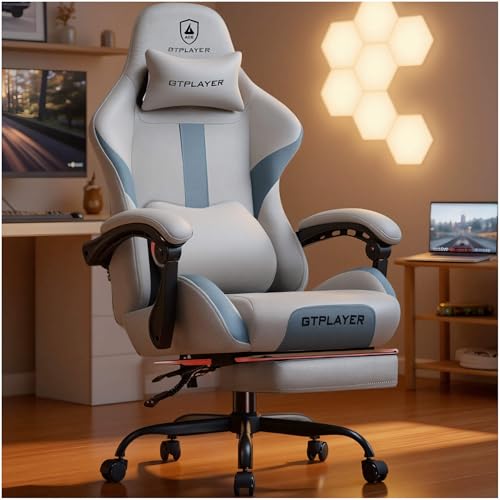
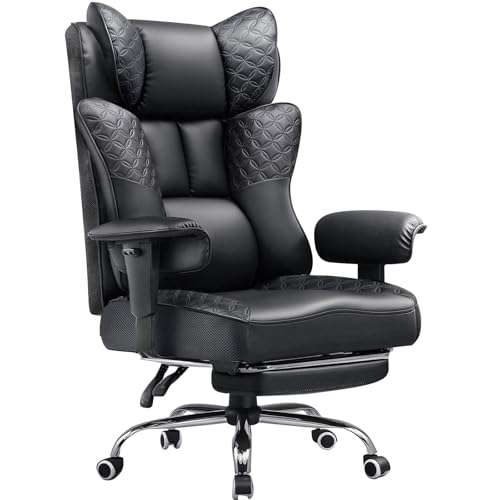
Desktop dimensions and chair mechanics require close attention before you commit to a purchase. Desks like the 40-inch Lufeiya models incorporate built-in power outlets and monitor tiers that keep displays at eye level, freeing up crucial mouse room. Meanwhile, chairs from GTPLAYER and COMHOMA showcase features like pocket-spring cushioning, retractable footrests, and 135-degree to 150-degree recline settings for resting between matches. If you need dedicated posture support on a strict budget, exploring ergonomic chairs under $200 can help you balance adjustability with sturdy steel frame construction.


Pros
- Built-in power and USB charging simplifies cable management and eliminates the need for separate extension cords.
- Customizable RGB lighting adds immersive ambiance for gaming or streaming without extra accessories.
- Durable carbon fiber surface is easy to clean and resists scratches from mouse movements and accidental spills.
- Monitor stand promotes ergonomic viewing angle, beneficial for long gaming sessions and productivity.
- Removable storage accessories provide convenient organization for small gaming peripherals.
Cons
- At 40 inches wide, the desk may feel cramped for users with multiple monitors or larger peripherals.
- Power strip placement might be fixed; some users may prefer a detachable or repositionable unit.
- No reviews yet, so long-term durability and real-world user experiences are not confirmed.
The Lufeiya Gaming Desk is a compact 40-inch workstation designed specifically for PC gamers, streamers, and remote workers who value both functionality and style. It packs a built-in power strip with two AC outlets and two USB ports, plus customizable RGB LED lighting, all in a footprint that fits easily in dorms, apartments, or smaller gaming rooms.
For performance, the desk's raised monitor stand is a standout feature: it lifts your screen to eye level, which can reduce neck fatigue during marathon gaming sessions or long workdays. The built-in power strip keeps your tower, monitor, phone, and peripherals powered without crawling under the desk - a real time-saver when you're switching between games or streaming.
The carbon fiber surface is a practical choice; it's scratch-resistant and waterproof, so spills from late-night energy drinks or frantic mouse movements won't leave permanent marks. The included storage bag and headphone hooks are removable, letting you customize your cable management and accessory storage to your exact needs.
Assembly is straightforward thanks to the included manual and tools - no extra drills required. Most users can put it together in under an hour. Just keep in mind that the 40-inch width is best for single-monitor setups; if you run two large screens, you might feel a bit squeezed. Also, the power strip is fixed to the desk, so you can't move it to the side if that creates cable tension.
Overall, the Lufeiya desk offers excellent value for budget-minded gamers and workspace organizers who want a neat, immersive setup. While long-term durability remains to be seen, the initial build quality and thoughtful features make it a strong contender for anyone needing a compact gaming desk with power and RGB built in.
The Lufeiya desk includes a built-in RGB LED strip that offers 7 adjustable colors, 4 dynamic modes, and 16 static lighting types. You can cycle through solid colors, breathing effects, or a fast rainbow sweep to match your mood or sync with other RGB peripherals. The strip is pre-installed along the back edge, creating a subtle glow that enhances the atmosphere without being distracting. Since there's no software required, you control the lights via a simple button on the strip - perfect for quick changes during a gaming session or streaming stream.
Setting up this desk is a breeze - the package includes all necessary tools and a clear manual, so you can assemble it in about 30-45 minutes. The power strip is integrated into the desk frame, with outlets and USB ports accessible from the front of the desktop. This design helps keep cables tidy, especially when combined with the included storage bag (which can hold small accessories) and the two headphone hooks. The carbon fiber surface also hides fingerprints and smudges, so your desk looks clean even after hours of use. If you need to move the desk, the lightweight 20.4-pound build makes it easy to reposition.




Pros
- Integrated power and USB ports simplify cable management and device charging at your desk.
- Customizable RGB lighting enhances the gaming vibe without needing separate LED strips.
- Monitor stand promotes better posture by raising the screen to comfortable viewing height.
- Removable storage bag and headphone hooks keep accessories tidy and easy to access.
- Quick and straightforward assembly saves setup time compared to bulkier desks.
Cons
- Particle board construction may not be as durable as solid wood or metal desks over years of heavy use.
- At 40 inches wide, this desk offers limited surface area for dual monitor setups or large peripherals.
- With zero user reviews yet, long-term reliability and quality feedback are unavailable.
The Lufeiya Black Gaming Desk is a practical and space-efficient solution for PC gamers, streamers, and content creators who want a compact workstation with integrated modern features. It combines a built-in power strip with two AC outlets and two USB charging ports, plus RGB LED lighting and a monitor stand, all in a 40-inch footprint. This desk is designed to reduce cable clutter and enhance the aesthetic of any gaming setup, making it a strong contender for dorm rooms, small home offices, or budget-conscious gaming stations.
For target users like competitive and casual gamers, esports players, and streamers, the desk's practical layout helps maintain a tidy desktop. The monitor stand elevates your screen to a more ergonomic height, which can reduce neck strain during extended sessions of FPS, MOBA, or open-world games. The built-in RGB lighting offers 7 colors and multiple dynamic modes, allowing you to match your mood or setup theme without adding separate LED strips. While not high-performance gear in the traditional sense, the desk contributes to a responsive and comfortable gaming environment by keeping your devices organized and at reach.
Build quality centers on thick particle board with a scratch-resistant and waterproof coating. It should hold up well against everyday spills and abrasion, though it may lack the long-term durability of solid wood or all-metal frames. The monitor stand is sturdy enough to support dual monitors or a laptop, and the included storage bag and two headphone hooks add extra convenience. Cable management is simplified by the built-in power strip, which lets you plug in your PC, monitor, and accessories without fishing for outlets behind the desk.
Setup is straightforward thanks to a detailed manual and all necessary tools provided. Most users can assemble the desk in under an hour. The compact size (19.7 x 39.4 x 33.4 inches) fits easily into smaller spaces, but it does limit surface area for larger peripherals or a full-size keyboard and mousepad combo. The particle board material means you should avoid excessive weight or heavy monitor arms without additional reinforcement.
Realistic limitations include the lack of user reviews to confirm long-term stability and the desk's modest dimensions. The integrated power strip is not surge-protected, so you may want to use an external surge protector for sensitive electronics. Additionally, the RGB lighting cannot be synced with major PC ecosystems; it is controlled manually via a button on the strip. Despite these trade-offs, the Lufeiya gaming desk offers excellent value for those seeking a functional and visually appealing setup on a budget. It is especially suitable for college gamers, work-from-home gamers, and RGB enthusiasts who want a clean, organized desktop with minimal cable mess.

Frequently Asked Questions
How do you verify that a chair fits under a gaming desk?
Measure from the floor to the lowest part of the desk frame, then check the chair’s maximum armrest and seat height. Many gaming desks sit at roughly 30 inches high, such as the Goplus table at 30 inches. Standard armrests need sufficient clearance so you can tuck the chair in completely when you are done playing.
What weight capacity should you look for in a Best Gaming Desk And Chair Combo?
Check the manufacturer specifications for both the chair frame and desk weight ratings before ordering. Standard chairs often support typical builds, while heavy-duty options like the GTPLAYER fabric model list capacities up to 350 pounds. If you need specialized reinforced frames, reviewing heavy-duty big and tall chairs ensures the gas lift and base match your requirements.
Are built-in desk power outlets and monitor stands worthwhile?
Integrated power strips and raised monitor shelves keep cables tidy and improve screen placement. Models like the Lufeiya 40-inch desk supply built-in outlets and USB ports right on the tabletop to charge headsets and controllers. The elevated shelf positions displays closer to natural eye level, saving desktop real estate for your keyboard and mousepad.
How does pocket spring cushioning compare to standard foam in gaming chairs?
Pocket spring seat cushions distribute body weight more evenly than traditional monolithic foam blocks. Chairs like the COMHOMA and GTPLAYER spring models combine individual coils with high-density padding to resist sagging over time. This configuration offers responsive bounce and helps prevent the compressed, hard feeling that dense foam can develop after long sits.
What maintenance does synthetic leather upholstery require?
Synthetic leather surfaces require basic routine wiping with a damp cloth to remove dust and sweat. Smooth finishes on the Goplus and N-GEN GAMING chairs resist spills and surface stains quite effectively. For additional lower back positioning, adding an aftermarket lumbar support pillow can also protect the seat upholstery from localized friction.
What recline angle works best for gaming and casual rest?
A recline range between 90 degrees and 135 degrees covers focused upright gaming as well as relaxed media viewing. Chairs such as the N-GEN GAMING model tilt up to 135 degrees, while the COMHOMA reaches 150 degrees and the Goplus reclines up to 180 degrees. Retractable footrests on these models deploy easily whenever you want to stretch your legs during breaks.







Write Your Review
No reviews yet. Be the first to share your experience!