


Cluttered desktops, tangled cords, and crowded mouse areas can quickly disrupt focus during intense gaming sessions. When your gear lacks dedicated storage or cable routing, small accessories end up drifting across your mat and getting in the way of wide arm sweeps. Selecting the Best Gaming Desk Accessories helps create an organized, practical battlestation where every peripheral has its own dedicated place. Many players pair these convenient organizers with ergonomic gaming desk chairs to maintain comfort while keeping controllers, headsets, and drinks within arm’s reach.
Surface organization directly impacts how freely you can position your hardware during long sessions. Wide desk pads shield desktop finishes while offering consistent mouse glide, leaving plenty of room for dedicated PC keyboards alongside quick mouse movements. Clamp-on organizers, dedicated drink holders, and weighted headset stands lift bulkier gear off your tabletop without requiring permanent wall anchors or drill holes. Verifying clamp clearance, desk thickness limitations, and cable channel widths guarantees every piece fits your workstation seamlessly.

Pros
- Large 31.5 x 12-inch size provides unified surface coverage for both keyboard and mouse
- Simple one-button control manages 14 lighting modes and brightness without software
- Power-off memory retains your chosen LED setting when restarted
- Waterproof microfiber fabric resists beverage spills and cleans easily
- Non-skid rubber base prevents sliding across smooth desk surfaces
Cons
- Requires an open USB port to power the LED lighting border
- Listing does not state the USB cable length or whether the cable is detachable
- At 12 inches deep, desk space may be tight for keyboards with large wrist rests
The DR CATCH Large RGB Mouse Pad is an extended desk mat designed for desktop computer users, office workers, students, and PC gamers who want a unified surface for both their mouse and keyboard. Measuring approximately 31.5 by 12 inches with a 0.3-inch thickness, this accessory provides substantial horizontal travel space for low-sensitivity mouse swipes while framing the desk with customizable ambient LED illumination.
Powered through a standard USB connection, the mouse pad operates on a plug-and-play basis without requiring specialized drivers, companion software, or background apps. Users simply connect the integrated or included USB plug to an available port on a computer, hub, or USB power adapter. Because the mat relies on direct USB bus power solely to illuminate the built-in LED edge strip, it does not communicate data to the host operating system or require driver compatibility checks.
The top surface is crafted from a smooth microfiber textile material engineered to promote fluid glide and consistent sensor tracking for optical and laser computer mice alike. A single push-button controller located on the pad allows users to cycle through 14 distinct lighting presets, which include static monochrome colors as well as dynamic breathing sequences. Double-clicking the control button adjusts the light brightness, while holding it for about three seconds toggles the lighting on or off. An onboard memory function also remembers the last chosen light setting after power is turned off.
Beneath the microfiber surface, the pad features a textured rubber backing that grips the desk firmly to prevent unintentional sliding or bunching during active mouse tracking. The surface is also treated for liquid resistance, helping to repel accidental spills from drinks or liquid drops so they can be wiped clean with water without causing fabric discoloration. At roughly 1.5 pounds, the mat carries sufficient heft to lay flat across wood, laminate, or glass desks.
When planning a setup, buyers should note that the product information does not specify the exact USB cable length or confirm whether the cable can be detached for travel or replacement. Additionally, with a vertical depth of roughly 12 inches, desk space from front to back is somewhat narrow compared to deeper desk pads, which might leave limited room for ergonomic keyboards with large integrated wrist rests. Prospective buyers should also verify that an open USB port is available near their workspace to power the lighting.
For users shopping for an affordable desk upgrade that combines mouse pad functionality with perimeter lighting, this DR CATCH extended mouse mat offers a practical blend of utility and atmosphere. It is particularly well-matched for gamers and remote workers who want ample side-to-side mouse clearance, simple hardware-based lighting controls, and easy-to-clean spill resistance without installing proprietary configuration software.
For daily office duties, study sessions, and web browsing, an extended mat helps protect desk finishes while offering a steady glide surface for office and productivity mice. The generous 31.5-inch width easily accommodates an office keyboard alongside the mouse, keeping peripherals resting at an even height.
The hardware-based button control means users do not need to install administrative software on work laptops to manage the lighting. If an office environment calls for a more understated setup, the illumination can be powered off entirely with a three-second button press, while the waterproof microfiber surface remains ready to guard against accidental coffee or water spills.
Built from flexible rubber and dense microfiber, the DR CATCH mouse pad weighs approximately 1.52 pounds, providing sufficient density to sit flat on work surfaces. The rubber underside provides traction against smooth surfaces such as finished wood or glass, minimizing movement during fast cursor navigation.
The edge perimeter integrates a diffuse LED light strip linked to an onboard control module. The listing notes that the pad is powered by USB and requires no drivers, though specific accessories such as a detachable cable or user guide are not detailed in the product specifications.

Pros
- Spacious size provides ample room for both keyboard and mouse, reducing clutter
- Water-resistant surface gives peace of mind against drink spills
- Smooth, consistent glide surface supports both gaming and productivity mouse performance
- Stitched edges improve durability and prevent the pad from peeling over time
- Affordable price point makes it a great value for upgrading your desk setup
Cons
- The topographic pattern may not appeal to everyone who prefers a solid color or RGB design
- Some users may initially notice a slight curl at the edges, though it usually flattens within a day
- No additional features like RGB lighting or cable management included
The DIGSOM XL Mouse Pad is a large, extended desk mat designed to cover a sizable portion of your desk, accommodating both your keyboard and mouse with plenty of space. Its 31.5 x 11.8 inch dimensions make it ideal for gamers, streamers, content creators, and office workers who want a unified surface that protects their desk and keeps their gear organized.
Based on product specifications and user feedback, this mouse pad is best suited for PC gamers who play a variety of genres, including FPS, MOBA, and open-world games, as well as streamers who need a clean, professional-looking setup. The smooth cloth surface allows for precise mouse movements, which can enhance aiming accuracy and overall responsiveness during competitive play. Casual gamers and those who work from home will also appreciate the comfortable, low-friction feel that reduces wrist fatigue over long sessions.
Build quality is a highlight. The pad features a 3mm thick neoprene base with a non-slip rubber bottom that keeps it firmly in place, even during fast-paced gaming. The stitched edges prevent fraying, adding to its durability. The water-resistant coating is a practical bonus, protecting against accidental spills of coffee, soda, or water, and it can be easily wiped clean with a damp cloth. Many reviewers note that the pad lays flat out of the box, though some report a slight initial curl that usually disappears within 24 hours.
Setup is straightforward: unroll the pad, let it sit for a short time, and it's ready to use. No software, drivers, or additional accessories are required. Cleaning is simple, and the pad dries quickly after a damp wipe. The minimalist black and white topographic pattern adds a subtle aesthetic touch that complements many gaming and office desks without being overly flashy.
A realistic limitation is that the design may not suit everyone. If you prefer vibrant RGB lighting or a specific color scheme, this pad's monochrome topographic style might feel too plain. Additionally, while the pad is large, it may not fit on smaller desks, so measuring your desktop beforehand is wise. There's no integrated cable management or wrist rest, but given the price point, these omissions are understandable.
Overall, the DIGSOM XL Mouse Pad delivers solid performance, good build quality, and practical features like water resistance and a non-slip base. It's a reliable choice for PC gamers, streamers, and anyone looking to upgrade their desk setup without spending a lot. Whether you're building a gaming rig, setting up a streaming station, or just want a cleaner home office space, this pad offers great value for its modest price.
This extended mouse pad transforms your desk into a cohesive gaming or work surface. The generous size accommodates a full-size mechanical keyboard, a large gaming mouse, and even a small tablet or notepad without overlapping. The non-slip rubber base stays put, which is especially helpful for those with smooth or glass desks. The water-resistant top also protects your desk from scratches and minor spills, keeping your setup looking clean. If you're a streamer or content creator, the clean, minimalist pattern provides a subtle background that won't distract from your on-screen content.

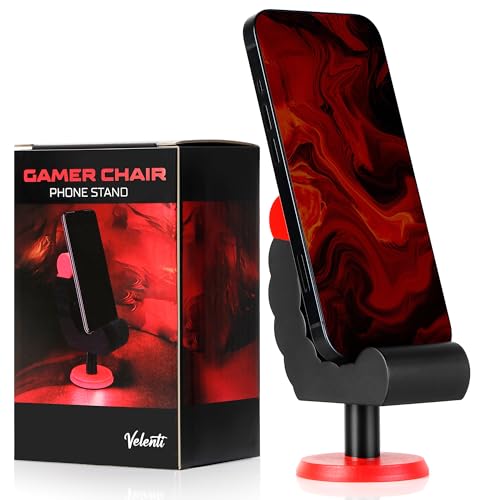
Pros
- Fun, gaming-themed design that complements any gaming setup.
- Sturdy build quality for reliable phone holding.
- Compact footprint saves desk space.
- Works with a wide range of devices up to 19 cm tall.
- Affordable price point for a practical desk accessory.
Cons
- Limited to holding devices up to 19 cm, so larger tablets may not fit.
- No adjustable viewing angle, which may not suit all preferences.
- Design may be too niche for users seeking a minimalist look.
The VELENTI Gamer Chair Phone Stand is a clever desk accessory designed for PC gamers, streamers, and gaming setup builders who want to keep their smartphone or Kindle within easy reach. Shaped like a miniature gaming chair, this phone holder adds a touch of personality to your desktop while serving a practical purpose. It's a simple yet effective way to keep an eye on notifications, messages, or streaming alerts without having to pick up your phone.
This phone stand is best suited for casual and competitive gamers, esports players, and content creators who spend long hours at their desk. It's also a great fit for college gamers or work-from-home users who want to stay connected without interrupting their workflow. The holder accommodates devices up to 19 cm tall, which covers most modern smartphones and even some e-readers like the Kindle.
In terms of real-world performance, the VELENTI stand excels at keeping your phone visible and accessible. It's not about low-latency or high refresh rates, but rather about desk convenience and reducing distractions. During long gaming sessions, you can quickly glance at incoming calls or messages without breaking focus. The sturdy construction ensures your device stays put, even if you bump the desk during an intense match.
Build quality is solid for a product in this price range. The stand is made from durable materials that feel robust enough to withstand daily use. Its compact size means it won't take up much space on your desk, which is a plus for gamers with limited real estate. The gaming chair design is fun and eye-catching, making it a conversation starter in any gaming room or streaming setup.
Setup is as simple as placing the stand on your desk and dropping your phone into the slot. There's no software to install, no cables to manage, and no maintenance required. Just wipe it clean occasionally to keep it looking fresh. One realistic limitation is that the stand doesn't offer adjustable viewing angles, so you're stuck with whatever angle the design provides. Also, larger tablets or phones with bulky cases may not fit securely.
Overall, the VELENTI Gamer Chair Phone Stand is a practical and affordable accessory for anyone looking to organize their gaming desk. It's not a must-have for performance, but it adds a nice touch of convenience and personality. If you're a PC gamer, streamer, or setup enthusiast who wants to keep your phone handy without clutter, this stand is a solid choice. It also makes a fun gift for fellow gamers who appreciate unique desk accessories.

Pros
- No-drill clamp installation is quick, tool-free, and desk-friendly.
- Spill-proof lines and rubber pad at the bottom keep your desk dry.
- Metal build is more durable than plastic alternatives, offering long-term reliability.
- Compatible with a wide range of cup sizes and shapes, including those with handles.
Cons
- May not fit very wide or oversized cups beyond 40 oz diameter.
- Clamp might not work on desks with thick edges over 2 inches.
- Only available in black; limited color options for those wanting customization.
If you're a PC gamer, streamer, or someone who spends long hours at a desk, keeping your workspace clean and clutter-free is essential. The OOKUU Large Desk Cup Holder Clamp is a simple yet smart accessory that helps you do just that. It's a sturdy metal clamp-on holder designed to securely cradle your drink, pen holder, or other small items right under your desk, freeing up valuable surface area for your keyboard, mouse, or gaming peripherals.
This cup holder is built for a wide range of users: competitive gamers who want to avoid spills during intense matches, casual gamers looking for a tidy setup, streamers who need easy access to drinks without leaving their chair, college gamers in dorm rooms, and work-from-home professionals who want a clean desk. The large 3.95-inch diameter fits most standard water bottles, tumblers, and even cups with handles, making it versatile for your daily hydration needs.
Performance-wise, the OOKUU holder focuses on spill prevention and stability. The bottom features spill-proof lines and a non-slip pad to keep your drink in place and catch any condensation or small drips. The clamp itself is reinforced with an anti-slip pad and a five-position adjustable bracket, allowing you to mount it at various angles. This means you can position two holders side by side without running into space issues, which is great for holding both a drink and a snack or a pen holder.
Build quality is a strong point here. The main body is made from high-quality metal, which is far more durable and tear-resistant than typical plastic cup holders. The clamp uses a metal construction with a hand-tightened knob that secures firmly without tools. Protective pads on the clamp prevent scratches on your desk edge, ensuring your gaming desk stays pristine. This robust build can handle the weight of larger 40 oz tumblers without wobbling or bending.
Setting up the OOKUU cup holder is straightforward. You don't need to drill any holes or use adhesive. Just position the clamp on your desk edge, tighten the knob by hand, and you're good to go. It's easy to remove or reposition if you rearrange your setup. Maintenance is minimal - just wipe it clean with a damp cloth if any spills occur. The U-shaped slot is especially handy for cups with handles, adding extra convenience for coffee mug users.
There are a couple of realistic limitations. The clamp may not work on desks with edges thicker than about 2 inches, so measure before buying. Also, while the diameter covers most cups, very wide bottles or mugs over 40 oz may not fit. The color is only black, which is neutral and matches most gaming setups, but those wanting RGB or other colors won't find options. For the price, this is a practical, well-built desk accessory that enhances your gaming or work area by keeping your drink secure and your desk tidy.
The OOKUU Large Desk Cup Holder Clamp is built to last. It uses a thick metal construction for both the cup holder and the clamp mechanism, which gives it a solid feel compared to flimsy plastic alternatives. The clamp features a non-slip pad on the contact points to ensure a firm grip on your desk edge without sliding or marking the surface. The protective padding also prevents scratches, so your desk stays looking new. The cup holder itself includes spill-proof ribs and a rubberized bottom pad to keep drinks stable and catch any condensation. All moving parts, like the adjustable bracket, are made from metal, ensuring long-term durability even under regular use. The hand-tightened knob is large enough to apply good torque without tools, making installation and adjustment easy. Overall, the build quality matches the needs of a daily-use gaming or office accessory.
Integrating the OOKUU cup holder into your desk setup is simple. The clamp-on design requires no drilling, adhesive, or permanent modifications. It attaches to any desk edge up to about 2 inches thick, making it compatible with most standard desks, including gaming desks, office desks, and dorm room tables. The five adjustable installation directions let you angle the holder to fit your reach and space, even allowing two holders to be mounted side by side without conflict. This is especially useful for gamers who want a drink and a snack within easy reach. The large 3.95-inch diameter accommodates a wide variety of bottle sizes - from standard 18 oz water bottles to larger 40 oz tumblers - as well as cups with handles thanks to the U-shaped slot. It can also serve as a pen holder or small accessory organizer, adding to its versatility. Whether you have a minimalist desk or a full RGB setup, this holder blends in with its black finish and stays out of the way while keeping essential items accessible.

Pros
- Unique collectible that actually serves a practical purpose
- Sturdy build with a weighted base for reliable device support
- Officially licensed by Activision with authentic Monkeybomb design
- Compatible with most smartphones, small tablets, and standard controllers
- Compact footprint - fits easily on crowded desks or shelves
Cons
- Limited to one specific character design - may not fit all gaming room themes
- May not accommodate large tablets or non-standard controller shapes
- Figure is non-adjustable - device placement depends on the fixed arm position
The Exquisite Gaming Call of Duty Monkeybomb stand is a clever crossover between a collectible figure and a practical desk accessory. Designed as a mini replica of the iconic exploding monkey from the game, this 8.5-inch PVC figure serves as a holder for your phone, controller, or small tablet. It's a niche product that blends fandom with everyday organization, making it a solid pick for PC gamers who want their gaming setup to reflect their favorite titles.
This stand is best suited for Call of Duty enthusiasts, casual gamers, and collectors who value themed decor. If you have a gaming desk that already features other game-inspired peripherals or RGB accents, the Monkeybomb adds a playful focal point. It's also a great conversation starter for streamers or content creators who want a recognizable prop on camera. That said, it's not a high-performance accessory - its job is to hold your gear safely, not to enhance gaming responsiveness or input speed.
When it comes to real-world performance, the stand delivers exactly what it promises. The heavy-duty PVC construction feels solid, and the wide base keeps devices from tipping over during aggressive gameplay or accidental bumps. Your phone or controller sits securely in the figure's grip, and you can easily retrieve it without any wobble. While it won't affect your gaming latency or refresh rate, it does help clear desk clutter, which can improve your overall setup's comfort and cable management.
Build quality is decent for the price point. The PVC material is durable and should hold up well over time, though it's not as premium as resin or metal collectibles. The paint job is clean, and the licensed design matches the in-game monkey bomb accurately. One practical limitation is the fixed arm position - you'll need to center your device carefully, and larger tablets or unusually shaped controllers might not fit. Also, because it's a single figure, you can't adjust the angle or height of the holder.
Setup couldn't be simpler: just unpack it, place it on your desk, and drop your device into the holder. No software, cables, or assembly required. Cleaning is easy too - a quick wipe with a microfiber cloth keeps it dust-free. The main maintenance concern is avoiding direct sunlight, which could fade the paint over time.
In summary, the Monkeybomb stand is a fun, functional accessory that's best for themed gaming setups. It won't revolutionize your gaming performance, but it will organize your essentials while showing off your love for Call of Duty. If you're a collector or a casual gamer who enjoys unique desk items, it's worth the modest investment. For competitive gamers or those with minimal desk space, a simple adjustable stand might be more practical. But for the right person, this figure adds genuine character to any PC gaming corner.

Pros
- Stylish walnut wood design adds a premium, natural aesthetic to any gaming or work desk
- Versatile 2-in-1 storage holds both a headset and a controller, saving valuable desk space
- Sturdy build with smooth, non-toxic finish feels solid and safe for expensive gaming equipment
- Bottom storage compartment is surprisingly spacious for cables, dongles, and small accessories
Cons
- Wood grain patterns may vary slightly between units, so the exact look may differ from product photos
- Controller holder is designed for standard-sized controllers; larger third-party controllers may not fit securely
- Limited color option (wood only) may not match all RGB-heavy or all-white gaming setups
The UPERGO headset stand with gaming controller holder is a well-designed desk accessory that brings both form and function to your gaming setup. This walnut wood stand is built to hold your headset and controller in one compact unit, while the base offers extra storage for small items like chargers, cables, or a power bank. It's a practical solution for PC gamers, streamers, and anyone who wants to keep their gaming desk tidy and organized.
This stand is best suited for competitive gamers, casual players, streamers, and gaming setup builders who value a clean desk space. If you're a college gamer with a small dorm desk or a work-from-home gamer juggling multiple devices, the UPERGO stand helps reduce clutter without sacrificing style. The solid black walnut wood construction gives it a premium feel that blends well with both modern and traditional desk setups.
In terms of real-world performance, this stand doesn't affect your gaming responsiveness or audio quality directly, but it does keep your gear accessible and organized. Having your headset and controller within easy reach means less fumbling during intense gaming sessions or when switching between games. The bottom storage is particularly useful for stashing a charging cable or a USB dongle, so you're not hunting for them mid-stream.
Build quality is a strong point here. The walnut wood is hand-sanded and treated with food-grade wood wax oil, which is odorless and non-toxic. The surface feels smooth and the natural grain adds a unique character to each stand. The controller holder is designed to fit most standard controllers from PS4, PS5, Xbox One, Series X/S, and Nintendo Switch, though larger third-party controllers may be a tight fit. The headphone arm is sturdy enough for over-ear gaming headsets without wobbling.
Setup is straightforward - just place it on your desk and start using it. No assembly required, no software to install. Cleaning is simple with a dry cloth, and the wood finish resists dust and fingerprints well. One realistic limitation is that the wood color may not match every RGB-heavy or all-white setup, but for most gamers, the natural walnut look adds a warm, premium touch.
Overall, the UPERGO headset stand is a smart purchase for PC gamers and streamers who want to improve their desk organization without spending a lot. It's especially useful for those with limited desk space or anyone who likes to keep their gaming area neat. If you're looking for a practical, stylish, and affordable way to store your headset and controller, this stand is worth considering.


Pros
- Simple peel-and-stick installation with no tools needed
- Holds multiple cables securely in place without slipping
- Silicone material is flexible and won't scratch or damage cables
- Works on a variety of surfaces including wood, glass, and plastic
- Very affordable and includes three different sizes for various cable bundles
Cons
- Not suitable for thick cables over 6mm in diameter or braided power cords
- Adhesive may lose grip over time if exposed to heat or humidity
- Once stuck, repositioning is difficult without losing stickiness
The Baskiss Cable Clips are a straightforward and practical solution for anyone dealing with cable clutter on their gaming desk or streaming setup. This 3-pack includes clips with 3, 5, and 7 slots, allowing you to organize different numbers of cables depending on your needs. Each clip is made from soft silicone that holds cables up to 6mm in diameter, which covers most common charging cables, mouse wires, and headphone cords.
For PC gamers and streamers, a tidy desk is more than just a visual preference - it helps reduce distractions and keeps your gear within easy reach. These clips can keep your mouse bungee, keyboard cable, and headset wire neatly arranged along the edge of your desk or under your monitor stand. The adhesive backing is strong enough to stick to wood, glass, plastic, and metal surfaces, so you can attach them just about anywhere.
Setup is effortless: peel off the protective film and press the clip onto a clean, dry surface. No screws or tools required. Once in place, the silicone material grips cables gently but firmly, preventing them from slipping out. The clips are also flexible enough to add or remove cables without too much fuss.
However, there are some limitations. The clips are designed for small-diameter cables only - thicker power cords or braided cables over 6mm won't fit. Also, the adhesive is permanent once fully pressed; repositioning can weaken its grip. Over time, especially in warm or humid environments, the adhesive may lose some holding power, so cleaning the surface before application is recommended.
For the price, these clips deliver solid value for gamers, content creators, and home office workers looking to clean up their desk without spending a lot. They won't solve every cable management challenge, but they're a great starting point for keeping commonly used cables organized and accessible.
Overall, if you're a PC gamer, streamer, or just someone tired of tangled wires, the Baskiss Cable Clips offer a low-cost, low-effort way to improve your desk setup. They work best for light-duty cable management and are a practical addition to any gaming rig or workstation.

Pros
- Tool-free, no-drill installation makes it easy to set up and reposition as your gaming desk evolves.
- Modular design with removable storage boxes and hooks adapts to different gear, from headsets to game controllers.
- Space-efficient – adds vertical storage to the side of your desk, freeing up valuable desk surface for mouse and keyboard.
- Sturdy clamp with protective padding holds securely without damaging desk surfaces.
Cons
- Maximum clamp thickness of 2 inches may not fit thicker office desks or standing desk frames.
- Pegboard panels are plastic, so heavy items like a full metal headset may require careful positioning to avoid sagging over time.
- Storage boxes are small; larger items like full-size gaming headsets with wide ear cups might not fit the dedicated hooks comfortably.
The KDD 7-in-1 Clamp-on Desk Pegboard is essentially a modular sidecar for your gaming desk. It clamps onto the edge of your workspace, adding vertical storage for headphones, controllers, phone, pens, and cables - all without drilling a single hole. For PC gamers, streamers, and setup builders who obsess over cable management and desktop real estate, this little organizer can make a noticeable difference.
Installation is about as simple as it gets: slide the clamp onto your desk, tighten a handle, and you are ready to snap on the accessories. The two pegboard panels connect with buckles and can be detached or rearranged depending on your needs. This flexibility is great for users who swap peripherals often, like switching between a streaming headset and a gaming headset, or storing a controller for racing games.
In terms of real-world gaming use, the biggest advantage is reclaiming desk space. Instead of a headset sprawling across your mousepad or controllers cluttering the corner, everything stays within arm's reach on the side. The included cable clips are a nice touch for routing charging cables away from your keyboard and mouse area, reducing visual clutter and potential tangles.
Build quality is functional and budget-friendly. The plastic pegboard feels light but sturdy enough for everyday use. The clamp has rubber pads that protect your desk from scratches. However, if you plan to hang a heavy professional headset or multiple controllers, you might want to check weight distribution - the hooks and boxes are designed for modest loads. The storage boxes are good for small items like earbuds, pens, or USB drives, but not for large objects.
One realistic limitation is the clamp's thickness limit of 2 inches. Many standing desks or solid wood desktops exceed that, so measure before you buy. Also, the pegboard is not expandable beyond the two panels provided, though you could theoretically clamp another unit on a different side. The all-black design fits well with most gaming setups, especially those with RGB lighting, as it does not compete for attention.
Overall, the KDD pegboard is a practical, low-cost solution for gamers, streamers, remote workers, and college students looking to tidy up their desk. It is not a premium metal pegboard system, but it gets the job done without a permanent commitment. If you value easy installation and modular organization, this is a solid pick for your gaming station.
Helpful Answers for Gaming Setup Upgrades
Do clamp-on desk accessories damage gaming desks?
No, clamp-on organizers generally do not damage desktops if they feature protective padding. Most clamp mounts, including metal cup holders and side pegboards, incorporate anti-slip pads that shield surfaces from scratches and pressure marks. You should check that your table thickness falls within the supported range, such as clamps designed for desks under 2 inches thick. Tightening the mounting knob firmly by hand provides stability without needing wood screws or drills.
What desk thickness is required for clamp-on gaming accessories?
Most clamp-on accessories accommodate desktops between 0.5 inches and 2 inches in thickness. For example, side-mounting pegboards and heavy metal drink holders specify a maximum table clearance of 2 inches. Desks with beveled edges, metal framing bars beneath the perimeter, or extreme thicknesses may prevent clamps from seating completely flat. Measure your desktop depth and underside clearance before purchasing clamp mounts to ensure a secure fit.
How do extended mouse pads benefit everyday gaming setups?
Extended desk mats protect large surface areas while providing a uniform glide for mouse sensors. Mats measuring around 31.5 by 12 inches offer sufficient room to host both full keyboards and mice simultaneously. Their non-slip rubber backing prevents movement during sudden gestures, while spill-resistant coatings stop accidental drink droplets from seeping into fabric fibers. They also soften wrist contact against hard desk edges during marathon sessions.
Can adhesive cable clips hold thick monitor and power cords?
Yes, but only if the cord diameter matches the clip slot sizing. Standard silicone cord organizers typically support wires measuring up to 6 millimeters in diameter, which suits USB cables, mouse cords, and headphone leads. Heavier power bricks and thick video cables linked to budget gaming monitors often require specialized under-desk trays or wider conduit clips. Placing adhesive organizers on smooth, cleaned surfaces like wood, glass, or metal maximizes grip.
What should you look for in a gaming headset stand in 2026?
A stable base and a wide, curved headrest are the key factors for a reliable headset stand. Weighted bases with non-slip silicone feet prevent stands from tipping over when you dock heavy wireless headsets. Curved headrests crafted from smooth plastic or treated wood help preserve headband cushioning and prevent creases over time. Dual-purpose stands that integrate controller cradles or base storage trays also help clear extra items off your Best Gaming Desk Accessories layout.


Write Your Review
No reviews yet. Be the first to share your experience!