


Managing Desk Space And Connectivity For Clean Setups
Cable clutter and limited laptop ports can quickly overwhelm a clean desk setup. When your workstation requires multiple external monitors, stable wired Ethernet, and gaming accessories, swapping cables every day gets frustrating. Adding a capable best pc docking station consolidates that entire configuration into a single upstream cable. Modern options from brands like Anker and Acer provide dual 4K video connections, fast data ports, and high-wattage charging in one compact footprint. Pairing your workstation with dedicated peripherals or checking how you configure your gaming mouse keeps desktop movement smooth and responsive.
Selecting the right dock involves balancing display outputs with peripheral bandwidth. Compact hubs handle basic dual screens, but advanced setups demand 10Gbps USB-C ports and reliable power delivery. Operating system compatibility is equally critical, as Windows supports extended multi-monitor layouts while macOS typically mirrors external displays on standard hubs. If you want to complement your desk with the best type of keyboard for gaming, picking a well-matched dock prevents unexpected power drops.


Pros
- Versatile dual-form design: full dock for desk setup, detachable hub for travel
- Triple 4K display capability enhances productivity and gaming immersion
- High 100W power delivery supports demanding gaming laptops
- Fast 10 Gbps data transfer speeds reduce wait times for large files
- Comprehensive port selection eliminates need for multiple adapters
Cons
- Some laptops may have port alignment issues where the hub blocks adjacent ports
- macOS users face mirrored displays on external monitors, not extended desktops
- USB-C upstream port does not support video output, limiting some configurations
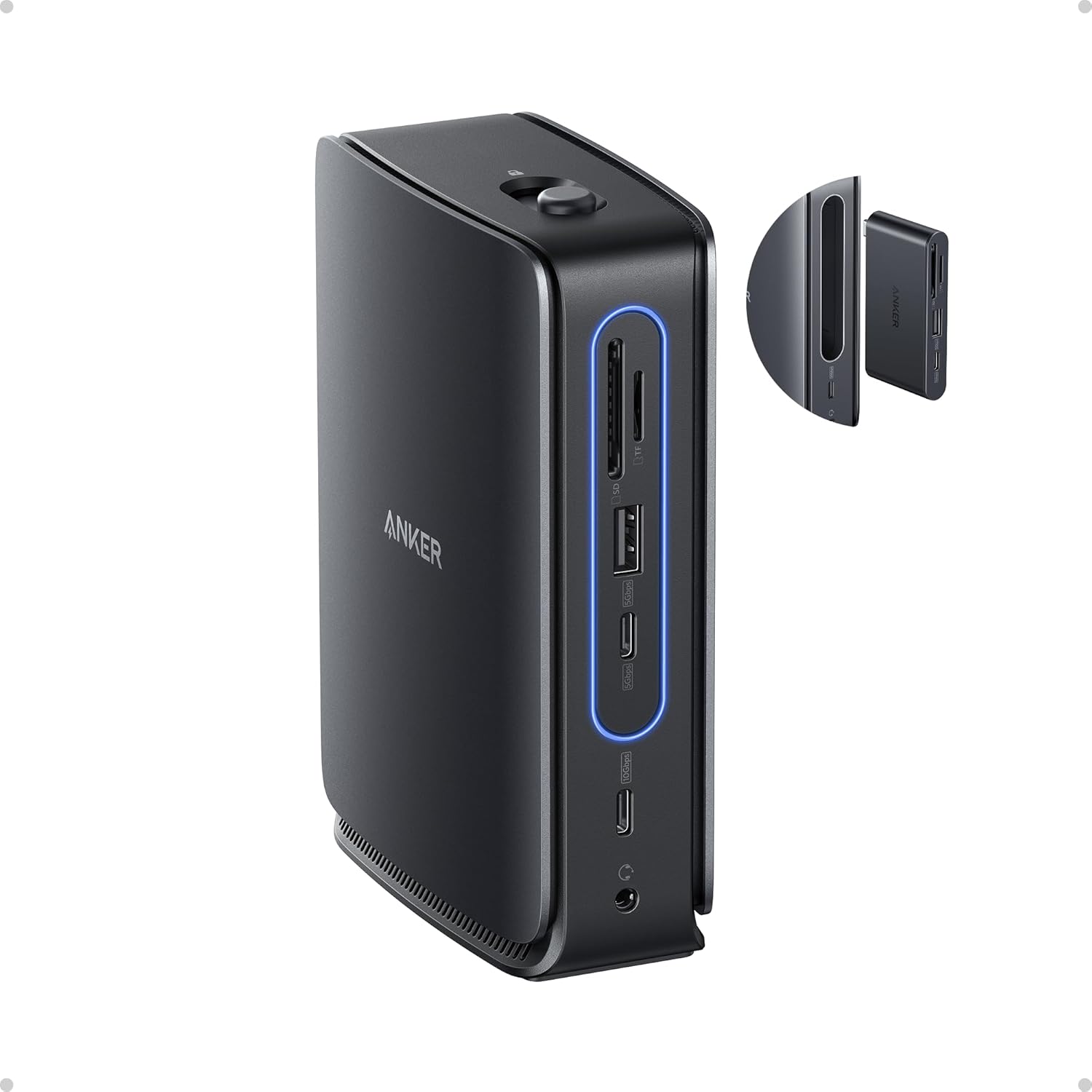
The Anker Nano Laptop Docking Station (13-in-1, Triple Display, Built-In Removable Hub) is a smart addition for any PC gamer, streamer, or gaming setup builder looking to simplify connectivity. This dock combines a full-featured 13-port station with a detachable 6-port hub, letting you maintain a clean desk while staying flexible for on-the-go use. It's designed for USB-C laptops and works with Windows 10/11 and macOS 13.5 or above, making it a practical choice for diverse setups.
Who is this for? It's ideal for PC gamers who want to hook up multiple monitors for immersive gameplay or streamers juggling a gaming PC, capture card, and streaming peripherals. Competitive gamers will appreciate the reliable Ethernet port for low-latency connections, while content creators can benefit from the SD/TF card slots and fast USB-C data transfers. Casual gamers and college gamers will find the compact form factor perfect for dorm rooms or small desks.
Real-world performance stands out with triple display support via 2 HDMI and 1 DisplayPort, allowing up to 4K resolution on each screen. This is great for racing games, open-world titles, or multitasking with Discord, OBS, and game overlays. The 100W Power Delivery keeps your laptop charged during long sessions, and the 10 Gbps USB-C ports handle high-speed data from external SSDs or gaming mice. The detachable hub retains all dock functions when removed, so you can quickly grab your laptop without unplugging everything.
Build quality is solid with a compact aluminum-like finish and a sleek light strip that glows blue when connected. The included 140W power adapter and 3 ft USB-C cable are well-made, though the cable length may be short for some desk arrangements. The dock's 3.74 x 1.57 x 5.51 inch footprint is small enough to fit beside a monitor stand or under a desk mount. Setup is plug-and-play on Windows, but macOS users should note that external monitors mirror content rather than extend the desktop.
Ease of use is a highlight: just connect the USB-C upstream cable to your laptop, attach the power adapter, and you're ready. The detachable hub clicks in and out with a button, making it simple to switch between desk and mobile modes. Cable management is straightforward with the compact power brick and included cable. One realistic limitation is that some laptops with side USB-C ports may have the hub block adjacent ports, so checking dimensions beforehand is wise. Also, the USB-C port does not support video output, so you'll rely on HDMI and DisplayPort for monitors.
Overall, the Anker Nano Docking Station is a practical investment for gamers and creators who need a reliable, space-saving dock with flexible connectivity. It's especially useful for those with a single USB-C laptop who want to expand to a triple-monitor gaming setup or streamline their streaming gear. If you prioritize clean desk organization and versatility without sacrificing performance, this dock is worth considering.
This dock offers 13 ports in total: 2 HDMI, 1 DisplayPort, 2 USB-C data ports (10 Gbps), 3 USB-A data ports, Ethernet, audio jack, SD and TF card slots, and a DC input. The detachable hub adds 6 essential ports for mobile use. All ports work simultaneously, though macOS limits external displays to mirroring. The Ethernet port provides stable wired internet for competitive gaming or streaming.
The Anker Nano features a sturdy plastic and metal construction with a compact footprint. The light strip indicates connection status and adds a modern look. The detachable hub mechanism feels secure with a click-in design. Included accessories: a 140W power adapter with built-in 5 ft cord and a 3 ft USB-C to USB-C cable. The overall build is durable enough for daily desk use and occasional travel.

Pros
- Consolidates up to nine USB peripherals, wired networking, and audio through a single laptop cable.
- Built-in GaN AC-DC power supply eliminates the need for an external power brick.
- Smart screen interface gives direct visual feedback on per-port wattage draw.
- Compact vertical footprint measuring 5.51 by 3.82 inches saves desk space.
Cons
- macOS systems only support mirrored external displays across both HDMI ports.
- Incompatible with Linux operating systems and cannot charge Lenovo Legion gaming laptops.
- Downstream USB-C data ports do not support display output or device charging.
The Anker Prime 14-Port Docking Station is a powered desktop connectivity hub designed for laptop-based workstations and peripheral-heavy desk configurations. For gamers running a gaming or multi-use laptop as their primary machine, a central dock provides a single-cable bridge to mechanical keyboards, gaming mice, audio interfaces, and external storage without exhausting the laptop built-in ports.
Setting up a gaming station around a multi-port dock requires attention to peripheral routing and data flow. This unit features five USB-A ports and four USB-C ports, with select data ports supporting speeds up to 10Gbps, which suits high-throughput peripherals and external solid-state drives. The inclusion of an RJ-45 Ethernet port allows players to connect directly to home network equipment for stable wired networking. Keep in mind that dedicated IQ ports handle power delivery only without data transmission, while downstream USB-C data ports do not output video or provide charging, making port assignment an important setup consideration.
Display routing is another key factor for gaming setups. The dock includes dual HDMI ports, and supported output depends on the host machine DisplayPort specification. On Windows systems with DisplayPort 1.4, dual display configurations support resolutions up to 2K at 60Hz across two monitors, or 1080p at 60Hz on DisplayPort 1.2 laptops. While dual 4K at 60Hz is referenced for compatible setups, the dock does not support ultra-wide 5120x1440 panels. Players looking for high-refresh-rate gaming monitors should verify their laptop GPU and display connection standards before routing displays through the dock.
Physically, the dock uses a vertical orientation measuring 5.51 by 3.82 by 1.85 inches and weighing 1.96 pounds. Its integrated GaN AC-DC power module eliminates the bulky external power bricks common to high-wattage hubs, helping keep cable runs tidy. The front panel features a real-time LCD smart display that reports active wattage output, complemented by an internal cooling design with ActiveShield 2.0 temperature controls. The package includes a 3.3-foot USB-C host cable rated for 100W and 10Gbps, which establishes a practical placement boundary of about three feet from the computer.
While versatile, this dock has documented limitations that affect setup planning. It officially supports Windows 10 and 11 as well as ChromeOS on fully functional USB-C laptops with Power Delivery and DP Alt Mode, but it is explicitly not compatible with Linux. For macOS devices, dual external displays will only mirror each other rather than extend. Furthermore, the dock cannot charge Lenovo Legion gaming laptops due to specific power negotiation constraints, meaning those users must retain their original laptop charger. User feedback also notes that the smart screen occasionally toggles between view modes automatically rather than retaining a fixed user preference.
The Anker Prime Docking Station serves as a practical, space-conscious hub for Windows laptop gamers who want to anchor wired peripherals, gaming mice, wired Ethernet, and external storage through one central hub. Buyers should evaluate whether their laptop USB-C port supports DisplayPort Alt Mode and adequate Power Delivery, and ensure that a 60Hz refresh rate ceiling on dual displays aligns with their visual preferences before integrating the dock into their gaming battlestation.
Host compatibility requires a fully functional USB-C, USB4, or Thunderbolt port supporting DisplayPort Alternate Mode and USB Power Delivery. The dock officially supports Windows 10, Windows 11, and ChromeOS. It is not compatible with Linux operating systems.
For multi-monitor gaming or productivity setups, Windows users on DisplayPort 1.4 systems can output to dual displays at up to 2K resolution at 60Hz, while DisplayPort 1.2 hosts output at 1080p at 60Hz. Dual external monitors on macOS will only mirror each other due to platform display limitations. The dock does not support 5120x1440 ultrawide monitors.
Laptops with specialized high-wattage charging requirements, such as the Lenovo Legion series, cannot receive power from this dock due to compatibility restrictions. Those machines require their original power adapter while using the dock strictly for data, display, and peripheral passthrough.
Integrating the dock into a gaming battlestation is straightforward thanks to its built-in GaN power supply, which avoids the need for an external power brick behind the desk. Its vertical design occupies a compact 5.51 by 3.82 inch footprint, making it easy to tuck beside a laptop stand or monitor arm.
High-speed peripherals such as external SSDs are best connected to the front-facing USB ports to leverage the 10Gbps data rating. Input devices like keyboards and mice can occupy the rear USB-A ports, while the integrated RJ-45 Ethernet port provides direct local area network routing to bypass wireless interference.
Users can customize dynamic power distribution using the companion Dock Manager application on their computer. The front LCD screen shows real-time wattage draw across active charging ports, though reviewers note that display settings may cycle periodically between aggregate and per-port views.
Frequently Asked Questions
Can a best pc docking station run dual extended monitors on macOS?
No, macOS does not support multi-stream transport (MST) across external displays on standard USB-C hubs. As listed in the specifications for the Acer USB-C Docking Station Dual Monitor and ALL- LUCKY 12-in-1, external screens mirror each other on Mac. Windows systems, however, support extended mode for distinct dual-screen multitasking.
Do docking stations provide enough power to charge gaming laptops?
Yes, many docks deliver between 90W and 100W of Power Delivery, though high-wattage systems may require proprietary chargers. The Anker Nano Dock supplies up to 100W to a laptop using its included 140W power adapter. When connecting power-hungry hardware like the best laptop for 1440p gaming, verify whether the dock matches your machine’s peak power demands.
What laptop ports are required to transmit video through a Best Pc Docking Station?
Your laptop must have a USB-C, USB4, or Thunderbolt port that supports DisplayPort Alternate Mode. Standard data-only ports cannot send video signals to external monitors. The Acer 9-in-1 dock explicitly requires DisplayPort Alt Mode for video output. Check your laptop manual or port symbols to verify video and Power Delivery capabilities.
Does using a docking station add input lag to gaming peripherals?
No noticeable input delay occurs when connecting standard USB mice, keyboards, or storage drives. With data transfer speeds up to 10Gbps on models like the Anker Prime Docking Station, input latency remains negligible. Users testing keyboard shortcuts for programmers will experience crisp keystroke delivery.
What is the difference between a portable USB-C hub and a desktop docking station?
Desktop docking stations use dedicated external power supplies, while portable hubs rely on pass-through chargers or host power. Hubs like the ALL- LUCKY 12-in-1 pass power through an existing laptop charger. Larger units like the Anker Prime Docking Station feature integrated power handling to charge multiple accessories at once.


Write Your Review
No reviews yet. Be the first to share your experience!