


Optimizing Your Desktop PC Rig and Workspace
Balancing graphics card thermals, chassis dimensions, and power delivery often creates unexpected headaches when configuring a high-performance computer station. Modern tower cases, especially panoramic glass designs, require plenty of intake airflow to keep components cool during heavy gaming or rendering workloads. Pairing your setup with the best gaming desk for pc hardware ensures your chassis stays elevated above floor dust while keeping essential ports accessible. A stable foundation lets you run a powerful pre-built gaming PC or a custom build without sacrificing workspace.
Managing peripheral connectivity presents another challenge when you route cables from multiple monitors, mechanical keyboards, and audio interfaces directly to your system. Integrated AC outlets and high-speed USB ports help reduce cable drag, keeping input devices responsive during competitive matches. Dedicated CPU platforms also protect your valuable investment from accidental knocks or wobbling during intense gameplay. Checking component support and integrated power options ensures your setup easily accommodates future hardware upgrades.

Pros
- Spacious 48-inch worktop with hutch and drawers offers excellent storage for a compact desk.
- Integrated LED lights and USB ports add convenience and style without extra accessories.
- Monitor stand promotes ergonomic posture for extended gaming or work sessions.
- Carbon fiber surface is durable and easy to wipe down, resisting wear from daily use.
- Great value for budget-conscious gamers and students looking for a complete desk solution.
Cons
- Fabric drawers are better suited for lightweight items like cables and small peripherals, not heavy gear.
- LED lights require a USB power source and may not be as customizable as premium RGB systems.
- Assembly can be time-consuming; the desk lacks built-in cable management channels, so zip ties or clips may be needed.
The Casaottima 48-inch gaming desk is a versatile all-in-one workstation designed for PC gamers, streamers, students, and anyone working from home. It combines a spacious carbon fiber desktop with a hutch, three fabric drawers, built-in USB ports, and LED lighting, making it a practical choice for those who want a tidy and immersive setup without a large footprint.
For gamers and content creators, the desk's 47.24 x 18.9-inch surface comfortably holds a dual-monitor configuration, a gaming keyboard, and a mouse, while the included monitor stand elevates your primary display to eye level. This ergonomic boost helps reduce neck fatigue during long gaming sessions or Twitch streams. The LED lights add a subtle glow to the room, enhancing the gaming atmosphere, and the USB ports let you charge your headset or phone without reaching behind your PC.
Build quality is solid for the price point. The carbon fiber finish is scratch-resistant and easy to clean, and the hutch and drawers provide ample storage for controllers, cables, notebooks, or desk accessories. The drawers are fabric-lined, so they're best for light items like mouse bungees or USB drives rather than heavy peripherals. The desk itself weighs 44.5 pounds, giving it a sturdy feel once assembled, though it's light enough to move if needed.
Setting up the desk requires some time with the included instructions. The hutch can be reversed to favor left- or right-handed users, which is a nice touch. However, there are no built-in cable management channels, so you'll want to use adhesive clips or zip ties to keep wires tidy. The LED lights plug into a USB port (not included) and offer basic color-changing modes rather than software control, which may disappoint RGB enthusiasts seeking advanced customization.
One realistic limitation is the fabric drawers: they can collect dust over time and aren't ideal for heavy gaming gear like backup hard drives or large tool kits. Also, the 18.9-inch depth is narrower than some full-size desks, so if you prefer a deep surface for a large mousepad or keyboard tray, you might feel slightly cramped. But for most standard gaming setups, it works well.
Overall, the Casaottima 48-inch gaming desk is a strong value pick for budget-conscious gamers, college students, or anyone setting up a compact gaming or streaming station. It offers a good mix of storage, ergonomics, and RGB flair at an affordable price. If you prioritize organization and aesthetics without sacrificing desk space, this is a solid choice for your gaming room or home office.

Pros
- Unique elevated PC display stand is a standout feature for RGB and tempered glass case enthusiasts.
- Integrated RGB lighting adds ambiance without requiring extra strips or hubs.
- Three drawers provide surprisingly generous storage for a desk with a built-in PC stand.
- Heavy-duty steel frame feels solid and stable during intense gaming sessions.
- Reversible design offers flexibility for different room layouts and cable routing.
Cons
- The elevated PC stand may limit monitor placement options for users with very large monitors.
- Some users might prefer a larger side shelf for bigger collectibles or speakers.
- Assembly can be time-consuming due to the number of components and the reversible configuration.
The AODK 63 inch Gaming Desk is a specialized gaming desk designed for PC gamers who want to showcase their high-end builds. Unlike standard desks that hide your tower underneath, this desk features an elevated PC display stand that lifts your chassis to eye level, making it perfect for panoramic fish tank cases like the Lian Li O11 or Hyte Y60. This desk is best suited for gaming setup builders, streamers, RGB enthusiasts, and anyone who treats their PC as the centerpiece of their gaming room.
In terms of real-world performance, the desk excels at enhancing your gaming experience through its integrated RGB LED lighting strip. The lighting sits under the monitor shelf and can be synced visually with your PC's internal RGB, creating a cohesive, glowing ecosystem that looks fantastic during long gaming sessions or streaming on Twitch. The 63-inch surface provides plenty of space for a dual-monitor setup, a full-size keyboard, and a mouse pad, so you can keep your competitive gaming gear within easy reach without feeling cramped.
Build quality is a strong point here. The desk uses an industrial steel frame and a thick desktop board that feels solid and stable, even when supporting a heavy full-tower case on the elevated stand. The stand itself is reinforced and tested to handle the weight of glass panels and high-end GPUs without wobbling, which is crucial for protecting expensive hardware during intense gameplay. The three built-in drawers are a practical addition, swallowing up cables, controllers, and accessories to keep your desktop clean and minimalist.
Setup is fairly straightforward, though you should expect to spend some time assembling the various components, especially if you choose to reverse the configuration. The reversible design is a nice touch, allowing you to place the PC stand and side shelf on either side based on your room layout and cable management preferences. The side shelf is great for displaying Funko Pops, action figures, or small speakers, but it may be too shallow for larger collectibles or studio monitors.
One realistic limitation is that the elevated PC stand might interfere with monitor placement for users with very large monitors or those who prefer a specific ergonomic height. Additionally, while the drawers are useful, they are not full-extension, so accessing items at the back can be a bit tricky. Overall, though, the desk offers a unique combination of display-focused design and practical storage that many gamers will appreciate.
For PC gamers who want their rig to be the star of the show, the AODK 63 inch Gaming Desk is a solid choice. It works well for competitive and casual gamers alike, and its RGB integration and storage features make it especially appealing for streamers and content creators. If you have a tempered glass case and want to create a clean, immersive gaming setup without sacrificing workspace, this desk delivers on its promises.


Pros
- Elevated monitor stand perfectly fits large panoramic PC cases, turning your rig into a centerpiece
- Spacious 59-inch surface with three fabric drawers provides ample storage and clutter-free workspace
- RGB lighting adds immersive ambiance without complex software, and USB/power ports offer convenient charging
- Heavy-duty construction feels stable and durable, even with heavy glass panels and large GPUs
- Side shelf is great for displaying collectibles or speakers, adding personality to your setup
Cons
- Fabric drawers are not as sturdy as metal or wood alternatives and may sag over time with heavy use
- The elevated stand may be too high for users who prefer a lower monitor position, requiring an adjustable chair
- RGB lighting is not individually addressable and may not sync with all third-party RGB ecosystems
The AODK 59 Inch Gaming Desk is a thoughtfully designed workstation tailored for PC gamers who want to put their rig on display. Unlike traditional desks that hide your computer underneath, this desk features an elevated monitor stand that lifts your panoramic case like the Lian Li O11 or Hyte Y60 to eye level. This not only protects your expensive hardware from floor dust but also turns your RGB-lit PC into the centerpiece of your gaming room. For streamers and RGB enthusiasts, this design is a clear winner.
Under the monitor shelf, an integrated RGB LED lighting strip adds a soft glow that can sync visually with your PC's internal lighting, creating a cohesive, streamer-ready aesthetic day or night. While it isn't individually addressable or software-controlled, the effect is still immersive and easy to set up. Combined with the carbon fiber black finish, the desk looks sharp and modern in any gaming setup.
Space management is a strong suit here. The desk includes three spacious fabric drawers that are perfect for stashing cables, controllers, and accessories, keeping your desktop clutter-free. The side display shelf with an overhead board gives you a dedicated spot for collectibles like Funko Pops or speakers, adding personality without obstructing your main rig. The desk also features 3 power outlets and 2 USB charging ports, letting you charge up to 5 devices simultaneously a real convenience for gamers with multiple peripherals.
Build quality is solid for the price. The industrial steel frame and thick desktop board provide a stable foundation even for heavy panoramic cases with tempered glass panels and large GPUs. The desk feels sturdy during intense gaming sessions, with minimal wobble. However, the fabric drawers are not as durable as metal or wood alternatives and may sag over time if overloaded. Additionally, the elevated stand might feel too high for some users, so pairing it with an adjustable chair is recommended.
Setup is straightforward, with clear instructions and all necessary hardware included. The reversible design allows for both left- and right-handed configurations, making it flexible for different room layouts. Cable management is handled naturally by the drawers, though you may still need zip ties for a cleaner look. One limitation is that the RGB lighting isn't compatible with major lighting ecosystems like Corsair iCUE or Razer Synapse, so if you want seamless syncing, you'll need to work around it.
Overall, the AODK 59 Inch Gaming Desk is an excellent choice for PC gamers, streamers, and RGB enthusiasts who want to showcase their panoramic case while keeping their workspace organized. Its spacious surface, convenient charging ports, and collectible display shelf make it a practical and stylish addition to any gaming room or dorm setup. If you prioritize aesthetics and organization over premium drawer construction, this desk offers great value for its price point.

Pros
- Ample storage with shelves, CPU stand, hook, and bag for accessories.
- Built-in power outlets and USB ports simplify cable management.
- Customizable RGB lighting enhances gaming atmosphere.
- Sturdy X-frame construction supports heavy monitors.
- Reversible layout adapts to any corner setup.
Cons
- Limited user reviews make long-term durability uncertain.
- Desktop depth (18.9 inches) may be shallow for some deep monitors.
- LED strip is not addressable per-key like premium gaming desks.
The ODK 53 Inch L Shaped Gaming Desk is a versatile corner workstation designed for PC gamers, streamers, content creators, and anyone building a compact gaming setup at home, in a dorm, or in a home office. It combines storage, power, and RGB lighting into one affordable package, making it a strong candidate for those who need an organized desk without spending a fortune.
For gaming performance, the desk delivers stability thanks to the X-shaped steel frame and adjustable foot pads. You can confidently place dual monitors, a gaming PC, and peripherals without worrying about wobble. The built-in 3 AC outlets and 2 USB ports keep your tower, displays, and phone charged right at your fingertips, reducing the need for external power strips and tangled cables. The RGB LED strip adds a customizable ambiance with 10 colors, 8 brightness levels, and 10 dynamic modes, perfect for late-night gaming or streaming sessions.
Build quality is practical for the price point. The reversible L-shape lets you mount the longer section on the left or right, adapting to your room layout. The desktop surface is spacious at 53 inches wide, though the depth of 18.9 inches is a bit shallow for very deep monitors or those with aggressive curves. The included storage shelves, CPU stand, accessory hook, and tool bag help keep your headphones, controllers, and cables organized, making it easier to maintain a clean gaming area.
Assembly is straightforward with pre-labeled parts and included tools, so you can have the desk ready in under an hour. The cable management channels behind the desktop help route wires from your PC and monitors, keeping the workspace tidy. However, the LED strip is a simple stick-on design rather than addressable per-key lighting, so you won't get effects that sync with game audio or screen content out of the box.
Realistically, this desk is best for gamers who prioritize storage and convenience over ultra-premium aesthetics. The shallow depth means it may not suit triple-monitor arrays or large curved ultrawides, but it handles a standard dual monitor setup well. With no user reviews yet, long-term durability is unproven, but ODK offers 24-hour customer support for missing or broken parts. If you need an affordable L-shaped desk with built-in power, modular storage, and RGB lighting, the ODK 53 Inch is a solid choice for getting your gaming setup organized.

Pros
- Integrated power and USB charging hub saves outlet space and keeps cables tidy
- LED lighting adds immersive ambiance and can reduce eye strain in dark rooms
- Large monitor stand improves viewing angle and provides extra storage underneath
- Ample shelving for PC tower, books, and accessories reduces desktop clutter
- Easy to assemble with clear instructions and labeled parts, according to product details
Cons
- MDF surface may show wear over time with heavy use or spills without protective coasters
- Fixed height (30 inches) may not suit all users; an adjustable desk might be better for tall or short gamers
- Limited cable management channels - you may need to add clips or raceways for a completely clean look
The ODK 48 Inch L-Shaped Gaming Desk is a corner-friendly workstation built for PC gamers, streamers, and anyone who spends long hours at their setup. It combines a roomy desktop, integrated power outlets, and customizable LED lighting - all at a price that won't break the bank. This desk is designed to hold multiple monitors, a PC case, and all your peripherals, making it a practical choice for competitive gamers, content creators, and college gamers alike.
One of the standout features is the built-in USB charging ports and power outlets. You can plug in your gaming mouse, keyboard, headset, or phone directly on the desk without crawling under for outlets. The LED strip offers 10 static colors, 6 brightness levels, and 10 dynamic modes - perfect for RGB enthusiasts who want to match their setup's vibe. The memory function remembers your last setting, so you don't have to redo it every time.
Build quality is solid for the price. The desk uses a premium metal frame and MDF board with a carbon fiber surface that resists scratches and water. Adjustable foot pads keep it stable on uneven floors, which is important for competitive gaming where any wobble can be distracting. The L-shape fits corners nicely, freeing up space in your room while giving you a large 48x19.7 inch main surface plus a monitor riser for better ergonomics.
Storage is a strong point. There's an under-desk bookshelf and a side storage bag for small items like controllers or cables. The monitor stand also offers room underneath for a keyboard or notes. This setup helps keep your gaming area organized - essential for streamers who need quick access to gear. However, cable management is basic; you may want to add some adhesive clips or a cable tray for a truly clean look.
Assembly is straightforward with step-by-step instructions and labeled parts. According to user feedback, most people can put it together in under an hour. One realistic limitation is the fixed 30-inch height - it works for average-height users but may not be ideal if you're very tall or short. Also, while the MDF is durable, it's not real wood, so using coasters for drinks is recommended to avoid rings.
Overall, the ODK 48 Inch L-Shaped Gaming Desk offers excellent value for PC gamers and streamers who want a practical, RGB-lit workstation with built-in power. It's great for dorm rooms, home offices, or gaming dens where you need maximum surface area in a corner layout. If you're okay with the fixed height and don't need premium wood, this desk checks all the right boxes for performance, convenience, and aesthetics.

Pros
- Large 63-inch desktop provides ample space for dual monitors and peripherals.
- Sturdy Z-shaped frame with reinforced design offers excellent stability for gaming and work.
- RGB lighting with remote control adds customizable ambiance to any gaming setup.
- Includes practical accessories like a cup holder, headphone hook, and large mouse pad.
- Easy to assemble with clear instructions and all necessary tools included.
Cons
- Some users may find the 23.6-inch depth slightly shallow for very deep monitors or large mouse movements.
- The carbon fiber surface, while durable, may show fingerprints or smudges over time.
- RGB lighting is limited to the desktop edges and may not be as bright as some premium options.
The HLDIRECT 63 Inch Gaming Desk is a solid choice for PC gamers, streamers, and gaming setup builders who need a spacious, well-organized workstation. With a 63-inch carbon fiber desktop, this desk easily accommodates two monitors, a gaming PC, and all your peripherals, making it ideal for competitive gamers, casual players, and content creators alike. The Z-shaped frame uses an innovative mechanical structure that divides the support into two independent triangular sections, improving stability and allowing the desk to hold up to 150 lbs (with a static limit of 200 lbs). This means you can confidently mount monitor arms or place heavy equipment without worrying about wobble during intense gaming sessions.
Performance-wise, the desk is designed for responsiveness and comfort. The carbon fiber surface is smooth, waterproof, and scratch-resistant, providing a durable workspace that's easy to clean after long gaming marathons. The included cable management tray helps keep wires organized, reducing clutter and improving airflow around your PC. For gamers who value low-latency setups, a tidy desk means fewer distractions and better focus on the game. The RGB lighting, controlled via remote, offers 4 groups of LED strips on each side of the desktop, with infinite color switching and gradient effects. This creates an immersive atmosphere that enhances any gaming room, whether you're playing FPS titles, MOBAs, or open-world adventures.
Build quality is a strong point here. The desk's Z-shaped frame is reinforced with a mechanical structure that distributes weight evenly, and the adjustable foot pads can be extended up to 1 cm to ensure stability on uneven floors. The desktop is made from FSC-certified wood, which is an eco-friendly touch. While the 23.6-inch depth might feel a bit shallow for some users with very deep monitors or those who prefer large mouse pads, the included large mouse pad helps compensate. The headphone hook and cup holder are practical additions that keep your gear within reach and prevent spills on your keyboard.
Setup is straightforward, with the manual and all necessary tools included. Most users can assemble the desk in under 30 minutes, which is great for college gamers or anyone setting up a new gaming room quickly. The desk's modern, minimalist appearance fits well in both gaming dens and home offices, making it versatile for work-from-home gamers or those who need a dual-purpose space. Maintenance is simple: the carbon fiber surface wipes clean with a damp cloth, and the cable management tray keeps dust from accumulating on wires.
One realistic limitation is that the RGB lighting is only on the desktop edges, not underneath the entire desk, so it may not be as immersive as some premium options. Additionally, the carbon fiber surface, while durable, can show fingerprints or smudges, especially in well-lit rooms. However, these are minor trade-offs for the price point. Overall, the HLDIRECT 63 Inch Gaming Desk is a practical, affordable choice for PC gamers, streamers, and gaming setup builders who want a large, stable desk with built-in RGB and useful accessories. It's especially well-suited for those building their first gaming station or upgrading from a smaller desk without breaking the bank.
Pros
- RGB lighting with app control offers vibrant customization for immersive gaming vibes.
- Integrated power outlets and USB ports eliminate cable clutter and keep devices charged.
- Ample storage with fabric drawers and hooks helps maintain a clean and organized desk.
- Solid build quality with 220 lb capacity and anti-slip feet for stable use.
- Easy to assemble with clear instructions and all necessary hardware included.
Cons
- Desktop depth of 18.9 inches may be too shallow for large monitors or dual-screen setups.
- Fabric drawers are not as rigid as wooden alternatives and may sag over time with heavy items.
- LED lighting requires app download and may lack advanced effects found in premium RGB ecosystems.
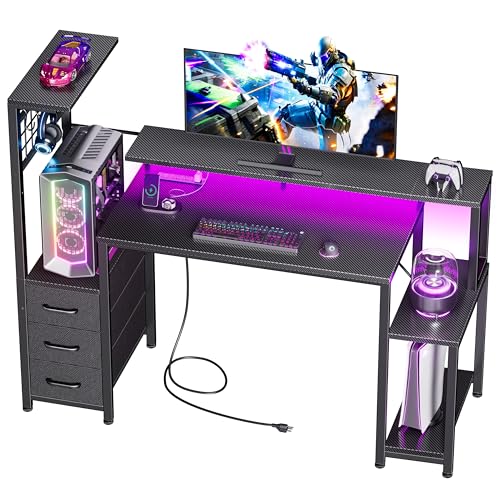
The Korfile 48 Inch Gaming Desk is a versatile workstation designed for PC gamers, setup enthusiasts, and streamers looking to level up their gaming space. It blends a carbon fiber textured desktop with integrated RGB lighting, a built-in charging station, and multiple storage options to keep your gear organized and your battlestation looking sharp.
For real-world use, this desk works well for competitive or casual gamers who need a sturdy surface for their keyboard, mouse, and monitor. The 220-pound weight capacity means it can handle a full PC tower, monitor arm, and peripherals without wobble. The anti-slip feet provide extra stability on carpet or hardwood floors, which is essential during intense gaming sessions.
Storage is a standout feature. Three fabric drawers and four side hooks give you plenty of room for controllers, headsets, cables, and other accessories. The reversible shelf can hold a gaming PC tower or console, helping you free up desktop space. This keeps your setup clutter-free and lets you focus on the game.
RGB lighting adds atmosphere with 10 static colors and 10 dynamic modes, all controllable via a smartphone app. It's not as advanced as top-tier lighting systems, but it offers good variety for creating a personalized gaming vibe. The built-in power station with 3 AC outlets and 2 USB ports is a practical addition for charging your phone, headset, or streaming gear right at your desk.
Setup is straightforward thanks to labeled parts and included tools. Most users can assemble it in under an hour with the step-by-step instructions. One limitation to note is the desktop depth of 18.9 inches, which may feel shallow if you use a large monitor or dual-screen setup. The fabric drawers are convenient but not built for heavy loads.
Overall, the Korfile 48 Inch Gaming Desk is a strong value for budget-conscious gamers, college students, or anyone setting up a compact home office. It provides solid build quality, useful storage, and nice RGB lighting at an affordable price. If you need a functional, organized desk that doesn't compromise on style or practicality, this is a smart choice.

Pros
- Excellent cable management with underdesk tray and magnetic slots.
- Immersive RGB lighting with music sync and app control.
- Smooth and quiet height adjustment with sturdy frame.
- Spacious 55x24 carbon fiber surface with ergonomic edge.
- Host shelf keeps PC off floor and moves with desk.
Cons
- No built-in USB ports or power outlets on the desk.
- LED strip may be less bright than premium standalone options.
- 55x24 size may be tight for ultra-wide or triple monitor setups.
The Flycity Gaming Standing Desk is a versatile addition to any gaming setup, combining a spacious 55x24 inch carbon fiber desktop with electric height adjustment, customizable RGB LED lighting, and thoughtful cable management. Designed for PC gamers, streamers, esports players, and content creators, this desk aims to enhance both comfort and aesthetics during long sessions. The underdesk host shelf keeps your PC case elevated and moving with the desk, freeing up valuable floor space and protecting it from dust.
Performance-wise, the electric lift motor operates quietly at under 50dB and adjusts height smoothly from 28.3 to 47.2 inches at 25mm per second. Whether you're sitting for competitive gaming or standing for streaming and productivity, the transition is quick and stable. The carbon fiber surface reduces arm friction and feels smooth during intense mouse movements, while the ergonomic curved edge brings you closer to the monitor for better posture.
Build quality is a strong point: the desktop uses CARB certified panels, and the T-shaped steel frame is reinforced for stability. The desk supports up to 330 lbs static load and 176 lbs dynamic, and the legs have passed 50,000 lift tests. For gamers with multiple monitors or heavy peripherals, this provides reassurance. The black carbon fiber finish looks premium and resists scratches and fingerprints.
The RGB LED lighting is a highlight, with 7 colors, 210 dynamic modes, and 255 voice-activated modes that sync with music. Control via remote or app lets you match your setup's mood without leaving your seat. While the strip may not be as bright as dedicated gaming lights, the integration is convenient and adds to the immersive experience.
Cable management is another standout: the underdesk tray holds plugs and routers, while magnetic slots route cables neatly. The enclosed host shelf moves with the desk, so you never have to re-cable when adjusting height. The main limitation is the lack of built-in USB ports or power outlets, so you'll need a separate power strip. Also, the 55x24 size is adequate for most single-monitor or dual 24-inch setups, but may feel tight for larger multi-monitor rigs. Overall, this desk is a solid choice for gamers and streamers prioritizing organization and style in their gaming room or home office.
The desk's RGB LED strip offers 7 colors, 210 dynamic modes, and 255 voice-activated modes that respond to music or ambient sounds. Control options include a remote and a smartphone app, allowing you to customize lighting without interrupting your game. The voice activation is particularly fun for streaming or parties, as lights pulse to beats. While the strip is integrated under the front edge, it provides a nice ambient glow. For users who want more intense lighting, pairing with additional RGB accessories is easy. The app includes presets and allows custom color selection, giving you full control over your setup's look.
The underdesk cable management system includes a spacious tray for power strips, routers, and excess cables, plus magnetic slots to route wires neatly along the desk's underside. The enclosed host shelf slides out and moves with the height adjustment, keeping your PC connected without cable tangles. This design eliminates the usual mess of wires under a standing desk, making it easier to adjust height or clean. The only downside is no integrated USB ports, but the tray can hold a small hub. Overall, this is one of the best cable management solutions in a gaming desk under $300.

Pros
- LED lighting built into the hutch adds instant RGB flair without extra cables or strips
- Display shelves are great for showing off figurines, trophies, or streaming gear
- CPU platform keeps your tower off the floor for better airflow and visibility
- Reversible orientation offers flexibility for corner placement or room rearrangement
- Side storage bag helps declutter the main surface for a cleaner look
Cons
- No built-in cable management channels or grommets may require additional zip ties or sleeves
- Some users may find the 51-inch size too small for large multi-monitor setups
- LED strip is only on the top hutch, not integrated into the desktop edge, limiting ambient desk lighting
The AODK L Shaped Gaming Desk is a 51-inch corner desk designed to maximize space while adding visual flair to any gaming setup. It features a reversible hutch with built-in LED lighting, two display shelves for collectibles, a desktop CPU platform, and a side-mounted fabric storage bag. This desk targets PC gamers, streamers, content creators, and RGB enthusiasts who want an organized, immersive workstation without sacrificing floor space.
Best suited for competitive gamers, casual players, esports hopefuls, and college students in dorms, the reversible design lets you configure the main top and hutch on the left or right. The wide open legroom allows you to stretch and reposition freely during long sessions, making it a practical choice for work-from-home gamers and those who spend hours grinding or streaming on Twitch or YouTube.
Gaming performance here is about desktop ergonomics and atmosphere. The LED strip on the hutch offers multiple colors and dynamic modes that wash both shelves and the desktop in light, creating an immersive glow for late-night wins. The CPU platform lets you keep your tower on the desk, highlighting your build, improving airflow, and protecting it from dust and kicks. However, the desk lacks built-in cable management holes, so you will need to use zip ties or a cable tray to keep wires organized.
Build quality is typical for a budget-friendly gaming desk. The frame is metal and the surfaces are engineered wood. The shelves hold collectibles, controllers, and small consoles but may not support very heavy items. The fabric storage bag is handy for headsets and cables but may show wear over time. Assembly is required; instructions are clear, and most users can set it up in under an hour. Cleaning is simple with a damp cloth.
A realistic limitation is the 51-inch total width, which may feel cramped for dual 27-inch monitors or a large streaming setup. The LED strip is only on the hutch, not the desk edges, so ambient lighting is limited to the top area. Additionally, the desk does not offer height adjustment, so pairing it with an ergonomic chair is important for long-term comfort.
Overall, this desk is a strong value for gamers with limited space who want an RGB-lit corner desk with display options. It suits single monitor gaming rigs, casual streaming stations, and dorm room setups. For a cleaner look, consider adding aftermarket cable management. If you need more surface area or integrated cable routing, you may want to explore larger or higher-end options. For the price, the AODK L shaped desk delivers a well-rounded package for most PC gamers and setup builders.
Setting up the AODK L Shaped Gaming Desk requires basic assembly. The reversible design means you can install the hutch and main top on your preferred side, making it flexible for corner use or against a wall. The included hardware is straightforward, but a screwdriver (not included) is needed.
Cable management is not pre-built into this desk. There are no grommets or channels, so we recommend using adhesive cable clips, a cable sleeve, or a under-desk cable management tray to keep wires from monitor, PC, and peripherals tidy. This is especially helpful if you are using the CPU platform on the desktop, as cables will connect to the tower from multiple directions.
The side fabric bag attaches easily and provides a spot for your headset, controllers, or cables, reducing desktop clutter. For LED control, the strip on the hutch has a remote (likely included) or a button interface, allowing quick adjustment of colors and effects. Overall, the desk is easy to assemble and reorganize if you decide to flip the layout later.
Frequently Asked Questions
How much RAM and storage should a gaming desktop include in 2026?
Most gaming systems benefit from at least 16GB of RAM paired with a 1TB solid-state drive. Operating systems and modern titles require high data bandwidth to load assets without stuttering. An NVMe SSD ensures rapid boot times compared to mechanical hard drives. You can expand secondary storage later if your motherboard includes spare M.2 slots.
Why is chassis airflow critical for desktop PC hardware longevity?
Proper case ventilation prevents thermal throttling by circulating cool air across your processor and graphics card. Elevated placement keeps bottom-intake fans away from carpet dust that chokes cooling systems. High-end rigs with gaming desktop liquid cooling rely on open exhaust paths to maintain low component temperatures. Clean airflow protects internal silicon during long gaming sessions.
Which ports should you look for on a desktop PC workstation?
A versatile desktop rig should provide multiple USB-A ports, a high-bandwidth USB-C port, DisplayPort or HDMI connections, and Gigabit Ethernet. Display outputs dictate your monitor refresh rates and multi-screen capabilities. Fast USB ports allow external drives to transfer data without bottlenecks. Accessible front ports make connecting flash drives and headsets much more convenient.
How do mid-tower and full-tower PC cases differ in upgrade flexibility?
Full-tower chassis accommodate larger motherboards, extra expansion cards, and thicker liquid cooling radiators than mid-tower enclosures. Mid-tower cases offer a balanced footprint that fits standard setups while still housing full-size graphics cards. Full towers provide superior clearance for multiple storage drives and complex cable routing. Your choice depends on available room space and future component expansion plans.
Can budget desktop computers handle future graphics card upgrades?
Upgrade capability depends on chassis clearance, motherboard expansion slots, and power supply wattage. Many prebuilt gaming PCs under 1500 allow straightforward GPU replacements if the power supply provides adequate wattage and PCIe cables. Checking physical clearance for long graphics cards avoids space conflicts with front case fans. Verifying motherboard BIOS support ensures compatibility with newer hardware.





Write Your Review
No reviews yet. Be the first to share your experience!