


Top Thermal Solutions for Modern Gaming Rigs
High temperatures can cause thermal throttling on modern processors, reducing clock speeds when demanding games require peak compute performance. When air coolers struggle under sustained workloads, selecting the best gaming desktop liquid cooling setup maintains stability and lower noise levels. Liquid cooling transfers heat away from the processor through a closed loop to a radiator, where case fans expel it outside the chassis. Matching radiator size to your PC case ensures smooth airflow and dependable daily operation.
Evaluating desktop thermals means balancing processor wattage, case radiator clearance, and fan acoustics. Prebuilt systems like the Skytech Gaming King 95 provide integrated 360mm liquid loops out of the box, saving you from complex installation. Gamers who stream their matches also benefit from liquid loops that handle encoding tasks on a desktop for streaming and gaming. For DIY upgrades, coolers like the ARCTIC Liquid Freezer III Pro 420 deliver offset cold plates and VRM cooling for consistent heat transfer.


Pros
- Top-tier CPU and GPU combo handles any modern game at high settings with ease.
- Fast 2TB Gen4 NVMe SSD provides huge storage and rapid load times.
- High-speed 32GB DDR5 6000MHz RAM enhances multitasking and gaming performance.
- Effective 360mm AIO liquid cooling keeps temperatures in check for consistent performance.
- No bloatware and straightforward setup make it ideal for gamers who want a plug-and-play experience.
Cons
- Premium price point may be out of budget for some PC gamers.
- Included keyboard and mouse are basic and may not satisfy serious esports players.
- Large case dimensions (18.7 x 11.8 x 17.4 inches) require ample desk space.
The Skytech Gaming King 95 is a high-end pre-built gaming desktop designed for PC gamers who demand uncompromised performance. Powered by the AMD Ryzen 7 9800X3D processor with a 5.2 GHz turbo boost and the NVIDIA RTX 5070 Ti with 16GB GDDR7, this system is built to handle the most demanding games at 1440p ultra settings with fluid frame rates. Whether you're a competitive esports player, a casual gamer exploring open-world titles, or a streamer running multiple applications, this PC delivers the responsiveness and reliability you need.
In real-world gaming scenarios, the Ryzen 7 9800X3D's 3D V-Cache technology significantly reduces latency, making it ideal for fast-paced titles like Valorant, Call of Duty, and Apex Legends. The RTX 5070 Ti ensures visual clarity with ray tracing and high refresh rates, while the 32GB of DDR5 6000MHz RGB memory keeps everything smooth during intense battles or while streaming on Twitch. The 2TB Gen4 NVMe SSD means games load in seconds, and you'll have plenty of space for your library.
Build quality is impressive with the King 95 case featuring tempered glass panels and ARGB fans that not only look stunning but also promote excellent airflow. The 360mm AIO liquid cooler is more than capable of taming the Ryzen 7 CPU, even during long gaming sessions or CPU-intensive tasks like video editing. The 850W Gold rated PSU provides stable power, ensuring no hiccups when pushing the system to its limits. Cable management inside the case is well-executed out of the box, reducing clutter and improving airflow.
Setup couldn't be easier - just connect your monitor, peripherals, and power, then boot straight into Windows 11 with zero bloatware. Skytech includes a free gaming keyboard and mouse, though serious gamers may want to upgrade these for better precision and comfort. The system also offers multiple USB ports (2.0, 3.0, and 3.2 Gen1), HDMI, and DisplayPort outputs for flexible connectivity.
One limitation to consider is the premium price, which reflects the high-end components but might be steep for budget-conscious buyers. Additionally, while the included keyboard and mouse work fine for general use, competitive players will likely want to invest in dedicated peripherals. The case size is also substantial, so make sure your desk can accommodate a tower that's nearly 19 inches tall and 18 inches deep.
Overall, the Skytech Gaming King 95 is an excellent choice for PC gamers who want a top-tier experience without the hassle of building their own system. It's well-suited for streamers who need reliable multitasking power, esports athletes who demand low-latency performance, and content creators who require fast rendering and editing capabilities. If you have the budget and want a powerful, ready-to-go gaming PC, this is a strong contender.
Based on product specifications, the Skytech Gaming King 95 is built for high-performance gaming at 1440p resolution with ultra settings. The Ryzen 7 9800X3D CPU, combined with the RTX 5070 Ti 16GB graphics card, can handle demanding titles like Cyberpunk 2077, Elden Ring, and Black Myth: Wukong with smooth frame rates above 60 FPS. The 32GB DDR5 RAM ensures minimal stutter during gameplay, while the Gen4 NVMe SSD eliminates load times almost entirely.
For competitive gaming, the low-latency CPU and GPU combination provides responsive input and high refresh rate support, making it ideal for esports titles such as Overwatch 2, Counter-Strike 2, and Rainbow Six Siege. The 360mm AIO cooler keeps temperatures low even during extended sessions, preventing thermal throttling that could impact performance. Overall, this PC is well-equipped to deliver an immersive and responsive gaming experience across a wide range of genres.
The Skytech Gaming King 95 features the King 95 case, which combines tempered glass panels with a sturdy steel frame for a premium look and feel. The case supports excellent airflow with a mesh front panel and multiple fan mounts, including the pre-installed 360mm ARGB AIO liquid cooler. The power supply is an 850W Gold rated unit, ensuring reliable and efficient power delivery to all components.
Inside, cable management is neatly organized, with cables routed behind the motherboard tray for a clean appearance. The system is assembled in the USA, and Skytech offers a 1-year warranty on parts and labor plus free technical support. The inclusion of ARGB fans and AIO allows for easy customization of lighting effects, making it a great choice for RGB setup enthusiasts.

Pros
- Efficient cooling performance for mid-range to high-end CPUs, keeping temperatures low during long gaming sessions.
- Quiet and smooth fan operation with PWM and ARGB control, suitable for both gaming and streaming setups.
- Customizable ARGB lighting adds a stylish touch to any gaming PC build, compatible with major motherboard software.
- Broad socket compatibility includes AMD AM5/AM4 and Intel LGA1700/1200, making it a versatile upgrade for many gamers.
- Easy installation with clear instructions and all necessary hardware except the LGA1700 bracket (sold separately).
Cons
- LGA1700 bracket is not included in the box and must be purchased separately if building an Intel 12th/13th/14th gen system.
- Pump noise can be noticeable at higher RPMs, though it's acceptable for most users under load.
- Radiator thickness may be tight in some compact cases; double-check clearance before purchasing.
If you're building a gaming PC and want reliable liquid cooling without breaking the bank, the Cooler Master MasterLiquid ML240L RGB V2 is a solid option. This 240mm all-in-one (AIO) CPU cooler combines a 3rd Generation dual chamber pump with two SickleFlow 120mm ARGB fans, aiming to keep your processor cool while adding a splash of customizable lighting. It's designed for PC gamers, esports players, content creators, and anyone who wants a tidy, efficient cooling solution for their gaming setup.
In terms of real-world performance, this cooler handles heat from mid-range to high-end CPUs well during gaming, streaming, and multitasking. The dual chamber pump improves coolant flow and reduces the risk of air bubbles, which helps maintain consistent thermal performance. The SickleFlow fans push decent airflow through the 240mm radiator, and their PWM control lets you balance noise and cooling. While you won't get the extreme cooling of a 360mm radiator, the ML240L is more than capable for most gaming builds, including overclocked CPUs up to around 200W TDP.
Build quality is a highlight here. The radiator uses reinforced aluminum fins, and the pump features industrial-grade EPDM seals that are more resistant to leaks over time. The fans have a refreshed design with quieter operation and improved RGB diffusion. The pump head itself has a cool ARGB logo ring that can be synced with your motherboard via 3-pin ARGB headers. Cable management is straightforward, with sleeved tubes and a flexible pump mount that fits most sockets.
Installation is fairly simple, especially for AMD systems. The pre-applied thermal paste and included backplate make the process quick. Note that Intel LGA1700 users will need to order a separate bracket (available on Amazon under part 603005870-GP), which is a minor inconvenience. The 240mm radiator fits in most mid-tower and full-tower cases, but you should measure your case's clearance for radiator thickness and fan height.
One limitation is that the pump can produce a slight whine at higher speeds, though it's not disruptive during gameplay. The fans are quiet at lower RPMs but can become audible under load. For users who prioritize near-silent operation, you might want to swap the fans later. Also, the ARGB lighting requires a 3-pin header on your motherboard; if you lack one, you'll need a separate controller.
Overall, the Cooler Master MasterLiquid ML240L RGB V2 offers a great balance of performance, aesthetics, and value for most gaming PC builders. It's especially suitable for those who want a reliable AIO cooler with RGB flair, and it works well for competitive gaming, streaming, or daily use. Just remember to grab the LGA1700 kit if you're on Intel's latest platform. For the price, it's a smart choice that won't let you down during long sessions.
The MasterLiquid ML240L RGB V2 uses a 3rd Generation dual chamber pump that separates the coolant into two chambers, reducing turbulence and improving heat transfer efficiency. This design helps maintain consistent cooling even under sustained loads. The 240mm radiator with a fin density optimized for static pressure fans pairs well with the SickleFlow 120mm fans, which push air through the radiator at up to 62 CFM. In practice, this cooler can handle CPUs like the Ryzen 7 7700X or Intel Core i5-13600K without thermal throttling in most gaming scenarios. The PWM control allows you to set fan curves for quiet operation at idle and higher speeds when gaming. While it won't match a premium 360mm AIO for extreme overclocking, it's ample for mainstream gaming and streaming builds.
Cooler Master has improved the durability of this AIO with industrial-grade EPDM (ethylene propylene diene monomer) seals on the pump and radiator connections, which better resist aging and leakage. The 240mm radiator is made of aluminum with a black painted finish, and the tubes are braided nylon for a clean look. The SickleFlow fans have a refreshed design with a semi-transparent frame that diffuses the ARGB LEDs evenly. The pump head features a rotating cap with the Cooler Master logo, and the ARGB ring can be controlled via motherboard software like ASUS Aura Sync, Gigabyte RGB Fusion, MSI Mystic Light, or ASRock Polychrome. The 4-pin PWM fan headers and 3-pin ARGB cables are standard, making cable management simple. Just be aware that the pump's ARGB cable is fixed, so you'll need to route it carefully.
This cooler supports Intel LGA1200, LGA115x, LGA1366, LGA2011, and LGA2066 sockets, as well as AMD AM5, AM4, AM3+, FM2+, and more. The AM5/AM4 mounting uses the existing motherboard backplate, which simplifies installation. For Intel LGA1700 (Alder Lake, Raptor Lake), you must purchase the separate bracket (part 603005870-GP). The package includes a tube of thermal paste already applied to the copper cold plate, so you can mount it straight out of the box. The mounting hardware is straightforward, with clear instructions. The 240mm radiator is 277mm long and 27mm thick (plus fan thickness), so it fits in most mid-tower cases like the Cooler Master MasterBox, Corsair 4000D, or NZXT H5. Check your case's radiator support before buying. The pump height is low, so it won't interfere with tall RAM modules. Overall, installation is beginner-friendly, with the only minor hurdle being the separate LGA1700 bracket.


Pros
- Exceptional gaming performance with RTX 5080 and Intel Ultra 9, handling AAA titles at high settings with ease.
- Quiet operation even under load, thanks to liquid cooling and improved airflow design.
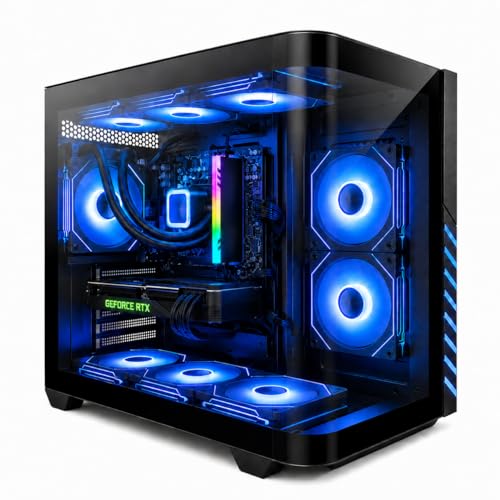
- Compact tower fits well on most desks, and clear side panel shows off internal components and RGB lighting.
- Alienware Command Center offers intuitive control over lighting, performance modes, and game profiles.
- Solid build quality with cable management and a robust power supply (1000W Platinum) ensures stability.
Cons
- Premium price compared to building a similar PC yourself, though GPU and RAM costs offset that for some buyers.
- Some users have reported startup issues that require a full discharge to resolve, which can be frustrating.
- Limited upgrade path due to proprietary motherboard and power supply connectors, though standard PCIe and RAM slots remain usable.
The Alienware Aurora ACT1250 is a top-tier gaming desktop built for PC gamers, streamers, and content creators who want a powerful system without the hassle of building their own. It combines an Intel Core Ultra 9 processor with an NVIDIA GeForce RTX 5080, delivering exceptional performance for 4K gaming, high-refresh-rate esports, and demanding creative workloads. The liquid-cooled CPU and carefully designed chassis keep things quiet and cool, even during marathon gaming sessions.
Based on product specifications and user feedback, this desktop excels in responsiveness and low-latency gaming. The RTX 5080 supports DLSS 4 and NVIDIA Reflex 2, which can dramatically boost frame rates in supported titles while reducing input lag. Many users report smooth gameplay in games like Cyberpunk 2077 and Escape from Tarkov at maximum settings. The Intel Core Ultra 9 with its 20 cores handles multitasking effortlessly, whether you're streaming, running Discord, or editing videos.
The build quality is solid: a matte black case with a clear side panel that shows off the internal components and customizable AlienFX lighting. The hexagonal side vents and top exhaust improve airflow without adding noise. Cable management is well-executed internally, keeping the system tidy and thermals efficient. The front I/O includes USB-C with Power Share, so you can charge devices even when the PC is off.
Set up is straightforward: plug in, power on, and Windows 11 Home takes care of the rest. The Alienware Command Center lets you tweak lighting, fan speeds, and performance presets - quiet, balanced, or performance mode. Some users noted that the included mouse and keyboard are basic, but most gamers will already have their own peripherals. The 1TB SSD is fast but may fill quickly with modern game libraries; you can add more drives via the two M.2 slots or a 3.5-inch bay.
Realistic limitations include the premium price - this is a significant investment. A few customers have experienced occasional startup glitches that require a full power discharge to fix, though this isn't widespread. Also, while the tower is compact, it's still a substantial piece of hardware that needs adequate desk space. The single HDMI port on the GPU might be an issue for those running multiple monitors, but the RTX 5080 typically has multiple DisplayPort outputs as well.
Overall, the Alienware Aurora ACT1250 is a strong choice for gamers who want a reliable, high-performance prebuilt with excellent cooling and quiet operation. It's especially well-suited for streamers, esports players, and anyone who values plug-and-play convenience over building their own rig. If you have the budget and prefer a polished experience, this desktop delivers.
The Alienware Aurora ACT1250 is powered by the NVIDIA GeForce RTX 5080, which brings the latest Blackwell architecture and features like DLSS 4 Multi Frame Generation. This allows for buttery-smooth frame rates in demanding titles, even at 4K resolution. Combined with the Intel Core Ultra 9, the system handles competitive games like Valorant and Call of Duty at high refresh rates with negligible input lag thanks to NVIDIA Reflex 2. According to user reviews, it easily pushes over 70 FPS in graphics-heavy games like Streets of Tarkov on ultra settings. The 32GB of DDR5 RAM ensures seamless multitasking while gaming and streaming.
The Alienware Aurora uses a 240mm liquid cooler for the CPU, supported by a smart thermal design that includes hexagonal side vents and a top exhaust. According to the product description, this results in 20% quieter operation and 7% lower temperatures compared to previous generations. The clear side panel lets you see the liquid cooling tubes and RGB lighting. The 1000W Platinum power supply ensures stable power delivery even under heavy loads. Users report that the system remains whisper-quiet during gaming and stays cool over extended sessions, making it suitable for both gaming rooms and open-plan setups.
Frequently Asked Questions
Does a prebuilt gaming PC require regular coolant maintenance?
Closed-loop all-in-one liquid coolers in prebuilts do not require coolant refilling or draining. Manufacturers seal these AIO units at the factory to prevent fluid loss over their working lifespan. In contrast, custom open loops using fluids like CORSAIR Hydro X Series XL8 require scheduled draining. For standard prebuilts, routine care only requires cleaning dust from the radiator fins.
How do 240mm and 360mm liquid radiators differ?
The difference centers on radiator surface area and fan capacity. A 240mm radiator uses two 120mm fans and fits into most mid-tower cases, while a 360mm unit uses three 120mm fans for heavier thermal loads. Larger radiators dissipate heat more rapidly, allowing fans to run at lower, quieter speeds during demanding gameplay.
Is liquid cooling necessary for mid-range gaming desktop processors?
Mid-range CPUs can operate on basic air cooling, but liquid loops provide quieter acoustic profiles and lower peak temperatures. Running resource-heavy sessions on a gaming desktop for Minecraft can elevate system heat over long sessions. A liquid cooler absorbs rapid thermal spikes easily, keeping clock rates stable without sudden fan noise.
Can an aftermarket AIO cooler fit both Intel and AMD motherboards?
Most aftermarket liquid coolers supply mounting brackets for multiple sockets. For example, the CoolerMaster MasterLiquid ML240L RGB V2 includes hardware compatible with AMD AM5 and AM4 alongside Intel LGA1700 sockets. Always check manufacturer documentation to verify your motherboard socket before upgrading.
What are the main signs that an AIO liquid cooler is failing?
Rapid CPU temperature spikes reaching thermal limits during light desktop tasks indicate pump failure or restricted fluid flow. You might also hear unusual buzzing, grinding, or rattling sounds coming from the pump block. In addition, motherboard firmware will often show an error if the pump tachometer signal drops to zero RPM.






Write Your Review
No reviews yet. Be the first to share your experience!