


Upgrading Your Desktop Atmosphere and Cable Flow
Cluttered surfaces and tangled cables can quickly drain the fun out of a gaming session. Setting up a tidy, responsive battlestation requires thoughtful peripheral organization and functional desk hardware that keeps your gear within arm’s reach. Integrating the Best Cool Pc Accessories into your daily space helps streamline controller storage, elevate notebook displays for better airflow, and inject personalized flair into plain tabletop layouts. Good desk items do not just look sharp under ambient room lighting; they solve tangible physical constraints like limited surface depth and strained viewing angles.
Building a functional battle station often pairs well with comfortable ergonomic desk chairs, but dialing in your tabletop accessories ensures long sessions remain comfortable. If you already run quality sound through specialized setup audio equipment, adding customizable pixel panels or bias projection lighting brings cohesive ambiance to the room. From oversized waterproof mouse surfaces to multi-device headphone mounts, modern gear focuses on balancing utility with striking visual accents.

Pros
- Large 31.5 x 12-inch size provides unified surface coverage for both keyboard and mouse
- Simple one-button control manages 14 lighting modes and brightness without software
- Power-off memory retains your chosen LED setting when restarted
- Waterproof microfiber fabric resists beverage spills and cleans easily
- Non-skid rubber base prevents sliding across smooth desk surfaces
Cons
- Requires an open USB port to power the LED lighting border
- Listing does not state the USB cable length or whether the cable is detachable
- At 12 inches deep, desk space may be tight for keyboards with large wrist rests
The DR CATCH Large RGB Mouse Pad is an extended desk mat designed for desktop computer users, office workers, students, and PC gamers who want a unified surface for both their mouse and keyboard. Measuring approximately 31.5 by 12 inches with a 0.3-inch thickness, this accessory provides substantial horizontal travel space for low-sensitivity mouse swipes while framing the desk with customizable ambient LED illumination.
Powered through a standard USB connection, the mouse pad operates on a plug-and-play basis without requiring specialized drivers, companion software, or background apps. Users simply connect the integrated or included USB plug to an available port on a computer, hub, or USB power adapter. Because the mat relies on direct USB bus power solely to illuminate the built-in LED edge strip, it does not communicate data to the host operating system or require driver compatibility checks.
The top surface is crafted from a smooth microfiber textile material engineered to promote fluid glide and consistent sensor tracking for optical and laser computer mice alike. A single push-button controller located on the pad allows users to cycle through 14 distinct lighting presets, which include static monochrome colors as well as dynamic breathing sequences. Double-clicking the control button adjusts the light brightness, while holding it for about three seconds toggles the lighting on or off. An onboard memory function also remembers the last chosen light setting after power is turned off.
Beneath the microfiber surface, the pad features a textured rubber backing that grips the desk firmly to prevent unintentional sliding or bunching during active mouse tracking. The surface is also treated for liquid resistance, helping to repel accidental spills from drinks or liquid drops so they can be wiped clean with water without causing fabric discoloration. At roughly 1.5 pounds, the mat carries sufficient heft to lay flat across wood, laminate, or glass desks.
When planning a setup, buyers should note that the product information does not specify the exact USB cable length or confirm whether the cable can be detached for travel or replacement. Additionally, with a vertical depth of roughly 12 inches, desk space from front to back is somewhat narrow compared to deeper desk pads, which might leave limited room for ergonomic keyboards with large integrated wrist rests. Prospective buyers should also verify that an open USB port is available near their workspace to power the lighting.
For users shopping for an affordable desk upgrade that combines mouse pad functionality with perimeter lighting, this DR CATCH extended mouse mat offers a practical blend of utility and atmosphere. It is particularly well-matched for gamers and remote workers who want ample side-to-side mouse clearance, simple hardware-based lighting controls, and easy-to-clean spill resistance without installing proprietary configuration software.
For daily office duties, study sessions, and web browsing, an extended mat helps protect desk finishes while offering a steady glide surface for office and productivity mice. The generous 31.5-inch width easily accommodates an office keyboard alongside the mouse, keeping peripherals resting at an even height.
The hardware-based button control means users do not need to install administrative software on work laptops to manage the lighting. If an office environment calls for a more understated setup, the illumination can be powered off entirely with a three-second button press, while the waterproof microfiber surface remains ready to guard against accidental coffee or water spills.
Built from flexible rubber and dense microfiber, the DR CATCH mouse pad weighs approximately 1.52 pounds, providing sufficient density to sit flat on work surfaces. The rubber underside provides traction against smooth surfaces such as finished wood or glass, minimizing movement during fast cursor navigation.
The edge perimeter integrates a diffuse LED light strip linked to an onboard control module. The listing notes that the pad is powered by USB and requires no drivers, though specific accessories such as a detachable cable or user guide are not detailed in the product specifications.
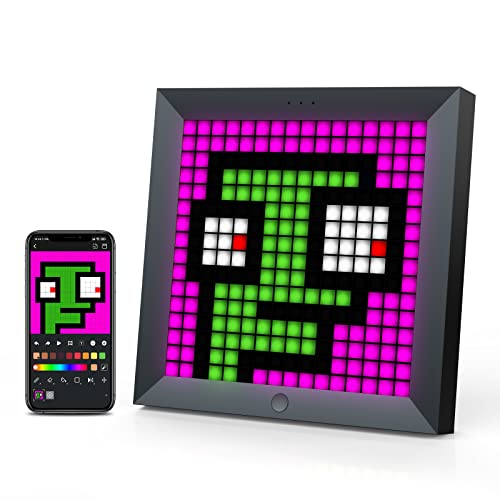
Pros
- Fun, customizable pixel art display with 16 million color options
- Easy app control for creating and uploading animations
- Music sync feature adds dynamic lighting to games and movies
- Compact size fits neatly on a desk without taking up much space
Cons
- 16x16 resolution limits the detail of pixel art compared to larger displays
- Requires the Divoom app for full customization and animation uploads
- Cable management may be needed as the unit uses a fixed USB cable
The Divoom LED Pixel Display Panel is a quirky and creative accent for any gaming desk or streaming setup. It's essentially a 16x16 grid of RGB LEDs that can display custom pixel art, animations, and even music-synced light shows. While not a core gaming peripheral like a mouse or keyboard, it serves as a visual centerpiece that adds personality to your space.
This device is best suited for PC gamers who enjoy customizing their desk aesthetics, RGB setup enthusiasts looking for something beyond standard light strips, and streamers who want an eye-catching background element. The retro pixel style also appeals to those who appreciate a blend of modern tech and classic arcade vibes.
In terms of performance, the display shines (literally) with vibrant 16 million colors and smooth animations. The app-controlled music sync feature can make the lights pulse to your game audio or favorite tracks, enhancing immersion during gaming sessions or movie nights. However, the 16x16 resolution is quite low, so complex artworks may appear blocky or simplified. It's best for simple icons, text, or small pixel characters.
Build quality feels solid, with a black plastic frame that sits flat on a desk. Setup is straightforward: plug in via USB (cable included) and download the Divoom app to browse animations, create your own, or set it to music sync. The app is intuitive, though full functionality requires creating a free account. There's no internal battery, so it needs a constant USB power source, which might add to cable clutter if not managed.
Realistic limitations include the reliance on the app for customization and the fact that the screen is fairly small for its price point. Some users might prefer a larger pixel panel for more detailed art. Additionally, the pixel art community may find the 16x16 grid limiting compared to 32x32 or higher options from other brands.
Overall, if you want a unique, fun RGB desk accessory that stands out from typical light strips and you enjoy creating or displaying pixel art, the Divoom panel is a solid choice. It works well for casual gamers, streamers, and RGB enthusiasts who value aesthetics and personalization. For those focused purely on performance-enhancing gear, this is more of a cosmetic add-on than a necessity.
The Divoom panel offers deep customization through the companion app. You can choose from a gallery of thousands of user-uploaded pixel animations, create your own from scratch on the 16x16 grid, or set the display to react to sound or music in real time. The 16 million color palette gives you plenty of freedom to match your setup's theme.
The app also includes a scheduling feature to automatically change animations at preset times, so you can have a morning greeting or a nighttime mood light. The display is bright enough to be noticeable even in a well-lit room, and the colors are vivid without being harsh.
One minor caveat: the unit only shows one animation at a time, and there's no way to layer effects. For a more dynamic light show, pairing it with other smart lights (like the brand's own light bars) can create a more cohesive setup. Overall, the customization options are extensive for a device of this size, and the music sync mode is particularly fun for gaming or watching movies.

Pros
- Incredibly affordable price point for an adjustable laptop stand.
- Compact and foldable design makes it easy to toss in a bag for travel.
- Anti-slip silicone pads and stable triangle structure keep devices secure.
- Good height adjustment range to improve ergonomics for most users.
Cons
- May feel flimsy with heavier 16-inch gaming laptops; stability can be a concern on uneven surfaces.
- Larger laptops (over 15.6 inches) might not sit securely on the stand's support tabs.
- The plastic construction, while lightweight, may not withstand heavy pressure or frequent rough handling.
The Tonmom 104S Laptop Stand is a simple yet effective accessory for anyone looking to elevate their laptop above a desk or table. Designed as a foldable, adjustable riser, it aims to improve ergonomics and cooling for laptops ranging from 10 to 15.6 inches. Given its low cost and compact size, it appeals not just to office workers but also to PC gamers, streamers, and content creators who want to reduce neck strain during long sessions and improve airflow to their machines.
Based on user feedback and product specifications, this stand fits best with lightweight to medium laptops. Casual gamers, college students with standard notebooks, and work-from-home users will appreciate its portability and ease of adjustment. However, owners of hefty 16-inch gaming laptops may find the stand less stable, as the front support tabs can let a heavy machine slide forward or tilt. Still, for typical 13-15 inch ultrabooks and Chromebooks, the Tonmom stand offers reliable support.
In terms of real-world performance, the primary benefits are ergonomic and cooling. The 7-level height adjustment from 2.78 inches to 6.5 inches allows users to position their laptop screen closer to eye level, which can reduce neck and shoulder fatigue over time. The forward-tilt angle and open design promote better air circulation, helping to keep laptops cooler during gaming or streaming. For streamers using a laptop for OBS or a secondary screen, this can be a simple way to improve airflow without adding bulky cooling pads.
Build quality is a mixed bag. The ABS plastic and silicone construction feels solid enough for everyday use, but some users note it can feel flimsy when supporting heavier loads. The triangle support structure and anti-slip pads do help keep the laptop secure, but the stand lacks a rigid metal frame found in more premium models. It’s not designed for heavy pressure or aggressive typing on the laptop itself - using an external keyboard is recommended for best stability. The foldable design is a strong point for travelers, collapsing to a size that fits inside most laptop bags.
Setup is incredibly straightforward: simply unfold the stand, choose your desired height (there are preset notches), and place your laptop on it. No tools, no assembly, no software to configure. Maintenance is minimal - just wipe it clean occasionally. The included storage pouch is a nice touch for keeping the stand tidy when not in use. Its small desk footprint makes it ideal for cramped dorm rooms, coffee shops, or simply freeing up space on a cluttered gaming desk.
Realistic limitations include potential instability on uneven surfaces and with oversized laptops. It’s not a heavy-duty solution for a permanent desktop replacement - think of it as a portable helper. For competitive gamers who need a rock-solid, permanent riser with extensive adjustability, a more expensive all-metal stand may be a better investment. However, for casual gamers, streamers, and students on a budget who value portability and basic ergonomics, the Tonmom stand delivers excellent value. It’s a practical addition to any gaming setup for less than the cost of a game.”


Frequently Asked Questions
How much desk space does an extended RGB mouse pad require?
Extended desk mats generally require at least 32 inches of clear horizontal table surface. The DR CATCH pad measures 31.5 by 12 inches, providing ample room to seat both a full-sized keyboard and your mouse without crowding. Rubber base backing keeps the microfiber fabric stationary during rapid mouse sweeps, while a standard USB port powers the perimeter lighting modes.
Do decorative gaming desk accessories require dedicated USB ports?
Yes, most illuminated desktop gear relies on standard 5V USB connectivity for power. Connecting multiple lights, pixel boards, and stands can quickly fill up your motherboard slots. Pairing versatile gear with modern dedicated desktop computers or an external powered USB hub guarantees enough reliable voltage without cable clutter.
Can a dual-purpose headset stand support multiple gamepads at once?
Yes, multi-tier stands are designed specifically to balance weight across multiple controllers and headphones. The KDD stand features a 360-degree rotating top hook and detachable lower brackets that safely cradle one headset alongside two controllers, or up to four gamepads simultaneously. Weighted bases with non-slip rubber pads prevent tipping when you grab your gear mid-match.
How does an adjustable laptop riser improve notebook cooling?
Risers improve laptop ventilation by elevating the chassis off flat desk surfaces to unblock intake vents. The foldable Tonmom stand lifts notebooks between 2.78 and 6.5 inches across seven height settings, creating open air circulation beneath the lower chassis. Anti-slip silicone pads prevent the frame from slipping while keeping hot exhaust away from sensitive table materials.
Are smart pixel art displays worth adding to the Best Cool Pc Accessories in 2026?
Yes, app-controlled pixel screens offer customizable visual flair and desktop utility in modern setups. Devices like the Divoom 16×16 panel connect via mobile software, letting you display custom pixel art animations, clock functions, or music visualizers. The compact footprint fits easily onto monitor shelves or speaker tops without consuming valuable mouse tracking space.


Write Your Review
No reviews yet. Be the first to share your experience!