


Positional audio cues and vocal clarity can define the outcome of a tense multiplayer round long before a player spots an approaching target. Answering what is a good gaming headset requires looking past flashing cosmetic lights to examine acoustic driver design, clean microphone capsule isolation, and ergonomic weight balance. When an audio peripheral reproduces muddy low frequencies or transmits muffled voice chat, team communication breaks down and crucial tactical awareness vanishes. Pairing your setup with a responsive gaming mouse provides rapid tracking, but auditory feedback delivers the critical information needed to anticipate opposing moves. Investing in proper communication hardware ensures every subtle reload, directional footstep, and tactical callout cuts through loud game mixes.
Long gaming marathons also place heavy demands on physical comfort, making clamping force and ear cushion ventilation vital criteria for any serious setup. A quality headset balances adequate skull grip with pliable memory foam cushions so that users wearing eyeglasses avoid painful temple pressure. Complementing your battlestation with a specialized desk pad for humid setups keeps your hands steady, while breathable ear cups prevent excessive perspiration during extended competitive matches. Reliable analog and 2.4 GHz wireless connections further guarantee that your sound stays perfectly synchronized with fast-moving on-screen action. Evaluating these core acoustic and physical elements helps buyers identify dependable gear tailored to their specific gaming platforms.
Pros
- Excellent positional audio for competitive gaming thanks to DTS Headphone:X 2.0
- Clear, crisp microphone with convenient flip-to-mute function
- Comfortable leatherette padding for long sessions
- Affordable price point for the feature set
- Works across multiple platforms via 3.5mm or USB
Cons
- On-ear design may cause discomfort for some users during very long sessions
- Leatherette ear pads can get warm over time
- Wired only – no wireless option for those who prefer cable-free setups
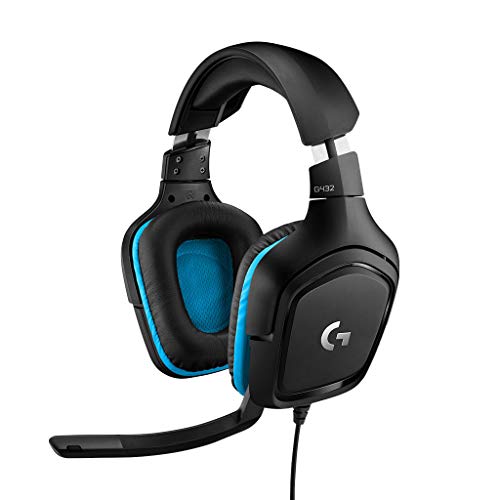
The Logitech G432 is a wired gaming headset that brings solid audio performance to PC gamers, esports players, and streamers without demanding a premium price. It features 50mm drivers and DTS Headphone:X 2.0 surround sound, which creates a convincing 3D soundscape for pinpointing enemy footsteps or environmental cues in competitive titles like Valorant or Call of Duty. The flip-to-mute mic is a practical touch for quick muting during intense moments or streaming on Twitch.
This headset is best suited for budget-conscious gamers who want reliable positional audio and a decent mic for team communication. Casual gamers will appreciate the immersive sound for open-world games, while streamers and content creators can use the USB DAC for easy connection to a PC. The on-ear design with leatherette padding offers decent comfort for sessions up to a few hours, though some users may prefer over-ear pads for extended wear.
Build quality is typical Logitech G – sturdy plastic construction that feels durable enough for daily use. The headband is padded and adjustable, and the ear cups swivel slightly for a better fit. The 3.5mm cable is braided and includes an inline volume wheel, which is handy for quick adjustments. Setup is plug-and-play on PC via USB, and the headset also works with consoles and mobile devices using the analog connection.
One realistic limitation is the on-ear fit: it presses against the ears rather than enclosing them, which can cause discomfort after several hours for some users. The leatherette material also traps heat, so you might notice sweating in warmer rooms. Additionally, there’s no wireless option, so you’re tethered to your device – fine for a desktop setup but less ideal if you like to move around.
Overall, the Logitech G432 is a strong choice for PC gamers and streamers on a budget who prioritize audio clarity and mic quality. It’s also a good entry-level headset for college gamers or those building their first gaming setup. If you can live with the on-ear design and wired connection, you get impressive surround sound and a reliable mic for under $50.
The Logitech G432 uses 50mm drivers that deliver clear highs, mids, and punchy bass. DTS Headphone:X 2.0 provides virtual 7.1 surround sound, which enhances spatial awareness in games. Footsteps, gunshots, and environmental sounds are well-defined, giving competitive gamers an edge. For music and movies, the sound is balanced but leans slightly toward a gaming-focused tuning.
The flip-to-mute mic on the G432 captures voice clearly without excessive background noise. It’s a 6mm cardioid mic that works well for team chat, Discord calls, and streaming. The mute function is physical and reliable – just flip the mic up to mute. Volume control is integrated into the cable for quick adjustments.
The headset features leatherette ear pads and a padded headband. The on-ear design is lightweight (1.2 lbs) but may press on ears during long sessions. Build quality is durable with a plastic frame and braided cable. The ear cups swivel slightly for a customized fit. Overall, it’s comfortable for moderate gaming sessions but may require breaks for extended wear.


Pros
- Excellent audio clarity and directional sound for competitive gaming
- Very comfortable for extended sessions thanks to lightweight build and memory foam cushions
- Clear microphone with good background noise rejection
- Simple plug-and-play setup with convenient on-cable controls
Cons
- Wired connection may be less convenient for some users compared to wireless options
- Non-detachable cable could be a durability concern over time
- Some users may find the noise isolation too effective for awareness of surroundings
The Razer BlackShark V2 X is a wired gaming headset designed for console and PC gamers who want solid performance without breaking the bank. It features 50mm TriForce drivers, a cardioid microphone, and a lightweight build that prioritizes comfort. This headset is officially licensed for Xbox but works with PS5, PC, and Switch via a standard 3.5mm audio jack, making it a versatile option for multi-platform gamers.
This headset is best suited for competitive and casual gamers, esports players, and content creators who need clear audio and reliable communication. The 50mm drivers deliver well-balanced sound with good detail, helping you hear footsteps, gunfire, and environmental cues in games like Rainbow Six Siege or Call of Duty. The cardioid mic does a solid job of picking up your voice while rejecting background noise, which is a plus for team chat or streaming on Twitch.
Comfort is a standout feature. At just 240 grams with memory foam ear cushions and a padded headband, the headset feels light even during marathon gaming sessions. The closed-back design provides passive noise cancellation, helping you stay immersed. The on-cable volume knob and mute button are easy to reach and operate without taking your hands off the controller.
Build quality is decent for the price point. The materials feel sturdy enough for regular use, though the non-detachable cable is a potential weak point. The ear cushions are covered in leatherette and offer a good seal for sound isolation. Setup is straightforward: plug into any device with a 3.5mm port and you're ready to go. Windows Sonic surround sound is supported on Xbox and PC for enhanced spatial awareness.
One realistic limitation is the wired connection. While it ensures zero latency and no battery anxiety, it can feel restrictive compared to wireless options. The cable is long enough for most setups, but it's permanently attached, so if it gets damaged, the whole headset is affected. Also, the passive noise cancellation is effective, which may not suit gamers who prefer to stay aware of their surroundings.
Overall, the Razer BlackShark V2 X offers strong value for gamers who want a comfortable, reliable headset with good audio and mic quality. It works well across multiple platforms and is a practical choice for anyone building a gaming setup on a budget. For the price, it's hard to beat if you prioritize comfort and clear communication.

Pros
- Excellent audio clarity with well-balanced sound signature that excels in competitive games.
- Comfortable lightweight build that can be worn for hours without fatigue.
- High-quality microphone that picks up voice clearly and minimizes background noise.
- Outstanding value for money given the performance and build quality at this price point.
Cons
- 7.1 surround sound is only available on Windows 10 64-bit systems, limiting console use.
- Wired 3.5mm connection may be less convenient than wireless for some users.
- Ear cushions can feel warm during extended sessions due to the leatherette material.
The Razer BlackShark V2 X is a wired gaming headset designed to bring esports-grade audio and communication to a wider audience. It features custom-tuned 50mm TriForce drivers that split the driver into three parts for individual tuning of highs, mids, and lows, resulting in brighter, clearer sound with punchy bass. The headset also includes 7.1 surround sound capability via software on Windows 10, giving competitive players a distinct advantage in positional audio.
This headset is best suited for PC gamers who want reliable performance without a high price tag. It also works great for console players on PS5, PS4, and Nintendo Switch, though the surround sound feature is PC-only. Streamers and content creators will appreciate the HyperClear cardioid microphone, which rejects background noise and delivers clear voice pickup for Discord calls or live commentary. Casual gamers and college students building a budget setup will find it a solid all-rounder.
In terms of real-world performance, the BlackShark V2 X excels in audio clarity and directional sound. Footsteps and gunfire in FPS games like Counter-Strike 2 are easy to pinpoint, and the microphone quality is among the best in its price range. The passive noise cancellation from the closed earcups helps block out ambient noise, allowing you to stay focused during intense matches. The lightweight 240g frame and memory foam ear cushions ensure comfort during long sessions, though some users note the leatherette can get a bit warm over time.
Build quality is typical of Razer's budget line: a sturdy plastic frame that feels durable enough for everyday use. The cable is braided and includes an audio/mic splitter for PC compatibility. There's no RGB lighting, which keeps the design simple and professional. The headset connects via a standard 3.5mm jack, making it plug-and-play on most devices without needing additional drivers. Setup is straightforward: just plug in and you're ready to go.
A realistic limitation is the lack of wireless connectivity and the fact that the 7.1 surround sound only works on Windows 10 64-bit. Additionally, some users report that the ear cushion material can cause slight discomfort in hot climates, though this is a minor trade-off for the price. The microphone is fixed (not detachable), which might be a drawback for those who prefer a clean headset for music listening.
Overall, the Razer BlackShark V2 X offers exceptional value for its price. It delivers clear audio, a quality mic, and comfortable fit that rivals headsets costing twice as much. If you're a PC gamer looking for a reliable wired headset for competitive play, casual gaming, or streaming, this is a strong contender. Console gamers will also enjoy its cross-platform compatibility. It's a practical choice for anyone needing a no-fuss, performance-focused audio solution for their gaming setup.
The Razer BlackShark V2 X features 50mm TriForce drivers that produce clear highs, detailed mids, and solid lows. The sound signature is balanced, making it suitable for both gaming and music. The 7.1 surround sound (on Windows 10) adds spatial awareness, helping you hear enemy movements and environmental cues with precision. The passive noise cancellation further enhances immersion by reducing external noise.
The flexible HyperClear cardioid microphone captures your voice accurately while rejecting background noise from the sides and rear. Vocal clarity is excellent during in-game communication and voice chats. Teammates and viewers will hear you clearly without distracting ambient sounds. The mic is non-detachable but folds up out of the way when not in use.
At just 240g, the BlackShark V2 X is one of the lightest gaming headsets available. The memory foam ear cushions and padded headband distribute weight evenly, reducing pressure points. The closed-back design provides good sound isolation but can trap heat. The plastic construction feels sturdy enough for daily use, and the cable is reinforced for durability.
Pros
- Excellent audio clarity with JBL's signature sound profile for competitive gaming and entertainment.
- Comfortable breathable ear cushions and lightweight build reduce pressure during long sessions.
- Detachable boom mic provides clear voice pickup and can be removed for non-gaming use.
- Broad compatibility across consoles, PC, and mobile devices with simple plug-and-play via 3.5mm jack.
- Budget-friendly price without sacrificing essential gaming headset features like spatial sound support.
Cons
- Wired design and short cable (per user feedback) may be less convenient for desktop setups that require extra reach.
- No noise cancellation on the ear cups, so ambient sound can bleed in during loud environments.
- Some users reported units with no audio out of the box, suggesting potential quality control variability.
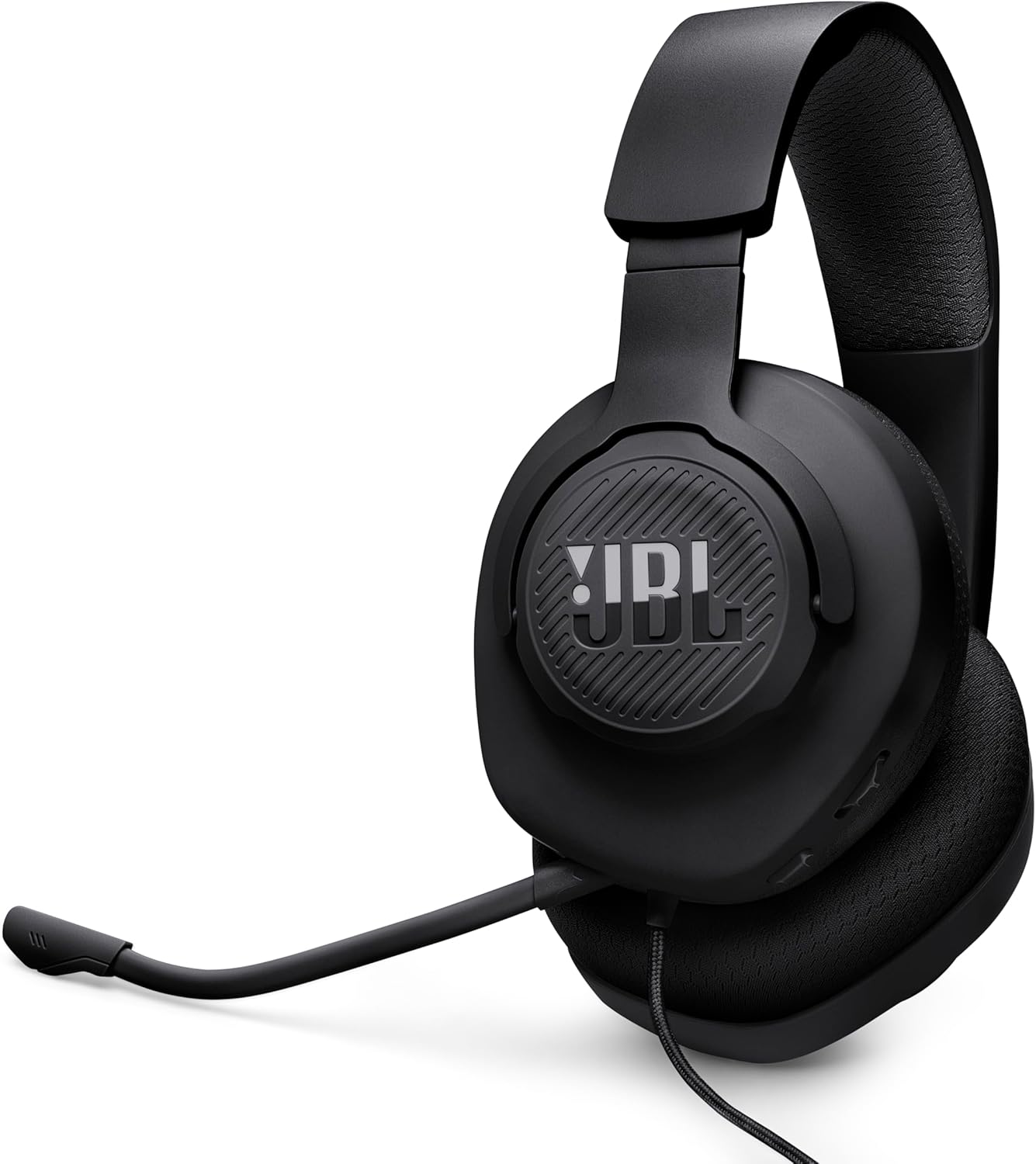
The JBL Quantum 100M2 is a wired over-ear gaming headset that focuses on delivering JBL's well-regarded QuantumSOUND Signature audio at an accessible price point. Designed for gamers, streamers, and even work-from-home professionals, this headset aims to provide clear, immersive sound and comfortable wear for extended use. With a detachable boom mic and compatibility across nearly every platform, it's a versatile option for anyone who needs a reliable all-rounder.
Based on product specifications and user feedback, the Quantum 100M2 excels in audio quality for its class. The 40mm dynamic drivers deliver crisp highs and punchy lows, making it easy to pinpoint enemy footsteps in FPS games or enjoy the cinematic boom of explosions in open-world titles. The support for Windows Sonic Spatial Sound is a nice bonus for PC and Xbox gamers, adding an extra layer of immersion without requiring expensive software or hardware.
Comfort is clearly a priority here. The ear cushions are covered in breathable fabric and filled with memory foam, which helps reduce heat buildup and pressure during marathon gaming sessions. The lightweight headband further contributes to a fatigue-free experience, and several user reviews confirm that the headset works well for glasses wearers over long play sessions. This makes it a solid choice for college gamers or anyone who spends hours at their desk.
The detachable voice-focus microphone is another highlight. It picks up speech clearly while minimizing background noise, making it suitable for multiplayer gaming, Discord calls, and even light streaming. The fact that you can remove the mic entirely when listening to music or streaming video is a thoughtful touch, turning the headset into a simple pair of headphones for everyday use.
Build quality feels decent for the price, with a durable plastic frame and a fabric-covered cable. However, the cable is on the shorter side, which might require an extension for desktop PC users who don't hook into the controller. Setup is straightforward: just plug the 3.5mm jack into your device, and you're ready to go. No drivers or software needed, though some users had to update their Xbox controller firmware before the mic worked properly.
While the JBL Quantum 100M2 doesn't offer active noise cancellation or wireless freedom, it nails the fundamentals for gamers on a budget. If you're a console or PC gamer who prioritizes clear audio, a comfortable fit, and a microphone that gets the job done, this headset is a practical buy. It also works well as a secondary headset for travel or for younger gamers just getting into multiplayer titles. For the price, it's a strong contender in the entry-level gaming headset market.
The JBL Quantum 100M2 is built with a lightweight frame that reduces strain during long sessions. The ear cushions use breathable fabric over memory foam, which conforms to your ears while preventing excessive sweating. Several users noted that the headset is comfortable for 4-5 hour gaming sessions, even for those who wear glasses. The headband is padded and flexible enough to fit a range of head sizes.
The build quality feels sturdy for a budget wired headset. Materials are primarily plastic but reinforced in key stress points. The detachable mic snaps in securely and the 3.5mm jack is gold-plated for reliable contact. Overall, this is a well-designed headset that prioritizes comfort and everyday practicality without feeling fragile.
The JBL Quantum 100M2 is compatible with all devices that have a standard 3.5mm audio jack, including PC, PlayStation 5 and 4, Xbox Series X|S and One, Nintendo Switch (in handheld mode), Mac, mobile phones, and VR headsets. It also supports Windows Sonic Spatial Sound on Windows 10 PCs and Xbox consoles for enhanced positional audio. Setup is plug-and-play; no additional drivers or software are required. Just note that for some Xbox controllers, a firmware update may be needed to enable the microphone.
Pros
- Ultra-low latency 2.4GHz wireless for competitive gaming on PC and consoles
- Excellent battery life with quick-charge feature for minimal downtime
- Comfortable memory foam padding for extended gaming sessions
- Clear microphone with flip-to-mute functionality for easy voice control
Cons
- Bluetooth mode does not support PS5/PS4 directly; requires separate adapter
- Microphone noise isolation could be better for noisy environments
- Not compatible with Xbox consoles
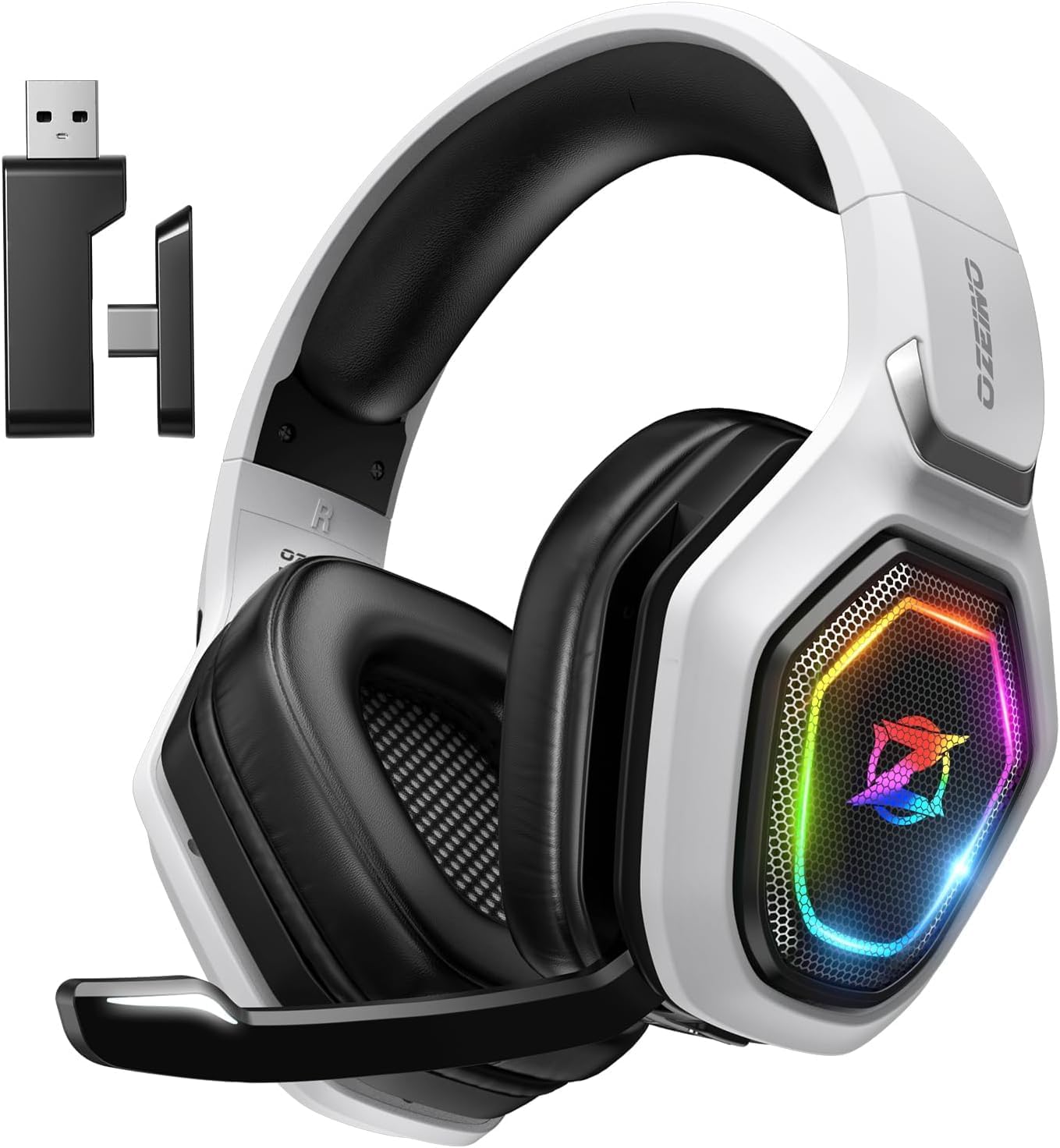
The Ozeino OW810 is a wireless gaming headset designed for PC, PS5, PS4, and other devices, offering a compelling mix of performance and affordability. It uses a 2.4GHz USB and Type-C transmitter to deliver lossless audio with less than 30ms latency, making it a solid choice for gamers who want a wire-free experience without sacrificing responsiveness. The headset also includes Bluetooth for mobile and Switch use, though that mode requires an extra adapter for console compatibility.
This headset is best suited for PC gamers, competitive and casual players, streamers, and gaming setup builders who need reliable audio without spending a fortune. The 50mm drivers provide clear sound with decent bass, helping you hear footsteps, reloads, and environmental cues in games like Fortnite, Call of Duty, and RPGs. The flip microphone works well for voice chat and streaming, though some users note it picks up background noise more than premium mics.
Comfort is a strong point thanks to memory foam ear cushions and a lightweight frame that reduces fatigue during long sessions. The adjustable headband and over-ear design fit most head sizes without feeling tight. The 40-hour battery life is impressive, and the quick-charge feature (10 minutes for 100 minutes of play) keeps you in the game when you forget to charge.
Build quality is good for the price, with a plastic construction that feels sturdy enough for everyday use. The RGB lighting adds a nice touch to your gaming setup without being distracting. Setup is simple: plug the USB transmitter into your PC or console, switch to 2.4GHz mode, and you're ready to go. The headset also includes a 3.5mm cable for wired use when the battery runs low, though it does not support Xbox.
One limitation is that Bluetooth does not work directly with PS5, PS4, or PC without a separate adapter, so you'll rely on the 2.4GHz mode for those platforms. The microphone could also be more effective at canceling background noise, which might be an issue for streamers or those in noisy rooms. However, for the price, these trade-offs are expected.
Overall, the Ozeino OW810 is a practical choice for budget-conscious gamers and setup enthusiasts who want a wireless headset with good sound, long battery life, and easy connectivity. It works well for PC gaming, console play, and casual streaming, making it a versatile addition to any gaming desk.

Evaluating the Essential Qualities of a High-Performance Gaming Headset
Determining what is a good gaming headset involves analyzing how well an audio device balances sound reproduction, microphone fidelity, physical endurance, and platform connectivity. Rather than functioning as simple music headphones with an attached microphone, gaming headsets feature acoustic tuning optimized for transient sounds like footsteps, weapon switches, and directional environmental audio. They must also deliver clean, intelligible voice transmission while isolating ambient room distractions such as mechanical keyboard clicks or computer cooling fans. Balancing these auditory tasks requires purposeful driver design, robust frame materials, and dependable physical controls.
Modern gaming environments range from quiet living room console setups to noisy dorm rooms and shared apartment offices. Because listening environments and use cases vary widely, no single acoustic parameter defines overall quality on its own. Instead, a truly effective headset synchronizes responsive hardware components with comfortable materials to maintain immersion across hours of intense concentration.
Acoustic Architecture and Dynamic Driver Engineering
Acoustic performance in gaming headsets begins with the internal speaker drivers, which typically measure between 40 and 50 millimeters in diameter. Large 50mm dynamic drivers, found in models like the Logitech G432 Wired Gaming Headset and the Razer BlackShark V2 X Gaming Headset, provide the air displacement necessary for punchy low frequencies. When low frequencies overpower the acoustic curve, vital sound cues like enemy footsteps become buried in the audio mix. Quality drivers maintain clean separation across the audible spectrum, allowing players to isolate subtle sound signatures during chaotic combat.
Advanced engineering techniques often separate the driver into distinct tuning chambers or utilize specialized diaphragm coatings to enhance clarity. For instance, the Razer TriForce design divides the driver into three distinct zones for separate tuning of high, mid, and low frequencies. Similarly, the AOC Wireless Gaming Headset for PS5, PS4 utilizes graphene diaphragms paired with dual acoustic chambers to enhance structural rigidity. Graphene-coated elements deliver crisper transient responses, meaning sudden audio spikes register with immediate clarity.
Acoustic enclosure design also plays a massive role in frequency presentation and noise isolation. Most gaming headsets employ a closed-back architecture, featuring sealed earcups that prevent sound leakage and block distracting external room noise. The Razer BlackShark V2 X Wired PlayStation relies on sturdy closed earcups with dense cushions to establish an acoustic seal that reinforces bass extension. While closed earcups trap more warmth than open-back headphones, they create the focused soundstage required for competitive concentration.
Spatial Sound Processing and Directional Audio Imaging
Directional imaging accuracy is one of the most practical benchmarks when evaluating what is a good gaming headset. Stereo imaging allows human ears to calculate sound origin based on slight timing and volume differences between the left and right earcups. High-performance gaming headsets pair clean stereo drivers with advanced spatial processing engines like DTS Headphone:X 2.0, Windows Sonic, or Sony Tempest 3D Audio. The JBL Quantum 100M2 – Wired Over-Ear Gaming Headset is designed specifically for full compatibility with native spatial sound systems like Windows Sonic.
Early gaming headsets occasionally attempted to produce true surround sound by cramming multiple small drivers into each earcup. However, audio engineers quickly discovered that multiple tiny drivers compromised tonal quality and created muddy phase cancellation issues. Modern positional audio relies instead on virtual surround sound algorithms processing high-fidelity stereo drivers. The Logitech G432 demonstrates this modern approach by utilizing its included USB DAC and DTS Headphone:X 2.0 to calculate precise positional channels within Windows.
Spatial audio proves especially valuable in first-person tactical shooters where split-second directional awareness determines survival. Knowing whether an opponent is walking on wooden floorboards above you or crawling through grass behind your position provides an immense advantage. When paired with high-resolution digital converters, such as the 96 kHz and 24-bit DAC built into select AOC models, spatial algorithms simulate sound reflections that mimic natural physical spaces.
Microphone Capsule Fidelity and Ambient Voice Isolation
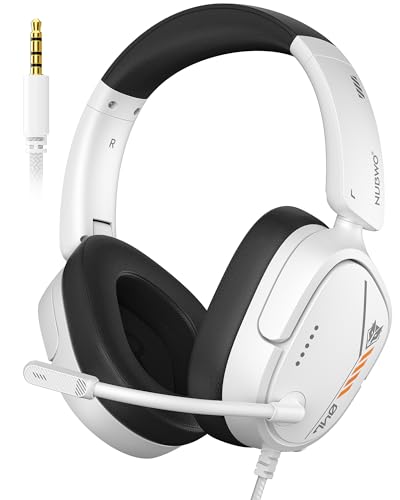
Voice communication represents the second half of any gaming headset equation, making microphone capsule design critical. A substandard microphone sounds thin, robotic, or excessively quiet, forcing teammates to adjust discord volume settings constantly. Premium options utilize cardioid or unidirectional polar patterns that capture voice primarily from the front of the capsule while rejecting noise from the sides. The NUBWO HG04L Gaming Headset for PS5/PS4 features a unidirectional microphone that filters ambient side sounds across a controlled 120-degree pickup angle.
Physical microphone placement and muting mechanisms also impact convenience during extended sessions. Many gamers favor flip-to-mute boom arms, like the six-millimeter microphone on the Logitech G432 and the folding arm on the Ozeino 2.4GHz Wireless Gaming Headset for PC, Ps5. Flipping the boom upward provides instant physical confirmation that your microphone is muted without fumbling for cord switches. Conversely, detachable boom microphones, such as those found on the JBL Quantum 100M2 and the AOC 2.4GHz Wireless Gaming Headset for PS5, PS4, allow players to remove the mic for casual solo listening.
Digital signal processing and acoustic foam shields further refine voice clarity by filtering sharp breath plosives and electrical hum. Multi-stage noise suppression setups, such as the triple-stage filtering in select AOC wireless models, combine physical foam barriers with DSP filters to strip background noise before transmission. Proper microphone calibration also involves setting appropriate operating system input gain and utilizing hardware sidetone when available. Sidetone loops your voice into the earcups with zero latency, preventing you from shouting unconsciously while wearing isolating pads.
Wired Latency Stability Versus 2.4 GHz RF Wireless Freedom
Connection protocol directly influences both audio latency and day-to-day desk ergonomics. Traditional analog headsets rely on standard 3.5mm TRRS audio jacks that deliver zero transmission delay and complete plug-and-play simplicity. Wired designs like the Razer BlackShark V2 X Xbox Gaming Headset draw power straight from the console controller or computer sound card, eliminating battery management. For players who spend long hours at a single desk or console, a reliable wired connection offers uncompressed stereo audio without wireless dropouts.
Gamers seeking freedom from tangled cords increasingly opt for modern wireless headsets powered by 2.4 GHz radio frequency dongles. Unlike standard Bluetooth, which often introduces noticeable audio delay and lipsync lag during gaming, 2.4 GHz RF technology delivers ultra-low latency transmission. The AOC wireless lineup boasts latency ratings at or below 20 milliseconds, ensuring that weapon firing sounds align perfectly with on-screen action. Much like pairing your workstation with a low latency wireless mouse, adopting RF wireless audio cleans up desk clutter while maintaining responsiveness.
Versatile modern headsets often provide multi-mode connectivity, combining a 2.4 GHz USB transceiver with Bluetooth and analog backup options. The Ozeino OW810 wireless headset features dual input options, letting users plug the 2.4 GHz dongle into a PlayStation or PC while utilizing Bluetooth for mobile phones. However, gamers should note that PlayStation and Xbox consoles generally do not support direct Bluetooth audio connections. Having an included 3.5mm analog cable ensures you can continue gaming even if the wireless battery runs empty midway through a match.
Cross-Platform Compatibility and Console Hardware Boundaries
Compatibility remains an essential factor when deciding what is a good gaming headset for multi-platform players. While 3.5mm analog connections generally work across PlayStation, Nintendo Switch, PC, and Xbox controllers, wireless connectivity introduces strict hardware boundaries. Microsoft Xbox consoles utilize a proprietary wireless communication protocol that requires specialized security authentication chips. As a result, standard 2.4 GHz USB dongles designed for PC or PlayStation will not connect wirelessly to Xbox consoles, forcing multi-platform users to rely on 3.5mm controller cables when playing on Xbox Series X or Series S.
Console specific hardware licensing often results in dedicated platform editions, such as the Razer BlackShark V2 X Xbox and PlayStation variants. While both editions utilize standard 3.5mm jacks and feature identical 50mm TriForce Titanium drivers, their cosmetic accents and marketing match specific console ecosystems. Meanwhile, PC gamers must pay close attention to computer audio jack configurations. Many desktop towers feature separate 3.5mm jacks for audio output and microphone input, requiring a dual-jack splitter extension cable when connecting single-plug TRRS headsets like the NUBWO HG04L.
USB connectivity introduces further platform nuances depending on whether a peripheral uses USB-A or modern USB-C interfaces. Wireless headsets like the Ozeino model and AOC wireless series package two-in-one USB transmitters or Type-C adapters to fit Nintendo Switch handheld ports, PS5 front panels, and PC motherboards. Ensuring that your selected headset includes the necessary adapters saves you from hunting down aftermarket converter blocks. Verifying platform compatibility before purchase prevents the frustrating discovery that your wireless transmitter cannot communicate with your preferred gaming console.
Ergonomics, Clamping Force, and Cushion Ventilation
Even the most accurate acoustic drivers become useless if a headset causes physical pain after forty-five minutes of play. Ergonomic comfort depends heavily on overall headset weight, headband crown padding, and clamping pressure against the sides of the skull. Lightweight designs excel in reducing long-term neck fatigue during extended raiding sessions or competitive scrims. Headsets like the Razer BlackShark V2 X weigh just 240 grams, while the NUBWO HG04L comes in at 250 grams, allowing the frames to rest lightly on the head without concentrating excessive force on the crown.
Ear cushion materials also directly influence thermal comfort, passive noise isolation, and low-frequency bass response. Dense protein leatherette cushions, found on the Logitech G432 and AOC models, provide a tight acoustic seal that enhances bass reproduction and blocks ambient household noise. However, synthetic leather traps body heat and perspiration during warm summer sessions. Headsets like the JBL Quantum 100M2 counter this by using breathable fabric-covered memory foam cushions that promote airflow, keeping your ears cool during marathon gaming sessions on a high performance gaming laptop or desktop rig.
Gamers who wear prescription glasses must pay special attention to ear cushion pliability and headband clamping tension. Stiff foam cushions press eyeglass frames against the temporal bones, causing throbbing headaches and breaking the acoustic bass seal around the ears. Soft memory foam earmuffs with rotatable hinges, like those featured on the NUBWO HG04L and AOC models, adapt naturally to different head shapes. Flexible earcups distribute pressure evenly across the skull, ensuring that glasses wearers enjoy consistent acoustic isolation without enduring painful contact points.
Battery Endurance, Power Management, and Hardware Longevity
Battery longevity represents a decisive practical factor for anyone investing in a wireless gaming setup. Running out of power during a ranked overtime match is a frustrating experience that every gamer wants to avoid. Modern wireless headsets have made significant strides in energy efficiency, routinely delivering between 40 and 45 hours of continuous gameplay on a single charge. Both the AOC 2.4GHz wireless headset and the Ozeino OW810 achieve battery runtimes exceeding 40 hours with dynamic lighting turned off, easily handling a full week of daily gaming sessions.
Recharge speeds and play-and-charge capabilities also determine how convenient a wireless headset proves over time. Fast USB-C recharging circuits can restore several hours of gameplay in just ten to twenty minutes of charging time, minimizing downtime between sessions. Furthermore, models like the AOC wireless series allow users to continue playing over 2.4 GHz audio while connected to a USB-C charging cable. This simultaneous charge-and-play capability ensures that a depleted battery never forces you to abandon your squad in the middle of a raid.
Long-term hardware durability depends on thoughtful material choices and strain relief engineering across cables and headbands. Wired models benefit significantly from anti-tangling braided cables, such as the 1.5-meter cord on the NUBWO HG04L, which resists stretching and friction wear. For wireless models, maintaining lithium-ion battery health involves using standard five-volt USB charging ports rather than high-wattage fast chargers that generate excess heat. Storing your headset on a dedicated stand or hook protects headband adjustment sliders and preserves the delicate foam shape of your ear cushions.
Audio Endpoint Calibration and Safe Listening Practices
Maximizing the potential of your gaming audio requires proper operating system configuration and endpoint verification. On Windows PCs, connecting a headset via USB or 3.5mm occasionally defaults the device to low-bandwidth telephony profiles rather than high-fidelity stereo output. Opening the Windows Sound Control Panel allows users to confirm that their headset is designated as both the default audio playback device and default communication device. Selecting twenty-four-bit audio depth at 48 or 96 kHz ensures that your sound card reproduces game audio with maximum clarity.
Microphone gain staging requires equal attention to ensure your voice transmits clearly without digital clipping or distortion. Setting your Windows microphone input level around seventy to eighty percent and positioning the capsule two fingers away from the corner of your mouth prevents explosive breath sounds. On-headset tactile controls, such as the volume wheel and physical mute switch on the Razer BlackShark V2 X and NUBWO HG04L, provide immediate adjustment during live gameplay. These physical controls let you tweak party chat balance without tabbing out of your game.
Protecting long-term hearing health is the final and most critical component of responsible headset ownership. Competitive players often make the mistake of raising overall volume excessively to hear subtle footstep cues, risking irreversible auditory fatigue over time. Utilizing virtual spatial sound processing and closed-back acoustic isolation provides the competitive clarity you need at safe, moderate listening levels. Ultimately, choosing a well-engineered headset with balanced drivers, clean microphone isolation, and ergonomic comfort delivers an immersive gaming experience that protects your senses across years of play.




Write Your Review
No reviews yet. Be the first to share your experience!