


Tackling Muffled Voice Capture and Ear Fatigue
Scratchy audio capture, background keyboard clatter, and aching ear cartilage can derail an otherwise smooth conference call or competitive gaming session. Standard built-in laptop microphones often pick up room echo and muffle natural speech, forcing listeners to ask for repeats. Upgrading to the best audio headset with microphone resolves these audio headaches by combining balanced acoustic drivers with focused directional voice capture. Whether connected to a high-performance battlestation next to a responsive gaming mouse or plugged into an office laptop, a quality headset keeps your voice clear while shielding your ears from fatigue.
Careful evaluation of driver diameter, microphone polar patterns, and clamping tension reveals major differences in all-day comfort. Models equipped with memory foam ear cushions, rotating boom arms, and intuitive inline volume controls simplify daily use. Pairing reliable voice communication with ergonomic desktop gear like a dedicated mouse for office work creates an efficient workstation where calls and media remain crystal clear throughout long sessions.


Pros
- Rich 7.1 surround sound enhances spatial awareness in competitive games like FPS and battle royale.
- Wide compatibility across PC, PlayStation, Xbox, Switch, and mobile platforms via USB or 3.5mm jack.
- Comfortable memory foam earmuffs and lightweight frame reduce pressure during extended gaming marathons.
- Clear, detachable microphone with mute control works well for streaming and team chat.
- Convenient in-line control box puts volume and mute at your fingertips without alt-tabbing.
Cons
- Microphone may pick up background noise in busy rooms due to lack of noise cancellation.
- 7.1 surround sound functionality may require USB connection and may not be supported on all platforms (e.g., Xbox).
- No software customization for EQ or surround sound tweaking; relies on onboard processing.
The FIFINE AmpliGame H9 is a wired gaming headset designed to deliver an immersive audio experience without breaking the bank. It features 7.1 surround sound driven by 50mm drivers, aiming to pull you into the action whether you're sneaking through a tactical shooter or exploring an open-world RPG. This headset is best suited for a wide range of users: PC gamers looking for an affordable upgrade, competitive players who need positional audio, casual gamers wanting reliable sound, streamers and content creators requiring clear microphone pickup, college gamers setting up a dorm rig, and anyone building a versatile gaming setup across multiple consoles.
In terms of real-world performance, the H9's 7.1 surround sound helps you pinpoint enemy locations and environmental cues in games like Valorant or Call of Duty. The 50mm drivers deliver bass-heavy explosions and crisp highs, though the overall sound signature is tuned for gaming rather than critical music listening. The microphone captures your voice with -42dB sensitivity, making it suitable for Discord calls or Twitch streams, but it doesn't have active noise cancellation, so it can pick up room noise in louder environments. Comfort is a strong point: the lightweight frame and breathable earmuffs keep you cool and pressure-free during long sessions, and the adjustable headband fits a variety of head sizes.
Build quality feels solid for its price range. The plastic construction is lightweight but not flimsy, and the braided cable adds durability and reduces tangles. The detachable microphone is a handy feature for when you want to use the headset purely for audio, and the inline control box is easy to reach without looking. Setup is genuinely plug-and-play: connect via USB for 7.1 on PC and PlayStation, or use the 3.5mm jack for Xbox controllers, Switch, or mobile devices. No drivers or software are required, which is great for simplicity but means you miss out on EQ customization or advanced surround sound adjustment.
A realistic limitation is that the 7.1 surround sound works best over USB, and some platforms like Xbox only support stereo audio via the 3.5mm connection. Also, while the microphone works well in quiet rooms, it can lack clarity in noisy environments. The headset doesn't have onboard EQ controls, so what you hear is what you get. Despite these points, the AmpliGame H9 offers strong value for its price, especially for multi-platform gamers who want one headset for PC, console, and mobile.
Overall, this headset is a practical recommendation for budget-conscious gamers, streamers, and gamers who need a reliable, comfortable all-rounder. It may not satisfy audiophiles or those needing advanced software features, but for everyday gaming and team communication, it delivers where it counts. Pair it with a good mouse and keyboard, and you've got a solid foundation for an immersive gaming setup without overspending.

Pros
- Excellent positional audio for competitive gaming thanks to DTS Headphone:X 2.0
- Clear, crisp microphone with convenient flip-to-mute function
- Comfortable leatherette padding for long sessions
- Affordable price point for the feature set
- Works across multiple platforms via 3.5mm or USB
Cons
- On-ear design may cause discomfort for some users during very long sessions
- Leatherette ear pads can get warm over time
- Wired only – no wireless option for those who prefer cable-free setups
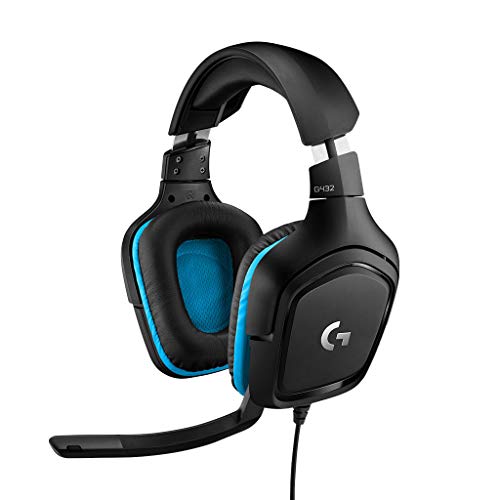
The Logitech G432 is a wired gaming headset that brings solid audio performance to PC gamers, esports players, and streamers without demanding a premium price. It features 50mm drivers and DTS Headphone:X 2.0 surround sound, which creates a convincing 3D soundscape for pinpointing enemy footsteps or environmental cues in competitive titles like Valorant or Call of Duty. The flip-to-mute mic is a practical touch for quick muting during intense moments or streaming on Twitch.
This headset is best suited for budget-conscious gamers who want reliable positional audio and a decent mic for team communication. Casual gamers will appreciate the immersive sound for open-world games, while streamers and content creators can use the USB DAC for easy connection to a PC. The on-ear design with leatherette padding offers decent comfort for sessions up to a few hours, though some users may prefer over-ear pads for extended wear.
Build quality is typical Logitech G – sturdy plastic construction that feels durable enough for daily use. The headband is padded and adjustable, and the ear cups swivel slightly for a better fit. The 3.5mm cable is braided and includes an inline volume wheel, which is handy for quick adjustments. Setup is plug-and-play on PC via USB, and the headset also works with consoles and mobile devices using the analog connection.
One realistic limitation is the on-ear fit: it presses against the ears rather than enclosing them, which can cause discomfort after several hours for some users. The leatherette material also traps heat, so you might notice sweating in warmer rooms. Additionally, there’s no wireless option, so you’re tethered to your device – fine for a desktop setup but less ideal if you like to move around.
Overall, the Logitech G432 is a strong choice for PC gamers and streamers on a budget who prioritize audio clarity and mic quality. It’s also a good entry-level headset for college gamers or those building their first gaming setup. If you can live with the on-ear design and wired connection, you get impressive surround sound and a reliable mic for under $50.
The Logitech G432 uses 50mm drivers that deliver clear highs, mids, and punchy bass. DTS Headphone:X 2.0 provides virtual 7.1 surround sound, which enhances spatial awareness in games. Footsteps, gunshots, and environmental sounds are well-defined, giving competitive gamers an edge. For music and movies, the sound is balanced but leans slightly toward a gaming-focused tuning.
The flip-to-mute mic on the G432 captures voice clearly without excessive background noise. It’s a 6mm cardioid mic that works well for team chat, Discord calls, and streaming. The mute function is physical and reliable – just flip the mic up to mute. Volume control is integrated into the cable for quick adjustments.
The headset features leatherette ear pads and a padded headband. The on-ear design is lightweight (1.2 lbs) but may press on ears during long sessions. Build quality is durable with a plastic frame and braided cable. The ear cups swivel slightly for a customized fit. Overall, it’s comfortable for moderate gaming sessions but may require breaks for extended wear.

Pros
- Affordable price point for an entry-level gaming headset with 7.1 surround sound support.
- Plug-and-play USB connection works seamlessly on PC, PS4, and PS5 without additional software.
- Noise-cancelling microphone performs well for in-game chat and Discord calls, reducing ambient noise.
- Memory foam ear cushions and lightweight design offer good comfort for extended gaming sessions.
- Long 2.2-meter cable provides flexibility for desk setups and couch console gaming.
Cons
- Not compatible with console game controllers (only PS4/PS5 USB port) – no Xbox support.
- Lacks dedicated software for EQ customization or surround sound tuning – relies on system defaults.
- Build materials feel mostly plastic, which may not hold up as well as more expensive headsets over time.
The EKSA E1000 is a USB gaming headset designed for PC gamers and console players who want a budget-friendly way to step into virtual surround sound. It plugs directly into a USB port on your computer, PS4, or PS5, and instantly delivers 7.1-channel audio without any drivers or software installation. This makes it a practical choice for anyone who values simplicity and low cost over advanced customization.
This headset is best suited for casual PC gamers, college students, work-from-home gamers, and those just starting to build their gaming setup. It's also a fine option for streamers or content creators who need a reliable backup mic, thanks to the noise-cancelling microphone that helps keep background chatter out of your broadcasts or Discord calls. However, competitive esports players may want to look for a headset with more precise sound imaging and a lighter weight.
In terms of audio performance, the 50mm neodymium drivers provide clear mids and decent bass, while the 7.1 surround sound creates a more immersive experience in games like shooters or RPGs. The microphone uses omnidirectional noise reduction to pick up your voice clearly and filter out ambient noise, though it may not match dedicated condenser mics in quality. For everyday gaming and voice chat, it gets the job done well.
Comfort is a strong point: the memory foam earmuffs are soft and breathable, and the adjustable headband distributes weight evenly, reducing pressure during long sessions. The 2.2-meter cable is generous for desktop setups and even gives you some room to lounge while gaming on a console nearby. The RGB lighting on the ear cups adds a subtle glow that enhances your desk aesthetic without being distracting.
A realistic limitation is that the EKSA E1000 is not compatible with console game controllers, only with USB ports on the console itself. That means no plugging into a PS5 controller for voice chat – you'll need to use the console's USB port. Also, there is no software EQ or surround sound tuning, so you're limited to the default sound profile. The all-plastic build feels a bit lightweight, but for the price, that's expected.
Overall, the EKSA E1000 is a great entry-level gaming headset for PC gamers on a tight budget, console players who can use USB audio, and anyone who needs a spare headset for their gaming desk or dorm room. It delivers solid comfort, an easy setup, and adequate audio for most casual and competitive gaming scenarios. Backed by a 2-year warranty, it's a low-risk purchase for those seeking value without breaking the bank.

Pros
- Excellent audio clarity with well-balanced sound signature that excels in competitive games.
- Comfortable lightweight build that can be worn for hours without fatigue.
- High-quality microphone that picks up voice clearly and minimizes background noise.
- Outstanding value for money given the performance and build quality at this price point.
Cons
- 7.1 surround sound is only available on Windows 10 64-bit systems, limiting console use.
- Wired 3.5mm connection may be less convenient than wireless for some users.
- Ear cushions can feel warm during extended sessions due to the leatherette material.
The Razer BlackShark V2 X is a wired gaming headset designed to bring esports-grade audio and communication to a wider audience. It features custom-tuned 50mm TriForce drivers that split the driver into three parts for individual tuning of highs, mids, and lows, resulting in brighter, clearer sound with punchy bass. The headset also includes 7.1 surround sound capability via software on Windows 10, giving competitive players a distinct advantage in positional audio.
This headset is best suited for PC gamers who want reliable performance without a high price tag. It also works great for console players on PS5, PS4, and Nintendo Switch, though the surround sound feature is PC-only. Streamers and content creators will appreciate the HyperClear cardioid microphone, which rejects background noise and delivers clear voice pickup for Discord calls or live commentary. Casual gamers and college students building a budget setup will find it a solid all-rounder.
In terms of real-world performance, the BlackShark V2 X excels in audio clarity and directional sound. Footsteps and gunfire in FPS games like Counter-Strike 2 are easy to pinpoint, and the microphone quality is among the best in its price range. The passive noise cancellation from the closed earcups helps block out ambient noise, allowing you to stay focused during intense matches. The lightweight 240g frame and memory foam ear cushions ensure comfort during long sessions, though some users note the leatherette can get a bit warm over time.
Build quality is typical of Razer's budget line: a sturdy plastic frame that feels durable enough for everyday use. The cable is braided and includes an audio/mic splitter for PC compatibility. There's no RGB lighting, which keeps the design simple and professional. The headset connects via a standard 3.5mm jack, making it plug-and-play on most devices without needing additional drivers. Setup is straightforward: just plug in and you're ready to go.
A realistic limitation is the lack of wireless connectivity and the fact that the 7.1 surround sound only works on Windows 10 64-bit. Additionally, some users report that the ear cushion material can cause slight discomfort in hot climates, though this is a minor trade-off for the price. The microphone is fixed (not detachable), which might be a drawback for those who prefer a clean headset for music listening.
Overall, the Razer BlackShark V2 X offers exceptional value for its price. It delivers clear audio, a quality mic, and comfortable fit that rivals headsets costing twice as much. If you're a PC gamer looking for a reliable wired headset for competitive play, casual gaming, or streaming, this is a strong contender. Console gamers will also enjoy its cross-platform compatibility. It's a practical choice for anyone needing a no-fuss, performance-focused audio solution for their gaming setup.
The Razer BlackShark V2 X features 50mm TriForce drivers that produce clear highs, detailed mids, and solid lows. The sound signature is balanced, making it suitable for both gaming and music. The 7.1 surround sound (on Windows 10) adds spatial awareness, helping you hear enemy movements and environmental cues with precision. The passive noise cancellation further enhances immersion by reducing external noise.
The flexible HyperClear cardioid microphone captures your voice accurately while rejecting background noise from the sides and rear. Vocal clarity is excellent during in-game communication and voice chats. Teammates and viewers will hear you clearly without distracting ambient sounds. The mic is non-detachable but folds up out of the way when not in use.
At just 240g, the BlackShark V2 X is one of the lightest gaming headsets available. The memory foam ear cushions and padded headband distribute weight evenly, reducing pressure points. The closed-back design provides good sound isolation but can trap heat. The plastic construction feels sturdy enough for daily use, and the cable is reinforced for durability.

Frequently Asked Questions
Does a USB connection provide better mic quality than a 3.5mm audio jack on the Best Audio Headset With Microphone?
Yes, a USB connection typically provides cleaner microphone clarity because it uses a built-in digital sound chip rather than relying on an unshielded motherboard audio port. Models like the Logitech H390 and EKSA E1000 process digital audio directly through USB-A, bypassing static or electrical hum from computer internals. Standard 3.5mm jacks remain more versatile for console gamepads and mobile devices, but USB delivers steady power for inline controls and noise filtering.
How does a unidirectional boom microphone filter out room chatter during calls?
A unidirectional boom mic focuses voice pickup specifically toward the front of the capsule while rejecting sound from the sides and rear. Headsets like the Razer BlackShark V2 X and JIAMQISHI use cardioid or unidirectional polar patterns to minimize mechanical keyboard clicks and background room echo. Positioning the microphone capsule about an inch away from the corner of your mouth keeps vocal output natural without picking up heavy breathing.
What acoustic driver size is ideal for the Best Audio Headset With Microphone of 2026?
A driver size between 40mm and 50mm delivers the best balance of punchy low-end response and clear vocal frequencies. Large 50mm drivers, featured in the FIFINE H9 and Logitech G432, move more air to reproduce detailed positional cues and explosions when playing on a powerful gaming laptop. Compact 30mm to 40mm drivers on office headsets prioritize speech intelligibility while keeping the earcups lightweight for all-day calls.
Can people who wear glasses use an on-ear or over-ear Best Audio Headset With Microphone comfortably?
Yes, people who wear glasses can avoid temple pain by choosing headsets with low clamping force and soft memory foam padding. Over-ear headsets like the Razer BlackShark V2 X distribute headband weight evenly and enclose the ears without pressing the ear cartilage against eyeglass frames. On-ear headsets require periodic adjustments during extended use to prevent pressure hotspots from forming over spectacle arms.
Is hardware flip-to-mute more reliable than software mute controls?
Yes, hardware controls offer dependable privacy because they physically disconnect or switch the microphone circuit without software lag. The Logitech G432 features a 6mm flip-to-mute boom arm that instantly silences your voice when raised vertically. Having a tactile inline mute switch or flip arm ensures you stay muted even when switching between different conference apps or using a low-latency wireless mouse across multiple open windows.




Write Your Review
No reviews yet. Be the first to share your experience!