


Desk space remains a precious asset for anyone setting up a tidy gaming station or home office. A bulky full tower often crowds your mouse pad and forces awkward peripheral placement, which makes compact case planning essential. Selecting the right foundation for the best building a micro atx pc project balances small-footprint convenience with dependable airflow and easy cable management. Smaller chassis designs keep your work surface open for essential gear, letting you position your monitor and pair your setup with the best type of keyboard for gaming without feeling cramped.
Modern compact enclosures eliminate many traditional compromises by offering clever internal layouts that house full-sized graphics cards alongside high-speed front panel connections. You will want to look at clearance numbers for your power supply and graphics hardware, as well as the placement of USB ports for quick peripheral access. Options like the Cooler Master MasterBox Q300L Micro-ATX PC Case and the MOROVOL MATX PC Case,270° Panoramic Tempered Glass provide versatile cooling paths and transparent side viewing without claiming too much room. Careful attention to intake ventilation and fan mounting positions ensures your components maintain stable temperatures during intense gaming sessions.

Pros
- Excellent 270-degree visibility for showcasing hardware.
- Smart A/B cooling layout enhances airflow and reduces heat buildup.
- Includes three fans for immediate cooling out of the box.
- Compact size fits easily on desks or in tight spaces.
- Magnetic dust filter is easy to remove and clean.
Cons
- Limited to micro-ATX boards, no full ATX support.
- Only includes basic fans; may want to upgrade for high-end builds.
- Cable management might be tight in such a compact case.
The MOROVOL V3 MATX PC Case is a micro-ATX tower that packs a visual punch with its 270-degree panoramic tempered glass panels. For U.S. PC gamers, streamers, and setup builders, this case offers an affordable way to showcase your build without sacrificing desk space. It's designed to fit compact gaming rigs while still supporting standard components like full-size GPUs and ATX power supplies.
This case is best suited for gamers who want a clear view of their hardware, especially those building RGB-heavy systems or themed setups. Whether you're a casual gamer, an esports player, or a college gamer setting up a dorm desk, the V3's small footprint (just over 13 inches tall) makes it easy to integrate into almost any workspace. The three pre-installed fans provide decent airflow for modest builds, and the A/B division cooling layout separates the power supply and hard drive zone from the motherboard area, which helps keep temps lower during long gaming sessions or streaming on Twitch.
Build quality is solid for the price point. The tempered glass panels feel sturdy, and the steel chassis offers enough rigidity for daily use. The magnetic top dust filter is a nice touch, letting you clean without tools. The IO panel includes one USB 3.0 and one USB 2.0 port, which is basic but functional for connecting a gaming mouse, keyboard, or headset. Cable management is doable but requires some patience due to the compact interior, and the included fans are basic 3-pin units, so upgrading to PWM fans would improve noise and control.
Setup is straightforward: the case accommodates standard M-ATX motherboards, and the power supply mounts behind the motherboard tray, which keeps the main chamber clean. However, if you're using a large CPU cooler or a long GPU, check clearance first based on the dimensions. The case supports up to 7 fans total, so you can add more for better cooling if needed. Maintenance is easy thanks to the removable dust filter and tool-free side panels.
A realistic limitation is that the case is only for micro-ATX or smaller boards. If you plan to upgrade to a full ATX motherboard later, you'll need a different case. Also, while the panoramic glass looks great, it does show fingerprints and dust quickly, so expect to wipe it down regularly. For the price, though, the MOROVOL V3 delivers impressive aesthetics and adequate cooling for mid-range gaming PCs, making it a strong choice for budget-conscious builders.
Overall, if you're a PC gaming enthusiast building a compact M-ATX system and want a stylish case that lets your components shine, the MOROVOL V3 is a solid bet. It's not for hardcore overclockers with massive cooling needs, but for everyday gaming, streaming, or workstation use, it offers great value and a clean, modern look that fits right in on any desktop or under a desk.
The MOROVOL V3 uses an A/B division cooling layout that separates the power supply and hard drive area from the motherboard and GPU chamber. This design helps reduce heat soak and keeps the main cavity cooler. The case includes three basic 3-pin fans (one rear exhaust and two top intake or exhaust depending on setup) and supports up to seven 120mm fans total. The top, rear, and bottom mesh areas provide plenty of ventilation. The magnetic dust filter on the top panel is easy to remove for cleaning. For best cooling performance, consider adding one or two front-mounted intake fans, as the case supports them. The included fans are adequate for entry-level to mid-range builds, but enthusiasts may want to upgrade to PWM fans with higher static pressure for better airflow through tight spaces.
The case features a steel frame with large tempered glass panels on the front and left side, giving a 270-degree view. The glass is thick and feels sturdy, though it does attract fingerprints. The chassis is surprisingly rigid for its lightweight design (about 10.7 pounds). The IO ports (one USB 3.0, one USB 2.0) are mounted on the top front edge, easy to access. The magnetic dust filter is well-designed and stays in place. The interior layout is clean, with the power supply mounted behind the motherboard tray to hide cables. However, the cable management space is limited, so using modular PSUs and slim cables is recommended. Overall, the build quality is impressive for a sub-$50 case, offering good value for budget-conscious gamers.

Pros
- Excellent airflow thanks to the perforated design on all sides, ideal for gaming sessions.
- Modular I/O panel offers multiple placement options for desk and setup flexibility.
- Magnetic dust filters are easy to remove and clean, keeping the interior dust-free.
- Compact size fits well on desks or in tight spaces while still supporting large GPUs and coolers.
- Transparent side panel lets you show off your gaming components and RGB lighting.
Cons
- The case includes only one pre-installed fan, so additional fans are recommended for optimal cooling.
- Cable management space is limited due to the compact size, requiring careful routing.
- The side panel is acrylic (not tempered glass), which may be less scratch-resistant over time.
The Cooler Master MasterBox Q300L is a Micro-ATX PC case designed for PC gamers, setup builders, and anyone looking to create a compact but capable gaming rig. It supports Micro-ATX and Mini-ITX motherboards, making it a versatile choice for both budget and mid-range builds. Whether you are a competitive gamer, casual player, or streamer, this case offers a solid foundation for a performance-focused gaming PC.
For gaming performance, the Q300L emphasizes airflow and cooling. Its perforated design on all sides promotes excellent heat dissipation, which is crucial for maintaining low temperatures during intense gaming sessions. The case can accommodate a 240mm liquid cooler and up to five fans, allowing you to build a system that stays cool even under heavy loads. The open thermal design helps reduce heat buildup, which can improve the longevity and stability of your components.
Build quality is practical and functional. The case features a sturdy steel frame with a transparent acrylic side panel, letting you show off your gaming hardware and RGB lighting. The magnetic dust filters are a nice touch, adding a distinctive look while keeping dust out, which reduces cleaning frequency. The modular I/O panel is a standout feature, allowing you to reposition it to the front, top, or bottom on either side. This flexibility is great for desk setups where cable routing or access needs vary.
Setup and maintenance are straightforward. The compact size (15.4 x 9.1 x 15 inches) means it fits well on desks or in tight spaces, though cable management can be a bit challenging due to limited space behind the motherboard tray. The case includes one pre-installed 120mm fan, but you will likely want to add more fans or a liquid cooler for optimal airflow. The magnetic dust filters are easy to remove and clean, making regular maintenance simple.
One realistic limitation is the single pre-installed fan, which may not be sufficient for high-heat gaming builds without additional cooling. Also, the acrylic side panel is more prone to scratches than tempered glass, so careful handling is recommended. The compact design also means less room for cable management, so plan your build accordingly.
Overall, the Cooler Master MasterBox Q300L is a practical choice for PC gamers, setup builders, and anyone building a compact gaming PC on a budget. It offers good airflow, modular I/O, and a clean look that fits well in most gaming setups. If you prioritize cooling flexibility and a compact footprint, this case is worth considering for your next gaming build.
The Cooler Master MasterBox Q300L is designed with an open thermal approach, featuring perforated panels on all sides to maximize airflow. This design helps dissipate heat effectively, keeping your gaming components cool during long sessions. The case supports a 240mm liquid cooler at the front and up to five 120mm fans, giving you plenty of options to customize your cooling setup. While it comes with one pre-installed 120mm fan, adding more fans or a liquid cooler is recommended for high-performance builds. The magnetic dust filters on the top and front panels add a distinctive look while preventing dust buildup, reducing maintenance frequency.
The MasterBox Q300L features a steel frame with a transparent acrylic side panel, offering a balance of durability and visibility. The acrylic panel is lighter than tempered glass but may be more susceptible to scratches, so handle with care. The case has a compact footprint (15.4 x 9.1 x 15 inches) and weighs just over a pound, making it easy to move or place on a desk. The magnetic dust filters are well-designed and easy to remove for cleaning. The modular I/O panel is a practical addition, allowing you to reposition the power button, USB ports, and audio jacks to suit your setup. Overall, the build quality is solid for its price point, with a focus on functionality and airflow.

Pros
- Excellent pre-installed ARGB fan setup saves time and money.
- Impressive hardware compatibility for high-end GPUs and liquid cooling.
- Beautiful all-white design with dual glass panels for maximum visibility.
- Good airflow with reverse-blade fans and dust filters.
- Included Type-C port for modern peripherals.
Cons
- Some users may prefer a more traditional mesh front for even better airflow.
- The case is heavy at nearly 18 pounds, so moving it around can be a bit cumbersome.
- Limited front I/O placement might be less convenient for desktop users who prefer top ports.
The MUSETEX Y6 is a white mid-tower ATX PC case that targets gamers, PC building enthusiasts, and RGB lovers who want a clean, high-visibility build without the hassle of sourcing extra fans. It comes with six pre-installed PWM ARGB fans right out of the box, including two reverse-blade fans on the side panel for optimized intake. That alone makes it an attractive option for anyone looking to save time and money on fan setups.
When it comes to cooling performance, the Y6 doesn't hold back. The side fans pull fresh air directly onto the GPU and motherboard, while three top fans and one rear fan exhaust heat efficiently. The top supports up to a 360mm radiator, so you can easily integrate liquid cooling for high-end CPUs. Magnetic dust filters on the top and bottom help keep dust out without restricting airflow too much, which is a nice touch for long-term maintenance.
Build quality is solid for its price range. The dual tempered glass panels offer a 270-degree view of your components, letting you show off every RGB fan and GPU backplate. The white paint job is clean and consistent, giving the case a premium look that stands out from the usual black cases. Internally, there's plenty of room for large GPUs up to 400mm, tall CPU coolers up to 176mm, and long power supplies up to 200mm. The layout is smartly divided to keep cable management tidy, with rubber grommets and ample routing space.
Setting up the Y6 is straightforward thanks to its tool-free side panels and spacious interior. The front I/O includes a USB 3.2 Type-C port, two USB 3.0 ports, and an HD audio jack, so you can fast-charge or transfer data quickly. For gamers who stream or do content creation, having those high-speed ports on the front is very convenient. The included fans can be controlled via your motherboard's software for synchronized ARGB effects, which means no extra remotes or hubs to deal with.
That said, there are a couple of realistic limitations. Because the front panel is mostly solid glass, airflow is primarily through the side and rear vents. While the reverse-blade fans do a good job, this design may not be ideal for extremely hot components or overclocked systems that need maximum fresh air. The case is also fairly heavy at about 18 pounds, so it's not the best choice if you attend LAN parties or need to move your rig often. Additionally, the glass panels can show fingerprints easily, so you'll want to wipe them down regularly to keep that showroom look.
Overall, the MUSETEX Y6 is a fantastic choice for PC gamers, RGB setup builders, and streamers who value aesthetics and pre-built convenience. It offers great hardware compatibility, impressive cooling out of the box, and a beautiful white finish that makes any build pop. Whether you're building your first gaming PC, upgrading your current setup, or crafting a themed streaming station, this case delivers solid performance and style at a very competitive price point.
Frequently Asked Questions
Can a micro-ATX case fit standard full-sized graphics cards?
Yes, many micro-ATX chassis models accommodate standard full-sized graphics cards. For example, the Cooler Master MasterBox Q300L Micro-ATX PC Case supports GPUs up to 360mm, while the MUSETEX ATX PC Case, 6 PWM ARGB Fans supports cards up to 400mm. Always verify the manufacturer clearance specifications against your specific graphics card length before assembling your setup.
Does a compact micro-ATX build have enough front ports for gaming accessories?
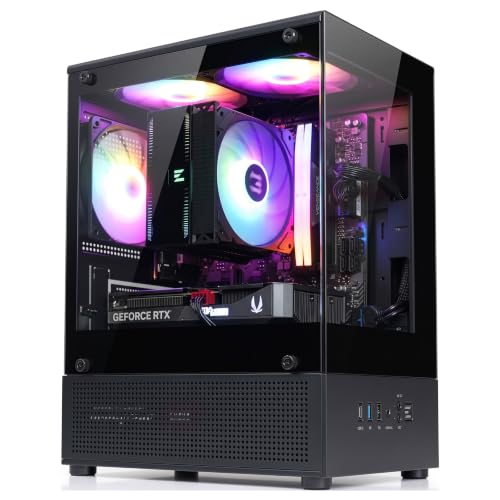
Yes, modern compact cases feature accessible front input ports for your daily peripherals. Cases like the Zalman CUBIX-G Micro-ATX MATX Compact Mini Tower provide both USB Type-C and USB 3.0 ports directly on the front panel. This layout makes it easy to plug in headsets or learn how to configure and use a gaming mouse with wired or wireless dongles without reaching behind the desk.
Will a smaller PC case hurt airflow during long gaming sessions?
No, a smaller enclosure will not necessarily restrict cooling if it features proper ventilation and fan placement. The MOROVOL MATX PC Case,270° Panoramic Tempered Glass supports up to seven fans and separates power supply heat through dual-chamber ventilation. Selecting a model with perforated panels or pre-installed fans maintains steady air circulation around your core components.
What power supply sizes fit into these compact gaming cases?
Most micro-ATX enclosures support standard ATX power supplies, though maximum supported lengths vary by model. The Zalman CUBIX-G accommodates ATX power supplies up to 140mm, whereas the Cooler Master MasterBox Q300L supports units up to 160mm. Checking your power supply dimensions against case limits prevents tight cable bends and simplifies cable management in smaller spaces.
How does a micro-ATX case save desk space compared to a standard mid-tower?
A micro-ATX case features a noticeably shorter height and smaller overall footprint, leaving more open desk surface for large mouse pads and monitors. This extra room gives you ample glide space when using the best mouse for pc gaming and fast tracking. It also allows flexible placement, whether you prefer the chassis on top of your desk or under it.
Are liquid coolers supported when building a micro-ATX PC?
Yes, many compact cases provide mounting brackets for liquid cooling radiators. The Cooler Master MasterBox Q300L supports up to a 240mm liquid cooler, and larger dual-compatible enclosures like the MUSETEX Y6 support up to a 360mm radiator on top. Be sure to check radiator clearance against your motherboard heatsinks and memory modules before installation.


Write Your Review
No reviews yet. Be the first to share your experience!