


Managing complex hotkeys and skill rotations directly on a standard keyboard layout can quickly crowd your hand movement during critical encounters. Shifting secondary abilities, item slots, and communication binds directly to your thumb cluster clears up keyboard space and keeps your movement fingers planted. Equipping the best gaming mice with side buttons gives you immediate mechanical access to multi-button macros without sacrificing tracking precision. While a standard versatile mouse for PC gaming setups handles everyday point-and-click accuracy, multi-button designs provide specialized hardware, such as onboard profile storage, dedicated thumb rests, and durable micro switches engineered for heavy macro usage.
Desk space and physical grip preferences also determine which shape and connection type best complements your setup. Many MMO-focused mice feature wider ergonomics and dedicated ring-finger rests, offering a hand feel distinct from symmetrical competitive mice. A dedicated large PC mouse frame supports palm grips across marathon sessions while preventing accidental actuation along the side grid. Integrated hardware touches like smooth Teflon feet, removable weight tuning kits, and wide DPI ranges up to 18,000 DPI let you match physical resistance and sensor tracking to your exact desk mat surface.
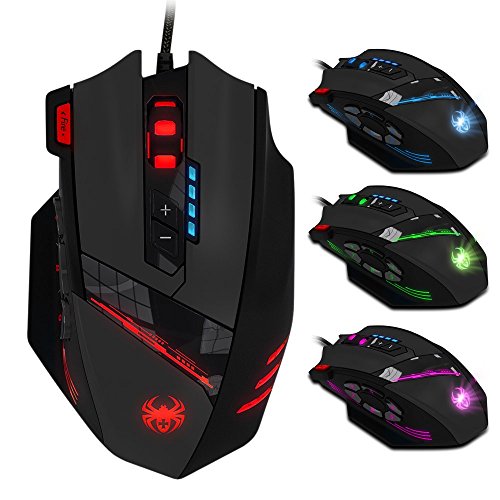
Pros
- Generous 12-button layout including a handy 6-key thumb grid for macro-heavy games
- Included 8-piece weight tuning system to match individual grip and glide preferences
- Durable braided USB cable with reliable gold-plated connector
- Convenient dedicated triple-click fire button for quick shooter inputs
Cons
- Wired connection requires a free USB port and tidy desk cable routing
- Ergonomic shape is sculpted specifically for right-handed mouse users
- Side cluster layout requires a short learning curve for gamers new to MMO mice
The AFUNTA C12 is a full-sized, wired macro gaming mouse engineered specifically for PC gamers who need quick access to complex commands. Equipped with 12 total programmable buttons, including a dedicated 6-button thumb cluster, this peripheral is tailored for MMO enthusiasts, MOBA strategists, and everyday PC gamers who want deep tactical control at their fingertips.
In fast-paced desktop scenarios, input responsiveness is critical. The C12 features a switchable DPI sensor offering 1000, 1500, 2000, and 4000 baseline levels, with double-speed adjustment capability pushing tracking up to 8000 DPI. This versatility lets users shift seamlessly from pinpoint sniper precision in shooters to sweeping camera pans in open-world titles. The inclusion of a dedicated rapid-fire triple-click button also gives action gamers a reliable mechanical shortcut during frantic firefights.
Physical balance makes a huge difference during marathon Discord and gaming sessions. The C12 houses a built-in cartridge with 8 removable tuning weights, letting you dial in the exact drag and heft you prefer. Smooth Teflon glide pads ensure fluid movement across both cloth and hard mouse pads, while a 6-foot braided cable with a gold-plated USB connector delivers durability against snagging and reliable signal integrity.
The ergonomic shell is heavily contoured to cradle the hand, providing supportive resting areas that help stave off palm fatigue. Flanked by an integrated 7-color cycling LED breathing system, the mouse adds an eye-catching aesthetic touch to any dark desktop or RGB battlestation. Maintenance is straightforward, as the slick Teflon skates wipe clean easily and the braided cord stays resilient against desk edge abrasion.
While the specialized right-handed grip and thumb-button layout might require a short adaptation period for gamers accustomed to minimalist three-button mice, the immense versatility makes it an attractive choice. For college students, home-office gamers, and MMO adventurers seeking extensive button mapping without breaking their peripheral budget, the AFUNTA C12 delivers solid utility, customizable ergonomics, and dependable wired performance.
Tracking accuracy and input agility remain central to the AFUNTA C12 design. The 4-stage DPI switch gives players immediate tactile feedback when shifting sensitivity tiers, making mid-match adjustments hassle-free. The dedicated side buttons provide crisp actuation, ensuring that spell casts, item slots, or weapon selections trigger cleanly without misclicks.
The integrated rapid-fire button on the upper frame offers a distinct advantage in action-oriented games where continuous clicks are necessary. Combined with the weight adjustment tray that dampens overshooting, this mouse offers steady tracking control whether holding tight angles in competitive tactical shooters or coordinating raid cooldowns in World of Warcraft.
Long gaming sessions demand a chassis that supports natural hand posture, and the contoured curves of the C12 keep fingers relaxed during extended gameplay. The thumb rest supports the side buttons naturally, putting all six secondary inputs within easy reach of the thumb knuckle without forcing awkward stretches.
Personalizing mouse feel is simple thanks to the modular 8-weight ballast setup located in the base. Gamers who prefer swift, flick-heavy movements can shed weights for a featherlight glide, while those wanting maximum stability for precise aim can retain the full ballast. The cycling multi-color lighting also keeps the aesthetic vibrant across any desk layout.

Pros
- Dense 16-button layout with 12 dedicated side buttons provides extensive macro flexibility
- Broad sensor adjustment options spanning 100 to 16,000 DPI and up to 1000Hz polling rate
- Rechargeable 1000mAh battery supports pass-through wired use while charging
- Five onboard memory profiles store custom key configurations directly on the mouse
- Software support allows detailed adjustment of both button macros and RGB illumination
Cons
- Software download from the manufacturer website is required to access full macro and lighting settings
- Product details do not specify the exact wireless transmission protocol or receiver type included
- Operating system compatibility is listed generally for PC and laptop without specifying non-Windows support
The Redragon M901P-KS is a wireless MMO gaming mouse engineered primarily for PC and laptop users who require direct physical access to extensive controls. With a specialized chassis holding 16 programmable buttons, it is aimed at players of MMO, MOBA, and FPS titles, as well as desktop users seeking one-click macros for routine computing tasks. The body is built with an ergonomic contour and skin-friendly materials intended to support hand placement during long desktop sessions.
For connectivity, the mouse operates untethered to eliminate cable drag across your desk surface. The manufacturer also highlights that the mouse can remain in active use while wired charging, meaning you do not have to pause your work or gameplay when the battery runs low. However, the listing documentation does not specify the precise wireless transmission protocol, such as whether a dedicated USB receiver is included or if Bluetooth is supported. Shoppers should verify their computer port setup and connectivity options prior to purchasing.
Control options are a standout element of this model, featuring a 12-button side panel arranged for quick thumb access. All 16 buttons can be remapped through macro editing to trigger multi-key shortcuts or specific in-game commands. Tracking relies on an adjustable sensor spanning from 100 up to 16,000 DPI, complemented by a 40G acceleration rating and selectable polling rates between 125Hz and 1000Hz. To make swapping between different games or productivity applications practical, the internal hardware stores up to 5 memory profiles and offers two switchable working modes.
Power is supplied by an integrated 1000mAh rechargeable battery, which the manufacturer states provides more than 70 hours of standby time when the RGB lighting is turned off. For visual customization, the mouse features 16.8-million-color RGB illumination across 4 lighting presets. Adjusting lighting modes, tweaking DPI steps, and remapping macros requires downloading the dedicated Redragon configuration software from the brand website.
Prospective buyers should take note of a few practical constraints. The high density of 12 side buttons typically involves an adjustment period for your thumb, and users who favor minimalist, lightweight mice might find the multi-button layout crowded. Additionally, while the listing references PC and laptop use, it does not confirm operating system compatibility beyond general PC setups, so Mac and Linux users should check driver and software availability beforehand.
For desktop gamers and macro-heavy PC users looking for an affordable multi-button mouse, the Redragon M901P-KS presents a feature-rich package. Its broad DPI range, onboard profile storage, and dual-mode flexibility make it an appealing option if you need deep customization without relying on a constant wired connection.
The defining feature of the Redragon M901P-KS is its 16 programmable buttons, highlighted by a dedicated 12-button keypad on the side thumb grip. Through macro editing, users can bind complex keyboard combinations to single mouse clicks, which is especially useful for MMO spell rotations, MOBA item activations, and complex desktop application shortcuts.
To support different games or distinct workflows, the mouse includes five onboard memory profiles and two working modes that switch with a single click. Full button remapping and macro creation depend on downloading the configuration software directly from the Redragon website.
This model is powered by an internal 1000mAh rechargeable battery designed to provide cord-free operation. According to manufacturer specifications, the mouse achieves over 70 hours of standby operation when the RGB backlighting is disabled. Using active lighting modes may decrease that operating window.
A practical benefit of the power design is that the mouse can be used while connected to its charging cable. This pass-through wired charging feature ensures that battery depletion will not interrupt active gaming sessions or important work projects.
The optical tracking system in the M901P-KS offers adjustable sensitivity from 100 DPI up to 16,000 DPI, allowing users to fine-tune cursor speed for both fast-paced action and precision aiming. The sensor also provides a 40G acceleration rating to keep up with rapid hand swipes across the mouse surface.
Additionally, the mouse supports adjustable polling rates ranging from 125Hz to 1000Hz. This setting determines how frequently the mouse reports its position back to your PC or laptop, letting you balance system responsiveness against processing overhead based on your hardware configuration.

Pros
- Dedicated 12-button side panel offers rapid access to keybinds, numpad entries, or complex macros
- Modular weight cartridge allows users to add up to 19.2 grams of additional ballast for tailored physical stability
- Wired USB connection provides continuous power without the need for battery replacements or recharging breaks
- Smooth Teflon feet pads support consistent gliding across mouse mats and flat desk surfaces
- Extensive sensitivity range adjustable from 200 to 12,400 DPI to suit various screen sizes and resolutions
Cons
- Macro programming and configuration software is compatible with Windows systems only, limiting Mac OS to standard mouse operations
- Broad profile measuring nearly four inches wide may feel oversized for small hands or claw-grip users
- Requires a standard USB-A port, necessitating an adapter for laptops or hubs that feature only USB-C connections
The Redragon M908 Impact is an optical wired gaming mouse designed specifically for users who need extensive macro keys within easy reach. Clad in a clean white finish, this model centers its layout around an integrated 12-button side keypad, catering directly to massively multiplayer online (MMO) players, MOBA enthusiasts, and PC users who frequently execute multi-step keyboard shortcuts. Its sculpted right-handed shell features contoured rests intended to support the palm and fingers during prolonged computer sessions.
Physical connectivity is handled through a built-in 6ft braided-fiber cable ending in a gold-plated USB-A connector. As a bus-powered wired peripheral, the mouse draws steady power directly from the host computer, completely removing battery life concerns, standby sleep modes, or wireless interference from the equation. Redragon documents broad operating system compatibility across modern and legacy Windows releases from Windows 2000 up to Windows 10 for full programmable customization. While the mouse connects and operates as a standard pointing device on Mac OS, software-driven macro configuration remains exclusive to Windows machines.
Under the hood, tracking is driven by a Pixart PAW3327 optical sensor. The manufacturer specifies a sensitivity ceiling of 12,400 DPI, a report rate up to 1000 Hz, and tracking acceleration rated at 30G. Out of the box, users can cycle through five preset DPI levels set at 500, 1000, 2000, 3000, and 6200. When paired with the Windows software utility, users can dial in tracking sensitivity in steps of 100 DPI ranging from 200 up to the maximum 12,400 DPI. For surface interaction, durable Teflon glide pads on the underside ensure consistent movement across mouse pads.
Hardware customization extends to physical balance through an included 8-piece weight tuning set, consisting of eight individual 2.4-gram weights. Users can remove or insert these small metal cylinders into a bottom-accessible compartment to adjust the overall heft to their personal preference. Additionally, the internal memory houses five distinct profiles, each assigned a dedicated status color to confirm which configuration is active at a glance. Visual accents are rounded out by a 16.8 million color RGB LED backlight system that can be adjusted or turned off completely if a distraction-free setup is preferred.
Potential buyers should consider a few physical and platform boundaries before purchasing. The mouse measures approximately 5.12 inches long, 3.94 inches wide, and 1.57 inches high. This wider footprint, combined with a pronounced side flare for the thumb grid, favors medium-to-large hands and palm grips, making it less suitable for users looking for an ultralight shell or a minimalist travel companion. Furthermore, because macro utilities are not available on Mac OS, Apple users will not be able to customize button mappings without third-party key-mapping tools.
For desktop users seeking comprehensive macro utility on a Windows system, the Redragon M908 Impact represents a feature-rich wired option. Its combination of a reliable Pixart sensor, physical weight customization, and 12 dedicated thumb triggers delivers substantial functional value for MMO gaming, video editing, or spreadsheet navigation without introducing wireless battery maintenance.
The core highlight of the Redragon M908 Impact is its 18 programmable button architecture. The primary focus is the thumb-accessible side cluster, which features 12 mechanical-style buttons arranged in an angled numerical grid. This panel is purpose-built to map action bars in MMO titles, complex hotkeys in design software, or repetitive numeric inputs for data entry tasks.
Through the downloadable Windows software utility, each button can be assigned custom keystrokes, system commands, or recorded macro strings. The mouse supports five internal memory profiles, enabling users to maintain distinct button setups for different games or applications. Each profile triggers a dedicated indicator light, making it simple to identify the active profile directly from the desktop.
Tracking on the Redragon M908 Impact is managed by the Pixart PAW3327 optical sensor. The hardware offers adjustable sensitivity ranging from 200 to 12,400 DPI, supporting both fine-detail cursor control and rapid, sweeping movements across multi-monitor workstations. Out-of-the-box cycling provides quick access to five baseline settings: 500, 1000, 2000, 3000, and 6200 DPI.
The sensor is rated to handle 30G of acceleration and supports polling rates up to 1000 Hz, meaning the mouse can report its position to the operating system up to one thousand times per second. Combined with smooth Teflon feet, the tracking assembly delivers consistent cursor registration on standard gaming mouse mats and cloth desk surfaces.
The Redragon M908 Impact connects via a direct wired interface using an integrated 6ft braided-fiber cable with a gold-plated USB-A plug. This physical connection ensures instantaneous input transmission and draws power directly from the computer, eliminating the need to monitor battery levels or manage wireless dongles.
Operating system support includes Windows 2000, ME, XP, 2003, Vista, 7, 8, and 10 for complete button programming, macro recording, and lighting controls. For Mac OS users, the mouse operates as a standard plug-and-play USB pointing device, though proprietary software customization is not provided for the Apple ecosystem.
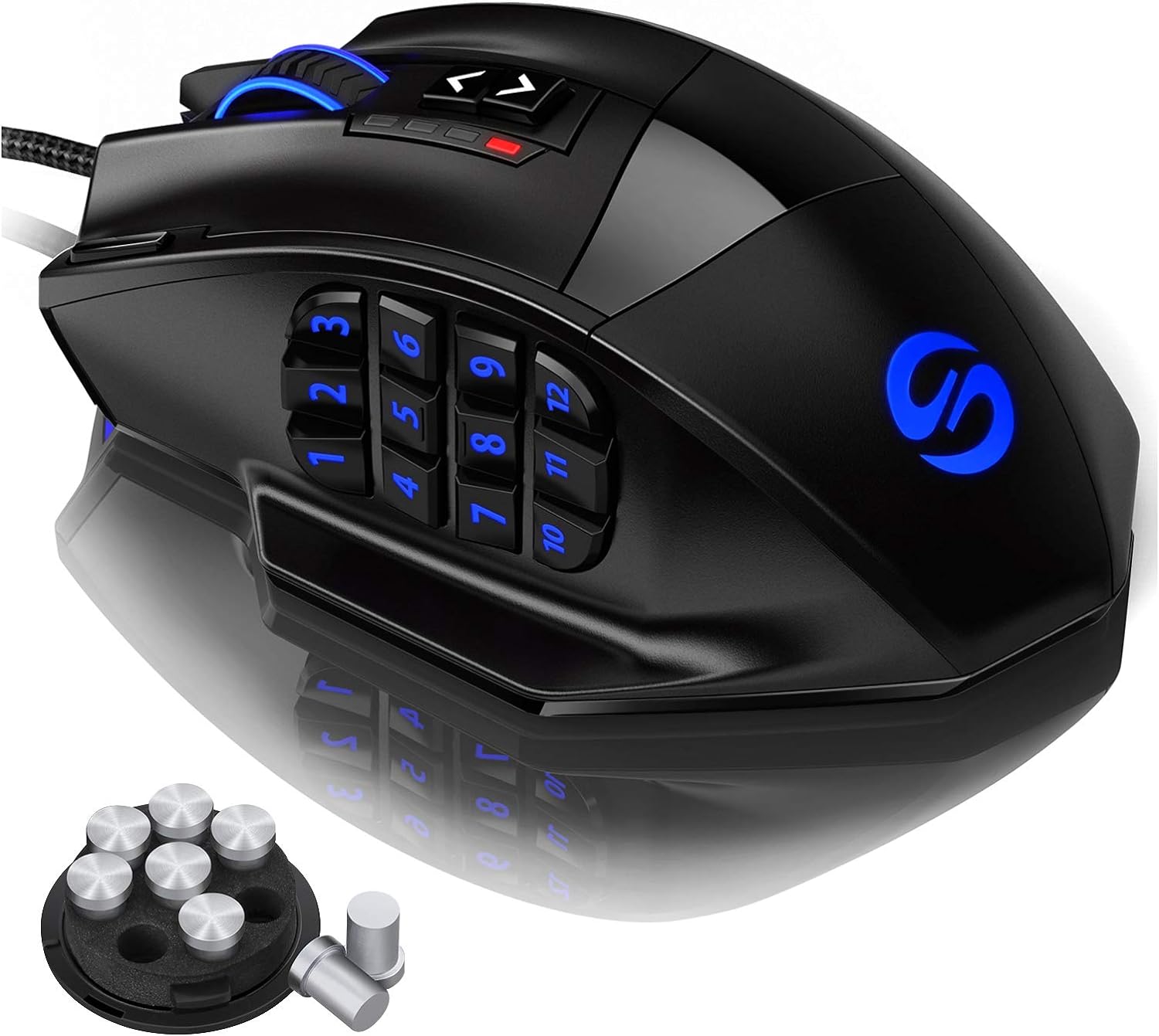
Pros
- Excellent value for a feature-rich MMO mouse with 18 programmable buttons
- High DPI range and precise Avago laser sensor suitable for various game genres
- Comfortable ergonomic shape with textured grip and adjustable weight for personalized feel
- RGB lighting with profile-specific colors helps identify settings at a glance
- Durable build with braided cable and Teflon feet for smooth gliding
Cons
- Software only available for Windows; profiles persist on Mac/Linux but cannot be adjusted
- Right-handed design only, not suitable for left-handed users
- 12 side buttons may feel crowded for users with smaller hands or those preferring fewer buttons
The UtechSmart Venus Gaming Mouse is a wired MMO gaming mouse designed for PC gamers who need quick access to many commands. With its 12 programmable side buttons, adjustable 16400 DPI laser sensor, and customizable RGB lighting, it caters to MMO, MOBA, and FPS players, as well as streamers, content creators, and competitive gamers who want to streamline their keybinds. Its ergonomic right-handed shape and frosted surface provide a comfortable grip for long sessions, making it a practical choice for college gamers, esports players, and anyone building a gaming setup on a budget.
In real-world use, the Venus mouse offers responsive tracking thanks to the Avago laser sensor and Omron micro switches. The 1000 Hz polling rate ensures low-latency input, which is crucial for fast-paced games like Fortnite, PUBG, and World of Warcraft. The 12 side buttons are angled differently to help your thumb find the right key quickly, reducing reaction time in complex MMO rotations. The adjustable weight system (up to 8 weights) lets you fine-tune the mouse's balance for better control. The braided 6ft cable with gold-plated USB connector ensures stable data transfer and minimal drag, while the included Velcro tie helps with cable management on your desk.
Build quality is solid for the price point. The mouse has a durable plastic shell with a matte finish that resists sweat. The Teflon feet pads provide smooth gliding on most mouse pads. The RGB lighting is vibrant and can be customized with 16 million colors across five profiles, which you can assign to different games. The software (Windows-only) allows you to program macros, adjust DPI, and set lighting effects. Once configured, the profiles are stored on the mouse, so they work on Mac and Linux as well.
Setup is straightforward: plug the mouse into a USB port, download the driver from the official website or Google Drive link, and start customizing. The learning curve is minimal if you've used programmable mice before, but the sheer number of buttons might take some getting used to. The mouse is right-handed only, which is a limitation for left-handed gamers. Also, the software is only available on Windows, so Mac and Linux users must pre-configure profiles on a Windows PC.
Overall, the UtechSmart Venus Gaming Mouse is a fantastic option for MMO and MOBA players who want a high-button-count mouse without breaking the bank. It offers strong performance, comfortable ergonomics, and plenty of customization. While it may not suit left-handed users or those who prefer a minimalist button layout, its value for dedicated gamers is undeniable. Whether you're raiding in WoW, building in Fortnite, or streaming on Twitch, this mouse can handle the workload.
The Venus mouse uses an Avago laser sensor capable of up to 16400 DPI, 12000 FPS, and 1000 Hz polling rate. This translates to precise tracking with minimal latency, suitable for both twitchy FPS games and methodical MMO gameplay. The Omron switches provide crisp, reliable clicks with a satisfying feel. The 12 side buttons are responsive and can be mapped to any keyboard key or macro, giving you an edge in games where every second counts. The adjustable DPI button on top lets you switch sensitivity on the fly, which is handy for different in-game situations.
The UtechSmart Venus features a sturdy plastic construction with a frosted coating that improves grip and resists fingerprints. The braided 6ft cable is flexible yet durable, with a gold-plated USB connector for corrosion resistance. Two extra Teflon feet pads are included for replacement, ensuring long-term smooth gliding. The mouse also comes with a weight tuning cartridge containing 8 weights (2.4g each) that can be added or removed to adjust the overall heft. The Omron switches are rated for high durability, so you can expect consistent performance over time.
Designed for right-handed users, the Venus mouse has a contoured shape that supports the palm and provides a rest for the thumb. The frosted surface prevents slippage even during intense gaming sessions. The 12 side buttons are arranged in angled rows, making them easy to locate by touch without looking. The mouse is relatively lightweight without weights (around 100g) but can be tuned up to about 120g. The included Teflon feet ensure smooth movement across most surfaces. Long-term comfort is good, though users with very large or small hands may want to test the fit.
The Venus mouse offers extensive RGB lighting with 16 million colors. The lighting zones include the scroll wheel, the UtechSmart logo, the side buttons, and a front LED strip. You can choose from multiple effects like breathing, static, and color cycling, and adjust brightness and speed via the software. There are five onboard profiles, each with its own LED color for easy identification. The software also allows you to remap all 18 programmable buttons, create macros, and adjust DPI settings. Once saved, profiles are stored on the mouse, so your customizations travel with you even on computers without the software.

Pros
- High DPI range up to 12,400 for fast and accurate tracking.
- 12 side buttons and 18 programmable buttons ideal for MMO and MOBA games.
- Comfortable ergonomic shape with weight tuning for personalized feel.
- Affordable price point for a feature-rich gaming mouse.
- Vibrant RGB lighting with multiple modes and profile color coding.
Cons
- Software is only compatible with Windows, limiting customization for Mac users.
- Some users may find the mouse too large for smaller hands.
- The side buttons can be accidentally pressed if not positioned correctly.
The Redragon M908 Impact is a wired optical gaming mouse designed specifically for MMO and MOBA gamers who need quick access to a large number of commands. With 12 side buttons and a total of 18 programmable buttons, this mouse aims to streamline gameplay for titles like World of Warcraft, League of Legends, and Dota 2. It also appeals to streamers and content creators who want customizable controls for their software.
Performance-wise, the M908 features the Pixart PAW3327 optical sensor, capable of up to 12,400 DPI with five adjustable levels. The 1000 Hz polling rate ensures low-latency input, which is crucial for competitive gaming. Whether you're executing complex rotations in an MMO or landing precise shots in an FPS, the sensor provides reliable tracking.
Build quality is solid for its price range. The mouse has a comfortable ergonomic shape that supports palm or claw grips, and the included weight tuning set (eight 2.4g weights) lets you adjust the heft to your liking. The braided fiber cable is durable and the TEFLON feet glide smoothly on most surfaces. The RGB lighting is vibrant and customizable via the software, adding to your setup's aesthetics.
Setting up the M908 is straightforward. The software allows you to remap buttons, adjust DPI, and configure lighting profiles. However, it's important to note that the software only works on Windows, so Mac users will lose customization features. The mouse works as a standard mouse on Mac, but you won't be able to program the side buttons or adjust lighting without Windows.
Some users might find the side buttons a bit too close together, leading to accidental presses, and the mouse may feel large for gamers with smaller hands. Despite these drawbacks, the M908 offers excellent value for the price. If you're a PC gamer who plays MMOs or MOBAs regularly, or if you need extra buttons for streaming and productivity tasks, the Redragon M908 Impact is a strong contender that won't break the bank.
The Redragon M908 Impact excels in gaming scenarios that demand quick access to multiple commands. The 12 side buttons are arranged in a grid pattern, similar to an MMO mouse, allowing you to bind abilities, items, or macros without moving your hand. The Pixart PAW3327 sensor provides accurate tracking up to 12,400 DPI, and the five adjustable DPI levels let you switch sensitivity on the fly for different in-game situations.
The 1000 Hz polling rate translates to a 1 ms response time, reducing input lag. This is noticeable in fast-paced games where every millisecond matters. The button switches have a satisfying click and are rated for durability, though they are not mechanical switches. Overall, the M908 delivers responsive and reliable performance for competitive and casual gaming alike.
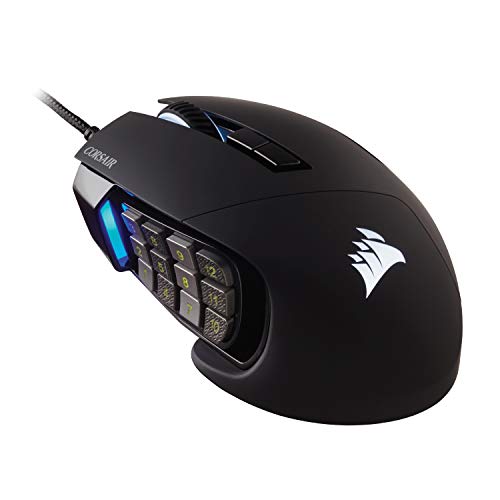
Pros
- 17 programmable buttons offer extensive shortcut and macro binding for complex PC games.
- Patented Key Slider mechanism lets users adjust side button placement for hand comfort.
- PixArt PMW3391 optical sensor supports fine 1-DPI incremental sensitivity adjustments up to 18,000 DPI.
- Durable build featuring 50 million click-rated Omron switches and a braided cable.
Cons
- Contoured right-hand shape with finger rest is not compatible with left-handed use.
- Fixed braided cable lacks the clutter-free mobility of wireless alternatives.
- Comprehensive macro programming and lighting adjustments require external software configuration.
The Corsair Scimitar RGB Elite is a wired gaming mouse built specifically for MMO and MOBA players who require immediate physical access to extensive key binds and macros. Designed for desktop PC gaming, this mouse centralizes complex controls onto a high-density thumb panel, making it a functional upgrade for players replacing standard three-button or six-button mice that lack dedicated action keys.
Connection is handled through a fixed, braided USB cable that links directly to your computer. Because this is a wired model, it draws reliable bus power straight from the host device, completely removing concerns about battery runtimes, recharging intervals, or wireless signal latency. Corsair lists the mouse under the personal computer category, though buyers should ensure their setup has an accessible USB port and supports the configuration software required for button mapping.
For handling and physical control, the mouse features a sculpted right-handed profile with a defined palm contour and a dedicated rest for your ring and pinky fingers. At a listed weight of approximately 0.27 pounds, the chassis provides substantial stability during gameplay. Tracking is managed by an integrated PixArt PMW3391 optical sensor, offering native resolution up to 18,000 DPI that can be fine-tuned in precise single-step increments to match your display resolution and cursor speed preferences.
The centerpiece of the Scimitar RGB Elite is its 17 fully programmable button array, highlighted by a 12-button grid on the thumb side. To prevent finger strain and accommodate varied hand sizes, Corsair incorporates a patented Key Slider control system that mechanically shifts the entire 12-button block forward or backward. Primary clickers are built using Omron switches rated for 50 million clicks, complemented by a sturdy textured scroll wheel designed to hold up to prolonged play.
There are practical limitations to keep in mind before choosing this model. The dedicated right-hand contour and finger rest mean left-handed players cannot use this mouse comfortably. Furthermore, users seeking a simple mouse for everyday office work, spreadsheets, or general web navigation may find the multi-button thumb grid crowded and unnecessary. Full customization of button binds, macros, and sensor steps also requires downloading and managing configuration software on your PC.
The Corsair Scimitar RGB Elite is a practical, feature-dense option for PC gamers who actively play MMOs, MOBAs, or simulation titles requiring instant access to dozens of commands. If you need adjustable side-panel ergonomics, durable Omron switches, and fine-grained DPI adjustments, this wired mouse matches those technical needs, while casual computer users may prefer a more basic, lightweight design.
The Scimitar RGB Elite provides 17 fully programmable buttons across its surface, giving players ample capacity to map spells, inventory slots, system shortcuts, and multi-key macro strings directly to the mouse.
A standout physical feature is the patented Key Slider mechanism. Rather than forcing your thumb into a fixed position, the Key Slider lets you mechanically reposition the 12-button side cluster along the side of the mouse so that the grid aligns naturally with your grip style and thumb length.
Tracking performance is powered by a custom PixArt PMW3391 optical sensor capable of reaching a native 18,000 DPI resolution. This allows users to configure the cursor speed from slow, measured tracking up to high-speed movement across multi-monitor setups.
The sensor is adjustable in 1 DPI resolution steps, offering granular tuning that avoids wide jumps between preset sensitivity stages. As with all optical sensors, optimal tracking response depends on pairing the mouse with a clean, flat desk surface or a dedicated mouse pad.

Pros
- 19 programmable buttons, including 12 side-panel keys suited for MMO and MOBA macros
- Broad tracking customization with adjustable DPI from 100 to 12400 and polling rates up to 1000Hz
- Eight removable 2.4-gram internal weights for balance and heft adjustments
- Five onboard memory profiles to retain custom settings across computers
- 16.8 million color RGB lighting with four selectable display modes
Cons
- Specific connection details such as cable type or wireless interface are not clearly specified in the listing details
- Accessing macro creation and lighting customization requires downloading software from the manufacturer website
- Dense 12-button side layout may require an adjustment period for users accustomed to standard office or basic gaming mice
The Redragon M901K is designed as a feature-dense gaming mouse primarily targeted at PC and laptop users who play MMO, MOBA, or FPS games, as well as power users who need rapid access to complex keystrokes. With its prominent 12-button side thumb grid and a total of 19 macro-programmable controls, this peripheral caters to gamers who want to offload keyboard shortcuts directly to their mouse hand.
The listing specifies support for PC and laptop platforms, making it suitable for desktop gaming setups and portable computers. However, the product documentation does not explicitly detail the exact connection type, such as whether it utilizes a standard wired USB-A cable or a wireless link. Shoppers should confirm the connection interface and verify port availability on their specific setup before ordering to ensure seamless physical compatibility.
Handling can be customized using an integrated weight tuning system that includes up to eight removable 2.4-gram weights. This allows players to adjust the mouse balance to match their personal preference. The chassis features an ergonomic shape made with skin-friendly materials intended to support long gaming stretches. Its sculpted body provides an intuitive resting area for the thumb over the 12 side switches, though users with smaller hands or those unfamiliar with dense button layouts may need time to adapt.
Under the hood, the M901K offers wide sensitivity adjustability ranging from 100 to 12400 DPI, complemented by a 40G acceleration rating and selectable polling rates from 125Hz to 1000Hz. Users can tailor tracking response for fast-paced gaming or steady daily office work. In addition, the mouse supports five onboard memory profiles and two switchable operating modes. Deep personalization, including macro mapping and cycling through four RGB lighting modes across 16.8 million colors, is managed through downloadable software available from the manufacturer website.
A practical consideration for potential buyers is the reliance on manufacturer software for configuring complex macros and lighting, which may not offer identical functionality across every operating system. Additionally, the lack of explicit connection specifications in the provided product details means buyers should confirm hardware connectivity beforehand. For players seeking an affordable MMO mouse with comprehensive thumb-button options and weight customization, the Redragon M901K offers a documented set of features well matched to keybind-heavy gaming.
The standout feature of the Redragon M901K is its array of 19 macro-programmable buttons. This includes a cluster of 12 side buttons positioned under the thumb, designed to execute multi-key combinations and gaming macros with a single press.
Settings can be saved across five onboard memory profiles, allowing users to maintain different layouts for various game genres or productivity tasks. Switching between two active working modes can be performed with one click, while complete macro programming and profile management are handled via downloadable software from the manufacturer website.
The mouse provides a listed sensitivity range from 100 up to 12400 DPI, giving users fine control over cursor speed across different screen resolutions. A 40G acceleration rating is documented to support rapid cursor movements during intense gaming sessions.
In addition to sensitivity adjustments, users can configure the polling rate between 125Hz and 1000Hz. This setting determines how frequently the mouse reports positional data to the computer, allowing customization based on system performance and user preference for both gaming and standard desktop work.
Frequently Asked Questions
How do you map custom keybinds on the Best Gaming Mice With Side Buttons?
You map custom keybinds by using the manufacturer desktop software to assign specific keyboard strokes, key combinations, or macros to each side button. Devices like the Corsair Scimitar and Redragon M908 allow you to configure and use your gaming mouse macros across multiple onboard memory profiles. Once saved to the onboard storage, the mouse executes your custom commands directly without needing the configuration utility running in the background.
Are side button gaming mice effective for first-person shooters?
Yes, side button mice function well in first-person shooters, though their heavier shells and wider profiles are designed primarily for MMO and MOBA games. High-precision optical sensors with 1000 Hz polling rates track fast flicks accurately, but the extra weight can slow rapid repositioning. Gamers who play tactical shooters often find value in mapping melee, weapon switching, and utility binds to the first few thumb keys.
How does mouse weight tuning affect movement across a desk pad?
Mouse weight tuning alters glide resistance and movement stability depending on your preferred aiming style. Options like the Redragon M901K and UtechSmart Venus include eight removable 2.4-gram weights to balance overall mass. Using a weighted mouse on a textured cloth mousepad for sweaty hands offers deliberate control, while removing the weights reduces wrist fatigue during broad sweeps.
How do you prevent misclicks on a dense side button grid?
Angled keycaps, distinct tactile click switches, and integrated thumb rests prevent unintentional button presses during fast movement. Mice such as the UtechSmart Venus feature textured and angled buttons so your thumb identifies each row by touch alone. The Corsair Scimitar includes an adjustable key slider system, allowing you to slide the thumb cluster forward or backward to match your exact grip span.
Do multi-button mice support full macro programming on macOS?
Basic tracking and standard clicks work on macOS, but full macro software configuration is typically restricted to Windows systems. Models like the Redragon M908 Impact list software support specifically for Windows environments. You can configure your profile settings and macros on a Windows PC first, save them directly into the mouse onboard memory, and then retain those functions on Mac systems.


Write Your Review
No reviews yet. Be the first to share your experience!