


Cramped desk surfaces cause friction when you need wide, sweeping mouse sweeps during fast-paced competitive firefights. Bulky full-size layouts force your arms into an unnaturally wide angle that strains wrists and eats up mousepad territory. Compact tenkeyless form factors eliminate the number pad to center your posture and grant effortless maneuvering room. Selecting the best wireless tkl gaming keyboard gives you untethered freedom alongside the rapid key response necessary for modern gaming. Recent advancements in 2.4GHz low-latency wireless ensure cord-free decks deliver the snappy responsiveness of wired boards without the annoying cord drag across your desk pad.
Modern wireless designs frequently incorporate factory-lubricated mechanical switches and oil-resistant double-shot PBT keycaps to ensure crisp tactile feedback and long-term durability. Gamers pairing these boards with a low latency wireless mouse can often use a single USB receiver for multiple devices to keep ports clear. Based on product specifications and verified buyer feedback, tenkeyless decks strike the sweet spot by keeping dedicated arrow keys and navigation buttons while preserving valuable desk space. Integrating one into your station can transform your comfort, whether you are climbing ranked ladders or adapting your setup into a responsive pc gaming keyboard workstation for daily productivity.

Pros
- Ultra-low profile design provides comfortable wrist ergonomics without needing a bulky wrist rest
- Factory-lubed linear switches offer smooth keystrokes with quiet acoustic feedback
- Tri-mode connectivity makes switching between a dedicated gaming rig and a work laptop quick and seamless
- Double-shot PBT keycaps feel textured, durable, and resistant to oily finger marks
- Single USB receiver 2:1 pairing reduces port clutter on modern gaming PCs
Cons
- Up to 36 hours of continuous battery life requires periodic charging if RGB lighting is kept at full brightness
- Low-profile key travel may require an adjustment period for players accustomed to traditional tall mechanical keys
- Lacks dedicated physical volume rollers found on larger full-size desktop boards
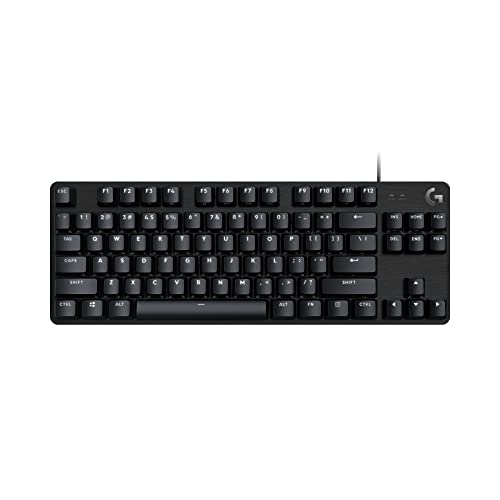
The Logitech G515 Lightspeed TKL is a sleek, low-profile wireless mechanical keyboard engineered for competitive players and clean desk setup enthusiasts. By eliminating the number pad, the tenkeyless layout opens up vital desk space, allowing wider, unobstructed mouse swipes in fast-paced shooter games. Its slim profile and clean matte black finish fit naturally into esports battlestations, dorm rooms, and hybrid work-from-home offices alike.
Performance is anchored by factory-lubed GL linear switches that offer a smooth, effortless travel with immediate actuation. In titles like Counter-Strike 2, Valorant, and Apex Legends, the reduced key travel translates into quick directional changes and responsive ability inputs. Logitech's LIGHTSPEED wireless protocol supplies a reliable 1ms report rate, matching the responsiveness of high-end wired connections without dragging cables across your desk mat.
Build quality highlights durability and ergonomics. The low-profile construction keeps wrists flatter against the desktop, helping to minimize fatigue during long competitive grinds or daily typing workloads. The keyboard is fitted with double-shot PBT keycaps, which offer a tactile, anti-oil surface that will not wear down to a slippery shine over months of heavy usage. Dedicated top buttons grant immediate access to connectivity switching and Game Mode to prevent accidental taskbar minimizes.
Setup and software configuration are straightforward. Players can connect via LIGHTSPEED wireless, pair to another device through Bluetooth, or plug in via USB-C for simultaneous play and charging. In Logitech G HUB, the KEYCONTROL utility unlocks deep personalization, enabling custom macro layers and complex key mappings. Additionally, per-key LIGHTSYNC RGB backlighting allows for 16.8 million color variations that can harmonize with your entire Logitech desktop ecosystem.
A realistic consideration is the rated 36-hour battery life, which will vary depending on your chosen RGB brightness level and daily usage habits. Gamers who prefer the long, deep travel of traditional mechanical switches might also need a couple of sessions to get used to the shorter low-profile stroke. For gamers, streamers, and hybrid professionals seeking top-tier wireless responsiveness, quiet linear switches, and clean desktop organization, the Logitech G515 Lightspeed TKL stands as a reliable, high-value choice.
Factory-lubed GL linear switches provide immediate actuation and an exceptionally smooth keystroke, reducing finger strain during extended FPS and MOBA matches. The shorter total travel distance allows rapid keystroke repeats and quick counter-strafing maneuvers.
LIGHTSPEED wireless delivers reliable 1ms response times, ensuring zero perceptible latency in competitive matches. The compact TKL form factor maximizes mouse space, giving low-DPI arm aimers complete freedom during wide flick shots.
Logitech G HUB unlocks KEYCONTROL, allowing you to remap individual keys and assign complex macro sequences to match your specific gaming genres or streaming workflow shortcuts.
LIGHTSYNC RGB delivers 16.8 million vibrant colors across individual keys. You can build personalized animated profiles or synchronize lighting effects across compatible Logitech mice, headsets, and desktop speakers.
Tri-mode connectivity lets you alternate effortlessly between tournament-grade LIGHTSPEED wireless on your gaming PC and Bluetooth on a second system or tablet with the press of a dedicated hotkey.
The included 2:1 wireless pairing feature allows you to connect a compatible Logitech gaming mouse to the exact same USB receiver, freeing up ports on your PC case and simplifying cable management.

Frequently Asked Questions
Does a wireless TKL gaming keyboard introduce noticeable input lag?
No, dedicated 2.4GHz wireless protocols deliver near-instantaneous transmission that rivals wired setups. Technologies like Logitech LIGHTSPEED achieve a robust 1 ms report rate to prevent skipped keystrokes during intense matches. Bluetooth modes present higher latency suited for office typing, but the USB receiver ensures latency-free gaming performance.
Are tactile or linear mechanical switches better for fast-paced gaming?
Linear switches provide a smooth, uninterrupted press that many gamers prefer for rapid actuation and double-tapping. Tactile switches feature a subtle bump halfway down the travel path to confirm the actuation without making excessive noise. If your rig alternates as a dedicated typing keyboard, tactile switches often help prevent accidental key triggers.
How long does the battery last on the %best wireless tkl gaming keyboard% with backlighting on?
Battery longevity drops noticeably when vibrant RGB lighting runs at maximum brightness. Many wireless mechanical boards run for roughly 36 hours of continuous play with full RGB backlighting enabled. Turning lighting off or lowering the brightness dramatically extends battery life to dozens of days of standard desk use.
What makes double-shot PBT keycaps superior to standard ABS plastic?
Double-shot PBT keycaps resist the smooth, shiny wear pattern caused by skin oils during marathon gaming sessions. The two-layer plastic molding process also prevents printed legends from fading or rubbing away over years of use. This construction retains a subtle textured surface that ensures confident finger grip during rapid keystrokes.
Why should gamers choose a TKL keyboard over a compact 60 percent layout?
Tenkeyless keyboards retain dedicated arrow keys, functional navigation blocks, and standard function rows without requiring complex hotkey layers. Ultra-compact 60 percent boards require secondary function key shortcuts for basic tasks, which can disrupt gameplay flow. A TKL board frees up ample space for wide mouse sweeps while allowing seamless pairing with a supportive gaming wrist rest.
Can you connect the %best wireless tkl gaming keyboard% to multiple devices?
Yes, models equipped with tri-mode connectivity alternate easily between high-speed 2.4GHz wireless and Bluetooth profiles. You can leave the USB dongle plugged into your gaming rig while pairing the Bluetooth mode with a work laptop or tablet. Dedicated hardware buttons allow you to switch active systems in a single click.





Write Your Review
No reviews yet. Be the first to share your experience!