


Cable drag on a crowded desk ruins quick mouse flicks right in the heat of a match. Tangled wires also look messy, which is why switching to the best wireless mechanical gaming keyboard makes such a noticeable difference in daily play. You get rid of desktop clutter without giving up responsive inputs, especially when pairing fast 2.4GHz wireless connections with responsive mechanical switches. Based on our analysis of switch actuation specs and buyer feedback, having seamless wireless flexibility lets you shift your typing posture on the fly. You can also explore responsive PC gaming keyboard designs to see how wireless models match up against wired competitors.
Modern gaming boards pack serious endurance and hot-swappable sockets into compact frames. Premium models like the ASUS ROG Strix Scope II 96 Wireless Mechanical combine pre-lubed switches with deep sound-dampening foam to keep acoustics clean and pleasant. That means no more annoying pinging sounds or hollow rattles echoing through your late-night voice chats. Whether you want crisp tactile bumps or linear switches for rapid double-taps, picking the right setup protects your wrists from strain during marathon sessions.

Pros
- Solid build with aluminum top case for minimal flex
- Tactile switches offer satisfying bump without excessive noise
- PBT keycaps are more durable than standard ABS
- Simple white LED lighting is effective and non-distracting
- Compatible with Windows and macOS out of the box
Cons
- No software customization (not recognized by Logitech G Hub)
- Non-hot-swappable switches, so soldering required for changes
- Full-size layout may take up more desk space than TKL versions
The Logitech G413 SE is a full-size mechanical gaming keyboard that strips away unnecessary frills to deliver a focused, high-performance typing and gaming experience. It features tactile mechanical switches, durable PBT keycaps, and a rigid aluminum top case that gives it a premium feel without a premium price tag. This keyboard is designed for gamers and professionals who value reliability and consistency over flashy RGB lighting or overly complex software.
This keyboard is best suited for competitive gamers, casual gamers, esports players, and content creators who want a straightforward tool that works out of the box. It also appeals to work-from-home gamers and college students who need a durable keyboard for both gaming and daily tasks. The full-size layout includes a number pad and dedicated navigation keys, making it versatile for productivity as well as intense gaming sessions.
In real-world use, the tactile switches offer a noticeable bump at the actuation point, providing clear tactile feedback that helps prevent accidental presses. The actuation force is moderate, striking a good balance between being light enough for rapid inputs and heavy enough to avoid fatigue during long typing sessions. The white LED backlighting is uniform and bright enough for low-light gaming without being distracting. The 6-key rollover anti-ghosting ensures that each key press is registered accurately, even during complex key combinations in fast-paced FPS or MOBA games.
Build quality is a standout feature of the G413 SE. The brushed aluminum top case provides excellent rigidity, with virtually no flex even under heavy use. The PBT keycaps are highly resistant to wear and heat, maintaining their texture and legends far longer than standard ABS keycaps. The keyboard connects via a sturdy USB cord, and the overall construction feels built to last.
Setting up the G413 SE is as simple as plugging it into a USB port. There is no proprietary software required, and the keyboard works seamlessly with Windows and macOS. However, this also means it is not recognized by Logitech's G Hub software, so users cannot customize lighting effects or create macros. The switches are soldered in place, so modifying them requires soldering skills. Additionally, the full-size layout may be too large for cramped desks, though a tenkeyless version is available for those who need more mouse space.
Overall, the Logitech G413 SE is a practical and trustworthy choice for anyone seeking a no-nonsense mechanical keyboard that prioritizes build quality and typing feel. It is particularly well-suited for gamers who prefer tactile switches and want a durable daily driver without paying extra for RGB or wireless features. For its price point, it offers excellent long-term value and a satisfying user experience.
The Logitech G413 SE features a brushed aluminum-magnesium alloy top case that serves as the keyboard's backbone. This material choice minimizes flex and provides a solid, weighty feel. The PBT keycaps are thicker and more resistant to shine compared to ABS keycaps, ensuring that frequently used keys like WASD retain their texture over time. The bottom housing is plastic but sturdy, and the keyboard has a non-slip rubber base to keep it stable on the desk. The USB cable is braided and thick, adding to the overall durability.
The tactile switches in the G413 SE offer a crisp bump with a moderate actuation force, making them suitable for both gaming and typing. In fast-paced games like first-person shooters or real-time strategy, the switch response feels immediate and accurate. The 6-key rollover anti-ghosting technology ensures that simultaneous key presses are registered correctly, which is crucial for executing complex combos. The white LED backlighting helps illuminate key legends without causing glare, allowing for comfortable gameplay in dark environments. While the keyboard lacks per-key RGB or macro programming, its straightforward performance is reliable and consistent.

Pros
- Compact 96% layout with full numpad and arrow keys, great for gamers who need function without clutter.
- Outstanding wireless performance with minimal latency thanks to ROG SpeedNova technology.
- Pre-lubed switches and dampening foam deliver a satisfying, quiet typing experience out of the box.
- Hot-swappable design lets users easily change switches to customize feel.
- Long battery life (up to 1500 hours) reduces charging frequency.
Cons
- Armoury Crate software can be cumbersome to set up and navigate.
- Space bar stabilizer may require a slight break-in period according to some users.
- Price is premium compared to other 96% keyboards, but build quality justifies it.
The ASUS ROG Strix Scope II 96 Wireless is a mechanical gaming keyboard designed for gamers who want the full functionality of a full-size keyboard but with a smaller desk footprint. It targets competitive gamers, streamers, content creators, and anyone building a clean, efficient gaming setup. The 96% layout keeps the numpad, arrow keys, and function row while shaving off unnecessary space.
In terms of real-world performance, the keyboard uses ROG's SpeedNova wireless technology for a low-latency 2.4GHz connection that feels just as responsive as wired. The pre-lubed ROG NX Snow linear switches provide smooth, consistent actuation, and the hot-swappable design lets you experiment with different switch types later. The integrated sound-dampening layers significantly reduce echo and pinging, resulting in a satisfying 'thocky' sound that many gamers prefer.
Build quality is excellent, with a solid aluminum top frame and PBT doubleshot keycaps that resist wear and shine. The keyboard includes a detachable wrist rest, three adjustable tilt angles, and a multi-function wheel for quick volume and lighting adjustments. The tri-mode connectivity (USB, 2.4GHz, Bluetooth) makes it easy to switch between a desktop, laptop, or even a mobile device, and the battery life is impressive at up to 1500 hours with 2.4GHz (RGB off).
Setting up the keyboard is straightforward: plug in the 2.4GHz dongle or pair via Bluetooth, and you're ready to go. The Armoury Crate software allows extensive customization of RGB lighting, macros, and key assignments, but some users find it less intuitive than alternatives. Additionally, the space bar stabilizer may need a brief break-in period to achieve maximum smoothness.
Overall, the ROG Strix Scope II 96 Wireless is a versatile, high-performance keyboard that works well for a wide range of users. Whether you're a competitive FPS gamer needing low latency, a streamer looking for a clean desk, or a work-from-home gamer wanting both productivity and gaming features, this keyboard delivers. It's a solid investment for anyone who values a compact layout without sacrificing full-size functionality.

Pros
- Tri-mode connectivity offers flexibility for both competitive and casual gaming setups.
- Hot-swappable design lets you experiment with different switches to find your perfect feel.
- Aluminum build provides a premium, durable feel at an affordable price point.
- Impressive battery life allows extended wireless use without frequent charging.
- Software support for macros and custom lighting adds extra personalization.
Cons
- Included keycaps are ABS plastic; some users may prefer PBT for better durability and feel.
- Wireless performance can be affected by RF interference; best used with 2.4G dongle for stability.
- Software interface is basic compared to premium brands, with limited advanced customization.
The Redragon K556 PRO is a wireless mechanical gaming keyboard designed for PC gamers who value flexibility and customization. This tri-mode keyboard supports Bluetooth 5.0, a 2.4GHz wireless connection, and USB-C wired use, making it a versatile choice for competitive gamers, casual players, streamers, content creators, and anyone building a gaming setup. Its full 104-key layout means you get a dedicated function row and numpad, which is especially useful for MMO gamers or those who use their keyboard for work and productivity.
In real-world gaming scenarios, the K556 PRO delivers solid responsiveness. The 2.4GHz wireless mode provides low-latency performance suitable for fast-paced FPS games like Valorant or Apex Legends, while the linear red switches offer a smooth, quiet keystroke that doesn't distract during long sessions. The anti-ghosting feature ensures every keypress registers accurately, even during complex combos in MOBAs or fighting games. For streamers, the ability to switch between devices via Bluetooth is handy for controlling a secondary PC or tablet on stream.
Build quality is a standout feature at this price point. The keyboard has a brushed aluminum top plate that gives it a premium, sturdy feel and prevents flex during heavy use. The hot-swappable switch sockets are compatible with virtually any 3- or 5-pin mechanical switch, so you can easily swap in different tactile or clicky switches without soldering. The included linear red switches are quiet thanks to the integrated sound-absorbing foam, making this keyboard suitable for shared spaces like dorm rooms or office environments.
Customization doesn't stop at switches. The K556 PRO has 16.8 million RGB colors with 20 preset lighting modes and adjustable brightness and speed, all controllable onboard. For more advanced macros and effects, Redragon's software lets you assign custom keybindings and lighting patterns. Battery life is impressive: up to 150 hours with RGB off, and around 50 hours with lights on, so you can game wirelessly for days. The keyboard recharges fully in under a night via USB-C.
Setting up the keyboard is straightforward. Plug in the 2.4GHz receiver or pair via Bluetooth for instant use. The software is optional but easy to install on Windows. One limitation is the ABS keycaps, which may develop shine over time; enthusiasts might want to upgrade to PBT caps. Additionally, wireless interference can sometimes occur in crowded environments, so using the wired mode or keeping the receiver close is recommended. The software, while functional, lacks the depth of premium brands like Corsair or Razer.
Overall, the Redragon K556 PRO offers exceptional value for gamers and setup builders looking for a wireless, hot-swappable mechanical keyboard with a solid aluminum frame. It's a practical choice for competitive gamers who need low-latency wireless, casual players who want to customize their switch feel, and streamers or content creators who appreciate versatile connectivity. If you're on a budget but refuse to compromise on build quality and customizability, this keyboard is a strong contender worth considering.
The Redragon K556 PRO excels in responsive gaming with its low-latency 2.4GHz wireless connection, eliminating noticeable input lag for competitive play. The linear red switches provide a consistent, smooth keypress with no tactile bump, allowing rapid double-taps in FPS games and effortless ability spamming in MOBAs. Anti-ghosting technology ensures all keys register accurately, even during fast multi-key combinations. For casual gamers, the Bluetooth 5.0 mode offers a convenient way to connect to tablets or laptops for less demanding titles. The battery life holds up well during long sessions, and you can always switch to wired mode for uninterrupted play.
The K556 PRO's brushed aluminum top plate gives it a premium, rigid feel that resists flex and keeps the keyboard stable on your desk. The hot-swappable sockets are reinforced to reduce wobble and support a wide range of 3- and 5-pin switches, making it easy to customize without soldering. The included linear red switches are rated for durability, though the ABS keycaps are a common point for upgrade. At 2.37 pounds, the keyboard feels substantial but not overly heavy, and the rubber feet provide good grip during intense gaming sessions. The USB-C port is neatly recessed for cable management.
With 16.8 million color RGB and 20 preset lighting modes, the K556 PRO offers plenty of visual flair straight out of the box. You can adjust brightness and speed using onboard shortcuts, or dive into the Redragon software to create custom lighting effects and assign macros to any key. The software allows per-key color customization, though its interface is basic compared to higher-end brands. For most users, the preset modes cover everything from a static color to reactive wave effects that sync with keystrokes. The lighting is bright and evenly distributed across the full-size layout.

Pros
- Smooth linear red switches with low actuation force for fast gaming and typing
- Hot-swappable switches make customization and replacement easy without soldering
- Full key anti-ghosting and 12 multimedia shortcuts enhance gameplay and convenience
- 11 backlit modes with 5-level brightness control offer versatile RGB lighting
- Durable double-shot PBT keycaps resist wear and maintain clarity over time
Cons
- Backlight color is not customizable; only preset modes are available
- FN key functions cannot be disabled, which may interfere with standard F-key use
- Driver software only supports Windows, limiting customization on Mac or other systems
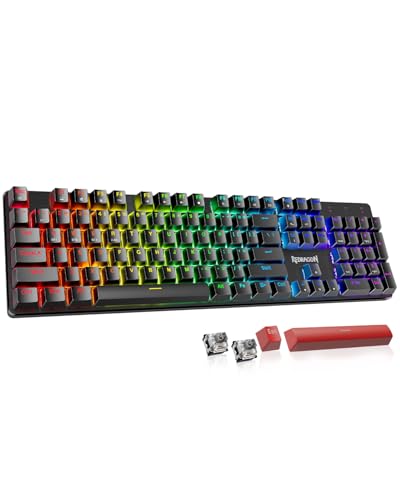
The Redragon K671 is a wired mechanical gaming keyboard that brings solid performance and customization to PC gamers without breaking the bank. It features linear red switches that require less force to press, making them smooth and responsive for both gaming and typing. Whether you are into competitive shooters, MOBAs, or long RPG sessions, the K671 delivers consistent input accuracy and low-latency performance that can keep up with fast-paced action.
This keyboard is best suited for a wide range of users including PC gamers, casual gamers, esports players, streamers, content creators, and gaming setup builders. It also works well for work-from-home gamers and college gamers who need a reliable keyboard for both play and productivity. The hot-swappable switch design is a standout feature, allowing you to replace switches without any soldering. The package includes four spare switches, so if a key ever fails, you can swap it out quickly and keep gaming.
In terms of build quality, the Redragon K671 feels sturdy with a solid frame and double-shot PBT keycaps that resist fading and shine even after extended use. The full key anti-ghosting ensures that every keypress registers accurately, which is crucial during intense gaming moments where multiple keys are pressed simultaneously. The 11 backlit modes provide plenty of visual flair, and you can adjust brightness and speed to match your gaming setup. However, the backlight color cannot be customized per key; you are limited to preset modes.
Setting up the keyboard is straightforward. It connects via a wired USB cable, so there is no pairing or battery concerns. The software for macro editing and lighting control is available for Windows, but Mac users will have to rely on onboard controls. The keyboard also includes 12 multimedia shortcuts for quick access to volume, media, and calculator functions, which adds convenience for everyday use. The spill-resistant design is a practical bonus for those who keep drinks at their desk.
One realistic limitation is that the FN key functions cannot be turned off, which may interfere with standard F-key usage in some applications or games. Additionally, the backlight color is not customizable, which might disappoint RGB enthusiasts who want full control. The driver software only supports Windows, so Mac users miss out on advanced customization. Despite these drawbacks, the K671 offers excellent value for its price point.
Overall, the Redragon K671 is a practical choice for anyone building a gaming PC setup on a budget. It delivers reliable mechanical performance, hot-swappable flexibility, and durable construction that can handle daily gaming and work. If you are a PC gamer, streamer, or gaming setup builder looking for an affordable mechanical keyboard with essential features and room for customization, the K671 is a solid recommendation.
Frequently Asked Questions
Does a wireless mechanical keyboard introduce noticeable input lag during fast gaming?
No, low-latency 2.4GHz wireless connections deliver response speeds virtually indistinguishable from wired connections. Dedicated USB dongles bypass Bluetooth polling restrictions to maintain instant keystroke registration during fast competitive gameplay. Bluetooth works fine for casual typing across laptops or tablets, but 2.4GHz RF remains the standard for gaming. Many players pair these boards alongside top wireless mouse setups to keep their desk free of messy cables.
Are linear or tactile switches better for gaming and typing?
Linear switches are widely favored for gaming, while tactile switches provide better feedback for typing accuracy. Smooth linear switches have no bump in the keystroke travel, which makes rapid double-taps effortless during high-speed action. In contrast, tactile switches offer a distinct physical bump at the actuation point to prevent accidental key presses during long work tasks. Your choice ultimately depends on whether you value split-second reaction speed or tactile certainty.
How long does the battery last on the Best Wireless Mechanical Gaming Keyboard with RGB turned on?
Active RGB lighting significantly reduces battery life from hundreds of hours down to roughly 30 to 50 hours of continuous use. Leaving per-key backlighting at maximum brightness draws heavy power from the internal rechargeable battery. Dimming the illumination or setting sleep timers extends uptime across multiple weeks of regular sessions. Turning the LEDs off completely allows high-capacity boards to run for months on a single charge.
What are the advantages of hot-swappable switches on a gaming keyboard?
Hot-swappable circuit boards allow you to replace worn or noisy switches instantly without soldering. This feature lets you test different switch styles across key clusters, such as placing heavier tactile switches on macro keys and light linears on movement keys. It also extends the overall lifespan of your board because a single malfunctioning switch can be swapped out in seconds with an included puller.
Can a wrist rest help prevent wrist fatigue during long typing sessions?
Yes, an angled support keeps your hands in a neutral posture to relieve tension on your tendons. Mechanical keyboards often feature taller chassis profiles, which can force your wrists to bend backward uncomfortably. Using integrated pads or separate ergonomic wrist rests keeps your forearms level and minimizes repetitive strain over long gaming sessions.
Is a 96 percent layout better than a full-size mechanical keyboard?
A 96 percent layout retains full numeric keypad functionality while saving valuable desk width for mouse movement. By condensing navigation keys into a tight grid, this form factor sits just slightly wider than a tenkeyless frame. You keep the dedicated number pad for data entry while gaining extra mouse swipe room for low-sensitivity gaming.





Write Your Review
No reviews yet. Be the first to share your experience!