


Cramped mouse pads and restricted arm swipes often disrupt intense match play when an oversized keyboard crowds your desktop. Switching over to a streamlined, space-saving board lets your mouse glide freely across wide swathes of cloth without accidental collisions. That extra clearance makes picking the best 60 mechanical gaming keyboard a massive upgrade for competitive FPS shooters and tight desk setups alike. Our review of manufacturer specifications, magnetic Hall effect switch designs, and verified player feedback highlights how modern compact boards pack rapid actuation into travel-friendly enclosures. Pairing your battlestation with a dedicated PC gaming keyboard built around a 60 percent layout ensures every keypress registers with crisp authority while freeing up crucial aiming room.
Today’s compact boards no longer force you to sacrifice speed or typing satisfaction just to trim off the number pad. Options like the Aula WIN60 HE and Redragon K617 pack high polling rates, hot-swappable switch sockets, and durable keycaps that resist greasy finger shine over late-night sessions. Whether you prefer the instant reset of rapid-trigger magnetic switches or the classic bounce of linear mechanical switches, finding the right blend of tactile feedback and ultra-low input latency transforms how you play. Many players also rely on a versatile gaming keyboard for typing during work hours, proving that portable boards handle daily productivity just as easily as ranked matches.

Pros
- Incredible value for Hall effect performance, often compared to keyboards costing much more
- Rapid trigger and adjustable actuation give a clear competitive edge in fast-paced games
- Solid build quality with PBT keycaps, good stabilizers, and minimal switch wobble
- Web-based driver is lightweight and works across devices without compatibility hangups
Cons
- Software interface feels unpolished and may require some tinkering to get working smoothly
- USB cable connection can become finicky after extended use, per some user reports
- No wireless or Bluetooth option, and not compatible with PlayStation consoles
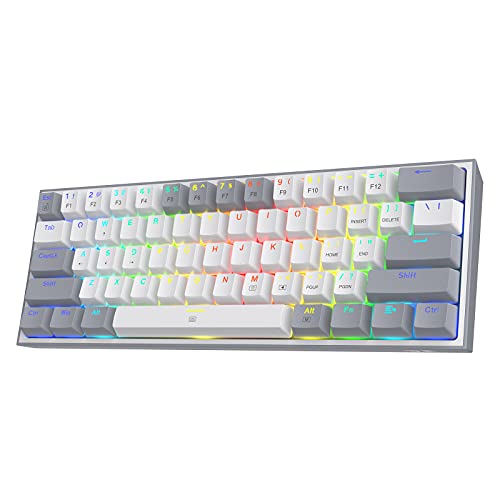
The Aula WIN60 HE is a 60% wired mechanical gaming keyboard that uses Hall effect magnetic switches instead of traditional mechanical contacts. This design offers contactless actuation, which means zero wear over time and incredibly precise keypress detection. It's tailored for PC gamers who demand low latency and fast response, especially those playing competitive FPS titles like Valorant, CS2, or Fortnite. Streamers, esports players, and gaming setup builders looking for a compact, budget-friendly option will find a lot to like here.
Performance-wise, the WIN60 HE punches well above its price point. With an 8000Hz polling rate and 0.3ms latency, inputs register almost instantly. The Rapid Trigger feature allows key resets at just 0.02mm, enabling faster peeking and counter-strafes. According to user feedback, this keyboard competes directly with premium Hall effect boards like the Wooting 60HE in feel and responsiveness. The Gray Wood magnetic switches come pre-lubed and sound satisfyingly crisp, with minimal ping or scratchiness.
Build quality is impressive for a sub-$50 keyboard. The PBT keycaps resist shine and feel durable, while the switches are hot-swappable if you ever want to experiment with different magnetic options. The 60% layout keeps your mouse hand close, ideal for low-sensitivity gamers. RGB lighting is bright and customizable via the web driver, with underglow effects that look great on a desk mat. Stabilizers are well-tuned, with no noticeable rattle on the spacebar or shift keys.
Setup is straightforward, though the web-based driver may require a few attempts to connect initially. Once configured, you can adjust actuation points (from 0.8mm to 3.4mm), enable rapid trigger, and set up advanced functions like DKS (Dynamic Keystroke) or SOCD. No software download is needed, which is convenient for multi-PC setups. Note that the keyboard is wired only via USB-C, and compatibility is limited to Windows PC - no PlayStation or Xbox support.
Limitations are minor but worth noting. Some users report the included USB cable can become loose over time, and the driver's UI lacks polish compared to major brands. There's no onboard memory for profiles, so settings are stored per session unless you keep the driver open. However, these issues don't detract from the core gaming experience. For $39.99, the WIN60 HE delivers Hall effect performance that would have cost three times as much just a year ago.
If you're a competitive gamer on a budget, a streamer wanting a clean desk setup, or anyone curious about magnetic switches without the high price tag, the Aula WIN60 HE is an easy recommendation. It offers genuine in-game advantages and solid build quality, making it one of the best value gaming keyboards available today.
The Aula WIN60 HE uses a web-based driver accessed via the official AULA website. You don't need to install any software - just connect the keyboard, open a Chrome browser, and navigate to the driver page. The interface lets you customize actuation distance, rapid trigger sensitivity, and polling rate. For advanced users, features like DKS (Dynamic Keystroke) allow one key to perform up to four actions based on press depth, while MT (Press and Hold) lets a key have two functions. SOCD (simultaneous opposing cardinal directions) is also available for fighting games.
RGB lighting can be adjusted with 16.8 million colors and multiple effects. You can save custom profiles, but they don't store onboard - the driver must be running or you can keep a profile active in the browser. The web driver is lightweight and works on any Windows PC, though it may not connect on the first try. Restarting the PC or refreshing the browser usually solves it. Once set up, the customization options are extensive and responsive, giving you full control over the keyboard's behavior.

Pros
- Exceptional responsiveness with 8000Hz polling and 0.3ms latency for competitive play
- Highly adjustable actuation and reset points for tailored feel in FPS, MOBA, and other genres
- Web-based driver allows easy customization without bulky software installations
- South-facing RGB LEDs provide bright, even lighting and prevent interference with keycap legends
- Detachable USB-C cable improves portability and cable management
Cons
- Web driver does not support macOS, limiting customization for dual-platform users
- 60% layout may require relearning key combinations for some users who rely on dedicated function rows
- Plastic build may feel less premium compared to metal-framed alternatives at higher price points
The AULA WIN68 HE is a 60% wired mechanical gaming keyboard that leverages Hall Effect magnetic switches to deliver a truly modern typing and gaming experience. Designed for PC gamers, esports players, and streamers who value desk space and lightning-fast inputs, this compact board packs features usually found on more expensive models. Its hallmark is the adjustable actuation point, which can be set from a featherlight 0.02mm to a deeper 3.44mm, allowing you to fine-tune every key to your preference.
For competitive gamers, the 8000Hz polling rate and 0.3ms latency are the standout specs. In fast-paced FPS titles like Valorant or Call of Duty, this translates to near-instantaneous shot registration. The Fast Trigger mode, combined with the ability to set press and reset sensitivity independently via the web driver, gives you a clear advantage in reaction-based scenarios. Casual gamers will appreciate the smooth, consistent feel of the magnetic switches, which lack the physical debounce delay of traditional mechanical switches.
Build quality is solid for the price point. The keyboard features a compact 68-key layout that retains dedicated arrow keys, making it usable for general productivity and coding. The detachable USB-C cable is a nice touch for cable management and portability. The black plastic case feels durable enough for daily use, though it doesn't have the heft of aluminum alternatives. The south-facing RGB LEDs provide bright, customizable lighting with 14 preset effects, and the lighting can be easily adjusted or turned off via key combinations or the web driver.
Customization is handled through AULA's web-based driver, which is accessible via a bit.ly link. It allows you to remap keys, create macros, adjust actuation points, and configure RGB lighting without installing a software package. This is convenient for Windows users, but macOS owners are out of luck as the driver only supports Windows. Setup is straightforward: plug in the USB-C cable, and the keyboard is recognized immediately. The web driver can be opened in a browser for more advanced tweaks.
One realistic limitation is the 60% form factor. While it saves desk space and looks clean, users who rely heavily on dedicated F-keys or a numpad will need to adapt to FN-layer combinations. The learning curve is manageable, but it's worth considering if you frequently use shortcuts in applications like Photoshop or Excel. Additionally, the keyboard lacks onboard memory for storing profiles, so custom settings must be configured via the driver each time you use it on a new PC.
Overall, the AULA WIN68 HE is a strong choice for budget-minded gamers and enthusiasts who want cutting-edge Hall Effect performance without breaking the bank. It's especially well-suited for competitive esports players, streamers with compact setups, college gamers in dorms, and anyone who values rapid responsiveness and extensive customization. While it has minor trade-offs in build material and OS compatibility, its core performance and adjustability make it a compelling option in the sub-$50 gaming keyboard market.
The AULA WIN68 HE's Hall Effect magnetic switches provide a distinct performance advantage with their adjustable actuation and rapid trigger capabilities. The 8000Hz polling rate and 0.3ms latency ensure that every key press and release is registered almost instantly. In competitive FPS games, this can mean the difference between winning and losing a firefight. The ability to set a very short actuation distance (0.02mm) is particularly useful for rapid-tapping scenarios like strafing or double-tapping in Valorant. For MOBA players, the adjustable reset sensitivity helps with skill spamming and precise movements. The keyboard supports SOCD (Simultaneous Opposing Cardinal Directions) and DKS (Dynamic Keystroke) functions via the web driver, which can be game-changers for fighting games and specific movement techniques. Overall, this keyboard punches well above its price class in raw gaming responsiveness.
The AULA WIN68 HE features a compact 60% layout with a durable plastic chassis. The case is solid with minimal flex, and the keycaps are double-shot ABS with a textured finish. The magnetic switches are hot-swappable? The product listing does not explicitly mention hot-swap, but Hall Effect switches are typically soldered? Actually, the features list includes 'Hot-Swappable' under Special Feature, suggesting you could potentially replace the switches. The detachable USB-C cable is braided and of good length. The south-facing RGB LEDs are well-integrated and provide even illumination. The overall design is understated with a black finish that fits most gaming setups. The keyboard's feet offer two tilt angles for ergonomic comfort. While not as premium as metal-framed boards, the build quality is reliable for the price.

Pros
- Excellent value for the price with solid build quality and responsive red switches.
- Compact size saves desk space while still including arrow keys and F-row shortcuts.
- Customizable blue backlighting with multiple modes adds style to any gaming setup.
- Detachable USB-C cable makes it easy to pack up and move between devices.
Cons
- ABS keycaps may show wear over time with heavy use, though double-shot injection improves durability.
- Blue backlight is single-color only, so no RGB customization for those wanting more color options.
- Some users may find the linear red switches lack tactile feedback preferred for typing.
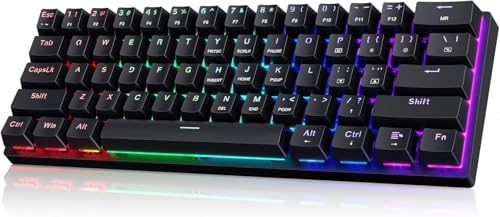
The MageGee MK-Box is a 60% mechanical gaming keyboard that packs a lot of value into a tiny footprint. With 68 keys, it shrinks down the traditional layout while keeping dedicated arrow keys and a full F-row, accessible via Fn combinations. This makes it a smart choice for PC gamers, college students, and anyone building a compact gaming or work-from-home setup who doesn't want to sacrifice functionality for space.
At the heart of this keyboard are linear red switches. They offer a smooth, quiet keystroke with no tactile bump, which many gamers appreciate for rapid, consecutive presses in fast-paced titles like FPS or MOBA games. The switches have minimal resistance, so your fingers won't tire out during long gaming sessions or extended typing. User feedback consistently highlights that the red switch version sounds and feels much better than clicky alternatives, making it a strong pick for shared spaces like dorm rooms or office desks.
Build quality is impressive for the price point. The keyboard features double-shot injection ABS keycaps, which means the legends are molded into the plastic and won't fade over time. The frame feels sturdy, and the detachable USB-C cable is a welcome addition, making cable management easy and the keyboard travel-friendly. The blue LED backlighting offers 16 modes, adjustable brightness, and speed control, letting you match the look to your mood or setup without needing any software.
Setup is truly plug-and-play. The keyboard works with Windows, Mac, and Linux right out of the box, no drivers required. The included key puller and 16 extra red keycaps let you customize the WASD or other keys for a personal touch. Some users have noted that the keycaps come in a mix of colors that you need to swap yourself to match the product images, but the process is straightforward.
One realistic limitation is that the ABS keycaps, while durable, may develop a shine over months of heavy use. Also, the backlight is single-color blue, so if you're an RGB enthusiast who wants per-key color customization, you'll need to look elsewhere. The keyboard also lacks software for macro programming, which competitive players might miss.
Overall, the MageGee MK-Box is an outstanding budget mechanical keyboard for gamers, streamers, or anyone who wants a reliable, space-saving input device. It delivers responsive performance, a clean aesthetic, and genuine portability. If you're a PC gamer on a budget, a college student with limited desk space, or someone who needs a backup travel keyboard, this is a fantastic buy that punches well above its price.
The MageGee MK-Box is built for responsive gaming. Its linear red switches actuate with a smooth, consistent feel, making them ideal for games where speed and quick double-taps matter. Full anti-ghosting across all 68 keys ensures that every keypress registers, even during complex combos in MOBAs or frantic movements in FPS titles. The compact layout puts all essential keys within easy reach, reducing hand travel and helping you react faster. While it lacks programmable macros, the straightforward plug-and-play nature means zero input lag from software overhead.
For a keyboard under $30, the MK-Box feels surprisingly solid. The plastic case has minimal flex, and the double-shot injection ABS keycaps resist wear and fading better than standard printed caps. The detachable USB-C cable is a premium touch, adding durability and making storage or travel easy. The switches are soldered to the board, so they aren't hot-swappable, but the overall construction is reliable for daily gaming and typing use. User reviews note that with basic mods like foam dampening, the keyboard can sound even better.
Frequently Asked Questions
What makes a 60 percent mechanical keyboard better for gaming?
Direct Answer: A 60 percent layout removes the number pad and navigation cluster to dramatically expand mouse movement area. This extra clearance helps low-sensitivity FPS players execute wide arm flicks without bumping into the keyboard chassis. Compact frames also encourage a more natural shoulder alignment during extended play sessions. Many gamers pair these mini decks with a supportive ergonomic keyboard wrist rest to keep wrist angles neutral during long matches.
How do Hall effect magnetic switches differ from traditional mechanical switches?
Direct Answer: Hall effect magnetic switches use electromagnetic sensors rather than physical metal contact leaves to detect keypresses. This contact-free design eliminates mechanical wear while unlocking rapid trigger capabilities and adjustable actuation points down to 0.02mm. Boards like the Aula WIN60 HE utilize this tech for near-instant reset times, allowing rapid counter-strafing in fast-paced shooters. You get reliable durability alongside fully customizable travel sensitivity.
Can I type comfortably on the best 60 mechanical gaming keyboard without dedicated arrow keys?
Direct Answer: Yes, because 60 percent keyboards access arrow keys and navigation functions through integrated function (Fn) key layers. Keyboards such as the MageGee MK-Box and AULA WIN68 HE retain dedicated physical arrow keys within a slightly wider 68-key format for effortless navigation. On standard 61-key layouts, simple shortcuts like pressing Fn with W, A, S, and D or the spacebar instantly activate direction controls. Most typists adapt to these shortcuts within a few days of regular use.
What switch type should I pick for gaming and quiet typing?
Direct Answer: Red linear switches provide the smoothest keystroke and lowest acoustic profile for shared rooms or quiet desks. Unlike clicky blue switches that produce a sharp snap, linear switches glide straight down without a tactile bump. They actuate smoothly under light finger pressure, preventing fatigue during rapid button-mashing sequences. Boards offering hot-swappable sockets also let you swap in custom pre-lubed switches whenever you want a deeper sound profile.
Do magnetic switch keyboards require heavy background software?
Direct Answer: No, leading 2026 models feature streamlined web-based drivers that run directly in your internet browser. The WIN60 HE and WIN68 HE allow users to calibrate rapid trigger thresholds, program macros, and tweak RGB backlights without installing bloated background utilities. Settings save straight to the keyboard hardware so your preferences stay intact across different computers. Combined with a clean desk setup featuring a low-latency wireless mouse, web-configured peripherals keep your gaming station uncluttered.
Are ABS keycaps durable enough on budget gaming keyboards?
Direct Answer: Double-shot ABS keycaps provide excellent legends that never wear away, though they can develop surface shine over time. The double-injection molding process fuses two plastic layers together so the lettering remains permanent even after millions of keystrokes. While textured PBT plastic resists finger oils longer, quality ABS keycaps keep retail costs accessible while delivering vibrant RGB backlighting passthrough.


Write Your Review
No reviews yet. Be the first to share your experience!