


Missed actuations and mushy keypresses during high-stakes firefights can ruin an otherwise solid gaming session. Responsive switch feel and quick input registration make a world of difference when split-second reactions determine the outcome. Selecting the best keyboard for gaming logitech offers can give you the reliability you need, whether you want ultra-fast linear travel or crisp tactile feedback. Many players pair these boards with a supportive gaming wrist rest for keyboard setups to keep hands comfortable during marathon sessions.
Modern gaming decks provide significant upgrades over standard office peripherals, featuring durable double-shot PBT keycaps, gasket-mounted dampening, and high report rates that register commands instantly. Logitech G designs range from ultra-thin low-profile wireless boards to tank-like aluminum frames with reliable mechanical stems. Evaluating physical layout options, onboard media controls, and companion G HUB programmability helps narrow down the ideal desk companion. If you want gear tailored for twitch-heavy gameplay, matching these features with the standards found on top-tier competitive PC gaming keyboards ensures every keystroke lands right on target.

Pros
- Solid build with aluminum top case for minimal flex
- Tactile switches offer satisfying bump without excessive noise
- PBT keycaps are more durable than standard ABS
- Simple white LED lighting is effective and non-distracting
- Compatible with Windows and macOS out of the box
Cons
- No software customization (not recognized by Logitech G Hub)
- Non-hot-swappable switches, so soldering required for changes
- Full-size layout may take up more desk space than TKL versions
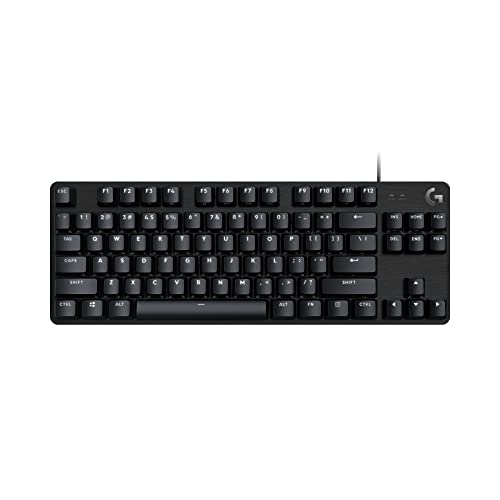
The Logitech G413 SE is a full-size mechanical gaming keyboard that strips away unnecessary frills to deliver a focused, high-performance typing and gaming experience. It features tactile mechanical switches, durable PBT keycaps, and a rigid aluminum top case that gives it a premium feel without a premium price tag. This keyboard is designed for gamers and professionals who value reliability and consistency over flashy RGB lighting or overly complex software.
This keyboard is best suited for competitive gamers, casual gamers, esports players, and content creators who want a straightforward tool that works out of the box. It also appeals to work-from-home gamers and college students who need a durable keyboard for both gaming and daily tasks. The full-size layout includes a number pad and dedicated navigation keys, making it versatile for productivity as well as intense gaming sessions.
In real-world use, the tactile switches offer a noticeable bump at the actuation point, providing clear tactile feedback that helps prevent accidental presses. The actuation force is moderate, striking a good balance between being light enough for rapid inputs and heavy enough to avoid fatigue during long typing sessions. The white LED backlighting is uniform and bright enough for low-light gaming without being distracting. The 6-key rollover anti-ghosting ensures that each key press is registered accurately, even during complex key combinations in fast-paced FPS or MOBA games.
Build quality is a standout feature of the G413 SE. The brushed aluminum top case provides excellent rigidity, with virtually no flex even under heavy use. The PBT keycaps are highly resistant to wear and heat, maintaining their texture and legends far longer than standard ABS keycaps. The keyboard connects via a sturdy USB cord, and the overall construction feels built to last.
Setting up the G413 SE is as simple as plugging it into a USB port. There is no proprietary software required, and the keyboard works seamlessly with Windows and macOS. However, this also means it is not recognized by Logitech's G Hub software, so users cannot customize lighting effects or create macros. The switches are soldered in place, so modifying them requires soldering skills. Additionally, the full-size layout may be too large for cramped desks, though a tenkeyless version is available for those who need more mouse space.
Overall, the Logitech G413 SE is a practical and trustworthy choice for anyone seeking a no-nonsense mechanical keyboard that prioritizes build quality and typing feel. It is particularly well-suited for gamers who prefer tactile switches and want a durable daily driver without paying extra for RGB or wireless features. For its price point, it offers excellent long-term value and a satisfying user experience.
The Logitech G413 SE features a brushed aluminum-magnesium alloy top case that serves as the keyboard's backbone. This material choice minimizes flex and provides a solid, weighty feel. The PBT keycaps are thicker and more resistant to shine compared to ABS keycaps, ensuring that frequently used keys like WASD retain their texture over time. The bottom housing is plastic but sturdy, and the keyboard has a non-slip rubber base to keep it stable on the desk. The USB cable is braided and thick, adding to the overall durability.
The tactile switches in the G413 SE offer a crisp bump with a moderate actuation force, making them suitable for both gaming and typing. In fast-paced games like first-person shooters or real-time strategy, the switch response feels immediate and accurate. The 6-key rollover anti-ghosting technology ensures that simultaneous key presses are registered correctly, which is crucial for executing complex combos. The white LED backlighting helps illuminate key legends without causing glare, allowing for comfortable gameplay in dark environments. While the keyboard lacks per-key RGB or macro programming, its straightforward performance is reliable and consistent.

Pros
- Blazing 8 kHz polling rate delivers minimal input delay for high-tier competitive gaming
- Gasket mount and acoustic dampening eliminate harsh plate ping and hollow reverberation
- Compact 98 percent layout provides the ideal balance between desktop space and spreadsheet productivity
- Convenient on-board LED dot-matrix display and physical media dial keep adjustments in arm's reach
Cons
- Running the full 8 kHz report rate may cause slight CPU overhead on older PC hardware
- Slightly larger desk footprint compared to minimalist 60 percent or tenkeyless keyboards
- Unlocking deep lighting customizations and macro mapping requires active Logitech G HUB software
The Logitech G316 X 98 is a high-performance mechanical gaming keyboard engineered for competitive esports players, streamers, and work-from-home gamers who require rapid input execution alongside everyday workstation utility. Featuring a streamlined 98 percent layout, this board preserves the essential number pad while trimming unnecessary borders, clearing valuable desk area for broad mouse sweeps in intense first-person shooters. It serves as a versatile bridge between dedicated tournament gear and full-sized daily desktop setups.
Responsive input delivery sits at the center of the typing experience. With an advanced 8 kHz report rate, the keyboard transmits keystroke data eight times faster than typical 1,000 Hz gaming keyboards, minimizing latency in high-stakes matches where split-second inputs decide the outcome. Paired with pre-installed linear switches, every keystroke glides cleanly through its actuation path without tactile bumps, allowing effortless double-taps and fluid movement sequences in MOBA and battle royale titles.
Logitech delivers refined acoustics through a gasket-mounted assembly bolstered by sound-dampening foam and silicone layers. This structure softens key bottom-out vibrations and suppresses hollow metallic pinging, creating a deeper, cleaner acoustic profile during late-night gaming sessions and Discord calls. Heavy-duty double-shot PBT keycaps prevent surface shine and oil accumulation, while modular hot-swap switch sockets provide switch customization without desoldering.
Hardware control is simplified with the interactive LED dot-matrix display and companion dial. Gamers can adjust volume, tweak polling rates, cycle media tracks, or modify lighting patterns directly from the board without alt-tabbing away from competitive lobbies. Through Logitech G HUB software, users can fine-tune dynamic 30-zone LIGHTSYNC RGB illumination, manage key assignments, and set up Game Mode profiles that prevent accidental Windows key presses.
Setting up the keyboard is painless via standard USB plug-and-play connectivity, although activating the maximum 8 kHz report rate and complex lighting scripts requires G HUB installation. Routine desktop upkeep is straightforward, as the durable PBT keycaps easily pull free with standard switch pullers to allow quick dust removal from the internal plate.
While the 8 kHz polling rate provides elite signal speed, older systems with modest processors might experience higher CPU utilization during high-frequency input spams. Additionally, minimalists who prioritize ultra-compact travel setups might still favor a tenkeyless or 60 percent layout. However, for PC gamers and creators who demand pro-grade input accuracy, quiet typing acoustics, and full numeric productivity, the Logitech G316 X 98 represents a superbly rounded addition to any gaming setup.
The 8 kHz polling rate ensures near-zero signal latency, communicating with your gaming PC at eight thousand times per second for virtually instant keystroke registration. In twitch-heavy tactical shooters like Valorant or Counter-Strike 2, this ultra-fast report rate translates to precise strafing stops, micro-adjustments, and reliable ability triggers.
Smooth linear switches eliminate mechanical resistance points, giving gamers seamless actuation during high-APM gaming. Combined with full anti-ghosting and complete key rollover, this keyboard reliably captures every command sequence even during frantic teamfights.
Acoustic dampening is achieved through a multi-layer gasket-mounted frame that isolates switch impacts from the outer chassis. Dense silicone padding and internal foam absorb unwanted hollow echoes, giving each keypress a satisfying, muted tap that will not overwhelm open streaming microphones.
The board is capped with textured double-shot PBT keycaps that resist finger oil and legends fading. Hot-swappable switch sockets also ensure long-term hardware longevity, giving builders the freedom to swap out switches or test custom mechanical variations over time.

Pros
- Fast and responsive mech-dome keys with tactile feedback.
- Spill-resistant construction adds durability for everyday use.
- Customizable RGB lighting with easy software control.
- Comfortable integrated palm rest and adjustable feet.
- Affordable price point for the features offered.
Cons
- Not mechanical switches; some users may prefer true mechanical feel.
- Wired connection only, no wireless option.
- Plastic build may not feel as premium as higher-end models.
The Logitech G213 Prodigy is a full-sized wired gaming keyboard that bridges the gap between membrane and mechanical designs. Its mech-dome keys offer a tactile bump and quick actuation, making it a solid choice for PC gamers, esports players, and casual users who want responsive feedback without the higher cost of mechanical switches. The keyboard’s spill-resistant body and integrated palm rest also appeal to streamers and college gamers who need durability and comfort during long sessions.
In terms of performance, the G213’s anti-ghosting matrix handles multiple simultaneous key presses accurately, which is crucial for competitive games like FPS and MOBA titles. The keys are tuned to register inputs faster than standard keyboards, providing a snappy feel that can give you an edge in fast-paced scenarios. While not as crisp as true mechanical switches, the mech-dome technology offers a satisfying tactile response that many users find adequate for both gaming and typing.
Build quality is practical rather than luxurious. The keyboard features a spill-resistant membrane and keyframe, so common accidents like spilled drinks or crumbs are less likely to ruin your session. The plastic construction feels sturdy enough for everyday use, though it won’t match the heft of aluminum-framed boards. The included palm rest is non-detachable but well-cushioned, reducing wrist fatigue during extended gaming marathons. Adjustable feet let you tilt the keyboard to your preferred angle, further improving ergonomics.
Customization is a highlight thanks to Logitech G HUB software. You can program five RGB lighting zones with millions of colors and sync effects with other Logitech G peripherals. The software also lets you assign macros and create game-specific profiles. Dedicated media controls on the top right let you adjust volume, mute, skip tracks, and pause without minimizing your game, which is a convenient touch for streamers and multitaskers.
Setup is straightforward: plug the USB cable into your PC, install the software if desired, and you’re ready to go. The cable is braided and reasonably long, making cable management easy on a typical gaming desk. Cleaning the keyboard is simple thanks to its sealed membrane; a quick wipe with a damp cloth handles most messes. However, the lack of mechanical switches and wireless connectivity are notable limitations for purists and those seeking a clutter-free desk.
Overall, the Logitech G213 Prodigy is an excellent value for gamers on a budget, especially those who prioritize durability, comfortable ergonomics, and customizable RGB. It suits competitive players who want reliable input, casual gamers who appreciate a quiet typing experience, and setup builders looking for an affordable keyboard that still looks great with a themed RGB desktop. If you don’t need mechanical switches or wireless freedom, this keyboard delivers dependable performance for daily gaming and productivity.
The Logitech G213 Prodigy features five independently customizable RGB lighting zones, each capable of displaying over 16.8 million colors. Using Logitech G HUB software, you can choose from preset lighting effects like wave, breathing, or color cycle, or create your own custom designs. The software also enables LIGHTSYNC integration, where lighting reacts to in-game actions in over 300 supported titles. This makes the keyboard a great addition for RGB enthusiasts who want their setup to respond to gameplay, and it also syncs with other Logitech G gear for a cohesive look.
Beyond lighting, the software allows you to assign macros or secondary functions to individual keys, which can streamline complex commands in MMOs or speed up productivity tasks. The customization is deep enough for dedicated users but remains simple for those who just want to change a few colors.
The G213 Prodigy prioritizes comfort with its integrated palm rest and two-level adjustable feet. The palm rest is padded and provides a stable surface to rest your wrists, reducing strain during long gaming or typing sessions. The feet flip out for a slight tilt that can help maintain a natural wrist angle. While the palm rest is not detachable, it is wide enough for most hand sizes and doesn’t take up excessive desk space. Over several hours of use, the keyboard remains comfortable, though users who prefer steep negative tilt may find the adjustment options limited. Combined with the quiet, tactile keystrokes, the G213 is a solid choice for anyone prone to fatigue during extended sessions.


Frequently Asked Questions About Logitech Gaming Keyboards
What mechanical switch type works best for fast gaming?
Linear switches are widely favored for fast-paced titles due to their smooth, uninterrupted keystroke from top to bottom. Switches like the low-profile GL Linear or GX Linear lack a tactile bump, enabling rapid double-taps and minimal actuation resistance. Gamers who also type daily might favor tactile switches to confirm key registration without accidental presses, much like setups built around a gaming keyboard for typing balance.
How does Logitech Lightspeed wireless compare to wired connections?
Logitech Lightspeed wireless delivers a 1 ms report rate that rivals standard wired connections. The proprietary 2.4GHz RF connection provides reliable signal stability without perceptible input lag during competitive play. You can also pair compatible devices to a single USB receiver alongside a reliable desk setup with a wireless mouse, freeing up valuable ports on your rig.
Are hot-swappable switches available on Logitech gaming keyboards?
Yes, select modern models such as the Logitech G316 X 98 feature hot-swappable switch sockets. This capability allows you to remove and replace switch modules without soldering, making it simple to experiment with custom linear or tactile switches. Most standard models, including low-profile boards like the G915 series, feature soldered switches that cannot be swapped out easily.
What is the benefit of double-shot PBT keycaps on the Best Keyboard For Gaming Logitech?
Double-shot PBT keycaps offer superior resistance against surface shine, finger oil accumulation, and fading. Because legends are molded from two separate plastic layers, the lettering will not wear away even under heavy friction during daily gaming. Models like the G413 SE and G515 incorporate PBT caps to maintain a textured, premium grip over extended use.
Can you use a Logitech gaming keyboard with macOS?
Yes, most wired and wireless Logitech gaming models function on macOS as standard USB or Bluetooth input devices. Basic typing and media hotkeys work reliably out of the box, though certain advanced features like per-key LIGHTSYNC RGB and complex macro profiles require Logitech G HUB software, which may have limited feature parity across different operating systems.
How long does the battery last on wireless Logitech gaming models in 2026?
Battery runtime ranges up to 36 hours of continuous play on boards like the G515 Lightspeed with RGB backlighting active. Turning off the RGB illumination or dimming the brightness can significantly stretch the operational window between USB-C charges.



Write Your Review
No reviews yet. Be the first to share your experience!