


Cable-Free Precision for Clean Battlestation Builds
Tangled black cables cluttering clean desktop mats can break the immersion of an immaculate white battlestation. Fast wireless connectivity has eliminated the annoying latency penalties that once plagued cord-cutting setups. Pairing high-polling 2.4GHz dongles with smooth mechanical switches ensures every keystroke registers instantly during tense matches. Finding the Best White Wireless Gaming Keyboard requires looking beyond clean exterior aesthetics. You need reliable multi-mode connectivity, solid battery endurance, and responsive switch actuation across PC and Mac setups. For players upgrading their full workstation, pairing wireless decks with competitive PC gaming keyboard setups helps balance rapid keystroke response with clean visual symmetry.
Acoustic refinement and wrist posture matter just as much as actuation speed during marathon gaming sessions. Hollow plastic enclosures often amplify harsh spring ping and stabilizer rattle, distracting you during late-night voice calls. High-grade options now incorporate multi-layer sound-dampening foam, hot-swappable sockets, and adjustable incline feet to maintain wrist comfort. While some premium models include cushioned rests, adding supportive keyboard wrist rests further alleviates forearm strain during ranked grinds. Based on our analysis of switch specs and buyer feedback, investing in the Best White Wireless Gaming Keyboard of 2026 keeps your desk clean while keeping your inputs lightning fast.


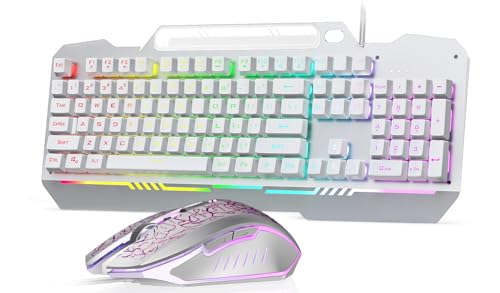

Pros
- Compact size saves desk space and looks clean in any gaming or work setup.
- Lightweight honeycomb mouse (65g) is great for fast-paced FPS and MOBA games.
- Long battery life with smart sleep mode helps conserve power between uses.
- Plug-and-play setup with no software required, just insert the receiver and go.
- Multiple RGB lighting options add personality to your gaming station.
Cons
- Non-mechanical membrane switches may feel mushier to users accustomed to true mechanical keyboards.
- 60% layout lacks dedicated arrow keys and function row, requiring FN combos that take time to learn.
- Shared receiver is stored under the mouse, which can be inconvenient if you need to swap frequently or lose it.
The RedThunder K62 wireless keyboard and mouse combo is a complete input solution designed for gamers who value a tidy desk without sacrificing essential performance. This set pairs a 60% compact keyboard with a perforated honeycomb mouse, both running on a single 2.4G wireless receiver. It's aimed at PC gamers, streamers, college students, and anyone building a minimalist gaming setup who wants reliable wireless functionality at an affordable price point.
In terms of gaming performance, the keyboard offers a mechanical feel through membrane-based switches with a claimed 2ms response time, which is competitive for non-mechanical options. The mouse features an optical sensor with up to 3600 DPI, 12000 FPS scanning speed, and 40G acceleration, making it responsive enough for fast-paced shooters and MOBAs. Both devices use a shared 2.4G dongle to reduce USB port usage, and the connection remains stable during intense sessions with minimal input lag. The mouse's lightweight honeycomb design (around 65g) also helps reduce wrist fatigue during long gaming marathons.
Build quality is practical for the price: the keyboard uses ABS keycaps with two-color injection molding to prevent fading, while the mouse's honeycomb shell provides ventilation to keep palms cool. The keyboard's 1850mAh battery (with lights on) and the mouse's 500mAh battery support around 8 hours of use with RGB enabled, and the smart sleep function kicks in after 2 minutes of inactivity to extend battery life. Both devices charge via a detachable Type-C cable, and the keyboard even has a translucent panel that diffuses RGB lighting for a more atmospheric glow.
Setup is straightforward: simply plug the USB receiver into your PC, turn on the switches on the keyboard and mouse, and they pair automatically. No software is required, which is convenient for those who prefer a plug-and-play experience. However, if you ever need to re-pair, the product includes clear steps for both keyboard and mouse. The 60% layout does mean you'll need to use FN combos for functions like arrow keys, volume control, and media playback, which may take a couple of gaming sessions to memorize.
Realistic limitations include the membrane feel, which lacks the crisp tactile feedback of true mechanical switches, and the small form factor that might feel cramped for users who rely heavily on a numpad or dedicated function row. Additionally, the mouse wheel RGB only lights up during charging, not during normal use. These are trade-offs for the compact size and budget-friendly price. The combo is best suited for gamers who prioritize desk space and wireless simplicity over switch customization or extensive key layout.
Overall, the RedThunder K62 combo is a practical purchase for anyone building a clean, affordable gaming setup. It works well for casual to mid-level competitive gaming, streaming on Twitch or YouTube, home office tasks, and dorm room gaming. If you're on a tight budget and want a wireless keyboard and mouse that look good and perform reliably without cluttering your desk, this set is worth considering.

Pros
- Small footprint saves valuable desk space while still including arrow keys
- Triple connectivity offers flexibility for multi-device users
- Quiet and responsive red switches satisfy both gamers and typists
Cons
- Compact layout may take time for users accustomed to full-size keyboards
- Software customization is available but could be more intuitive
- White color may show dirt more easily over time
The DIERYA DK63 is a 60% wireless mechanical gaming keyboard designed for PC gamers, streamers, content creators, and anyone building a clean, efficient gaming setup. With its 63-key layout that includes dedicated arrow keys, this compact keyboard keeps your desk uncluttered while still offering all the essential function keys through the FN layer. It's especially well-suited for competitive gamers who need quick, accurate inputs, casual gamers who want a quieter experience, and college gamers or work-from-home users who value portability and a small footprint.
Performance-wise, the DK63 uses DIERYA's custom red switches, which are linear and require 45g of actuation force. These switches produce a smooth keystroke with no tactile bump and only about 40dB of noise – quiet enough for late-night gaming sessions or a shared workspace. The anti-ghosting support (though the product data notes it as anti-ghosting, typical for most mechanical keyboards) and fast response ensure every keypress is registered accurately during intense gaming. The triple-mode connectivity – Bluetooth 5.0, 2.4G wireless, and USB-C wired – allows you to switch seamlessly between your gaming PC, laptop, tablet, or even a smartphone, making it a versatile choice for multi-device users. The 2.4G connection offers a stable 10-meter range, and even with obstacles it remains reliable up to 6 meters.
Build quality is solid for its price point. The keyboard weighs 1.41 pounds and has a durable plastic frame with a white finish. The keycaps are doubleshot ABS (based on typical construction at this price), which ensures legends won't wear off quickly. The integrated 2.4G receiver storage is a nice touch – it hides beside the adjustable stand, keeping the receiver safe and maintaining the keyboard's clean look. The adjustable footrests let you set a comfortable typing angle, reducing wrist strain during long gaming or typing sessions.
The DK63 features a rich RGB backlighting system with 18 dynamic modes and 16.8 million colors. You can customize lighting effects using the provided software, tailoring the glow to match your gaming setup or mood. The white keycaps allow the RGB to shine through well, creating a vibrant look that RGB enthusiasts will appreciate. However, the white body may show smudges or dust more easily than darker colors.
Setup is straightforward: plug in the USB-C cable to charge, or use the included 2.4G receiver or Bluetooth to connect wirelessly. The 3000mAh battery provides about 8 hours of continuous use with full RGB brightness, and a whopping 90 hours with the backlight off – adequate for most daily use without constant charging. Maintenance involves occasional cleaning of the keycaps since the white color can show grime, but the compact size makes it easy to wipe down.
One realistic limitation is the learning curve for those used to full-size keyboards. The 60% layout requires memorizing FN key combinations for functions like arrow keys (though the DK63 includes dedicated arrows) and media controls. Also, the keycaps are not PBT, so they may develop shine over time. Overall, the DIERYA DK63 is an excellent value for PC gamers and desk setup builders who want a compact, wireless mechanical keyboard with responsive switches, multiple connectivity options, and plenty of RGB flair – all at a very approachable price.
The DIERYA DK63 delivers reliable gaming performance thanks to its linear red switches, which provide smooth, rapid keystrokes ideal for fast-paced games like FPS, MOBA, or racing titles. The anti-ghosting feature ensures every keypress is registered accurately during complex inputs, and the low latency wireless connection via 2.4G keeps input delay minimal. The 45g actuation weight strikes a good balance between preventing accidental presses and allowing quick double-taps. For competitive gamers, the compact layout also frees up mouse movement space, while the quiet switch noise keeps focus. The battery life under RGB is shorter (8 hours), so wired or low-brightness use is recommended for long sessions.
The DK63 has a sturdy plastic chassis with a clean white finish that fits modern or minimalist gaming setups. The keycaps are doubleshot ABS, offering decent durability without the yellowing issues of cheaper single-shot sets. The adjustable feet give two height options, and the rubber pads on the bottom keep the keyboard firmly in place during intense play. The integrated 2.4G receiver storage is a clever design choice that prevents losing the receiver. The USB-C port is centered on the back, making cable management neat if you prefer wired use. Overall, it feels well-built for its price range and should hold up to daily gaming and typing.
The DIERYA DK63 offers 18 RGB lighting modes with 16.8 million colors, accessible via FN shortcuts or the downloadable software. You can adjust brightness, speed, and color patterns to suit your preference. The white keycaps diffuse the RGB nicely, creating a vivid glow that looks great on a desk. The software also lets you remap keys and create custom profiles, which is handy for gamers who want specific lighting effects tied to certain games. While not as deep as some premium brands, the customization options are more than adequate for most users and add a lot of personality to your setup.
Frequently Asked Questions
Does a 2.4GHz wireless connection introduce input lag during gaming?
No, modern 2.4GHz wireless connections deliver virtually latency-free performance comparable to wired USB cords. Dedicated USB dongles maintain a stable 1000Hz polling rate without the signal drops common to basic Bluetooth. Most competitive gamers rely on 2.4GHz wireless for rapid keystroke registration in fast-paced shooters, reserving Bluetooth for everyday multi-device typing.
What is the main difference between linear and tactile switches for gaming?
Linear mechanical switches feature smooth, uninterrupted keystroke travel from top to bottom, making them ideal for rapid double-taps. Tactile switches provide a subtle bump at the actuation point for physical confirmation. While linear switches offer quiet speed, typists who also game often prefer tactile feedback to prevent accidental bottoming out on a gaming keyboard for typing.
How long does the battery last on a best white wireless gaming keyboard with RGB lighting on?
RGB backlighting significantly impacts battery runtime, often reducing continuous endurance to between 8 and 40 hours. Keyboards with large 3000mAh or 4000mAh batteries run around 8 hours under maximum dynamic RGB lighting, but can last hundreds of hours with illumination switched off. Turning down backlighting brightness or using sleep standby modes greatly extends battery life between charges.
Are white keycaps and keyboard cases prone to yellowing or grime?
White keycaps made from dense PBT plastic resist shine and UV-induced yellowing far better than budget ABS plastic. Dust and skin oils do show up faster on white hardware compared to black peripherals. Wiping the board periodically with a soft microfiber cloth and choosing double-shot or side-printed legends keeps your white aesthetic crisp and clean over years of play.
What layout size works best for a white wireless gaming setup?
Compact 60% and 75% layouts work best for gamers seeking maximum mouse movement space and a minimalist desk look. Compact frames remove empty bezel space while keeping essential keys within easy finger reach. Players who need dedicated arrow keys and a number pad can opt for efficient 96% layouts that provide full functionality without crowding your mouse pad.






Write Your Review
No reviews yet. Be the first to share your experience!