


Stuttering gameplay and sudden frame drops often happen when an ambitious graphics card gets held back by an overworked central processing unit. Modern PC titles demand rapid single-thread clock cycles and generous cache pools to keep minimum frame rates steady during chaotic multiplayer matches. Pinpointing the best gaming ryzen cpu makes the difference between annoying stutter and buttery-smooth responsiveness. Builders balancing overall component expenses often look at affordable gaming CPU options before committing to higher-tier silicon. Based on our detailed comparison of core configurations, socket compatibility, and user feedback, prioritizing balanced clock speeds and power efficiency avoids expensive hardware mismatches.
Platform longevity remains another key factor because deciding between the proven AM4 ecosystem and newer AM5 motherboards dictates memory generation and upgrade paths. Veteran builders can still achieve outstanding 1080p and 1440p speed using DDR4 hardware, but transitioning to modern sockets unlocks fast DDR5 memory bandwidth and PCIe 5.0 lanes. We evaluated thermal design limits, boost clocks, and multi-core capabilities across standalone bundles and prebuilt towers so you can game without thermal throttling. Selecting the right processor doesn’t just improve your frame rates; it keeps your entire system running cool and quiet under heavy gaming sessions.


Cons
- Requires a dedicated graphics card since the Ryzen 5 5500 has no integrated GPU.
- Limited to PCIe 3.0 for the M.2 slot, not PCIe 4.0, which may impact future SSD upgrades.
- Bluetooth connectivity can be somewhat inconsistent based on user feedback for some units.
The Micro Center AMD Ryzen 5 5500 Desktop Processor and ASUS TUF Gaming A520M-PLUS WiFi Motherboard bundle is a solid, budget-conscious entry point for PC gamers and builders looking to refresh an older AM4 system or assemble a new rig without breaking the bank. This combo pairs a 6-core, 12-thread Zen 3 CPU with a well-equipped microATX board that includes onboard WiFi and Bluetooth, making it a practical choice for gamers who want a clean, cable-free desk setup.
For competitive gamers and casual players alike, the Ryzen 5 5500 offers enough horsepower to push 100+ FPS in popular titles like Valorant, Fortnite, and CS2 when paired with a dedicated GPU. The lack of integrated graphics means you'll need a separate video card, but that also keeps the CPU cost lower and lets you allocate your budget toward a stronger GPU. The ASUS TUF Gaming A520M-PLUS WiFi motherboard brings military-grade durability with reinforced PCIe slots, LANGuard protection, and ESD safeguards, making it a reliable foundation for a daily driver gaming rig.
Setup is straightforward for anyone familiar with PC building. The microATX form factor fits neatly into most mid-tower or smaller cases, and the built-in WiFi and Bluetooth eliminate the need for extra dongles or cables. The board includes four USB 3.2 Gen 1 Type-A ports on the back, plus a USB 3.2 Gen 1 header for front-panel connectivity, so hooking up peripherals like gaming mice, headsets, and streaming gear is simple. The single M.2 slot supports PCIe 3.0 x4 speeds, which is plenty fast for everyday gaming loads and quick boot times, though it doesn't offer PCIe 4.0 support for future ultra-fast NVMe drives.
Cooling is handled by the included Wraith Stealth cooler, which keeps the 65W TDP Ryzen 5 5500 running at comfortable temperatures during standard gaming sessions. The motherboard also features Fan Xpert 2+ software for custom fan curves, letting you balance noise and airflow to your liking. The VRM area has a dedicated heatsink, and the board's overall layout is clean, making cable management easier even in compact cases.
For gaming setup builders, the onboard WiFi is a major convenience. You can place your rig anywhere without worrying about an Ethernet cable run, and the Bluetooth 5.0 support is handy for connecting wireless controllers or headsets. The A520 chipset does limit some PCIe lanes and overclocking headroom compared to B550 or X570 boards, but for a mid-range gaming build, this combo delivers reliable performance without unnecessary complexity.
One consideration is that the Ryzen 5 5500 lacks PCIe 4.0 support, so if you plan to drop in a high-end GPU like an RTX 4070 or faster, you may lose a small amount of performance compared to a PCIe 4.0-capable CPU. However, for most gamers using cards up to the RTX 3060 or RX 6600 class, this won't be noticeable. The board also only has one M.2 slot, so you'll want to plan your storage carefully from the start.
Overall, this Micro Center bundle is a great value pick for a first-time builder, a college gamer on a budget, or anyone looking to upgrade an older AM4 system without spending a fortune. It offers a clear upgrade path to faster Ryzen 5000 series CPUs later, and the TUF Gaming features give you peace of mind for durability. Just remember to budget for a dedicated graphics card, and you'll have a capable 1080p gaming setup ready to go.


Pros
- Top-tier CPU and GPU combo handles any modern game at high settings with ease.
- Fast 2TB Gen4 NVMe SSD provides huge storage and rapid load times.
- High-speed 32GB DDR5 6000MHz RAM enhances multitasking and gaming performance.
- Effective 360mm AIO liquid cooling keeps temperatures in check for consistent performance.
- No bloatware and straightforward setup make it ideal for gamers who want a plug-and-play experience.
Cons
- Premium price point may be out of budget for some PC gamers.
- Included keyboard and mouse are basic and may not satisfy serious esports players.
- Large case dimensions (18.7 x 11.8 x 17.4 inches) require ample desk space.
The Skytech Gaming King 95 is a high-end pre-built gaming desktop designed for PC gamers who demand uncompromised performance. Powered by the AMD Ryzen 7 9800X3D processor with a 5.2 GHz turbo boost and the NVIDIA RTX 5070 Ti with 16GB GDDR7, this system is built to handle the most demanding games at 1440p ultra settings with fluid frame rates. Whether you're a competitive esports player, a casual gamer exploring open-world titles, or a streamer running multiple applications, this PC delivers the responsiveness and reliability you need.
In real-world gaming scenarios, the Ryzen 7 9800X3D's 3D V-Cache technology significantly reduces latency, making it ideal for fast-paced titles like Valorant, Call of Duty, and Apex Legends. The RTX 5070 Ti ensures visual clarity with ray tracing and high refresh rates, while the 32GB of DDR5 6000MHz RGB memory keeps everything smooth during intense battles or while streaming on Twitch. The 2TB Gen4 NVMe SSD means games load in seconds, and you'll have plenty of space for your library.
Build quality is impressive with the King 95 case featuring tempered glass panels and ARGB fans that not only look stunning but also promote excellent airflow. The 360mm AIO liquid cooler is more than capable of taming the Ryzen 7 CPU, even during long gaming sessions or CPU-intensive tasks like video editing. The 850W Gold rated PSU provides stable power, ensuring no hiccups when pushing the system to its limits. Cable management inside the case is well-executed out of the box, reducing clutter and improving airflow.
Setup couldn't be easier - just connect your monitor, peripherals, and power, then boot straight into Windows 11 with zero bloatware. Skytech includes a free gaming keyboard and mouse, though serious gamers may want to upgrade these for better precision and comfort. The system also offers multiple USB ports (2.0, 3.0, and 3.2 Gen1), HDMI, and DisplayPort outputs for flexible connectivity.
One limitation to consider is the premium price, which reflects the high-end components but might be steep for budget-conscious buyers. Additionally, while the included keyboard and mouse work fine for general use, competitive players will likely want to invest in dedicated peripherals. The case size is also substantial, so make sure your desk can accommodate a tower that's nearly 19 inches tall and 18 inches deep.
Overall, the Skytech Gaming King 95 is an excellent choice for PC gamers who want a top-tier experience without the hassle of building their own system. It's well-suited for streamers who need reliable multitasking power, esports athletes who demand low-latency performance, and content creators who require fast rendering and editing capabilities. If you have the budget and want a powerful, ready-to-go gaming PC, this is a strong contender.
Based on product specifications, the Skytech Gaming King 95 is built for high-performance gaming at 1440p resolution with ultra settings. The Ryzen 7 9800X3D CPU, combined with the RTX 5070 Ti 16GB graphics card, can handle demanding titles like Cyberpunk 2077, Elden Ring, and Black Myth: Wukong with smooth frame rates above 60 FPS. The 32GB DDR5 RAM ensures minimal stutter during gameplay, while the Gen4 NVMe SSD eliminates load times almost entirely.
For competitive gaming, the low-latency CPU and GPU combination provides responsive input and high refresh rate support, making it ideal for esports titles such as Overwatch 2, Counter-Strike 2, and Rainbow Six Siege. The 360mm AIO cooler keeps temperatures low even during extended sessions, preventing thermal throttling that could impact performance. Overall, this PC is well-equipped to deliver an immersive and responsive gaming experience across a wide range of genres.
The Skytech Gaming King 95 features the King 95 case, which combines tempered glass panels with a sturdy steel frame for a premium look and feel. The case supports excellent airflow with a mesh front panel and multiple fan mounts, including the pre-installed 360mm ARGB AIO liquid cooler. The power supply is an 850W Gold rated unit, ensuring reliable and efficient power delivery to all components.
Inside, cable management is neatly organized, with cables routed behind the motherboard tray for a clean appearance. The system is assembled in the USA, and Skytech offers a 1-year warranty on parts and labor plus free technical support. The inclusion of ARGB fans and AIO allows for easy customization of lighting effects, making it a great choice for RGB setup enthusiasts.

Pros
- Excellent networking suite with WiFi 6E and 2.5Gb LAN for competitive gaming and streaming
- Robust 12+2 power stage design handles high-end Ryzen 5000 processors with ease
- PCIe 4.0 support on both M.2 slots and primary GPU slot for fast storage and graphics
- Comprehensive RGB ecosystem with Aura Sync and addressable Gen 2 header
- BIOS Flashback and user-friendly UEFI make updates and overclocking straightforward
Cons
- No PCIe 5.0 support, limiting future-proofing for next-gen GPUs and SSDs
- DDR4 memory only, which may disappoint users looking to move to DDR5 platforms
- Premium pricing for a B550 board; some budget alternatives offer similar core features
The ASUS ROG Strix B550-F Gaming WiFi II is an ATX motherboard built around the AMD B550 chipset, designed for PC gamers and gaming setup builders who want a solid foundation for a Ryzen-based rig. It supports AMD Ryzen 3000 and 5000 series processors (including G-series), making it a versatile choice for both current-gen and last-gen CPUs. The board comes packed with features that appeal to competitive gamers, streamers, and RGB enthusiasts alike.
Performance-wise, the motherboard delivers where it matters most. With PCIe 4.0 support on the primary PCIe x16 slot and both M.2 slots, you can run the latest graphics cards and NVMe SSDs at full speed, reducing load times and improving gaming responsiveness. The 12+2 teamed power stages, paired with a ProCool power connector and high-quality alloy chokes, ensure stable power delivery even under heavy CPU loads. That means smoother gameplay in CPU-intensive titles and stable overclocking potential for those who like to push their Ryzen 5000 chips.
Connectivity is a standout feature. The integrated WiFi 6E (802.11ax) module provides ultra-low latency wireless networking, ideal for online gaming and streaming without the clutter of Ethernet cables. For wired setups, the Intel 2.5Gb Ethernet port with ASUS LANGuard offers reliable, high-speed connections. The rear I/O also includes HDMI 2.1 and DisplayPort 1.2 outputs, which can drive high-resolution monitors directly from an APU or as secondary displays. Bluetooth v5.2 is included for wireless peripherals.
Build quality and ease of setup are well thought out. The board features a clean layout with clearly labeled headers, including an addressable Gen 2 RGB header for custom lighting control via Aura Sync. The BIOS Flashback button lets you update the BIOS without a CPU or RAM installed, which is a lifesaver when upgrading to a newer Ryzen processor. The UEFI BIOS dashboard is intuitive, offering both basic and advanced tuning options. Cable management is straightforward thanks to well-placed connectors and a sleek black PCB with subtle ROG styling.
That said, there are a few realistic limitations. The B550 chipset lacks PCIe 5.0 support, so if you're planning to use future GPUs or SSDs that leverage Gen5 speeds, you'll need to step up to an X570 or newer platform. Also, this board uses DDR4 memory, which is still excellent for gaming but may feel less future-proof as DDR5 becomes more mainstream. Finally, the price point is on the higher side for a B550 board, though the feature set justifies the cost for many builders.
Overall, the ASUS ROG Strix B550-F Gaming WiFi II is a strong recommendation for PC gamers, streamers, and gaming setup builders who want a reliable, feature-rich AM4 motherboard. It excels in networking, power delivery, and RGB customization, making it a great match for a Ryzen 5000-based gaming PC. If you're building a new rig or upgrading from an older platform and don't need PCIe 5.0 or DDR5, this board offers excellent value and performance for years of gaming enjoyment.

Pros
- Powerful CPU and GPU combo handles modern games at high settings.
- Plentiful 32GB RAM supports heavy multitasking for gaming and streaming.
- Effective liquid cooling with customizable ARGB lighting adds visual appeal.
- Large 1TB NVMe SSD provides fast load speeds and ample storage.
- Easy plug-and-play setup with Windows 11 pre-installed.
Cons
- Reviews mention potential reliability issues after extended use.
- Some users may find the stock graphics card brand varies, which can affect performance consistency.
- Limited upgrade room for high-end GPUs due to the 650W power supply.
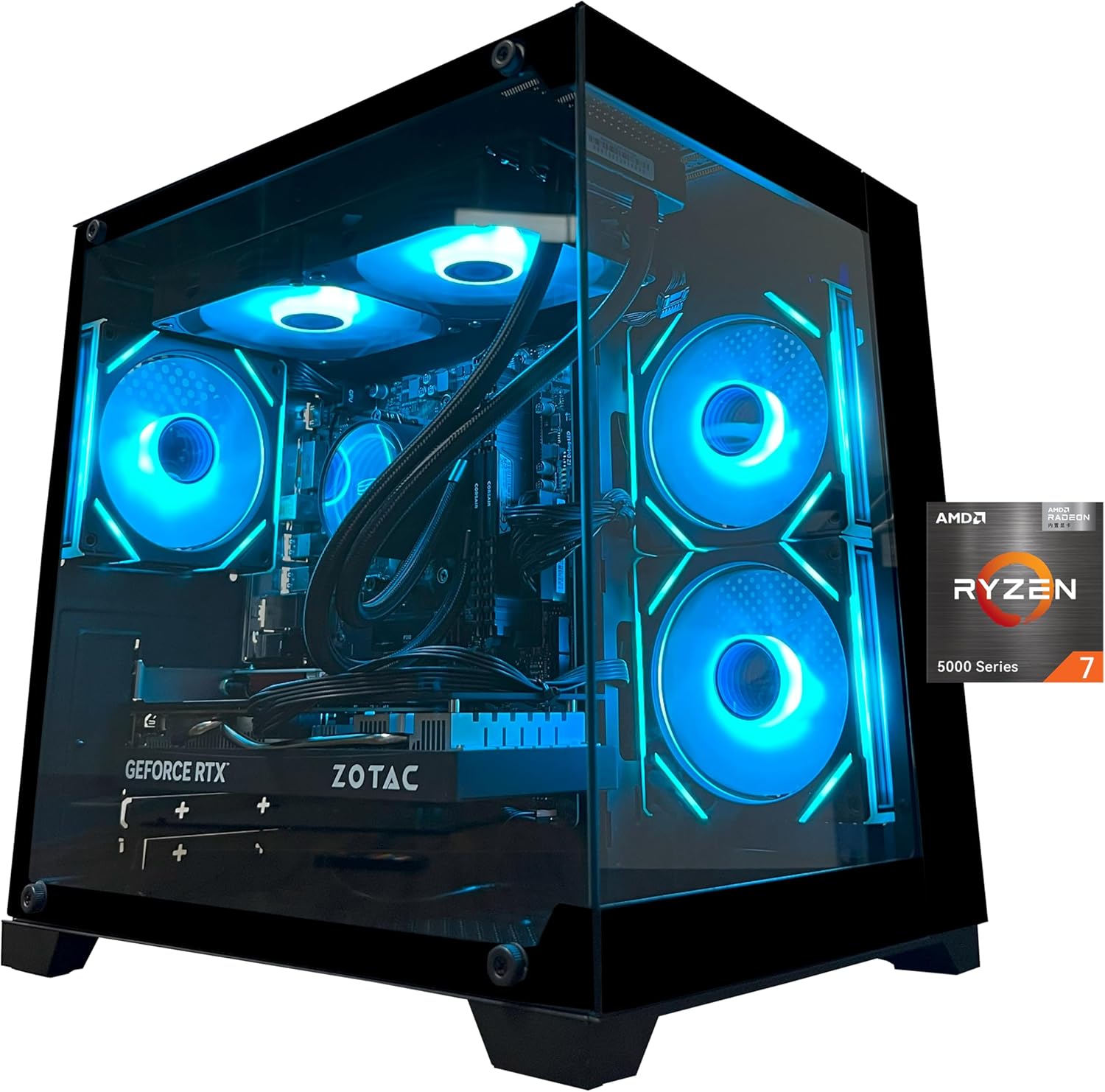
The YAWYORE gaming PC desktop is a pre-built tower designed for gamers, streamers, and content creators who want strong performance without the hassle of building their own rig. It packs an AMD Ryzen 7 5700X CPU, an NVIDIA GeForce RTX 5060 GPU, 32GB of DDR4 RAM, and a 1TB NVMe SSD into a stylish case with liquid cooling and ARGB fans. This setup targets a wide audience, from competitive esports players to casual gamers and even those who need a versatile machine for work-from-home or college tasks.
In real-world gaming, the RTX 5060 with 8GB of GDDR7 memory and DLSS 4 support delivers smooth frame rates in modern titles at 1080p and even 1440p with some settings adjustments. The Ryzen 7 5700X’s eight cores handle multitasking well, allowing you to stream or run Discord alongside gameplay without noticeable stutter. User feedback highlights quiet operation during sessions, which is a plus for immersive gaming or content creation. The included 240mm liquid cooler and three ARGB fans keep temperatures in check, even during extended use, and the lighting can be controlled with a remote for easy desktop customization.
Build quality appears solid, with an MSI B550M-A PRO motherboard that offers good stability and upgrade paths. The case has a tempered glass side panel, though not explicitly stated in specs, typical for this price range. The 650W 80 Plus Bronze power supply is sufficient for the current components but may limit future GPU upgrades to mid-range options. Setup is straightforward: Windows 11 is pre-installed, and the system boots quickly thanks to the NVMe SSD. However, the product description advises removing internal foam padding upon arrival, which adds a small initial step.
One limitation noted in user reviews is mixed reliability. While many users praise the performance and appearance, some report issues after a few months, with one reviewer experiencing a system failure after two months. This suggests that while the PC offers great value on paper, quality control may vary. Also, the graphics card brand may differ from what’s listed, which could affect performance consistency. The 650W PSU might struggle with future high-end upgrades, so buyers should plan accordingly.
For desk setup, the tower is relatively compact for a liquid-cooled system, and the RGB fans add flair to any gaming station. Cable management inside appears tidy based on user images. The included WiFi and Bluetooth eliminate the need for dongles, simplifying connectivity. Overall, this PC is well-suited for gamers who want a ready-to-run machine with strong out-of-box performance and visual appeal, especially those building their first gaming setup or upgrading from a laptop. However, those seeking long-term reliability might want to consider extended warranty options or build their own system for more control.
Pros
- High-performance 8-core processor great for gaming and multitasking.
- DDR5 and PCIe 5.0 support for future-proofing.
- WiFi 6 and Bluetooth 5.3 for wireless convenience.
- Overclocking headroom with unlocked CPU and robust VRM.
- Bundle simplifies shopping and ensures compatibility.
Cons
- No CPU cooler included: requires separate purchase.
- Only 0 reviews at launch: early adopter risk.
- GIGABYTE B850 is a mid-range board: lacks PCIe 5.0 for GPU slot (only M.2).
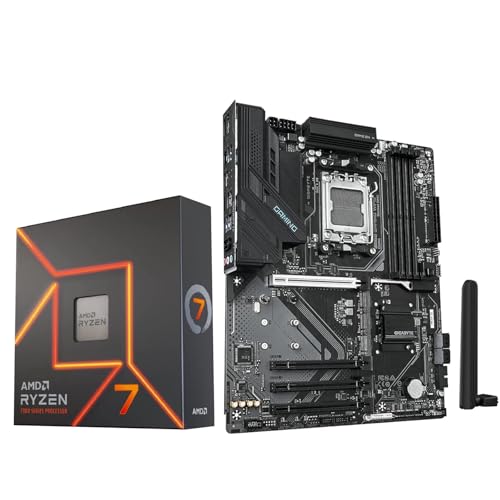
The Micro Center bundle combining the AMD Ryzen 7 7700X CPU and GIGABYTE B850 Gaming WiFi6 motherboard provides a straightforward path to building a powerful AM5 gaming PC. The Ryzen 7 7700X is an 8-core, 16-thread processor with a max boost of 5.4 GHz, designed to deliver smooth 100+ FPS performance in popular games. Paired with the GIGABYTE B850 Gaming ATX board, this kit supports DDR5 memory (overclockable up to 8200 MT/s) and includes a PCIe 5.0 M.2 slot for blazing-fast storage.
This setup is ideal for PC gamers, competitive esports players, and streamers who want a responsive foundation for high-refresh-rate gaming. The combination of a fast CPU and a modern chipset ensures low-latency performance in titles like Call of Duty, Valorant, and Fortnite. Content creators will also appreciate the multi-core muscle for video encoding and multitasking during streams.
Build quality is solid: the GIGABYTE B850 board features a digital 6+2+2 phase VRM with thermal armor, keeping the CPU cool under load. The board includes three M.2 slots (one PCIe 5.0, two PCIe 4.0) and four SATA ports for ample storage. Connectivity is robust with WiFi 6, Bluetooth 5.3, USB 3.2 Gen 1 Type-C, and HDMI/DisplayPort outputs for integrated graphics (though a discrete GPU is recommended for gaming).
Setup is streamlined thanks to the bundle: the CPU and motherboard come together, eliminating compatibility guesswork. GIGABYTE's EZ-Latch feature simplifies GPU and M.2 installation, and the included Q-Flash BIOS update tool makes firmware upgrades easy. However, note that no CPU cooler is included in the box, so you will need to purchase a separate cooler (air or liquid) to keep the 105W TDP processor running cool.
A realistic limitation is the lack of user reviews at launch, which means early adopters may encounter firmware quirks. Additionally, the B850 chipset is positioned below X870, so it lacks advanced PCIe 5.0 lanes for graphics cards (the GPU slot is PCIe 4.0). For most gamers, PCIe 4.0 is more than sufficient, but enthusiasts aiming for future GPU bandwidth may prefer a higher-end board.
Overall, this bundle offers excellent value for gamers and builders who want a high-performing AM5 platform without hunting for separate deals. The Ryzen 7 7700X provides top-tier gaming performance, and the GIGABYTE B850 motherboard provides the essential modern features. If you are building a new gaming PC or upgrading to DDR5, this well-matched combo is a practical choice.
Frequently Asked Questions
What cooling setup is necessary to prevent thermal throttling on Ryzen gaming CPUs?
A 240mm or 360mm AIO liquid cooler is ideal for 105W processors, while standard 65W chips run safely on quality dual-tower air coolers. Aggressive boost algorithms push clock speeds until thermal headroom narrows. Processors like the 7700X and 9800X3D benefit greatly from liquid setups. Maintaining ample case airflow keeps sustained frequencies stable during marathon gaming sessions.
Should you choose an AM4 or AM5 motherboard for the best gaming ryzen cpu in 2026?
AM5 is the smarter choice for fresh builds requiring DDR5 memory and PCIe 5.0, whereas AM4 remains an exceptional budget-friendly alternative. Existing AM4 setups running chips like the Ryzen 7 5800XT easily push fluid frames without requiring expensive motherboard swaps. If you are pairing your rig with a high-refresh gaming display, the improved single-core IPC on AM5 delivers noticeably tighter frame pacing.
How much does DDR5 memory speed impact gaming performance on Ryzen platforms?
Memory frequency directly affects frame stability because AMD processor interconnects sync closely with system RAM speed. For modern AM5 processors, DDR5-6000 with low latency provides the optimal sweet spot for performance and system stability. Running slow or single-channel RAM can restrict CPU data pipelines, leading to micro-stutters in open-world titles.
Does 3D V-Cache provide a noticeable advantage in gaming workloads?
Yes, 3D V-Cache substantially boosts average frame rates and 1% low frames in cache-sensitive titles. By vertically stacking expanded L3 cache on the processor die, the CPU accesses game engine data instantly without pinging system memory. This architecture pays huge dividends in competitive shooters, dense RPGs, and simulation titles.
Do you need a discrete graphics card when running these AMD processors?
Yes, dedicated graphics cards are essential because most gaming-focused Ryzen desktop CPUs lack capable integrated GPUs. Processors ending in ‘F’ or high-performance ‘X’ models require a video card to send a display signal to your monitor. Dedicated GPUs ensure your processor can stretch its legs without graphic rendering bottlenecks.





Write Your Review
No reviews yet. Be the first to share your experience!