


Thermal throttling can ruin an intense gaming session faster than almost anything else. High core temperatures force your silicon to drop its boost clocks, which triggers annoying frame drops during competitive matches. Picking the best gaming cpu cooler canada ensures your system holds top boost clocks without sounding like a vacuum cleaner. It’s a straightforward upgrade that keeps temperatures steady across demanding titles, so you won’t have to worry about sudden stuttering during peak action.
Balancing airflow, socket clearance, and pump noise takes careful evaluation, especially with the hot chiplet designs of modern platforms. Based on manufacturer specifications and builder feedback, high thermal capacity keeps both single-core boost spikes and sustained multi-threaded renders in check. Pairing an efficient dual-tower heatsink or liquid radiator with a high-performance gaming processor guarantees consistent frame pacing and silent everyday operation.

Pros
- Excellent cooling performance for its price range, handling mid-range to high-end CPUs well.
- Easy installation thanks to simplified brackets and clear instructions.
- Quiet operation under normal loads, with PWM control for noise management.
- Compact 152mm height fits most cases, even some smaller mid-towers.
- All-black aesthetic looks great in any gaming build, especially with RGB or non-RGB themes.
Cons
- May not provide sufficient cooling for extreme overclocking or very high-end CPUs like i9 or Ryzen 9 under heavy sustained loads.
- No RGB lighting is included, so those wanting customizable lighting will need to add their own fans or strips.
- The included fan is good but some users might prefer higher static pressure fans for push-pull configurations.
The Cooler Master Hyper 212 Black CPU Air Cooler is a reliable air cooling solution for gaming PCs, designed to keep your processor running cool during long gaming sessions. It is particularly suited for PC gamers building or upgrading a system with mid-range to high-end CPUs like AMD Ryzen 7 or Intel Core i7, as well as esports players and streamers who need consistent performance without breaking the bank.
With four copper heat pipes and a copper base, this cooler efficiently transfers heat away from your CPU. The included 120mm SickleFlow 120 Edge fan uses a PWM curve to adjust speeds between 690 and 2,500 RPM, providing ample airflow while keeping noise levels low. During gaming, you will notice stable temperatures that help maintain smooth frame rates and system responsiveness, even in demanding titles like Call of Duty or Cyberpunk 2077.
The Hyper 212 Black features a durable aluminum top cover and a sleek black finish that blends seamlessly into any gaming setup. Its 152mm height makes it compatible with most mid-tower and full-tower cases, including popular options like the Corsair 4000D or NZXT H510. The redesigned mounting brackets simplify installation on AMD AM5/AM4 and Intel LGA1851/1700/1200 sockets, so you can have it up and running quickly.
Installation is straightforward, even for first-time builders, thanks to clear instructions and a pre-applied thermal paste. The single fan setup is easy to manage, and the PWM connection allows for automatic speed control. Keep in mind that while this cooler handles Ryzen 7 and i7 chips well, it may struggle with heavy overclocking or extreme CPUs like the i9-13900K under full load. Additionally, there is no RGB lighting, so if you are building a colorful setup, you will need to add your own LEDs.
If you are a PC gamer, esports player, or content creator looking for an affordable, quiet, and effective air cooler that fits most modern sockets, the Cooler Master Hyper 212 Black is a solid choice. It works well for casual gamers, competitive players, and even streaming setups where consistent performance is key. For those on a budget or building a new gaming PC, this cooler offers excellent value without sacrificing cooling capability.
The Hyper 212 Black supports a wide range of sockets, including AMD AM5 and AM4, as well as Intel LGA1851, LGA1700, LGA1200, and LGA115x. Its 152mm height ensures compatibility with most standard tower cases, though it is recommended to check your case's CPU cooler clearance before purchase. The cooler comes with all necessary mounting hardware for a hassle-free installation.


Pros
- Excellent cooling performance for high-end gaming CPUs, with a thick 38mm radiator and high-static-pressure P12 Pro fans.
- Integrated VRM fan helps keep motherboard voltage regulators cool during sustained loads, boosting system reliability.
- Offset mounting improves heat transfer on both Intel and AMD platforms, reducing CPU temperatures in real-world gaming scenarios.
- Cable management is a standout feature - only one visible cable for all fans, making builds cleaner and easier to manage.
- Contact frame design ensures even pressure distribution, potentially extending CPU lifespan and reducing risk of bending.
Cons
- Thicker 38mm radiator may not fit in all cases, especially those with limited clearance for top or front mounting.
- PWM cables integrated into tubing could complicate replacement or custom loop upgrades if needed in the future.
- A-RGB lighting is limited to pump and fans; some users may prefer more extensive RGB coverage on the radiator itself.
The ARCTIC Liquid Freezer III Pro 360 A-RGB is a purpose-built all-in-one CPU cooler that targets serious PC gamers, streamers, and custom PC builders. This 360mm AIO combines a thick 38mm radiator, ARCTIC's P12 Pro fans, and a unique integrated VRM fan to deliver reliable thermal performance even under the sustained loads of competitive gaming or live streaming. The included contact frame for Intel LGA1851 and LGA1700 ensures even pressure distribution, which not only improves heat transfer but also helps protect your CPU from long-term stress.
For gaming PCs, this cooler excels at taming high-TDP processors during extended sessions. The native offset mounting for both Intel and AMD platforms positions the cold plate directly over the CPU's hotspot, making it an effective choice for overclocked gaming rigs. The P12 Pro fans offer a strong balance of airflow and silence; they move plenty of air at higher speeds when needed but stay remarkably quiet at lower RPMs, so you won't hear them during casual gameplay or desktop work. The integrated VRM fan is a thoughtful addition for streamers and content creators who push their systems hard, as it actively cools the voltage regulators around the CPU socket.
Build quality is solid across the board. The radiator feels sturdy with its reinforced frame, and the sleeved tubing is both flexible and durable. One of the cooler's biggest practical advantages is the integrated cable management: the PWM cables for all three fans are routed inside the tubing sleeve, so you only have to manage a single, clean cable to the motherboard. This simplicity makes installation and cable routing much easier compared to traditional AIOs with multiple fan cables, especially in compact gaming cases where airflow organization is critical. The pump is PWM-controlled as well, allowing system software to fine-tune performance versus noise.
Setting up the Liquid Freezer III Pro 360 A-RGB is straightforward, thanks to included mounting hardware for Intel LGA1851/1700 and AMD AM5/AM4. The contact frame design removes guesswork from mounting pressure. However, the 38mm radiator thickness means you should double-check case compatibility: many mid-towers can accommodate a 360mm radiator, but clearance for the added thickness depends on your case layout and whether you top-mount or front-mount it. Also, because the fan cables are permanently embedded in the tubing, replacing a fan requires more effort than usual.
A realistic limitation is that this AIO is best suited for users who value a clean, functional build over extensive RGB customization. While the pump and fans feature A-RGB lighting that can sync with most motherboards, the radiator itself doesn't have integrated LEDs. Some gamers who prefer a fully illuminated setup might look for more flashy options. Additionally, the fan cable integration means you cannot easily swap fans for other brands without cutting into the tubing sleeve, which is a minor inconvenience for modders.
Overall, the ARCTIC Liquid Freezer III Pro 360 A-RGB is a smart choice for PC gamers, streamers, and content creators who prioritize cooling performance, reliability, and build simplicity. Its integrated cable management and VRM fan set it apart from many competitors in the same price range. If your case has the clearance for a 38mm radiator, this cooler delivers robust thermal performance and a clean aesthetic that will complement any gaming setup, from competitive esports rigs to quiet home-office gaming machines.
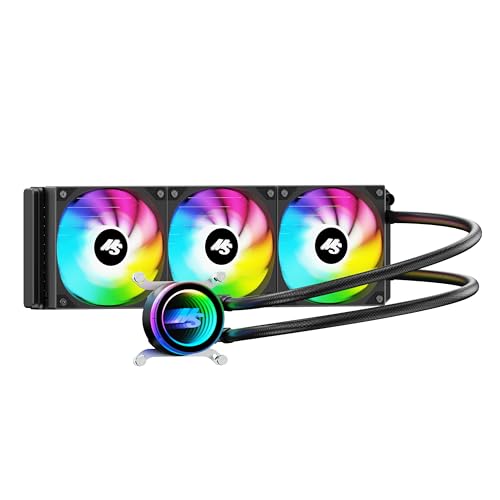


Frequently Asked Questions About Gaming CPU Cooling
Will a 120mm air cooler be enough for the Best Gaming Cpu Cooler Canada setup in 2026?
Yes, a quality single-tower 120mm air cooler works reliably for processors rated up to 150W TDP. Units like the Cooler Master Hyper 212 or ID-COOLING SE-214-XT handle mid-range six-core and eight-core processors with ease during gaming. If you push unlocked multi-core chips under heavy blender exports, moving up to a dual-tower or a 360mm AIO is recommended to avoid thermal throttling.
Do modern desktop processors require liquid cooling instead of air cooling?
No, modern desktop processors do not strictly require liquid cooling unless you run top-tier enthusiast chips at high power limits. Premium dual-tower air coolers handle high heat loads quietly without pump failure risks. Many builders pairing modern AMD gaming processors find that robust air heatsinks provide plenty of thermal headroom for sustained gaming clocks.
How does radiator thickness affect liquid cooling performance?
Radiator thickness directly increases surface area for heat exchange, leading to cooler coolant temperatures under sustained loads. Units like the ARCTIC Liquid Freezer III use a 38mm thick radiator that dissipates thermal energy faster than standard 27mm radiators. Just make sure your chassis has enough motherboard clearance so the extra thickness doesn’t collide with VRM heatsinks or high-profile RAM.
What is an offset mounting bracket and why does it matter for AMD AM5 sockets?
An offset mounting bracket shifts the cooler’s cold plate center directly over the CPU’s primary compute die hotspot. Because AMD AM5 chiplets place the hottest compute dies off-center rather than in the middle, native offset mounts improve heat transfer significantly. This design allows lower fan speeds and prevents sudden thermal throttling during heavy multi-threaded workloads.
Can an all-in-one liquid cooler fit inside compact or vertical GPU PC cases?
Yes, most 360mm and 240mm liquid coolers fit inside mid-tower cases, but component clearance requires careful verification. When installing a top-mounted radiator in PC cases with vertical GPU mount setups, ensure the radiator tubing and graphics card riser cable do not obstruct case airflow. Double-check your case specifications for radiator thickness and RAM height clearance before assembly.
How do integrated VRM fans benefit gaming motherboard longevity?
Integrated VRM fans push direct airflow over the power delivery heatsinks surrounding the CPU socket. Liquid cooling blocks often leave the motherboard power delivery area without active air movement, causing voltage regulators to run warm. Coolers equipped with small VRM fans lower those component temperatures, improving overall power stability during extended gaming marathons.





Write Your Review
No reviews yet. Be the first to share your experience!