


Tab switching between a game, Discord, and a stream can kill immersion. When you’re in a competitive match, every second you spend alt-tabbing is a second you’re vulnerable. That’s where a multi-monitor setup comes in. But if you’re on a gaming laptop, you don’t have the desk space for a bulky external monitor setup. The best gaming laptops for multi-monitor solutions now include portable screen extenders that attach directly to your laptop. These slim, lightweight displays add extra screen real estate without cluttering your desk. Whether you’re monitoring chat while grinding ranked or running a strategy guide on a secondary panel, these laptop screen extenders can boost your efficiency and help you stay focused on the game. We’ve analyzed the top 10 models based on specs, user feedback, and build quality to help you find the right fit for your battle station. If you’re still deciding on monitor size, check out our guide on whether a 24 inch monitor is good for gaming.
Portable monitors have evolved beyond simple productivity tools. Many now feature 1080p IPS panels, USB-C plug-and-play, and ultra-slim designs that weigh under 2 pounds. For gamers, the ability to add a second or even third screen to a gaming laptop means you can keep an eye on performance metrics, stream overlays, or simply have a browser open for quick searches without alt-tabbing. The options range from single portable displays to triple-screen extenders that clip onto your laptop. Based on product specifications and user reviews, we’ve identified 10 models worth considering for 2026.
Pros
- Adds two external monitors for immersive gaming and streaming without a bulky desktop setup
- Sleek aluminum build is both durable and lightweight for travel
- Simple plug-and-play setup with only two USB-C cables (if laptop supports full functionality)
- Wide compatibility with most laptops 13-17.3 inches and multiple operating systems
- Great for boosting productivity in gaming, coding, and content creation workflows
Cons
- Requires laptop USB-C port with full DisplayPort and power delivery support for single-cable simplicity
- At 4 lbs, it may be heavier than some users prefer for long commutes
- No built-in battery; pulls power from the laptop, which may drain the battery faster
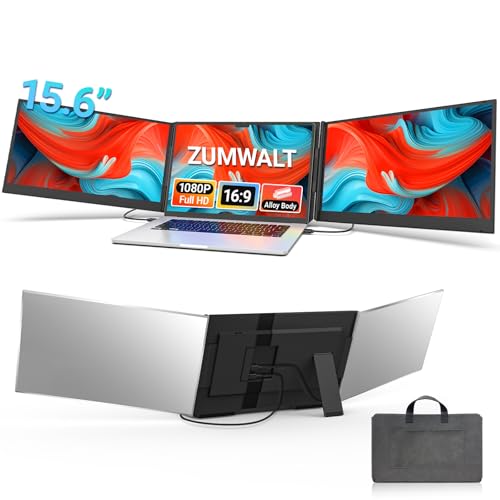
The ZUMWALT P7 is a laptop screen extender that transforms your portable setup into a triple-monitor powerhouse. It adds two 15.6-inch 1080P displays to your existing laptop screen, giving you three times the screen real estate for multitasking, gaming, streaming, or content creation. This device is designed for PC gamers, streamers, content creators, work-from-home gamers, college students, and anyone who needs extra productivity without a bulky desktop.
When it comes to performance, the dual monitors deliver FHD resolution with 280 nits of brightness and a 178-degree viewing angle. According to product specifications, this ensures vibrant colors and clear visuals whether you're editing videos, monitoring chat while streaming, or playing games across multiple windows. The 60Hz refresh rate is standard for portable monitors and works well for casual gaming and productivity, though competitive esports players may prefer a higher refresh rate on their primary display.
Build quality is a strong point. The ultra-slim aluminum alloy shell gives it a premium feel while keeping the weight at just 4 pounds. The included leather carry bag makes it easy to transport, and the lack of a top baffle or clip simplifies installation and removal. The design also reduces stress on your laptop's hinge, which is a thoughtful touch for daily use.
Setup is straightforward. With a modern laptop that has a full-function USB-C port (supporting DisplayPort and power delivery), you only need two USB-C cables to connect both monitors. This eliminates messy cables and compatibility headaches. The extender is plug-and-play on Windows, Mac, and Android devices, so you can start using it right away. However, if your laptop's USB-C port is limited to data only, you may need additional cables or adapters, which could add complexity.
Practical limitations include the need for a laptop with adequate USB-C support and the fact that the monitors draw power from the laptop, which can reduce battery life. The weight of 4 lbs might be noticeable in a backpack but is reasonable for a dual-screen setup. Additionally, the 60Hz refresh rate and 1080P resolution are fine for most tasks but may not satisfy hardcore competitive gamers who prioritize high refresh rates.
Overall, the ZUMWALT P7 is a solid choice for PC gamers and streamers who want a portable triple-screen solution for gaming on the go, streaming from coffee shops, or managing multiple apps during a workday. It's also great for content creators who need more screen space for editing timelines and asset management. If you have a compatible laptop and value productivity without sacrificing portability, this extender is worth considering.
Pros
- Quad-screen multitasking enhances gaming, streaming, and productivity without needing external monitors.
- Easy single-cable USB-C connection simplifies setup and keeps your desk tidy.
- Auto-rotating top screen offers flexible viewing angles for streaming and collaboration.
- Aluminum alloy build provides sturdy support without damaging your laptop's hinge.
- Low blue light and high brightness help reduce eye fatigue during long sessions.
Cons
- Requires a laptop with USB-C video output or a compatible adapter, which may limit older devices.
- At 15.6 inches per screen, the total footprint might be large for smaller desks or tight travel bags.
- Premium pricing may not suit budget-conscious gamers who only need a single extra monitor.
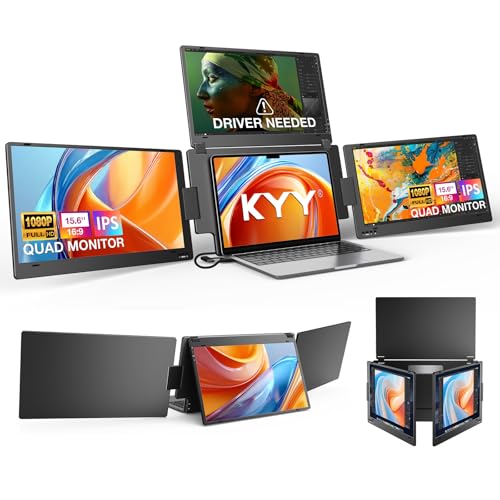
The KYY Triple Screen Laptop Monitor Extender is a portable quad-monitor solution designed for PC gamers, streamers, and content creators who crave extra screen real estate without the hassle of multiple external monitors. This 15.6-inch FHD 1080P extender connects to your laptop via a single USB-C cable, instantly turning your portable setup into a four-screen workstation. Whether you're managing game guides, monitoring your Twitch chat, or juggling spreadsheets while streaming, this device aims to streamline your workflow and keep you in the action.
For competitive gamers and esports players, the 60Hz refresh rate and 1080P resolution deliver smooth visuals for most games, though fast-paced FPS titles may benefit from higher refresh rates. The real strength here is multitasking: you can keep your main game on the laptop screen, a stream dashboard on one extender, Discord on another, and a browser on the top screen. This setup is a game-changer for streamers who need to keep an eye on chat, alerts, and overlays without alt-tabbing constantly.
Build quality is a highlight. The integrated aluminum alloy stand avoids the common clip-on design that can stress your laptop's hinge, providing a stable, durable base that feels solid on any desk. The screens adjust up to 360 degrees, with the top screen auto-rotating when folded backward, making it easy to share content or angle the display for comfortable viewing. This thoughtful engineering means you can set it up once and trust it for long gaming sessions or work marathons without wobble or strain.
Setup is impressively simple: plug the single USB-C cable into your laptop, and all four screens activate in extended or mirrored mode. No complex drivers are needed for most modern laptops running macOS, Windows, Linux, or Android (driver required for some Linux/Android devices). The low blue light technology and 400 nits brightness help reduce eye fatigue, so you can game or work for hours without discomfort. Cable management is minimal thanks to the single-cable design, keeping your desk clean and organized.
Realistic limitations include the need for a USB-C port that supports video output, which older laptops may lack. Also, at around 15.6 inches per screen, the overall footprint is substantial, so it might not fit in a small backpack or on a cramped desk. The premium price tag reflects the all-in-one convenience, but budget-conscious gamers who only occasionally need extra screens might find a single portable monitor more cost-effective.
Overall, the KYY Triple Screen Laptop Monitor Extender is a practical investment for dedicated streamers, content creators, and productivity-focused gamers who want a clean, portable multi-monitor setup. It excels in reducing clutter, easing eye strain, and boosting efficiency during intense gaming or work sessions. If you're a PC gamer, streamer, or professional who lives in multiple windows, this extender could be the key to leveling up your desk setup and workflow.

Pros
- Sharp 1080P IPS display with good color accuracy and wide viewing angles
- Plug-and-play USB-C connectivity works with many devices without extra drivers
- Lightweight and thin for easy portability to LAN parties or dorm rooms
- Included smart cover is practical for protection and stand use
- Multiple connectivity options (USB-C, HDMI) support various gaming platforms
Cons
- Requires USB-C DP Alt Mode or Thunderbolt 3 for single-cable operation, limiting compatibility with older devices
- Built-in speakers may lack depth for immersive gaming audio
- Matte screen can reduce contrast in bright environments compared to glossy panels
The MNN Portable Monitor is a 15.6-inch Full HD 1080P IPS display designed for PC gamers, streamers, content creators, and anyone who needs a second screen for their gaming setup. This ultra-slim external monitor connects via USB-C or HDMI, making it versatile for use with laptops, PCs, phones, and consoles like the PS5, Xbox, and Nintendo Switch. Its lightweight build and included smart cover make it a practical choice for gamers who want to extend their desktop or take their gaming on the go.
In terms of performance, the 1080P resolution and IPS panel deliver clear visuals with decent color accuracy and 178-degree viewing angles. The matte screen helps reduce glare and blue light, which is a nice touch for long gaming sessions or late-night streaming. While the 60Hz refresh rate is standard for portable monitors, it works well for strategy games, casual gaming, or as a secondary screen for Discord, chat, or productivity tasks during competitive play. The HDR mode adds a bit more pop to colors and contrast, though it's not a replacement for a high-end gaming monitor.
Build quality feels solid for its price range, with a slim profile that measures just 0.3 inches thick and weighs 1.53 pounds. The smart cover is made of durable PU leather and doubles as a stand, offering protection during travel and flexible orientation options (landscape or portrait). This is especially useful for streamers who want to manage chat or OBS on a vertical screen. The dual USB-C ports support plug-and-play connectivity, but note that your device must support USB-C DP Alt Mode or Thunderbolt 3 for single-cable operation. If not, you'll need to use the included USB-C cable for power and HDMI for video.
Setting up the MNN monitor is straightforward: just connect it to your laptop, PC, or phone, and it works as an extended or mirrored display. The multiple display modes (copy, extend, second screen, portrait) give you flexibility for different tasks, whether you're gaming, working, or creating content. The built-in speakers are adequate for basic audio, but most gamers will prefer using a gaming headset or external speakers for better sound quality. Cable management is simple thanks to the compact design, and the monitor requires minimal maintenance beyond occasional screen cleaning.
One realistic limitation is that the 60Hz refresh rate and 5ms response time (typical for portable monitors) won't satisfy competitive esports players who need high refresh rates for fast-paced FPS games. Additionally, the single-cable USB-C convenience depends on your device's compatibility, so check your laptop or phone specs before buying. The speakers are also basic, so don't expect rich audio for movies or games.
Overall, the MNN Portable Monitor is a solid choice for PC gamers, streamers, and gaming setup builders who want an affordable, portable second screen for multitasking, travel, or casual gaming. It works well as a companion for laptops in dorm rooms, home offices, or on the go. If you need a high-refresh-rate gaming monitor for competitive play, look elsewhere, but for general productivity and light gaming, this is a practical and budget-friendly option.

Pros
- Plug-and-play simplicity with one USB-C cable (driver download required initially) for fast triple-monitor setup.
- Sharp 1080P IPS panels with 178° viewing angles deliver consistent color and clarity for gaming and content creation.
- Rotating screens and adjustable kickstand offer versatile positioning, ideal for collaborative work or multi-angle viewing.
- Portable and lightweight design fits easily into a laptop bag, making it a great travel companion for remote work or gaming on the go.
Cons
- Driver installation is required before first use, which may be a minor inconvenience for some users.
- 60Hz refresh rate limits its appeal for competitive gamers who prefer higher frame rates; best suited for strategy, RPG, or productivity tasks.
- Relies on USB-C power delivery, so laptops with limited power output may need an external power adapter for full brightness and performance.
The KYY X90D is a laptop screen extender that adds two 15.6-inch 1080P IPS monitors to your existing laptop, effectively turning it into a triple-display powerhouse. While it's not a traditional gaming monitor, it's a versatile accessory for PC gamers, streamers, content creators, and anyone who needs extra screen real estate for multitasking. Whether you're managing Discord chats while gaming, editing video timelines, or juggling spreadsheets during a work-from-home session, this device can significantly boost your productivity.
For PC gamers, the X90D works best for strategy games, MMOs, and simulation titles where extra screens for maps, inventory, or guides are helpful. Streamers will appreciate having a dedicated panel for Twitch chat, OBS controls, or stream alerts without alt-tabbing. Content creators can use the portrait mode for coding, reading scripts, or editing timelines. However, competitive esports players should note the 60Hz refresh rate – it's fine for secondary displays but not ideal for fast-paced FPS gaming where high refresh rates matter.
Build quality is solid with an aluminum alloy chassis and a sturdy built-in kickstand that adjusts up to 90°. Each screen rotates 360°, making it easy to share content with colleagues or switch between landscape and portrait orientations. The single USB-C connection simplifies cable management, but note that drivers must be downloaded before first use. The package includes all necessary cables and a power adapter for laptops that can't supply enough power via USB-C alone.
In terms of performance, the 1080P IPS panels offer good color reproduction and wide 178° viewing angles, so multiple people can view the screens without distortion. The control wheel on each screen allows quick adjustments to brightness, volume, and orientation – a nice touch for on-the-fly changes. Setup is straightforward: install the driver, connect the USB-C cable, and you're ready to go. The extender is lightweight and fits easily into most laptop bags, making it a practical travel companion for remote workers or college gamers.
One realistic limitation is the driver requirement – some users may find it less convenient than truly plug-and-play solutions. Additionally, the 60Hz refresh rate means it's not a replacement for a high-refresh-rate gaming monitor. But for its intended purpose – adding portable, flexible extra screens – the X90D performs well. It's ideal for gamers who multitask, streamers who need extra monitoring space, and professionals who want a mobile dual-monitor setup without carrying separate monitors.
Overall, the KYY X90D is a solid choice if you need a portable triple-screen solution for gaming, streaming, or productivity. It's not for competitive gamers chasing high refresh rates, but for anyone who values extra screen space and flexibility, it's a practical investment. Consider your primary use case: if you often find yourself wishing for more screen real estate while on the move, this extender delivers.

Pros
- Ultra-portable design at just 0.27" thick and 1.9lb, ideal for travel and compact setups.
- Secure Five-Clip System with silicone grommets protects laptop screen and hinge during use.
- Plug-and-play with no driver installation required, works with a wide range of devices including laptops, consoles, and smartphones.
- Vivid FHD display with 178° viewing angle and 300nit brightness suitable for indoor and outdoor use.
- Versatile mode switching (extended, mirrored, portrait, landscape) enhances productivity for gaming, streaming, and work.
Cons
- No integrated battery, so it must be powered via laptop USB or external power adapter, which may limit portability in some scenarios.
- Built-in speakers are basic and may not satisfy audiophiles or those seeking immersive gaming audio without external headphones.
- The 14" screen size may feel small for users accustomed to larger dual-monitor desktop setups.
The BreezyLife 14" Dual Laptop Screen Extender is a portable monitor designed to add a second display to your laptop, making it a versatile tool for PC gamers, streamers, content creators, and anyone who needs to multitask on the go. This ultra-thin monitor measures just 0.27 inches thick and weighs only 1.9 pounds, so it slips easily into a backpack or laptop bag without adding bulk. Whether you're a competitive gamer monitoring chat and stats while playing, a streamer managing overlays and alerts, or a college gamer juggling coursework and gaming, this extender can help streamline your workflow.
In terms of performance, the monitor offers a 14-inch FHD 1080P IPS display with 300 nits of brightness and a 72% NTSC color gamut. This provides clear, vibrant visuals with wide 178-degree viewing angles, making it suitable for gaming, watching videos, or working on creative projects. The display supports extended, mirrored, duplicate, portrait, and landscape modes, allowing you to customize your setup for different tasks. For gamers, this means you can keep a game guide, map, or Discord chat open on the second screen without alt-tabbing, which can improve responsiveness and immersion during long sessions.
Build quality is a strong point here. The monitor uses military-grade ABS plastic with a patented Five-Clip System that securely attaches to laptops ranging from 13 to 17.3 inches. Reinforced silicone grommets prevent pressure on your laptop's screen, and the widened aluminum base offers adjustable height and a stable 90-degree tilt. This design has been tested for 50,000 cycles, so it should hold up well to daily use. The included cables (Type-C to C, USB-A to C, and Mini HDMI) are 43.3 inches long, giving you some flexibility in positioning the monitor on your desk or in a coffee shop.
Setup is straightforward: just connect the monitor to your laptop via USB-C or HDMI, and it works without installing any drivers. It's compatible with Windows, Mac, Android, Linux, ChromeOS, and even gaming consoles like the Switch and PS5 via USB-C DP Alt Mode. One thing to note is that the monitor doesn't have a built-in battery, so it needs power from your laptop's USB port or an external power adapter. If you see a 'No Signal' message, simply connect additional power to activate it. This is a minor inconvenience but worth considering if you plan to use it in places without easy access to power.
While the built-in speakers are functional for basic audio, they won't replace a good gaming headset or external speakers for immersive sound. The 14-inch size is also smaller than typical desktop monitors, so if you're used to a large dual-monitor setup, this might feel cramped. However, for travel, dorm rooms, or compact desks, it's a practical solution. The monitor's anti-glare and flicker-free design helps reduce eye strain during extended use, which is a plus for long gaming or work sessions.
Overall, the BreezyLife 14" Dual Laptop Screen Extender is a solid choice for PC gamers, streamers, and productivity users who need a portable second screen. It's lightweight, easy to set up, and works with a wide range of devices. If you often find yourself needing extra screen real estate while traveling or working from different locations, this monitor can boost your efficiency without adding much weight to your bag. Just keep in mind the power requirement and the basic speakers, and you'll have a reliable tool for multitasking on the go.

Pros
- Instant triple-screen setup boosts multitasking for gaming, streaming, and productivity.
- Auto-adjust width and reinforced hook ensure a secure fit on most 13-17 inch laptops.
- IPS display with 100% sRGB and 300 nits brightness delivers vibrant, clear visuals.
- Plug-and-play connectivity with USB-C or HDMI+USB-A makes setup quick and easy.
Cons
- Not compatible with Mac devices using M1/M2/M3 chips or older MacBook models (pre-2018).
- Requires two fully functional USB-C ports or one USB-C plus HDMI+USB-A for full dual-screen operation, which may limit compatibility with some laptops.
- At 4.1 pounds, it adds noticeable weight to your laptop setup, though still portable for travel.
The Wixzet Laptop Screen Extender is a portable dual-monitor solution that attaches directly to your laptop, adding two 14-inch FHD 1080P IPS displays. This triple-screen setup is designed for PC gamers, streamers, content creators, and productivity users who need more screen real estate without the bulk of separate monitors. Whether you're monitoring chat and stream stats while gaming, editing videos with multiple timelines, or managing trading charts, this extender aims to streamline your workflow.
In terms of performance, the 1080P resolution with 100% sRGB color gamut and 300 nits brightness delivers clear, vibrant visuals that are suitable for gaming and content creation. The anti-glare and low blue light features help reduce eye strain during long sessions, which is a plus for competitive gamers and streamers who spend hours at their desk. The plug-and-play setup is straightforward: if your laptop has two USB-C ports with display output, you can connect both screens with a single cable each. Otherwise, you can use one USB-C and one HDMI+USB-A combination. This flexibility makes it compatible with a wide range of Windows, Mac, Chrome, Android, Linux, Dex, and even Switch devices, though it's important to note that Macs with M1/M2/M3 chips and older MacBooks (pre-2018) are not supported.
Build quality is solid for a portable device. The reinforced top hook and widened back stand keep the extender securely attached to your laptop, preventing slips during use. The 180-degree foldable design protects the screens when not in use and allows for adjustable viewing angles. At 4.1 pounds, it's light enough for travel but does add noticeable weight to your laptop bag. The auto-adjust width mechanism fits laptops from 13 to 17 inches, making it versatile for different setups.
For gamers and streamers, this extender can be a game-changer for multitasking. You can keep your game on the main screen, Discord or chat on one side, and a stream dashboard or guide on the other. The independent brightness and volume controls for each screen let you customize your viewing experience. However, keep in mind that the extender relies on your laptop's graphics capabilities, so demanding games may see a performance hit when driving three displays. It's best suited for productivity, streaming, and less graphically intensive games.
One realistic limitation is compatibility: not all laptops have the necessary USB-C or HDMI ports to support dual external displays. Always check your laptop's specifications before purchasing. Additionally, the extender is not a standalone monitor; it must be attached to a laptop, so it won't work with desktop PCs. Setup is simple, but cable management can be a bit tricky since the included cables are relatively short. Overall, the Wixzet Laptop Screen Extender is a practical choice for PC gamers, streamers, and professionals who need a portable triple-screen setup for enhanced productivity and multitasking on the go.

Pros
- Effortless plug-and-play setup with a single Type-C cable – no external power needed for most laptops.
- Sturdy aluminum build feels premium and durable for frequent transport.
- Bright 1080P IPS panels with good color reproduction for media consumption and basic editing.
- Customizable OSD lets you adjust brightness, contrast, and color temperature per screen.
Cons
- Requires a laptop with Type-C or USB-A that supports video output – not all models are compatible.
- Driver installation may be blocked on some corporate or school laptops, limiting workplace use.
- At 15.6" per screen, the total width is significant; may not fit on smaller desks without rearranging peripherals.
The KYY X90D is a portable dual-monitor extender designed to turn your laptop into a triple-screen productivity hub. While it’s not a high-refresh-rate gaming monitor, it excels as a secondary display solution for PC gamers, streamers, content creators, and anyone who multitasks during their gaming sessions. Imagine managing Discord, OBS, and a browser with live stats while your main gaming screen stays uninterrupted – that’s the core value here.
Best suited for streamers on Twitch or YouTube, esports players who need real-time analytics, and editing workflows where timeline and preview windows demand extra real estate. The 1080P resolution is adequate for monitoring text, video feeds, and social media without straining your primary GPU. The IPS panels offer decent viewing angles, so you won’t lose clarity when glancing sideways.
Build quality is a standout. The CNC aluminum alloy shell feels much sturdier than plastic extenders, resisting flex and heat buildup. The 360° rotatable screens and adjustable kickstand let you position each display independently – handy for portrait mode coding or reading. The single Type-C cable keeps your desk free of messy wires, which is a major plus for gamers who value a clean setup.
Setup is straightforward if your laptop supports video over Type-C. Just connect the cable, install the driver (if prompted), and you’re good to go. Some corporate laptops may block driver installation, so check your IT policy first. The OSD menu lets you tweak brightness, contrast, and color temperature per screen, though you won’t have advanced gaming features like adaptive sync or high refresh rates.
Realistic limitations include the need for a compatible video-output port and a relatively large footprint when both screens are deployed – it won’t fit on cramped desks without rearranging. Also, at around $250, it’s an investment for those who genuinely benefit from multi-monitor workflows. Casual gamers who only game on one screen might find cheaper single portable monitors more practical.
For the U.S. gamer who streams, creates content, or juggles multiple tasks while gaming, the KYY X90D delivers a reliable, sturdy, and clutter-free way to expand your workspace. It’s not about gaming performance per se, but about gaming-session efficiency. If you’re a streamer or content creator looking to level up your productivity without a full desktop setup, this portable extender is worth serious consideration.
Streamers will appreciate the extra screen space for OBS studio, chat overlays, and alert panels. The 1080P resolution is crisp enough to read small text, and the IPS panels prevent color shifting when you glance over. The single-cable connection keeps your desk tidy – essential when you have a webcam, microphone, and lighting already competing for USB ports.
Content creators editing in Premiere Pro or DaVinci Resolve can use one screen for the timeline and the other for previews, while the main laptop screen runs the project panel. The 360° rotation allows a vertical monitor for long code or social media feeds, boosting workflow flexibility.
Productivity gains are real: having three screens reduces window-switching and keeps you in the flow. Whether you’re managing a raid in MMOs, tracking stock tickers, or monitoring live chat, the added real estate pays off quickly.
The KYY X90D uses a CNC aluminum alloy shell – a step up from cheaper plastic portable monitors. It feels solid and dissipates heat well during extended use. The 0.2" thin profile and lightweight construction make it easy to slip into a laptop bag alongside your main machine.
The adjustable kickstand is sturdy and doesn’t wobble even with both screens extended. The hinges provide enough resistance to hold your desired angle. Each screen folds flat for storage, and the overall design looks modern – a nice match for a gaming setup with other aluminum accessories.
One practical note: the monitors don’t have their own batteries – they draw power from your laptop via Type-C, so be mindful of battery drain during unplugged use. If you’re gaming on the go, it’s best to keep the laptop plugged in.

Pros
- Sharp 1080p IPS panel with good color accuracy for its size.
- Lightweight and slim design with a protective case for travel.
- Broad compatibility with most laptops, consoles, and Android devices.
- Simple plug-and-play setup with included cables.
- Blue light filter helps reduce eye fatigue during extended use.
Cons
- Not compatible with MacBooks with M1/M2/M3 chips or Surface devices with only one USB-C port.
- Weight of nearly 7 pounds may be heavier than expected for a portable monitor.
- No adjustable stand or VESA mount included; relies on protective case for propping up.
The CIDETTY Laptop Screen Extender is a portable 14-inch FHD 1080P IPS monitor designed to add extra screen space for multitasking. While it is not a traditional gaming monitor with high refresh rates, it serves as a practical tool for PC gamers, streamers, content creators, and work-from-home users who need a secondary or tertiary display for their laptop. Based on product specifications and user feedback, this screen extender can enhance productivity and streamline gaming sessions by allowing you to keep chat apps, streaming software, or game maps visible on a dedicated screen.
This monitor is best suited for PC gamers who want a compact second screen for Discord, OBS, or browser tabs during gameplay. Streamers and esports players may find it useful for monitoring their stream or viewing overlays without alt-tabbing. Casual gamers and college gamers will appreciate the ability to extend their laptop screen for class notes or entertainment. However, competitive gamers who demand high refresh rates and low response times should note that this panel is standard 60Hz - it is meant for auxiliary display, not primary gaming.
In terms of real-world performance, the 1080p IPS panel provides decent color rendering and viewing angles, making it suitable for browsing, watching videos, or light photo editing. The built-in speakers offer basic audio output, though they lack bass and volume for immersive gameplay. Visual clarity is adequate for productivity tasks, but color accuracy may not satisfy professional content creators. The blue light filter and anti-glare coating help reduce eye strain during long sessions, which is a thoughtful addition for anyone spending hours at their desk or on the road.
Build quality is practical for a portable monitor. The screen thickness is only 0.24 inches, and it comes with a dedicated protective case that doubles as a stand. The included cables (two USB-C, one HDMI to USB-C, and two USB-A to USB-C power cables) make setup straightforward - just plug the monitor into your laptop's full-featured USB-C port or HDMI port, and it works. The product's compatibility is broad, covering Windows, macOS, Linux, PS5, Xbox, and Switch, but note the important limitation: it is not compatible with MacBooks using M1, M2, or M3 chips, nor with Surface devices that have only a single USB-C port. This could be a dealbreaker for some Apple users.
Setup is largely plug-and-play, with no driver installation required for most systems. However, users with power delivery or video output limitations may need to use the included power supply cables. The monitor supports both mirror and extended display modes, and you can daisy-chain multiple units for a triple-screen portable workstation. Cable management is decent for a portable device, though the multiple cables can become messy if you are using all ports. The protective case adds a layer of security for transport, but the monitor is still somewhat heavy at nearly 7 pounds, which may reduce portability.
Realistic limitations include the weight, the lack of a built-in adjustable stand (the case prop it up at a fixed angle), and the Mac compatibility issue. Additionally, the 60Hz refresh rate and average color accuracy mean it is not ideal for gaming or color-critical work as a primary display. Despite these drawbacks, the CIDETTY Laptop Screen Extender is a solid choice for gamers and multitaskers who need a portable secondary screen for their laptop. If you need extra screen real estate for streaming, productivity, or casual gaming on the go, and your laptop is compatible, this monitor offers good value for its price.

Pros
- Sharp 1080P IPS display with HDR mode delivers vibrant colors and good clarity for gaming and media.
- Extremely lightweight and thin, making it highly portable for travel or moving between rooms.
- Plug-and-play compatibility with a wide range of devices including modern laptops, consoles, and smartphones.
- Affordable price point provides excellent value as a secondary monitor without breaking the bank.
- Included smart cover offers decent protection and doubles as a stand, though stability could be improved.
Cons
- The magnetic smart cover stand can feel unstable when the monitor is moved or touched, requiring careful positioning.
- No built-in battery - must be powered via USB-C or separate cable, which adds to cable clutter.
- Some devices may need a specific USB-C 3.1 cable (included) for video output, and older phones may require an adapter.
The KYY Portable Monitor K3 is a 15.6-inch IPS display with a 1920x1080 resolution and 60Hz refresh rate, designed to serve as a lightweight secondary screen for PC gamers, streamers, and productivity users. Its ultra-slim design (just 0.3 inches thick) and 1.7lb weight make it easy to slip into a backpack alongside a gaming laptop or tablet. According to user feedback, the picture quality is surprisingly sharp for the price, with decent color accuracy and HDR mode that boosts contrast in games and movies.
For gaming, the 60Hz IPS panel delivers smooth visuals for casual titles like indie games, strategy games, or console gaming via HDMI. The 178-degree viewing angles and 1000:1 contrast ratio ensure the display looks good from multiple positions, which is handy when sharing the screen with friends. However, competitive gamers who need high refresh rates (120Hz+) may want a faster panel - this monitor is best suited for secondary tasks like Discord, streaming dashboards, or web browsing while your main display handles the action.
Build quality is solid considering the price: the metal back and matte screen surface feel premium, and the included smart cover protects the panel when not in use. The cover doubles as a stand with two angle options, but some users report it can be wobbly if the monitor is bumped - a minor trade-off for the portability. The cables included (USB-C to USB-C, USB-C to USB-A, Mini-HDMI to HDMI) are adequate, though the setup can feel cable-heavy if both power and video connections are needed.
Compatibility is a highlight: the KYY works with nearly any device that has a full-featured USB-C port or HDMI output, including modern laptops, MacBooks, PS4, Xbox, and Switch. For phones, you'll need a USB-C 3.1 cable (included) - older models may require an adapter. Setup is genuinely plug-and-play - no driver installation required on Windows, Mac, or Android. One caveat: the monitor has no built-in battery, so it must draw power from the host device or a separate power source via the USB-A cable.
In terms of practical use, this monitor shines as a travel companion for work-from-home gamers or college students who need extra screen real estate in dorm rooms. Streamers can use it as a dedicated chat or OBS control panel. The dual speakers are adequate for casual use, but you'll likely want headphones for immersive gaming. Overall, the KYY K3 is a reliable, affordable portable monitor that delivers on its promise of extra screen space without weighing you down.
If you're a PC gamer looking for a lightweight, budget-friendly second screen for travel or desk setup expansion, the KYY Portable Monitor offers excellent value. Just be aware of the stand's stability quirks and the need for external power. For most casual and multitasking users, this is a solid choice.
The KYY K3 features a 15.6-inch IPS panel with Full HD resolution (1920x1080) and a 60Hz refresh rate. According to product specs, it delivers 300 nits brightness and a 1000:1 contrast ratio, with 72% NTSC color gamut. In practice, user reviews highlight clear text and vibrant colors for the price, with HDR mode adding a bit more punch to supported content. The matte screen surface reduces glare, making it usable in bright rooms or near windows. While not matching premium gaming monitors, the display is more than adequate for secondary tasks, casual gaming, and media consumption.
This portable monitor supports a wide range of devices via USB-C (with video output support) and Mini-HDMI. It works seamlessly with laptops, PCs, MacBooks, PS4, Xbox One, Nintendo Switch, and many modern smartphones (iPhone 15 series and newer, Samsung Galaxy devices with USB-C 3.1). Setup is truly plug and play - no driver installation needed on most systems. The package includes three cables: USB-C to USB-C (for power and video), USB-C to USB-A (for power only), and Mini-HDMI to HDMI (for video). Note that devices without a full-featured USB-C port will require the HDMI + USB power combo, which can add cable clutter. The monitor also has dual USB-C ports for daisy-chaining power delivery, though it lacks built-in battery - it must be powered via a connected device or USB power source.

Pros
- Lightweight and slim design makes it easy to carry for gaming on the go or to a friend's house.
- Sharp FHD IPS displays with good color accuracy for enjoying games and media.
- Plug-and-play compatibility with most laptops and devices - no complex software to configure.
- Adjustable stand securely holds the extender without wobbling, even during fast-paced gameplay.
- Blue light filter helps reduce eye fatigue during extended use.
Cons
- Requires two cables (USB-C data/power and HDMI/DisplayPort) that may clutter a small desk setup.
- Not a gaming monitor with high refresh rate (likely 60Hz), so less ideal for competitive esports where 144Hz+ matters.
- Some users may need to verify if their laptop supports video output via USB-C for optimal single-cable connection.
The Sharanix Laptop Screen Extender is a triple portable monitor setup that adds two 15.6-inch 1080P IPS displays to your laptop. While it's not a traditional gaming monitor, it's a powerful companion for PC gamers, streamers, content creators, and multitaskers who need extra screen real estate. If you juggle Discord, a game, and a browser guide at the same time, this extender helps you keep everything visible without alt-tabbing.
For competitive gamers, the 60Hz refresh rate keeps things smooth for strategy, RPG, and most casual games, but esports players may still want a dedicated high-refresh monitor. For streamers, however, having a dedicated screen for OBS alerts, chat, and scene management is a game changer. The 300-nit brightness and 100% sRGB ensure colors look vibrant, and the anti-glare coating helps when you're gaming near a window.
Build quality feels solid with a silver aluminum alloy frame that resists fingerprints. The adjustable telescopic stand accommodates 13 to 17.3-inch laptops, and the reinforced back bracket with rubber pads keeps the whole setup stable - no wobbling during intense gaming moments. At just 3.9 pounds, it's one of the lightest triple-screen extenders, easily slipping into the included carrying case for trips or LAN parties.
Setup is straightforward: connect two cables (one USB-C for data and power, plus an HDMI or second USB-C for video) and the screens fire up instantly - no driver installation needed. The 60cm cable length helps with routing, but you'll still have a couple of wires to manage. A small cable tie or desk clip can keep things tidy. The screens can rotate 180 degrees for sharing or private viewing, which is handy for collaboration or just angling a monitor for comfort.
One limitation is that some laptops may not support video through a single USB-C cable, requiring both a USB-C and HDMI connection. Also, since these are 60Hz panels, they're not ideal for high-refresh gaming. But for productivity, game streaming, and light gaming, the visual quality is more than adequate. The built-in blue light filter is a nice touch for late-night sessions.
Overall, the Sharanix triple monitor extender is a great buy for PC gamers who want a portable multi-screen setup without breaking the bank. It shines for streamers, work-from-home gamers, and college gamers who need to multitask between gaming, schoolwork, and entertainment. If you value desk organization and efficiency, this extender delivers a clutter-free triple-screen experience that boosts productivity and gaming immersion alike.
Frequently Asked Questions
Do portable monitors work with gaming laptops?
Yes, most portable monitors and screen extenders are compatible with gaming laptops that have a full-featured USB-C port or HDMI output. Models like the KYY X90D and ZUMWALT P7 require a driver download for Windows or macOS, while others like the BreezyLife 14-inch extender are plug-and-play. Always check your laptop’s port specifications before buying. For more on monitor compatibility, see our best curved gaming monitor under 200 picks.
What is the difference between USB-C and HDMI connections for screen extenders?
USB-C can carry both video signal and power in a single cable, making it the cleaner choice for portable monitors. HDMI requires a separate USB power cable, adding clutter. For gaming laptops with Thunderbolt 3 or USB-C DP Alt Mode, a single USB-C cable is all you need. Many triple-screen extenders like the KYY X90D use one USB-C to power both displays.
Are laptop screen extenders compatible with all operating systems?
Most extenders support Windows, macOS, Chrome OS, and Android. Some require driver installation (e.g., KYY models), while others are plug-and-play. Note that Apple Silicon Macs (M1/M2/M3) may have limited compatibility with certain clip-on designs. Always verify with the manufacturer before purchase.
Can I use a portable monitor for gaming?
Absolutely. Many portable monitors feature 1080p IPS panels with 60Hz refresh rates, which work well for strategy games, MMOs, and casual titles. For competitive esports, you might prefer a dedicated high-refresh monitor, but for a secondary screen for Discord, overlays, or guides, these are great. The MNN 15.6-inch portable monitor even includes HDR mode for better visuals.
How many screens can I add to my laptop?
Most gaming laptops support up to two external displays via USB-C and HDMI. Triple-screen extenders like the KYY X90D add two extra screens, giving you three total (including the laptop screen). Quad monitor setups are possible with specialized models like the KYY Quad Monitor version, but they require a powerful laptop GPU to handle multiple displays while gaming.
What should I look for in a portable monitor for gaming?
Focus on resolution (1080p minimum), panel type (IPS for better colors and viewing angles), brightness (300 nits or higher), and connectivity (USB-C with DP Alt Mode is ideal). Also consider weight and thickness if you travel. For gamers, a model with built-in speakers and a sturdy kickstand is a plus.
Do I need to install drivers for a laptop screen extender?
It depends on the model. Some screen extenders (like BreezyLife and MNN) are truly plug-and-play without drivers. Others (like KYY triple-screen models) require a driver download for full functionality, especially on Windows and Mac. Always check the product description before buying. For more on optimizing your gaming setup, check out best corner desk gaming setup ideas.




Write Your Review
No reviews yet. Be the first to share your experience!