


Deciding on a gaming setup often starts with understanding how core hardware interacts with visual performance on your desk. When evaluating what are good specs for a gaming desktop, the goal is finding a balanced configuration where the processor, graphics card, system memory, and display output work together without creating severe bottlenecks. Powerful components mean little if your monitor cannot showcase their speed, just as a high refresh rate display sits underutilized if an underpowered graphics card struggles to render stable frames. Understanding this relationship helps you avoid overpaying for parts you cannot fully leverage while matching graphics cards to responsive gaming monitors.
Modern titles demand substantial processing power, fast solid-state storage, and dedicated video memory to maintain fluid frame pacing at higher visual presets. Whether you want competitive fluidity at 1080p or immersive fidelity across quad high definition and ultra high definition screens, your internal specs dictate the ceiling of your experience. Looking closely at configurations from brands like Skytech Gaming reveals how modern combinations of AMD Ryzen processors and NVIDIA GeForce or AMD Radeon graphics handle current workloads. While evaluating high performance gaming computers, focusing on realistic display targets ensures you invest in hardware that delivers consistent results across every session.


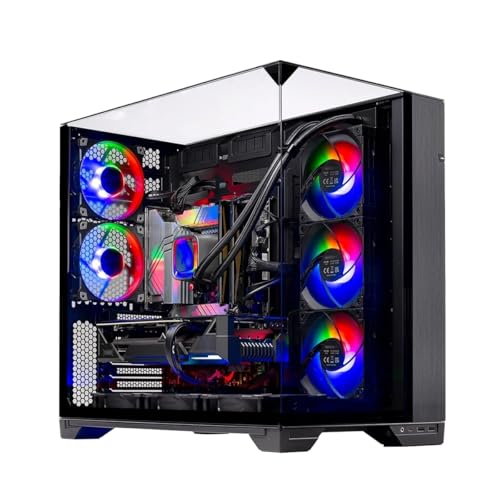
Pros
- Top-tier CPU and GPU combo for high-refresh-rate 1440p and entry-level 4K gaming.
- Generous 32GB DDR5 RAM handles streaming, editing, and heavy multitasking with ease.
- Excellent cooling with 360mm AIO and well-ventilated case keeps components running cool.
- Clean, no-bloatware Windows 11 installation and US assembly ensure quality and convenience.
- Includes a free keyboard and mouse, so you can start gaming right away.
Cons
- The 12GB RTX 5070 may be limiting for 4K ultra settings in future titles; better suited for 1440p.
- Limited storage with only 1TB SSD may require upgrades for users with large game libraries.
- Brand of the graphics card may vary, which could affect warranty or aesthetics slightly.
The Skytech Gaming O11 Vision is a prebuilt gaming desktop that combines the latest hardware from AMD and NVIDIA in a showcase-ready chassis. Powered by the AMD Ryzen 7 7700X (4.5GHz base, 5.4GHz boost) and the new NVIDIA RTX 5070 with 12GB GDDR7 memory, this PC is built to handle today's most demanding games at 1440p with high refresh rates. It comes with 32GB of DDR5-5600MHz RAM and a 1TB Gen4 NVMe SSD, ensuring fast load times and smooth multitasking whether you're gaming, streaming, or editing.
This system is ideal for a wide range of users: competitive gamers will appreciate the low-latency performance in esports titles like Valorant, CS2, and Apex Legends; casual and open-world gamers can enjoy ultra settings in games like Cyberpunk 2077, Elden Ring, or Black Myth Wukong at 60+ FPS. Streamers and content creators benefit from the 8-core CPU and 32GB of RAM for smooth OBS recording and editing in applications like Premiere Pro or DaVinci Resolve. RGB enthusiasts and setup builders will love the Lian Li O11 Vision case, which offers excellent cable management and a panoramic tempered glass view perfect for showing off ARGB fans and the 360mm AIO cooler.
In terms of real-world gaming performance, the Ryzen 7 7700X and RTX 5070 deliver excellent responsiveness and frame rates. You can expect over 100 FPS in most competitive shooters at 1440p and smooth 60+ FPS in graphically intense single-player titles. The 360mm AIO cooler keeps CPU temperatures in check even during extended sessions, preventing thermal throttling. The system includes Wi-Fi, multiple USB ports (2.0, 3.0, 3.2 Gen1), and HD audio, making it easy to connect peripherals and a headset.
Build quality is solid: the Lian Li O11 Vision case features a metal frame with tempered glass panels, good cable management channels, and ample space for future upgrades. The AIO cooler uses ARGB fans, and the included keyboard and mouse are basic but functional for starting out. The system comes with Windows 11 Home and no bloatware, so you can unbox and install your games without hassle. Skytech offers a 1-year warranty on parts and labor plus free technical support for peace of mind.
Some realistic limitations: The 12GB VRAM on the RTX 5070 is sufficient for 1440p but may struggle at high resolutions in future titles or with heavy ray tracing. The 1TB SSD fills up quickly if you install many AAA games; expansion via additional NVMe or SATA SSDs is easy but an added cost. The graphics card brand may vary (e.g., ASUS, MSI, Gigabyte), which slightly affects the look but not the performance.
Overall, the Skytech Gaming O11 Vision is a strong recommendation for U.S. gamers looking for a high-performance prebuilt that's ready to go for 1440p gaming and streaming. It's a practical choice for college gamers, work-from-home multitaskers, and anyone who wants a powerful, visually impressive desktop without the hassle of building it themselves. If you prefer a system that balances cutting-edge specs with excellent cooling and aesthetics, this PC delivers on all fronts.
The combination of the Ryzen 7 7700X and RTX 5070 is a potent pairing for 1440p gaming. In titles like Call of Duty: Modern Warfare III, Fortnite, and Apex Legends, you can expect frame rates well above 100 FPS at high settings. More demanding games like Cyberpunk 2077 or Black Myth Wukong run smoothly at 60+ FPS with a mix of high and ultra settings. The 32GB of DDR5 RAM ensures zero stuttering during intense battles or open-world exploration. The 1TB Gen4 NVMe SSD drastically reduces load times, letting you jump into matches quickly.
The 360mm AIO liquid cooler, paired with three ARGB fans in the Lian Li O11 Vision case, provides exceptional thermal management. The case itself has a dual-chamber design that separates the PSU and drives from the main components, improving airflow. Even during extended gaming sessions, CPU temperatures stay well within safe limits, and the GPU runs cool thanks to the ventilated bottom intake. The ARGB fans are controllable via the motherboard software, allowing you to sync lighting with the rest of your setup.
Skytech includes a free gaming keyboard and mouse with the PC, which is a nice bonus for first-time builders or those upgrading. The keyboard is a standard membrane design with RGB lighting, and the mouse has a decent optical sensor with adjustable DPI (though specific DPI range is not provided). They are perfectly usable for everyday gaming and office work, though enthusiasts may want to upgrade later. Also included are power cables, Wi-Fi antennas, and documentation for quick setup.
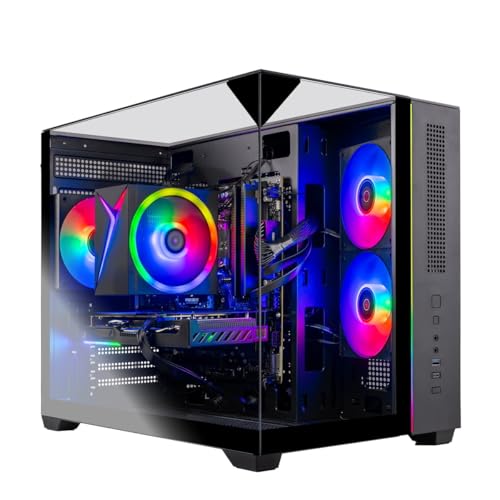
Pros
- Strong 1080p gaming performance with RTX 5060 and Ryzen 7 5700.
- Generous 32GB RAM and 1TB NVMe SSD for fast multitasking and storage.
- Clean, bloatware-free Windows 11 installation for a smooth experience.
- Attractive tempered glass case with ARGB fans for a premium look.
- Free keyboard and mouse included, reducing initial setup costs.
Cons
- Graphics card brand may vary, which could affect consistency.
- Only one HDMI and one DisplayPort output guaranteed; additional ports may vary.
- Case size may be larger than some compact desk setups require.
The Skytech Gaming Crystal is a pre-built gaming desktop designed for PC gamers who want a powerful system without the hassle of building one themselves. It combines an AMD Ryzen 7 5700 processor with an NVIDIA GeForce RTX 5060 graphics card, 32GB of DDR4 RAM, and a 1TB NVMe SSD, all housed in a striking tempered glass case with ARGB fans. This setup is well-suited for competitive gamers, casual players, streamers, and content creators who need reliable performance for 1080p gaming at high settings.
In terms of real-world gaming performance, the RTX 5060 and Ryzen 7 5700 deliver smooth frame rates in popular titles like Call of Duty, Fortnite, Valorant, and Elden Ring at 1080p Ultra settings, often exceeding 60 FPS. The 32GB of RAM ensures you can run games alongside Discord, streaming software, or browser tabs without slowdowns. The 1TB NVMe SSD provides fast load times, so you spend less time waiting and more time playing. The included high-performance air cooler and ARGB fans help maintain good airflow and keep temperatures in check during long sessions.
Build quality is solid, with a durable steel frame and triple tempered glass panels that showcase the internal components and RGB lighting. The case offers decent cable management options, though some users may want to tidy up the interior further. The system comes with a free gaming keyboard and mouse, which are functional for getting started but may be upgraded later for a more premium feel. The lack of bloatware is a nice touch, as it keeps the Windows 11 experience clean and responsive.
Setup is straightforward: plug in the power, connect your monitor and peripherals, and you're ready to go. The system includes Wi-Fi 802.11ac for wireless connectivity, plus USB 2.0, 3.0, and 3.2 Gen1 ports for your devices. One limitation is that the graphics card brand may vary, and only one HDMI and one DisplayPort output are guaranteed, which could be a concern if you need multiple monitors with specific port types. The case is also on the larger side, so make sure your desk or gaming space can accommodate its dimensions (16.6 x 11.3 x 14.4 inches).
For streamers and content creators, the Ryzen 7 5700's multi-core performance handles encoding and editing tasks reasonably well, though a dedicated streaming PC or higher-end CPU might be better for heavy workloads. The 32GB of RAM is a plus for multitasking, and the NVMe SSD speeds up file transfers and project loading. The ARGB fans and tempered glass panels make it a visually appealing centerpiece for any RGB-themed gaming setup.
Overall, the Skytech Gaming Crystal is a practical choice for PC gamers who want a ready-to-use system with strong 1080p performance, ample memory, and fast storage. It's especially suitable for those who prefer a pre-built over DIY assembly, value a clean software experience, and want a case that shows off their components. While there are minor limitations like variable GPU branding and limited guaranteed video outputs, the overall package offers good value for its target audience.


Pros
- Top-tier CPU and GPU combo handles any modern game at 1440p Ultra settings with ease.
- Generous 32GB DDR5 RAM and 1TB Gen4 SSD offer fast multitasking and quick load times.
- 360mm AIO cooler provides excellent thermal headroom for sustained performance.
- Clean white case with ARGB lighting looks great in any gaming setup.
- Includes a free gaming keyboard and mouse, plus no bloatware for a clean experience.
Cons
- Premium price point may be out of budget for casual gamers or those on a tight budget.
- Graphics card brand may vary, which could affect aesthetics or minor performance differences.
- Large case size (61.9 pounds) requires ample desk space and may be heavy to move.
The Skytech Gaming King 95 Desktop PC is a pre-built powerhouse designed for gamers who want top-tier performance without the hassle of building their own rig. It features the AMD Ryzen 7 9800X3D processor, which is one of the fastest gaming CPUs on the market, paired with the NVIDIA RTX 5070 Ti 16GB graphics card. This combination is built to crush 1440p gaming at Ultra settings with smooth 60+ FPS, making it ideal for competitive esports players, streamers, and content creators who demand responsiveness and visual clarity.
In real-world gaming scenarios, this PC handles everything from fast-paced shooters like Valorant and Call of Duty to open-world titles like Elden Ring and Baldur's Gate 3 without breaking a sweat. The Ryzen 7 9800X3D's 3D V-Cache technology reduces latency and improves frame rates in CPU-bound games, while the RTX 5070 Ti's 16GB of GDDR7 VRAM ensures high-resolution textures and ray tracing run smoothly. For streamers, the 32GB of DDR5 RAM allows for seamless multitasking, running OBS, Discord, and a game simultaneously without stuttering.
Build quality is solid, with a white tempered glass case that showcases the ARGB fans and 360mm AIO liquid cooler. The AIO keeps the CPU cool even during long gaming sessions, preventing thermal throttling and maintaining peak performance. The 850W Gold ATX 3.0 PSU provides reliable power and supports future GPU upgrades. The included 1TB Gen4 NVMe SSD offers lightning-fast load times, so games and apps launch in seconds.
Setup is straightforward: plug in the power, connect to Wi-Fi (802.11ac), and you're ready to go. The system comes with Windows 11 Home pre-installed and zero bloatware, which is a nice touch. The free gaming keyboard and mouse are decent for starters, but most serious gamers will want to upgrade to their own peripherals. The case has ample USB ports (2.0, 3.0, 3.2 Gen1) and audio jacks for easy connectivity.
One limitation is the price, which is on the higher end for a pre-built. Also, the graphics card brand may vary, so the look might differ from what's shown. The case is large and heavy (61.9 pounds), so it requires a sturdy desk and may be a hassle to move for LAN parties. However, for gamers who want a no-compromise 1440p machine that's ready out of the box, this PC is a strong contender.
Overall, the Skytech Gaming King 95 is best suited for competitive gamers, streamers, and content creators who prioritize performance and reliability. It's also a great choice for college gamers or work-from-home users who need a powerful setup for both gaming and productivity. If you're looking for a premium pre-built that can handle anything you throw at it, this is worth considering.
The Ryzen 7 9800X3D and RTX 5070 Ti combination delivers exceptional gaming performance at 1440p resolution. In titles like Call of Duty: Modern Warfare III, you can expect well over 100 FPS on Ultra settings, while more demanding games like Cyberpunk 2077 with ray tracing still run smoothly above 60 FPS. The 32GB of DDR5 RAM ensures no stuttering during intense firefights or open-world exploration. For esports titles like Valorant and Rocket League, the system easily pushes beyond 200 FPS, providing a buttery-smooth competitive advantage.
The 360mm AIO liquid cooler with ARGB fans is a standout feature, keeping the Ryzen 7 9800X3D well within safe temperatures even under prolonged load. The King 95 case has a mesh front panel and multiple fan mounts for excellent airflow. During gaming sessions, the CPU rarely exceeds 70°C, and the GPU stays cool thanks to the three-fan design on the RTX 5070 Ti. The AIO's pump is quiet, and the fans are barely audible under normal gaming conditions, making for a comfortable experience.
Understanding Balanced Specifications for Modern Desktop Gaming
A well-configured gaming desktop relies on component harmony rather than chasing a single standout specification on paper. Evaluating what are good specs for a gaming desktop requires identifying how your central processor, graphics card, system memory, and storage interact under demanding workloads. When these components match your visual expectations, you enjoy consistent frame delivery, low latency, and smooth multitasking. Neglecting one vital component can easily hold back faster hardware and lead to frustrating performance drops during demanding gaming sessions.
Graphics Processing Units and Resolution Targets
The graphics processing unit serves as the primary engine for rendering three-dimensional environments, making it the most critical component for visual fidelity. Modern graphics cards feature dedicated video memory, with capacities ranging from eight gigabytes up to sixteen gigabytes in contemporary configurations. An eight-gigabyte card like the NVIDIA GeForce RTX 5060 or RTX 5060 Ti targets full high definition gaming at 1080p, delivering fast frame rates in esports titles. Players aiming for sharp 1440p Quad HD or 4K Ultra HD resolutions generally need larger memory pools, such as twelve or sixteen gigabytes found on the RTX 5070, RTX 5070 Ti, or AMD Radeon RX 9070 XT.
Video memory capacity directly dictates how well a system handles high-resolution texture packs, ray tracing calculations, and complex geometry without stuttering. Modern titles like Cyberpunk 2077 and Baldur’s Gate 3 quickly consume video buffer space when settings are pushed toward ultra presets. When a graphics card exhausts its dedicated video memory, it must swap data across system RAM, causing sudden frame drops. Investing in a card with sixteen gigabytes of GDDR6 or GDDR7 memory provides sufficient headroom for modern rendering demands, including advanced shader computation and texture streaming.
Selecting a graphics processor also determines the types of display technologies you can reliably utilize on your desk. Dedicated cards include modern output standards like DisplayPort 1.4 or 2.1 alongside HDMI 2.1, supporting variable refresh rate technologies to eliminate screen tearing. If you intend to run open-world games on an ultrawide screen or a high-density 4K display, your graphics card must maintain stable rendering speeds to match your monitor’s native refresh rate. Mismatching an entry-level graphics chip with an ultra-high-resolution monitor forces frustrating compromises in render scale and visual clarity.
Central Processing Units and Frame Rate Stability
While the graphics card draws each scene, the central processing unit coordinates game physics, artificial intelligence, geometry data, and overall system logic. A capable processor prevents micro-stutters and ensures that average frame rates translate into consistent frame times during intense action. Modern gaming desktops commonly feature six-core or eight-core processors from AMD, such as the Ryzen 5 5500, Ryzen 7 7700X, or the specialized Ryzen 7 9800X3D and 9850X3D. These processors feature high turbo clock speeds exceeding 5.0 gigahertz, providing the rapid single-thread calculation speed that gaming engines demand.
Processors equipped with expanded cache technology, such as AMD’s 3D V-Cache architecture found on the Ryzen 7 9800X3D, offer notable advantages in gaming stability. By placing extra high-speed cache memory directly adjacent to the processor cores, the CPU can retrieve critical game instructions without waiting for slower system memory transactions. This design significantly improves one percent low frame rates, reducing visual hitching in dense multiplayer arenas and simulation titles like Counter-Strike 2 or Helldivers 2. For competitive gamers who prioritize maximum motion clarity on high refresh rate displays, an X3D processor provides reliable responsiveness.
Thermal dissipation plays an essential role in sustaining peak processor clock frequencies over extended gaming marathons. High-performance CPUs generate considerable heat under full load, necessitating robust cooling solutions to avoid automatic thermal throttling. Prebuilt systems often employ either multi-fan tower air coolers or closed-loop 360mm all-in-one liquid coolers equipped with dedicated radiators and addressable RGB fans. Liquid cooling loops distribute heat away from the processor socket quickly, allowing high-draw processors to maintain turbo boost clocks without throttling fan acoustics or slowing down performance during intense combat.
System Memory and Solid-State Storage Architecture
System memory provides the temporary high-speed workspace your computer needs to run operating systems and active game assets simultaneously. While sixteen gigabytes of memory remains an acceptable baseline for casual play, thirty-two gigabytes has rapidly become the recommended standard for modern desktop gaming. Demanding titles can consume substantial memory footprints, especially when voice communication programs or web browsers run in the background. Modern gaming desktops feature high-speed DDR4 memory clocked at 3200 megahertz or next-generation DDR5 memory operating between 5600 and 6000 megahertz.
Beyond overall capacity, memory bandwidth and latency heavily influence how smoothly an operating system feeds information to the processor. Dual-channel memory configurations allow the CPU to read and write data across two channels simultaneously, doubling effective bandwidth compared to single-channel setups. Desktops equipped with 32GB of DDR5 memory running in dual-channel mode ensure that background services do not steal crucial throughput from your primary game thread. Heat spreaders on the memory modules also help dissipate thermal build-up, maintaining stable timing profiles during lengthy gaming sessions.
Primary storage specifications have evolved dramatically away from traditional mechanical hard drives toward high-speed solid-state drives. Contemporary gaming computers rely on fourth-generation NVMe M.2 solid-state drives that connect directly through the motherboard’s PCIe bus. These drives achieve transfer speeds up to thirty times faster than legacy mechanical drives, drastically reducing system boot times and level loading screens. Furthermore, modern game engines take advantage of direct drive-to-GPU asset streaming, meaning a fast one-terabyte or two-terabyte Gen4 SSD directly prevents texture pop-in and geometry loading pauses in expansive open-world titles.
Motherboards, Power Supplies, and Airflow Design
The motherboard and power supply unit form the foundational backbone that supplies clean electricity and communication lanes to your core components. Quality motherboards, such as those built on AMD X670 chipsets, provide robust voltage regulator modules, generous PCIe lanes, and modern connectivity including Wi-Fi and multiple USB 3.2 ports. An inadequate motherboard can restrict high-draw processors through weak power delivery, while a well-built board allows modern silicon to boost freely. In addition, quality onboard audio shielding and isolated traces prevent unwanted electrical noise from bleeding into your gaming headset during quiet passages.
Power supply units must supply stable, efficient current to handle the rapid transient power spikes characteristic of modern graphics architectures. A reliable gaming desktop typically utilizes a power supply rated between 650 watts and 850 watts with an 80-Plus Gold efficiency certification. High-spec configurations pairing cards like the RTX 5070 Ti with powerful processors benefit from ATX 3.0 compliant power supplies that include dedicated power cables engineered to handle instant power surges. Choosing adequate power headroom ensures long-term system stability and leaves room for future component upgrades without requiring a complete power overhaul.
Case construction and airflow engineering significantly impact component temperatures and long-term hardware reliability. Enclosures like the Skytech King 95, Skytech Crystal, or Lian Li PC-O11 Vision utilize combinations of tempered glass panels and dedicated fan mounts to balance visual presentation with effective thermal management. Front and side intake fans pull fresh ambient air across the graphics card and motherboard, while top and rear exhaust fans expel hot air efficiently. Adequate case clearance prevents internal heat pockets from forming, keeping GPU fans spinning at quieter acoustic profiles while protecting sensitive silicon from thermal degradation.
Connecting Desktop Hardware to Gaming Displays
A high-performance gaming desktop only achieves its potential when properly paired with an equally capable gaming monitor. When connecting your system, using DisplayPort cables or high-speed HDMI 2.1 leads ensures that high refresh rates and deep color depths transmit without signal compression. Many players overlook display panel technology, yet the choice between IPS panels with wide viewing angles, fast VA panels with deep contrast, and self-emissive OLED screens dramatically influences visual immersion. Gamers interested in high contrast ratios often benefit from selecting the right gaming monitor panel that complements their graphics card’s rendering output.
Refresh rate synchronization plays a pivotal role in maintaining fluid motion and sharp responsiveness during fast-paced play. Variable refresh rate technologies, such as NVIDIA G-Sync Compatible and AMD FreeSync, dynamically match the monitor’s refresh cycle to the exact frame rate output by the desktop graphics card. This synchronization completely eliminates horizontal screen tearing without introducing the noticeable input lag historically associated with traditional software V-Sync. If your desktop generates between 90 and 140 frames per second, a compatible variable refresh rate monitor delivers a silky smooth visual experience that feels connected to your mouse inputs.
Resolution scaling requires realistic evaluation to prevent hardware mismatches between your desktop specifications and your monitor’s pixel grid. Running an entry-level graphics card on a 4K display forces the card to render four times the pixels of standard 1080p, drastically cutting frame rates. Conversely, pairing a top-tier graphics card with a basic 60Hz 1080p office display wastes immense rendering headroom that could otherwise provide ultra-smooth motion. Aligning your internal desktop specifications with the appropriate monitor resolution ensures you achieve your desired balance between sharp visual details and rapid frame delivery.
Display Form Factors, Viewing Distance, and Setup Ergonomics
The physical dimensions of your display must complement your desktop setup, viewing distance, and desk depth to prevent eye strain. Standard competitive setups often favor 24-inch or 27-inch monitors because players can scan the entire screen surface without excessive neck movement. However, players who focus on expansive flight simulations, immersive role-playing campaigns, or productivity tasks often prefer larger displays with broader fields of view. Those who have adequate desk space may find value in choosing a larger PC display, provided their graphics hardware can maintain adequate pixel density and frame rates across the expanded panel area.
Curved monitors represent another popular form factor, particularly on ultrawide screens spanning 34 inches or wider. A gentle screen curvature matches the natural curvature of the human eye, reducing distortion at the peripheral edges and enhancing visual immersion during cockpit or open-world gameplay. When planning your desktop purchase, check the physical dimensions of your desk alongside monitor arm or stand requirements. Solid ergonomics, adjustable screen heights, and comfortable viewing angles allow you to enjoy marathon gaming sessions without unnecessary physical fatigue.
Practical Component Verification and Balanced Spec Profiles
To summarize what constitutes a well-balanced gaming desktop, organize your hardware targets into distinct resolution profiles based on your primary gaming goals. An entry-level 1080p profile features a six-core processor, an eight-gigabyte graphics card like the RTX 5060, sixteen or thirty-two gigabytes of RAM, and a one-terabyte NVMe SSD. A balanced 1440p configuration steps up to an eight-core processor like the Ryzen 7 7700X, a twelve-gigabyte or sixteen-gigabyte graphics card like the RTX 5070, thirty-two gigabytes of DDR5 RAM, and liquid cooling. An enthusiast 4K profile pairs top-tier components like the Ryzen 7 9800X3D with sixteen-gigabyte graphics processors such as the RTX 5070 Ti or RX 9070 XT.
Before finalizing any gaming desktop selection, verify physical expansion room, included manufacturer warranties, and driver support for your intended peripherals. Prebuilt systems assembled with standard off-the-shelf components make future part replacements and storage additions straightforward as your gaming library expands over time. Ensuring that your internal hardware, thermal cooling solutions, and display connections align creates an enjoyable, reliable desktop gaming environment tailored directly to your favorite genres.


Write Your Review
No reviews yet. Be the first to share your experience!