


Massive modern graphics cards and dense liquid cooling radiators often turn a dream assembly into a frustrating headache when clearances fall short. Cable clutter behind the motherboard tray can choke off vital airflow paths, trapping heat inside your chassis and pushing fan curves to irritating noise levels. That is why tracking down the best white pc cases requires balancing clean, snow-white aesthetics with sensible thermal engineering. Whether you want a panoramic dual-chamber showcase or a compact mid-tower with back-connect motherboard support, your build deserves reliable ventilation alongside seamless cable routing.
Manufacturers continue refining interior layouts by integrating angled intake fans, hidden power supply chambers, and tool-free tempered glass panels. After evaluating detailed manufacturer dimensions, radiator mounting locations, and user feedback on thermal behavior, we highlighted models that balance hardware space with practical assembly. Pairing your system with a dedicated white chassis build ensures you get expansive GPU clearance, generous top radiator clearance for liquid coolers, and accessible front panel USB Type-C ports. A well-designed case protects your expensive hardware investment while keeping everyday thermals running quiet and cool on your desk.


Pros
- Seven pre-installed ARGB fans save time and money on additional cooling.
- Stunning 270-degree tempered glass view shows off your build beautifully.
- Excellent compatibility with large GPUs, tall CPU coolers, and 360mm radiators.
- USB Type-C port on the front I/O is a modern convenience for fast data and charging.
- White color scheme looks clean and pairs well with other white gaming peripherals.
Cons
- Side and bottom fans are reverse-blade, which may confuse some builders during setup.
- Limited to 160mm CPU cooler height, which may not fit the largest air coolers.
- Cable management space behind the motherboard tray could be tighter than some full-tower cases.
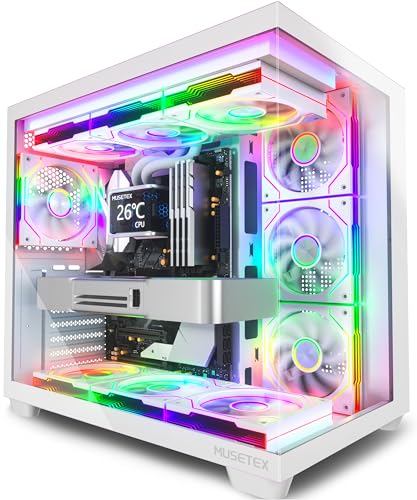
The MUSETEX Y6 is an ATX mid tower PC case designed for gamers and PC enthusiasts who want a visually striking build without sacrificing performance. It comes with seven pre-installed 120mm Infinity Mirror PWM ARGB fans, including three reverse-blade fans on the side, three reverse-blade fans on the bottom, and one forward fan on the rear. This setup creates a continuous gradient rainbow lighting effect that looks far more dynamic than standard ARGB fans, making it a top choice for RGB setup enthusiasts and streamers who want their rig to stand out on camera.
This case is best suited for PC gamers, competitive gamers, casual gamers, esports players, streamers, content creators, gaming setup builders, and even college gamers looking for a reliable and attractive foundation for their first or next build. The 270-degree full view tempered glass panels let you showcase your GPU, CPU cooler, and any collectible figures you place inside, which is a huge plus for those who take pride in their desktop aesthetics.
In terms of real-world performance, the Y6 delivers strong cooling potential thanks to its seven pre-installed fans and support for top-mounted 360mm liquid coolers. The anti-vortex fan blades help maintain steady airflow, and the PWM control allows you to adjust fan speeds via your motherboard software for a balance between noise and cooling. This makes it suitable for long gaming sessions, streaming marathons, or content creation workloads where thermal management is critical.
Build quality is solid, with a steel frame and tempered glass panels that feel sturdy. The internal layout is well-organized, with separate compartments for the power supply and drives, which helps with cable management. The front I/O includes a USB Type-C port, USB 3.0, and USB 2.0, plus audio jacks, making it easy to connect modern peripherals. The white finish is clean and matches well with other white gaming gear, though it may require occasional dusting to keep it looking pristine.
Setup is straightforward for anyone familiar with PC building, though the reverse-blade fans on the side and bottom might confuse first-time builders. The included manual and screw kit help, but you'll need to pay attention to fan orientation for optimal airflow. Cable management is decent, with rubber grommets and tie-down points, but the space behind the motherboard tray is a bit tight if you have a lot of cables. Overall, the Y6 is a practical choice for gamers who want a feature-rich case with impressive RGB lighting and good cooling out of the box.
One realistic limitation is the CPU cooler height limit of 160mm, which may not accommodate the largest air coolers on the market. Additionally, the side and bottom fans are reverse-blade, meaning they pull air in from the back, which is fine for intake but requires careful planning. Despite these minor quirks, the MUSETEX Y6 offers excellent value for its price, especially for those who want a pre-fanned case with stunning RGB and a panoramic view. It's a strong recommendation for anyone building a mid-range to high-end gaming PC, streaming setup, or RGB-focused desktop.

Frequently Asked Questions
Do white PC cases show dust and dirt more easily than black chassis options?
No, white chassis finishes actually show surface dust far less than matte black metal or dark tinted glass. Fine grey dust blends in against bright white powder coating, whereas it stands out immediately on darker panels. You will still want removable dust filters along bottom and side intakes to prevent buildup inside components, but external maintenance is often much easier to manage visually over time.
Can back-connect motherboards fit inside standard white mid-tower cases?
Back-connect motherboards require specific chassis cutouts positioned behind the motherboard tray for reverse power and data headers. Standard older cases lack the necessary frame openings to route connections behind the board. Modern options like the Lian Li O11 Vision Compact and V100 provide dedicated cutouts specifically engineered for reverse-connector motherboard standards to eliminate visible interior wiring.
Will a 360mm top radiator collide with tall RAM heatsinks in panoramic cases?
Top radiator clearance depends heavily on the offset distance between the chassis roof bracket and the top edge of the motherboard. Cases with sufficient vertical clearance or offset brackets easily clear tall DDR5 heat spreaders. If vertical space is tight, dual-chamber cases allow you to side-mount a 360mm radiator, keeping cooling lines completely clear of memory modules and cooling your high performance CPU choices efficiently.
Does tempered glass on the front panel restrict airflow compared to perforated mesh?
Solid front glass restricts direct front-to-back intake, but modern dual-chamber layouts compensate with angled side and bottom fan mounts. Models like the NZXT H6 Flow use angled side fans and perforated bottom intakes to draw fresh ambient air directly into the GPU intake path. If you are comparing lower-cost options, check out budget airflow pc cases featuring direct mesh panels to weigh raw ventilation against panoramic aesthetics.
What maximum GPU length clearance should you look for in the %best white pc cases% in 2026?
A minimum GPU clearance of 380mm to 400mm is recommended to accommodate modern triple-fan graphics cards comfortably. Large flagship graphics cards can measure up to 360mm in length, leaving very little room if you also plan to install front-mounted liquid cooling fans or reservoirs. Chassis like the Lian Li V100 support up to 420mm, providing ample breathing room and preventing clearance conflicts during system assembly.
How do pre-installed reverse-blade fans improve airflow aesthetics?
Reverse-blade fans draw air inward through their front face, hiding the structural motor hub and frame brackets behind the blades. In showcase cases with visible side or bottom intakes, standard fans force you to look at the ugly support frame. Reverse-blade setups maintain strong directional airflow into your chassis while presenting an unobstructed RGB infinity mirror appearance through your tempered glass panels.


Write Your Review
No reviews yet. Be the first to share your experience!