


Mounting a thick liquid cooling radiator inside a cramped chassis often leads to frustrating clearance conflicts with motherboard heatsinks and high-profile memory sticks. Selecting the best pc cases for water cooling requires examining overhead radiator space, GPU clearance, and dedicated intake pathways that prevent thermal throttling during intense gaming sessions. Modern desktop builds benefit immensely when liquid lines have plenty of breathing room, keeping coolant temperatures stable without forcing awkward tube bends. If you are aiming for clean aesthetics and reliable thermal dissipation, evaluating chassis options alongside budget airflow computer chassis helps balance performance and wallet-friendly pricing.
Chassis layouts featuring dual tempered glass or high-flow mesh panels give liquid cooling setups the airflow balance needed to push heat out rapidly. According to detailed product specifications and builder feedback, models supporting 240mm or 360mm radiators offer the headroom required for modern multi-fan liquid setups. Many desktop enthusiasts also prefer clean white gaming PC cases to showcase coolant reservoirs, colorful tubing, and vibrant ARGB fan rings. Prioritizing ample rear cable routing depth and flexible fan mounting brackets guarantees that installing your pump and radiator assembly remains straightforward and hassle-free.

Pros
- Excellent airflow thanks to the perforated design on all sides, ideal for gaming sessions.
- Modular I/O panel offers multiple placement options for desk and setup flexibility.
- Magnetic dust filters are easy to remove and clean, keeping the interior dust-free.
- Compact size fits well on desks or in tight spaces while still supporting large GPUs and coolers.
- Transparent side panel lets you show off your gaming components and RGB lighting.
Cons
- The case includes only one pre-installed fan, so additional fans are recommended for optimal cooling.
- Cable management space is limited due to the compact size, requiring careful routing.
- The side panel is acrylic (not tempered glass), which may be less scratch-resistant over time.
The Cooler Master MasterBox Q300L is a Micro-ATX PC case designed for PC gamers, setup builders, and anyone looking to create a compact but capable gaming rig. It supports Micro-ATX and Mini-ITX motherboards, making it a versatile choice for both budget and mid-range builds. Whether you are a competitive gamer, casual player, or streamer, this case offers a solid foundation for a performance-focused gaming PC.
For gaming performance, the Q300L emphasizes airflow and cooling. Its perforated design on all sides promotes excellent heat dissipation, which is crucial for maintaining low temperatures during intense gaming sessions. The case can accommodate a 240mm liquid cooler and up to five fans, allowing you to build a system that stays cool even under heavy loads. The open thermal design helps reduce heat buildup, which can improve the longevity and stability of your components.
Build quality is practical and functional. The case features a sturdy steel frame with a transparent acrylic side panel, letting you show off your gaming hardware and RGB lighting. The magnetic dust filters are a nice touch, adding a distinctive look while keeping dust out, which reduces cleaning frequency. The modular I/O panel is a standout feature, allowing you to reposition it to the front, top, or bottom on either side. This flexibility is great for desk setups where cable routing or access needs vary.
Setup and maintenance are straightforward. The compact size (15.4 x 9.1 x 15 inches) means it fits well on desks or in tight spaces, though cable management can be a bit challenging due to limited space behind the motherboard tray. The case includes one pre-installed 120mm fan, but you will likely want to add more fans or a liquid cooler for optimal airflow. The magnetic dust filters are easy to remove and clean, making regular maintenance simple.
One realistic limitation is the single pre-installed fan, which may not be sufficient for high-heat gaming builds without additional cooling. Also, the acrylic side panel is more prone to scratches than tempered glass, so careful handling is recommended. The compact design also means less room for cable management, so plan your build accordingly.
Overall, the Cooler Master MasterBox Q300L is a practical choice for PC gamers, setup builders, and anyone building a compact gaming PC on a budget. It offers good airflow, modular I/O, and a clean look that fits well in most gaming setups. If you prioritize cooling flexibility and a compact footprint, this case is worth considering for your next gaming build.
The Cooler Master MasterBox Q300L is designed with an open thermal approach, featuring perforated panels on all sides to maximize airflow. This design helps dissipate heat effectively, keeping your gaming components cool during long sessions. The case supports a 240mm liquid cooler at the front and up to five 120mm fans, giving you plenty of options to customize your cooling setup. While it comes with one pre-installed 120mm fan, adding more fans or a liquid cooler is recommended for high-performance builds. The magnetic dust filters on the top and front panels add a distinctive look while preventing dust buildup, reducing maintenance frequency.
The MasterBox Q300L features a steel frame with a transparent acrylic side panel, offering a balance of durability and visibility. The acrylic panel is lighter than tempered glass but may be more susceptible to scratches, so handle with care. The case has a compact footprint (15.4 x 9.1 x 15 inches) and weighs just over a pound, making it easy to move or place on a desk. The magnetic dust filters are well-designed and easy to remove for cleaning. The modular I/O panel is a practical addition, allowing you to reposition the power button, USB ports, and audio jacks to suit your setup. Overall, the build quality is solid for its price point, with a focus on functionality and airflow.
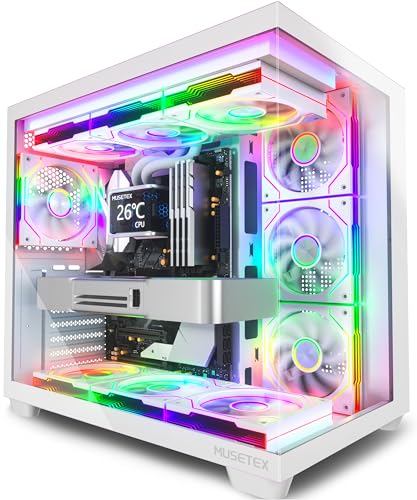
Pros
- Seven pre-installed ARGB fans save time and money on additional cooling.
- Stunning 270-degree tempered glass view shows off your build beautifully.
- Excellent compatibility with large GPUs, tall CPU coolers, and 360mm radiators.
- USB Type-C port on the front I/O is a modern convenience for fast data and charging.
- White color scheme looks clean and pairs well with other white gaming peripherals.
Cons
- Side and bottom fans are reverse-blade, which may confuse some builders during setup.
- Limited to 160mm CPU cooler height, which may not fit the largest air coolers.
- Cable management space behind the motherboard tray could be tighter than some full-tower cases.
The MUSETEX Y6 is an ATX mid tower PC case designed for gamers and PC enthusiasts who want a visually striking build without sacrificing performance. It comes with seven pre-installed 120mm Infinity Mirror PWM ARGB fans, including three reverse-blade fans on the side, three reverse-blade fans on the bottom, and one forward fan on the rear. This setup creates a continuous gradient rainbow lighting effect that looks far more dynamic than standard ARGB fans, making it a top choice for RGB setup enthusiasts and streamers who want their rig to stand out on camera.
This case is best suited for PC gamers, competitive gamers, casual gamers, esports players, streamers, content creators, gaming setup builders, and even college gamers looking for a reliable and attractive foundation for their first or next build. The 270-degree full view tempered glass panels let you showcase your GPU, CPU cooler, and any collectible figures you place inside, which is a huge plus for those who take pride in their desktop aesthetics.
In terms of real-world performance, the Y6 delivers strong cooling potential thanks to its seven pre-installed fans and support for top-mounted 360mm liquid coolers. The anti-vortex fan blades help maintain steady airflow, and the PWM control allows you to adjust fan speeds via your motherboard software for a balance between noise and cooling. This makes it suitable for long gaming sessions, streaming marathons, or content creation workloads where thermal management is critical.
Build quality is solid, with a steel frame and tempered glass panels that feel sturdy. The internal layout is well-organized, with separate compartments for the power supply and drives, which helps with cable management. The front I/O includes a USB Type-C port, USB 3.0, and USB 2.0, plus audio jacks, making it easy to connect modern peripherals. The white finish is clean and matches well with other white gaming gear, though it may require occasional dusting to keep it looking pristine.
Setup is straightforward for anyone familiar with PC building, though the reverse-blade fans on the side and bottom might confuse first-time builders. The included manual and screw kit help, but you'll need to pay attention to fan orientation for optimal airflow. Cable management is decent, with rubber grommets and tie-down points, but the space behind the motherboard tray is a bit tight if you have a lot of cables. Overall, the Y6 is a practical choice for gamers who want a feature-rich case with impressive RGB lighting and good cooling out of the box.
One realistic limitation is the CPU cooler height limit of 160mm, which may not accommodate the largest air coolers on the market. Additionally, the side and bottom fans are reverse-blade, meaning they pull air in from the back, which is fine for intake but requires careful planning. Despite these minor quirks, the MUSETEX Y6 offers excellent value for its price, especially for those who want a pre-fanned case with stunning RGB and a panoramic view. It's a strong recommendation for anyone building a mid-range to high-end gaming PC, streaming setup, or RGB-focused desktop.
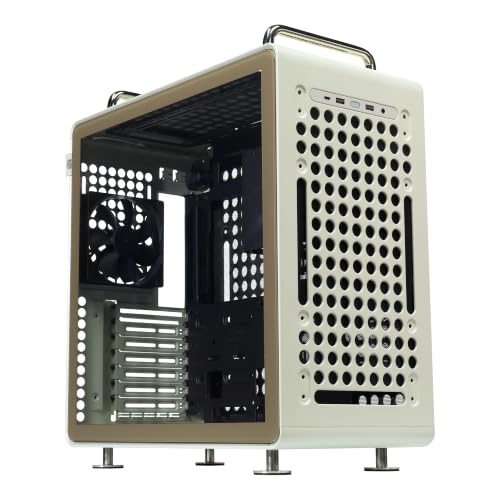

Pros
- Eye-catching wood-grain design sets it apart from typical gaming cases.
- Pre-installed ARGB PWM fans save time and provide solid airflow out of the box.
- Excellent radiator and GPU clearance for high-end components.
- Dust filters on all major intakes reduce maintenance and improve longevity.
- Dual tempered glass showcases internal RGB and hardware cleanly.
Cons
- Front I/O may lack a USB-C port, depending on configuration.
- Wood-grain aesthetic may not appeal to everyone's taste.
- Side reverse-blade fans might require careful orientation for optimal airflow.
The Montech XR-B is a mid-tower ATX gaming case that stands out with its unique wood-grain design on the front I/O panel. It's built for PC gamers, setup builders, and RGB enthusiasts who want a case that performs well and looks distinct on their desk or streaming station.
The case comes equipped with three ARGB PWM fans - two reverse-blade on the side and one regular on the rear - delivering strong airflow right out of the box. With support for a 360mm radiator at the top and clearance for large GPUs like the RTX 4090, the XR-B can handle high-end gaming builds without thermal worries. Whether you're pushing frames in competitive shooters or rendering streams, this case keeps temps in check.
Build quality feels solid with dual tempered glass panels allowing a full view of your components. The wood-grain I/O isn't just a gimmick - it offers easy-access ports and adds a warm aesthetic. Full-coverage dust filters on top, bottom, and side panels help keep the interior clean and airflow optimized, so you spend less time dusting and more time gaming.
Setting up the XR-B is straightforward thanks to the pre-installed fans and ample space for cable management. The case supports up to nine fans total, giving you plenty of room to expand cooling later. Its compact dimensions still fit ATX motherboards and large GPUs, making it a versatile choice for both first-time builders and seasoned enthusiasts looking to upgrade their gaming room or streaming setup.
One realistic limitation is the front I/O - while it covers essentials, some users may miss a dedicated USB-C port. Also, the wood-grain styling is unique but might not blend with every RGB theme. That said, for the price, the XR-B delivers a lot of value in both aesthetics and cooling capability.
Overall, the Montech XR-B is an excellent choice for gamers and builders who value both aesthetics and performance. If you're building a high-end gaming rig with a large GPU and AIO cooler, this case offers great compatibility and cooling out of the box. It's also a solid pick for streamers and RGB enthusiasts who want a clean, visually striking setup without breaking the bank.
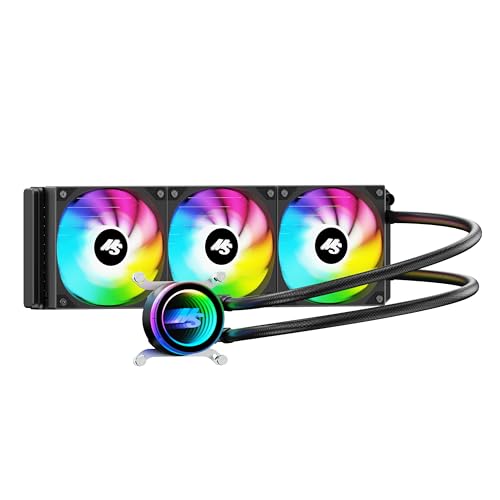
Frequently Asked Questions
Can a 360mm radiator fit in the top panel of compact mid-tower cases?
Yes, several mid-tower chassis like the MONTECH XR-B and MUSETEX Y6 explicitly support top-mounted 360mm radiators. Manufacturers offset top mounting rails toward the outer tempered glass panel to prevent thick radiators and 120mm fans from hitting motherboard VRM heatsinks or memory modules. Checking motherboard standoff clearance before installing an AIO cooler ensures smooth assembly without component collisions.
Will a front-mounted liquid cooler radiator reduce available graphics card clearance?
Yes, front-mounted radiators reduce total GPU clearance by the combined thickness of the radiator core and cooling fans, typically around 52mm to 55mm. Cases offering upwards of 410mm to 415mm of GPU space, such as the Cooler Master QUBE 540, easily house long triple-fan graphics cards even with a radiator assembly installed. Verifying card dimensions against chassis internal length prevents physical interference during system assembly.
Is top radiator placement better than front mounting for liquid cooling loops?
Yes, top mounting is generally preferred for all-in-one liquid coolers because it places the radiator above the pump block, preventing trapped air bubbles from causing pump noise or premature wear. Exhausting liquid heat directly through the chassis roof also keeps ambient intake air cooler for internal components. Pairing your liquid setup with the right high-performance processor selection ensures sustained boost clocks without thermal throttling.
Do dual tempered glass showcase cases provide sufficient airflow for liquid cooling?
Yes, dual tempered glass cases maintain solid thermal dissipation by utilizing dedicated side intake slots and bottom fan mounts. Models like the MUSETEX Y6 incorporate reverse-blade side and bottom fans to push fresh outside air directly across internal components while the top radiator exhausts hot air. This positive pressure arrangement prevents dust infiltration and keeps water loop temperatures stable under heavy loads.
Can Micro-ATX chassis support custom or closed-loop liquid cooling?
Yes, compact Micro-ATX enclosures such as the Cooler Master MasterBox Q300L support 240mm radiators along perforated intake panels. While liquid cooling support in smaller chassis requires careful cable routing and low-profile power supply units, it allows builders to create space-saving systems with robust thermal control. Builders should confirm pump tubing flexibility to navigate tighter interior clearances comfortably.


Write Your Review
No reviews yet. Be the first to share your experience!