


Cramming a liquid cooler into a cramped computer chassis often leads to motherboard heatsink collisions and restricted exhaust flow. Modern gaming hardware pushes thermal boundaries, so picking the best pc case for liquid cooling requires close attention to radiator bracket offsets, fan clearances, and unrestricted intake paths. A well-designed chassis prevents thermal throttling by drawing fresh air directly across critical components while providing ample room for multi-fan radiators. Builders can prevent clearance headaches by selecting high airflow cases built with liquid cooling in mind.
Careful analysis of manufacturer clearance limits and user feedback reveals that radiator versatility makes or breaks an enthusiast setup. Whether mounting a 360mm radiator in the front or a 240mm unit up top, top-tier chassis designs give you the flexibility needed for clean tubing runs. Dedicated power supply basements and broad cable routing channels also keep internal clutter from choking system airflow. Investing in a chassis with flexible radiator mounting positions and high-performance airflow panels ensures your gaming rig stays quiet under heavy workloads.

Pros
- Excellent airflow thanks to the perforated design on all sides, ideal for gaming sessions.
- Modular I/O panel offers multiple placement options for desk and setup flexibility.
- Magnetic dust filters are easy to remove and clean, keeping the interior dust-free.
- Compact size fits well on desks or in tight spaces while still supporting large GPUs and coolers.
- Transparent side panel lets you show off your gaming components and RGB lighting.
Cons
- The case includes only one pre-installed fan, so additional fans are recommended for optimal cooling.
- Cable management space is limited due to the compact size, requiring careful routing.
- The side panel is acrylic (not tempered glass), which may be less scratch-resistant over time.
The Cooler Master MasterBox Q300L is a Micro-ATX PC case designed for PC gamers, setup builders, and anyone looking to create a compact but capable gaming rig. It supports Micro-ATX and Mini-ITX motherboards, making it a versatile choice for both budget and mid-range builds. Whether you are a competitive gamer, casual player, or streamer, this case offers a solid foundation for a performance-focused gaming PC.
For gaming performance, the Q300L emphasizes airflow and cooling. Its perforated design on all sides promotes excellent heat dissipation, which is crucial for maintaining low temperatures during intense gaming sessions. The case can accommodate a 240mm liquid cooler and up to five fans, allowing you to build a system that stays cool even under heavy loads. The open thermal design helps reduce heat buildup, which can improve the longevity and stability of your components.
Build quality is practical and functional. The case features a sturdy steel frame with a transparent acrylic side panel, letting you show off your gaming hardware and RGB lighting. The magnetic dust filters are a nice touch, adding a distinctive look while keeping dust out, which reduces cleaning frequency. The modular I/O panel is a standout feature, allowing you to reposition it to the front, top, or bottom on either side. This flexibility is great for desk setups where cable routing or access needs vary.
Setup and maintenance are straightforward. The compact size (15.4 x 9.1 x 15 inches) means it fits well on desks or in tight spaces, though cable management can be a bit challenging due to limited space behind the motherboard tray. The case includes one pre-installed 120mm fan, but you will likely want to add more fans or a liquid cooler for optimal airflow. The magnetic dust filters are easy to remove and clean, making regular maintenance simple.
One realistic limitation is the single pre-installed fan, which may not be sufficient for high-heat gaming builds without additional cooling. Also, the acrylic side panel is more prone to scratches than tempered glass, so careful handling is recommended. The compact design also means less room for cable management, so plan your build accordingly.
Overall, the Cooler Master MasterBox Q300L is a practical choice for PC gamers, setup builders, and anyone building a compact gaming PC on a budget. It offers good airflow, modular I/O, and a clean look that fits well in most gaming setups. If you prioritize cooling flexibility and a compact footprint, this case is worth considering for your next gaming build.
The Cooler Master MasterBox Q300L is designed with an open thermal approach, featuring perforated panels on all sides to maximize airflow. This design helps dissipate heat effectively, keeping your gaming components cool during long sessions. The case supports a 240mm liquid cooler at the front and up to five 120mm fans, giving you plenty of options to customize your cooling setup. While it comes with one pre-installed 120mm fan, adding more fans or a liquid cooler is recommended for high-performance builds. The magnetic dust filters on the top and front panels add a distinctive look while preventing dust buildup, reducing maintenance frequency.
The MasterBox Q300L features a steel frame with a transparent acrylic side panel, offering a balance of durability and visibility. The acrylic panel is lighter than tempered glass but may be more susceptible to scratches, so handle with care. The case has a compact footprint (15.4 x 9.1 x 15 inches) and weighs just over a pound, making it easy to move or place on a desk. The magnetic dust filters are well-designed and easy to remove for cleaning. The modular I/O panel is a practical addition, allowing you to reposition the power button, USB ports, and audio jacks to suit your setup. Overall, the build quality is solid for its price point, with a focus on functionality and airflow.


Pros
- Excellent airflow design with mesh panels and perforated shroud for GPU cooling.
- Supports large radiators (360mm front, 240mm top) for liquid cooling enthusiasts.
- Pre-installed fans provide good starting airflow for most gaming configurations.
- Cable management system with channels and straps makes building and organizing easy.
- Tempered glass side panel showcases your build nicely.
Cons
- Bottom fan mounts for GPU cooling are not included, requiring additional fan purchases for optimal effect.
- Cable management space behind motherboard tray is somewhat limited due to compact size.
- Front panel I/O is basic (2x USB-A, no USB-C) – some users may want a USB-C port.
The NZXT H5 Flow 2024 is a compact ATX mid-tower PC case that prioritizes airflow and build convenience. It's designed for PC gamers and gaming setup builders who want a clean, high-performance foundation without taking up too much desk space. With its ultra-fine mesh panels and perforated PSU shroud, this case focuses on getting cool air to your components, especially your GPU.
For performance, the H5 Flow 2024 delivers impressive cooling potential right out of the box. It comes with two 120mm Quiet Airflow fans (one front, one rear) to get you started. But the real highlight is the support for up to a 360mm radiator in the front and a 240mm radiator on top, giving you plenty of room for liquid cooling setups. The perforated shroud allows two bottom 120mm fans (not included) to feed fresh air directly to your graphics card, which can make a noticeable difference in GPU temperatures during long gaming sessions or streaming.
Build quality is solid for the price point. The steel frame feels sturdy, the tempered glass side panel is clean and secure, and the mesh panels are fine enough to block dust while letting air pass through. Cable management is a strong point thanks to wide channels, Velcro straps, and pre-routed hooks. Even first-time builders will find it easy to keep things tidy. The compact dimensions still support full-size ATX power supplies and most graphics cards, but you'll want to double-check GPU length clearance if you plan to install a front radiator.
Ease of setup is above average – panels come off easily, and the included standoffs and screws are well-organized. The lack of a USB-C port on the front I/O might be a minor drawback for those with modern motherboards, but it's a common omission in this price range. The case also has a relatively small desk footprint, making it a good fit for dorm rooms, compact gaming desks, or home offices where space is tight.
One realistic limitation is that the bottom fan spots for GPU cooling aren't populated, so you'll need to grab a couple of extra fans to fully unlock that feature. Also, the cable management area behind the motherboard is a bit tighter than in larger cases, so you'll need to be deliberate with your cable routing. But for most users – whether you're a competitive gamer, a casual builder, or a streamer – the H5 Flow 2024 offers a very balanced mix of cooling, looks, and practicality.
Overall, this case is a great choice for anyone building a mid-range to high-end gaming PC on a budget. It works well for esports rigs, streaming PCs, and everyday gaming setups. If you value airflow and clean cable management without the extra bulk, the NZXT H5 Flow 2024 is definitely worth considering.

Pros
- Excellent cooling performance for high-end gaming CPUs, with a thick 38mm radiator and high-static-pressure P12 Pro fans.
- Integrated VRM fan helps keep motherboard voltage regulators cool during sustained loads, boosting system reliability.
- Offset mounting improves heat transfer on both Intel and AMD platforms, reducing CPU temperatures in real-world gaming scenarios.
- Cable management is a standout feature - only one visible cable for all fans, making builds cleaner and easier to manage.
- Contact frame design ensures even pressure distribution, potentially extending CPU lifespan and reducing risk of bending.
Cons
- Thicker 38mm radiator may not fit in all cases, especially those with limited clearance for top or front mounting.
- PWM cables integrated into tubing could complicate replacement or custom loop upgrades if needed in the future.
- A-RGB lighting is limited to pump and fans; some users may prefer more extensive RGB coverage on the radiator itself.
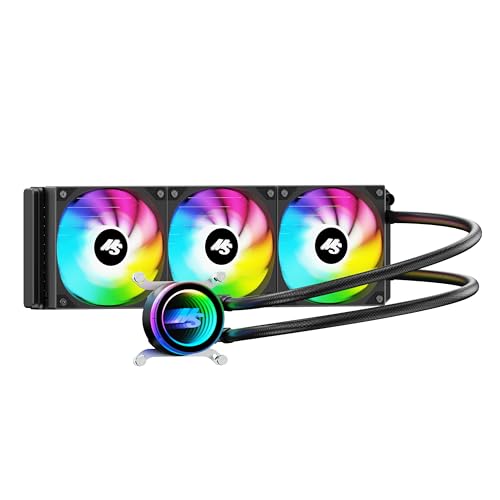
The ARCTIC Liquid Freezer III Pro 360 A-RGB is a purpose-built all-in-one CPU cooler that targets serious PC gamers, streamers, and custom PC builders. This 360mm AIO combines a thick 38mm radiator, ARCTIC's P12 Pro fans, and a unique integrated VRM fan to deliver reliable thermal performance even under the sustained loads of competitive gaming or live streaming. The included contact frame for Intel LGA1851 and LGA1700 ensures even pressure distribution, which not only improves heat transfer but also helps protect your CPU from long-term stress.
For gaming PCs, this cooler excels at taming high-TDP processors during extended sessions. The native offset mounting for both Intel and AMD platforms positions the cold plate directly over the CPU's hotspot, making it an effective choice for overclocked gaming rigs. The P12 Pro fans offer a strong balance of airflow and silence; they move plenty of air at higher speeds when needed but stay remarkably quiet at lower RPMs, so you won't hear them during casual gameplay or desktop work. The integrated VRM fan is a thoughtful addition for streamers and content creators who push their systems hard, as it actively cools the voltage regulators around the CPU socket.
Build quality is solid across the board. The radiator feels sturdy with its reinforced frame, and the sleeved tubing is both flexible and durable. One of the cooler's biggest practical advantages is the integrated cable management: the PWM cables for all three fans are routed inside the tubing sleeve, so you only have to manage a single, clean cable to the motherboard. This simplicity makes installation and cable routing much easier compared to traditional AIOs with multiple fan cables, especially in compact gaming cases where airflow organization is critical. The pump is PWM-controlled as well, allowing system software to fine-tune performance versus noise.
Setting up the Liquid Freezer III Pro 360 A-RGB is straightforward, thanks to included mounting hardware for Intel LGA1851/1700 and AMD AM5/AM4. The contact frame design removes guesswork from mounting pressure. However, the 38mm radiator thickness means you should double-check case compatibility: many mid-towers can accommodate a 360mm radiator, but clearance for the added thickness depends on your case layout and whether you top-mount or front-mount it. Also, because the fan cables are permanently embedded in the tubing, replacing a fan requires more effort than usual.
A realistic limitation is that this AIO is best suited for users who value a clean, functional build over extensive RGB customization. While the pump and fans feature A-RGB lighting that can sync with most motherboards, the radiator itself doesn't have integrated LEDs. Some gamers who prefer a fully illuminated setup might look for more flashy options. Additionally, the fan cable integration means you cannot easily swap fans for other brands without cutting into the tubing sleeve, which is a minor inconvenience for modders.
Overall, the ARCTIC Liquid Freezer III Pro 360 A-RGB is a smart choice for PC gamers, streamers, and content creators who prioritize cooling performance, reliability, and build simplicity. Its integrated cable management and VRM fan set it apart from many competitors in the same price range. If your case has the clearance for a 38mm radiator, this cooler delivers robust thermal performance and a clean aesthetic that will complement any gaming setup, from competitive esports rigs to quiet home-office gaming machines.

Frequently Asked Questions About Liquid Cooling Cases
Can a top-mounted 360mm radiator interfere with motherboard RAM or VRM heatsinks?
Yes, top-mounted 360mm radiators can collide with tall RAM heat spreaders and oversized motherboard VRM heatsinks if the case lacks sufficient vertical offset. Many mid-tower designs place top fan mounts too close to the motherboard tray, causing clearance issues with radiators thicker than 27mm. Choosing a chassis with offset mounting rails ensures your tubing and memory modules fit comfortably.
Is front radiator mounting better than top mounting for overall system temperatures?
Front mounting delivers lower processor temperatures, but top mounting generally maintains lower graphics card temperatures. Installing your radiator as a front intake pulls ambient room air through the cooling fins, lowering CPU heat while exhausting warmer air inside. Top radiator exhaust expels rising interior heat out of the chassis, keeping your graphics card cooler during gaming sessions.
What radiator sizes fit inside compact mid-tower enclosures?
Most compact mid-tower enclosures support up to 360mm radiators in the front panel and 240mm radiators along the top bracket. Some high-capacity models accommodate larger setups for heavy thermal loads. If you prefer a clean setup aesthetic, popular options like a white gaming PC case often feature modular brackets that make liquid cooling installation much simpler.
How does a mesh front panel compare to tempered glass for liquid cooling?
Perforated mesh front panels offer significantly higher airflow efficiency and lower fan noise than solid tempered glass panels. Radiators require strong static pressure to push air through dense cooling fins, and solid glass restricts fresh air intake to tiny side vents. Mesh panels allow intake fans to draw unrestricted airflow, keeping fluid temperatures lower under heavy loads.
Do you need extra clearance when installing a graphics card alongside a front radiator?
Yes, you must subtract the combined thickness of your radiator and cooling fans from the advertised maximum GPU clearance. Standard radiators measure roughly 27mm thick while standard cooling fans add another 25mm, reducing available length by over 50mm. Matching high-draw processors, such as those featured in our guide on the best CPU for PC builds, with long graphics cards requires verified chassis clearance before assembly.


Write Your Review
No reviews yet. Be the first to share your experience!