


Screen tearing mid-clutch can ruin even the best reflexes. That jittery line splitting your crosshair during a firefight? It’s the kind of distraction that costs rounds, especially in fast-paced esports titles where every millisecond counts. G-Sync compatibility fixes that by syncing your monitor’s refresh rate to your GPU’s frame output, eliminating that visual stutter without adding input lag. For gamers hunting for a budget-friendly way to lock in fluid motion, best g-sync monitor under 300 offers solid picks that balance high refresh rates, decent color accuracy, and variable refresh rate support from both Nvidia and AMD sides. Many models in this bracket pack 144Hz to 300Hz panels with 1ms response times, giving you a competitive edge without forcing you into the premium price tier. Whether you’re running a budget Nvidia card or just want a smoother desktop experience, these displays handle ghosting and tearing well. If you’re exploring whether 24-inch screens still hold up for gaming, check out our guide on 24-inch monitor viability. For those who prefer curved screens, our curved gaming monitor under 200 picks might also catch your eye.

Pros
- Exceptionally smooth 300Hz refresh rate with 1ms response time ideal for competitive gaming and esports
- Vibrant IPS panel with wide color gamut (95% DCI-P3) and HDR 400 for vivid visuals
- Fully adjustable stand (height, tilt, swivel, pivot) offers ergonomic flexibility for desk setups
- Dual HDMI 2.1 and DisplayPort 1.4 provide future-proof connectivity for consoles and high-end GPUs
- FreeSync Premium and G-Sync compatibility ensure tear-free gameplay on both AMD and NVIDIA systems
Cons
- USB-C port only delivers 15W power delivery, which may not be enough to charge larger laptops
- No built-in speakers, so you'll need external audio or a headset for sound
- Stand base has a moderate footprint that may take up desk space in compact setups
The LG 27G640A-B UltraGear is a 27-inch QHD IPS gaming monitor designed for gamers who demand speed, clarity, and precision. It's built for competitive players, esports enthusiasts, and anyone who wants a high-refresh-rate display without sacrificing color accuracy. With a 300Hz refresh rate and 1ms response time, this monitor targets the fast-paced world of games like Valorant, Apex Legends, and Call of Duty, but it's also versatile enough for casual gaming, content creation, and everyday use.
Performance is where this monitor shines. The 300Hz refresh rate combined with 1ms (GtG) response time delivers incredibly fluid motion and near-instantaneous pixel transitions. Screen tearing and stutter are effectively eliminated thanks to AMD FreeSync Premium and NVIDIA G-Sync compatibility, making it a great match for both PC and console gamers. The QHD resolution provides a noticeable step up from 1080p, offering sharper visuals without the heavy GPU demand of 4K. Color reproduction is strong with 95% DCI-P3 coverage and VESA DisplayHDR 400, giving lifelike highlights and deeper shadows in HDR-enabled titles.
Build quality and ergonomics are practical for long sessions. The monitor includes a fully adjustable stand with height, tilt, swivel, and pivot controls, so you can find a comfortable viewing angle whether you're gaming, streaming, or working from home. The slim bezels make it suitable for multi-monitor setups, and the overall construction feels sturdy. However, the stand base has a moderate footprint that may take up desk space in compact setups. The lack of built-in speakers means you'll need external audio, but that's common among gaming monitors.
Connectivity is a strong point. You get dual HDMI 2.1 ports, a DisplayPort 1.4, and a USB-C port with 15W power delivery. HDMI 2.1 is great for next-gen consoles like PS5 and Xbox Series X, enabling 1440p at 120Hz or higher. The USB-C port can charge a phone or small device, but 15W is insufficient for most laptops. There are no additional USB-A ports, so you'll need a separate hub for peripherals. Setup is straightforward, and the on-screen display (OSD) with a joystick controller makes adjustments easy.
On the software side, LG's gaming features add value. Dynamic Action Sync reduces input lag, Black Stabilizer brightens dark areas to spot enemies, and the Crosshair overlay improves accuracy in shooters. An FPS counter is also built in. These tools are useful for competitive play without needing third-party software. The monitor's color accuracy out of the box is decent, though calibration can further improve it for content creators.
Overall, the LG 27G640A-B is a strong recommendation for competitive gamers who prioritize high refresh rates and smooth gameplay. Its combination of QHD resolution, IPS color quality, and 300Hz refresh rate at this price point is compelling. Casual gamers and streamers will also appreciate the HDR support and ergonomic stand. The main limitations are the low-power USB-C and lack of built-in speakers, but these are minor trade-offs for the performance and features offered. It's a solid choice for a gaming setup, whether you're building a new rig or upgrading your current display.
The LG 27G640A-B is built for speed. The 300Hz refresh rate delivers incredibly fluid motion, giving competitive gamers a clear advantage in fast-paced titles. The 1ms GtG response time minimizes ghosting, so fast-moving objects stay sharp. Combined with AMD FreeSync Premium and NVIDIA G-Sync compatibility, screen tearing and stuttering are virtually eliminated, creating a seamless experience in both PC and console gaming. The QHD resolution offers a nice balance between visual fidelity and performance, allowing high frame rates without overburdening your GPU.
Advanced gaming features like Dynamic Action Sync reduce input lag for real-time responsiveness, while Black Stabilizer brightens dark scenes to reveal hidden enemies. The Crosshair overlay helps with aim precision, and the built-in FPS counter keeps you informed. These tools are especially useful for esports games like Overwatch, Rainbow Six Siege, and Fortnite. For open-world and story-driven games, the IPS panel's wide color gamut and HDR 400 support add depth to environments, though HDR performance is modest compared to higher-tier monitors.
The monitor features a sturdy construction with a slim bezel design that looks modern on any desk. The stand offers full ergonomic adjustments: height (up to 110mm), tilt (-5 to 15 degrees), swivel (-30 to 30 degrees), and pivot (90 degrees for portrait mode). This flexibility makes it easy to find a comfortable position for gaming, streaming, or work. The base is solid but has a moderate footprint, so ensure you have enough desk space. VESA 100x100mm compatibility allows for monitor arm mounting if you prefer a cleaner setup.
Cable management is minimal due to the lack of a built-in routing channel, but the ports are conveniently located on the back. The OSD joystick is intuitive and responsive, making menu navigation a breeze. Overall, the build quality feels reliable for daily use, and the ergonomic adjustments are a welcome feature for long sessions.

Pros
- High refresh rate (144Hz O/C) and 1ms MBR for smooth, responsive gameplay.
- Vibrant IPS colors with HDR10 and wide sRGB coverage.
- Adaptive sync support works with both NVIDIA and AMD GPUs.
- Useful gaming features like Crosshair, Black Stabilizer, and Dynamic Action Sync.
- Affordable price point for a feature-rich 24-inch gaming monitor.
Cons
- 1ms MBR is motion blur reduction, not true 1ms GtG response time; some motion blur may still be noticeable.
- 24-inch size may feel small for gamers preferring larger immersive displays.
- Tilt-only stand lacks height and swivel adjustments, limiting ergonomic flexibility.
The LG 24G411A-B UltraGear gaming monitor is a 24-inch Full HD (1920x1080) IPS display designed for gamers who want a responsive, color-accurate screen without breaking the bank. It features a native 120Hz refresh rate that can be overclocked to 144Hz, along with 1ms Motion Blur Reduction (MBR) to keep fast-moving action sharp. This monitor is best suited for competitive and casual PC gamers, esports players, and streamers who need a reliable, low-latency display for FPS, MOBA, and racing titles. Its compact size also makes it a great fit for college gamers, work-from-home setups, or anyone with a smaller desk.
In real-world gaming, the 144Hz overclocked refresh rate and 1ms MBR work together to deliver smooth, fluid visuals that reduce motion blur and ghosting. Combined with NVIDIA G-Sync Compatibility and AMD FreeSync, screen tearing and stuttering are virtually eliminated, giving you a competitive edge in fast-paced matches. The Dynamic Action Sync feature further reduces input lag, helping you react quicker in-game. For FPS players, the built-in Crosshair overlay provides a handy accuracy boost without modifying game settings.
The IPS panel offers vibrant HDR10 color with up to 99% sRGB coverage, making games look rich and lifelike. Blacks are decent for an IPS display, and the Black Stabilizer helps brighten dark areas so you can spot enemies hiding in shadows. Color accuracy is solid out of the box, which is a bonus if you also do light photo editing or content creation.
Build quality is typical for LG's UltraGear line - a slim, plastic body with a minimal bezel that looks clean on any desk. The stand is simple and tilt-adjustable but lacks height, swivel, or pivot adjustments, so you may want to invest in a VESA-compatible arm (100x100mm) for better ergonomics. Connectivity includes HDMI and DisplayPort, which cover most modern GPUs and consoles, but there's no USB hub or built-in speakers.
Setup is straightforward: plug in the cables, attach the stand with a few screws, and you're ready to go. The on-screen display (OSD) is intuitive, and the LG Switch app makes it easy to split your screen into multiple sections for multitasking during streams or work. The slim footprint and lightweight design (7.3 pounds) make it easy to move or mount.
While the 24-inch size and tilt-only stand may limit some users, the LG 24G411A-B offers excellent value for budget-conscious gamers who prioritize high refresh rates and adaptive sync. It's a practical choice for competitive play, casual gaming, and even light productivity, making it a versatile addition to any gaming setup.

Pros
- Ultra-high 300Hz refresh rate is ideal for fast-paced esports titles like Valorant and CS2
- Fast IPS panel combines speed with excellent color reproduction and wide viewing angles
- Variable refresh rate compatibility with both G-SYNC and FreeSync Premium Pro offers flexibility
- ELMB Sync effectively reduces motion blur while maintaining VRR support
- Solid build quality and ergonomic stand from ASUS ROG lineup
Cons
- Premium pricing compared to similar 1440p 240Hz monitors
- No built-in speakers, requiring external audio solution for full setup
- Stand footprint may take up significant desk space for smaller setups
The ASUS ROG Strix XG27AQMR is a 27-inch QHD gaming monitor built for players who refuse to compromise on speed or visual fidelity. It combines a Fast IPS panel with a whopping 300Hz refresh rate and 1ms GTG response time, making it one of the fastest 1440p displays available today. This monitor is designed to keep up with the most demanding competitive games while still offering rich colors and high dynamic range for single-player titles and content creation.
This monitor is best suited for competitive gamers, esports athletes, and streamers who want every frame to be as smooth as possible. The 300Hz refresh rate is a clear advantage in fast-paced shooters where split-second reactions matter. But it's also a strong choice for PC gamers who play a mix of genres and appreciate accurate colors. The DisplayHDR 600 certification and DCI-P3 color gamut mean HDR content looks punchy, and the panel is usable for light photo or video editing thanks to its wide color coverage.
In real-world gaming, the XG27AQMR excels at delivering buttery-smooth motion. The combination of 300Hz and 1ms response eliminates ghosting and keeps fast-moving objects sharp. G-SYNC Compatible and FreeSync Premium Pro support ensure no screen tearing regardless of whether you use an NVIDIA or AMD graphics card. ASUS's ELMB Sync technology is a standout feature: it reduces motion blur even further while still allowing variable refresh rate to work, giving you the best of both worlds during competitive play.
Build quality is typical of the ROG Strix lineup: a sturdy stand with tilt, swivel, height, and pivot adjustments for finding the perfect viewing angle. The rear panel has a subtle RGB logo that can be customized via ASUS Aura Sync. Connectivity includes DisplayPort 1.4 and HDMI 2.0 ports, along with a headphone jack. There is no USB hub or built-in speakers, so you'll need to factor those into your desk setup. The stand is quite large, so a monitor arm might be a good investment if desk space is tight.
Setting up the monitor is straightforward: plug in the cables, adjust the stand, and you're ready to go. The on-screen display (OSD) is controlled via a joystick and offers quick access to features like GamePlus crosshairs and timer overlays. Color accuracy out of the box is good, but you can fine-tune it through the OSD or use the included ASUS DisplayWidget software. One limitation to consider is the price – it sits at a premium over 240Hz 1440p monitors, but for those who want the extra headroom and the ELMB Sync feature, it's a worthwhile investment.
Overall, the ASUS ROG Strix XG27AQMR is an excellent choice for any PC gamer who wants top-tier competitive performance without sacrificing image quality. It's especially well-suited for esports players, streamers who need fluid motion on camera, and gamers who play a mix of fast and slow-paced titles. If you have a powerful PC that can push 300 frames in your favorite games, this monitor will let you see every one of them with stunning clarity.
The XG27AQMR's 300Hz refresh rate is its headline feature, but it's the combination with Fast IPS technology that really shines. Response time is a snappy 1ms GTG, which eliminates motion blur in fast-paced scenes. When paired with a GPU that can hit high frame rates, gameplay feels incredibly responsive and fluid. The ELMB Sync (Extreme Low Motion Blur Sync) technology is a highlight: it uses backlight strobing to reduce perceived motion blur while staying compatible with variable refresh rates, so you don't have to choose between smoothness and clarity.
Variable refresh rate support is comprehensive: G-SYNC Compatible works seamlessly with NVIDIA cards, and FreeSync Premium Pro adds low-framerate compensation and HDR support for AMD setups. Tearing is completely eliminated, and input lag is minimal thanks to the monitor's low latency design. For competitive titles like Overwatch 2, Apex Legends, or Call of Duty, this monitor delivers a noticeable advantage in tracking and target acquisition.
The 27-inch QHD panel offers a crisp 2560x1440 resolution that hits a sweet spot between detail and performance. The Fast IPS technology ensures vibrant colors and wide 178-degree viewing angles, so the image stays consistent even when you're not sitting dead center. DisplayHDR 600 certification means the monitor can deliver up to 600 nits peak brightness for HDR content, with decent local dimming for improved contrast in supported games and movies.
Color accuracy is strong out of the box, covering about 97% of the DCI-P3 gamut. This makes the monitor useful for light creative work like photo editing or SDR video grading. The panel also supports 10-bit color via 8-bit+FRC, which helps reduce color banding. For gamers who also create content, this dual-purpose capability is a real bonus.

Pros
- Exceptional value for a high-refresh-rate curved monitor under $150.
- Versatile connectivity with two DP and two HDMI ports for PC, console, and secondary devices.
- Decent 4000:1 contrast ratio delivers deeper blacks and more vibrant colors than typical IPS panels.
- VESA 100x100mm mount compatible for desk arms or wall mounting, freeing up desk space.
- Low Blue Light and flicker-free technology help reduce eye strain over long gaming sessions.
Cons
- 1080P resolution on a 27-inch screen may result in lower pixel density compared to 1440P or 4K monitors.
- Limited HDR support and 250-nit brightness may not satisfy users seeking high dynamic range content.
- No built-in speakers, requiring external speakers or a headset for audio output.
The Z-Edge UG27S is a 27-inch curved gaming monitor that packs a 300Hz refresh rate and 1ms response time into an affordable package. It is designed primarily for competitive PC gamers and esports enthusiasts who need every frame advantage in fast-paced shooters, MOBAs, and racing games. Casual gamers and streamers will also appreciate the smooth visuals and immersive curve for a more engaging experience.
Performance-wise, the 300Hz refresh rate (achievable via DisplayPort) ensures buttery-smooth motion, making it easier to track targets and react quickly. The 1ms MPRT response time minimizes ghosting, so fast-moving objects remain crisp. Combined with AMD FreeSync support, screen tearing and stuttering are virtually eliminated when paired with a compatible GPU. This monitor is a strong choice for anyone prioritizing low latency and fluidity over raw resolution.
Build quality is solid for the price point. The 1500R curvature wraps around your peripheral vision, enhancing immersion without causing noticeable distortion. The three-sided borderless design looks sleek and works well in multi-monitor setups. The stand is basic but functional, and VESA 100x100mm compatibility allows for easy mounting on an arm or wall to reclaim desk space.
Connectivity is a highlight: two DisplayPort 1.4 ports both support 300Hz, while two HDMI 2.0 ports handle up to 240Hz, making it easy to switch between a gaming PC and a console. On-screen display controls are straightforward, with options for low blue light, FreeSync toggle, and preset gaming modes.
A realistic limitation is the 1080P resolution on a 27-inch panel, which results in a lower pixel density than 1440P or 4K alternatives. Text and fine details won't look as sharp, which may bother users who also do productivity work. Additionally, HDR support is minimal, and brightness is average, so it's best used in a controlled lighting environment.
Overall, the Z-Edge UG27S is a compelling budget-friendly monitor for competitive gamers who value high refresh rates and smooth gameplay over higher resolution. It's also a solid pick for streamers building a multi-monitor setup without breaking the bank. If you prioritize responsiveness and immersion, this monitor delivers excellent bang for the buck.
The Z-Edge UG27S excels in gaming performance thanks to its 300Hz refresh rate and 1ms response time. In titles like CS2, Overwatch 2, and Fortnite, the high refresh rate provides exceptionally fluid motion, reducing perceived input lag and giving you a visual edge. FreeSync support ensures no screen tearing when paired with an AMD GPU or adaptive sync compatible NVIDIA cards. The 1500R curve also helps you stay immersed without causing eye strain, making long sessions more comfortable.
This monitor uses a VA panel with a 4000:1 contrast ratio, delivering deeper blacks and better shadow detail than many IPS panels in the same price range. Colors are vibrant with 16.7 million shades, though out-of-the-box accuracy may require minor tweaking. The 1080P resolution is adequate for fast-paced gaming, but users accustomed to higher resolutions will notice less sharpness on text and fine details. The low blue light mode is a welcome addition for reducing eye fatigue during extended use.
The Z-Edge UG27S offers two DisplayPort 1.4 ports and two HDMI 2.0 ports, providing flexible connectivity for multiple devices. Both DP ports support the full 300Hz refresh rate, while HDMI caps at 240Hz. This makes it easy to connect a gaming PC at maximum refresh and a console or secondary computer simultaneously. The inclusion of a 3.5mm audio jack allows for headphone connection, though there are no built-in speakers.

Pros
- Exceptional OLED picture quality with glossy finish and HDR True Black 400
- Fast 240Hz refresh rate and near-instant 0.03ms response time for competitive edge
- Wide connectivity with dual HDMI 2.1 and DisplayPort 1.4 for PC and console gamers
- Ergonomic stand with full adjustability and RGB Hexagon lighting for setup aesthetics
Cons
- Premium pricing compared to standard IPS gaming monitors
- Glossy screen may reflect ambient light in bright rooms
- OLED burn-in risk requires careful use and OLED care features
The LG 27GX704A-B is a 27-inch QHD OLED gaming monitor that targets serious PC gamers, esports competitors, and streamers who want the best visual performance. With a 240Hz refresh rate and 0.03ms response time, this monitor is built for fast-paced FPS, MOBA, and racing games where every millisecond matters. The glossy OLED panel delivers incredible color accuracy and contrast, making it a strong choice for gaming setups that prioritize image quality.
In real-world gaming, the 240Hz refresh rate combined with NVIDIA G-Sync Compatible and AMD FreeSync Premium Pro ensures buttery-smooth, tear-free gameplay. The 0.03ms response time virtually eliminates ghosting, so fast-moving objects stay sharp. The VESA DisplayHDR True Black 400 certification with 1.5M:1 contrast ratio brings out deep blacks and bright highlights, enhancing immersion in dark games like horror titles or open-world adventures. The 98.5% DCI-P3 color coverage makes colors pop, which is great for both gaming and content creation.
Build quality is solid with a fully adjustable stand that offers swivel, tilt, height, and pivot adjustments for comfortable long sessions. The 4-side virtually borderless design and Hexagon lighting add a clean, modern look to any gaming desk. Connectivity includes dual HDMI 2.1, DisplayPort 1.4, USB 3.2 upstream, and two downstream ports, making it easy to hook up a gaming PC, console, and peripherals without cable clutter.
Setup is straightforward with On-Screen Control software for adjusting display settings and OLED care features. The monitor includes automatic pixel care cycles to mitigate image retention, which is important for OLED longevity. Users should be mindful of static elements on screen for extended periods, but the built-in protections help reduce burn-in risk.
One limitation is the glossy screen, which can reflect light in bright rooms, though it enhances perceived contrast and color vibrancy. The price is higher than comparable IPS monitors, but the OLED performance justifies the cost for enthusiasts. Overall, the LG 27GX704A-B is an excellent choice for competitive gamers, streamers, and PC builders who want a top-tier gaming monitor with stunning visuals and fast response times.

Pros
- 240Hz refresh rate and 1ms response deliver top-tier competitive performance.
- Wide color gamut (95% DCI-P3) ensures rich, accurate colors out of the box.
- Dual adaptive sync support (G-Sync + FreeSync) works flawlessly with both NVIDIA and AMD GPUs.
- Fully adjustable stand offers excellent ergonomics for comfort during long gaming sessions.
- HDMI 2.1 enables 240Hz at QHD on compatible consoles and PCs.
Cons
- DisplayHDR 400 is entry-level HDR; highlights may not pop as much as higher HDR tiers.
- No built-in speakers; you'll need a headset or external speakers for audio.
- Stand base is relatively wide and may take up considerable desk space.
The LG 27GR83Q-B is a 27-inch QHD (2560x1440) IPS gaming monitor designed to deliver a competitive edge. With a 240Hz refresh rate and 1ms GTG response time, it's built for esports players, competitive gamers, and anyone who values ultra-smooth motion in fast-paced titles. Its IPS panel offers wide viewing angles and vibrant colors, while support for both NVIDIA G-Sync and AMD FreeSync Premium ensures tear-free gameplay regardless of your GPU.
This monitor is best suited for PC gamers who play shooters like Valorant, Apex Legends, or Call of Duty, where every millisecond counts. It also works well for streamers and content creators who need accurate colors for editing or broadcasting, thanks to its 95% DCI-P3 color gamut. Casual gamers will appreciate the smoothness and responsiveness, but the high refresh rate really shines in competitive scenarios.
In real-world use, the 240Hz refresh rate provides exceptionally fluid motion, reducing eye strain during long sessions. The 1ms response time minimizes ghosting, so fast-moving objects stay sharp. The IPS panel maintains consistent colors from any angle, which is great for co-op gaming or when sharing the screen. Adaptive sync works silently in the background, eliminating screen tearing without added input lag. The DisplayHDR 400 certification adds a modest boost to contrast and peak brightness, but it's not as impactful as higher HDR standards like 600 or 1000.
Build quality is solid with a sturdy plastic chassis and a metal-reinforced stand that supports tilt, height, and pivot adjustments. The cable management channel on the stand helps keep your desk tidy. Connectivity is generous with two HDMI 2.1 ports (supporting up to 240Hz at QHD) and one DisplayPort 1.4, plus a 4-pole headphone jack with DTS Headphone:X for 3D audio. The on-screen display is easy to navigate with a joystick, and features like Black Stabilizer, Dynamic Action Sync, and a crosshair overlay are useful for gaming tweaks.
One limitation is the lack of built-in speakers, so you'll need a headset or external speakers. The stand base is fairly large, which might be an issue on small desks. Also, the HDR performance is basic; it's fine for HDR content but not comparable to premium HDR monitors. Setup is straightforward: plug in the cables, adjust the stand, and you're ready to go. The monitor supports VESA mounting if you prefer an arm.
Overall, the LG 27GR83Q-B is an excellent choice for competitive gamers who want a high-refresh-rate QHD display with adaptive sync and solid color accuracy. It's also a good fit for console gamers thanks to HDMI 2.1, and for esports enthusiasts who prioritize responsiveness. If you're building a gaming setup around a mid-to-high-end PC and need a monitor that balances speed and image quality, this is a strong contender worth considering.
The LG 27GR83Q-B delivers outstanding gaming performance thanks to its 240Hz refresh rate and 1ms GTG response time. In fast-paced games like Overwatch 2, Counter-Strike 2, or Fortnite, motion clarity is exceptional, and you'll notice far less blur than on a standard 60Hz or 144Hz monitor. The IPS panel maintains consistent colors and contrast even when viewed at an angle, so you get a consistent experience whether you're leaning in or sitting back.
Adaptive sync is fully supported: NVIDIA G-Sync Compatible and AMD FreeSync Premium both work without issue. This eliminates screen tearing and stutter across a wide frame rate range. Input lag is negligible, with Dynamic Action Sync further reducing delay. The monitor also includes a Black Stabilizer to brighten dark areas without overexposing highlights, which is helpful for spotting enemies in shadowy corners.
The LG 27GR83Q-B offers excellent connectivity for a modern gaming setup. It includes two HDMI 2.1 ports that support 2560x1440 at 240Hz with HDR, making it perfect for both PC and next-gen consoles like the PS5 and Xbox Series X. There's also one DisplayPort 1.4 for high refresh rates on PCs. Additionally, a 4-pole headphone jack with DTS Headphone:X provides immersive 3D audio through any compatible headset.
The HDMI 2.1 ports are a standout feature, as many monitors in this price range still use HDMI 2.0. This ensures you can take full advantage of the monitor's speed with modern consoles. The DisplayPort also supports the full 240Hz at QHD without compression. Cable management is handled by a channel on the stand, keeping your desk neat.

Pros
- Industry-leading 300Hz refresh rate and 1ms response time for ultra-responsive gameplay.
- Excellent color accuracy with 95% DCI-P3 and HDR400 support for vivid visuals.
- Sturdy, fully adjustable stand allows for comfortable extended gaming or work use.
- Wide connectivity options including HDMI 2.1 and USB-C for modern consoles and laptops.
Cons
- Built-in speakers are basic and lack power; external speakers or a headset are recommended for immersive audio.
- USB-C power delivery is limited to 15W, which may not charge larger laptops under load.
- As a new model, there are limited user reviews available to gauge long-term reliability.
The LG 27-inch QHD 300Hz Gaming Monitor (model B0GN8C735X) is a high-performance display built for gamers who prioritize speed and clarity. With its 300Hz refresh rate, 1ms response time, and support for both NVIDIA G-Sync and AMD FreeSync Premium, this monitor targets competitive players, esports enthusiasts, and serious streamers looking for a buttery-smooth, tear-free experience.
At the heart of this monitor is a 27-inch IPS panel with QHD (2560x1440) resolution. That combination delivers sharp details and vibrant colors with 95% DCI-P3 coverage and VESA DisplayHDR 400 certification. Whether you are dropping into a Warzone firefight, racing in Forza Horizon, or exploring open worlds, the image quality remains crisp and immersive. The IPS technology ensures consistent colors from wide viewing angles, making it a solid pick for multiplayer setups or co-op gaming.
Connectivity is a strong point. The monitor includes dual HDMI 2.1 ports, a DisplayPort 1.4, and a USB-C port with 15W power delivery. This makes it easy to hook up a gaming PC, PlayStation 5, Xbox Series X, or a laptop without juggling adapters. The HDMI 2.1 ports are especially useful for next-gen consoles that support 1440p at 120Hz or higher. The included USB-C also simplifies cable management for users who switch between a desktop and a work laptop.
The ergonomic stand offers height, tilt, swivel, and pivot adjustments, letting you dial in the perfect viewing angle for long gaming sessions or productivity work. The slim-profile base takes up minimal desk space, and the 100x100mm VESA mount gives the option for a monitor arm if you prefer a cleaner, floating setup. Additional gaming features like Dynamic Action Sync, Black Stabilizer, an FPS counter, and a customizable crosshair are built into the on-screen display, giving you quick access to settings that improve in-game visibility and response.
Build quality feels solid, with a matte black finish that keeps fingerprints at bay. The bezels are reasonably thin, making the monitor suitable for multi-monitor setups. One practical limitation is the built-in speakers, which are adequate for system sounds but lack the volume and depth for immersive gaming. Most users will want to pair this monitor with a dedicated headset or external speakers. Also, the USB-C port delivers only 15W of power, so it won't charge a high-performance laptop under heavy load, but it's fine for trickle charging or peripherals.
Overall, the LG 27-inch QHD 300Hz Gaming Monitor is a strong contender for competitive gamers who value high refresh rates and responsive gameplay without sacrificing resolution. It also works well for content creators who need accurate colors, and for gamers who want a versatile hub for PC and console gaming. Given its feature set and pricing, it offers excellent value for those looking to upgrade to a high-speed QHD display.
The 300Hz refresh rate is the standout feature for competitive gaming, providing a dramatic reduction in motion blur and input lag compared to standard 60Hz or 144Hz monitors. This makes tracking fast-moving targets in shooters like Valorant or Overwatch 2 feel much smoother. The 1ms response time (GtG) ensures that fast transitions remain crisp without ghosting, which is critical for edge detection and precision aiming.
Support for both NVIDIA G-Sync Compatible and AMD FreeSync Premium means you can enjoy variable refresh rate technology with a wide range of graphics cards, eliminating screen tearing and stuttering during gameplay. The inclusion of Dynamic Action Sync further reduces input lag by processing frames more quickly, giving you a slight competitive edge in online matches.
For fighting games and MOBAs, the combination of high refresh and low response time makes every input feel immediate. Casual gamers will also appreciate the fluid motion in open-world titles like Cyberpunk 2077 or Elden Ring, though achieving 300 fps may require lowering graphics settings. Overall, this monitor excels in scenarios where responsiveness and clarity directly affect in-game performance.
Pros
- Exceptional 300Hz refresh rate for competitive edge in esports titles
- QHD strikes ideal balance between clarity and performance for most gaming PCs
- Highly adjustable stand improves comfort and viewing angles for all-day use
- Rich port selection with HDMI 2.1 and DP 1.4 ensures future-proof connectivity
- Affordable price point for a high-refresh QHD IPS monitor
Cons
- No built-in speakers require external audio solution for gaming or streaming
- Basic HDR support with only 350 nits peak brightness limits true HDR impact
- Limited user reviews available as a new model, making long-term reliability uncertain
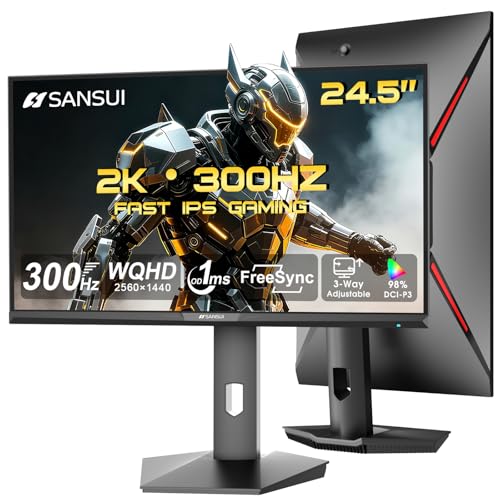
The SANSUI ES-G25F6Q Pro is a 24.5-inch QHD gaming monitor designed for PC gamers who demand high refresh rates and fast response times. It's built specifically for competitive esports players, streamers, and anyone building a performance-focused gaming setup. With a 300Hz refresh rate and 1ms response time, this monitor aims to deliver silky-smooth motion and minimal input lag for games like Valorant, Overwatch 2, and Apex Legends.
In real-world gaming, the combination of QHD resolution and a fast IPS panel provides sharp visuals without overburdening your graphics card. The 300Hz refresh rate ensures every frame feels instantaneous, which is a clear advantage in fast-paced shooters and racing games. The 130% sRGB color gamut and 350 nits brightness produce vivid colors and decent contrast for both gaming and media consumption. While HDR support is limited, the panel still offers a pleasing image quality that works well for most users.
Build quality is solid with a fully ergonomic stand that supports pivot, swivel, height adjustment, and tilt. This makes it easy to find a comfortable viewing angle during long gaming sessions, and the VESA 100x100mm mount compatibility allows for clean desk setups or multi-monitor configurations. The monitor includes a DP cable, and connectivity options include two HDMI 2.1 ports and two DP 1.4 ports, all of which can handle the full 300Hz refresh rate. Eye care features like low blue light and anti-flicker help reduce fatigue during extended use.
Setting up the monitor is straightforward: attach the stand, connect via DP or HDMI, and adjust settings through the on-screen display. However, note that there are no built-in speakers, so you'll need external headphones, speakers, or a gaming headset for audio. The OSD includes game-assist features like crosshair overlays, timers, and preset modes for FPS, RTS, Racing, and more, which can enhance gameplay without third-party software.
The main limitations are the lack of built-in audio and the relatively modest HDR brightness. Also, as a new product, there are few user reviews available to gauge long-term reliability. However, based on specs and brand reputation, it seems a strong contender in the budget high-refresh monitor space.
Overall, the SANSUI 24.5-inch QHD 300Hz monitor is an excellent choice for competitive gamers who want high refresh rates and good resolution without breaking the bank. It fits well in gaming PC builds, dorm room setups, and esports rigs. If you're a streamer or content creator, the smooth motion and color accuracy will also serve you well. Just plan for external audio and realistic expectations about HDR performance.
For competitive gaming, the 300Hz refresh rate and 1ms response time are the standout features. These specs minimize motion blur and input lag, giving you a tangible edge in reaction-based scenarios. The QHD resolution (2560x1440) provides a sharp image without requiring a top-tier GPU to maintain high frame rates, making it ideal for mid-range to high-end gaming PCs.
The Fast IPS panel ensures consistent color and viewing angles even in fast motion, while FreeSync support (implied) helps eliminate screen tearing when paired with compatible AMD or NVIDIA graphics cards. The inclusion of dual HDMI 2.1 and dual DP 1.4 ports means you can connect multiple devices (PC, console, streaming PC) and still enjoy full 300Hz output. The DP cable included is a nice touch for immediate setup.
Game assist features like crosshair overlays, timers, and preset modes are accessible via the OSD menu and can be switched quickly. These are practical for switching between different game genres. Overall, the monitor delivers the responsiveness and flexibility that gamers, streamers, and esports players need.

Pros
- Exceptional 300Hz refresh rate for competitive gaming at a budget-friendly price
- Fast 1ms response time minimizes motion blur in high-speed scenes
- Adaptive Sync works well to smooth out frame rate fluctuations
- Low blue light mode is gentle on eyes for long gaming sessions
- VESA mountable for clean desk organization
Cons
- HDMI input limited to 120Hz; DisplayPort required for full 300Hz
- Built-in speakers are basic, not suitable for immersive gaming audio
- Limited to FHD resolution, not ideal for high-res content creation
The Gawfolk 24.5-inch 300Hz gaming monitor is built for PC gamers who demand speed and smoothness without breaking the bank. This FHD 1080p display is ideal for competitive gamers, esports players, and anyone who plays fast-paced shooters or MOBAs where every millisecond matters. Its VA panel offers wide 178-degree viewing angles and 98% sRGB color coverage, so you get decent color accuracy for a monitor in this price range.
At the core of this monitor is its 300Hz refresh rate and 1ms GTG response time, which combine to deliver incredibly fluid motion and virtually no ghosting. You need to use the DisplayPort connection to hit the full 300Hz, as HDMI maxes out at 120Hz. With Adaptive Sync support, screen tearing and stuttering are kept to a minimum, making your gameplay feel responsive and smooth even when frame rates fluctuate.
Build quality is practical for a budget gaming monitor. The thin bezels give it a modern look, and the VESA 75x75mm mount compatibility means you can easily attach it to a monitor arm or wall bracket for a cleaner desk setup. It weighs about 7.7 pounds, so it's light enough for most mounting solutions. The on-screen menu is straightforward, though you may not need to tweak much out of the box.
Eye comfort is a nice bonus. The monitor uses DC global dimming for a flicker-free experience and includes a low blue light mode that reduces eye strain during long gaming sessions. This is a welcome feature for streamers, content creators, and college gamers who spend hours in front of a screen.
On the downside, the built-in speakers are basic at best. They'll get you through system sounds or casual YouTube viewing, but for gaming or streaming you'll want dedicated speakers or a headset. Also, the FHD resolution is fine for competitive gaming, but if you're into high-res content creation or immersive single-player titles, you might find the pixel density lacking.
Overall, the Gawfolk 24.5-inch 300Hz gaming monitor offers impressive speed and value for its price. It's a strong choice for competitive PC gamers, esports players, and budget-minded setup builders who prioritize high refresh rates over resolution. If you're looking for a responsive, no-frills monitor that handles fast games well, this is worth considering.

Pros
- High 200Hz refresh rate at QHD resolution is hard to beat at this price point.
- Fast IPS panel offers excellent color accuracy with 132% sRGB and HDR400 support.
- Multiple inputs (DP 1.4 x2, HDMI 2.0 x2) provide flexibility for PCs and consoles.
- Built-in speakers and headphone holder add convenience for daily use.
Cons
- HDMI 2.0 ports are limited to 144Hz, so 200Hz requires DisplayPort for full performance.
- Brand is relatively new to the monitor market, so long-term reliability is unproven based on user feedback.
- No USB-C connectivity, which may be a drawback for some laptop users.
The Amzfast AMZG27F5Q is a 27-inch gaming monitor that targets PC gamers looking for a balance between high refresh rates and resolution without breaking the bank. With a QHD 2560x1440 Fast IPS panel, 200Hz refresh rate, and 1ms response time, it’s designed for competitive play in shooters, MOBAs, and racing games, while still offering enough color accuracy for casual gaming and streaming.
This monitor is best suited for competitive gamers who demand smooth, low-latency visuals in titles like Overwatch or Call of Duty, as well as casual gamers who enjoy detailed open-world experiences. Streamers and content creators will appreciate the built-in speakers for basic audio monitoring, though dedicated external speakers remain preferable for critical work. The VESA mount support also makes it easy to integrate into multi-monitor setups for streaming or productivity.
In terms of real-world performance, the 200Hz refresh rate combined with Adaptive-Sync (G-SYNC and FreeSync compatible) ensures tear-free, fluid motion during fast-paced scenes. The 1ms response time means virtually no ghosting, giving you a clear view of enemy movements. The Fast IPS panel delivers vibrant colors with 132% sRGB coverage and HDR400, making games like Cyberpunk 2077 pop with vivid lighting and detail. The built-in speakers are adequate for everyday use but lack bass for immersive audio.
Build quality is solid for its price range: a metal base provides stability, and the slim bezels offer a modern look. The headphone holder is a thoughtful addition for desk organization. However, the OSD joystick can feel a bit stiff at first, but after a few uses it becomes intuitive. Cable management is straightforward, though there’s no built-in cable routing channel.
A realistic limitation is that the HDMI 2.0 ports max out at 144Hz, so to get the full 200Hz you’ll need a DisplayPort connection — make sure your GPU has one. Also, as a relatively new brand, long-term support and reliability are less established compared to bigger names like ASUS or Dell. But based on specifications and early user feedback, the monitor delivers strong value.
Overall, the Amzfast AMZG27F5Q is a great buy for PC gamers building a competitive setup on a budget. It works well for dorm room gaming, home offices, or as a secondary display for streaming. If you prioritize high refresh rate and resolution over brand recognition, this monitor is worth considering.
The 200Hz refresh rate and 1ms response time give this monitor an edge in fast-paced genres like FPS and fighting games. Adaptive-Sync eliminates tearing, and the Fast IPS panel ensures minimal input lag. The QHD resolution provides a nice upgrade over 1080p for spotting details at distance without sacrificing too many frames.
With 132% sRGB and 96% DCI-P3 coverage, colors are rich and accurate out of the box. HDR400 improves contrast in supported games, though it’s entry-level HDR. The 450 cd/m² brightness handles well-lit rooms, and the anti-glare coating reduces reflections during long sessions.
Frequently Asked Questions
Does G-Sync work with any Nvidia GPU?
Yes, most modern Nvidia GeForce GTX 10-series and later cards support G-Sync over DisplayPort. For HDMI connections, you’ll need a monitor that specifically lists G-Sync Compatible support, like many of the best g-sync monitor under 300 options. Check your GPU’s specs to confirm compatibility.
Can I use FreeSync monitors with Nvidia cards?
Absolutely. Most FreeSync monitors work with Nvidia cards as long as they are labeled G-Sync Compatible. The monitors on our list, like the LG UltraGear and ASUS ROG Strix models, support both adaptive sync technologies, so you get tear-free gameplay regardless of your GPU brand.
What refresh rate should I look for under $300?
For competitive gaming, aim for at least 144Hz. Many best g-sync monitor under 300 models reach 240Hz or even 300Hz, like the SANSUI 24.5-inch QHD 300Hz. Higher refresh rates reduce motion blur and improve target tracking. For casual play, 120Hz is still a big upgrade over 60Hz.
Is IPS or VA better for G-Sync gaming?
IPS panels generally offer better color accuracy and wider viewing angles, ideal for immersive single-player games. VA panels deliver deeper blacks and higher contrast, great for dark scenes. Most best g-sync monitor under 300 use IPS, striking a good balance. For color-critical work, IPS remains the safer bet.
How important is response time for G-Sync monitors?
Response time matters to prevent ghosting. Look for 1ms (GtG) or 1ms MPRT. The LG 27G640A-B boasts 1ms GtG, which pairs well with G-Sync for crisp motion. Even 4ms is fine for most players, but faster response times help in fast FPS titles.
Does HDR matter on a budget G-Sync monitor?
It can enhance visual quality in supported titles, but budget HDR is limited. Monitors like the ASUS ROG Strix XG27AQMR offer DisplayHDR 600, providing better brightness and contrast. For most best g-sync monitor under 300, HDR is a bonus feature, not a dealbreaker.
Do these monitors include built-in speakers?
Some include basic speakers, but gaming headsets remain the standard for accurate audio. The Amzfast 27-inch model has built-in speakers, while the SANSUI 24.5-inch includes an audio jack only. For competitive play, dedicated headphones or speakers are recommended. If you’re building a complete setup, see our corner desk gaming setup picks for space-saving ideas.
Have questions about the monitors above? Check out our 240Hz OLED monitor guide for premium options, or the ASUS curved monitor lineup for immersive curved displays.




Write Your Review
No reviews yet. Be the first to share your experience!